
Quick Answer: AI Agents for Sales
AI agents for sales are controlled workflow assistants that help revenue teams research accounts, prepare meeting briefs, draft follow-ups, improve CRM hygiene, flag deal risks, and recommend next actions. The useful version is not a fully autonomous salesperson. It is a governed system that connects to approved data, creates reviewable outputs, writes back to the CRM only inside policy, and keeps sellers in control of judgment-sensitive work.
The safest first use cases are narrow and measurable: enrich a lead before an SDR opens the record, prepare an account brief before discovery, draft a follow-up from meeting notes, or flag stale opportunities that need a next step. Those workflows save time without letting an agent send unapproved outreach, invent account facts, or silently change revenue records.
If you are deciding where to start, use the AI Agent Readiness Assessment to check workflow clarity, data readiness, integration access, and human-review controls before you invest in a sales automation build.
Where Sales AI Agents Fit in the Pipeline
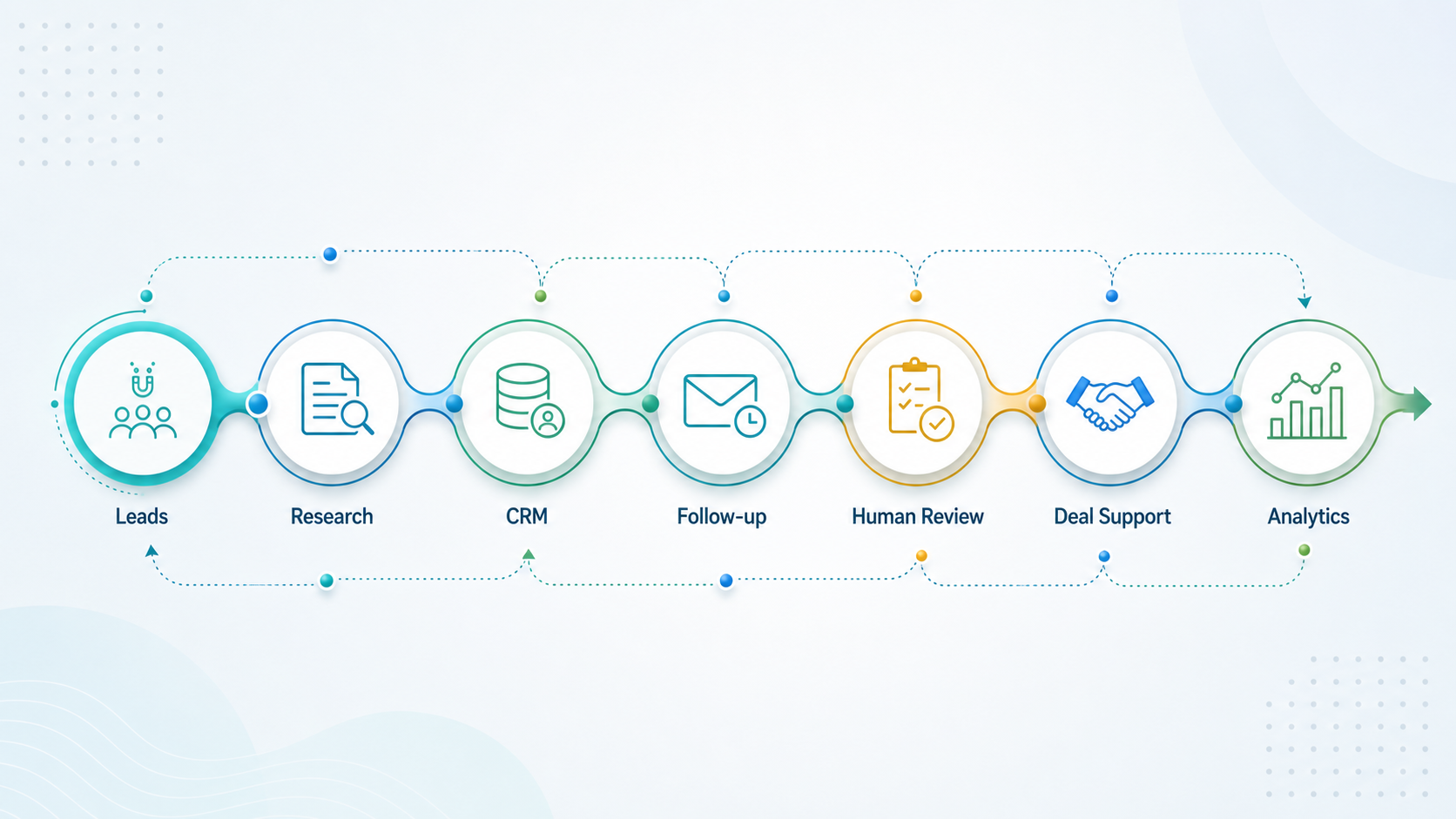
Sales teams lose time in the small gaps between systems: researching a company, checking the latest contact context, writing a first draft, logging activity, updating next steps, and preparing for handoffs. AI agents can help when those tasks have a clear input, a repeatable output, and an obvious place to store the result.
A good sales agent does not replace judgment. It reduces the blank-page work around judgment. For example, an agent can summarize the account, identify likely pain points from CRM and public data, draft a personalized email, and suggest a next action. The salesperson still decides whether the message is accurate, appropriate, and worth sending.
This is why sales agents should be designed around jobs-to-be-done, not broad promises. "Improve pipeline" is not a workflow. "Create a verified account brief before every discovery call" is a workflow that can be tested, measured, and governed.
Sales Agent Use Cases Worth Building First
Start with tasks that are frequent, data-backed, and easy to review. The table below separates practical first builds from workflows that need more governance, integrations, and compliance review.
| Workflow | What the Agent Does | Human Control | Why It Matters |
|---|---|---|---|
| Lead research | Combines CRM context, website data, firmographics, and notes into a concise brief | Rep reviews before outreach | Reduces prep time and improves relevance |
| Follow-up drafting | Turns call notes, email history, and next steps into a draft response | Rep edits and sends | Protects tone while speeding response time |
| CRM hygiene | Suggests missing fields, next steps, stale opportunities, duplicate records, and owner changes | Rep or manager approves writes | Improves forecast quality and reporting |
| Meeting prep | Creates agenda, account summary, open questions, and stakeholder context | Rep adapts for the call | Improves discovery quality |
| Deal support | Highlights objections, stalled stages, missing champions, and follow-up gaps | Manager reviews recommendations | Helps coaching and pipeline inspection |
| Autonomous outreach | Selects targets, writes, schedules, and sends messages | Requires policy, consent, and deliverability controls | Higher risk if accuracy or compliance is weak |
For many teams, the first automation sprint should be chosen with a workflow lens. The Workflow Automation Opportunity Finder can help rank sales tasks by repeatability, volume, data availability, and risk before engineering starts.
A Practical Sales Agent Operating Model
A production sales AI agent needs more than a prompt. It needs approved context, retrieval, business rules, permissions, action boundaries, review states, write-back controls, audit logs, and measurement. Without that operating model, teams often create a clever assistant that cannot be trusted inside CRM, email, or forecast workflows.
The model should make five decisions explicit. First, what sources can the agent read? Second, what outputs can it create? Third, which actions require approval? Fourth, which systems can it update? Fifth, how will managers know whether the agent improved pipeline quality instead of creating cleanup work?
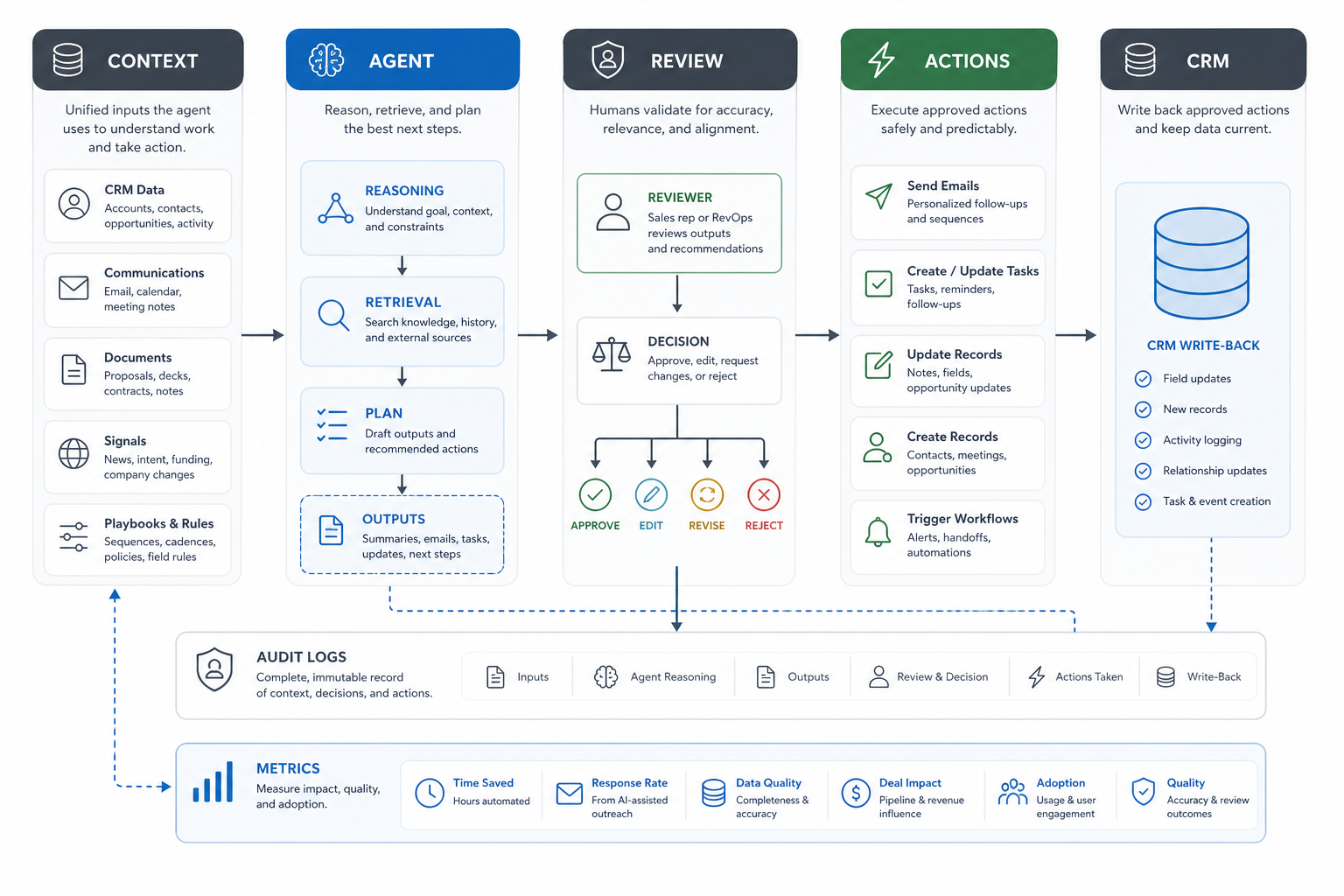
This is where the work moves beyond a generic AI tool. A CRM-connected sales agent must behave like product infrastructure. For complex implementations, NextPage treats this as AI development services tied to real workflows, data permissions, fallback paths, and measurable adoption.
Lead Research and Account Prep
Lead research is often the cleanest first AI-agent workflow because it is easy to review before action. The agent can gather approved CRM fields, recent notes, company context, product interest, prior activity, and likely buyer concerns into a short account brief. That gives the rep a starting point without pretending the agent knows the relationship better than the seller.
The key design choice is source control. A sales research agent should show where its recommendation came from, distinguish internal CRM records from public context, and avoid inventing facts. If the agent cannot verify a claim, it should mark the claim as uncertain or leave it out.
For teams with multiple products or buyer personas, lead research can also route the conversation. A qualified inbound lead might need a service-fit summary, a suggested discovery path, and a handoff note for the right owner. That is a strong fit for controlled LLM and retrieval work through LLM development, especially when the agent must answer from private context and cite the source of each recommendation.
Follow-Up and Sequence Drafting
Follow-up speed matters, but unreviewed automation can create trust problems. A practical sales agent should draft follow-ups from meeting notes, CRM context, approved message patterns, and next-step commitments, then leave the final send to the salesperson. That keeps the response fast without outsourcing relationship judgment.
For outbound sequences, the agent should work inside a policy boundary: approved audiences, suppression lists, opt-out handling, sender identity, message limits, and review steps for claims. FTC CAN-SPAM guidance and Google sender requirements both reinforce the same practical point: automated sales outreach still needs accurate identity, non-deceptive content, unsubscribe handling, and sender reputation controls.
Teams that already use sales engagement platforms should treat the agent as a drafting and context layer, not a second source of truth. The CRM or sales platform should remain the system that decides who can be contacted, when, and by whom.
CRM Hygiene and Pipeline Quality
CRM hygiene is a high-value sales-agent use case because it affects every report, forecast, handoff, and manager review. Agents can flag missing next steps, stale opportunities, inconsistent stages, duplicate companies, unlogged meeting outcomes, or deals that need manager attention.
The risk is silent data damage. An agent should not freely rewrite important revenue records. A safer pattern is suggestion-first: generate recommended updates, show the evidence, ask for approval, and log what changed. For low-risk fields, teams can later allow controlled auto-updates with audit trails.
This kind of build is often less about the model and more about integration quality. The agent needs CRM permissions, field mapping, duplicate rules, activity history, role-based access, and error handling. If your CRM roadmap is already becoming custom business infrastructure, the custom CRM development cost guide explains how workflow depth, data ownership, integrations, and reporting change the estimate.
Sales Chatbots vs Sales Agents
A chatbot usually interacts with a person in a conversation. A sales agent can perform a workflow across systems. The difference matters because a website chatbot that qualifies leads is a narrower product than an agent that reads CRM history, prepares a follow-up, updates records, and alerts the account owner.
For inbound teams, a custom sales chatbot can still be the best starting point. It can answer common questions, qualify intent, route high-fit inquiries, and collect context before a human joins. That is a focused fit for AI chatbot development when the primary surface is website, product, portal, or support conversation.
Sales agents become more valuable when the workflow crosses tools: CRM, calendar, email, call notes, enrichment, support tickets, product usage, proposal systems, and analytics. At that point, the architecture should include permissions, logging, retries, and clear handoff states.
Governance, Compliance, and Deliverability
Sales AI agents touch trust-sensitive workflows. They can influence what prospects receive, what the CRM says, and how managers evaluate pipeline health. That means governance should be part of the first version, not a later cleanup.
| Control | What To Define | Practical Implementation |
|---|---|---|
| Data boundaries | Which sources the agent can read and write | Role-based permissions and approved connectors |
| Human review | Which outputs require approval | Draft states, approval queues, and send controls |
| Outreach policy | Who can be contacted and how often | Suppression lists, opt-out handling, and message limits |
| CRM audit trail | What changed and why | Logged recommendations, updater identity, and before/after fields |
| Quality checks | How accuracy is measured | Sample reviews, hallucination checks, and feedback loops |
| Fallback path | What happens when the agent is uncertain | Escalation to rep or manager instead of forced action |
For production LLM systems, these controls are part of the product, not documentation alone. A strong implementation includes evaluation, retrieval quality, integration depth, latency, cost, and monitoring so teams can trust the agent after launch. The supporting guide on enterprise AI agent governance is a useful companion when the agent can use tools, update systems, or influence customer-facing actions.
How to Estimate ROI Before Building
Sales-agent ROI should be tied to measurable work, not vague AI adoption. Start with the hours spent on account research, follow-up drafting, CRM cleanup, meeting prep, and manager inspection. Then estimate what percentage can be assisted without increasing review burden or compliance risk.
Useful measurements include time saved per rep, faster response time, higher CRM completeness, fewer stale opportunities, better meeting preparation, improved handoff quality, approval rate, edit distance, and adoption by role. Revenue impact can follow, but only after the workflow is stable enough to measure.
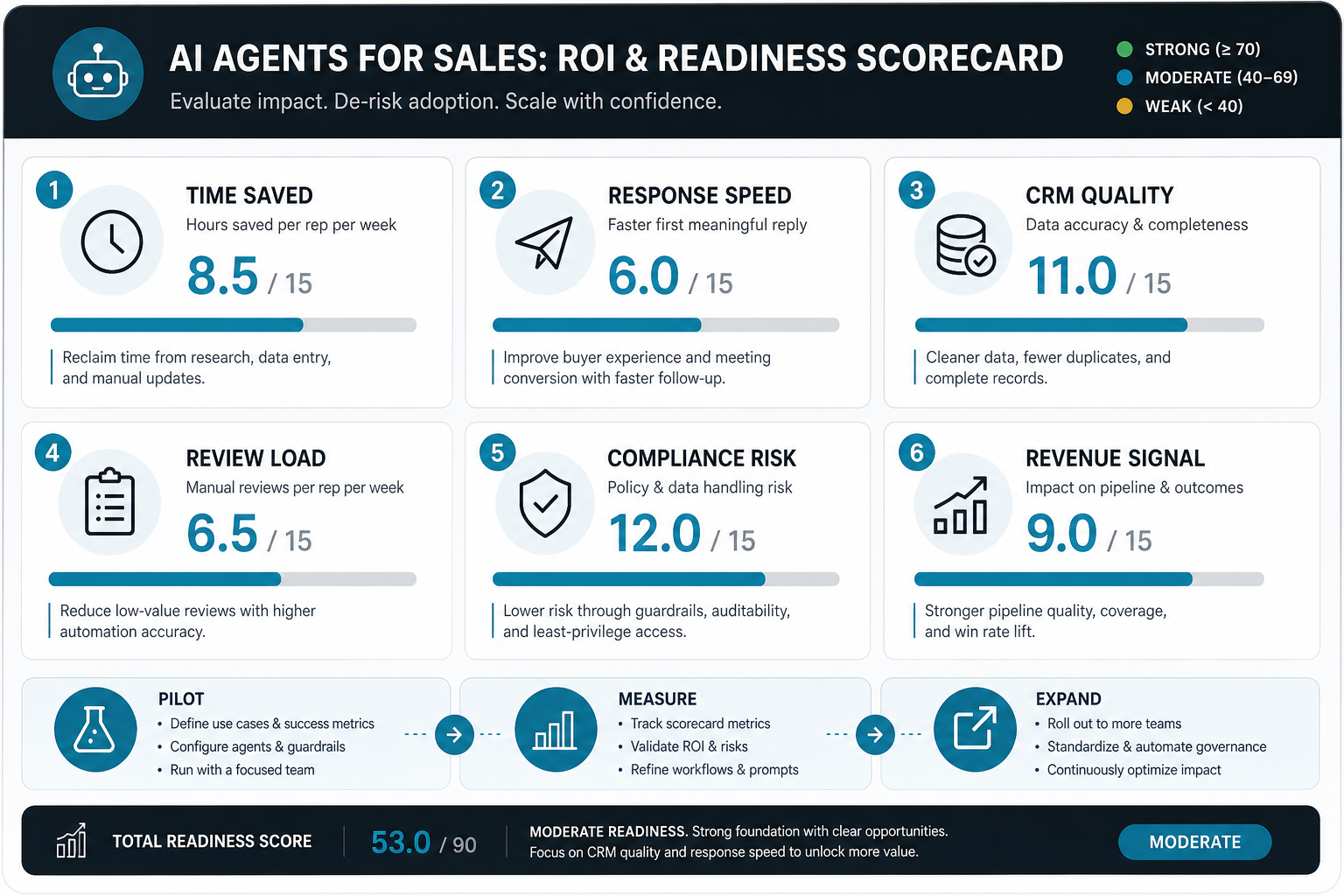
For a first pass, the AI Automation ROI Calculator can translate weekly hours, team size, hourly cost, and automation potential into a directional savings estimate. That gives the business case a grounded starting point before procurement or engineering planning.
Implementation Roadmap for a Sales AI Agent
A sales AI agent should be built like an operating-system improvement, not a novelty feature. The roadmap starts with one workflow, one user group, and a clear approval model.
- Choose the first workflow. Pick a repeatable sales task with clear inputs, outputs, and review criteria.
- Map data and permissions. Identify CRM fields, notes, email context, calendar data, enrichment sources, and write permissions.
- Design the human-in-the-loop path. Decide what the agent can draft, suggest, update, or send.
- Build a small evaluation set. Use real examples to test accuracy, tone, missing context, and edge cases.
- Launch to a controlled team. Measure time saved, quality, adoption, and failure patterns.
- Expand only after trust is proven. Add write permissions, automation, or more teams after the first workflow is reliable.
This sequence keeps the first build useful and defensible. It also prevents a common failure mode: buying or building a broad AI layer before the sales process is clean enough for automation. If the workflow needs multi-step planning, tool use, and supervised action, compare the concept with the broader explanation of what agentic AI is and where it fits.
Build, Buy, or Customize a Sales AI Agent?
Many teams should start with the AI features already inside their CRM or sales engagement platform. Packaged tools can be excellent for email drafting, meeting summaries, activity capture, and simple prospecting assistance. A custom build becomes relevant when the workflow crosses systems, needs private business rules, requires custom approval states, or must connect to a proprietary data model.
| Path | Best Fit | Watch-Out |
|---|---|---|
| Packaged CRM AI | Standard CRM tasks, email drafts, summaries, simple recommendations | Limited control over custom workflows and data boundaries |
| Sales engagement AI | Sequence drafts, call summaries, coaching prompts, prospecting support | Can become disconnected from deeper CRM and fulfillment context |
| Custom agent | Cross-system workflows, proprietary rules, CRM write-back, custom approvals, auditability | Needs product engineering, security, evaluation, and rollout ownership |
For integration-heavy cases, a sales agent may sit inside a broader custom software development roadmap. That is especially true when the agent needs to coordinate CRM, billing, support, product usage, proposal generation, and internal approvals.
How NextPage Builds Sales AI Agents
NextPage approaches sales AI agents by mapping the workflow first: data sources, approval points, CRM ownership, outreach policy, success metrics, and support needs. Then we design the smallest agent that can produce a measurable improvement without weakening trust in the sales process.
For some teams, that means a lead research and account prep agent. For others, it means a CRM hygiene assistant, a sales chatbot, a proposal-support workflow, or an internal manager copilot. The right answer depends on your data quality, sales motion, compliance posture, and integration access.
If you already know the sales workflow you want to automate, start with readiness and ROI. If the workflow is still unclear, shortlist the tasks where reps spend the most time and managers spend the most cleanup effort. The guide to AI workflow automation can help separate simple automation from agentic work before the first sprint starts.