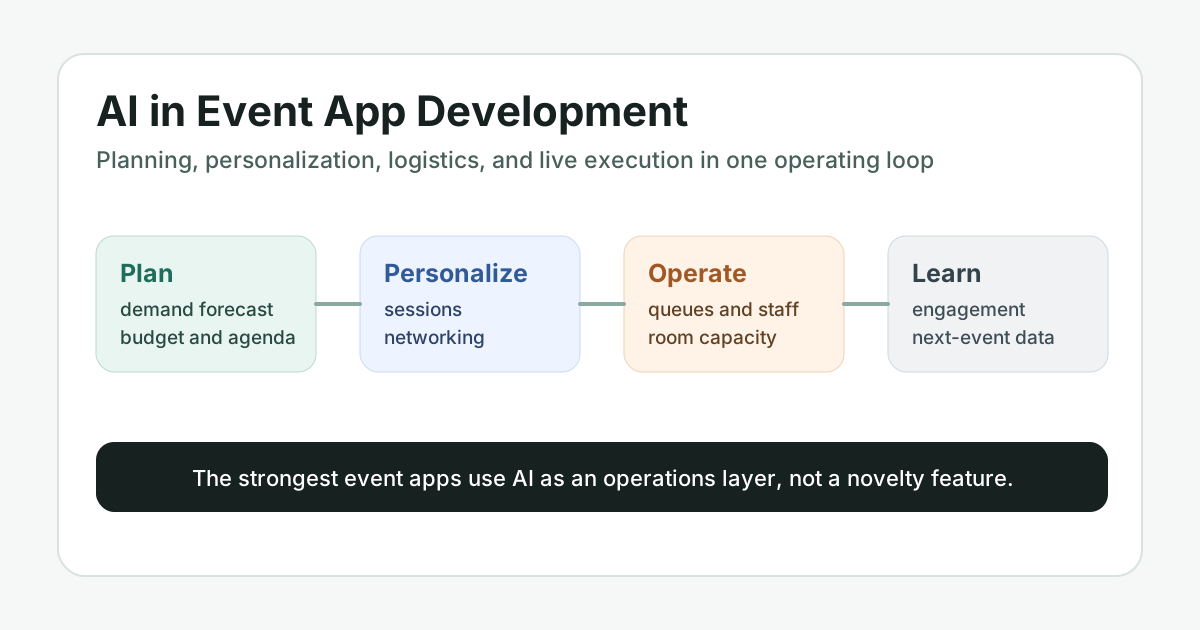

AI in event app development is most useful when it improves the operating system around an event: planning, promotion, attendee matching, live support, logistics, and post-event learning. The goal is not to bolt a chatbot onto an agenda. The goal is to help organizers make better decisions before the event starts and react faster while people are actually on site or inside a virtual experience.
This refreshed guide explains where AI belongs in event planning and execution, which features are worth building first, what data foundations are required, and how product teams can avoid risky automation. It is written for founders, event operators, associations, venues, and product teams planning an event app or upgrading an existing one.
Quick Answer: How Does AI Improve Event App Planning and Execution?
AI improves event app planning and execution by turning attendee, agenda, venue, marketing, and live engagement data into useful recommendations. In practice, that means better session suggestions, smarter attendee networking, demand forecasting, automated support, real-time capacity alerts, targeted event promotion, and post-event insights that shape the next event. The best event apps keep humans in control while using AI to surface patterns and next actions faster.
Why Event Apps Need AI as an Operations Layer
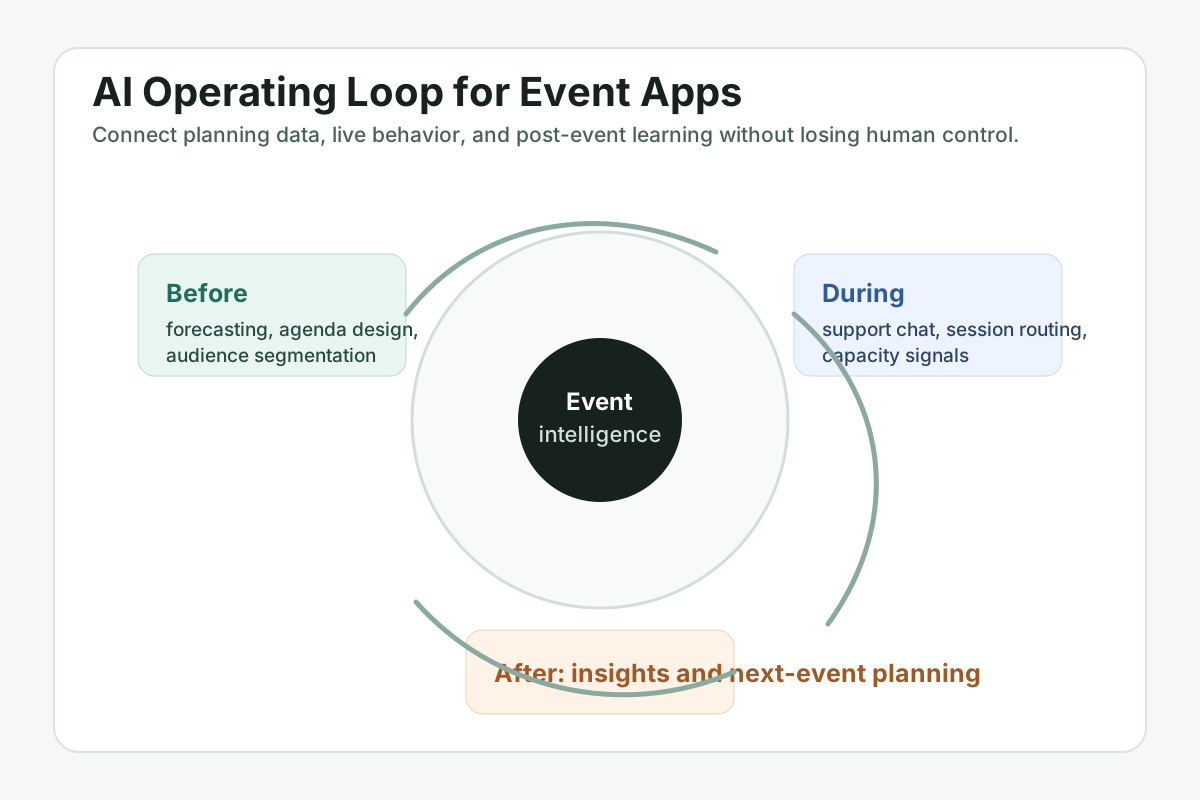
Modern events create more signals than a human team can comfortably watch in real time: registrations, session saves, check-ins, badge scans, content interactions, chat messages, support requests, sponsor engagement, room capacity, feedback, and marketing attribution. An event app becomes more valuable when it can organize those signals into operational decisions.
That is where AI should sit. Instead of treating AI as a novelty, event product teams can use it as a decision-support layer that helps organizers answer practical questions: Which sessions may overflow? Which attendees should be introduced? Which leads are ready for sponsor follow-up? Which campaign audience is underperforming? Which agenda changes will reduce friction?
High-Value AI Use Cases for Event Apps
The strongest AI features usually support one of four jobs: make planning more accurate, make attendee experiences more relevant, make operations more responsive, or make reporting more actionable.
- Agenda and demand forecasting: predict popular sessions, recommend room assignments, and flag schedule conflicts before launch.
- Personalized attendee journeys: recommend sessions, exhibitors, people, and content based on interests, role, history, and behavior.
- AI support chat: answer venue, agenda, travel, policy, and event logistics questions while escalating exceptions to human staff.
- Networking and matchmaking: suggest useful introductions between attendees, sponsors, speakers, investors, or community members.
- Live operations alerts: detect queue pressure, room capacity risk, delayed sessions, low engagement, or sudden support spikes.
- Marketing optimization: segment audiences, personalize reminders, and improve registration campaigns using historical performance.
- Post-event intelligence: summarize feedback, highlight engagement patterns, and recommend changes for the next event cycle.
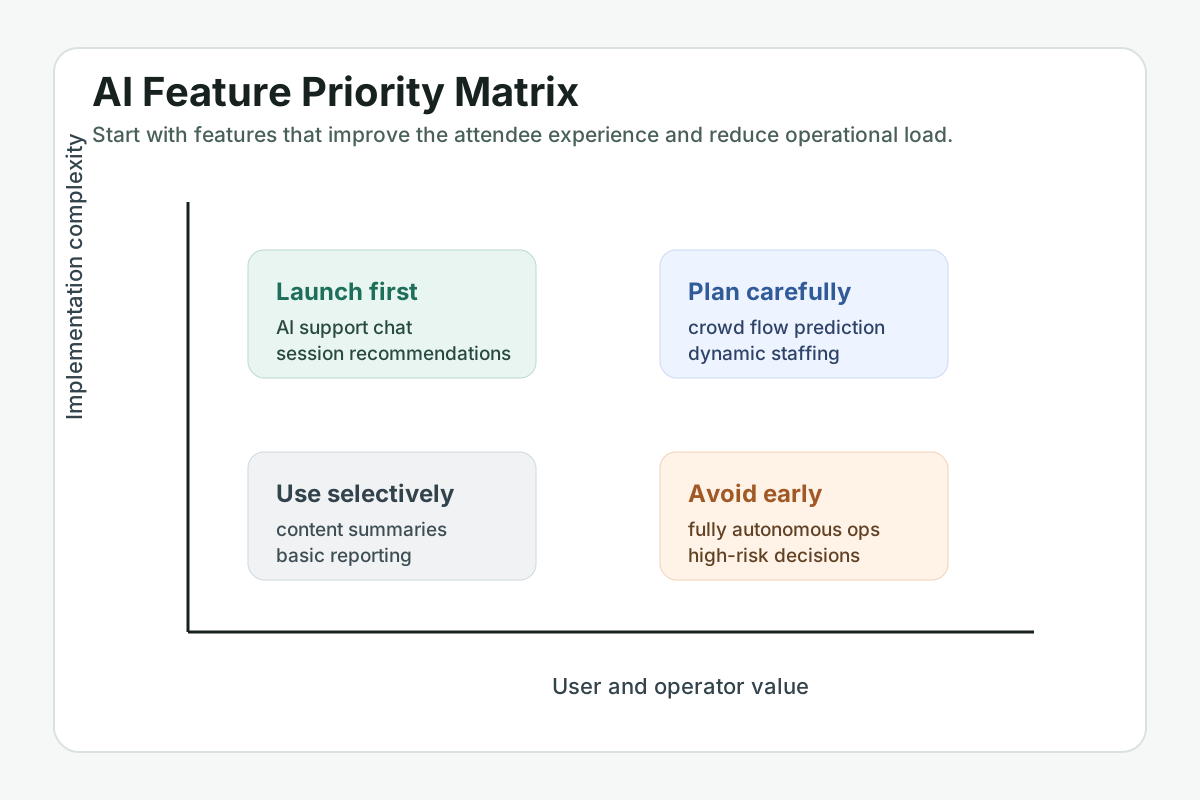
Feature Priority Matrix for AI Event Apps
Not every AI feature deserves to ship in the first release. Product teams should prioritize features with clear user value, accessible data, explainable outputs, and manageable operational risk. Session recommendations and event support chat are often easier to validate than fully automated staffing or crowd-flow decisions.
Planning Workflows AI Can Improve Before the Event
Before an event, AI can help organizers move from guesswork to evidence-backed planning. Historical attendance, registration velocity, audience segments, topic interest, and venue constraints can all feed better decisions.
Useful pre-event workflows include agenda planning, audience segmentation, speaker and sponsor matching, capacity planning, budgeting, campaign targeting, and content recommendations. Teams building a new product can use the custom software cost estimator to frame the delivery effort, then refine scope around the AI features that have the clearest operational return.
Live Execution Use Cases During the Event
During the event, AI should help staff notice problems sooner and help attendees find the right next step. An attendee may need a room change, dietary information, a schedule recommendation, sponsor directions, or help finding relevant people. Organizers may need to know that a session is over capacity, a queue is growing, or a sponsor zone is underperforming.
These workflows require careful product design. Real-time recommendations should be explainable enough for staff to trust, and high-impact decisions should remain reviewable by humans. If the event app includes agentic workflows, the AI agent development path is relevant for controlled task orchestration and approval handoffs.
Data Foundation for Event AI
AI features depend on the quality and structure of event data. A reliable event app should define clear data models for attendees, tickets, sessions, venues, speakers, exhibitors, sponsors, preferences, scans, messages, support tickets, and feedback. Without that structure, AI outputs become inconsistent and hard to audit.
| Data area | AI use | Product risk to manage |
|---|---|---|
| Attendee profile and preferences | Session and networking recommendations | Consent, privacy, and unwanted assumptions |
| Agenda and venue data | Capacity planning and navigation support | Outdated room or schedule information |
| Live engagement signals | Operational alerts and personalization | Noisy signals and overreaction |
| Feedback and survey text | Post-event summaries and trend detection | Biased samples and unclear sentiment |
Personalization Without Creeping Out Attendees
Personalization is valuable only when it feels helpful. Attendees should understand why they are seeing a recommendation and should be able to adjust preferences. For example, a recommendation can say it is based on saved topics, job role, or sessions already attended. That is more trustworthy than a vague "AI picked this for you" message.
Privacy should be part of the interface, not buried in legal pages. Consent, profile controls, data deletion paths, and sponsor-sharing boundaries need visible product treatment. This is especially important when event apps combine attendee networking with sponsor lead generation.
How to Build AI Into an Event App Safely
A pragmatic rollout starts with narrow workflows, clear success metrics, and human review. Teams can launch AI support for low-risk questions, measure deflection and satisfaction, then expand into recommendations and operational alerts once the data model is stable.
- Map the event operations journey: define before-event, live-event, and post-event workflows before selecting AI features.
- Choose measurable use cases: prioritize features tied to registration, engagement, support load, sponsor value, or staff efficiency.
- Prepare structured data: normalize agenda, venue, attendee, session, and feedback data before model integration.
- Add guardrails: keep approval steps for high-impact actions and route uncertain cases to staff.
- Measure and improve: compare recommendations, support outcomes, and attendee behavior across event cycles.
Where NextPage Can Help
If you are planning an AI-enabled event platform, NextPage can help shape the product architecture, data model, AI workflow design, and mobile experience. Start with mobile app development for the attendee-facing experience, AI development services for recommendation and automation workflows, and the AI automation ROI calculator to estimate whether a repeatable operations workflow is worth automating.
For supporting product patterns, review Event App Development: User-Friendly Interfaces. For proof of live-event product thinking, the PaceSync portfolio case study shows a mobile experience built around scheduled live events, operational trust, and user engagement.
Final Takeaway
AI can make event apps more useful, but only when it is tied to real planning and execution workflows. The winning products will not be the ones that claim the most automation. They will be the ones that help organizers make better decisions, help attendees find more relevant experiences, and turn every event cycle into sharper data for the next one.