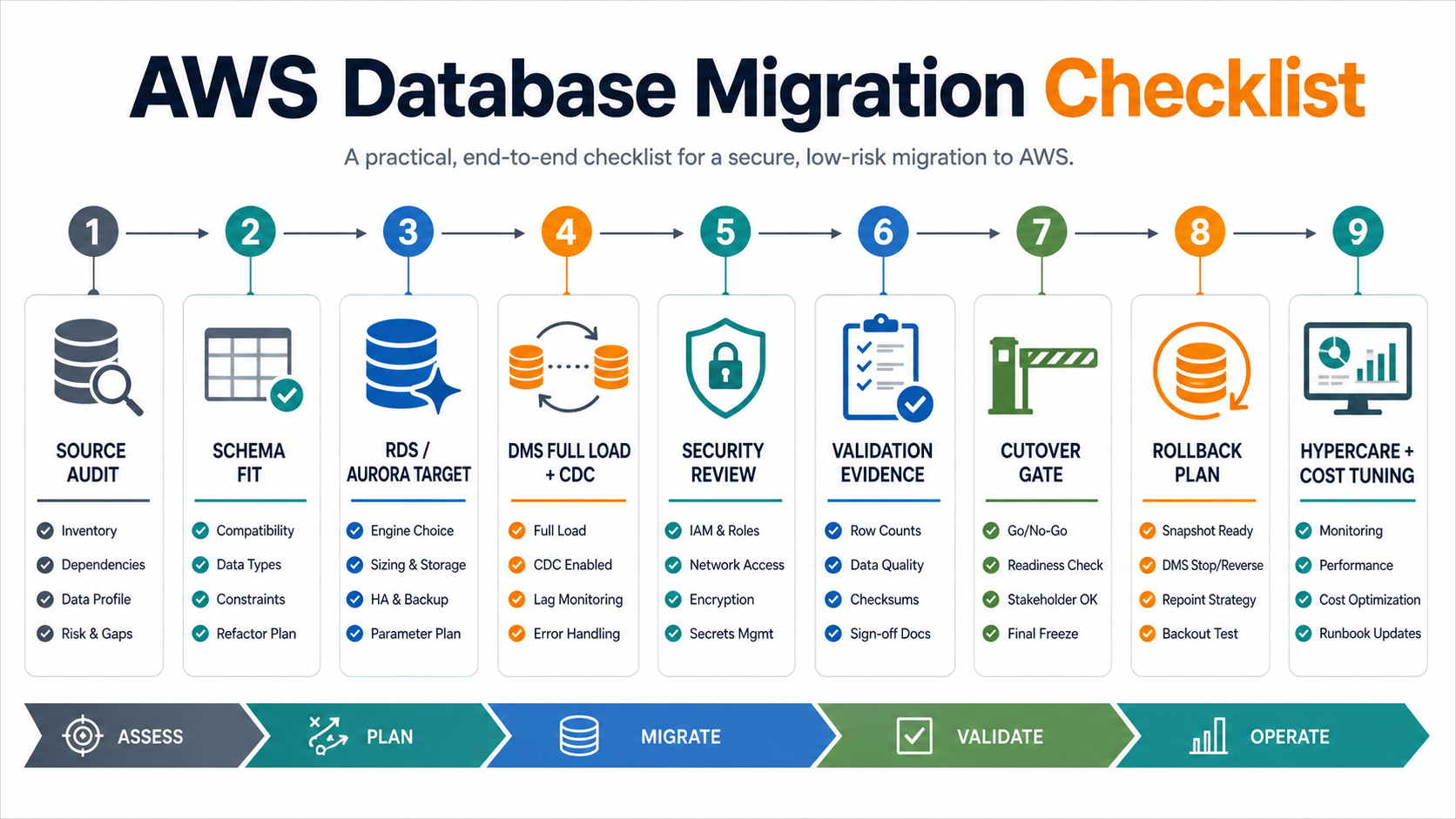

An AWS database migration checklist should prove more than whether data can be copied into Amazon RDS or Amazon Aurora. It should prove that the source workload is understood, the target database is right-sized, AWS DMS is configured for the correct migration pattern, security controls are in place, validation evidence is ready, and the team can cut over or roll back without guessing under pressure.
The safest migrations are planned around evidence. Before production cutover, the team should know which schemas, tables, extensions, jobs, reports, applications, users, permissions, and integration dependencies matter. They should also know which downtime tier the business can accept, how ongoing changes will be captured, and which validation results are strong enough for go-live.
Use this checklist when moving an on-premises or self-managed database to AWS, modernizing a legacy database into RDS or Aurora, planning a low-downtime AWS DMS migration, or comparing AWS database migration services partners for a production system that cannot afford data loss.
AWS Database Migration Checklist Summary
Start with the migration path, then turn every phase into owner-backed evidence. If the team cannot show its source audit, target decision, replication plan, validation report, security review, cutover runbook, rollback trigger, and monitoring plan, the migration is not ready for production.
| Checklist Area | What To Confirm | Evidence To Capture |
|---|---|---|
| Source audit | Engine version, schema size, tables, indexes, stored procedures, extensions, jobs, data volume, query patterns, users, dependencies, and downtime constraints are known. | Source inventory, workload profile, dependency map, baseline metrics, risk notes. |
| Target choice | RDS or Aurora engine, instance class, storage, HA/DR model, version compatibility, network placement, and operating-cost assumptions are approved. | Target architecture, sizing notes, compatibility report, cost estimate, recovery objective. |
| DMS design | Full load, CDC, endpoints, replication instance, task settings, table mappings, LOB handling, error behavior, and monitoring are defined. | DMS task plan, endpoint tests, mapping rules, CloudWatch metrics, task rehearsal logs. |
| Security | IAM, Secrets Manager, TLS, encryption at rest, VPC routing, security groups, audit logging, and temporary migration access are controlled. | Security review, access list, network diagram, encryption settings, revocation checklist. |
| Validation | Counts, checksums, referential integrity, application smoke tests, report comparisons, and owner signoff are defined before the first rehearsal. | Reconciliation report, validation queries, UAT evidence, exception log, signoff record. |
| Cutover and rollback | Freeze window, final CDC catch-up, go/no-go owner, app switch, rollback trigger, backup restore plan, and hypercare coverage are ready. | Cutover runbook, backup proof, rollback runbook, monitoring dashboard, execution log. |
1. Audit The Source Database And Workload
The source audit determines whether the migration is a simple engine-compatible move, a managed-service modernization, or a deeper refactor. Do not start with tool selection. Start with the current database reality: engine, version, schema, workload, dependencies, compliance exposure, and operational behavior.
A strong audit includes schemas, tables, row counts, storage growth, indexes, views, triggers, functions, stored procedures, extensions, scheduled jobs, replication configuration, backup strategy, maintenance windows, user roles, performance baselines, and downstream consumers. It should also capture application behavior such as write patterns, long-running transactions, connection pooling, batch jobs, reporting peaks, and acceptable downtime.
For older systems, assess modernization risk before choosing the AWS target. A legacy software modernization scorecard helps surface unsupported versions, fragile integrations, manual maintenance, security gaps, and operational dependencies that can make a direct database lift risky.
| Audit Item | Questions To Answer | Owner |
|---|---|---|
| Engine and version | Is the current engine supported by the target RDS or Aurora version, and are upgrades required first? | Database owner |
| Schema and code | Which stored procedures, triggers, functions, extensions, and jobs need conversion or replacement? | Database engineer and application lead |
| Workload baseline | What are peak query, write, storage, latency, connection, and batch-processing patterns? | Platform owner |
| Dependencies | Which applications, reports, APIs, queues, ETL jobs, and support workflows depend on this database? | Integration owner |
| Business constraints | What downtime, recovery point, recovery time, compliance, and validation requirements must be met? | Business process owner |
2. Choose The Right RDS Or Aurora Target
Target selection is not only an AWS service choice. It is an operating model decision. Amazon RDS can be a strong fit when teams want a managed version of a familiar database engine with predictable administration. Amazon Aurora can be a stronger fit when the workload needs Aurora-specific scalability, availability, storage behavior, or global-read patterns. The right answer depends on workload characteristics, compatibility constraints, team experience, cost, and recovery objectives.
If the migration includes application, network, storage, and infrastructure changes, connect the target database decision to the wider cloud migration assessment and the broader data migration services plan. Application dependencies, data flows, security controls, traffic patterns, and cost assumptions should be mapped before the database architecture is locked.
| Decision Area | RDS Considerations | Aurora Considerations |
|---|---|---|
| Compatibility | Good when the current engine and version map cleanly to supported RDS options. | Useful when Aurora-compatible MySQL or PostgreSQL features fit the target workload. |
| Availability | Multi-AZ deployments support managed high availability for many workloads. | Aurora architecture can support higher availability and read scaling patterns when designed correctly. |
| Performance | Right-size instance, storage, IOPS, parameters, indexes, and connection behavior. | Evaluate storage behavior, replica strategy, failover, query patterns, and engine-specific tuning. |
| Operations | Familiar administration model with managed backups, patching, monitoring, and maintenance windows. | Requires Aurora-aware monitoring, cost review, failover testing, and parameter tuning. |
| Cost | Estimate instance, storage, I/O, backup, transfer, support, and operational time. | Model workload-specific storage, I/O, replica, global database, and capacity patterns. |
3. Decide Where AWS DMS Fits
AWS Database Migration Service is useful for many full-load and change data capture migration patterns, but it is not a substitute for schema assessment, data-quality cleanup, application testing, or cutover planning. Treat DMS as one part of the migration runbook.
For homogeneous migrations, DMS can help move data between compatible database engines. For heterogeneous migrations, teams usually need schema conversion, code review, data-type mapping, and application testing before DMS data movement is meaningful. AWS documentation for database migrations highlights DMS and schema conversion as core self-service migration options, but the implementation still needs target compatibility and validation work.
| DMS Design Item | Checklist Action | Evidence |
|---|---|---|
| Endpoints | Test source and target endpoint connectivity, credentials, TLS, VPC routes, and security groups. | Successful endpoint tests and network review. |
| Replication instance | Size for data volume, change rate, LOB handling, task count, latency, and migration window. | Sizing notes and rehearsal metrics. |
| Task mode | Choose full load only, full load plus CDC, or CDC-only based on downtime and cutover needs. | Task configuration and business downtime approval. |
| Table mapping | Define included tables, filters, transformations, exclusions, and large object behavior. | Mapping JSON, source-to-target review, exception list. |
| Error handling | Define what happens when rows fail, constraints reject data, or latency exceeds limits. | Error policy, retry settings, alert rules, support owner. |
| Monitoring | Track lag, throughput, full-load progress, task errors, target load, and validation outputs. | CloudWatch metrics, runbook thresholds, migration dashboard. |
4. Secure The Migration Path
Database migration creates temporary security exposure because migration users, network paths, staging data, backups, logs, and validation exports may exist outside normal production routines. Security controls should cover both the future database and the migration machinery.
Use least-privilege IAM, scoped database users, managed secrets, encrypted connections, encryption at rest, private network paths where appropriate, and explicit access revocation after migration. Review whether DMS task logs, validation exports, scripts, or failure queues could expose sensitive customer, financial, health, or operational data.
| Security Control | Checklist Action | Evidence |
|---|---|---|
| Credentials | Store migration credentials securely and restrict who can read or rotate them. | Secrets Manager review and credential owner list. |
| Network | Confirm VPC placement, routing, security groups, network ACLs, DNS, and private connectivity. | Network diagram and endpoint test record. |
| Encryption | Require TLS for transit where supported and encryption at rest for target storage and snapshots. | Connection settings, KMS notes, backup settings. |
| Access | Limit migration users, database permissions, console access, and emergency privileges. | Access matrix and post-migration revocation proof. |
| Auditability | Log extraction, load, validation, approvals, task changes, and cutover decisions. | Execution logs, CloudTrail or audit logs, decision archive. |
5. Rehearse And Validate Before Cutover
Validation should be designed before the first full load. Record counts are necessary, but they are not sufficient. The team also needs schema validation, referential integrity checks, sample record review, financial or operational total reconciliation, report comparison, application smoke tests, integration tests, permission checks, and owner signoff.
The same evidence discipline applies to platform-neutral migration work. NextPage recently published a data migration checklist covering inventory, mapping, validation, cutover, and rollback. Use that as a broader reference when the AWS database move is part of a larger SaaS, analytics, or legacy-system migration.
| Validation Layer | What To Test | Proof Needed |
|---|---|---|
| Completeness | Rows, tables, partitions, files, history ranges, skipped records, and failed rows. | Source vs target count report and exception list. |
| Accuracy | Balances, sums, statuses, dates, IDs, reference values, and calculated outputs. | Reconciliation queries and approved tolerances. |
| Integrity | Foreign keys, parent-child relationships, lookup values, constraints, and indexes. | Integrity test output and unresolved issue log. |
| Application behavior | Login, search, create, update, checkout, reporting, batch jobs, notifications, and API calls. | Smoke test and UAT evidence. |
| Performance | Critical query latency, connection behavior, batch duration, replication lag, and target load. | Baseline comparison and performance notes. |
6. Plan Cutover, Rollback, And Hypercare
Cutover is the controlled moment when source writes pause or narrow, DMS catches up, validation runs, applications switch to the target, and the team watches real traffic. Rollback planning must be decided before that moment, because teams under cutover pressure should not invent recovery rules live.

| Cutover Step | Checklist Question | Required Proof |
|---|---|---|
| Freeze or quiet window | When do source writes stop or narrow, and who approves exceptions? | Release calendar, freeze notice, owner confirmation. |
| CDC catch-up | Has replication lag reached the approved threshold before the app switch? | DMS task metrics and timestamped lag evidence. |
| Final validation | Which counts, totals, smoke tests, and owner checks must pass before go-live? | Go/no-go checklist and signed validation report. |
| Application switch | How will app config, secrets, DNS, connection strings, jobs, and integrations point to target? | Switch runbook and smoke test evidence. |
| Rollback trigger | Which failures require rollback instead of hotfix or forward-fix? | Trigger list tied to business impact and recovery time. |
| Hypercare | Who monitors errors, performance, replication, reports, and user issues after launch? | Support rota, dashboard, escalation path, issue log. |
7. Optimize After The Database Is Live
A database can migrate successfully and still need post-migration tuning. Watch query latency, slow queries, connection pressure, storage growth, CPU, memory, I/O, lock behavior, backup duration, failover behavior, and cost. Compare production behavior against the baseline captured during source audit.
Post-migration optimization should also clean up temporary access, remove stale migration users, archive evidence, shut down old jobs safely, confirm backup and restore behavior, and tune alerts. If the old database is being retired, plan decommissioning only after business owners confirm that reporting, audit, compliance, and rollback requirements are satisfied.
| After Go-Live | What To Monitor | Why It Matters |
|---|---|---|
| Performance | Slow queries, CPU, memory, I/O, locks, latency, connection count, and batch duration. | Confirms the target supports production workload behavior. |
| Reliability | Backups, snapshots, restore testing, failover, maintenance windows, and alarms. | Validates the operational model, not only the migration event. |
| Cost | Instance size, storage growth, I/O, replicas, backup retention, data transfer, and idle resources. | Prevents migration success from becoming long-term cloud waste. |
| Security | Temporary accounts, DMS roles, security groups, secrets, audit logs, and access exceptions. | Closes temporary migration exposure. |
| Business confidence | Reports, workflows, integration jobs, support tickets, and unresolved exceptions. | Shows whether users and stakeholders trust the migrated database. |
How NextPage Helps With AWS Database Migration
NextPage helps teams plan AWS database migrations with the same discipline used for production software delivery: source discovery, workload profiling, target architecture, AWS DMS design, schema and data validation, security review, rehearsal, cutover planning, rollback design, and post-go-live support.
A practical first engagement can audit the current database and application dependencies, identify RDS or Aurora fit, define an AWS DMS replication approach, create validation evidence, and turn cutover into an executable runbook. For teams with field, operations, or inspection data flowing through mobile and web systems, the ClearRoute case study shows how structured evidence, processing, and review workflows support operational confidence. That gives engineering and business stakeholders a clearer path before committing to a high-pressure production move.
If your team is preparing an AWS database migration, start with the checklist evidence. NextPage can help turn source audit, target selection, replication, validation, cutover, rollback, monitoring, and optimization into a controlled migration plan. For early scope and budget framing, use the custom software cost estimator before a deeper migration discovery call.