
Quick Answer: When Custom Internal Tools Make Sense
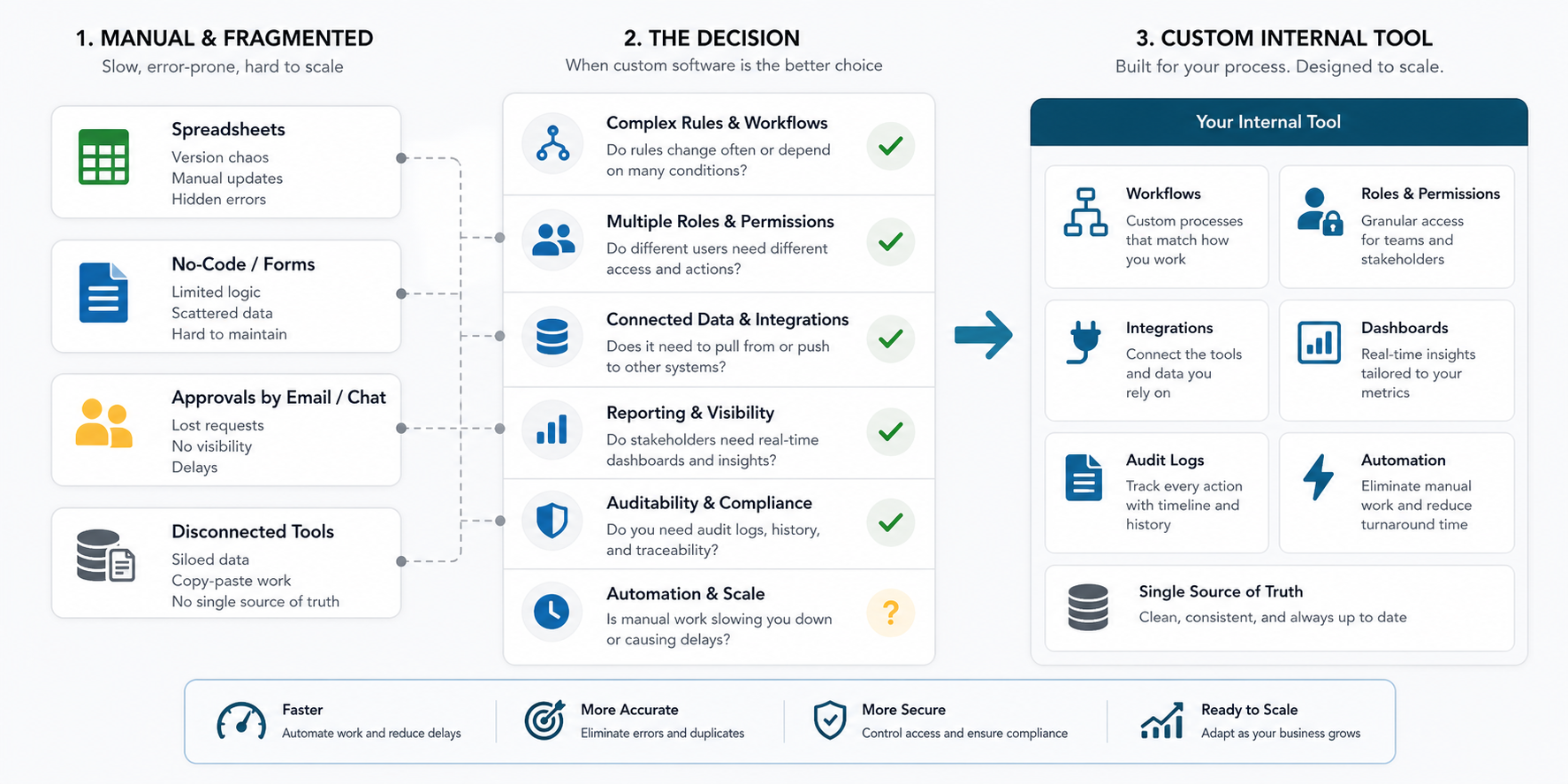
Custom internal tool development makes sense when a repeated workflow is important to the business, too specific for off-the-shelf software, and too risky or slow to keep inside spreadsheets, email threads, shared folders, and disconnected SaaS tools. The best candidates usually combine approvals, permissions, integrations, reporting, audit trails, and enough operating volume that small errors become expensive.
No-code and low-code tools are useful for prototypes, lightweight admin panels, and early workflow validation. Custom software becomes the better option when the process needs durable data models, role-based access, performance, API ownership, compliance controls, maintainable automation, or a user experience that fits how the team actually works.
If the decision is still unclear, use the Build vs Buy Decision Tool first. If custom development looks likely, the custom software cost estimator can turn the workflow scope into a practical budget and timeline band.
What Is Internal Tool Development?
Internal tool development is the design and build of software used by employees, operations teams, support teams, finance teams, sales teams, field teams, or administrators to run the business. These tools usually do not sell the product directly, but they decide how quickly and accurately the company can deliver work.
Common examples include operations dashboards, approval systems, inventory consoles, order management panels, reporting portals, scheduling tools, document review workflows, support admin screens, migration utilities, data cleanup tools, and integration hubs. Some are small interfaces over one database. Others become full internal platforms with multiple roles, external APIs, notifications, file handling, analytics, and automation.
The important point is that an internal tool is not just a nicer spreadsheet. It is a controlled workflow. The software defines who can do what, what data is required, what happens next, which systems must sync, and how leadership can trust the result.
Why Spreadsheets and No-Code Start Breaking
Spreadsheets are flexible because they do not enforce much structure. That same flexibility becomes a problem once multiple people depend on the same process. Columns change, formulas drift, tabs duplicate, permissions become unclear, and there is no reliable audit trail for who changed a critical value.
No-code tools improve structure, but they can still become brittle when business rules multiply. A workflow that starts as a simple form can turn into conditional approvals, exceptions, role-specific screens, API sync, notifications, exports, reporting, and edge-case recovery. At that point, the cost is no longer only the tool subscription. It is the time spent working around the tool.
| Signal | What It Usually Means | Better Direction |
|---|---|---|
| Teams keep copying spreadsheet tabs | The process needs records, states, ownership, and history | Database-backed workflow app |
| Approvals happen in chat or email | The workflow lacks enforceable status and accountability | Approval queue with permissions and notifications |
| Reports require manual cleanup | Source data and reporting data are drifting apart | Operational dashboard tied to validated records |
| No-code logic is hard to debug | The process has outgrown visual rules and hidden dependencies | Custom backend logic with tests and logs |
| People export data between SaaS tools | The business needs integration, not more manual transfer | API-led workflow orchestration |
Build vs Buy vs No-Code Decision Framework
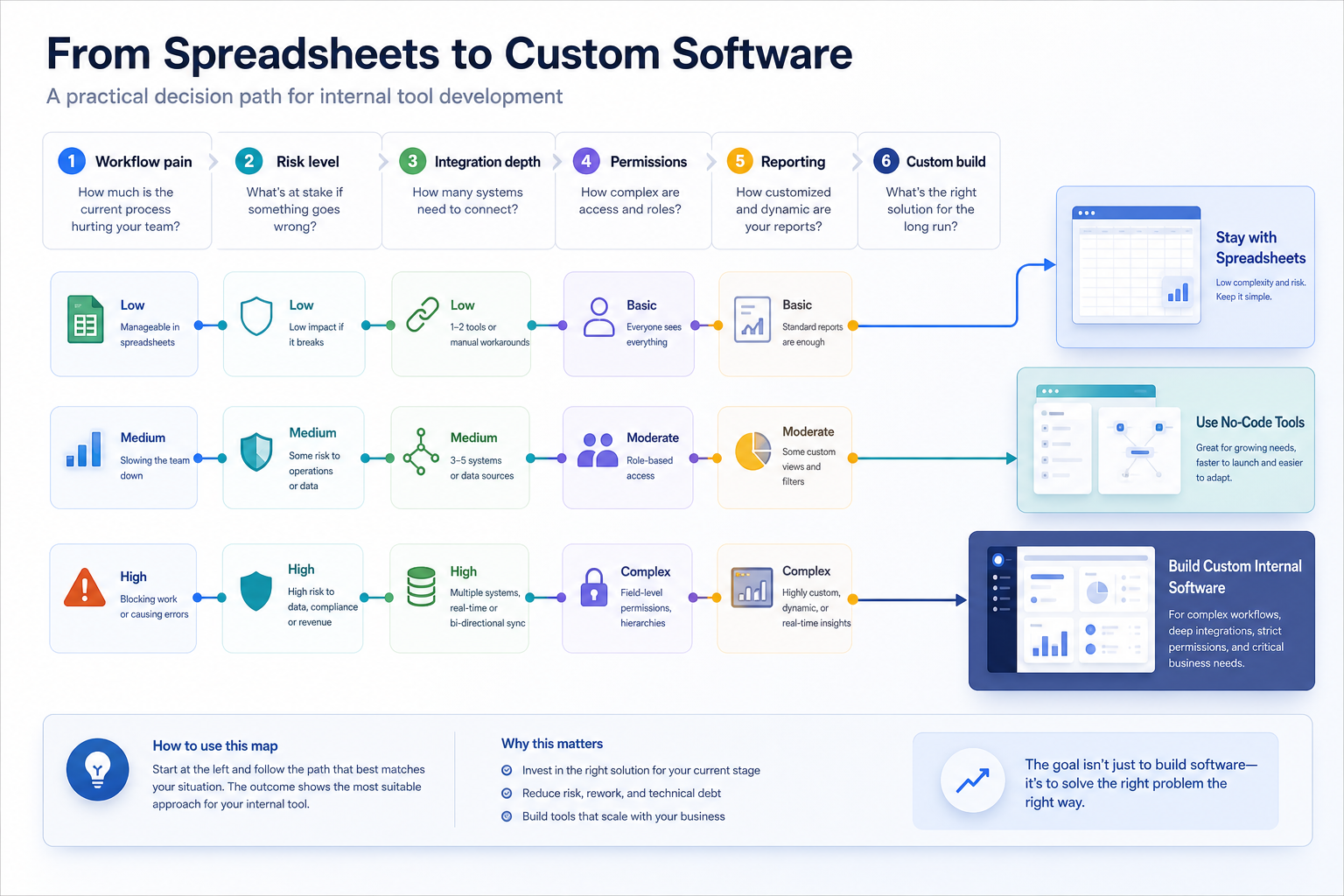
Buying is usually best when the workflow is standard and the team can adapt to the product's default process. No-code is useful when the workflow is low-risk, changes often, and needs speed more than deep control. Custom internal tool development fits when the workflow is strategically important, integration-heavy, role-specific, or too unusual for generic software.
The decision should not be ideological. Many companies need a mix: buy payroll software, configure a CRM, use no-code for temporary operations, and build custom tools around the parts that create operating advantage or reduce serious manual work.
| Option | Best Fit | Watch Out For |
|---|---|---|
| Buy SaaS | Standard workflows such as payroll, tickets, accounting, or CRM basics | Forcing a unique process into a rigid product |
| No-code or low-code | Fast prototypes, lightweight admin panels, and early workflow validation | Hidden complexity, subscription limits, weak auditability, difficult version control |
| Custom internal tool | Unique workflows, integrations, permissions, reporting, automation, and long-term maintainability | Building too much before the workflow is proven |
For a structured comparison, NextPage's build-vs-buy decision tool weighs workflow uniqueness, integration depth, strategic advantage, and compliance needs before recommending buy, configure, integrate, or build.
Internal Tool MVP Scope
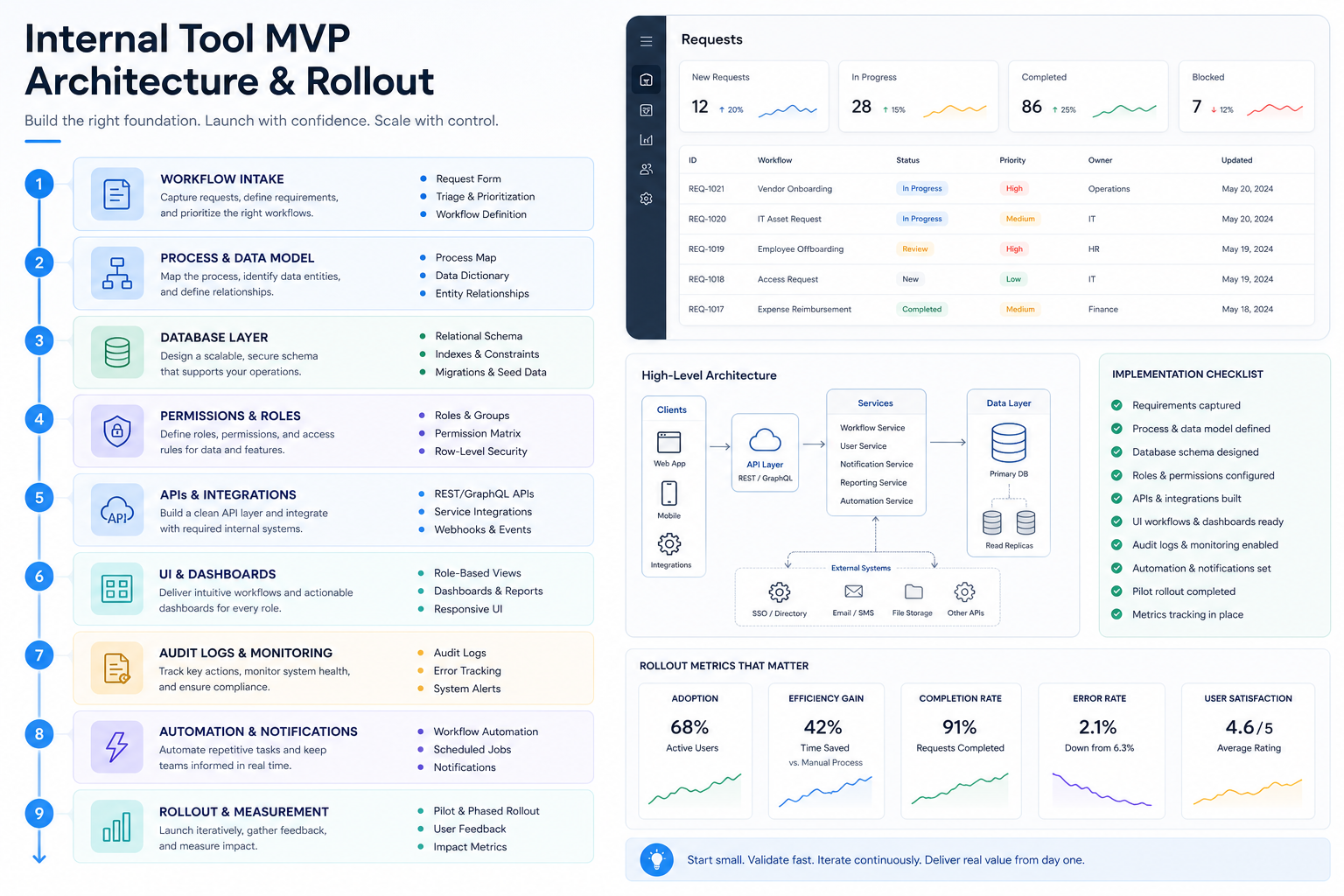
The first version of an internal tool should remove a real bottleneck without trying to become an enterprise platform immediately. A strong MVP usually has one primary workflow, a small number of roles, a reliable data model, clear status transitions, and enough reporting to show whether the tool is saving time or reducing errors.
For example, an approval tool MVP might include request intake, required fields, reviewer assignment, status changes, comments, notifications, audit history, and a basic dashboard. It should not start with every possible exception, every department, advanced forecasting, and deep automation unless those pieces are essential to the first measurable outcome.
| MVP Layer | Include First | Usually Defer |
|---|---|---|
| Users and roles | Admin, operator, reviewer, read-only leadership view | Complex hierarchy and every edge permission |
| Workflow | Core states, required fields, comments, notifications | Rare exceptions and advanced branching |
| Data | Validated records, imports, exports, searchable history | Full data warehouse or BI program |
| Integrations | One or two systems that remove manual copy-paste | All possible SaaS connections |
| Reporting | Cycle time, backlog, errors, volume, ownership | Predictive analytics before baseline data exists |
This is where custom software development discipline matters. The goal is not a bigger first release. The goal is a release that is narrow enough to ship and structured enough to grow.
Architecture for Maintainable Internal Tools
Internal tools tend to live longer than expected. A quick admin panel can become the daily command center for operations, finance, support, logistics, or content teams. That means architecture decisions matter even when the user interface looks simple.
A maintainable internal tool usually needs a real database schema, typed API boundaries, role-aware frontend routes, background jobs for slow tasks, integration retries, structured logging, backup plans, and a deployment process that does not depend on one developer's laptop. The exact stack can vary, but the operating responsibilities do not disappear.
For web-based internal systems, NextPage usually treats the work as web app development with a strong backend foundation: admin screens, APIs, workflow logic, database design, authentication, authorization, and reporting built as one coherent product.
Security, Permissions, and Auditability
Internal software often touches more sensitive data than customer-facing marketing pages: customer records, invoices, financial approvals, operational exceptions, documents, staff activity, vendor information, or private business metrics. A tool used by twenty employees still needs serious access control if it can change important records.
At minimum, plan for authentication, role-based permissions, least-privilege access, protected admin actions, audit logs, safe file handling, data retention rules, environment separation, and a recovery path for mistaken changes. For regulated workflows, approval history and immutable event logs may matter as much as the visible screens.
Security is also a product design issue. If permissions are too confusing, users share accounts or route work outside the system. Good internal tools make the correct path faster than the workaround.
Where AI and Automation Fit
AI can be useful in internal tools, but it should start from a workflow problem rather than a feature label. Strong use cases include triaging requests, summarizing records, extracting fields from documents, drafting replies, detecting anomalies, recommending next actions, and routing work to the right team.
Before adding AI, check whether the workflow has clean inputs, clear decisions, review points, reliable data access, and a way to measure accuracy. If the process is already unclear, AI usually makes the uncertainty faster instead of making the operation better.
Use the AI Agent Readiness Assessment before investing in internal copilots or agentic workflows. For repeatable manual work, the Workflow Automation Opportunity Finder and AI Automation ROI Calculator can help rank which workflows deserve automation first.
Cost and Timeline Planning
Internal tool cost depends on workflow complexity, user roles, data model depth, integration count, security requirements, reporting, migration needs, and how much design polish the team needs for adoption. A small internal dashboard can be a compact build. A multi-role operations platform with approvals, integrations, audit logs, and automation is a larger custom software project.
Use these planning bands as directional guidance, not fixed quotes:
| Scope | Typical Build | Planning Range |
|---|---|---|
| Focused internal dashboard | One workflow, simple roles, existing data source, basic reporting | $15,000-$45,000 |
| Workflow MVP | Custom data model, intake forms, approvals, notifications, admin screens, exports | $45,000-$110,000 |
| Operations platform | Multiple roles, integrations, audit logs, files, automation, dashboards, deployment hardening | $110,000-$300,000+ |
The biggest cost-control move is to define the first workflow tightly. A focused release can prove adoption, generate real operating data, and reveal which automation is worth building next.
Rollout and Adoption Plan
Internal tools fail when they are technically complete but operationally ignored. Adoption needs a rollout plan: identify the owner, migrate the first records, train the real users, define what old process stops, and measure whether the tool is reducing cycle time, errors, manual handoffs, or reporting effort.
Start with a pilot group that feels the pain directly. Keep feedback loops short, fix confusing states quickly, and avoid adding features that only recreate the old spreadsheet in a new interface. The product should make the correct workflow obvious.
Useful launch metrics include request volume, average cycle time, overdue items, manual rework, duplicate records, support questions, exception count, and time spent preparing reports. These metrics turn internal tool development from a side project into an operating improvement program.
How NextPage Plans Internal Tools
NextPage starts internal tool projects by mapping the work people already do: records, roles, approvals, handoffs, systems, files, reports, exceptions, and decisions. Then we separate what should be bought, configured, automated, or custom-built.
For custom builds, we shape the first release around the smallest workflow that can remove a measurable bottleneck. That may be an operations dashboard, approval queue, admin portal, reporting tool, integration layer, or AI-assisted workflow. The technical plan covers database design, frontend UX, backend APIs, authentication, permissions, deployment, and support from the beginning.
If your team is deciding whether to replace a spreadsheet-heavy process, start by documenting the user roles, current handoffs, required fields, approval rules, systems to sync, reports needed, and the cost of mistakes. That is enough to turn a vague internal tool idea into a practical roadmap.