
Inventory management software development cost usually starts around $45,000-$90,000 for a focused stock-control MVP and can move past $250,000-$500,000 when the system controls barcode/RFID workflows, multiple warehouses, ERP synchronization, purchasing, eCommerce order flow, analytics, and demand forecasting. The real budget is not driven by a generic inventory screen count. It is driven by how many physical workflows the software must control and how safely it must exchange inventory data with the rest of the business.
If you only need item records, stock adjustments, reorder alerts, purchase orders, and a basic dashboard, the first release can stay compact. If the product must scan cartons on the warehouse floor, reserve stock across sales channels, sync with ERP/accounting systems, support batch or serial tracking, forecast demand, and give managers a reliable source of truth, you are building an operations platform.
This guide breaks the budget into scope tiers, modules, integrations, timeline, risks, and a practical buyer checklist. If you are still shaping a first estimate, start with the Custom Software Cost Estimator, then use the sections below to decide what belongs in release one. For a faster first-pass scope, pair the estimate with the MVP Scope Builder so must-have warehouse, ERP, and forecasting work does not get mixed with later-phase automation.
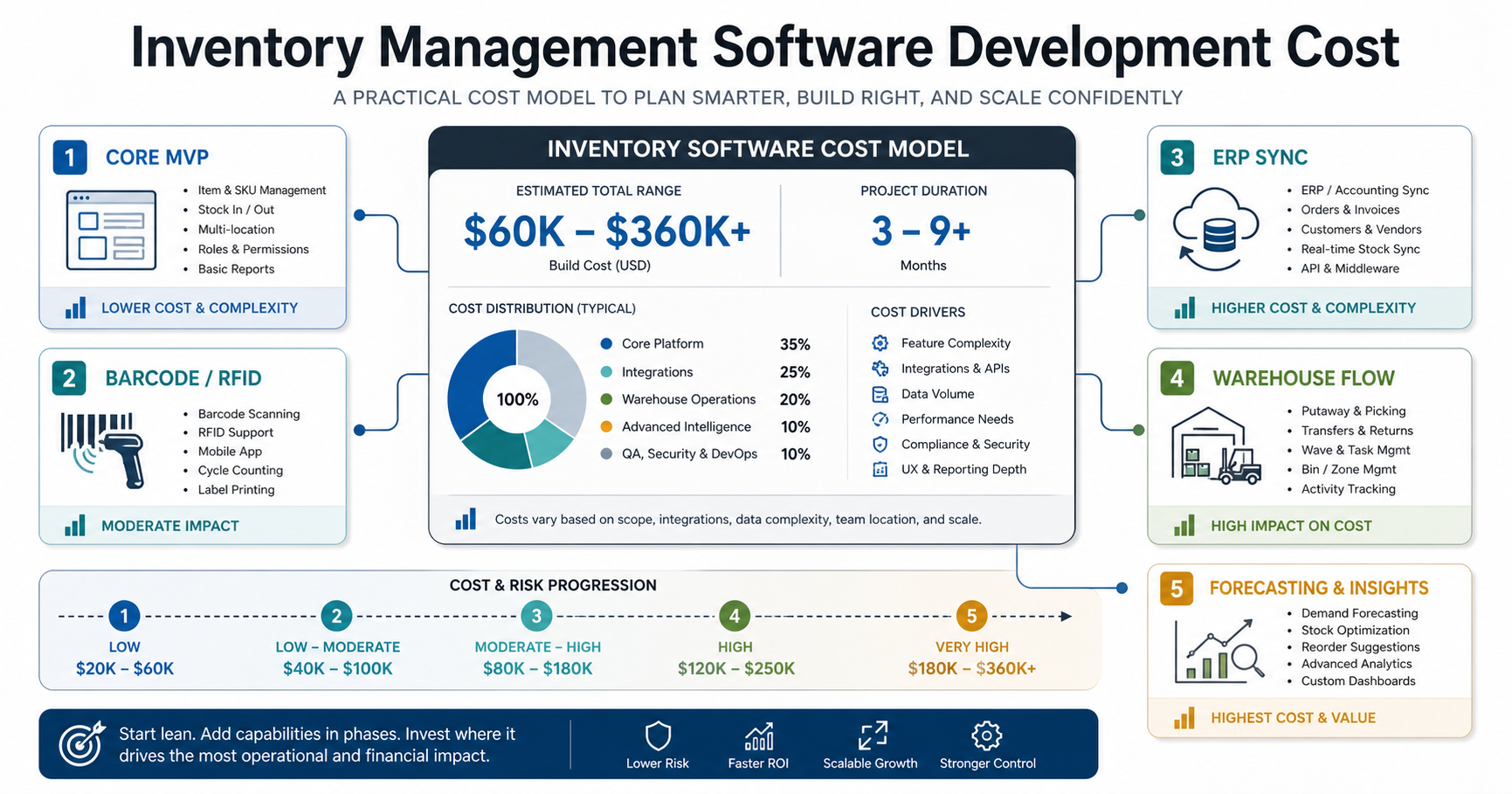
Quick Cost Ranges For Inventory Management Software Development
Use these ranges as planning bands. They assume professional discovery, UX, backend development, QA, deployment, admin tooling, and a production-ready web or mobile experience. Hardware, licensing, SaaS subscriptions, ERP consultant time, and warehouse device procurement are usually separate.
| Scope | Typical Planning Range | Best Fit | Main Budget Risk |
|---|---|---|---|
| Discovery and workflow audit | $8,000-$25,000 | Teams replacing spreadsheets or deciding build-vs-buy | Unclear SKU, location, and integration assumptions |
| Core inventory MVP | $45,000-$90,000 | Stock records, adjustments, reorder points, supplier records, purchase orders, basic reports | Growing into warehouse or ERP scope after launch |
| Barcode/RFID warehouse system | $90,000-$180,000 | Receiving, putaway, pick/pack/ship, bin locations, cycle counts, label printing, handheld scanning | Device compatibility, offline edge cases, and floor-process redesign |
| ERP-integrated inventory platform | $150,000-$350,000 | Manufacturing, wholesale, healthcare, retail, or distribution teams with ERP/accounting/eCommerce sync | Master-data ownership, two-way sync, migration, and exception handling |
| Advanced forecasting and automation platform | $250,000-$500,000+ | Multi-location operators needing forecasting, allocation, replenishment, dashboards, and advanced controls | Data quality, model governance, integration volume, and ongoing optimization |
These ranges align with current market examples that place custom inventory systems from tens of thousands for simpler builds to several hundred thousand dollars for enterprise complexity. Recent competitor pages also separate barcode/RFID, ERP-integrated, and forecasting-heavy systems into higher tiers because each layer adds workflow, data, and testing risk.
What Drives Inventory Management Software Cost?
The expensive parts of inventory software are usually the operating rules behind the interface. A simple CRUD app can show stock on hand. A production inventory system must decide what stock means, where it lives, who can move it, which system owns it, how it changes during orders, and what happens when a scan, shipment, purchase order, or integration fails.
SKU, Location, And Unit Complexity
Cost rises with the number of SKUs, warehouses, bins, shelves, stores, regions, units of measure, lot rules, expiration dates, serial numbers, kits, bundles, substitutions, and reorder policies. A distributor with 2,000 SKUs in one warehouse is a different build than a manufacturer tracking raw materials, work in progress, finished goods, serialized assets, returns, and scrap across multiple plants.
Before estimating, document SKU count, location hierarchy, item attributes, unit conversions, movement types, and exception rules. This is the inventory data model. If it is vague, every feature estimate becomes soft.
Warehouse Workflows And Barcode/RFID Support
Barcode and RFID features add cost because they move software onto the warehouse floor. The system must support scanners, mobile devices, label printing, offline or poor-network behavior, bin validation, receiving, cycle counts, picking, packing, transfers, and mistake recovery. Device support also changes QA because teams must test scans, labels, latency, permissions, and edge cases in real warehouse conditions.
If your operations depend on picking speed, receiving accuracy, or traceability, a focused warehouse and inventory management software build can be more valuable than a generic inventory dashboard. The budget should include process mapping, device workflow design, and pilot testing with actual warehouse staff.
Barcode Vs RFID Scope Decisions
Barcode and RFID are often discussed as hardware choices, but the software estimate changes because each option creates different validation, exception, and support workflows.
| Decision | Barcode-First Scope | RFID-Heavy Scope | Budget Guidance |
|---|---|---|---|
| Best fit | Item-level scans, receiving, picking, cycle counts, label printing, and controlled warehouse tasks | Bulk reads, high-speed movement, pallets, totes, assets, restricted zones, or low-touch visibility | Start barcode-first unless RFID solves a measurable labor, accuracy, or traceability problem |
| Software work | Scan validation, label templates, mobile UX, movement ledger, mistake recovery, and device testing | Reader events, middleware, location interpretation, noisy-read filtering, exception queues, and reconciliation | RFID usually needs more discovery, pilot testing, and operational tuning |
| Risk to validate | Label quality, scanner latency, Wi-Fi gaps, user adoption, and wrong-bin scans | Read accuracy, tag placement, interference, duplicate reads, hardware layout, and support ownership | Fund a warehouse pilot before committing to a full RFID rollout |
ERP, eCommerce, Accounting, And POS Integrations
Integration depth is often the biggest budget swing. Inventory touches purchasing, sales, finance, fulfillment, customer service, production planning, and reporting. A one-way nightly export is cheaper than a near-real-time two-way sync with ERP, eCommerce, POS, accounting, CRM, and supplier systems.
Plan these questions early:
- Which system owns item master, vendor, customer, order, inventory, and accounting records?
- Which data syncs one way, which syncs two ways, and which must remain read-only?
- How fast must stock changes update across sales channels?
- What happens when an API is down, a record conflicts, or a shipment changes after an order is placed?
- Who sees and resolves sync exceptions?
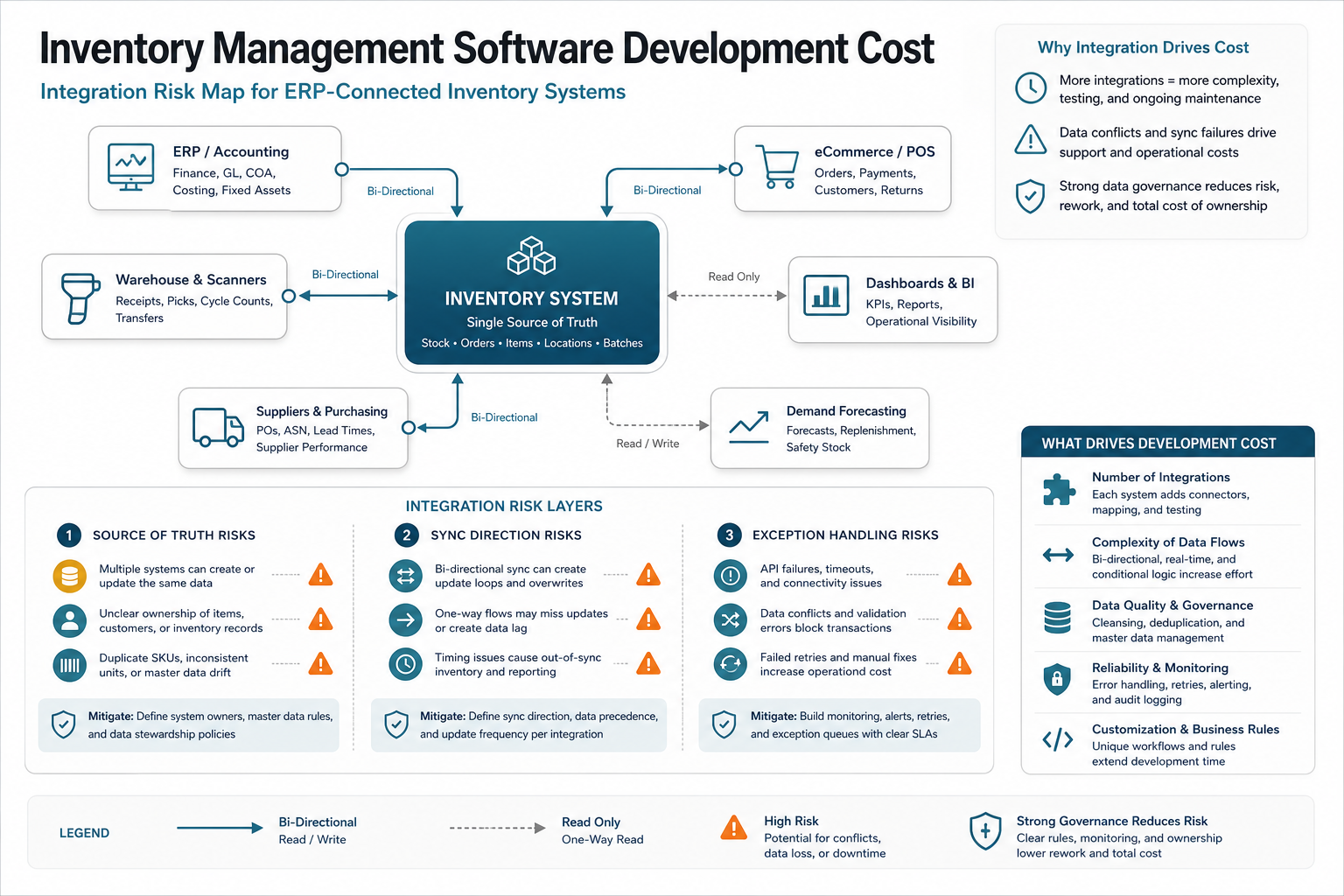
NextPage's custom ERP development cost guide is useful here because integration scope can add more cost than screens. If the inventory module becomes part of a broader operating backbone, review custom ERP development services before locking the architecture.
Reporting, Dashboards, And Forecasting
Basic reports are straightforward: stock value, low-stock items, movement history, supplier performance, receiving delays, shrinkage, and cycle count accuracy. Forecasting is more expensive because it requires clean historical demand, seasonality, lead times, supplier reliability, returns, promotions, channel mix, and stockout context. A model trained on messy order history can recommend the wrong reorder quantity with impressive-looking charts.
If forecasting matters, start with dashboards and data readiness before building automation. NextPage's AI solutions for logistics and supply chain operations cover demand and inventory forecasting, reorder analytics, and operational AI workflows when the data foundation is ready.
Module Cost Breakdown By Feature Area
A useful estimate separates must-have operating modules from nice-to-have analytics. The percentages below help you pressure-test a vendor quote.
| Workstream | Typical Share Of Build Budget | What To Validate |
|---|---|---|
| Discovery and workflow design | 8%-12% | Inventory states, user roles, movement types, integrations, MVP scope |
| UX and admin design | 8%-14% | Warehouse usability, mobile/scanner flow, manager dashboards, exception handling |
| Core inventory backend | 20%-30% | Items, locations, stock ledger, adjustments, transfers, reorder rules, audit logs |
| Warehouse and device workflows | 15%-28% | Barcode/RFID, label printing, picking, packing, receiving, counts, offline behavior |
| Integrations | 15%-30% | ERP, eCommerce, accounting, POS, WMS, suppliers, APIs, webhooks, reconciliation |
| Analytics and forecasting | 8%-22% | Dashboards, forecast inputs, data quality, seasonality, anomaly alerts, model monitoring |
| QA, migration, launch, support | 12%-22% | Data migration, UAT, scanner testing, performance, monitoring, training, rollout |
For manufacturing-heavy scope, align the estimate with manufacturing software development requirements such as bills of materials, shop-floor updates, purchasing, quality, production planning, and ERP sync.
What Should Be In The First Inventory Software MVP?
The first release should prove the inventory source of truth and one or two critical workflows. Do not try to replace ERP, WMS, eCommerce, purchasing, forecasting, and accounting in one launch unless the organization is ready for a major transformation program.
| MVP Area | Include In Release One | Defer Until Later |
|---|---|---|
| Inventory records | Items, categories, units, locations, stock on hand, stock movements, adjustment reasons | Advanced product lifecycle management and complex configuration |
| Purchasing | Supplier records, purchase orders, receiving, reorder alerts, basic approval rules | Advanced procurement optimization and supplier portals |
| Warehouse workflow | Receiving, bin movement, cycle counts, picking or transfer flow, barcode validation if critical | Full labor optimization, wave planning, robotics, advanced RFID gates |
| Integrations | One or two source-of-truth integrations with clear failure handling | Every marketplace, supplier EDI, multi-ERP sync, and complex master-data hub |
| Reporting | Low stock, stock value, movement history, aging inventory, reorder exceptions | Predictive forecasts, simulation, advanced optimization, executive BI suite |
For companies where order flow is the main driver, pair inventory planning with eCommerce order fulfillment automation. Fulfillment complexity can change the inventory roadmap more than the item catalog itself.
Inventory Readiness Gate Before You Fund The Build
The cheapest inventory software estimate is not always the safest one. Before approving barcode/RFID, ERP sync, or forecasting scope, classify each workstream as ready, needs design, or should be deferred. This keeps discovery focused on the work that lowers operational risk.
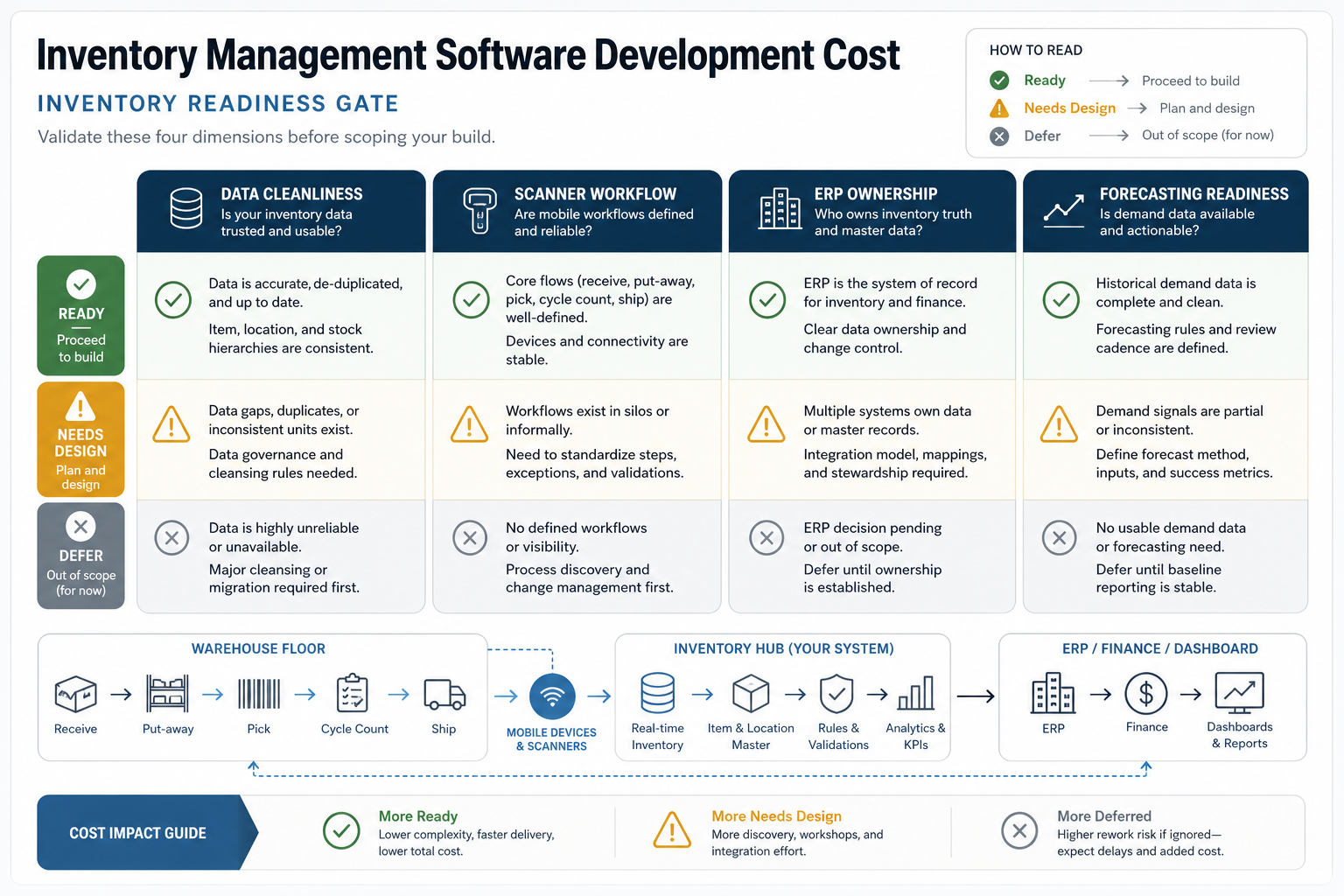
| Readiness Area | Ready For Build | Needs Design First | Defer For Later |
|---|---|---|---|
| Data cleanliness | SKU, unit, supplier, location, and stock records are trusted enough to migrate | Duplicates, missing fields, or inconsistent units need cleanup rules | No reliable baseline inventory data exists yet |
| Scanner workflow | Receiving, putaway, picking, packing, and cycle-count steps are documented | Warehouse staff use informal workarounds that need process mapping | Physical workflow is not stable enough for device automation |
| ERP ownership | Source-of-truth rules for items, orders, vendors, inventory, and finance are agreed | Multiple systems own overlapping records and need governance | ERP decision or access is not ready for integration scope |
| Forecasting readiness | Demand, lead time, stockout, returns, and promotion history are usable | Signals are partial and need dashboard validation first | Forecast automation would be guesswork until reporting stabilizes |
This readiness gate is where a custom software development partner should challenge scope. If scanner workflows or ERP ownership are still uncertain, the first milestone should be discovery, data cleanup, and a pilot flow instead of a large fixed build.
Data Migration And Inventory Cleanup Can Make Or Break The Budget
Inventory projects often fail because the new system inherits old data problems. Duplicate SKUs, inconsistent naming, missing supplier records, inaccurate bin locations, unit-of-measure conflicts, old barcode labels, and untrusted stock counts can consume more launch time than the first dashboard. The estimate should include a migration plan, not just an import script.
A practical migration plan has five parts:
- Data audit: Profile item records, suppliers, locations, units, costs, barcodes, lot or serial fields, and historical transactions.
- Cleanup rules: Decide how duplicates, inactive SKUs, old vendors, missing attributes, and inconsistent categories will be handled.
- Opening stock strategy: Define whether launch starts from a physical count, ERP snapshot, WMS export, or reconciled hybrid.
- Migration rehearsals: Run test imports and compare totals by item, location, value, and exception type.
- Cutover support: Assign owners for launch-day discrepancies, blocked receipts, open purchase orders, and order allocation issues.
Budget more for migration when the current process relies on spreadsheets, old ERP exports, manual adjustments, or different naming rules across locations. A clean build cannot overcome bad inventory data without discovery and cleanup time.
Security, Roles, And Audit Trails Are Not Optional
Inventory changes affect financial statements, customer promises, warehouse productivity, and purchasing decisions. That makes role-based access and audit history part of the core product, not an enterprise add-on. A warehouse associate may need to scan a receipt but not change item cost. A manager may approve adjustments but not edit accounting sync rules. A finance user may need valuation reports without operational edit access.
Include these controls in the estimate:
- Role-based permissions for receiving, picking, adjustment, purchasing, reporting, configuration, and admin work.
- Audit logs for stock changes, user actions, integration events, failed syncs, and manual overrides.
- Approval rules for high-value adjustments, write-offs, emergency stock changes, and supplier updates.
- Backup and recovery checks for inventory records, transaction history, and migration files.
- Monitoring for integration failures, unusual adjustment volume, duplicate scans, and negative stock events.
These controls reduce risk after launch. Without them, teams often fall back to side spreadsheets, chat messages, and database fixes when something goes wrong.
Industry Scope Changes The Inventory Software Estimate
Two companies can ask for inventory management software and need very different systems. The industry context determines which rules are expensive.
| Industry | Scope That Changes Cost | What To Validate Early |
|---|---|---|
| Retail and omnichannel | POS, marketplace, store, warehouse, returns, loyalty, click-and-collect, and near-real-time availability | Which channel owns reservations and how fast stock must update |
| Manufacturing | Raw materials, WIP, finished goods, BOMs, production orders, quality holds, scrap, and ERP sync | How inventory states map to production and finance |
| Wholesale and distribution | Bulk receiving, carton/pallet tracking, customer-specific pricing, order allocation, pick waves, shipping integrations | Picking, packing, and allocation rules by customer and location |
| Healthcare and pharmacy | Lot tracking, expiration, controlled inventory, purchasing controls, audit trails, and compliance reports | Traceability, access rules, and reporting obligations |
| Field service | Technician vans, parts usage, returns, replenishment, offline mobile, and service job linkage | Mobile stock ownership and reconciliation between field and warehouse |
This is why an estimate should not start with a universal feature checklist. It should start with the operating environment, stock movement rules, and financial impact of inventory errors.
Build Vs Buy: When Custom Inventory Software Makes Sense
Off-the-shelf inventory tools are often the right first move for small teams with standard workflows. Custom software makes sense when your operations create enough friction, revenue risk, or integration complexity that adapting to a generic tool becomes more expensive than owning the workflow.
Custom inventory software is worth serious evaluation when:
- Teams duplicate inventory data across spreadsheets, ERP, eCommerce, accounting, and warehouse tools.
- Barcode or RFID workflows need to match physical movement, not a generic scanner flow.
- Stock availability must be accurate across multiple channels, warehouses, or production stages.
- Existing tools cannot support lot, serial, expiration, quality, kitting, or replenishment rules.
- Managers need operational dashboards that combine inventory, orders, purchasing, and finance data.
- Forecasting or automation depends on proprietary data and business-specific constraints.
If the decision is still open, NextPage's custom software vs off-the-shelf guide can help compare total cost, integration risk, data ownership, and long-term flexibility.
Inventory Management Software Development Timeline
A focused MVP can take 3-5 months after discovery. A barcode-enabled warehouse build commonly takes 5-8 months. ERP-integrated or forecasting-heavy platforms can take 8-14 months or longer, especially when migration, device testing, and multi-location rollout are involved.
| Phase | Typical Duration | Output |
|---|---|---|
| Discovery and workflow audit | 2-4 weeks | Process maps, scope, data model, integration plan, MVP estimate |
| UX and architecture | 3-6 weeks | Warehouse flows, admin screens, API design, database model, rollout plan |
| MVP build | 10-18 weeks | Core inventory, purchasing, movement ledger, reports, selected integrations |
| Device and integration hardening | 4-10 weeks | Scanner/RFID testing, ERP sync, exception workflows, performance checks |
| Migration and pilot launch | 3-8 weeks | Data import, UAT, training, warehouse pilot, support playbook |
The timeline compresses only when the team narrows scope and integration access is ready. It stretches when the business has dirty inventory data, unclear ownership, multiple warehouses, custom hardware, or unresolved ERP permissions.
Hidden Costs To Budget After Launch
Inventory systems become operational infrastructure. Budget for post-launch work before the first release goes live.
- Data cleanup: duplicate items, inconsistent units, missing supplier fields, inaccurate stock counts, and old SKU naming.
- Hardware and labels: scanners, mobile devices, printers, RFID readers, tags, Wi-Fi coverage, mounts, and replacement plans.
- ERP and SaaS fees: API access, connectors, middleware, sandbox environments, and consultant support.
- Training and adoption: warehouse playbooks, manager dashboards, exception handling, and floor-team coaching.
- Monitoring and support: failed sync alerts, performance monitoring, backup checks, security updates, and release support.
- Continuous optimization: reorder logic, forecasting improvements, cycle count rules, warehouse layout changes, and new channels.
Skipping these costs does not make the project cheaper; it moves risk into operations. The best inventory builds include support ownership, alerting, and change control from the beginning.
Questions To Ask Before Requesting A Quote
The fastest way to get a useful estimate is to answer the questions that affect architecture and operating risk. Bring these into discovery:
- How many SKUs, warehouses, bins, stores, suppliers, and users must release one support?
- Which inventory movements exist today: receive, transfer, adjust, reserve, pick, pack, ship, return, scrap, assemble, or consume in production?
- Which records must sync with ERP, accounting, POS, eCommerce, WMS, CRM, supplier portals, or analytics systems?
- What is the acceptable delay for stock updates across channels: real time, near real time, hourly, nightly, or manual?
- Do users need barcode scanners, RFID, mobile devices, label printers, offline behavior, or warehouse Wi-Fi remediation?
- Which reports are operationally critical, and which are executive nice-to-haves?
- How clean is the current data, and who owns cleanup before migration?
- What mistakes are most expensive: stockouts, overstock, expired inventory, picking errors, financial mismatch, or delayed orders?
- Who approves manual adjustments, and what audit trail is required?
- What is the smallest release that would reduce spreadsheet work or inventory errors within 90 days?
Good answers let the estimate separate a launchable MVP from later automation. Weak answers usually produce a quote that looks precise but hides assumptions.
How To Control Inventory Software Development Cost
Cost control should come from scope clarity, not from removing QA, security, or migration work. Use these controls during discovery:
- Define the stock ledger early. Agree how stock moves, who can adjust it, and how every movement is audited.
- Pick one source of truth per record. Item, vendor, order, customer, stock, and invoice data should not have competing owners.
- Limit release-one integrations. Choose the systems that are required for operational value, then defer lower-value syncs.
- Prototype warehouse flows with real users. Scanner UX must match receiving, picking, counting, and packing behavior on the floor.
- Clean data before migration. Bad SKU data will make a good system look broken.
- Use forecasting only after dashboards are trusted. Forecast automation needs accurate inputs and operational acceptance.
- Build exception handling into the estimate. Sync failures, scan mistakes, partial receipts, returns, and inventory discrepancies are normal events.
How NextPage Plans Inventory Management Software
NextPage starts with a workflow audit: SKU and location structure, stock movement rules, warehouse jobs, existing tools, integration ownership, reporting needs, and first-release constraints. Then we separate the estimate into core inventory, warehouse/device workflow, integrations, dashboards, migration, QA, and rollout support.
For inventory-heavy operations, the build may route through custom software development, web app development, data migration services, ERP integration, mobile scanning, or AI forecasting depending on the workflow. Similar operating-system patterns show up in NextPage portfolio work such as the facility operations and asset management platform, where assets, tickets, inspections, mobile field updates, permissions, and dashboards have to stay connected. The goal is not to recreate a generic inventory product. The goal is to give your team a reliable operating system for stock, purchasing, warehouse movement, reporting, and growth.