
AR, VR, and mixed reality apps succeed when the product is planned around spatial behavior, not just a headset demo. A useful immersive app has to understand the user's environment, render 3D content smoothly, keep interactions comfortable, protect camera and sensor data, and connect the experience to a real business workflow.
This guide explains the key features that matter in AR/VR app development, how to prioritize them, which platform decisions affect cost, and how to choose a development partner that can move from prototype to production.
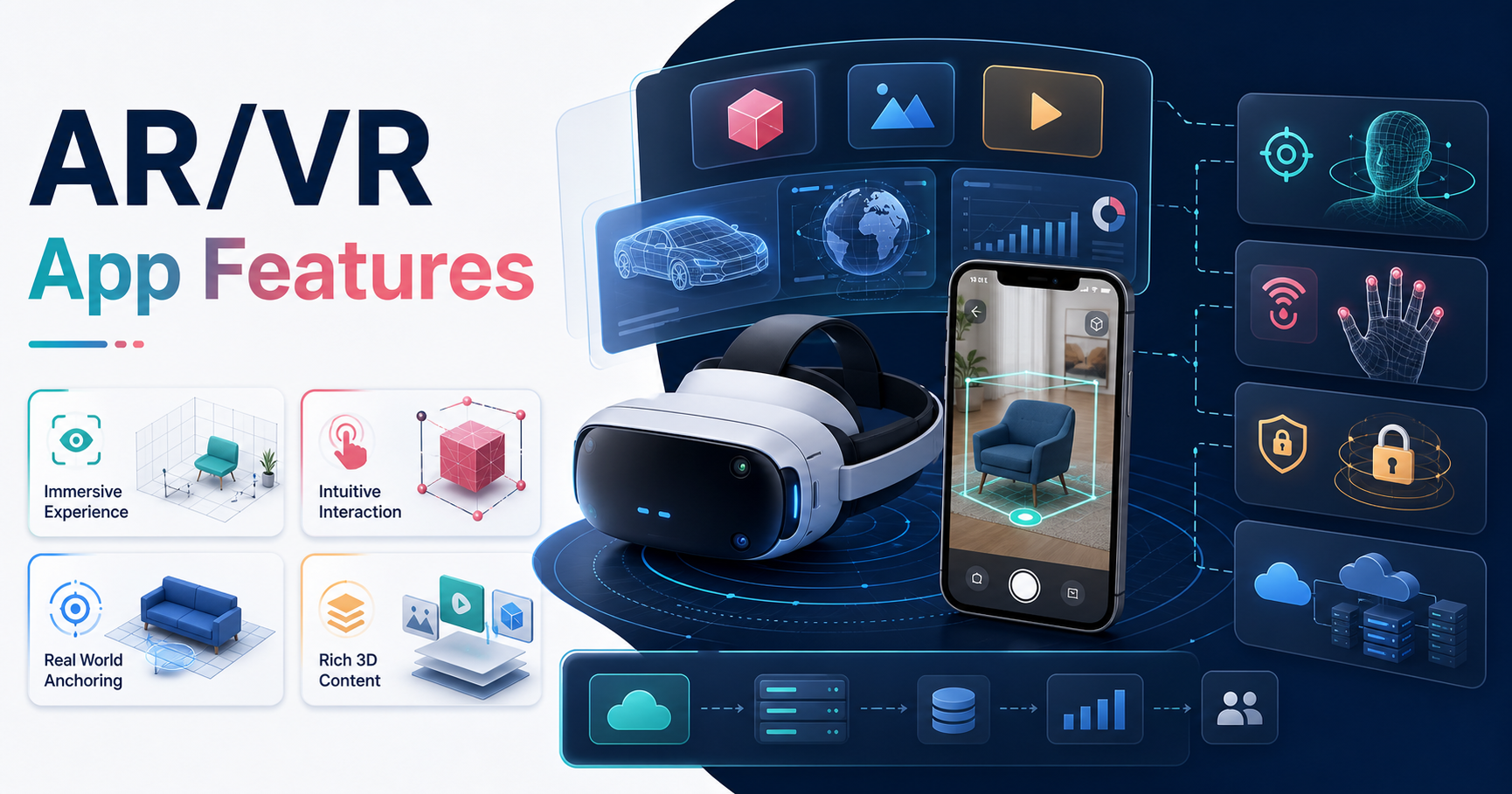
Quick Answer: What Features Make An AR/VR App Successful?
A successful AR/VR app needs accurate spatial tracking, optimized 3D content, intuitive interactions, low-latency performance, comfort-safe UX, privacy-aware sensor handling, useful onboarding, analytics, and a scalable backend for accounts, content, payments, and operations. For commercial products, the app also needs a focused use case: training, sales visualization, gaming, education, remote assistance, healthcare simulation, real estate tours, retail try-ons, or industrial guidance.
Because AR and VR products often combine mobile, cloud, media, and device-specific SDK work, plan them as a serious mobile app development or cross-platform software project. The immersive layer is only one part of the delivery system.
AR/VR App Feature Priority Matrix
The best AR/VR roadmaps do not start with every possible immersive feature. They separate the first usable release from advanced interaction and scale needs. That keeps the MVP narrow enough to validate while leaving room for richer spatial computing later.
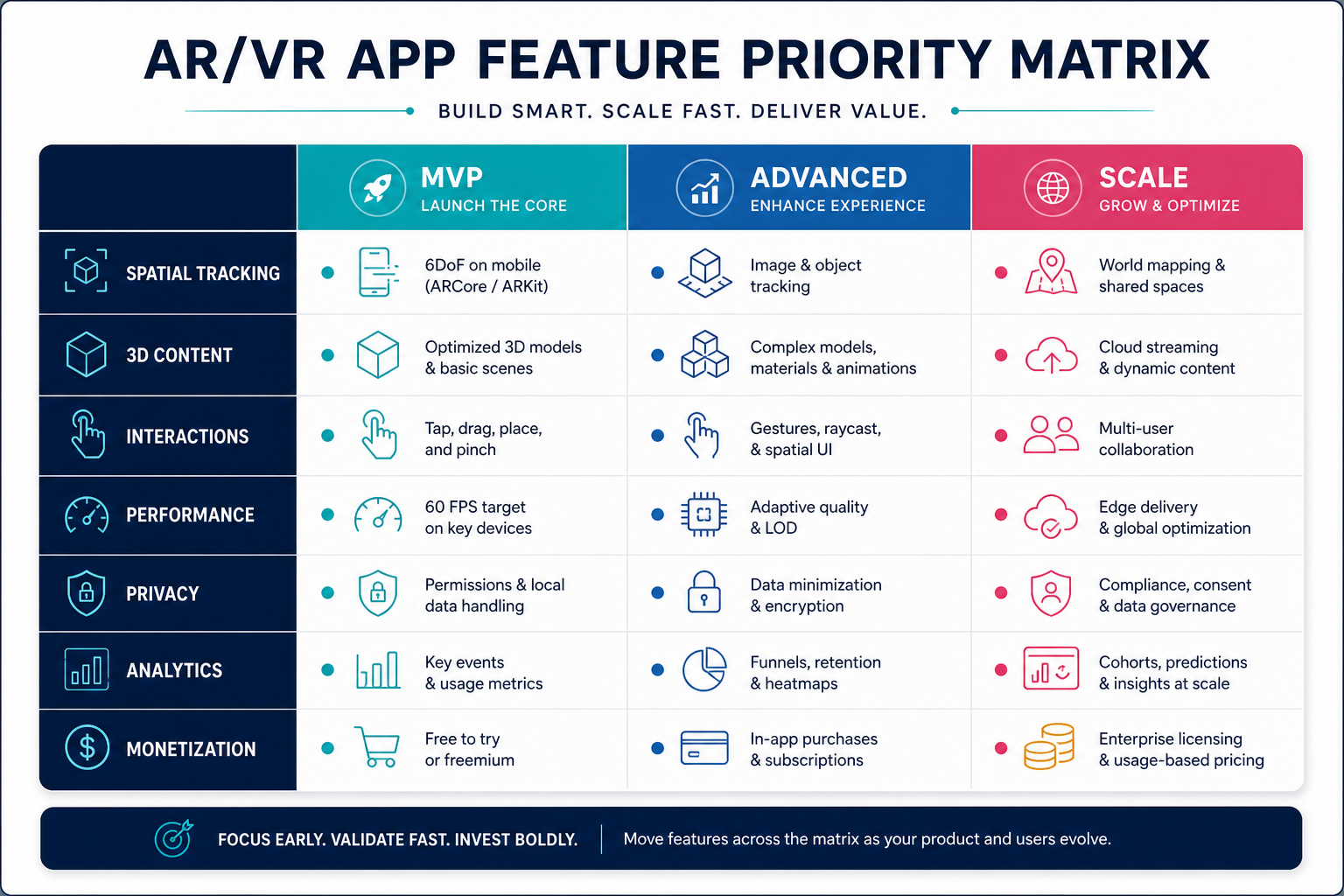
| Stage | Feature focus | Why it matters |
|---|---|---|
| MVP | Core scene, device tracking, stable 3D model loading, basic gestures or controllers, onboarding, and analytics events. | Users can complete one immersive workflow without confusion or motion discomfort. |
| Advanced | Object recognition, spatial anchors, occlusion, shared sessions, adaptive quality, and richer spatial UI. | The app starts to feel native to the user's environment instead of a flat demo in 3D. |
| Scale | Cloud content delivery, admin tools, account roles, licensing, compliance controls, heatmaps, and operational monitoring. | The product can support real customers, teams, updates, and measurable business outcomes. |
1. Define The Use Case Before The Platform
AR/VR technology is broad, so the first decision is not Unity versus Unreal or iOS versus Android. The first decision is the business problem. A training simulator, virtual showroom, remote expert tool, fitness experience, classroom lab, and mixed reality field-assistance app each need different interaction models, content pipelines, hardware support, and privacy controls.
Define the user, environment, session length, device, safety constraints, business metric, and post-session workflow before choosing the stack. If the idea is still open-ended, use the MVP Scope Builder to separate the first release from later spatial features.
2. Accurate Spatial Tracking And Scene Understanding
Spatial tracking is the foundation of an immersive app. In AR, the app needs to understand planes, surfaces, lighting, depth, device motion, and where virtual objects should stay anchored. In VR, it needs stable head tracking, controller or hand input, boundaries, and sometimes room-scale movement.
Apple's visionOS and ARKit ecosystem, Google's ARCore APIs, and Meta Quest mixed reality capabilities all make different tradeoffs around spatial data, camera access, hand tracking, passthrough, and privacy. A production roadmap should test these capabilities on target devices instead of assuming the same feature behaves identically across platforms.
3. Optimized 3D Content Pipeline
AR/VR apps depend on 3D assets, but heavy models can ruin performance quickly. The asset pipeline should cover model creation, polygon budgets, texture compression, materials, animations, collision shapes, level of detail, file formats, versioning, and loading behavior.
For ecommerce, retail, real estate, manufacturing, or training products, the content pipeline often becomes a business process. Someone needs to upload models, review quality, update scenes, and retire outdated assets. That is where immersive apps start to overlap with custom software development, backend workflows, and admin tooling.
4. Intuitive Interactions And Spatial UI
Good AR/VR interaction feels obvious. Users should know what can be tapped, grabbed, placed, resized, rotated, inspected, or reset. Controls should support the device: touch and camera movement on phones, gestures and gaze on spatial computing devices, hand tracking and controllers in VR, and keyboard or mouse when the experience also runs on desktop.
Keep instructions close to the action, avoid cluttering the user's view, and make exits easy. For business users, the interface should also connect the immersive session to the next workflow: save a configuration, send a quote, assign training progress, create a support ticket, or update a customer record.
5. Performance, Comfort, And Accessibility
Performance is not just a technical metric in AR/VR. Low frame rates, latency, sudden movement, unstable anchors, and visual mismatch can make users uncomfortable. The app should be tested for target frame rate, startup time, model load time, thermal behavior, battery drain, memory pressure, and network fallback.
Comfort also includes UX choices: reduce forced camera motion, avoid aggressive acceleration, keep text readable in space, provide seated and standing modes when relevant, and support accessible controls. A polished immersive app should feel calm, predictable, and recoverable even when the underlying technology is complex.
6. Privacy-Safe Camera, Sensor, And AI Features
AR/VR apps can touch sensitive signals: camera frames, room layout, hand movement, location, voice, biometrics, and behavioral analytics. Teams should decide early what data is processed locally, what is sent to the cloud, how long it is stored, and what consent or enterprise governance is required.
If the app uses object recognition, computer vision, recommendations, or an AI assistant, connect those features to an explicit review model. NextPage's AI development services work is relevant when immersive products need vision, automation, retrieval, evaluation, or guardrails beyond the 3D interface.
AR/VR App Architecture
A production AR/VR app is usually a system, not a standalone scene. The architecture may include devices and sensors, a 3D asset pipeline, an app engine, backend APIs, cloud content delivery, analytics, and an operations dashboard.
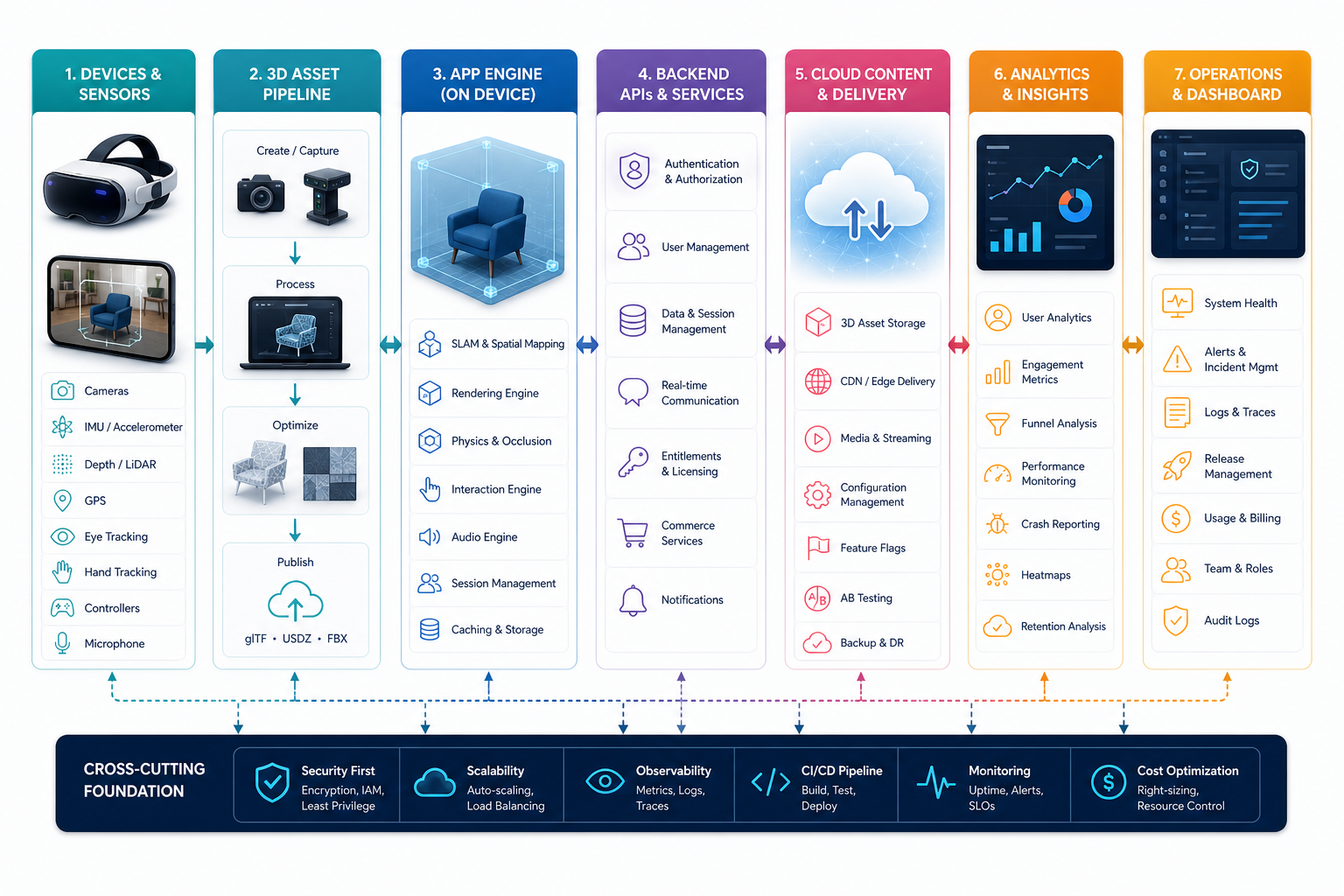
Unity and Unreal remain common choices for immersive 3D, while native stacks such as SwiftUI, RealityKit, ARKit, ARCore, and Meta SDKs may be better when the target platform demands native behavior. The right choice depends on graphics complexity, team skills, device coverage, content pipeline, integrations, and long-term maintenance.
7. Backend, Accounts, And Content Management
Many AR/VR products need authentication, user roles, saved sessions, asset storage, permissions, payments, licensing, analytics, and notifications. Enterprise use cases may also need admin dashboards, audit logs, device management, customer-specific content, and support tooling.
Do not leave the backend until late in the project. If the immersive experience needs product catalogs, training progress, customer records, or subscription states, those workflows should be designed alongside the app. For budget framing, the Custom Software Cost Estimator can help expose backend, integration, and QA assumptions.
8. Analytics, Measurement, And Business Outcomes
AR/VR analytics should measure more than installs. Useful events include onboarding completion, scene load success, model placement, object interaction, session length, drop-off point, conversion action, training completion, error states, and comfort-related exits.
For business workflows, analytics should tie the immersive session to the outcome: fewer training errors, faster sales configuration, higher product confidence, lower support cost, better remote guidance, or more qualified leads. If automation is part of the case, the AI Automation ROI Calculator can help teams estimate whether a workflow is worth deeper investment.
9. Monetization And Commercial Models
AR/VR apps can monetize through paid downloads, subscriptions, premium content, hardware bundles, enterprise licensing, usage-based pricing, sponsored experiences, product visualization, or internal productivity gains. The best model depends on whether the app is a consumer product, a sales enablement tool, a training system, or a workflow application.
Build monetization around value delivered, not novelty. A virtual showroom should help someone choose or configure a product. A training app should reduce risk or speed up learning. A support tool should reduce field visits or improve first-time resolution.
Common AR/VR Development Mistakes To Avoid
- Starting with a demo instead of a workflow: a beautiful scene is not enough if users cannot complete a useful task.
- Underestimating 3D asset work: models, materials, optimization, and updates often take more effort than expected.
- Ignoring device constraints: frame rate, battery, heat, memory, permissions, and platform rules affect what can ship.
- Skipping privacy planning: camera, room, location, and hand-tracking data need clear handling and consent decisions.
- Trying to launch every feature at once: a narrow MVP is usually better than a large, unstable immersive product.
How To Choose The Right AR/VR Development Partner
Look for a partner that can discuss product strategy, UX, device constraints, 3D content, backend architecture, QA, analytics, and post-launch support. A team that only shows an impressive visual prototype may not be ready to own the production system around it.
For many companies, AR/VR delivery fits naturally with broader mobile app development, custom software development, or AI-enabled workflow work. The partner should help decide what belongs in version one, what should be validated manually, and what can wait until users prove demand.
Final Recommendation
Start with one clear immersive job: visualize a product, train a user, guide a technician, teach a concept, support a sales conversation, or create a memorable entertainment loop. Then build the smallest AR/VR feature set that can deliver that job reliably on the target device.
The strongest AR/VR app is not the one with the longest feature list. It is the one where tracking, content, interaction, performance, privacy, backend workflows, and business measurement work together.