
Quick Answer: Mobile App Launch Checklist
A mobile app launch checklist is the release gate that proves an iOS, Android, Flutter, or React Native app is ready for real users. In 2026, that evidence must cover release ownership, build freeze, device and OS coverage, regression testing, app store assets, Apple privacy manifests, required-reason API and SDK evidence, Google Play target API requirements, Android vitals, analytics, crash monitoring, rollback plans, support handoff, and first-week operating routines.
The goal is not to create a longer QA spreadsheet. The goal is to decide whether the app should ship, ship to a limited audience, wait for fixes, or move into a staged rollout. A strong checklist tells the team what passed, what failed, what evidence exists, who accepted each risk, and what will happen if production users expose a problem.
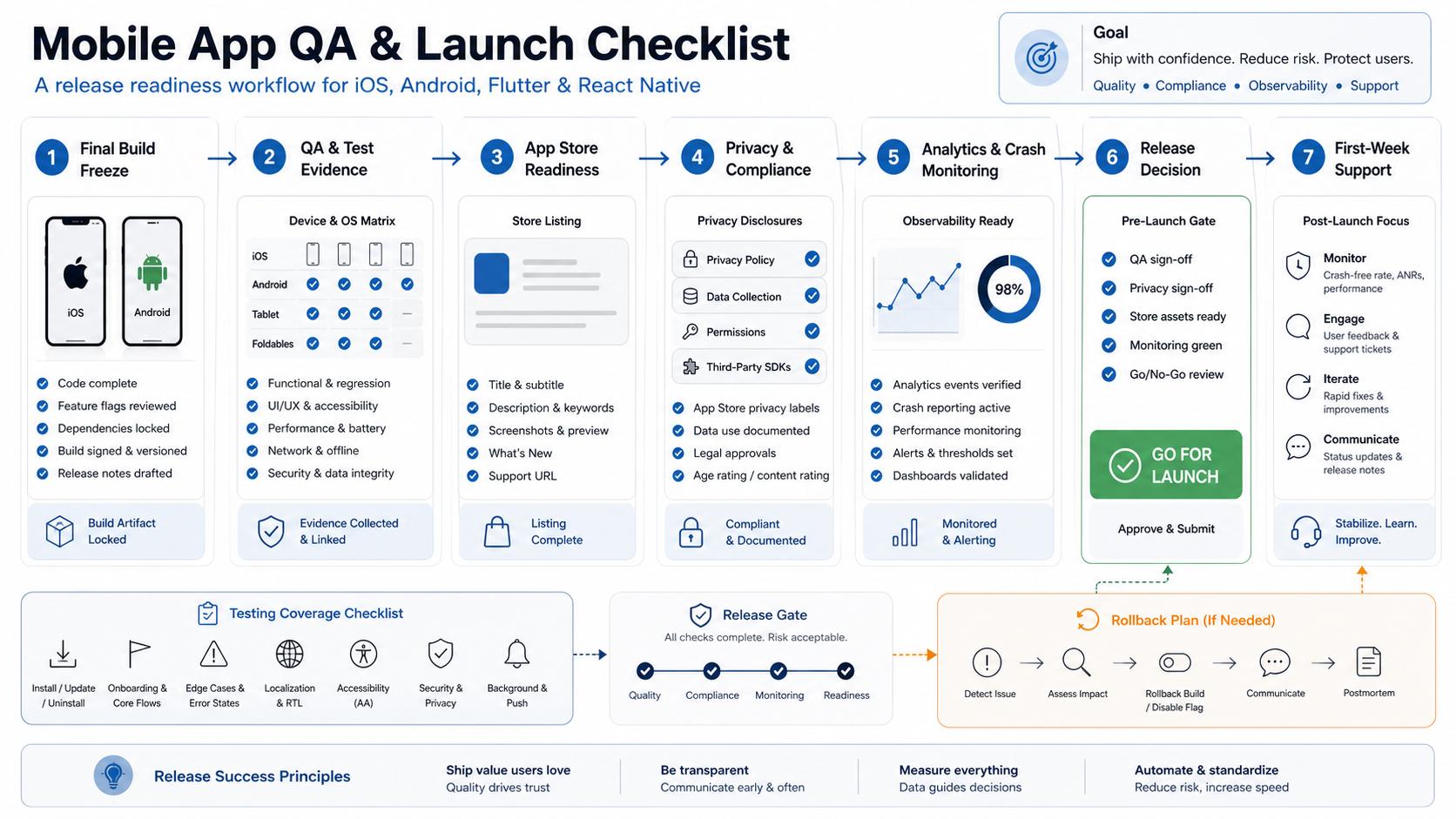
What A Launch Checklist Must Prove
A mobile app testing checklist proves the app works under expected and risky conditions. A launch checklist goes one step further: it proves the organization is ready to release, monitor, support, and recover. If the team only checks test cases, it can still miss app review blockers, broken privacy disclosures, missing dashboards, unclear support ownership, or no rollback path.
Use NextPage's Mobile App Testing Checklist Before Launch as the tactical QA companion, or bring in mobile app testing services when the team needs independent device, OS, regression, and store-readiness evidence. This guide focuses on the release decision around that evidence: what must be true before the app reaches app stores, production users, sales teams, support teams, and executives.
| Launch Area | Question To Answer | Evidence To Keep |
|---|---|---|
| Product readiness | Do the critical user journeys work for target users and roles? | Signed-off acceptance tests, known defects, scope decisions |
| Technical readiness | Is the production build stable, observable, and recoverable? | Release candidate, crash dashboards, alert rules, rollback plan |
| Store readiness | Can Apple or Google review the app without confusion? | Screenshots, descriptions, test account, review notes, privacy policy |
| Operational readiness | Can support, product, and engineering respond during the first week? | Support scripts, triage owners, incident channels, escalation path |
1. Confirm Release Owners And Build Freeze
Every launch needs a named owner for the app build, backend release, app store submission, QA signoff, analytics, customer support, marketing communications, and final go/no-go decision. Without ownership, teams discover release gaps only when someone assumes another person handled them. If QA ownership is split across product, engineering, and vendors, map the release gates against NextPage's broader software QA testing services model so every blocker has one accountable owner.
Set a build-freeze rule before final QA starts. The release candidate should have a build number, commit or tag, backend configuration, feature flags, app store assets, and environment variables that match production intent. If a last-minute change lands after build freeze, restart the relevant smoke, regression, and acceptance checks instead of treating the previous pass as still valid.
This ownership discipline should be part of vendor selection too. The Mobile App Development RFP Checklist explains how to ask partners for launch, QA, and maintenance evidence before the project starts.
2. Lock The Device, OS, And Platform Matrix
The launch matrix should match the audience and the technology choice. A native app, React Native app, Flutter app, PWA-adjacent mobile experience, or IoT-connected app each creates different release risks. Decide which devices, operating systems, screen sizes, languages, countries, app store territories, and network conditions are officially supported for launch. For Android releases, confirm the target API level early: Google Play says that starting August 31, 2026, new apps and app updates must target Android 16/API level 36 or higher for standard phone and tablet submissions, with separate lower targets for some Wear OS, Automotive, TV, and XR categories.
The Native Vs Cross-Platform Mobile App Development guide is useful when the team is still deciding how platform choice affects performance, OS APIs, release speed, and QA coverage. Android-heavy releases should also align build, signing, Play Console, policy, and device testing ownership with an Android app development company scope before final QA starts. For launch, convert those decisions into a practical device and OS matrix.
- Minimum OS: verify the oldest supported iOS and Android versions with the production build.
- Device classes: cover small screens, large screens, older low-memory models, and high-use audience devices.
- Capabilities: test camera, location, biometrics, Bluetooth, NFC, push, background tasks, and payments on real hardware where relevant.
- Markets: confirm currency, language, date/time, app store territory, privacy copy, and local support expectations.
3. Complete Regression And Acceptance Coverage
Before launch, regression coverage should protect flows that would block adoption, revenue, trust, or operations. Prioritize onboarding, login, account recovery, permissions, profile updates, search, checkout, booking, subscriptions, uploads, admin workflows, push notification deep links, and support contact paths. If the app depends on payments, maps, push, chat, video, subscriptions, or in-app purchases, use the Mobile App Integrations Checklist to confirm vendor readiness, API fallbacks, and support ownership before signoff. Acceptance coverage should prove that the product owner and business stakeholders agree the release matches the approved scope.
For detailed flow-level coverage, use the Functional Testing Checklist for Web and Mobile App Launches and the UAT vs Functional Testing vs Regression Testing matrix to separate smoke, regression, and stakeholder acceptance decisions. Then add mobile-specific regression checks: app restart, background/foreground transition, denied permissions, poor network, duplicate taps, interrupted upload, expired session, stale cache, and app update from the previous version.
| Coverage Layer | Launch Checklist Item | Decision Signal |
|---|---|---|
| Smoke | Install, open, login, core navigation, primary workflow, logout | Build can enter deeper release testing |
| Regression | Critical workflows, integrations, roles, notifications, payments, admin paths | Known defects are launch-acceptable or fixed |
| Acceptance | Business scenarios, content, pricing, policies, operational handoffs | Product owner accepts the release candidate |
| Update path | Upgrade from prior app version with stored data and active sessions | Existing users are not broken by the release |
4. Check Performance, Accessibility, Security, And Privacy
A mobile app can pass functional QA and still be unfit for launch. Slow cold start, battery drain, memory pressure, inaccessible controls, weak session handling, excessive logging, or unclear consent flows can cause user churn, app review problems, and support load.
Measure cold start, warm start, key screen load times, API latency, crash-free sessions, memory, battery, and network behavior on representative devices. The Mobile App Performance Optimization Checklist can help convert those measurements into release gates. Review text scaling, screen-reader labels, contrast, focus order, touch target size, and reduced-motion behavior. Confirm secure token storage, session expiry, API authorization, dependency versions, SDK permissions, privacy disclosures, and whether analytics or crash payloads contain sensitive data.
Privacy should be checked as a release artifact, not as an afterthought. The app's permission prompts, privacy policy, analytics consent, account deletion flow, app store privacy labels, third-party SDK declarations, and required-reason API usage should tell the same story. Apple requires teams to disclose collected data in App Store Connect, and privacy manifests help identify the privacy practices of app code and dependencies.
5. Prepare App Store, Privacy, And Review Evidence
App store readiness is part of launch QA. Prepare screenshots, descriptions, keywords, support URL, marketing URL if used, privacy policy, age rating, subscription metadata, release notes, review notes, and test account credentials. Reviewers should be able to reach the paid, permissioned, or role-based parts of the app without guessing. Treat Apple privacy labels, privacy manifests, required-reason API declarations, third-party SDK signatures, Google Play target API rules, Data safety copy, Android vitals, and staged rollout settings as evidence rows in the same release packet.
| 2026 Platform Gate | Launch Evidence To Keep | Decision It Supports |
|---|---|---|
| Google Play target API | Android 16/API 36 target plan for new apps and updates from August 31, 2026, or documented category exception | Submit, upgrade, or hold Android release |
| Apple privacy and SDK evidence | Privacy labels, privacy manifest files, required-reason API declarations, and SDK signatures where required | Submit without preventable privacy rejection risk |
| Review access | Test accounts, demo data, entitlements, subscription notes, and reviewer instructions | Help reviewers reach protected workflows |
| Technical quality | Crash, ANR, battery, wake-lock, and first-week alert thresholds with owners | Stage rollout, pause rollout, or continue |
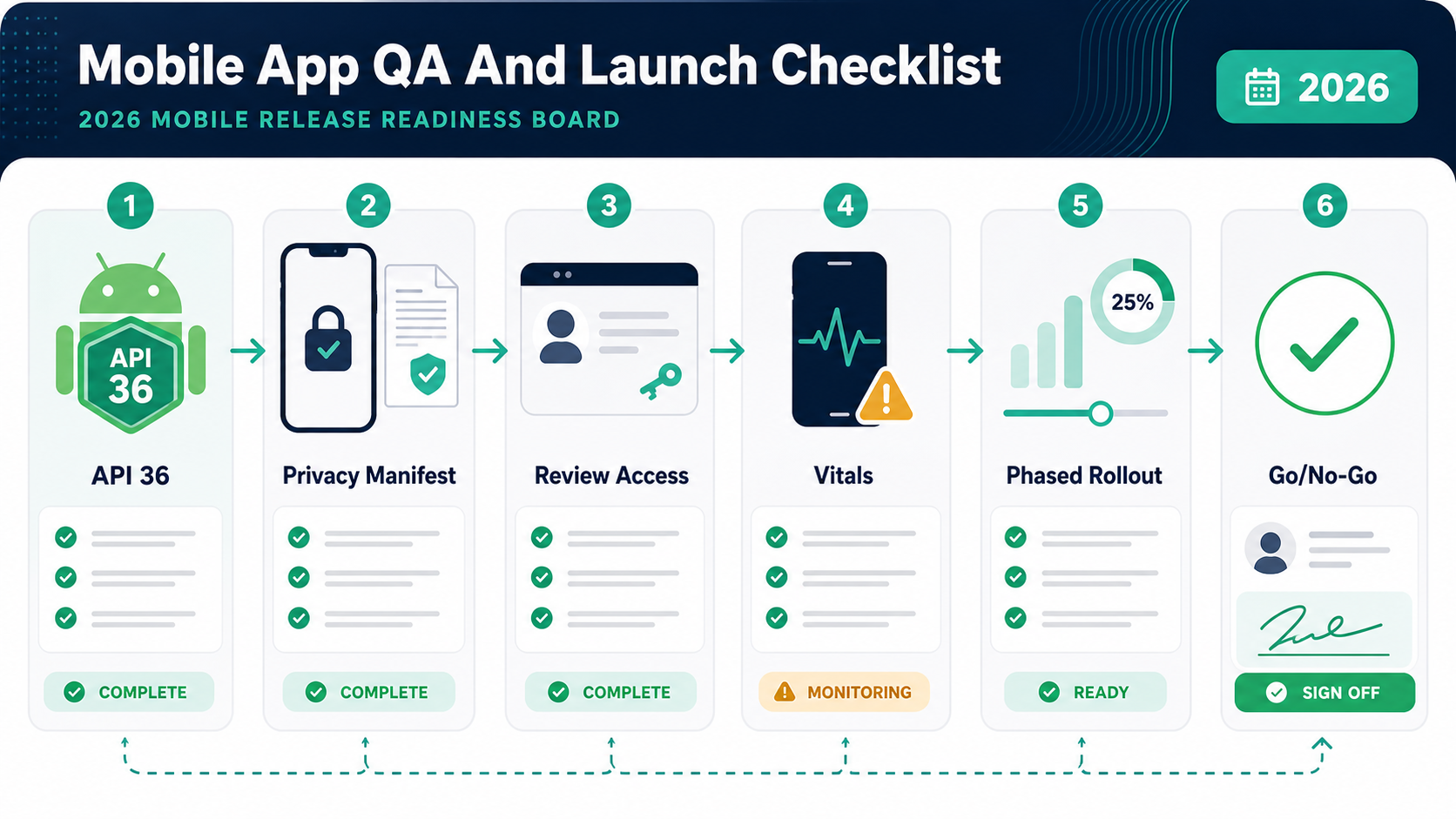
For app listing quality, NextPage's App Store Optimization (ASO) guide covers why screenshots, descriptions, and positioning affect discoverability and conversion. For launch readiness, make sure those assets also match the app's real production behavior.
- Confirm app name, subtitle, package/bundle ID, version, build number, release notes, and screenshots.
- Provide test accounts, demo data, subscription notes, backend access requirements, and review instructions.
- Check privacy policy, data collection disclosures, permission explanations, third-party SDK declarations, and required-reason API evidence.
- Confirm Android target API level, Play Console data safety answers, production signing, testing track, and staged rollout settings.
- Prepare phased release choices, country availability, pricing, support routing, and rollback or hold criteria.
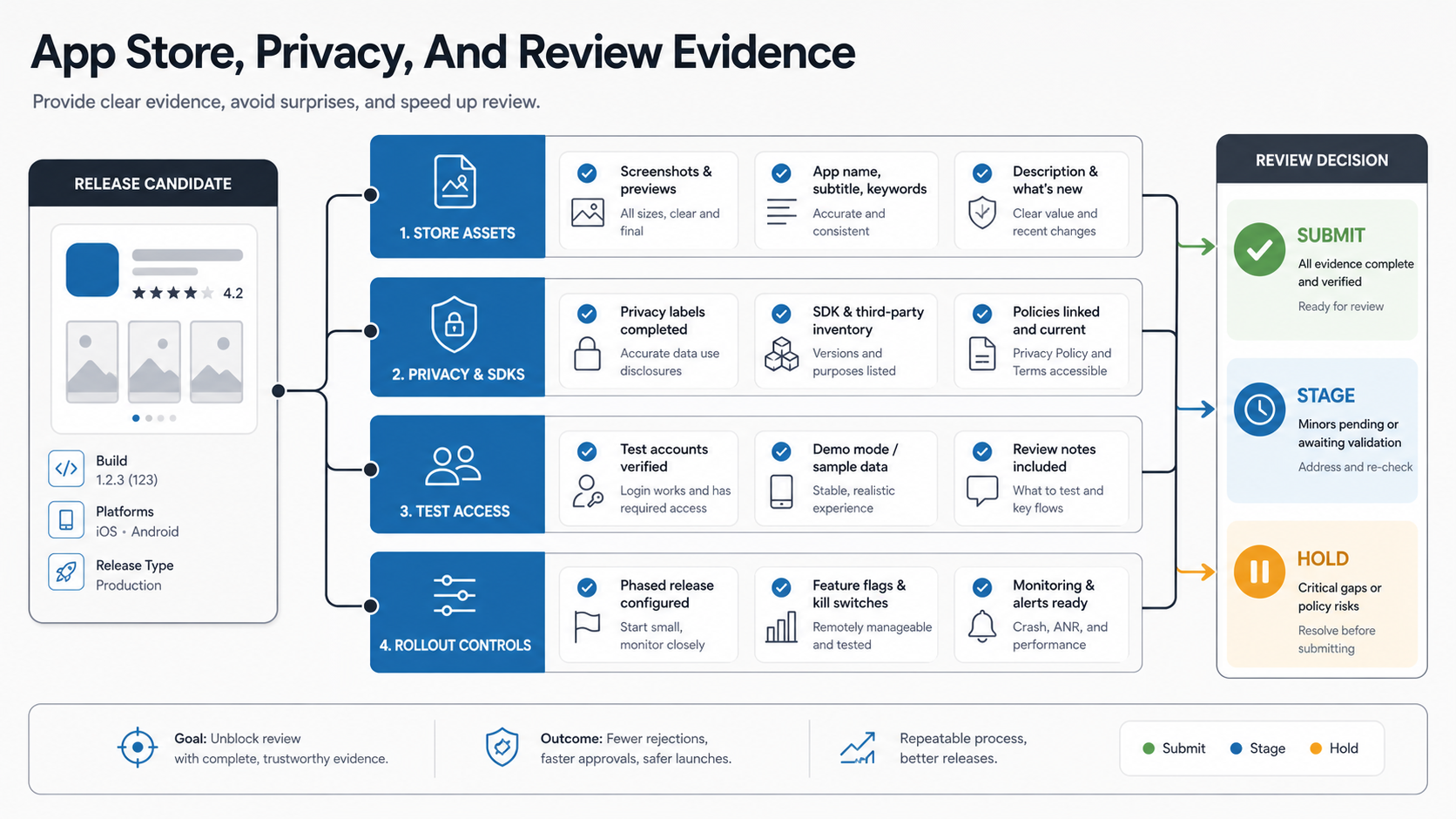
6. Verify Analytics, Crash Monitoring, And Alerting
Analytics, crash reporting, and alerting must work before launch because they are the first-week operating system. Validate that key events fire once, use consistent names, carry allowed properties, respect consent, and appear in dashboards. Confirm that crash reports are symbolicated and include app version, build number, OS version, device model, release channel, and relevant breadcrumbs. For Android, watch Android vitals closely: Google lists user-perceived crash rate, user-perceived ANR rate, and excessive partial wake locks as core vitals for all apps, and its technical-quality guidance has historically used 1.09% user-perceived crash rate and 0.47% user-perceived ANR rate as bad-behavior thresholds. Launch monitoring should include these signals instead of only server uptime.
The launch checklist should also define alert thresholds. For example: a spike in crashes on one OS version, failed payments, login errors, API 500s, push notification failures, unusually low onboarding completion, or a sudden support-ticket pattern. Assign an owner and response time for each threshold.
7. Plan Rollback, Hotfix, And Release Controls
Mobile rollback is harder than web rollback because users install app binaries and app store review can slow emergency fixes. That makes release controls essential. Use feature flags, remote config, backend kill switches, staged rollout, phased release, and clear hotfix criteria wherever the architecture allows it. For automated coverage that supports those controls, pair manual release judgment with a practical mobile test automation strategy in CI.
| Control | Use It For | Launch Evidence |
|---|---|---|
| Feature flag | Disable risky features without resubmitting the app | Flag owner, default state, test proof |
| Remote config | Adjust copy, limits, endpoints, or feature exposure | Config audit, rollback values, approval flow |
| Staged rollout | Expose a small audience before full release | Rollout percentage, monitoring thresholds, stop criteria |
| Hotfix path | Repair defects that need a new binary | Branch plan, reviewer availability, expedited-review notes if relevant |
Document what cannot be rolled back quickly. Those risks should influence the go/no-go decision more heavily than defects hidden behind remotely controlled features.
8. Hand Off First-Week Monitoring And Support
A release is not complete when the app appears in the store. The first week should have a monitoring cadence, support script, escalation channel, defect triage owner, app review owner, and update plan. Support teams need known issues, troubleshooting steps, refund or cancellation rules if relevant, and clear language for users.
This launch checklist should flow into a maintenance plan. NextPage's Post-Launch Mobile App Maintenance Checklist covers crash monitoring, OS compatibility, dependency updates, app store feedback, support trends, performance, and product iteration after the launch window closes.
9. Use A Go/No-Go Evidence Matrix
The final release meeting should not rely on confidence statements. Use an evidence matrix that ties every launch risk to a result, owner, decision, and next action. This makes the difference between "QA passed" and "we know what is safe to ship, what is being watched, and what would make us stop rollout."
Score Release Gates Before Go/No-Go
Give each gate a green, yellow, or red status before the launch meeting starts. Green means the evidence is complete and owned. Yellow means the risk is accepted with a mitigation, monitoring owner, and date to close. Red means the release should pause, narrow to a staged rollout, or keep the feature behind a flag until the evidence changes.
| Gate | Score Before Launch | Owner | Decision Rule |
|---|---|---|---|
| Critical journeys | Green only when top workflows pass on supported roles and platforms | Product and QA | Red blocks launch; yellow requires scoped rollout |
| Store and privacy evidence | Green when app review notes, test access, disclosures, and policy copy match the build | Product and compliance | Red blocks submission; yellow needs reviewer-ready notes |
| Observability | Green when analytics, crash reporting, alert thresholds, and incident owners are live | Engineering and support | Red blocks launch; yellow requires manual monitoring |
| Recovery path | Green when rollback, hotfix, staged rollout, and support scripts are rehearsed | Engineering lead | Red blocks full rollout; yellow requires feature flags or phased release |
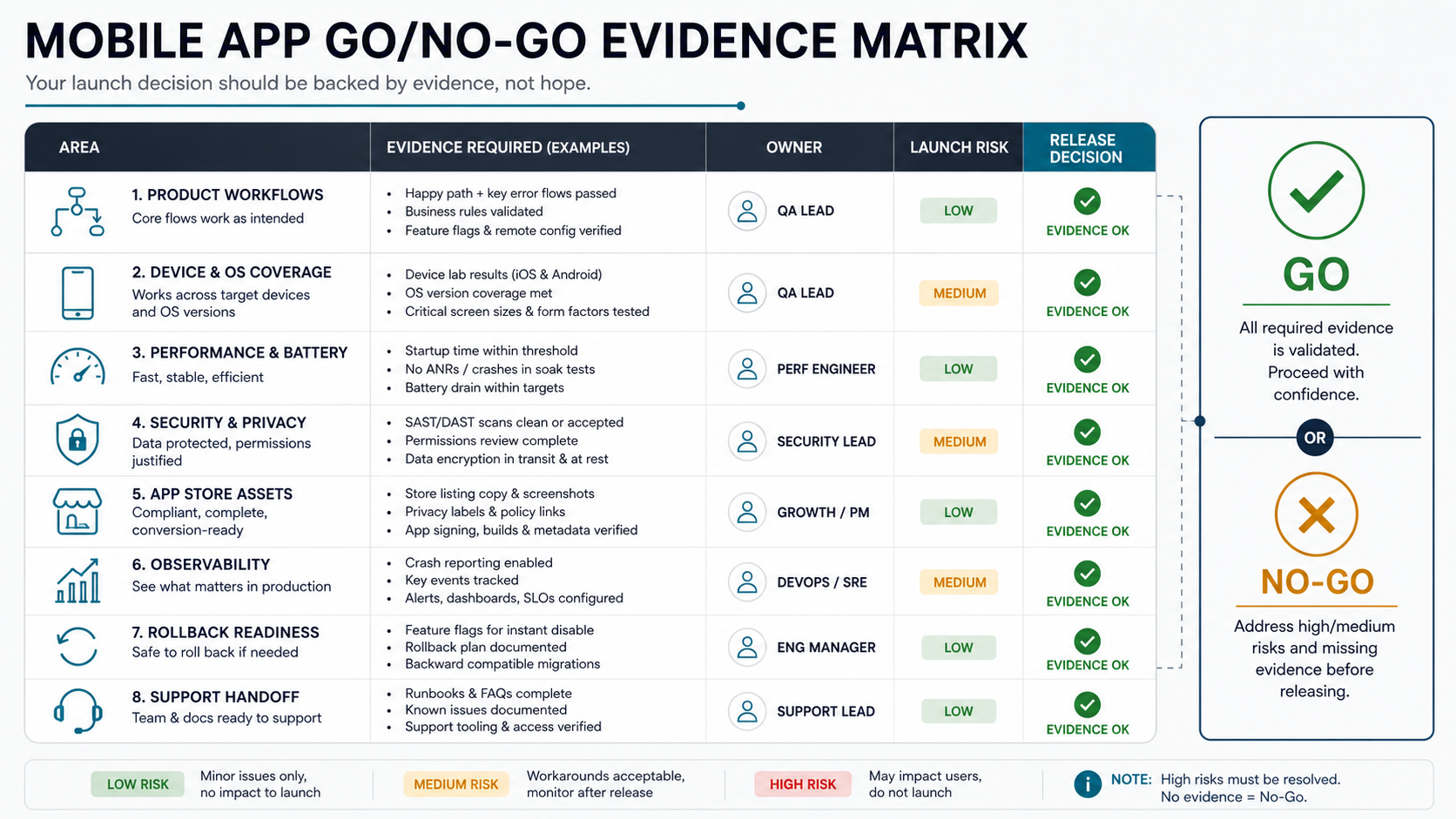
| Evidence Row | Green Means | Yellow Means | Red Means |
|---|---|---|---|
| Critical workflows | Passed on supported roles and platforms | Known workaround or limited exposure | User, revenue, data, or trust blocker |
| Device/OS coverage | Target matrix tested with no major gaps | Gaps documented and accepted | Core audience device or OS untested |
| Privacy and store review | Disclosures, policy, assets, and test access ready | Minor copy or asset issue remains | Review blocker or inconsistent data claims |
| Observability | Analytics, crash, alerts, and owners live | Manual monitoring available temporarily | Team cannot detect or diagnose production issues |
| Rollback/support | Stop criteria, support scripts, and escalation path ready | Partial fallback for lower-risk features | No practical response path if launch fails |
When NextPage Can Help
NextPage helps teams plan, build, test, launch, and improve mobile apps with the release discipline needed for real customers. Our mobile app development and functional testing services cover iOS, Android, cross-platform apps, backend systems, QA, analytics, launch support, and post-launch iteration. For a public-safe example of mobile product depth, the InkCraft portfolio case study shows how onboarding, uploads, saved galleries, and admin operations create QA and release evidence beyond the app UI.
If your release date is approaching, start with a launch readiness review: device matrix, regression scope, app store evidence, privacy and SDK checks, analytics and crash dashboards, rollout controls, support handoff, and first-week monitoring. For an early budget frame, use the Custom Software Cost Estimator to size build, integration, QA, launch, and maintenance effort before the release window is already at risk.