
Quick Answer: When Should You Choose Progressive Web App Development?
Choose progressive web app development when the product needs broad web reach, fast iteration, app-like repeat access, installability, and enough offline tolerance for the core workflow without committing to separate native iOS and Android apps too early. A PWA is strongest when a single web-first product can serve mobile, tablet, and desktop users while the team is still proving the business model.
A PWA is not a cheaper native app clone. It is a web application enhanced with a manifest, service worker, secure delivery, performance work, caching, install behavior, offline fallbacks, and browser-supported device APIs. That makes it useful for portals, marketplaces, booking flows, dashboards, field data capture, restaurant ordering, training tools, and customer self-service products where access from a link still matters.
The practical question is not whether PWAs are better than native apps. The question is which build path gets a useful first release into customers' hands with the least platform risk. If your team is still defining that first release, start with the MVP Scope Builder, then compare the delivery range with the custom software cost estimator.
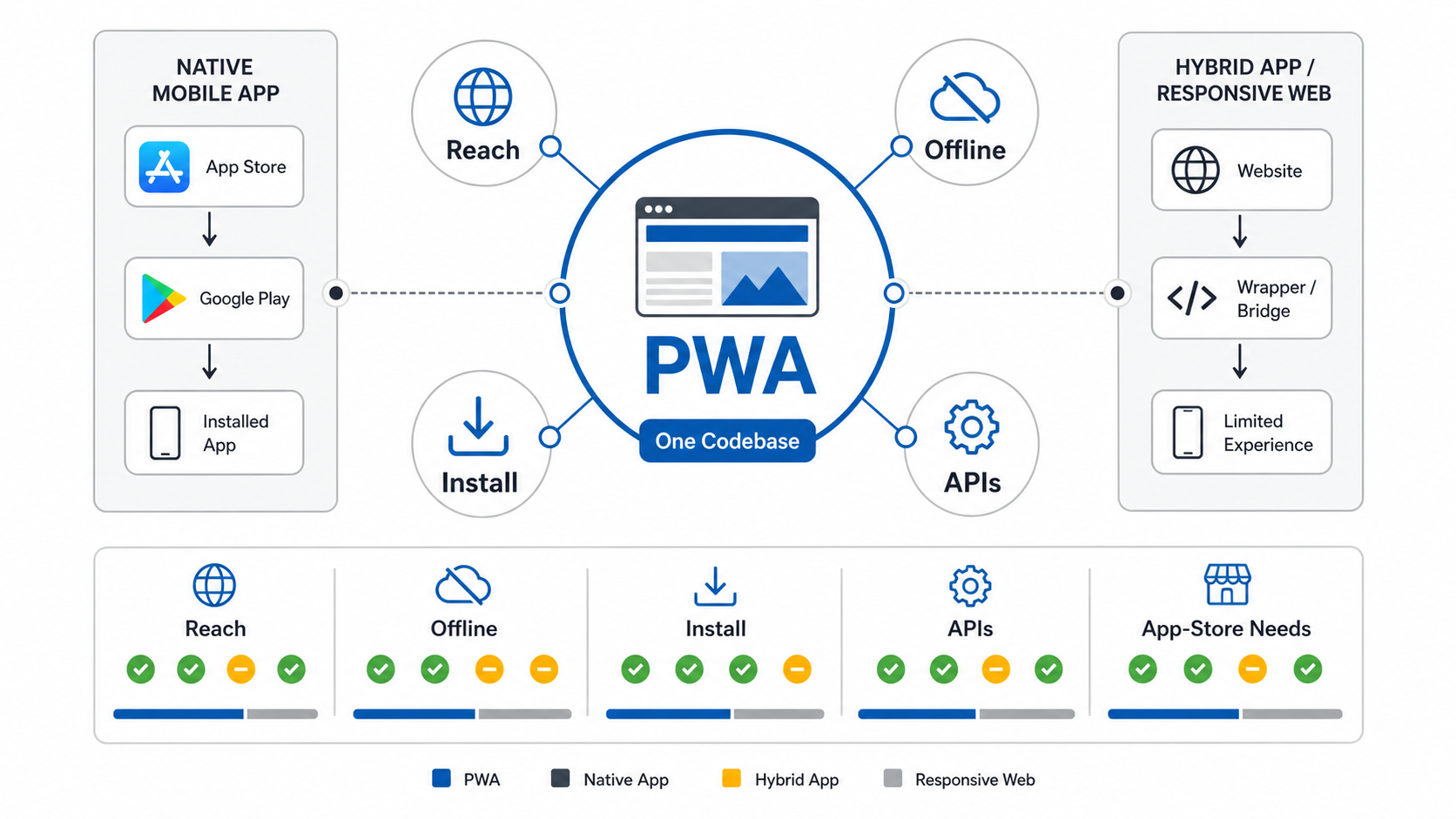
What a Progressive Web App Actually Is
A progressive web app is a web app that progressively adds native-like capabilities where the browser and operating system support them. Users on modern browsers may get install prompts, standalone launch behavior, cached screens, offline fallbacks, push-style re-engagement, and smoother return sessions. Users on more limited browsers should still receive a usable web experience.
Most production PWAs combine responsive UX, HTTPS, a web app manifest, service-worker logic, app-shell loading, cache rules, icons, permissions handling, analytics, accessibility, and cross-browser QA. The manifest tells the browser how the app should look when installed. The service worker can intercept network requests, cache selected assets, queue certain actions, and show useful fallbacks when the network is weak.
For buyers, the important point is simple: a PWA is still part of the web. That is a strength when discoverability, link sharing, centralized deployment, and one maintainable codebase matter. It becomes a constraint when the product depends on capabilities the browser cannot reliably provide.
Why PWAs Are Still Relevant For Business Apps
PWAs remain relevant because many companies need a dependable app-like workflow before they need full native complexity. A customer portal, field checklist, internal approval tool, appointment flow, ordering interface, training portal, or lightweight marketplace often benefits more from fast web access than from app-store distribution on day one.
A PWA can reduce delivery risk in four ways. First, it avoids splitting the early roadmap across separate iOS, Android, and web builds. Second, users can start from a URL before they decide to install. Third, product teams can deploy improvements without app-review cycles. Fourth, the business can learn which workflows deserve deeper mobile investment before funding native features.
That does not mean the PWA is always the final architecture. It is often the best first release. If usage proves the workflow and users later demand deeper device integration, a native or hybrid path can follow with better evidence. NextPage's MVP development process uses that evidence-first approach when platform choice is still uncertain.
Where PWA Development Beats Native Mobile Apps
Progressive web app development often beats native mobile app development when reach, iteration speed, and operating simplicity matter more than platform-specific polish. The trade-off is strongest when the first release needs to support both mobile and desktop users, when acquisition starts from search or campaigns, or when the business is still validating which features people actually use.
| Decision Factor | PWA Advantage | Native Advantage |
|---|---|---|
| Distribution | Users can start from a link and may install from the browser. | App-store presence, ratings, and store search can matter for consumer trust. |
| Release Speed | Web deployments can update the app without waiting for app review. | Native releases are better when platform-specific features need controlled rollout. |
| Initial Budget | One web-first build can cover mobile and desktop use cases. | Separate native apps cost more but can deliver deeper platform behavior. |
| Offline Tolerance | Service workers can cache the app shell, selected screens, and queued actions. | Native apps can support heavier offline storage, background work, and device-managed sync. |
| Device APIs | Enough for many camera, location, notification, and file workflows, depending on browser support. | Better for Bluetooth, sensors, AR, media processing, background location, and OS integrations. |
If the business case depends on broad access, lower first-release cost, fast iteration, and campaign or search discoverability, a PWA is worth serious consideration before native apps. If the product depends on native capability from the first session, use the native vs cross-platform mobile app development comparison to evaluate native, cross-platform, and hybrid options early.
PWA vs Native vs Hybrid vs Responsive Web: Which Should You Choose?
Use a PWA when users need an app-like web experience and the business wants one maintainable codebase. Use native apps when the experience depends on deep platform integration, high-performance graphics, complex background work, advanced media, strict store monetization, or app-store distribution. Use hybrid when store packaging matters but much of the product can share code. Use responsive web when installability, offline behavior, and app-like re-engagement are not priorities.
This choice should happen during discovery, not after design is complete. Platform decisions affect authentication, notification strategy, offline data, file handling, analytics, release operations, QA scope, security, and maintenance. A good web app development plan makes those constraints visible before build commitments harden.
PWA Capability Fit Checklist
Use a capability checklist before deciding that a PWA is enough. Score each area as green, amber, or red. Green means browser support is enough for the first release. Amber means the team can mitigate a limitation. Red means native or hybrid should be evaluated before the roadmap is funded.
| Capability | Good PWA Fit | Reconsider If |
|---|---|---|
| Installability | Users benefit from home-screen access but can still start from the browser. | App-store discovery, subscriptions, or managed enterprise distribution are core to the model. |
| Offline Use | The app needs cached screens, drafts, queued actions, or resilient read access. | The product must run fully offline for long sessions with complex data sync. |
| Device Access | Camera, location, files, notifications, and basic permissions are enough. | Bluetooth, NFC, AR, sensors, background location, or deep OS hooks are central. |
| Performance | The workflow is forms, content, commerce, dashboards, portals, or moderate media. | Real-time graphics, advanced video processing, or game-like performance define value. |
| Release Model | Fast web deployments and centralized updates matter more than store packaging. | Store review, native release controls, or platform-specific trust signals are required. |
If several rows are amber, keep the first release narrow and test assumptions quickly. If multiple rows are red, a PWA may still support a marketing site or companion portal, but the primary app probably needs mobile app development from the beginning.
Offline, Sync, And Cache Readiness
Offline support is where many PWA projects become more complex than expected. A service worker can cache assets and selected responses, but the product still needs business rules for stale data, queued writes, retries, conflicts, user warnings, and recovery after the network returns. Without those rules, offline mode becomes a source of trust problems instead of resilience.
Plan five layers before promising offline behavior. The app shell should load reliably. Critical read data should be cacheable without exposing sensitive information. User actions should show whether they are saved, queued, failed, or synced. Cache invalidation should prevent old prices, inventory, bookings, or account data from misleading users. QA should test real device and browser combinations, including update scenarios where a new service worker replaces old cache logic.
| Layer | Planning Question | Output |
|---|---|---|
| App Shell | Which navigation and core screens must load when the network drops? | Shell cache list, fallback route, loading state, retry action. |
| Critical Data | Which data can be cached safely and how fresh must it be? | Cache policy, stale-data warning, privacy rule. |
| Sync Queue | Which actions can be saved offline and replayed later? | Queue model, retry logic, conflict handling, user status. |
| Cache Rules | Which assets are cache-first, network-first, or stale-while-revalidate? | Service-worker strategy and invalidation plan. |
| QA Evidence | How will the team prove offline behavior works across target browsers? | Device matrix, install tests, offline tests, update tests. |
This is where PWA planning overlaps with QA testing services. Installation, offline states, cache updates, network recovery, permissions, and browser differences should be tested before launch, not treated as minor polish.
Where A PWA Is The Wrong First Choice
A PWA is the wrong first choice when the product's core value depends on native capabilities the browser cannot support reliably enough for the target users. Common examples include performance-heavy games, AR-heavy experiences, Bluetooth or NFC workflows, advanced camera pipelines, complex background location, deep OS integrations, device-management requirements, and workflows that must operate for long periods without network access.
It may also be the wrong choice when app-store discovery, in-app purchases, device-level trust signals, enterprise mobile-device management, or native SDK integrations are central to the go-to-market plan. In those cases, native or cross-platform mobile work may cost more upfront but reduce product risk.
The risk is not that PWAs are weak. The risk is choosing a PWA for a product whose critical behavior is not web-shaped. Document the red-line capabilities before procurement. The mobile app development RFP checklist is useful when those requirements need to become vendor-ready scope.
Progressive Web App Development Requirements
A production PWA needs more than a manifest file. At minimum, plan the app shell, routing, performance budget, cache strategy, offline fallback, sync behavior, authentication, permissions, install experience, browser support matrix, accessibility, analytics, observability, and release QA.
Security also matters. PWAs are web apps, so the team still needs secure sessions, CSRF and XSS controls, permission-aware APIs, privacy-conscious caching, careful handling of personal data, and safe invalidation when users sign out or roles change. Sensitive account data should usually be network-first unless there is a clear encrypted local-storage model and a business reason for offline access.
Ownership should be explicit. Someone must own service-worker updates, dependency upgrades, browser changes, analytics review, performance budgets, and incident response after launch. If that work will continue after the first release, include it in the maintenance model instead of assuming the PWA is finished at deployment.
PWA Cost Drivers And Timeline Factors
PWA cost is driven less by the label and more by workflow complexity. A simple installable content app is very different from an offline-capable field workflow with user roles, file uploads, notifications, admin controls, and sync conflict handling.
The largest cost drivers are authentication, roles, admin workflows, payments or booking flows, integrations, offline data, sync conflict rules, analytics, performance requirements, accessibility, browser/device QA, and post-launch monitoring. If the PWA may later become native, the architecture should also preserve API and design decisions that can support future mobile apps.
Before requesting a fixed quote, map the workflows and compare scope scenarios with the web app development cost guide. The estimate should distinguish between a responsive web app, an installable PWA, a PWA with offline-first workflows, and native or hybrid builds.
PWA Development Roadmap For A First Release
A practical PWA roadmap starts with discovery and ends with measurable usage, not just deployment. First decide whether the product really needs installability, offline tolerance, push notifications, fast repeat access, or app-store alternatives. If the answer is no, responsive web may be enough.
Next, define core user journeys, device targets, browser support, and data sensitivity. Then design the app shell, navigation, permission prompts, offline fallback, stale-data states, re-entry paths, and analytics. During engineering, implement the manifest, service worker, caching strategy, API integration, authentication, accessibility, performance budget, and monitoring. Before launch, test installation, updates, offline behavior, cache invalidation, notification permission flows, and cross-browser behavior.
For custom workflows, a custom software development team should also plan admin tools, support handoffs, release operations, error reporting, and operational ownership. After launch, use a maintenance cadence similar to the one in the mobile app maintenance checklist: monitor crashes, support issues, performance, browser changes, and user behavior instead of waiting for complaints.
How To Decide Before You Build
Use these five questions before choosing PWA development:
- Can users start from a link? If yes, web-first distribution may reduce friction.
- Will repeat users benefit from installability? If yes, a PWA can improve return usage.
- Is offline tolerance useful but bounded? If yes, service-worker caching and queued actions may be enough.
- Are native device features central to value? If yes, validate native or hybrid early.
- Is the first release still uncertain? If yes, a PWA can help prove the workflow before native investment.
The answer may be phased. Start with a PWA for reach and learning, then add native apps after the product proves which mobile behaviors matter most. The decision should be written into the roadmap so the team knows which platform constraints are accepted now and which ones trigger a future native build.
How NextPage Plans PWA Development
NextPage treats PWA development as an architecture decision, not a trend label. We map users, workflows, target devices, offline needs, integrations, data sensitivity, acquisition path, support model, and long-term mobile roadmap before recommending responsive web, PWA, hybrid, or native.
If the PWA path fits, we define the service-worker strategy, install experience, performance budget, browser matrix, API contracts, analytics, QA plan, and maintenance ownership before development starts. If native is the better choice, we say that early so the team does not force a web architecture into a mobile-first problem.
If you are deciding between PWA, native, hybrid, and responsive web, start by estimating the first release with the custom software cost estimator. It will help separate the features you need now from the platform investments that can wait.