
Quick Answer: SaaS Application Development Cost
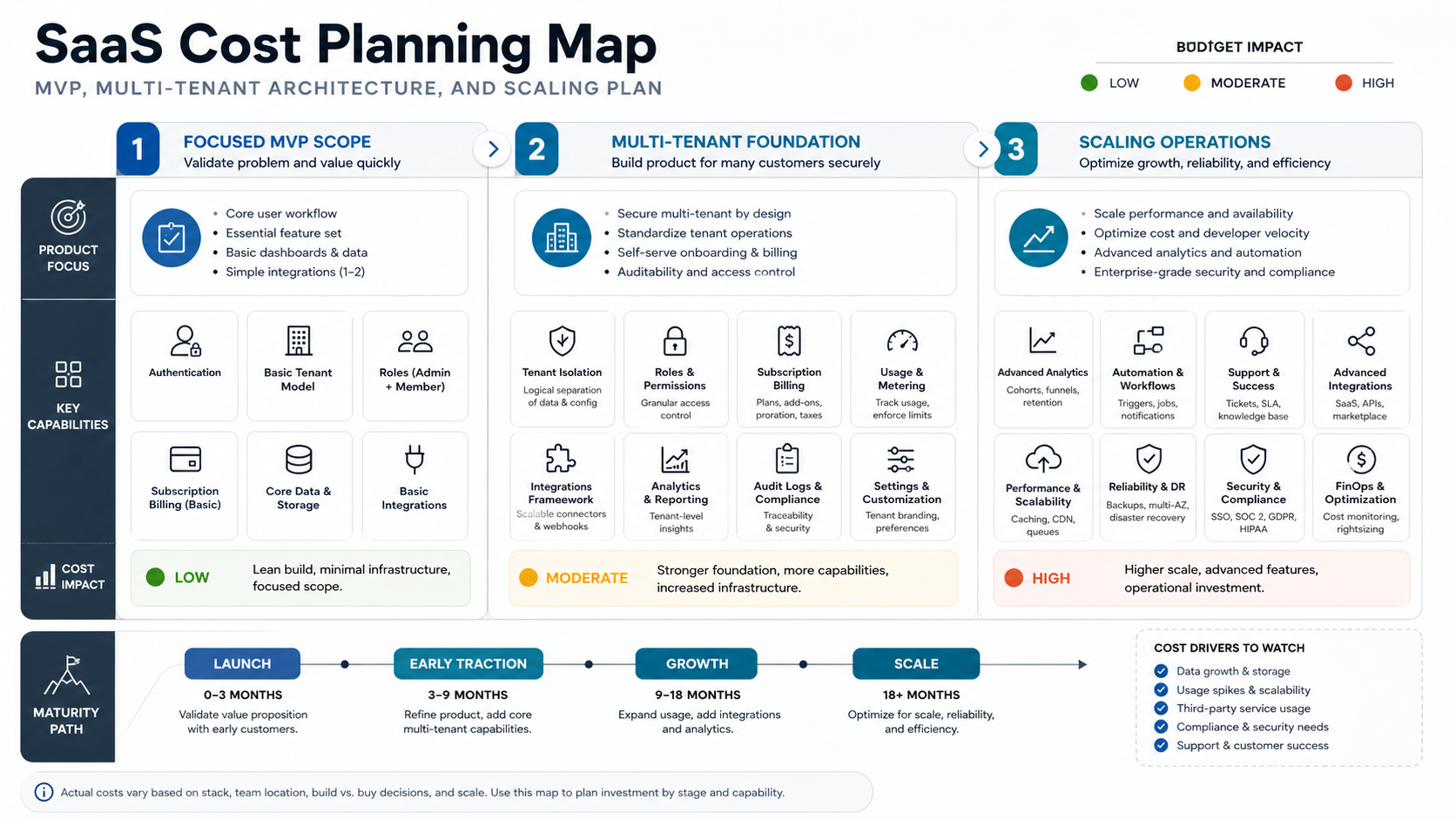
SaaS application development cost is driven by the product you need to launch, the tenant model you choose, the billing rules you support, the number of user roles, the integrations required, and the amount of operational infrastructure needed after customers start using the platform. A small SaaS MVP with one workflow, simple plans, and light admin tooling is a different project from a multi-tenant platform with usage-based billing, granular permissions, customer workspaces, analytics, AI features, data exports, and enterprise controls.
For planning, treat SaaS cost as a set of scope decisions rather than a single universal number. The first decision is whether version one should prove a focused user outcome or ship a broader platform. The second is how much architecture must be built correctly from day one: tenant separation, subscription state, roles, audit trails, integrations, background jobs, observability, and release operations. The third is how quickly the product must scale across customers, data volume, support load, and pricing experiments.
If you need a directional estimate, start with the Custom Software Cost Estimator. If the first version is still too broad, use the MVP Scope Builder before asking for a build quote. A better first-release boundary usually improves the estimate more than debating framework choices.
What Counts As A SaaS Build?
A SaaS product is not just a web app with a login screen. The product has to serve multiple customers reliably, keep tenant data separated, manage access and subscriptions, support customer onboarding, and keep operations manageable as more accounts arrive. That is why SaaS work often sits inside web app development, but the estimate expands when product, revenue, and operations layers become part of the build.
A simple SaaS build may include authentication, one customer workspace, a core workflow, a subscription plan, a basic admin area, email notifications, and product analytics. A more serious platform may include multiple tenant roles, invite flows, team management, billing portal integration, metered usage, file storage, exports, API access, onboarding checklists, account health dashboards, support tooling, audit logs, and data warehouse sync.
The cost question is therefore not "How much does SaaS cost?" It is "Which parts of a SaaS business need to be real software in version one, and which can wait until traction proves the next investment?"
Typical SaaS Cost Bands
Planning bands are useful when they are tied to scope. They are misleading when they pretend every SaaS product has the same complexity. Use these ranges as early budgeting bands, then adjust for your product, market, and technical risk.
| SaaS scope tier | Typical build shape | Indicative planning range | What pushes it higher |
|---|---|---|---|
| Focused SaaS MVP | One core workflow, one or two roles, simple plans, basic tenant separation, simple admin, limited integrations | $25,000-$75,000 | Native mobile apps, deeper permissions, migration, custom reporting, payments beyond simple subscriptions |
| Growth-ready SaaS platform | Multiple roles, team workspaces, richer admin, billing portal, onboarding, integrations, analytics, notifications, support tools | $75,000-$180,000 | Usage-based billing, complex workflows, external APIs, enterprise roles, advanced analytics, stronger security reviews |
| Enterprise or scale-stage SaaS | Advanced tenant isolation, audit logs, SSO, compliance workflows, usage metering, data exports, APIs, AI features, observability, operational tooling | $180,000-$400,000+ | Regulated data, high availability needs, multiple products, white-labeling, custom contracts, data warehouse, multi-region architecture |
These are not quotes. A narrow product with difficult billing or tenant rules can cost more than a feature-rich product with standard patterns. A strong estimate should show the cost impact of each assumption.
SaaS Cost Drivers That Change The Estimate
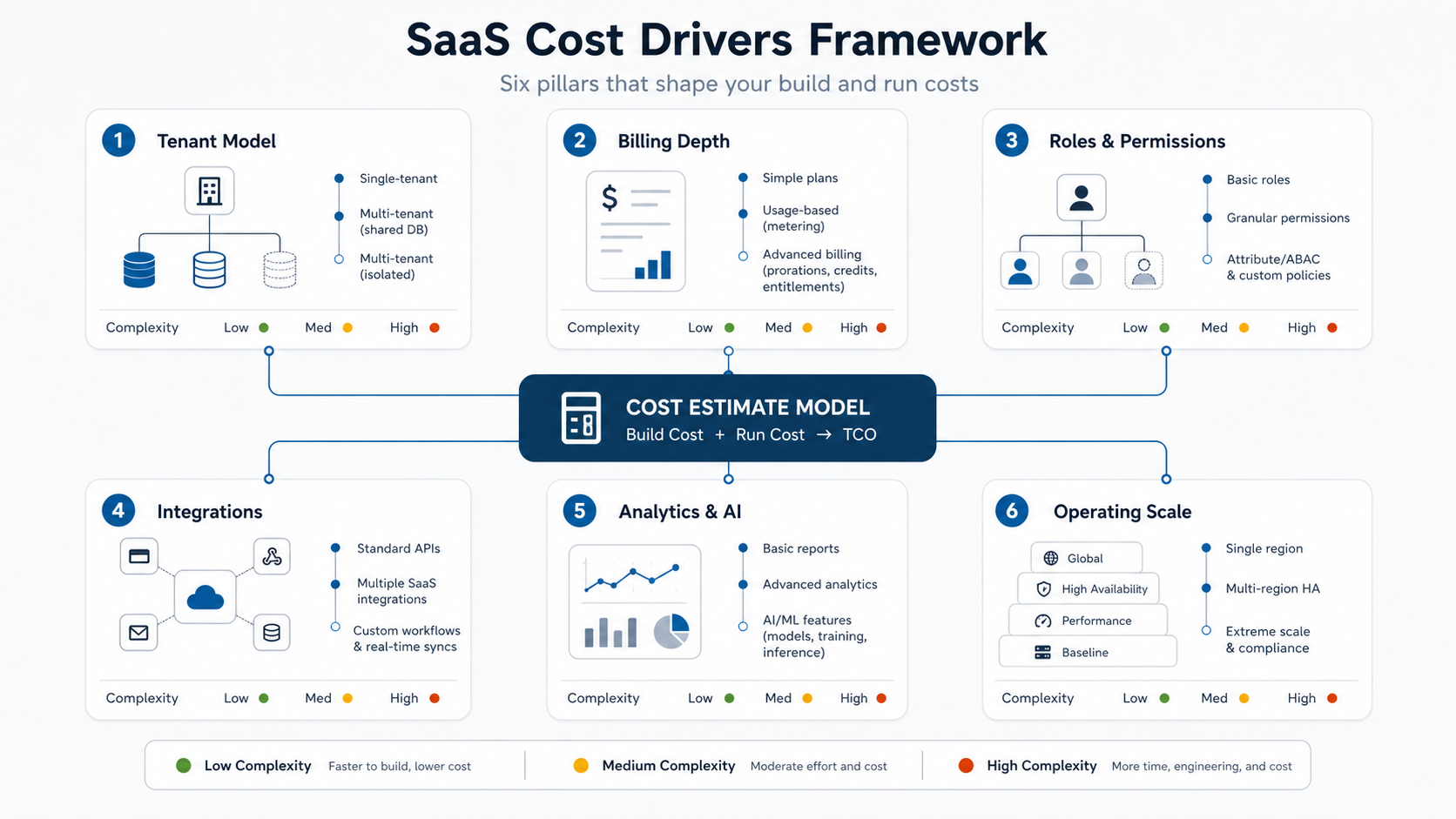
The main SaaS cost drivers are tenant architecture, billing depth, user roles, integrations, analytics, AI features, security, infrastructure, QA surface area, and launch operations. These drivers matter because they create hidden backend and operational work that users may not see on the first screen.
| Cost driver | Lower scope | Higher scope |
|---|---|---|
| Tenant model | Shared application with simple tenant identifiers and standard account boundaries | Tenant-specific data isolation, custom domains, regional requirements, dedicated resources, or white-label rules |
| Billing | One or two subscription plans handled through a hosted checkout and billing portal | Usage-based pricing, credits, trials, coupons, invoicing, tax handling, custom contracts, proration, revenue reporting, and dunning workflows |
| Roles and permissions | Owner, admin, and member permissions | Departments, approval chains, external collaborators, field-level permissions, audit logs, and enterprise policy controls |
| Integrations | Email, analytics, payment provider, and one operational integration | CRM, accounting, support desk, data warehouse, calendar, SSO, webhooks, public API, and customer-specific connectors |
| Analytics and AI | Basic product analytics and reports | Custom dashboards, cohort reporting, anomaly detection, recommendations, copilots, workflow automation, and evaluation/monitoring loops |
| Scale and operations | Standard cloud deployment, backups, logs, and manual support | Observability, queues, rate limits, usage metering, incident workflows, release controls, customer health tracking, and support dashboards |
MVP Scope For SaaS: What To Build First
A SaaS MVP should prove the core customer workflow, not the entire future platform. The first release normally needs enough product, admin, billing, and support coverage to survive real customer use. It does not need every enterprise feature unless those features are essential to the first buyer.
Start by naming the first customer type, the primary job they need to complete, the minimum account model, and the operational promises you must keep. Then decide which SaaS layers must ship now.
- Core user workflow: The main action customers pay for, plus onboarding and success states.
- Tenant account model: Organization, workspace, team, or project structure with clear ownership.
- Access control: The smallest role set that keeps customer data and admin actions safe.
- Billing path: A practical subscription or invoicing flow that matches the go-to-market model.
- Admin and support: Internal visibility into accounts, subscriptions, support issues, and failed jobs.
- Learning loop: Product analytics, event tracking, feedback capture, and roadmap signals.
If a feature does not improve proof, launch safety, onboarding, or customer retention, it probably belongs after launch. This is where MVP scoping and custom software development planning overlap: you are not only trimming screens, you are choosing which operational responsibilities the first product can actually support.
Multi-Tenant Architecture Decisions
Multi-tenant architecture affects cost because it shapes data models, permissions, infrastructure, testing, support, and future enterprise sales. AWS's tenant-isolation guidance frames tenant isolation as a foundational SaaS concern: customers must not be able to access another tenant's resources even when the product uses shared infrastructure. That principle is simple to state and easy to underestimate during early development.
Common approaches range from shared database rows with tenant identifiers, to separate schemas, to separate databases, to more isolated infrastructure for large or regulated customers. The cheapest option is not always wrong, and the most isolated option is not always necessary. The right choice depends on customer risk, compliance expectations, data volume, noisy-neighbor concerns, reporting needs, and how much operational overhead the team can afford.
The estimate should also include tenant-aware testing. Every query, background job, export, webhook, and admin action needs the correct tenant boundary. A system that is safe for one account can still leak or corrupt data when the tenant model is added late.
Billing, Subscriptions, And Revenue Operations
Billing is one of the most common sources of hidden SaaS cost. A simple subscription integration can be straightforward. The cost rises when the product needs multiple plans, trials, coupons, upgrades, downgrades, failed-payment handling, usage-based pricing, credits, invoicing, tax logic, revenue reporting, and customer self-service.
Stripe's current SaaS and Billing documentation highlights the practical scope areas that product teams need to plan: subscriptions, invoicing, customer portals, usage-based billing, subscription lifecycle events, and webhooks for changes such as upgrades, downgrades, payment failures, and customer updates. Even when a billing provider handles much of the payment infrastructure, the SaaS product still needs clean internal subscription state, entitlement checks, customer messaging, and support workflows.
Do not estimate billing as one checkout button unless that is truly the only version-one requirement. If pricing experiments are central to the business model, plan billing as product infrastructure.
Integrations, Analytics, And AI Features
Integrations can make a SaaS product valuable, but they also add authentication, mapping, retries, error handling, monitoring, documentation, and support burden. A first version may only need email, payments, analytics, and one operational integration. A scale-stage platform may need CRM, accounting, support desk, data warehouse, SSO, calendar, webhooks, API keys, and customer-specific connectors.
Analytics should be estimated at two levels. Product analytics show whether users are adopting the workflow. Customer-facing analytics help users get value from the product. Internal operational analytics show account health, support load, billing issues, and usage patterns. Each layer has different data and privacy requirements.
AI features should be scoped with the same discipline. A summarization feature, recommendation engine, support assistant, or workflow automation can be useful when the underlying process and data are ready. If the AI feature automates repeatable operational work, the AI Automation ROI Calculator can help decide whether the prototype is worth building now or later.
Timeline For SaaS Development
A focused SaaS MVP often takes 8-16 weeks when the scope is narrow, integrations are limited, and the team has fast decision-making. A growth-ready SaaS platform can take 4-8 months. Enterprise-grade SaaS with deeper isolation, SSO, audit logs, usage billing, custom analytics, public APIs, and compliance-sensitive workflows can take longer and should be planned in phases.
| Phase | What happens | Typical duration |
|---|---|---|
| Discovery and scope | Define first customer, product promise, roles, billing model, tenant model, no-scope list, launch metrics, and risks | 1-3 weeks |
| UX and architecture planning | Design core flows, data model, tenant boundaries, billing state, admin tooling, integrations, and delivery plan | 2-4 weeks |
| MVP build and QA | Build customer workflow, admin layer, billing, analytics, notifications, support visibility, and tests | 6-12 weeks |
| Beta and launch readiness | Onboard early customers, fix workflow issues, confirm billing, monitor usage, document support, and prepare roadmap | 2-6 weeks |
The timeline stretches when product decisions stay unresolved. The cheapest schedule control is a stable version-one scope.
Hidden Costs That Surprise SaaS Teams
SaaS teams often underestimate the work that sits behind the product interface. Hidden costs usually appear in tenant-aware QA, billing edge cases, support dashboards, onboarding, data imports, failed jobs, permission exceptions, usage limits, email deliverability, analytics definitions, release operations, and customer success workflows.
Infrastructure cost is only one part of the story. Engineering time is often spent on reliability, observability, deployment safety, backups, incident response, logging, queue processing, access reviews, and documentation. Those investments are not glamorous, but they protect customer trust.
Another hidden cost is roadmap discipline. Every new tenant type, plan, integration, and permission rule multiplies future QA and support work. A SaaS product needs a clear product owner, not just developers adding features.
How To Estimate Your SaaS Build
Before requesting a SaaS estimate, prepare a scope model that separates launch requirements from later roadmap ideas. A useful estimate should be able to trace each budget item back to a product or operational decision.
- Define the first customer segment. Enterprise buyers, SMB teams, internal operators, and prosumers need different onboarding, permissions, support, and billing.
- Map the first paid workflow. Name the exact job the product helps users complete and the proof that it worked.
- Choose the tenant model. Decide how accounts, workspaces, teams, projects, and data boundaries should work in version one.
- Set billing assumptions. List plans, trials, invoices, coupons, usage metrics, tax needs, failed-payment handling, and upgrade/downgrade rules.
- Rank integrations. Mark each integration as launch-critical, beta-only, manual for now, or later phase.
- Define admin operations. Identify what support, success, finance, and product teams must see or change after launch.
- Plan measurement. Decide which product analytics, account-health signals, and revenue metrics matter in the first 90 days.
Once that model is clear, the estimator can produce a more realistic budget band and a build team can challenge risky assumptions early.
How NextPage Plans SaaS Builds
NextPage plans SaaS builds by starting with the product promise, first customer workflow, and operating model. We then map the tenant structure, billing path, admin needs, integrations, analytics, security expectations, and scaling assumptions before recommending a first release. That keeps the estimate tied to business reality instead of a generic list of screens.
For early products, that may mean a focused SaaS MVP with a narrow workflow, simple subscription plan, and enough admin visibility to support first customers. For growth-stage products, it may mean stronger architecture, deeper reporting, workflow automation, API access, AI features, and customer success tooling. For enterprise SaaS, it may mean tenant isolation, SSO, audit logs, data exports, and operational controls from the start.
If you are planning a SaaS product, use the cost estimator to shape the budget, then pressure-test the first release against tenant model, billing, roles, integrations, and operations. The goal is not to build the biggest version one. The goal is to build the smallest SaaS platform that can earn trust, prove value, and scale without expensive rework.