Portfolio case study

LedgerMint: Digital banking and wallet operations platform

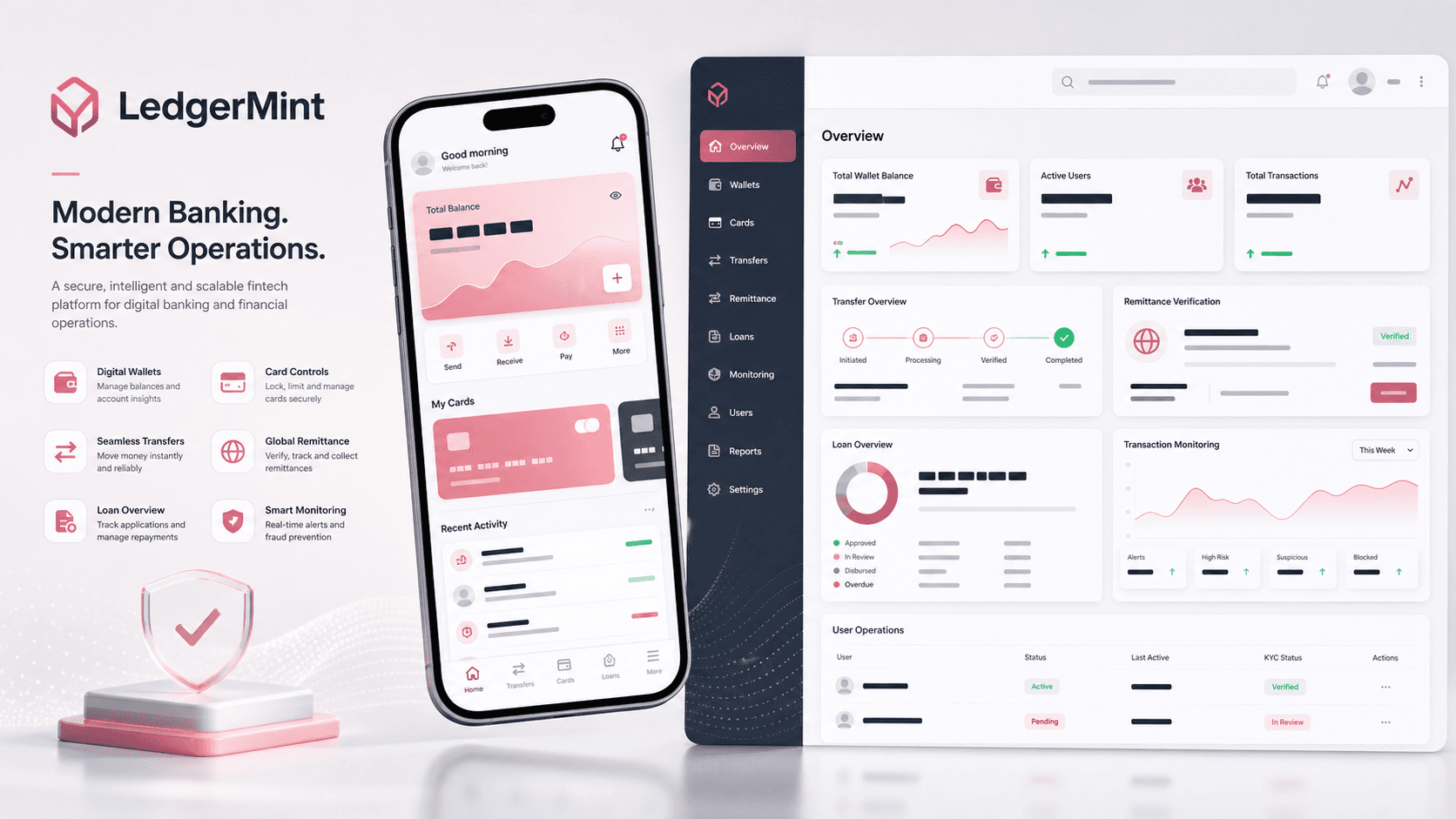
A mobile-first digital banking platform with account onboarding, card and wallet management, transfers, remittances, loan discovery, EMI calculation, notifications, profile completion, and a supporting React admin console for users, balances, settings, and transaction visibility.

Name changed to respect NDA.

Digital banking platform visual with mobile wallet screens, card controls, transfer flow, remittance verification, loan overview, and admin dashboard panels
Project scope

Flutter mobile app engineering, React admin console delivery, banking workflow integration, account operations, and transaction visibility

Flutter
consumer banking app
React
admin console
10+
mobile banking workflows
OTP
remittance verification flow

Timeline

Multi-surface fintech product build across consumer mobile banking and browser-based operations

A fintech app needed everyday banking flows and operating visibility

The product needed to feel simple for mobile banking users while still giving operators a browser workspace for user records, balances, transaction review, and configuration. Banking workflows also needed careful state handling across onboarding, profile completion, cards, accounts, wallets, loans, and remittances.

  • Mobile users needed a guided path from signup, login, OTP, profile completion, and password recovery into daily account activity
  • Card, wallet, account, transaction, loan, EMI, send-money, and remittance features had to stay discoverable on a small screen
  • Remittance workflows needed recipient selection, currency exchange, purpose of transfer, confirmation, and OTP verification
  • Administrators needed protected routes for users, settings, transactions, and available-balance views

A connected mobile banking app with a practical admin layer

LedgerMint pairs a Flutter app for consumer banking workflows with a React and Material UI admin console. The mobile app handles daily financial actions, while the admin surface keeps support and operations teams close to users, transactions, balances, and settings.

  • Flutter and GetX create a route-driven mobile banking experience across authentication, landing, profile, wallet, cards, loans, transfers, and notifications
  • Dio-backed API calls centralize authenticated request handling, connectivity checks, response validation, and file upload behavior
  • Reusable mobile widgets support wallet cards, card sliders, balance views, dropdowns, OTP entry, buttons, app bars, and profile headers
  • React Router protected routes and Material UI tables organize user management, transaction review, balance actions, and settings for operators

Product surfaces

What the platform brought together

The work spanned core product operations, daily user workflows, data-heavy coordination, and resilient platform management.

Authentication and profile completion

The mobile app supports the account journey from signup and login through OTP, forgot-password recovery, reset password, profile completion, and secure session storage.

  • Login, signup, forgot password, reset password, OTP, change password, and first-time profile routes
  • Stored user session data with token-aware API headers and completion checks
  • Profile fields for name, contact, address, date of birth, tax ID, occupation, employer, images, country, state, and city selection

Accounts, cards, and wallets

Users can review accounts, manage wallet balances, add cards, choose defaults, mask sensitive numbers, and move through account-linked actions.

  • Account list, card list, default card, default account, wallet list, add-wallet-money, and manage-wallet flows
  • Card validation, expiry selection, CVV capture, card save API calls, and reload paths for home and card lists
  • Wallet cards, current-balance views, transaction summaries, and send-money entry points

Transfers and remittances

The platform supports local send-money flows and structured remittance workflows with exchange calculation, recipient selection, confirmation, OTP verification, and success feedback.

  • Domestic and international transfer modes with amount and note validation
  • Country, recipient, purpose-of-transfer, exchange amount, currency conversion, and preview states
  • Remittance save and verification flow with bottom-sheet OTP confirmation and completion dialog

Loans, EMI, and transaction visibility

Loan and transaction screens help users understand lending options, repayment estimates, historical activity, and notification context.

  • Loan list with pagination and tab state for new or existing lending records
  • EMI calculator workflow for estimating loan repayment behavior
  • Transaction list, transaction detail, notifications, and reusable no-data states

Admin operations console

A secured browser console gives operators the structured surfaces needed to review users, transactions, balances, and settings without crowding the mobile app.

  • Protected admin shell with login, signup guard, layout, side navigation, and top navigation
  • Users table with role, active-status, age, country, and searchable operational structure
  • Transactions and available-balance screens with recent activity tables, balance summaries, statement actions, and transfer prompts

Buyer priorities

What mattered most to the people evaluating the platform

Prospective buyers want to know whether the work solved real workflow, adoption, reliability, data, and operations problems. These priorities shaped the product decisions.

Mobile banking clarity

Financial products need dense workflows, but users still expect the app to feel predictable and quick during repeated daily actions.

  • Route names, controller methods, and shared components keep navigation consistent across account, card, wallet, loan, and transfer areas
  • Masked account and card formatting protects readability without exposing full sensitive numbers
  • Connectivity checks and common response handling reduce one-off error states across banking actions

Trust and verification

Money movement and profile workflows need deliberate validation, verification, and completion paths.

  • OTP flows support login, recovery, and remittance verification moments
  • Profile completion checks gate first-time user readiness before normal app use
  • Validation covers card number, email, phone, amount, note, expiry date, CVV, and remittance inputs

Operational support

The admin console gives teams a browser workspace for supervision while preserving the mobile app as the customer-facing banking surface.

  • Protected routes keep admin pages behind an authenticated layout
  • Material UI tables provide scan-friendly views for users and transactions
  • Balance and statement actions show how support workflows can sit beside mobile banking features

System model

How the platform connects roles, workflows, and product surfaces

The product architecture brings every role into the same operating model, with shared data moving cleanly between web, mobile, media, and notification layers.

Account to transfer workflow

Users move from authentication and profile completion into accounts, cards, wallets, transfers, remittance verification, and transaction review.

Customer and operator surfaces

The mobile banking app handles customer actions while the admin console supports users, transactions, balances, settings, and support visibility.

Mobile app with admin operations layer

Flutter screens, shared controllers, REST APIs, storage, verification flows, and React admin routes work together as one fintech platform.

Technology

The Stack We Used And Why

The stack section is written for buyers who need to understand the product architecture, operational trade-offs, and long-term maintainability of the system.

Mobile app

Used for iOS and Android banking workflows across onboarding, authentication, profile, accounts, cards, wallets, loans, remittances, notifications, and settings.

FlutterDartGetXGetStorageDioConnectivity Plus

Mobile interface system

Used to keep banking screens consistent across cards, balances, OTP, dropdowns, profile headers, responsive text, and image-heavy app states.

Flutter SVGCached Network ImageGoogle FontsAuto Size TextCarousel SliderImage Picker

Admin web

Used for the operations console covering user records, transaction visibility, balance views, protected routing, settings, and admin navigation.

ReactTypeScriptReact RouterMaterial UIRedux ToolkitRedux Persist

Financial workflow layer

Used to model account, card, wallet, loan, transaction, recipient, remittance, currency, country, state, city, and user data across the app.

REST APIsToken headersForm data uploadPaginationOTP verificationCurrency exchange workflow

Why Flutter For The Banking App

The primary product needed a consistent mobile experience across many form-heavy financial workflows without splitting iOS and Android delivery.

  • Flutter kept onboarding, cards, accounts, wallets, loans, remittances, and profile flows in one codebase
  • GetX matched the route-driven controller structure used across the app
  • Shared widgets reduced repeated UI decisions across sensitive banking screens

Why A Separate React Admin Console

Operations teams needed denser tables and browser controls than the consumer mobile app should expose.

  • React Router organized protected admin sections for users, transactions, balances, and settings
  • Material UI gave the console scan-friendly tables, buttons, typography, and layout primitives
  • Keeping admin workflows separate helped the mobile app stay focused on customer banking actions

Why Centralized API Handling

Banking features repeat the same concerns across screens: authenticated headers, connectivity, response validation, upload handling, loading states, and error messages.

  • Dio interceptors and token-aware requests made API calls consistent across controllers
  • Connectivity checks prevented common offline failure paths from becoming screen-specific logic
  • Shared validation and formatting helpers supported account, card, profile, and remittance input quality

Delivery

How the product came together

The work moved from domain modeling to core platform delivery, mobile adoption, and operational hardening.

1

Map banking journeys

Break the app into authentication, profile readiness, home, accounts, cards, wallets, loans, transfers, remittances, notifications, and settings.

2

Build mobile workflow foundations

Create shared controllers, storage, API handling, widgets, validation helpers, and navigation paths before filling in each banking area.

3

Layer in money movement

Connect card, account, wallet, send-money, remittance, exchange calculation, recipient, OTP, and transaction-detail workflows.

4

Add operational visibility

Use a React admin workspace for user records, settings, transaction tables, available-balance summaries, and statement-oriented actions.

Operational depth

What made the platform usable after launch

The strongest case studies are not only feature lists. They show how the system is operated, monitored, governed, and improved when real users depend on it.

Remittance workflow depth

The remittance controller shows a practical sequence for international money movement rather than a single static form.

  • Country and recipient lists are loaded from API-backed data sources
  • Currency exchange calculation feeds preview and save behavior
  • OTP verification completes the remittance flow after confirmation

Profile and KYC-style readiness

The profile workflow captures the kind of identity and contact information financial products need before deeper account use.

  • Name, email, address, date of birth, tax ID, occupation, employer, and location fields are modeled in the profile controller
  • Profile and cover image uploads are handled through multipart upload paths
  • First-time profile completion checks guide users before normal landing-page access

Admin balance and transaction views

The browser console gives operations teams quick views for balances, spending, transfer prompts, statement actions, and transaction status.

  • Available-balance cards summarize account and expense signals
  • Recent transaction tables show reference, amount, balance, and status fields
  • Users and transactions sit behind a protected admin layout

Results

The measurable and observable lift from the work

The strongest improvements are the ones a buyer can connect to daily work: fewer disconnected tools, safer operations, clearer workflows, and more reliable product behavior.

10+

Mobile Workflow Areas

The Flutter app covers login, signup, OTP, profile, accounts, cards, wallets, send money, remittances, loans, EMI, transactions, notifications, and settings.

2

Connected Product Surfaces

A customer-facing mobile banking app is paired with a protected React admin console for operational visibility.

Verification

Money Movement Guardrails

Remittance flows include recipient selection, exchange calculation, save, OTP verification, and completion feedback.

Reusable

Fintech UI Foundation

Shared widgets, controllers, models, validators, and API helpers reduce repeated work across form-heavy financial screens.

Outcome

A stronger operating system for digital banking and wallet operations platform

The platform reduced tool fragmentation and gave each role a clearer path from live activity to day-to-day action.

A Flutter mobile banking app with authentication, OTP, profile completion, accounts, wallets, cards, transfers, remittances, loans, EMI, notifications, and settings

A React admin console with protected routing for users, transactions, available balance, settings, and browser-based operational review

Reusable financial models for accounts, cards, loans, transactions, recipients, remittances, currency exchange, countries, states, cities, wallets, and user data

A structured API layer for authenticated requests, connectivity checks, response validation, file uploads, pagination, and money-movement verification

FAQ

Frequently Asked Questions About LedgerMint

Answers about the digital banking and wallet operations platform scope, platform model, technology choices, operational workflows, and related build patterns.

What Kind Of Fintech Platform Does LedgerMint Represent?

LedgerMint represents a digital banking and wallet operations platform with mobile customer workflows for accounts, cards, wallets, transfers, remittances, loans, EMI, notifications, and profile management, plus a browser admin console for operational visibility.

Why Does A Banking App Need A Separate Admin Console?

The mobile app should stay focused on customer actions, while operators need denser browser screens for users, balances, transaction status, statements, settings, and support workflows.

How Were Remittances Supported?

The remittance flow includes country selection, recipient selection, purpose of transfer, exchange calculation, confirmation, save behavior, OTP verification, and completion feedback.

Can This Pattern Support Other Financial Products?

Yes. The same architecture can support neobanking, wallet apps, lending portals, remittance products, prepaid card products, expense apps, savings tools, and financial operations consoles.

Related services

Build a similarly ambitious product without starting from a blank page.

We can help scope the web, mobile, AI, media, and operating layers needed for your own platform.

Start a project inquiry