Portfolio case study

MindGarden: Wellness learning mobile app

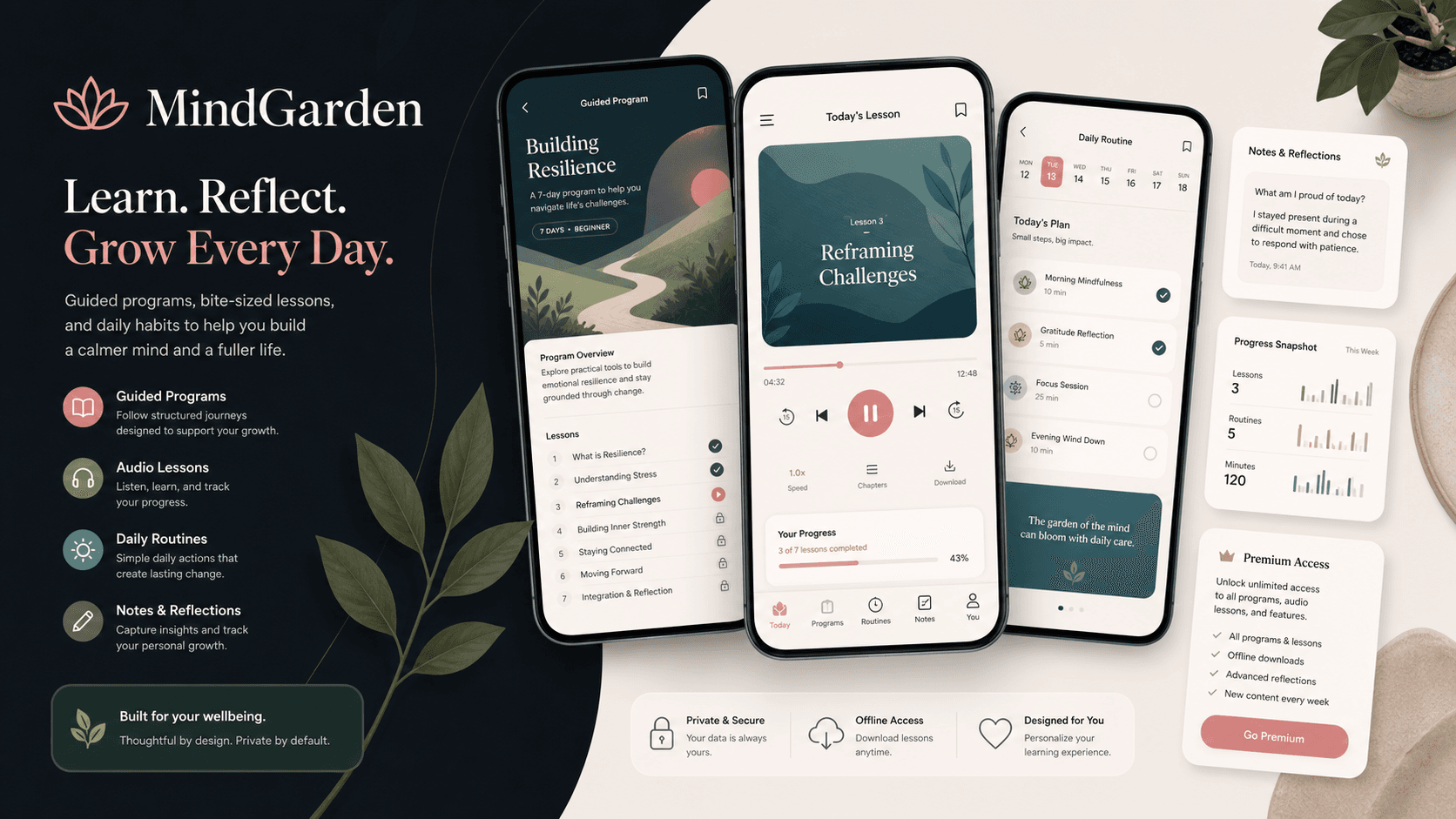
A mobile wellness learning platform that brings guided programs, audio and video lessons, daily routines, notes, progress tracking, profile management, and subscription access into one cross-platform app experience.

Name changed to respect NDA.

Mobile wellness learning platform visual with guided program cards, audio lesson progress, routine tasks, notes, and subscription access
Project scope

Flutter mobile app, learning workflows, Firebase-backed habit tracking, subscriptions, and content API integration

4
primary mobile tabs
3
lesson media modes
2
subscription tiers
Firebase
routine and progress sync

Timeline

Mobile wellness product build and platform evolution

Wellness content needed to become a daily practice

The product needed to move beyond a static course library. Users needed a calm mobile experience where guided content, habit routines, saved notes, progress, and paid access could stay connected.

  • Course discovery, purchased programs, lesson progress, routines, and account actions were separate mental models
  • Audio, video, quiz, attachment, and webview lesson formats needed consistent handling inside the app
  • Wellness routines and lesson notes required a user-specific sync layer rather than one-off local state
  • The business model needed mobile subscription access without making the learning experience feel transactional

A cross-platform app for learning, practice, and retention

MindGarden connects content browsing, enrolled programs, routine practice, account management, and monetization in one Flutter app with provider-managed state and Firebase-backed personal workflows.

  • Bottom-tab navigation organizes home, programs, routines, and profile into a predictable daily app shell
  • Guided programs support sections, lessons, audio playback, video playback, quizzes, attachments, webviews, and completion tracking
  • Firebase collections store user routines, intentions, todos, lesson notes, and lesson progress
  • In-app purchase flows support monthly and yearly subscriptions across iOS and Android

Product surfaces

What the platform brought together

The work spanned core product operations, daily user workflows, data-heavy coordination, and resilient platform management.

Program discovery and course library

Users can browse featured learning, categories, top courses, search results, filtered courses, course details, wishlists, and enrolled programs.

  • API-backed course, category, language, wishlist, and enrolled-course providers
  • Course detail screens with sections, lessons, outcomes, requirements, includes, ratings, instructor data, and purchase state
  • Search and filter flows for category, price, level, language, and rating discovery

Guided lesson experience

Programs support multiple content modes so wellness learning can include listening, watching, reading, exercises, and external resources.

  • Audio lessons use an in-app player with speech-session configuration and resume prompts
  • Video lessons support native video playback, YouTube-style playback, and webview fallbacks
  • Quiz, iframe, attachment, and webview lessons open through routed lesson actions

Routine and habit layer

Daily practice is treated as a product surface, with routines and intentions saved against each user rather than buried inside course screens.

  • Firebase-backed todos, evening routines, intentions, and combined routine streams
  • Current-day filtering keeps routine views focused on what matters now
  • Provider-backed routines give the app a practical retention loop beyond passive content consumption

Progress, notes, and subscriptions

The app connects monetization with learning continuity so users can resume lessons, review notes, and unlock premium content.

  • Lesson progress is written to Firebase and API endpoints as users listen, watch, and complete content
  • Per-lesson notes create a private reflection layer tied to individual learning moments
  • Monthly and yearly subscription products are queried through native store integrations

Module depth

Dedicated product blocks for the highest-value workflows

For large platforms, the conversion story depends on showing how each major module solves a specific operating problem, not only listing features.

Retention

Daily Routines Turn Content Into Practice

The routine system gives the wellness app a daily use case after a user has completed the first lesson.

Source evidence showed Firebase collections for todos, evening routines, intentions, combined routine streams, and date-filtered current-day routine views.

  • Users can create and update routine tasks
  • Intentions and evening routines are modeled separately
  • Current-day queries keep routines actionable
  • Provider state keeps routine changes reflected in the mobile UI

Learning depth

Audio, Video, Quiz, And Attachment Lessons Share One Flow

The lesson engine routes users to the right playback or content surface without turning every lesson type into a separate product.

Source evidence showed lesson-type branching for video, audio, quiz, iframe, attachment, native player, YouTube-style playback, and webview-based resources.

  • Audio lessons can resume from saved progress
  • Video lessons can use native or embedded playback
  • Quizzes and attachments stay inside the app navigation model
  • Completion updates feed both course progress and personal progress records

Revenue

Subscriptions Fit The Wellness Product Model

The app supports paid access without making subscription code dominate the user journey.

Source evidence showed native in-app purchase setup, monthly and yearly product IDs for iOS and Android, purchase stream handling, and post-purchase unlock messaging.

  • Monthly and yearly subscription choices
  • iOS and Android store product querying
  • Purchase stream handling for completion states
  • Premium access messaging tied to course availability

Buyer priorities

What mattered most to the people evaluating the platform

Prospective buyers want to know whether the work solved real workflow, adoption, reliability, data, and operations problems. These priorities shaped the product decisions.

Habit formation

Wellness apps need users to return gently and frequently, so the experience needed daily routines, saved progress, and low-friction re-entry.

  • Routine tabs made practice visible outside the course library
  • Lesson progress helped users resume instead of restarting
  • Notes gave users a reason to reflect during lessons

Content flexibility

The product needed to support different wellness content formats without forcing the team into separate app architectures.

  • Course APIs supported categories, search, filters, sections, lessons, and enrolled programs
  • Audio, video, quiz, attachment, iframe, and webview lesson types used common navigation patterns
  • Reusable widgets kept content cards, headers, program lists, and player surfaces consistent

Monetization readiness

A wellness content business needs a clear paid-access path that works across app stores and does not block the core learning flow.

  • Native store integrations handled subscription product discovery
  • Monthly and yearly plans supported recurring revenue options
  • Purchase feedback reassured users when paid access was unlocked

System model

How the platform connects roles, workflows, and product surfaces

The product architecture brings every role into the same operating model, with shared data moving cleanly between web, mobile, media, and notification layers.

Learning to routine loop

Users discover programs, complete audio or video lessons, save notes, build routines, and return through progress cues.

User and platform surfaces

Learners, content managers, subscription services, and support workflows connect through one mobile experience.

Flutter app with API and Firebase layers

The app combines Flutter screens, REST content APIs, Firebase personal state, media playback, and app-store subscriptions.

Technology

The Stack We Used And Why

The stack section is written for buyers who need to understand the product architecture, operational trade-offs, and long-term maintainability of the system.

Mobile app

Used for a cross-platform wellness app where content discovery, guided learning, routines, and account workflows needed one consistent product shell.

FlutterDartProviderShared PreferencesCurved Navigation

Content and APIs

Used to load course catalogs, categories, filters, details, sections, lessons, wishlists, enrolled programs, and profile data.

REST APIsHTTPDioJSON modelsMultipart uploads

Firebase layer

Used for authenticated user-specific routines, intentions, todos, notes, lesson progress, and messaging-ready mobile infrastructure.

Firebase CoreFirebase AuthCloud FirestoreFirebase Messaging

Media and learning

Used for guided wellness lessons across audio, video, YouTube-style playback, HTML content, webviews, and downloadable or linked resources.

Just AudioAudio SessionVideo PlayerFlick Video PlayerYouTube PlayerWebView

Revenue and engagement

Used for paid access, sharing, notifications, ratings, profile images, and app metadata across mobile platforms.

In-App PurchaseLocal NotificationsShare PlusImage PickerPackage Info

Why Flutter For Wellness Learning

The product needed a polished mobile app across iOS and Android without duplicating course, routine, account, and playback logic.

  • Flutter kept program discovery, routines, profile, media playback, and subscriptions in one codebase
  • Provider matched the app state model for authentication, courses, enrolled programs, routines, and lesson progress
  • Reusable widgets kept the UI consistent across card-heavy learning surfaces

Why Firebase For Personal Practice

Daily routines, notes, and lesson progress are personal state, so they needed user-scoped real-time storage instead of only content API responses.

  • Firestore collections separated routines, notes, and lesson progress by authenticated user
  • Streams kept routine and note lists current without manual refresh loops
  • Firebase Auth gave the mobile app a reliable identity anchor for personal data

Why Native Store Subscriptions

A wellness content app needs recurring access that fits mobile user expectations and store compliance.

  • Monthly and yearly products allowed simple paid-access packaging
  • Native store APIs kept purchase state aligned with iOS and Android platform behavior
  • Subscription screens could live alongside course access without rebuilding the content system

Delivery

How the product came together

The work moved from domain modeling to core platform delivery, mobile adoption, and operational hardening.

1

Map wellness journeys

Organize the app around discovery, enrolled programs, routines, and account flows instead of isolated screens.

2

Build learning workflows

Connect course APIs, categories, filters, sections, lessons, media playback, webviews, and completion handling.

3

Add personal practice

Layer in Firebase-backed routines, intentions, todos, lesson notes, and lesson-progress records for returning users.

4

Prepare monetization

Add native subscriptions and purchase-state handling so the content business can support recurring paid access.

Operational depth

What made the platform usable after launch

The strongest case studies are not only feature lists. They show how the system is operated, monitored, governed, and improved when real users depend on it.

Course API depth

The app was built around practical course operations rather than static content screens.

  • Top courses, category-wise courses, search, filters, details, sections, lessons, wishlists, and enrolled courses are modeled
  • Course and lesson models include ratings, enrollment counts, lesson duration, completion states, video URLs, attachments, and section metadata
  • Authenticated course-detail calls adjust purchase and wishlist state for logged-in users

Personal learning continuity

Lesson progress and notes help the app remember where the user is and what they captured during a session.

  • Audio lessons can prompt users to resume from a saved point
  • Lesson completion updates feed both provider state and API-side course progress
  • Per-lesson notes are stored under the authenticated user and lesson ID

Mobile platform readiness

The implementation includes the operational pieces expected in a serious mobile content product.

  • Firebase initialization, authentication, messaging, local notifications, and shared preferences support mobile app behavior
  • Image upload and profile management flows support account personalization
  • StoreKit and Google Play billing paths support subscription packaging

Results

The measurable and observable lift from the work

The strongest improvements are the ones a buyer can connect to daily work: fewer disconnected tools, safer operations, clearer workflows, and more reliable product behavior.

Multi-format

Lesson Delivery

The app supports audio, video, quiz, attachment, iframe, webview, and embedded playback patterns.

Daily

Practice Loop

Routines, intentions, todos, notes, and lesson progress give users reasons to return after the first course session.

Cross-store

Subscription Access

Monthly and yearly subscription products are wired through native iOS and Android purchase flows.

API + Firebase

Hybrid Data Model

Course catalog and profile data come from APIs while personal routines, notes, and progress use Firebase-backed user state.

Outcome

A stronger operating system for mobile wellness learning and habit platform

The platform reduced tool fragmentation and gave each role a clearer path from live activity to day-to-day action.

A Flutter wellness learning app with home, programs, routines, profile, authentication, account, and subscription flows

API-backed content discovery for categories, courses, search, filters, wishlists, course details, sections, lessons, and enrolled programs

A guided lesson engine for audio, video, quiz, attachment, iframe, webview, notes, completion, and resume behavior

Firebase-backed personal routines, intentions, todos, notes, lesson progress, authentication, and messaging-ready infrastructure

FAQ

Frequently Asked Questions About MindGarden

Answers about the mobile wellness learning and habit platform scope, platform model, technology choices, operational workflows, and related build patterns.

What Kind Of Wellness App Does MindGarden Represent?

MindGarden represents a mobile wellness learning and habit platform with guided programs, audio and video lessons, routines, notes, profile workflows, subscriptions, and progress tracking.

Why Combine Courses And Routines In One App?

Courses help users learn, while routines help them return and practice. Bringing both into one mobile product improves retention and makes wellness content feel actionable.

How Were Lesson Formats Supported?

The app routes different lesson types to the right experience, including native audio playback, video playback, quiz webviews, iframe content, attachments, and external resources.

Can This Pattern Support Other Wellness Products?

Yes. The same pattern can support meditation apps, coaching libraries, therapy-adjacent education, fitness learning, habit programs, creator-led wellness communities, and subscription content products.

Related services

Build a similarly ambitious product without starting from a blank page.

We can help scope the web, mobile, AI, media, and operating layers needed for your own platform.

Start a project inquiry