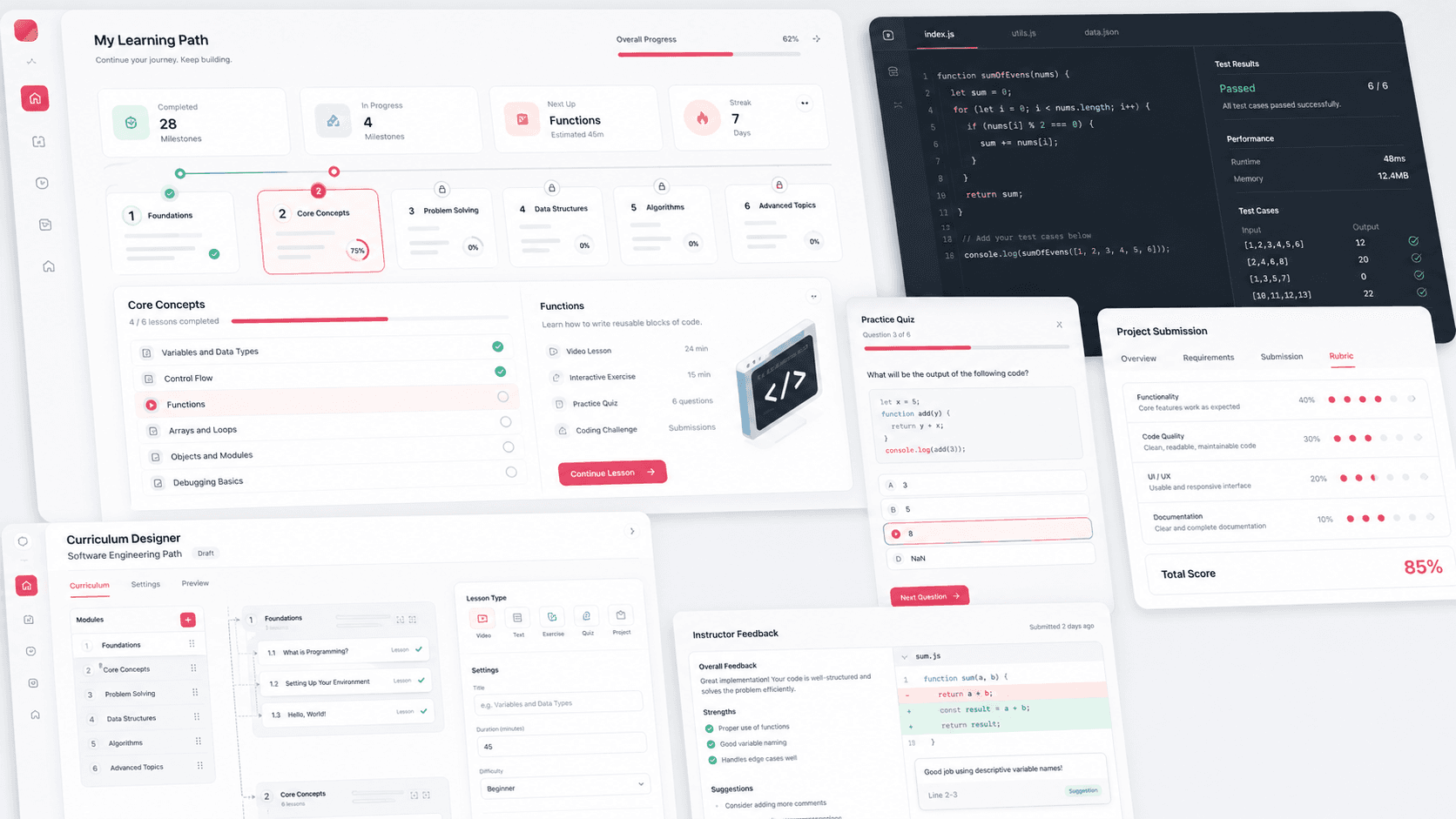
A coding education learning management platform that connects student progress, milestone-based curriculum, quizzes, project submissions, instructor feedback, admin controls, and curriculum design workflows in one web app.
React web app, student learning flows, curriculum authoring, grading workflows, Firebase data model, and role-aware operations
4
role-specific workspaces
5
activity types
3
curriculum levels
Firebase
progress and content operations
Timeline
Learning platform build and curriculum workflow evolution
The education workflow needed more than static course content
A coding education program needed a web platform where students could move through structured learning paths while instructors and admins could monitor progress, manage profiles, and keep curriculum content current.
Students needed a clear path through courses, chapters, lessons, quizzes, videos, and project work
Instructors needed a way to review project submissions and give usable feedback
Admins needed profile, permission, and progress controls without exposing every learner workflow
PathForge organizes the product around learners, instructors, admins, and curriculum designers so each role can work in the same learning system without seeing the same controls.
Milestone, chapter, lesson, and activity hierarchy for structured course progression
Activity engine for videos, quizzes, exercises, instructions, and project-step submissions
Student dashboards and progress locks that guide learners to the next appropriate lesson
Designer and admin surfaces for curriculum updates, profile management, permission changes, and feedback review
Product surfaces
What the platform brought together
The work spanned core product operations, daily user workflows, data-heavy coordination, and resilient platform management.
Milestone-based learning paths
The platform turns a coding curriculum into browsable courses, chapters, lessons, and activity cards with lock states and completion signals.
Course and chapter cards help students understand where they are in the curriculum
Lesson views group videos, quizzes, exercises, instructions, and project work into a single progression
Current-lesson tracking keeps the next learning action visible from the dashboard
Interactive activity engine
Different learning tasks render through purpose-built activity components instead of a single generic content page.
Video activities support direct progression after playback or review
Quiz activities support multi-response questions, answer selection, scoring, and instructor answer review
Instruction and exercise activities use markdown-ready content for coding education material
Project submission and grading loop
Hands-on coding assignments can collect structured student responses and return score-linked instructor feedback.
Project-step instructions and rubrics present the assignment expectations before submission
Submission fields store learner responses against the user and project step
Feedback messages and scores appear back inside the student workflow when grading is complete
Curriculum designer workspace
Designers can edit milestone, chapter, lesson, and activity content without pushing every curriculum change through engineering.
Dedicated designer routes support milestones, chapters, lessons, and individual activities
Markdown editor flows make project-step instructions and rubrics easier to revise
Quiz and video designer views separate content authoring from the learner-facing experience
Buyer priorities
What mattered most to the people evaluating the platform
Prospective buyers want to know whether the work solved real workflow, adoption, reliability, data, and operations problems. These priorities shaped the product decisions.
Learner momentum
Students need fewer decisions between lessons and more clarity about what to do next.
Current lesson context appears on the dashboard with course, chapter, and lesson names
Sequential navigation moves students across activities, lessons, chapters, and milestones
Lock states keep learners focused on the correct stage of the curriculum
Instructor leverage
Coding education needs reviewable project work, not only multiple-choice completion.
Project-step submissions store structured responses for later review
Rubrics and feedback messages keep grading tied to the original assignment
Profile views surface project submissions in a way admins and instructors can inspect
Operational control
The platform had to support real program operations: roles, profile updates, account migration, and curriculum maintenance.
Admin controls support user search, profile access, permission toggles, and student progress updates
Role-aware dashboards separate student, instructor, admin, and designer workflows
Configuration flags support rollout choices such as activity access and account-transfer behavior
System model
How the platform connects roles, workflows, and product surfaces
The product architecture brings every role into the same operating model, with shared data moving cleanly between web, mobile, media, and notification layers.
Learner to feedback loop
Students move through lessons, complete activities, submit project steps, receive feedback, and continue through the curriculum.
Role-aware education platform
Students, instructors, admins, and designers use one platform with different permissions and daily workflows.
React LMS with Firebase operations
The browser app, role state, content hierarchy, activity results, and project submissions connect through a Firebase-backed platform layer.
Technology
The Stack We Used And Why
The stack section is written for buyers who need to understand the product architecture, operational trade-offs, and long-term maintainability of the system.
Web app
Used for the learner, instructor, admin, and curriculum designer interfaces that run in the browser.
ReactJavaScriptReact RouterMaterial UIReact Icons
State and content
Used to keep authentication state, role-aware data, course hierarchy, activity results, and project submissions connected.
The work moved from domain modeling to core platform delivery, mobile adoption, and operational hardening.
1
Model the curriculum
Define the course hierarchy and the rules that decide what each learner can open next.
2
Build learning activities
Create dedicated experiences for video, quiz, instruction, exercise, and project-step activities.
3
Add instructor and admin workflows
Support profile review, permission updates, project submissions, grading feedback, and account operations.
4
Enable curriculum operations
Give designers edit surfaces for lessons and activities so curriculum changes can continue after launch.
Operational depth
What made the platform usable after launch
The strongest case studies are not only feature lists. They show how the system is operated, monitored, governed, and improved when real users depend on it.
Sequential progress engine
The platform can advance learners from one activity to the next, then into the next lesson, chapter, or milestone.
Activity completion writes results with scores and timestamps
Next-step logic checks current lesson, chapter, and milestone order before updating progress
Feature flags can loosen or enforce course and activity access rules
Student profile operations
Admins can view and adjust learner state without needing direct database access.
Profile pages show current milestone, chapter, lesson, permissions, and project submissions
Student progress can be edited by selecting milestone, chapter, and lesson values
Account transfer controls support migration paths for existing learners
Curriculum authoring depth
The designer workspace separates content maintenance from student consumption.
Designer routes cover milestones, chapters, lessons, and activity-level editing
Project-step instruction and rubric fields can be reviewed and edited in context
Quiz and video designer surfaces support multiple lesson formats
Results
The measurable and observable lift from the work
The strongest improvements are the ones a buyer can connect to daily work: fewer disconnected tools, safer operations, clearer workflows, and more reliable product behavior.
Role-based
Learning Operations
Students, instructors, admins, and designers receive different workspaces in one platform.
5 types
Activity Coverage
Videos, quizzes, exercises, instructions, and project steps each have dedicated learner experiences.
Structured
Project Review
Project-step submissions, rubrics, scores, and feedback messages create a practical grading loop.
Realtime
Progress Data
Learner progress, activity results, profile state, curriculum content, and permissions are backed by Firebase data paths.
Outcome
A stronger operating system for coding education lms and curriculum operations platform
The platform reduced tool fragmentation and gave each role a clearer path from live activity to day-to-day action.
A React-based LMS for coding education with dashboards, milestone cards, chapter lessons, activity pages, and profile workflows
A flexible activity engine for video, quiz, exercise, instruction, and project-step learning experiences
Instructor and admin operations for learner search, profile review, progress updates, role permissions, submissions, scoring, and feedback
Curriculum designer routes for maintaining milestones, chapters, lessons, activities, project instructions, rubrics, quizzes, and videos
FAQ
Frequently Asked Questions About PathForge
Answers about the coding education lms and curriculum operations platform scope, platform model, technology choices, operational workflows, and related build patterns.
What Kind Of Education Platform Does PathForge Represent?
PathForge represents a coding education LMS with structured curriculum paths, student progress, interactive activities, project submissions, instructor feedback, admin controls, and curriculum designer workflows.
Why Is Project Submission Important In A Coding LMS?
Coding programs need learners to build and explain work, not only watch lessons. Project-step submissions and rubrics create a feedback loop that supports practical skill development.
How Does The Platform Support Different Roles?
The platform separates student, instructor, admin, and designer workflows so learners focus on lessons while operations teams manage profiles, permissions, feedback, and curriculum updates.
Can This Pattern Support Other Training Businesses?
Yes. The same architecture can support coding bootcamps, after-school STEM programs, certification training, internal academies, cohort-based learning, and project-driven online education products.
Related services
Build a similarly ambitious product without starting from a blank page.
We can help scope the web, mobile, AI, media, and operating layers needed for your own platform.