Portfolio case study

PropCheck: Property snagging and maintenance coordination mobile app

A Flutter property snagging app that helps property teams, residents, and workers log defects, schedule snag appointments, assign tasks, capture before-and-after photos, track worker progress, and verify completion from one mobile workflow.

Name changed to respect NDA.

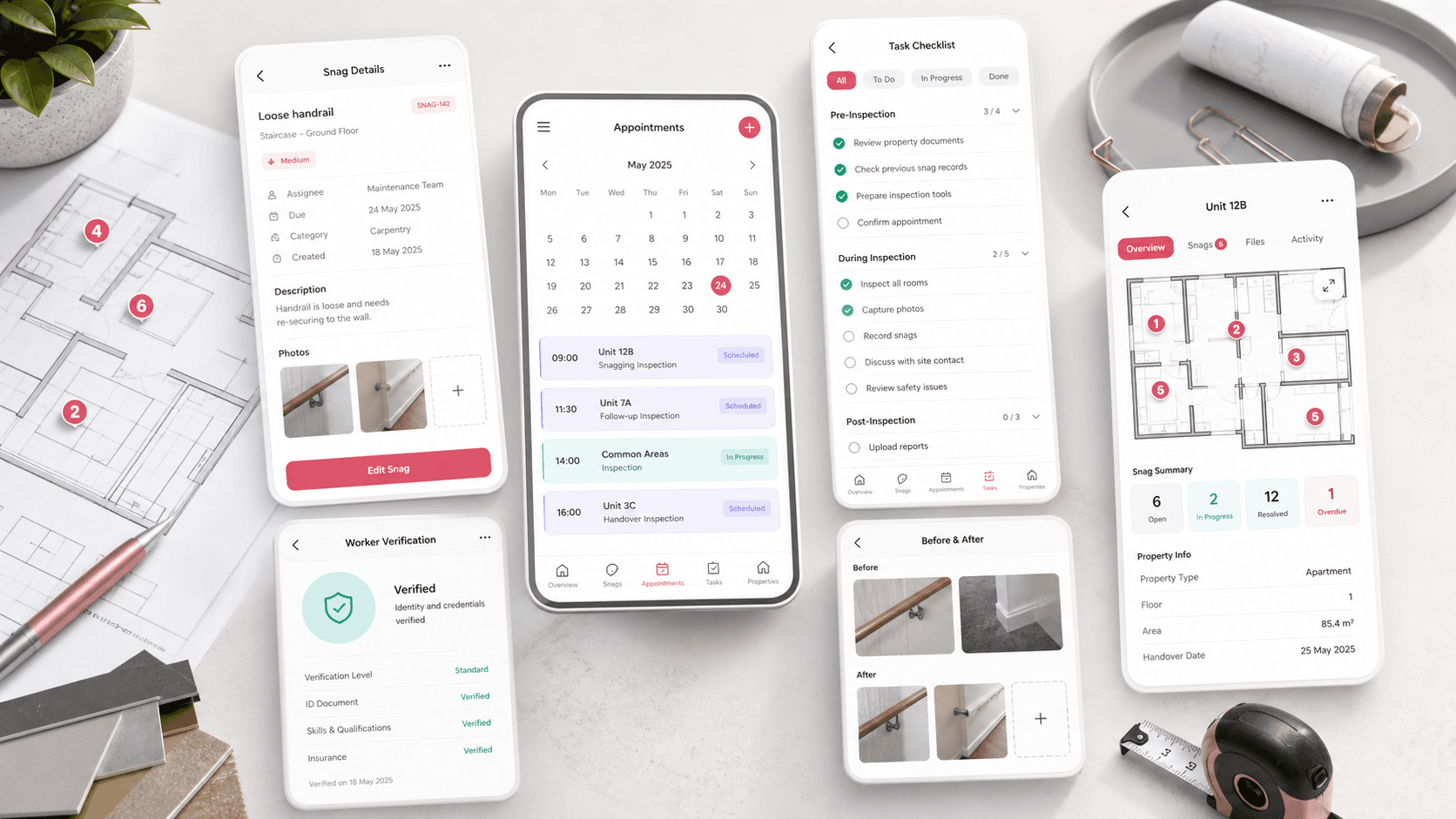
Property snagging mobile app visual with snag cards, appointment calendar, task checklist, before and after photo placeholders, and worker verification status
Project scope

Flutter mobile app engineering, route architecture, role-aware workflow design, shared UI components, validation, and release-ready iOS plus Android setup

2
role-aware mobile workspaces
10+
snag and appointment screens
Photo
before-and-after evidence flow
iOS + Android
mobile release targets

Timeline

Cross-platform mobile app build for property snagging and worker coordination

Property snagging needed clearer handoff between residents and workers

Property teams needed a mobile workflow where defects could be reported, scheduled, assigned, inspected, and verified without losing context across phone calls, paper notes, photos, and scattered status updates.

  • Residents and property managers needed a structured way to add snags with descriptions, locations, features, images, and appointment dates
  • Workers needed a focused task list with accept, reject, archive, and inspection actions
  • Teams needed before-and-after photo evidence, notes, history, and status changes attached to each snag
  • Appointment views needed filters for today, this week, this month, and archived snags so teams could prioritize work

A role-aware Flutter app for snag reporting and repair coordination

PropCheck turns property snagging into a mobile operating flow with resident-facing snag creation, worker task queues, appointment management, status tracking, photo capture, notes, and completion verification.

  • A home dashboard routes users into open snag tracking, appointment review, and new snag creation
  • Snag creation captures title, description, schedule, location, feature, images, and assigned task checklist items
  • Worker screens separate active snag response from resident and property manager review flows
  • Details and tracking screens combine status, notes, before-and-after photos, sign-off, archive, and verification actions

Product surfaces

What the platform brought together

The work spanned core product operations, daily user workflows, data-heavy coordination, and resilient platform management.

Snag intake and scheduling

Property defects can be logged with the context a repair team needs before the appointment starts.

  • Snag name, description, date picker, location selector, feature selector, and validation states
  • Image upload surfaces for property evidence using reusable photo widgets
  • Task assignment checklist for work items that should be handled during the snag visit

Appointment and snag lists

The app gives property teams and workers filtered lists for near-term appointments, open snags, and archived work.

  • Today, this week, this month, and archived snag filters
  • Appointment cards with date, time, duration, worker, property, and status context
  • Separate resident/property and worker list presentations for different operating needs

Worker response workflow

Workers can triage assigned snag appointments and move repair work toward inspection readiness.

  • Worker home workspace with snag cards and time-based filters
  • Accept, reject, archive, and detail actions for assigned repairs
  • Task checklist, worker notes, photo approval, sign-off, archive, and inspection completion states

Verification and history

Each snag detail view keeps the repair record understandable after the initial appointment has passed.

  • In-progress and complete status options with visual status cues
  • Before-and-after image sections for inspection evidence
  • Note history grouped by day so property teams can see what changed and when

Buyer priorities

What mattered most to the people evaluating the platform

Prospective buyers want to know whether the work solved real workflow, adoption, reliability, data, and operations problems. These priorities shaped the product decisions.

Operational clarity

Property maintenance teams need a clear source of truth for what was reported, who is responsible, and what happens next.

  • Snag forms collect the details required to route work correctly
  • Appointment filters help teams focus on the next time window
  • Status and task checklists make repair progress easier to scan

Worker adoption

The worker experience had to be direct enough for field use while still capturing the evidence needed by managers and residents.

  • Assigned snag cards lead workers into the details they need for the job
  • Accept, reject, archive, and inspection actions keep the workflow action-oriented
  • Notes and photos let workers report progress without a separate communication channel

Inspection confidence

Snagging workflows depend on proof. The app needed to preserve evidence around defects, repair activity, and completion.

  • Before-and-after image sections support visual comparison
  • Verification actions keep completion distinct from in-progress repair work
  • History entries make notes and edits easier to audit after handoff

System model

How the platform connects roles, workflows, and product surfaces

The product architecture brings every role into the same operating model, with shared data moving cleanly between web, mobile, media, and notification layers.

Snag to verification workflow

A defect moves from intake to scheduling, worker task response, photo evidence, inspection, and verification.

Roles around one property record

Residents, managers, workers, inspectors, and support users act on the same snag record from different mobile views.

Mobile app foundation

Flutter screens, GetX routing, controllers, reusable widgets, image capture, local preferences, and platform builds form one app system.

Technology

The Stack We Used And Why

The stack section is written for buyers who need to understand the product architecture, operational trade-offs, and long-term maintainability of the system.

Mobile app

Used to deliver a consistent property snagging experience across resident, property manager, and worker workflows.

FlutterDartMaterial widgetsGetXResponsive sizing utilities

Navigation and state

Used to keep a multi-screen app understandable across login, dashboard, snag lists, details, tracking, history, and worker flows.

GetX routingGetPage bindingsObservable modelsController-based screen state

Forms and validation

Used to make snag creation, scheduling, location selection, feature selection, and account entry safer on mobile.

Form validatorsCustom dropdownsDate picker utilitiesReusable text fields

Media and evidence

Used to support property photo capture and repeatable before-and-after evidence sections across snag workflows.

Image pickerCached network imagesReusable property image componentsSVG asset system

App foundation

Used to maintain a cohesive mobile UI system with typography, icons, bottom navigation, preferences, localization, and platform builds.

Poppins typographyInter typographyflutter_svgSharedPreferencesAndroid and iOS project setup

Why Flutter For Property Snagging

The product needed one mobile codebase for property users and workers, with consistent forms, photo flows, status cards, and appointment screens.

  • Flutter kept resident and worker experiences visually aligned across iOS and Android
  • Reusable widgets made repeated form, image, dropdown, app bar, and button patterns easier to maintain
  • Platform folders prepared the app for mobile release work after the product flow was validated

Why Role-Aware Navigation

Snagging work changes depending on whether someone reports, manages, repairs, or verifies the issue.

  • Separate worker and property flows keep field work distinct from reporting and review
  • Route bindings make each screen responsible for its own controller and state
  • Dashboard entry points reduce navigation friction for common actions

Why Evidence Was Central

Property defects are easiest to resolve when photos, notes, tasks, and status changes stay connected to the appointment.

  • Before-and-after photo sections help compare repair state
  • Worker notes and history create a lightweight audit trail
  • Verification and sign-off actions make completion explicit

Delivery

How the product came together

The work moved from domain modeling to core platform delivery, mobile adoption, and operational hardening.

1

Map property snag flows

Turn snag reporting, appointment scheduling, worker response, evidence capture, and verification into a mobile route map.

2

Build the shared app shell

Create reusable app bars, buttons, fields, dropdowns, image widgets, bottom navigation, theme styles, and responsive sizing.

3

Implement snag workflows

Ship the intake, listing, appointment, detail, tracking, history, and worker screens around one consistent snagging model.

4

Prepare mobile delivery

Connect platform folders, assets, localization, preferences, validation, and release-friendly mobile project structure.

Operational depth

What made the platform usable after launch

The strongest case studies are not only feature lists. They show how the system is operated, monitored, governed, and improved when real users depend on it.

Scheduling as a first-class flow

Appointments are not treated as passive metadata. They drive dashboards, filters, detail screens, and worker priorities.

  • Date picker and time-window UI patterns for snag appointments
  • Today, weekly, monthly, and archived filters
  • Appointment cards with worker and property context

Repair evidence loop

The app keeps evidence close to the task so inspection and resident communication can happen with less backtracking.

  • Before and after image sections on snag details
  • Photo approval area in the tracking workflow
  • Reusable image picker surfaces for property evidence

Field-ready worker actions

The worker side is shaped around quick decisions and repair progress rather than back-office navigation.

  • Worker task cards with archive, accept, reject, and detail actions
  • Task checklist and notes for repair activity
  • Inspection completion and sign-off actions after work is done

Results

The measurable and observable lift from the work

The strongest improvements are the ones a buyer can connect to daily work: fewer disconnected tools, safer operations, clearer workflows, and more reliable product behavior.

One app

Shared Repair Record

Snag details, appointment context, tasks, photos, notes, status, and verification live in one mobile workflow.

Role-aware

Cleaner Handoffs

Property users and workers get different surfaces while staying aligned around the same snagging process.

Photo proof

Inspection Confidence

Before-and-after evidence and photo approval areas make completion easier to review.

Filtered

Daily Prioritization

Today, weekly, monthly, and archived views help property teams and workers focus on the right appointments.

Outcome

A stronger operating system for property snagging and maintenance coordination app

The platform reduced tool fragmentation and gave each role a clearer path from live activity to day-to-day action.

A cross-platform Flutter property snagging app with login, dashboard, snag creation, appointment lists, worker queues, detail views, tracking, history, and account settings

A structured defect intake workflow covering snag title, description, schedule, location, feature, images, and assigned repair tasks

Worker-facing flows for filtering assigned snags, responding to tasks, adding notes, managing evidence, and moving work toward inspection

A mobile product foundation with GetX routing, controller bindings, reusable widgets, validation, localization, image handling, and iOS plus Android project setup

FAQ

Frequently Asked Questions About PropCheck

Answers about the property snagging and maintenance coordination app scope, platform model, technology choices, operational workflows, and related build patterns.

What Kind Of App Does PropCheck Represent?

PropCheck represents a Flutter property snagging and maintenance coordination app with snag reporting, appointment scheduling, task assignment, worker response flows, photo evidence, notes, status tracking, and verification.

Why Is A Mobile App Useful For Property Snagging?

A mobile app is useful because property defects are reported, repaired, photographed, and verified in the field. Keeping forms, photos, appointment details, tasks, and notes in one workflow reduces handoff friction.

How Does The App Support Workers Separately From Property Users?

The app includes worker-specific screens for assigned snag lists, time filters, accept or reject decisions, archive actions, task checklists, notes, photo review, sign-off, and inspection completion.

Can This Pattern Support Other Maintenance Or Inspection Products?

Yes. The same mobile workflow pattern can support rental maintenance, facilities inspections, construction punch lists, hotel room maintenance, residential warranty claims, and field-service verification apps.

Related services

Build a similarly ambitious product without starting from a blank page.

We can help scope the web, mobile, AI, media, and operating layers needed for your own platform.

Start a project inquiry