Portfolio case study

SpeakFlow: Public speaking preparation mobile app

A mobile speech preparation and delivery assistant that guides speakers from audience analysis to structured content, speaker notes, dictation, saved drafts, PDF export, print, share, and cloud-backed file workflows.

Name changed to respect NDA.

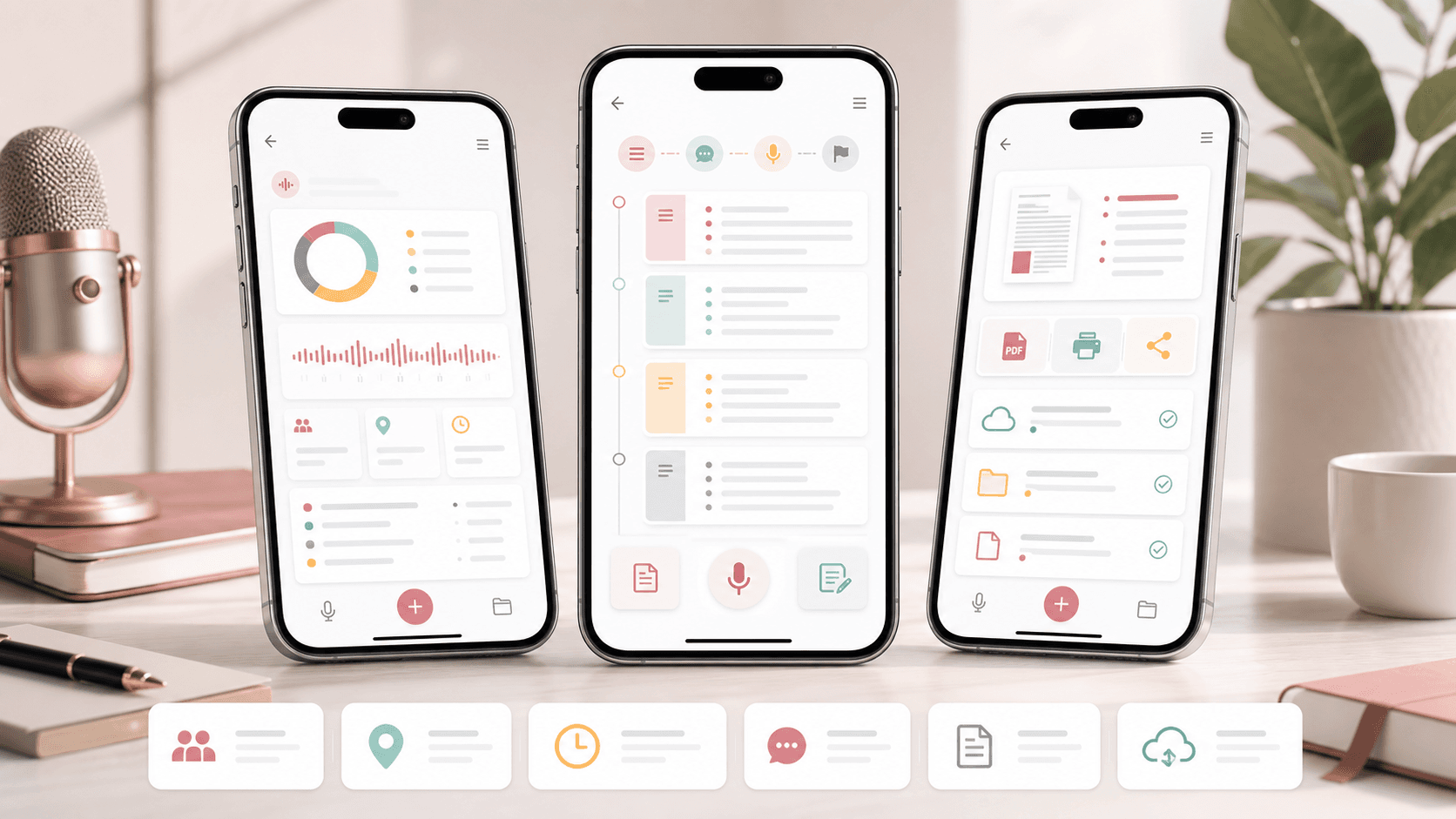
Mobile speech preparation assistant visual with phone screens for analysis, outline writing, speaker notes, dictation, and document export workflows
Project scope

Flutter mobile product engineering, guided speech workflow design, PDF generation, speech-to-text input, local persistence, API integration, file management, and cross-platform release support

3
guided preparation modes
PDF
export, print, and share workflows
Voice
speech-to-text capture
iOS + Android
cross-platform mobile app

Timeline

Mobile app delivery and production support for guided speech creation workflows

Speakers needed more than a blank writing screen

The product had to help users prepare a talk in stages: understand the speaking context, shape the message, capture delivery notes, and keep finished materials available for rehearsal, printing, sharing, or later editing.

  • Public speaking preparation needed structured prompts for purpose, timing, venue, audience, and supporting material
  • Content drafting had to connect full answers with short memory cues for delivery notes
  • Users needed keyboard and voice input without losing work during mobile sessions
  • Finished analysis, content, notes, PDFs, and saved files needed a practical mobile file workflow

A guided mobile workspace for turning ideas into delivery-ready notes

SpeakFlow organizes speech preparation into analysis, content, and notes workflows. Each step uses editable prompts, saved progress, voice input, PDF generation, and file management so speakers can move from planning to delivery inside one app.

  • Analysis workflow for purpose, timing, venue, audience, and supporting-element decisions
  • Content workflow for outline, hook, main messages, supporting points, summary, final quote or joke, and call to action
  • Notes workflow that turns content cues into concise speaker prompts for rehearsal or live delivery
  • PDF preview, print, share, saved file list, local storage, and API-backed save or upload workflows

Product surfaces

What the platform brought together

The work spanned core product operations, daily user workflows, data-heavy coordination, and resilient platform management.

Speech analysis workflow

The app guides users through the practical context that shapes a speech before they start drafting.

  • Editable question sets for purpose, timings, venue, audience, and supporting elements
  • So-what guidance that helps users translate context into delivery choices
  • Progress tracking so completed sections move out of the active preparation list

Content and notes builder

The drafting flow connects long-form speech content with short delivery cues that later populate the notes workflow.

  • Structured sections for beginning, messages, supporting points, summary, and call to action
  • Companion note fields for abbreviations, images, or memory cues tied to each content block
  • Automatic handoff from content notes into the dedicated speaker notes experience

Voice input and mobile writing

Mobile-first inputs reduce friction for users who want to capture speech ideas while thinking aloud.

  • Speech-to-text entry inside reusable app text fields
  • Keyboard visibility handling, focus management, and scroll behavior for longer prompts
  • Responsive Flutter layouts tuned around a portrait phone preparation workflow

Documents, files, and cloud handoff

Finished preparation can move from the app into portable documents and saved work records.

  • PDF generation, preview, print, share, and local save flows for analysis, content, and notes
  • Recent saved file browsing with PDF opening and local file management
  • REST API integration for speech records and file upload workflows

Buyer priorities

What mattered most to the people evaluating the platform

Prospective buyers want to know whether the work solved real workflow, adoption, reliability, data, and operations problems. These priorities shaped the product decisions.

Guided confidence

The app needed to lower the blank-page problem by giving speakers practical prompts that lead toward a finished talk.

  • Default question sets provided a proven preparation structure
  • Editable prompts let users adapt the framework to different speech types
  • Notes generation kept delivery preparation connected to content drafting

Mobile continuity

Users needed to start, stop, revise, and return to speech preparation without losing context.

  • Shared preferences preserved draft analysis, content, notes, and PDF data on device
  • Saved file screens made previous exports and work records accessible
  • Provider state management kept section progress and navigation consistent

Practical output

The product had to end in usable speaker materials rather than only an in-app draft.

  • PDF export and preview supported rehearsal, review, and sharing
  • Print and share actions connected preparation to real-world delivery needs
  • Cloud save and upload flows created a path for account-level persistence and support

System model

How the platform connects roles, workflows, and product surfaces

The product architecture brings every role into the same operating model, with shared data moving cleanly between web, mobile, media, and notification layers.

Analysis to notes workflow

A speech moves from audience and venue analysis into content structure, short delivery cues, and final speaker notes.

Mobile app plus service layer

The Flutter app connects local drafts, device files, voice input, PDF generation, and API-backed speech records.

Speaker-centered roles

The product experience supports the same user as planner, writer, rehearser, and presenter across one preparation journey.

Technology

The Stack We Used And Why

The stack section is written for buyers who need to understand the product architecture, operational trade-offs, and long-term maintainability of the system.

Mobile app

Used for a cross-platform iOS and Android experience with guided preparation, text entry, file handling, PDF preview, and device permissions.

FlutterDartProviderFlutter ScreenUtilPage Transition

Speech and document workflows

Used to capture voice input, generate portable documents, preview PDFs, print, share, and open saved files from the device.

Speech To TextPDFFlutter PDFViewPrintingShare PlusOpen File

Local device layer

Used to preserve draft work, manage files, request permissions, and support offline-friendly mobile sessions.

Shared PreferencesPath ProviderPermission HandlerDevice Info Plus

API and file services

Used to save speech records, list previous work, retrieve saved speech content, and upload generated files.

REST APIsDioMultipart uploadConnectivity Plus

Product operations

Used to support mobile app packaging, launcher assets, app icons, templates, fonts, and cross-platform release setup.

AndroidiOSCustom fontsLauncher iconsDocument templates

Why Flutter

The product needed one codebase for iOS and Android while still using device capabilities like microphone input, local files, permissions, printing, and sharing.

  • Flutter supported a consistent guided writing experience across platforms
  • Device plugins enabled speech input, document handling, file storage, and share actions
  • Provider kept the multi-step preparation state simple and predictable

Why Structured Prompts

A speech assistant is most useful when it turns a vague preparation task into a sequence of decisions.

  • Analysis prompts captured speaking context before content writing began
  • Content prompts translated ideas into hook, messages, support, and ending sections
  • Notes prompts converted long-form content into delivery cues

Why Document Output Was Core

Speakers often rehearse, share, print, and carry notes outside the app, so PDF and file workflows were treated as product features.

  • PDF generation supported portable review and printing
  • Share and open-file flows connected mobile prep to external workflows
  • Recent saved files made previous speech materials easier to revisit

Delivery

How the product came together

The work moved from domain modeling to core platform delivery, mobile adoption, and operational hardening.

1

Map the preparation method

Break public speaking preparation into analysis, content, and notes so the app could guide users instead of offering an empty editor.

2

Build the mobile writing flow

Implement portrait-first Flutter screens, editable prompts, saved progress, speech-to-text input, and smooth navigation across sections.

3

Add document and file workflows

Generate PDFs, preview documents, support print and share actions, and give users a recent saved file workspace.

4

Connect persistence and services

Wire local storage, API calls, file upload, connectivity checks, and device permissions around the core preparation journey.

Operational depth

What made the platform usable after launch

The strongest case studies are not only feature lists. They show how the system is operated, monitored, governed, and improved when real users depend on it.

Draft continuity

Speech preparation is often interrupted, so the app preserves work across sections and sessions.

  • Local persistence for analysis, content, notes, and generated PDF data
  • Section lists that remove completed prompts from the active queue
  • Recent saved file browsing for exported work

Device-native output

The app uses mobile device capabilities to make finished speech materials useful outside the application.

  • PDF preview, print, share, and open-file flows
  • Storage and external permission handling for Android and iOS file access
  • Microphone-driven dictation for hands-free idea capture

Service-ready architecture

The mobile app includes API boundaries for saving speeches, retrieving prior work, and uploading generated files.

  • Dio client layer for GET, POST, and multipart upload requests
  • Repository methods for speech records and file endpoints
  • Connectivity handling to support network-dependent actions

Results

The measurable and observable lift from the work

The strongest improvements are the ones a buyer can connect to daily work: fewer disconnected tools, safer operations, clearer workflows, and more reliable product behavior.

3 modes

Preparation Journey

Analysis, content, and notes workflows helped speakers move from planning to drafting to delivery preparation.

Voice ready

Mobile Capture

Speech-to-text entry gave users a faster way to capture ideas while preparing on a phone.

PDF output

Portable Materials

Generated PDFs, preview, print, and share workflows turned app content into rehearsal and delivery assets.

API backed

Saved Workflows

REST and multipart upload support created a path for saved speech records and generated files beyond local drafts.

Outcome

A stronger operating system for speech preparation and public speaking mobile app

The platform reduced tool fragmentation and gave each role a clearer path from live activity to day-to-day action.

A Flutter mobile app that guides speakers through analysis, content creation, and delivery notes instead of leaving them with a blank editor

Speech-to-text, editable prompts, saved progress, and local persistence tuned for mobile preparation sessions

PDF generation, preview, print, share, and saved file workflows that make finished speech materials portable

Repository and API integration patterns for saved speeches, file uploads, and cloud-backed work history

FAQ

Frequently Asked Questions About SpeakFlow

Answers about the speech preparation and public speaking mobile app scope, platform model, technology choices, operational workflows, and related build patterns.

What Kind Of App Does SpeakFlow Represent?

SpeakFlow represents a public speaking preparation mobile app with guided analysis, speech content drafting, speaker notes, voice input, saved drafts, PDF export, printing, sharing, and API-backed file workflows.

Why Does A Speech App Need Structured Analysis?

Speech quality depends on purpose, timing, venue, audience, supporting material, and delivery context. Structured prompts help users make those decisions before they start writing the final talk.

How Does The Notes Workflow Support Delivery?

The content workflow captures short cues beside longer answers, then carries those cues into the notes experience so users can rehearse and present from concise speaker prompts.

Can This Pattern Support Other Guided Writing Apps?

Yes. The same architecture can support coaching worksheets, lesson planning, grant writing, interview prep, sales scripts, training content, and other structured writing products.

Related services

Build a similarly ambitious product without starting from a blank page.

We can help scope the web, mobile, AI, media, and operating layers needed for your own platform.

Start a project inquiry