Portfolio case study

StockWise: Restaurant purchasing and inventory operations platform

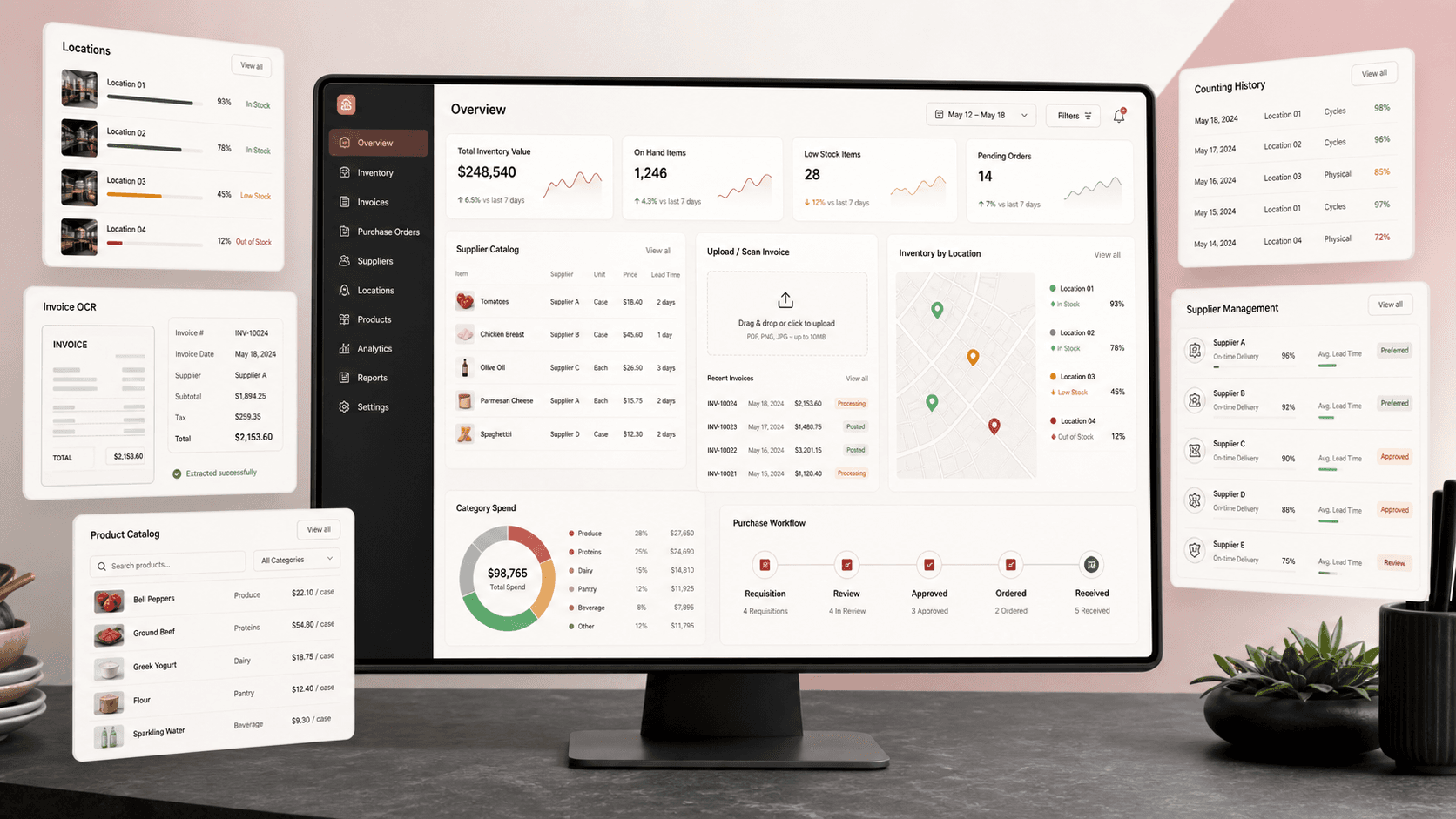
A restaurant purchasing and inventory operations platform that connects invoice intake, product catalogs, supplier setup, stock counting, location controls, category reporting, and role-aware back-office workflows.

Name changed to respect NDA.

Restaurant purchasing and inventory operations platform visual with invoice intake, supplier catalog, stock counting, location controls, and category analytics dashboard panels
Project scope

Back-office product engineering across Blazor Server workflows, Azure AD authentication, MongoDB data services, MudBlazor tables and forms, invoice parsing, inventory counting, supplier catalogs, location setup, and restaurant-level reporting

9
back-office modules
OCR
invoice document intake
MongoDB
product and location records
Azure AD
authenticated staff access

Timeline

Restaurant purchasing and inventory operations platform with document intelligence, stock control, and multi-location workflows

Restaurant stock and purchasing data needed one operating system

Restaurant teams were managing products, suppliers, invoices, stock counts, categories, and locations across workflows that needed tighter structure. The platform had to turn invoices and inventory activity into product records, value reporting, and repeatable back-office controls.

  • Stock teams needed restaurant, location, category, status, date, and month filters to make inventory counts usable in daily operations
  • Invoices needed upload, scanning, supplier matching, manual correction, and conversion into reusable product records
  • Operations teams needed global product, local product, supplier, category, restaurant, profile, and location setup screens
  • Leaders needed value reporting by restaurant, date, month, main category, and subcategory without rebuilding spreadsheets

A Blazor operations console for stock, invoices, suppliers, and reporting

StockWise uses a secured .NET and Blazor Server application to connect inventory counting, invoice document intelligence, product conversion, supplier setup, location management, and analytics into one restaurant operations workspace.

  • Azure AD protected Blazor Server app with MudBlazor navigation, tables, filters, dialogs, forms, and role-aware menu behavior
  • MongoDB-backed services for products, local product records, restaurants, suppliers, locations, categories, invoices, history, counting events, users, and validation
  • Invoice upload and processing flow using document recognition, PDF text extraction, supplier model matching, editable line items, and conversion into product data
  • Inventory and reporting screens for stock counts, location assignment, category totals, month/date views, status filters, and restaurant-level operational visibility

Product surfaces

What the platform brought together

The work spanned core product operations, daily user workflows, data-heavy coordination, and resilient platform management.

Inventory counting workspace

Stock teams can filter, review, edit, and value local inventory records by restaurant, location, date, month, category, status, and search terms.

  • Restaurant, main-location, sub-location, main-category, subcategory, date, month, status, and search filters
  • Editable stock-count table with previous count dates, amounts, values, new count entry, unit price, and total value support
  • History-aware product records connected to restaurant-specific local stock and location data

Invoice intake and document intelligence

Supplier invoices move from upload or logged inbox files into structured product rows that operators can correct before conversion.

  • PDF, JPEG, PNG, and JPG invoice uploads with server-side file handling and supplier selection
  • Azure Form Recognizer and PDF extraction workflows for invoice detection, line-item analysis, and supplier model matching
  • Editable invoice line table for item number, description, delivered quantity, unit, unit price, total amount, and delivery date

Product and supplier catalog control

The platform separates global product templates from restaurant-specific stock records so common products can be reused without losing local operating context.

  • Global product list with restaurant, status, existing-stock, search, category, and supplier workflows
  • Local product views that connect product details, restaurant assignment, locations, history, and counting events
  • Supplier, category, unit conversion, and profile setup screens for ongoing catalog maintenance

Restaurant and location operations

Operational setup screens give administrators the data structure needed to manage multiple restaurants, storage locations, and access rules.

  • Restaurant administration, profile settings, supplier management, categories, locations, and sublocations
  • Role-aware navigation that can limit users to profile-only access or expose full operations modules
  • Danish localization and date handling for restaurant staff workflows

Module depth

Dedicated product blocks for the highest-value workflows

For large platforms, the conversion story depends on showing how each major module solves a specific operating problem, not only listing features.

Inventory control

Stock Counts Become Searchable Operational Records

The inventory workspace turns physical counts into structured product, location, date, month, and value records that staff can filter and update.

Source evidence showed the Mit Lager screen with restaurant, location, category, status, counting date, month, search, editable count rows, unit price, value totals, print support, and cached product/location data services.

  • Count history is visible beside new count entry
  • Location and category filters reduce scanning time
  • Unit pricing connects quantity changes to stock value
  • Restaurant-specific local products preserve operating context

Document automation

Invoices Feed The Product Database Instead Of Another Spreadsheet

Invoice processing gives operators a reviewable path from supplier documents to structured product records.

Source evidence showed invoice upload, PDF/image acceptance, Azure Form Recognizer integration, PDF text extraction, supplier model selection, editable invoice rows, and conversion into global product records.

  • Supplier invoice models guide extraction
  • Operators can repair missing units before conversion
  • Invoice files can be read from upload or inbox-style logs
  • Converted rows can become reusable product data

Reporting

Category Value Reporting Supports Better Purchasing Decisions

Restaurant leaders can review inventory value by date, month, main category, and subcategory instead of manually rebuilding stock summaries.

Source evidence showed the Statistik screen grouping count values by main category and subcategory with restaurant/date/month filters and total-value footers.

  • Date and month views match stock-count cadence
  • Category grouping makes value drivers easier to scan
  • Restaurant filtering supports multi-site review
  • Search and table grouping keep reports operational, not just decorative

Buyer priorities

What mattered most to the people evaluating the platform

Prospective buyers want to know whether the work solved real workflow, adoption, reliability, data, and operations problems. These priorities shaped the product decisions.

Purchasing discipline

Restaurant purchasing improves when invoices, products, suppliers, categories, and inventory counts share one data model.

  • Invoice rows can be reviewed before becoming product records
  • Supplier and category setup keeps product data clean enough for reporting
  • Global and local product separation supports reuse without losing restaurant context

Location-aware stock control

Food and beverage teams need to know where stock lives, when it was counted, and how much value is tied up in each product group.

  • Main-location and sub-location filters match real storage areas
  • Count events preserve previous dates, quantities, and values
  • Restaurant-level filtering supports teams managing more than one site

Back-office adoption

The tool needed familiar operations screens for staff who spend their day in tables, forms, filters, and review queues.

  • MudBlazor tables, selects, switches, dialogs, and snackbars keep workflows familiar
  • Role-aware navigation keeps the interface smaller for restricted users
  • Localized dates and Danish interface terms fit the working environment

System model

How the platform connects roles, workflows, and product surfaces

The product architecture brings every role into the same operating model, with shared data moving cleanly between web, mobile, media, and notification layers.

Invoice to inventory workflow

Supplier invoices move through upload, extraction, review, conversion, product catalog updates, stock counts, and reporting.

Restaurant operations roles

Stock staff, purchasing managers, suppliers, restaurant admins, and finance reviewers share one operating model with different controls.

Secure .NET operations platform

Blazor screens, Azure AD identity, MongoDB services, invoice recognition, and reporting modules work as one protected back-office system.

Technology

The Stack We Used And Why

The stack section is written for buyers who need to understand the product architecture, operational trade-offs, and long-term maintainability of the system.

Operations web app

Used for authenticated back-office workflows where staff manage invoices, products, stock counts, suppliers, categories, locations, and reporting.

ASP.NET CoreBlazor Server.NET 6Razor componentsMudBlazor

Data model

Used to persist restaurant, product, supplier, category, location, invoice, history, count, user, and settings data behind operational screens.

MongoDBMongoDB C# DriverBSON modelsService layer caching

Identity and access

Used to protect restaurant operations workflows and adjust navigation based on user settings and privilege levels.

Azure ADMicrosoft Identity WebOpenID ConnectJWT BearerRole-aware navigation

Invoice intelligence

Used to extract invoice data from supplier files, validate rows, and convert reviewed documents into structured product records.

Azure AI Form RecognizeriText 7PDF extractionFile upload handlingSupplier models

Why Blazor Server For Operations

The product needed authenticated internal screens with dense tables, editable rows, filters, dialogs, and server-side data access.

  • Blazor Server kept UI workflows and .NET service logic close together for back-office screens
  • MudBlazor accelerated table-heavy inventory and invoice interfaces
  • ASP.NET routing and authentication fit the protected operations-console model

Why MongoDB For Restaurant Records

Product, location, count, supplier, invoice, and history records needed flexible structures as operational workflows evolved.

  • Document models suited product details, nested locations, counting events, and history records
  • Service classes kept database access organized around restaurant operations modules
  • Short-lived caching reduced repeated product and location reads during table workflows

Why Document Recognition Matters

Manual invoice entry is one of the highest-friction points in restaurant purchasing operations.

  • Invoice scanning reduced the need to retype supplier line items
  • Editable review tables kept staff in control before data conversion
  • Supplier-specific models made extraction practical across different invoice formats

Delivery

How the product came together

The work moved from domain modeling to core platform delivery, mobile adoption, and operational hardening.

1

Map restaurant purchasing data

Connect restaurants, products, suppliers, categories, locations, invoices, stock counts, and user settings into one data model.

2

Build operational screens

Create authenticated Blazor workflows for inventory, invoices, global products, local products, statistics, and setup modules.

3

Add invoice intelligence

Use document recognition and PDF extraction to turn supplier invoices into reviewed product rows.

4

Surface value reporting

Group count data into restaurant, date, month, category, subcategory, and total-value views for purchasing visibility.

Operational depth

What made the platform usable after launch

The strongest case studies are not only feature lists. They show how the system is operated, monitored, governed, and improved when real users depend on it.

Global and local product structure

The platform supports reusable product templates while allowing each restaurant to maintain its own local stock, locations, count history, and status.

  • Global products can be filtered by restaurant delivery context
  • Local products attach restaurant-specific location and counting data
  • Existing-stock filtering helps operators avoid duplicate local records

Invoice review before conversion

Document recognition is paired with human review so extracted supplier data can be corrected before it affects the product catalog.

  • Uploaded invoice rows remain editable in the UI
  • Missing unit values can be applied across rows
  • Supplier-specific model selection improves extraction context

Operational reporting from count history

Stock value reporting is built from count events rather than detached manual summaries.

  • Date and month filters match inventory review cycles
  • Main-category and subcategory grouping creates purchasing-level summaries
  • Total footers make category value visible at review time

Results

The measurable and observable lift from the work

The strongest improvements are the ones a buyer can connect to daily work: fewer disconnected tools, safer operations, clearer workflows, and more reliable product behavior.

9 modules

Operations Coverage

Navigation covers dashboard, inventory, local products, global products, invoices, scan errors, profile, suppliers, categories, locations, restaurants, and statistics workflows.

OCR-ready

Invoice Intake

Supplier invoice files can be uploaded, analyzed, reviewed, and converted into structured product data.

Location-aware

Stock Counts

Inventory records connect products to restaurants, main locations, sublocations, count dates, quantities, and values.

Category totals

Purchasing Visibility

Reporting groups inventory value by restaurant, date, month, main category, and subcategory.

Outcome

A stronger operating system for restaurant purchasing and inventory operations platform

The platform reduced tool fragmentation and gave each role a clearer path from live activity to day-to-day action.

A secured Blazor Server operations console for restaurant inventory, invoices, products, suppliers, categories, locations, restaurants, and reporting

An invoice intake workflow that combines upload, document recognition, PDF extraction, supplier model matching, editable rows, and product conversion

A restaurant-specific inventory counting workspace with location, category, date, month, status, search, value, and print-oriented workflows

MongoDB-backed data services for product catalogs, local stock, locations, suppliers, invoices, history, counting events, users, and settings

FAQ

Frequently Asked Questions About StockWise

Answers about the restaurant purchasing and inventory operations platform scope, platform model, technology choices, operational workflows, and related build patterns.

What Kind Of Platform Does StockWise Represent?

StockWise represents a restaurant purchasing and inventory operations platform for invoice intake, supplier catalogs, product records, local stock counts, location setup, category reporting, and authenticated back-office workflows.

Why Combine Invoice Scanning With Inventory Management?

Invoices contain supplier product and price data, while inventory counts show what is actually held at each restaurant. Connecting both helps teams reduce duplicate entry and make purchasing decisions from fresher operational data.

Why Use A Global And Local Product Model?

Global products create reusable catalog records, while local products preserve restaurant-specific location, count, history, and status details. That separation keeps catalog data reusable without flattening each restaurant into the same stock view.

Can This Pattern Support Larger Hospitality Groups?

Yes. The same architecture can extend to multi-site hospitality groups with approval workflows, supplier portals, budget thresholds, purchase orders, mobile stock counts, variance alerts, and finance integrations.

Related services

Build a similarly ambitious product without starting from a blank page.

We can help scope the web, mobile, AI, media, and operating layers needed for your own platform.

Start a project inquiry