Portfolio case study

TicketPilot: Event ticketing and organizer analytics platform

An event ticketing and organizer analytics platform that pairs customer account access with a browser-based operations dashboard for organizers, locations, events, registrations, event status, and reporting.

Name changed to respect NDA.

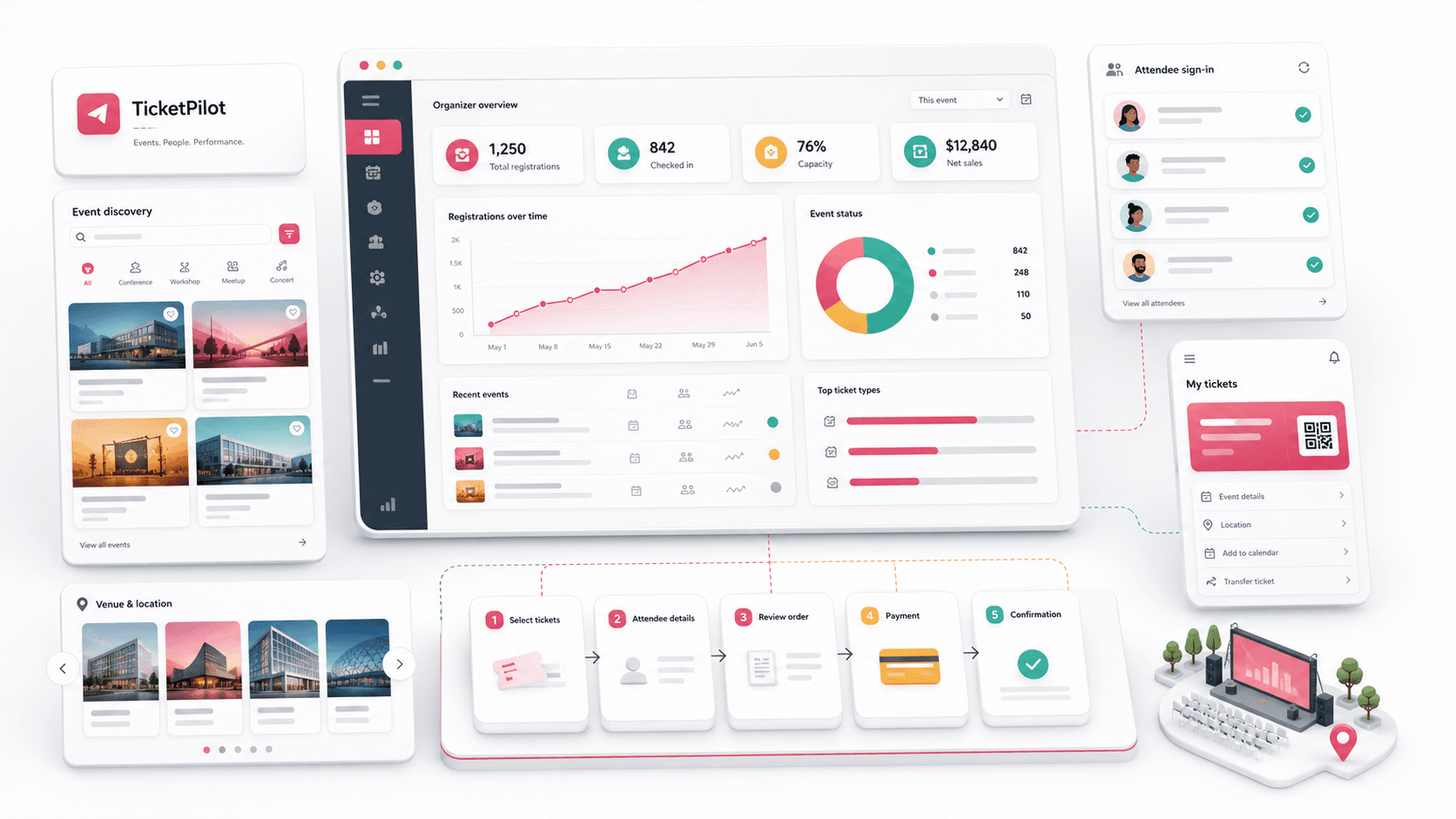
Event ticketing and organizer analytics platform visual with attendee account cards, event dashboard metrics, registration chart, status donut, venue cards, and ticket workflow blocks
Project scope

Frontend product engineering across customer account access, authentication journeys, organizer dashboard UI, event reporting cards, charting, and admin navigation foundation

2
connected web surfaces
4
dashboard operating metrics
8
admin navigation areas
Charts
event statistics and status views

Timeline

Customer web and admin dashboard foundation for an event ticketing platform

The event platform needed a credible customer and operator foundation

The project needed the first visible layers of a modern event ticketing product: customer account access for attendees and organizers, plus an administrative dashboard that could help operators monitor events, locations, organizers, registrations, and status trends.

  • Customer-facing account screens needed to support login, signup, password recovery, social sign-in options, and mobile-responsive presentation
  • Operators needed a dashboard with high-level counts for organizers, places, events, and registrations
  • Event teams needed charts and tables to compare monthly statistics, event status, registration fees, locations, categories, contacts, and completion state
  • The product needed a navigation model that could expand into events, organizers, registrations, locations, messages, calendar, and settings

A two-surface web platform for attendees and event operators

TicketPilot combines a Next.js customer web layer with a React administration dashboard so account entry, organizer operations, event metrics, and registration oversight can evolve from one product foundation.

  • Next.js customer web app with login, signup, forgot-password, email login link, social sign-in affordances, and public account-entry routing
  • React admin panel with dashboard overview cards, event statistics chart, event status chart, and a high-density event table
  • Sidebar navigation for dashboard, events, organizers, registrations, places and locations, messages, calendar, and settings
  • Reusable chart and layout components that give event operators a starting point for analytics-heavy workflows

Product surfaces

What the platform brought together

The work spanned core product operations, daily user workflows, data-heavy coordination, and resilient platform management.

Customer account access

The customer-facing web surface establishes the entry point for attendees and organizers before deeper ticketing workflows are added.

  • Login, signup, and forgot-password routes in a Next.js App Router structure
  • Email/password, login-link, Google, Facebook, and Apple sign-in affordances
  • Responsive authentication layouts with branded entry panels and policy links

Organizer operations dashboard

The admin surface gives operators a fast overview of the event business before they drill into individual management areas.

  • Overview metric cards for organizers, places and locations, total events, and registrations
  • Monthly event statistics chart and event status donut chart
  • Event table covering organizer, event type, location, fee, registration count, category, contact, email, and status

Expandable event management shell

The navigation and layout patterns establish clear places for the modules a full event marketplace needs as it matures.

  • Dashboard, events, organizers, registrations, locations, messages, calendar, and settings navigation
  • Private layout shell with sidebar and header patterns for authenticated admin screens
  • React Router structure ready for additional event, organizer, registration, and settings pages

Analytics-ready interface components

The product foundation includes visual reporting patterns that can grow into organizer and platform intelligence.

  • Line chart and donut chart components for event trends and status distribution
  • Bootstrap, Sass, Material UI, ApexCharts, Chart.js, and Google Charts support for dashboard UI work
  • Responsive table and card patterns for dense operational data

Buyer priorities

What mattered most to the people evaluating the platform

Prospective buyers want to know whether the work solved real workflow, adoption, reliability, data, and operations problems. These priorities shaped the product decisions.

Faster operator orientation

Event operators need to understand platform health quickly before diving into details.

  • Top-level counts make organizers, locations, events, and registrations immediately visible
  • Monthly and status charts help operators scan event activity without exporting data first
  • Event tables place fee, category, location, contact, and status context in one view

Expandable product structure

Early-stage event platforms benefit from a shell that can absorb more modules without redesigning navigation each time.

  • Separate customer and admin surfaces keep attendee access distinct from operator workflows
  • Admin navigation already accounts for event, organizer, registration, location, message, calendar, and settings modules
  • Reusable layouts and chart components support future reporting and management screens

Trustworthy account entry

Ticketing products need simple, familiar account access before users reach higher-stakes flows such as purchases, organizer setup, or registrations.

  • Login, signup, and recovery paths create the basic account lifecycle
  • Social sign-in affordances reduce friction for returning users
  • Responsive auth layouts help the platform feel credible across device sizes

System model

How the platform connects roles, workflows, and product surfaces

The product architecture brings every role into the same operating model, with shared data moving cleanly between web, mobile, media, and notification layers.

Customer and operator surfaces

Account access and organizer dashboards work as separate surfaces on the same event platform foundation.

Event operations overview

Operators scan organizers, locations, events, registrations, monthly trends, status mix, and event records from one dashboard.

Expandable operating roles

Attendees, organizers, venue teams, and administrators can be supported through role-specific modules as the platform grows.

Technology

The Stack We Used And Why

The stack section is written for buyers who need to understand the product architecture, operational trade-offs, and long-term maintainability of the system.

Customer web

Used for account entry and public-facing web flows that can grow into event discovery, ticket purchase, organizer onboarding, and attendee account management.

Next.jsReactTypeScriptBootstrapSass

Admin console

Used for authenticated event operations, dashboard navigation, organizer management, registration oversight, and reporting surfaces.

ReactTypeScriptReact RouterReact ScriptsSass

Dashboard reporting

Used to create visual summaries for event statistics, status mix, registration volume, and operational tables.

ApexChartsChart.jsReact ApexChartsReact Google Charts

Interface system

Used to build familiar admin controls, responsive cards, sidebar navigation, chart panels, and data-heavy layouts.

Material UIBootstrap gridSCSSReusable layout components

Why Split Customer And Admin Surfaces

Attendee account entry and operator dashboards have different density, routing, and layout needs.

  • Next.js fits public-facing web journeys where routing, metadata, and page structure matter
  • A separate React admin console keeps dense operational screens out of the customer experience
  • The two-surface model can later connect through shared APIs for events, users, tickets, and registrations

Why Dashboard-First Admin Work

Event teams need immediate platform visibility before deeper CRUD screens become valuable.

  • Metric cards show the operating shape of the platform at a glance
  • Charts introduce trend and status views for event activity
  • Tables make individual event records scannable for support and operations

Why A Modular Navigation Shell

Ticketing platforms often expand quickly from accounts into events, registrations, venues, messaging, calendars, and settings.

  • Sidebar navigation gives each major operating area a stable home
  • Private layouts keep authenticated admin UI consistent as modules are added
  • Reusable dashboard components reduce redesign work as the product matures

Delivery

How the product came together

The work moved from domain modeling to core platform delivery, mobile adoption, and operational hardening.

1

Define the event platform entry points

Separate customer account access from authenticated operator workflows so the product can grow in both directions.

2

Build the dashboard foundation

Create the first operator view around metrics, charts, event records, sidebar navigation, and responsive dashboard layout.

3

Prepare expansion modules

Reserve clear navigation homes for events, organizers, registrations, locations, messages, calendar, and settings.

4

Shape the reporting layer

Use chart and table components that can evolve from static foundation data into API-backed analytics.

Operational depth

What made the platform usable after launch

The strongest case studies are not only feature lists. They show how the system is operated, monitored, governed, and improved when real users depend on it.

Account lifecycle foundation

The customer web app covers the core account-entry moments needed before ticketing, organizer onboarding, or attendee management can scale.

  • Login, signup, and password recovery routes
  • Email login link and social sign-in affordances
  • Responsive branded entry screens for desktop and mobile use

Admin overview model

The dashboard gives event operators a single first screen for platform activity and event record scanning.

  • Organizer, place, total event, and registration counts
  • Event statistics and event status chart panels
  • Event table with fee, registration, category, contact, email, and status fields

Event management runway

The navigation structure sets up the modules expected in a fuller ticketing and organizer platform.

  • Events, organizers, registrations, places, messages, calendar, and settings areas
  • Authenticated private layout shell
  • Component structure that can absorb API-backed management screens

Results

The measurable and observable lift from the work

The strongest improvements are the ones a buyer can connect to daily work: fewer disconnected tools, safer operations, clearer workflows, and more reliable product behavior.

2 surfaces

Customer And Admin Split

The product separates account-entry web journeys from the higher-density admin dashboard experience.

4 metrics

Operator Overview

Organizers, locations, events, and registrations are surfaced as first-screen dashboard indicators.

8 modules

Admin Navigation Coverage

The admin shell accounts for dashboard, events, organizers, registrations, locations, messages, calendar, and settings workflows.

Chart ready

Reporting Foundation

Line and donut chart patterns establish the foundation for event statistics and status reporting.

Outcome

A stronger operating system for event ticketing and organizer analytics platform

The platform reduced tool fragmentation and gave each role a clearer path from live activity to day-to-day action.

A customer-facing Next.js web surface for login, signup, password recovery, and social account-entry patterns

A React admin dashboard with organizer, location, event, and registration overview metrics

Event statistics, event status, and event table views that give operators a practical analytics starting point

An expandable admin navigation shell for events, organizers, registrations, places, messages, calendar, and settings

FAQ

Frequently Asked Questions About TicketPilot

Answers about the event ticketing and organizer analytics platform scope, platform model, technology choices, operational workflows, and related build patterns.

What Kind Of Platform Does TicketPilot Represent?

TicketPilot represents an event ticketing and organizer analytics platform with customer account access, organizer dashboards, event metrics, registration visibility, location tracking, and an expandable admin console.

Why Separate The Customer Website From The Admin Console?

Customer-facing account flows and operator dashboards have different needs. Separating them keeps attendee entry simple while giving administrators room for dense metrics, charts, tables, and management modules.

What Would Come Next In A Full Event Ticketing Build?

The next build phase would typically add event discovery, ticket inventory, organizer onboarding, registration checkout, attendee profiles, venue management, messaging, calendar operations, and API-backed reporting.

Can NextPage Build A Complete Event Marketplace From This Pattern?

Yes. The same foundation can grow into a complete event marketplace with public event pages, organizer tools, registration workflows, payments, attendee communication, reporting, and role-aware administration.

Related services

Build a similarly ambitious product without starting from a blank page.

We can help scope the web, mobile, AI, media, and operating layers needed for your own platform.

Start a project inquiry