Portfolio case study

VenueCart: Event commerce and vendor operations platform

A multi-surface event commerce platform that lets attendees discover events, preorder food, buy tickets, manage payments, chat around orders, and report lost items while vendors and organizers manage menus, orders, coupons, event operations, and performance dashboards.

Name changed to respect NDA.

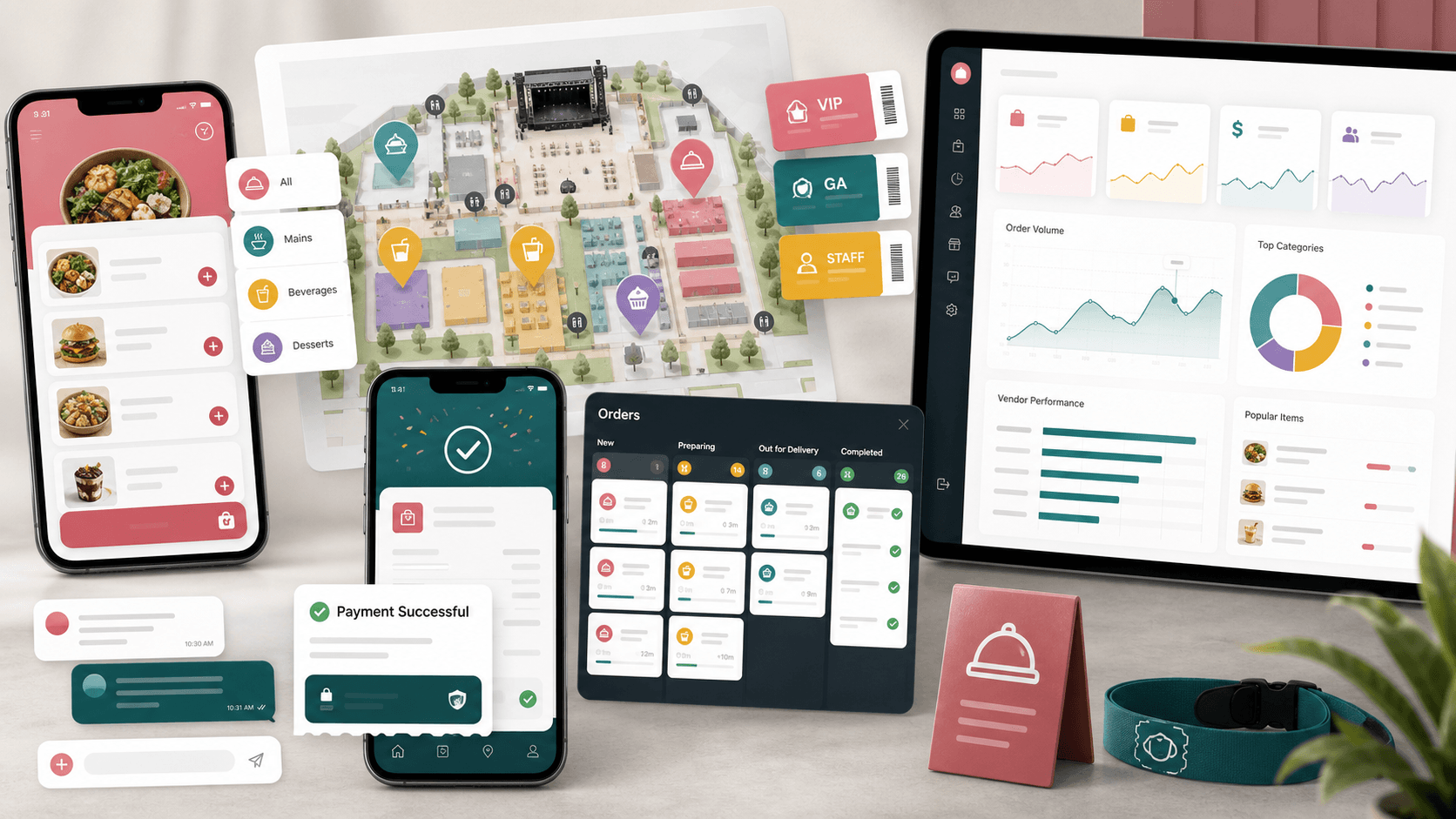
Event commerce platform visual with mobile ordering screens, vendor operations dashboard, ticket badges, order lanes, payment confirmation, chat, coupons, and analytics charts
Project scope

Mobile app, admin console, vendor operations, event ordering, payments, notifications, and analytics delivery

2
connected product surfaces
5
core mobile navigation areas
3
operating roles
Stripe
card and saved payment workflows

Timeline

Multi-surface product build for event-day commerce and operations

Event ordering needed to work before, during, and after the venue rush

The product had to support attendees browsing events and vendors, vendors managing menus and order status, and organizers keeping event operations visible without forcing every workflow into one generic admin screen.

  • Attendees needed a faster path from event discovery to vendor menu, cart, payment, pickup, review, and support
  • Vendors needed mobile-first tools for menus, coupons, orders, pickup timing, revenue, ratings, and payouts
  • Organizers needed a browser console for users, events, vendors, snippets, coupons, and event dashboards
  • The system needed notifications, chat, payment methods, and connectivity handling for real event-day usage

A shared commerce layer for attendees, vendors, and event operators

VenueCart pairs a Flutter mobile app with a React admin console. The mobile app handles event discovery, vendor menus, tickets, checkout, orders, chat, account settings, lost-and-found, and vendor tools, while the admin console gives operators control over events, vendors, users, coupons, snippets, and dashboards.

  • Role-aware Flutter flows for attendee ordering, vendor menu management, and dashboard views
  • Event and vendor discovery with tickets, vendor menus, reviews, preorder flows, and event-specific ordering
  • Order lifecycle tooling across pending, completed, cancelled, detail, chat, review, and confirmation screens
  • React admin modules for event setup, vendor management, user management, coupons, snippets, and reporting

Product surfaces

What the platform brought together

The work spanned core product operations, daily user workflows, data-heavy coordination, and resilient platform management.

Event discovery and preorder commerce

Attendees can browse events, inspect vendors, review menus, add items to cart, apply coupons, and pay through saved or new cards.

  • Homepage and event detail flows for event discovery, tickets, vendors, vendor menus, reviews, and preorder
  • Cart update, checkout, payment success, saved cards, and Stripe tokenization flows
  • Coupon discovery and application paths connected to order totals

Vendor mobile operations

Vendors get mobile tools for daily sales, menus, categories, pickup timing, orders, coupons, ratings, feedback, and payouts.

  • Vendor dashboard, sales analytics, upcoming order, menu, order history, and feedback views
  • Menu, category, coupon, pickup-time, sales-payout, and vendor feedback management screens
  • Order status updates, order detail views, customer chat, and review confirmation workflows

Organizer and admin console

The browser admin surface gives operations teams a structured workspace for event, vendor, user, coupon, snippet, and dashboard management.

  • React role-gated navigation for super admin and admin workflows
  • Event, organizer event, vendor, user, coupon, location, type, snippet, order, and dashboard routes
  • Event invite, event dashboard, vendor detail, and searchable table workflows

Engagement and support loops

Notifications, announcements, chat, ratings, help, and lost-and-found features keep the product useful beyond checkout.

  • Push notification settings, OneSignal/Firebase messaging readiness, and notification screens
  • Order chat, announcements, help, previous orders, privacy, terms, and account management
  • Lost item hub with add, detail, and personal item management flows

Buyer priorities

What mattered most to the people evaluating the platform

Prospective buyers want to know whether the work solved real workflow, adoption, reliability, data, and operations problems. These priorities shaped the product decisions.

Event-day throughput

The app needed to reduce friction at busy venues where ordering, payment, pickup, and vendor communication happen under time pressure.

  • Preorder and checkout flows reduce queues before attendees reach vendors
  • Order status views and vendor dashboards keep preparation work visible
  • Saved cards and payment confirmation shorten repeat purchase paths

Vendor autonomy

Food vendors needed to update their own menus, categories, coupons, pickup windows, and customer interactions without waiting on central operators.

  • Vendor menu and category screens let teams maintain available items
  • Coupons and pickup-time settings support event-specific promotion and fulfillment
  • Ratings, feedback, revenue, and payout screens give vendors business visibility

Operator control

Admin teams needed a browser workspace for setup and supervision while the mobile app handled high-frequency field workflows.

  • Role-based admin navigation separates super-admin and admin concerns
  • Event, vendor, user, snippet, and coupon modules support operational setup
  • Dashboards and searchable tables help teams monitor activity without digging through raw data

System model

How the platform connects roles, workflows, and product surfaces

The product architecture brings every role into the same operating model, with shared data moving cleanly between web, mobile, media, and notification layers.

Attendee to vendor order flow

Event discovery leads into vendors, menus, cart, coupon, payment, order tracking, chat, review, and previous-order history.

Three-sided operating model

Attendees, vendors, and event operators share the same commerce foundation while using role-specific screens and controls.

Mobile and admin platform layers

Flutter app workflows, React admin modules, commerce APIs, notifications, file uploads, and analytics work together as one event platform.

Technology

The Stack We Used And Why

The stack section is written for buyers who need to understand the product architecture, operational trade-offs, and long-term maintainability of the system.

Mobile app

Used for attendee and vendor workflows that need fast, touch-friendly access across event discovery, ordering, menus, payments, chat, and account tools.

FlutterDartRiverpodDioShared PreferencesCached Network Image

Admin web

Used for the browser-based operations console covering events, vendors, users, coupons, snippets, dashboards, tables, and role-gated navigation.

ReactTypeScriptReact RouterReduxRedux-SagaBootstrap

Commerce and communication

Used to support card tokenization, saved cards, order charging, push notifications, order chat, announcements, and support workflows.

StripeOneSignalFirebase MessagingWebSocket channelREST APIs

Operations layer

Used to model event, vendor, user, order, product, coupon, ticket, rating, lost-item, and sales dashboard data across mobile and web surfaces.

Role-based APIsPaginationFile uploadsSales dashboardsRatings models

Why Flutter For The Field App

The product needed one mobile codebase for attendee and vendor workflows, with smooth navigation, resilient local preferences, and consistent UI across iOS and Android.

  • Flutter kept event discovery, vendor tools, checkout, and account screens in one maintainable app
  • Riverpod providers separated screen state from API and model concerns
  • Connectivity checks, loaders, and shared widgets made high-frequency mobile flows more consistent

Why A Separate Admin Console

Event operators need denser controls than the mobile experience can comfortably provide, especially for setup, moderation, and reporting.

  • React Router and role-gated menus organized users, events, vendors, orders, coupons, snippets, and dashboards
  • Table-driven admin screens made searchable operations easier for support teams
  • Separating admin and mobile surfaces kept attendee ordering focused and lightweight

Why Payments And Notifications Were Core

For event commerce, checkout and post-order communication are part of the product experience, not add-ons.

  • Stripe card tokenization, saved cards, and charge flows supported repeat ordering
  • Push notification setup helped order, event, and account updates reach users on mobile
  • Chat, announcements, and help screens gave users ways to resolve event-day questions

Delivery

How the product came together

The work moved from domain modeling to core platform delivery, mobile adoption, and operational hardening.

1

Map the event commerce journey

Break the product into attendee discovery, vendor selection, menu browsing, cart, payment, order tracking, chat, and review flows.

2

Build vendor operating tools

Create the screens and API connections vendors need to manage menus, categories, orders, coupons, pickup timing, ratings, and sales.

3

Add admin supervision

Use a browser console for role-gated user, vendor, event, coupon, snippet, and dashboard management.

4

Connect payments and support

Wire card tokenization, saved payment methods, charge flows, notifications, chat, help, announcements, and lost-and-found paths.

Operational depth

What made the platform usable after launch

The strongest case studies are not only feature lists. They show how the system is operated, monitored, governed, and improved when real users depend on it.

Role-aware mobile experiences

The mobile app adapts its navigation and screens to attendee and vendor needs instead of forcing every user through the same commerce journey.

  • Attendees see event discovery, orders, lost-and-found, and account tools
  • Vendors get dashboard, menu, coupon, pickup, order, feedback, and payout workflows
  • Shared authentication, profile, notification, and support screens keep the app coherent

Commerce depth beyond a basic cart

The platform includes enough commerce behavior to support real event ordering rather than a simple menu demo.

  • Cart updates, coupons, tickets, saved cards, payment success, and order history
  • Order status updates across pending, completed, cancelled, detail, review, and chat flows
  • Ratings and feedback connect post-order experience back to vendors

Admin and organizer readiness

The admin console supports the operational setup work that happens before an attendee ever opens the app.

  • Event and organizer-event routes support event creation, editing, detail, and invitations
  • Vendor and user routes give operators control over marketplace participants
  • Coupon, snippet, type, location, order, and dashboard modules support everyday administration

Results

The measurable and observable lift from the work

The strongest improvements are the ones a buyer can connect to daily work: fewer disconnected tools, safer operations, clearer workflows, and more reliable product behavior.

30+ screens

Mobile Workflow Coverage

The Flutter app covered discovery, events, vendors, menus, checkout, orders, chat, account, coupons, categories, dashboards, and lost-and-found workflows.

10+ modules

Admin Console Scope

The React console included event, organizer-event, vendor, user, coupon, snippet, order, location, type, and dashboard management.

Role aware

Marketplace Operations

Attendee, vendor, organizer, admin, and super-admin responsibilities were separated across mobile and web surfaces.

Payment ready

Checkout Infrastructure

Stripe tokenization, saved cards, card deletion, order charging, coupon application, and payment success flows supported event commerce.

Outcome

A stronger operating system for event commerce and vendor operations platform

The platform reduced tool fragmentation and gave each role a clearer path from live activity to day-to-day action.

A Flutter mobile app for event discovery, vendor browsing, tickets, preorder, checkout, orders, chat, notifications, accounts, lost-and-found, and vendor tools

A React admin console for users, vendors, events, organizer events, orders, coupons, snippets, locations, types, dashboards, and role-gated navigation

Commerce workflows covering cart updates, coupons, saved cards, card charging, payment success, order statuses, reviews, ratings, and sales dashboards

Support and engagement loops through push notifications, announcements, help, privacy and terms screens, order chat, profile editing, and lost-item management

FAQ

Frequently Asked Questions About VenueCart

Answers about the event commerce and vendor operations platform scope, platform model, technology choices, operational workflows, and related build patterns.

What Kind Of Platform Does VenueCart Represent?

VenueCart represents an event commerce and vendor operations platform with attendee ordering, vendor menus, event tickets, checkout, order tracking, chat, reviews, coupons, dashboards, and an admin console.

Why Does An Event Ordering App Need Vendor Tools?

Event ordering depends on vendors keeping menus, pickup timing, coupons, order status, customer communication, ratings, and payouts up to date. Vendor tools make the marketplace operational instead of only customer-facing.

How Did The Product Support Event Operators?

The browser admin console gave operators role-gated access to user, vendor, event, organizer-event, order, coupon, snippet, location, type, and dashboard workflows.

Can This Pattern Support Other Venue Commerce Products?

Yes. The same architecture can support stadium ordering, festivals, conferences, food courts, campus events, trade shows, pop-up markets, and other venue-based commerce models.

Related services

Build a similarly ambitious product without starting from a blank page.

We can help scope the web, mobile, AI, media, and operating layers needed for your own platform.

Start a project inquiry