
Quick Answer: AI Agent Development Cost
AI agent development cost depends less on the word agent and more on the business workflow the system is expected to complete. A small internal assistant that answers questions from approved documents is a different build from an agent that reads customer context, calls APIs, updates records, asks for approval, monitors outcomes, and escalates exceptions.
For planning, think in tiers. A narrow assistant can often be scoped in weeks if the data is clean and the tool surface is limited. A RAG-backed agent with authenticated context, citations, and human review needs more design, data engineering, testing, and observability. A production workflow agent that acts across CRM, helpdesk, ERP, calendar, billing, or internal admin systems should be estimated like custom software, not like a prompt experiment.
NextPage usually starts AI agent estimates by mapping the workflow, data, integrations, permissions, evaluation plan, and operating owner. If those pieces are unclear, the AI Agent Readiness Assessment is the safest first step before budgeting a build.
What Drives AI Agent Cost?
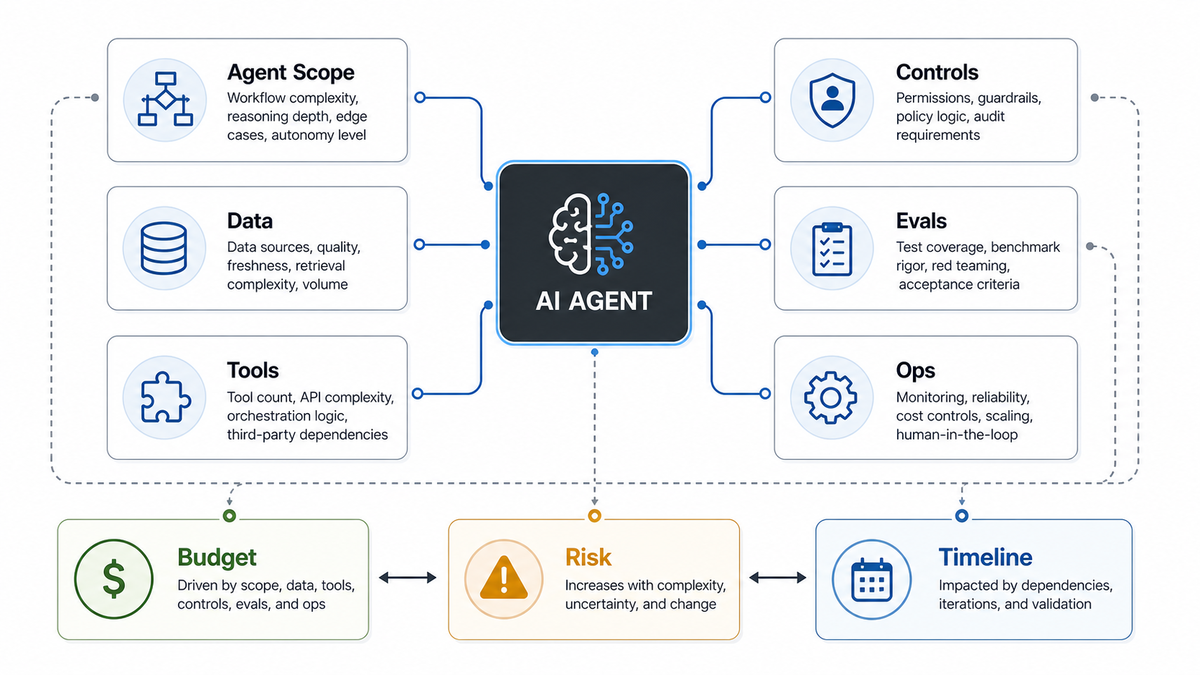
The largest cost drivers are workflow complexity, data readiness, tool integration depth, controls, evaluation, and operations. Model usage matters, but it is only one part of a production system. The expensive work is making the agent reliable inside a real business process.
| Cost driver | What changes the budget | Why it matters |
|---|---|---|
| Workflow scope | Number of steps, edge cases, user roles, exceptions, approvals, and handoffs | Defines the product design, orchestration logic, testing, and support model |
| Data access | Public docs, private knowledge, live database records, permissions, freshness, and citations | Turns an agent into a maintained data product instead of a static assistant |
| Tool integrations | CRM, helpdesk, ERP, ecommerce, calendar, billing, messaging, search, and internal APIs | Requires authentication, field mapping, retries, rate limits, logs, and failure handling |
| Controls and permissions | Role-based access, allowed tools, action limits, approvals, audit logs, and rollback paths | Limits what the agent can expose or change |
| Evaluation | Golden datasets, regression checks, red-team cases, acceptance criteria, and monitoring | Turns subjective model quality into measurable release gates |
| Operations | Observability, cost monitoring, prompt and retrieval changes, incident response, and ownership | Keeps the agent useful after launch |
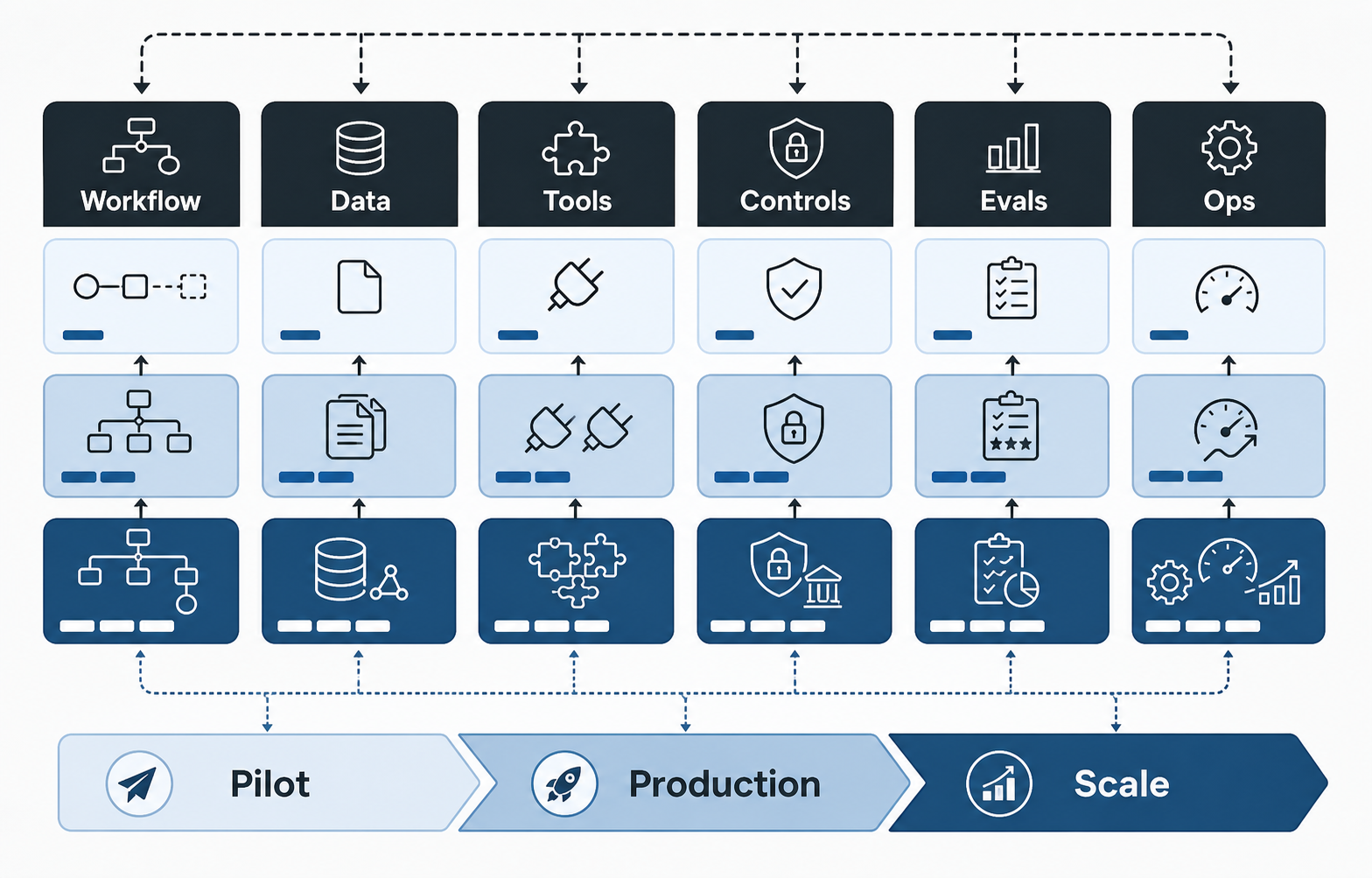
A quote that does not cover these inputs is usually guessing. Two AI agents can share the same model and chat UI while requiring completely different engineering effort because one only drafts answers and the other can change business records.
Cost Tiers For AI Agent Development
A practical estimate starts by choosing the lowest tier that can solve the business problem. Teams often overbuy autonomy when a grounded assistant, workflow helper, or human-reviewed agent would produce value with less risk.
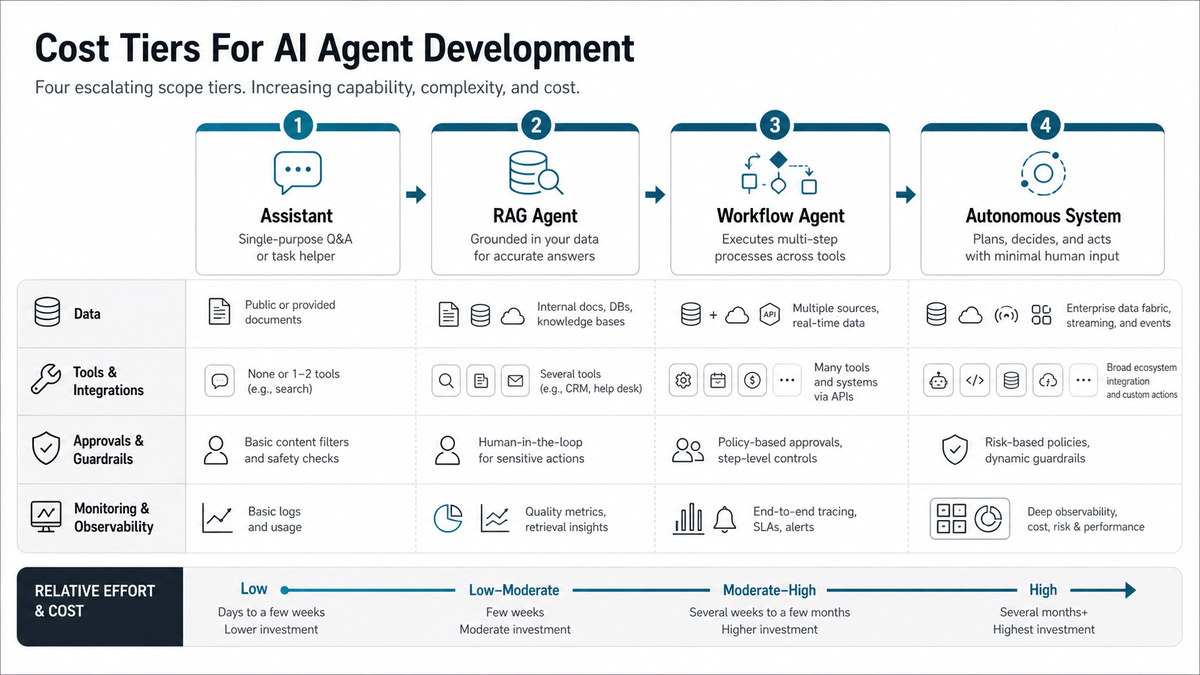
| Tier | Best fit | Typical complexity | Main budget risk |
|---|---|---|---|
| Assistant | Single-purpose Q&A, summarization, classification, or drafting | Low to moderate | Prompt quality, UX, source content, and adoption |
| RAG agent | Answers or drafts grounded in documents, policies, tickets, or product knowledge | Moderate | Retrieval quality, permissions, citations, and content freshness |
| Workflow agent | Completes multi-step work across tools with human approval | Moderate to high | API reliability, state management, exception handling, and review design |
| Autonomous system | Plans, decides, acts, monitors, and coordinates across many systems | High | Governance, evaluation, observability, and operational accountability |
If the use case needs retrieval, model routing, evaluation, and secure context handling, treat it as an LLM development project with agent behavior layered on top. If the agent must act across tools, estimate integration, controls, monitoring, and support from day one.
Workflow Complexity And Autonomy
Autonomy is the first major budget lever. A low-autonomy assistant suggests, drafts, or answers. A higher-autonomy agent decides which tool to use, calls that tool, evaluates the result, and continues to the next step. Each additional decision point increases design, engineering, test coverage, and monitoring needs.
For example, a sales assistant that drafts a follow-up email from CRM notes is relatively contained. An agent that qualifies a lead, enriches the account, books a meeting, updates CRM fields, creates a task, and alerts an account owner has more states to manage. It also needs approval rules so the system does not write bad data or make commitments a person has not reviewed.
NextPage's generative AI development work separates content generation from AI automation services discovery early. That prevents a proof of concept from becoming a production risk because no one defined who approves actions, where errors go, or how the team recovers from a failed tool call.
Data, RAG, And Memory Costs
Data work can outweigh model work. A useful agent may need public website content, private documents, product manuals, tickets, customer records, invoices, calendars, analytics, or transaction history. Each source introduces access rules, freshness expectations, schema mapping, and retrieval quality questions.
RAG adds ingestion, chunking, embeddings, vector search, permission filtering, citation behavior, evaluation datasets, and content refresh routines. Memory adds another layer: what should the agent remember, for how long, for which user, and with what deletion or audit policy? Without clear answers, memory can become a privacy and quality risk.
The cheapest reliable version often starts with a small trusted corpus and a narrow workflow. Add more sources after the team can measure whether the agent retrieves the right information, refuses uncertain answers, and escalates gracefully.
Tool Integration And System Actions
Tool use is where many AI agent budgets move from prototype to production software. Reading from a single knowledge base is one level of work. Writing to HubSpot, Salesforce, Zendesk, Intercom, Stripe, Shopify, Jira, Slack, Google Workspace, a data warehouse, or an internal admin panel is a different level.
Every tool action needs authentication, scoped permissions, input validation, idempotency, rate-limit handling, retries, logs, user-visible status, and a fallback path. If an action changes money, access, customer records, or operational commitments, it should usually require human confirmation until the workflow has enough evidence to loosen controls.
When the agent is part of a larger product, the cost often overlaps with AI development services and custom application development: backend APIs, admin screens, queues, audit views, and analytics matter as much as the model call.
Security, Permissions, And Human Review
Security scope should be included before launch, not added after a demo. Production AI agents need role-based access, tenant isolation where relevant, secrets handling, prompt and response logging, data retention rules, abuse prevention, and audit trails for tool calls.
Human review also changes cost. A simple assistant can show a draft. A support or operations agent may need approval queues, confidence thresholds, supervisor review, and escalation paths. A high-risk workflow may require step-level confirmations, restricted tool lists, and policies that block certain actions entirely.
The practical question is not whether the model can perform a task once. It is whether the system can perform the task repeatedly with evidence, permissions, approval states, and recovery paths.
Evaluation, Observability, And QA
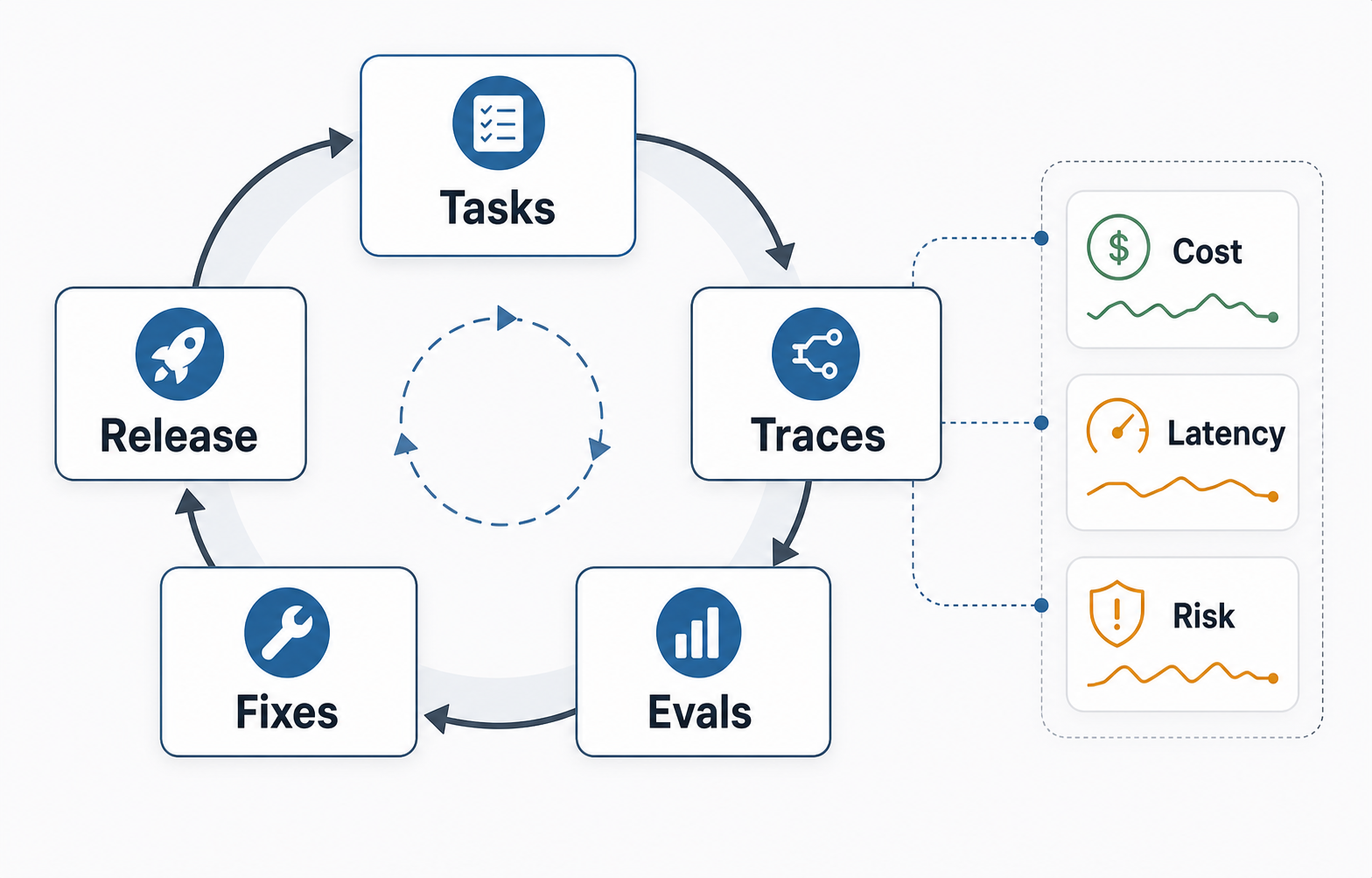
AI agent QA is not the same as checking a static feature. The system needs regression tests for prompts, retrieval, tool calls, refusal behavior, edge cases, permissions, and expected outputs. For higher-risk workflows, it also needs adversarial tests and human review of failures.
Observability is another budget line. Teams need to know which workflow ran, which data was retrieved, which tools were called, what the model returned, how long it took, what it cost, and whether a human corrected the result. Without those signals, the agent is difficult to improve and risky to expand.
Use evaluation as a scope-control tool. If a workflow cannot be tested with clear examples and acceptance criteria, it is probably too vague for a production agent.
Model API And Infrastructure Costs
Model fees are usually an operating cost rather than the full project cost. Official pricing changes over time, so estimate with current provider pages and refresh assumptions before procurement. During this run on 2026-07-22, the official OpenAI API pricing page, OpenAI GPT-5 page, Anthropic Claude pricing documentation, Anthropic Claude Sonnet 5 announcement, and OWASP LLM application risk guidance were checked for current token-pricing and risk context. Treat model pricing as a live procurement input because rates, context windows, caching discounts, regional processing, and batch pricing can change during an agent program.
Monthly cost depends on conversation volume, average turns, prompt length, retrieved context size, output length, model choice, caching, background jobs, evaluation runs, and tool-call overhead. A high-volume agent may need model routing, response caching, context trimming, batch jobs, rate limits, and spend alerts.
Infrastructure can also include vector storage, databases, queues, logs, analytics, secrets management, admin dashboards, background workers, and monitoring. These are not decorative line items; they are what let the agent run reliably after the first demo.
Timeline And Delivery Phases
AI agent timelines should be phased because discovery often changes the estimate. A sensible plan starts with workflow selection and readiness checks, then moves to a prototype, controlled pilot, production hardening, and expansion.
| Phase | What happens | Budget decision |
|---|---|---|
| Discovery | Map workflow, users, data, tools, risks, and success metrics | Confirm whether an agent is the right solution |
| Prototype | Build a narrow agent path with representative data and limited tools | Validate feasibility before broad integration |
| Pilot | Add human review, evaluation, logging, and real users in a controlled workflow | Measure quality, time saved, and failure modes |
| Production | Harden permissions, monitoring, support, deployment, and operating ownership | Decide launch scope and maintenance budget |
| Expansion | Add more workflows, tools, roles, and automation where evidence supports it | Scale only after the first workflow is stable |
For ROI planning, the AI Automation ROI Calculator can translate hours saved and team size into a directional payback view. The Workflow Automation Opportunity Finder is useful when several workflows are competing for the first automation sprint.
Budget Planning Checklist
Use this checklist before asking for an AI agent estimate. It turns a broad idea into inputs a build team can price responsibly.
- Define the primary workflow. What job should the agent complete, and what should stay manual?
- List users and roles. Who can ask, approve, override, or audit the agent?
- Map data sources. Which documents, systems, and records can the agent read?
- Map tool actions. Which systems can the agent write to, and which actions need approval?
- Set success metrics. Time saved, faster response, fewer errors, higher conversion, cleaner records, or better triage?
- Define risk controls. Access rules, action limits, escalation paths, audit logs, and rollback plans.
- Plan evaluation. Example tasks, expected answers, refusal cases, tool-call checks, and review cadence.
- Assign ownership. Who updates data, reviews failures, monitors cost, and approves new capabilities?
If the agent is part of a broader internal platform, supporting internal tool development may be part of the budget. Dashboards, admin review screens, and workflow controls often make the difference between a promising agent and a usable operations system.
How NextPage Estimates AI Agent Builds
NextPage estimates AI agent builds by separating the agent experience from the system behind it. We map the workflow, data access, retrieval design, tool integrations, permissions, human review, evaluation, analytics, and ongoing support. Then we recommend a version-one scope that can produce measurable value without adding uncontrolled autonomy.
Sometimes that means a RAG assistant. Sometimes it means a workflow agent with strict approvals. Sometimes the right first step is a readiness assessment, prototype, or internal tool before agent autonomy is added. The goal is not to build the most autonomous system possible. The goal is to build the simplest reliable system that improves the workflow.
If you are planning an AI agent for operations, support, sales, or internal knowledge work, start with the workflow and the risk controls. The budget will follow from the data, tools, approvals, evaluation, and operating model required to make that workflow dependable.