
Quick Answer: Android App Migration Checklist
An Android app migration checklist should prove that the app can meet current platform, security, UX, QA, and Play Store requirements without breaking critical workflows. The checklist should cover target API level, Android behavior changes, build tooling, third-party SDKs, permissions, privacy, local data, performance, accessibility, regression testing, release evidence, staged rollout, and rollback.
For Google Play submissions, new apps and updates must target Android 15, API level 35, or higher, with category-specific exceptions for Wear OS, Android Automotive OS, and Android TV. Existing apps also need to avoid falling behind availability requirements for users on newer Android versions. That makes Android modernization a product and release-risk decision, not only a Gradle setting.
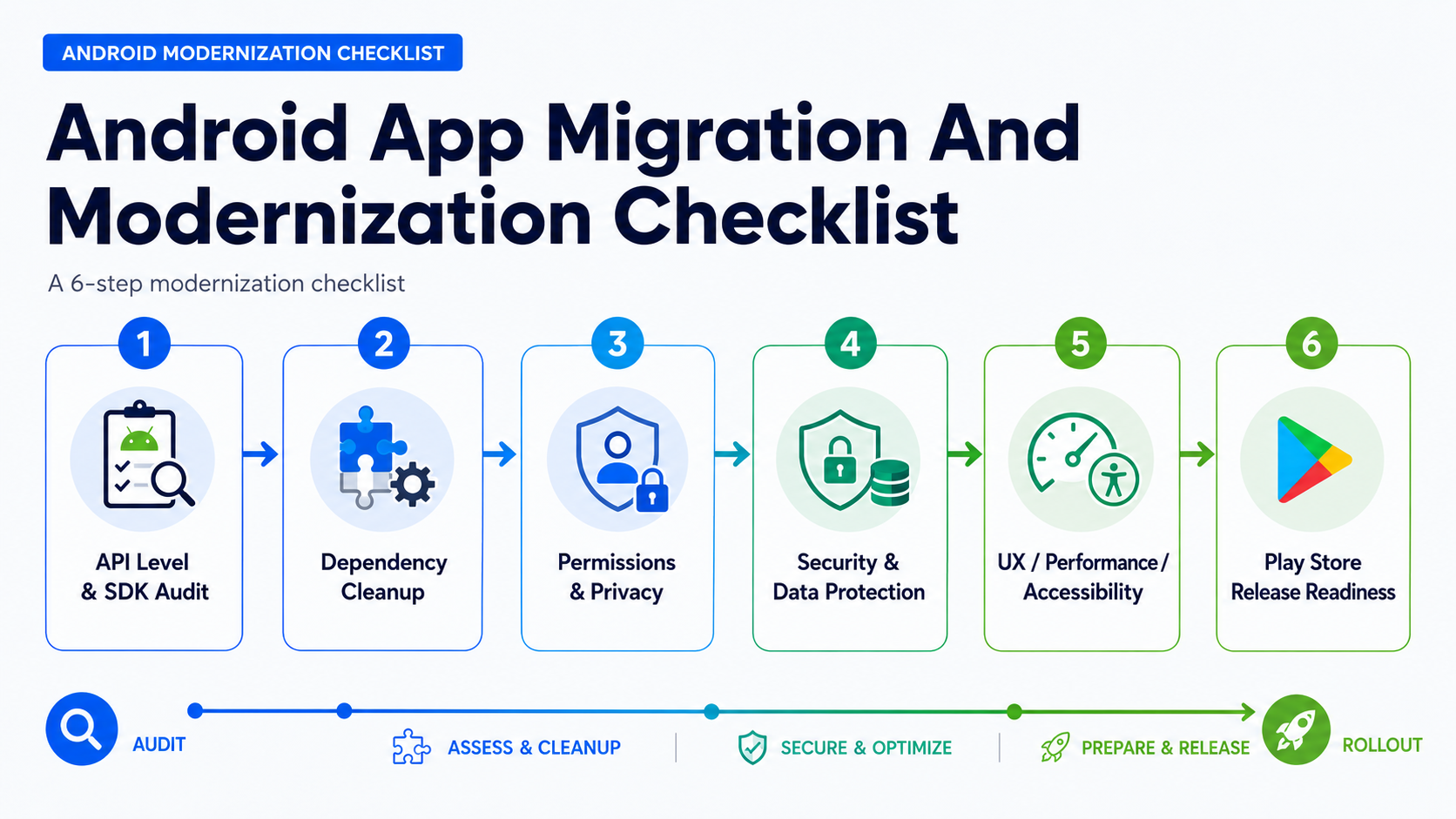
This guide is for CTOs, founders, product owners, and engineering teams responsible for an older Android app, a neglected codebase, a Play Console warning, a fragile hybrid wrapper, or a major modernization release. If the app needs Android-specific product decisions, NextPage's Android app development company team can audit the codebase, plan Kotlin and Jetpack modernization, and support the Play Store release path.
Migration Audit Snapshot
Start with a short executive snapshot before the team changes code. The snapshot should identify what must be fixed for the next release, what can wait, and where modernization might become a rebuild. This prevents the migration from becoming a scattered list of dependency updates with no release decision.
| Audit Area | Question To Answer | Evidence To Capture |
|---|---|---|
| Platform | Which Android versions, devices, form factors, and target API changes affect the app? | compileSdk, targetSdkVersion, minSdk, device matrix, behavior-change notes. |
| Codebase | Can the app be changed safely without blocking product work? | module map, architecture risks, build health, test coverage, owner notes. |
| Dependencies | Which SDKs, plugins, and libraries are deprecated, risky, or policy-sensitive? | dependency inventory, update path, replacement options, regression scope. |
| Security and privacy | Can the app justify every permission and protect sensitive data? | permission map, data safety inputs, token storage review, API security notes. |
| Release | What proves the migrated app is safe to ship? | QA pass, Play pre-launch report, rollout plan, crash/ANR monitoring, rollback trigger. |
If the current app is inherited, unstable, or stuck with a prior vendor, connect the audit to software project rescue services before funding a large rewrite. A short stabilization assessment often reveals whether migration is enough or whether the architecture needs a controlled rebuild.
Risk Matrix: Modernize, Improve, Or Rebuild?
The highest-value migration decision is not which dependency to update first. It is whether the existing app deserves another modernization cycle. Score each major area by migration risk and business value. Low-risk, low-value modules can stay stable. Low-risk, high-value modules should improve in place. High-risk, high-value modules need phased modernization. High-risk, low-value modules may be better retired, replaced, or isolated.
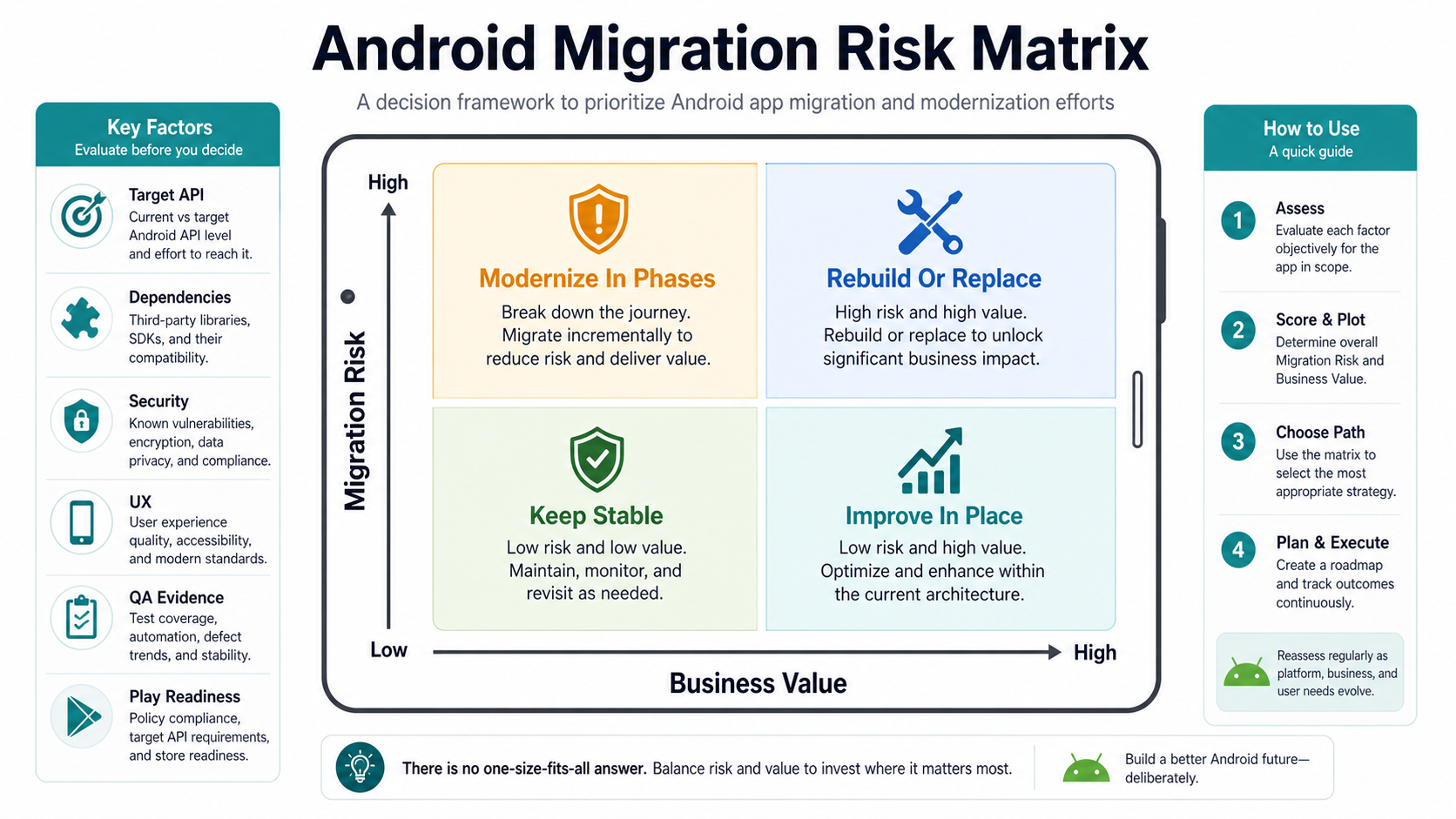
Use this matrix section-by-section. A stable reporting screen may only need target API validation. A payment, authentication, offline sync, Bluetooth, media, or field-workflow module deserves deeper testing. A legacy Cordova or PhoneGap shell may need a separate path through PhoneGap and Cordova app migration services if plugins, permissions, or Play Store compatibility have become the main risk.
For cost framing, compare the migration against the Android app development cost guide and run early estimates through the Custom Software Cost Estimator. A migration that only buys one more fragile release can be more expensive than a planned rebuild over the next two years.
1. Audit API Levels And Android Behavior Changes
Record the current compileSdk, targetSdkVersion, minSdk, Android Gradle Plugin, Gradle version, Kotlin version, Java compatibility, app signing setup, build variants, CI jobs, release tracks, and crash monitoring. Then map every skipped Android version to behavior changes that affect real workflows.
Android 15 targeting introduces release-relevant changes around edge-to-edge UI, foreground services, media processing, Do Not Disturb behavior, and other system behaviors. Android 16 targeting adds planning concerns such as adaptive layouts, predictive back behavior, health permissions, Bluetooth bond handling, safer intent matching, and large-screen assumptions. The team should translate these platform notes into workflow tests, not leave them as documentation links.
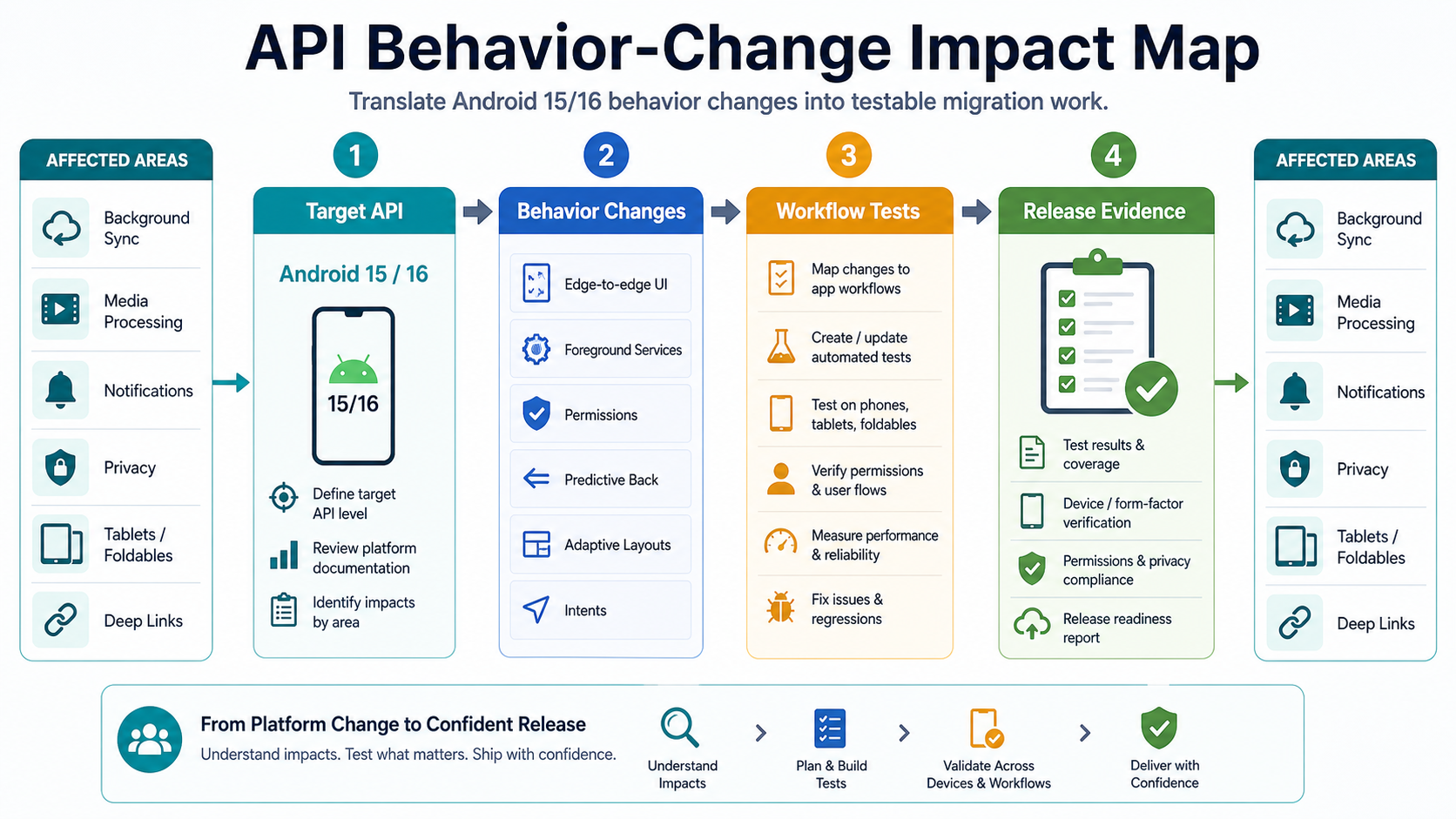
- Target API: confirm the required API level for the release date, app category, and Play Console track.
- Skipped versions: review behavior changes from the current target API through Android 15 and Android 16.
- Workflow impact: map platform changes to login, payments, media, location, notifications, background work, deep links, and offline sync.
- Build readiness: isolate build-tool upgrades from product feature work so failures are easier to diagnose.
- Regression plan: define which automated, manual, and real-device tests must pass before rollout.
2. Clean Up Dependencies, SDKs, And Architecture
Dependency cleanup is where Android modernization usually becomes real. Inventory AndroidX, Firebase, Google Play services, payment SDKs, analytics, ads, maps, push notifications, camera, storage, networking, database, crash reporting, chat, identity, and any proprietary vendor SDKs. Mark each dependency as current, upgradeable, deprecated, abandoned, internally forked, policy-sensitive, or replacement-needed.
Do not upgrade every package in one broad sprint. Group changes by blast radius. Build tooling, language versions, payment SDKs, authentication, maps, push notifications, analytics, and crash reporting each need their own verification path. The mobile app maintenance checklist is a useful operating model after the migration so SDK updates do not pile up again.
| Area | Migration Risk | Practical Move |
|---|---|---|
| Build and language tooling | Can break CI, signing, and every release variant. | Upgrade in a separate branch with clean build evidence. |
| Payments and auth | Can break revenue, login, or account trust. | Use sandbox tests, callback checks, session tests, and rollback criteria. |
| Analytics and crash SDKs | Can hide post-release failures or corrupt attribution. | Validate event names, consent, dashboards, and environment separation. |
| Push and deep links | Can break retention and campaign paths. | Test permission states, channels, cold-start behavior, and app-to-web handoffs. |
| Legacy plugins | Can block target API migration or store review. | Replace, isolate, or migrate the shell before the Play submission window. |
If the app also needs backend or admin changes, connect the mobile migration to the broader mobile app development plan. Android code may compile cleanly while APIs, admin workflows, and support dashboards remain unready for production.
3. Review Permissions, Privacy, And Security
A migration is the right time to remove permissions the app no longer needs. Review location, camera, contacts, storage, Bluetooth, notifications, microphone, health, background work, media, and any special app access. For every permission, define the user-facing reason, denial behavior, privacy-policy coverage, analytics impact, and test case.
Security review should cover token storage, local databases, screenshots, deep links, exported activities, receivers, services, intent filters, TLS behavior, API authentication, sensitive logging, account deletion, data export, and CI secret handling. Permission changes should be validated on supported Android versions and on devices that represent the real audience.
- Remove unused permissions, abandoned SDKs, and stale tracking code before resubmission.
- Check whether data safety declarations still match actual SDK and app behavior.
- Verify runtime permission prompts, denial states, and changed-permission recovery.
- Review exported components, deep links, intent handling, and backend API auth.
- Keep security and privacy evidence with the release record, not only in tickets.
4. Test UX, Performance, Accessibility, And Device QA
A modernized Android app should feel current, not merely compliant. Test navigation, back behavior, edge-to-edge layout, system bars, keyboard behavior, loading states, offline mode, orientation changes, large text, TalkBack labels, color contrast, touch targets, tablets, foldables, split screen, and low-memory devices.
Device coverage should reflect the business. Commerce, booking, logistics, field operations, media, healthcare, and enterprise apps need workflow-level testing, not only screen-by-screen smoke tests. Use the functional testing checklist for web and mobile apps to translate user journeys into repeatable regression coverage, and use mobile app testing services when the release needs independent QA evidence.
| QA Area | Migration Test | Release Risk If Skipped |
|---|---|---|
| Core workflows | Login, browse, search, checkout, booking, upload, sync, or admin task. | The app opens but revenue or operations fail. |
| System behavior | Back navigation, permissions, notifications, background work, and deep links. | Users hit broken Android-specific flows. |
| Performance | Cold start, slow screens, memory, battery, ANRs, and network retries. | Play quality signals and retention suffer. |
| Accessibility | Large text, TalkBack, contrast, touch targets, and focus order. | Usability and compliance risk increases. |
| Form factors | Phones, tablets, foldables, landscape, and split screen where relevant. | Layouts break on modern devices. |
5. Prepare Play Store Release Evidence
Play Store readiness is not a final upload step. It is a release gate. Before submission, confirm target API, app signing, versionCode, release notes, privacy policy, data safety form, SDK policy status, screenshots, store listing, staged rollout plan, pre-launch report, crash monitoring, ANR monitoring, support routing, and rollback triggers.
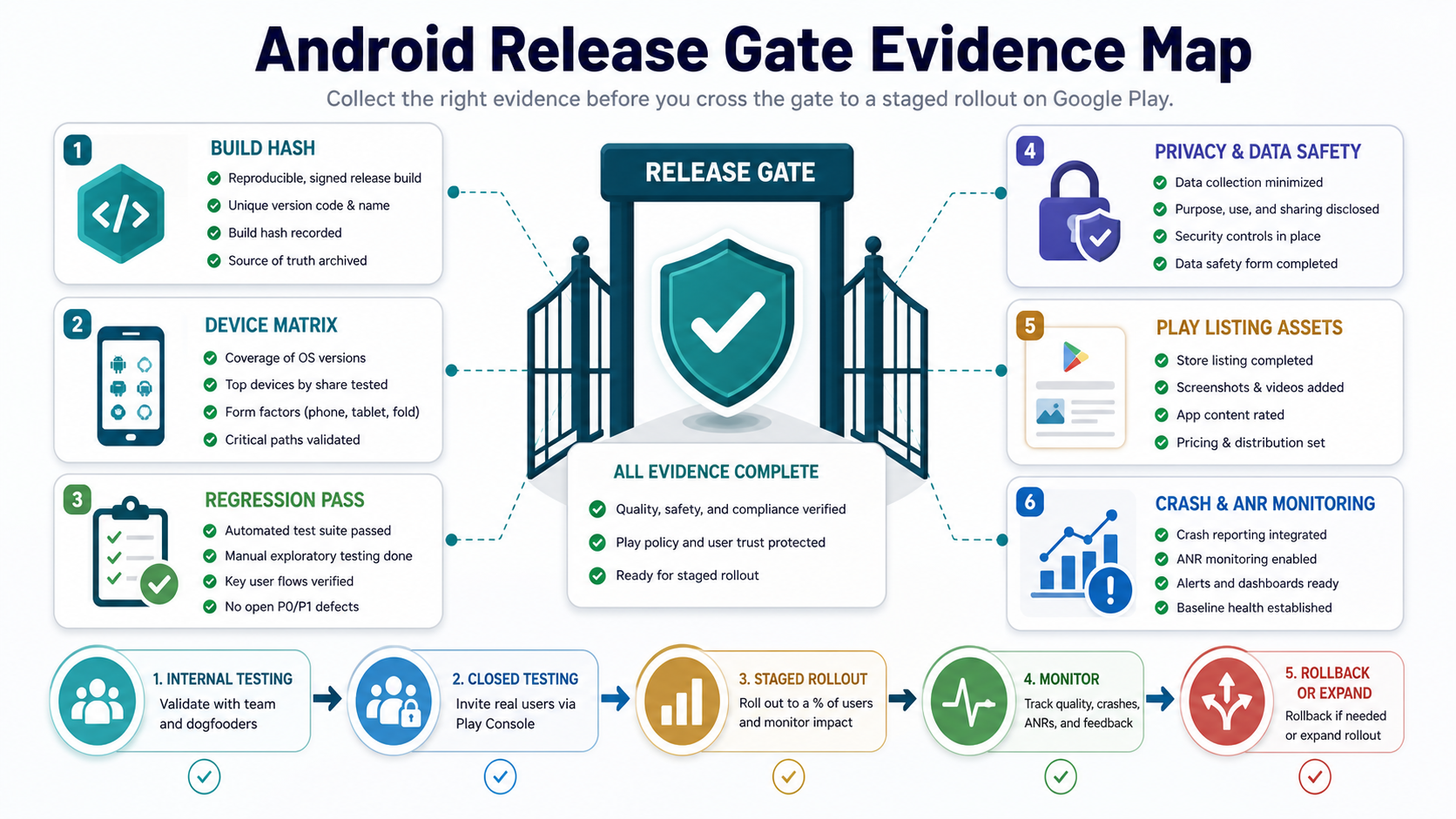
Use a release candidate build that product, QA, engineering, and support can all identify. Run Play Console pre-launch checks, smoke test the uploaded artifact, verify deep links, confirm analytics in the correct environment, and test app update behavior from the currently live version. The mobile app QA launch checklist is the right companion when the team needs a launch decision instead of another QA spreadsheet.
- Confirm target API and category-specific submission requirements.
- Validate store listing assets, screenshots, descriptions, policy declarations, and test accounts.
- Use internal or closed testing before a staged rollout when the change has real workflow risk.
- Define crash, ANR, payment, login, support-volume, and rollback triggers.
- Archive release evidence: build hash, QA result, source branch, store artifact, approval note, and monitoring dashboard.
Build A Practical Android Migration Roadmap
The safest roadmap separates compliance work from modernization work. Phase one should make the app buildable, testable, observable, and eligible for submission. Phase two should remove the riskiest dependencies and repair critical workflow issues. Phase three can modernize architecture, Jetpack patterns, Kotlin modules, Compose-ready screens, analytics, backend integrations, and design-system behavior.
| Phase | Goal | Typical Deliverables |
|---|---|---|
| Stabilize | Understand risk and restore reliable builds. | Code audit, build audit, dependency inventory, crash review, release plan. |
| Comply | Meet target API, policy, and Play submission requirements. | API target update, behavior-change fixes, permission review, QA evidence. |
| Modernize | Improve maintainability and user experience. | Architecture cleanup, SDK replacements, UX fixes, performance improvements. |
| Operate | Keep the app ready for future Android releases. | Monitoring, maintenance cadence, dependency policy, release checklist. |
If modernization is part of a broader platform decision, compare the plan with native vs cross-platform mobile app development before coupling Android migration with a larger rewrite. If requirements are still fuzzy, the mobile app development RFP checklist can help teams collect vendor-ready scope and QA expectations.
How NextPage Helps Modernize Android Apps
NextPage helps teams turn an aging Android app into a maintainable product again. A focused first engagement can include a codebase audit, target API readiness review, dependency risk map, Play Console issue review, UX and performance QA, security and privacy review, and a phased modernization roadmap. The output is not a vague recommendation to update everything. It is a sequenced plan that separates compliance, stability, user experience, and long-term maintainability.
For teams without enough internal Android capacity, NextPage can provide Android, backend, QA, release, and support capacity as an extended software team. If your app has Play Console warnings, unmaintained SDKs, crash issues, stale permissions, or a neglected codebase, start with an Android modernization readiness review and use the checklist above to decide what must happen before the next release.