
Assistive technologies improve elderly care when they make daily risk visible without taking independence away from the person receiving care. AI can detect patterns, prioritize alerts, and guide caregivers toward the next action. IoT devices can capture real-world signals from wearables, medication devices, smart home sensors, fall detectors, and connected health equipment.
The strongest elderly-care products combine both. They do not simply collect data. They help families, clinicians, senior-living teams, and home-care operators respond faster, coordinate better, and document care with less manual work.
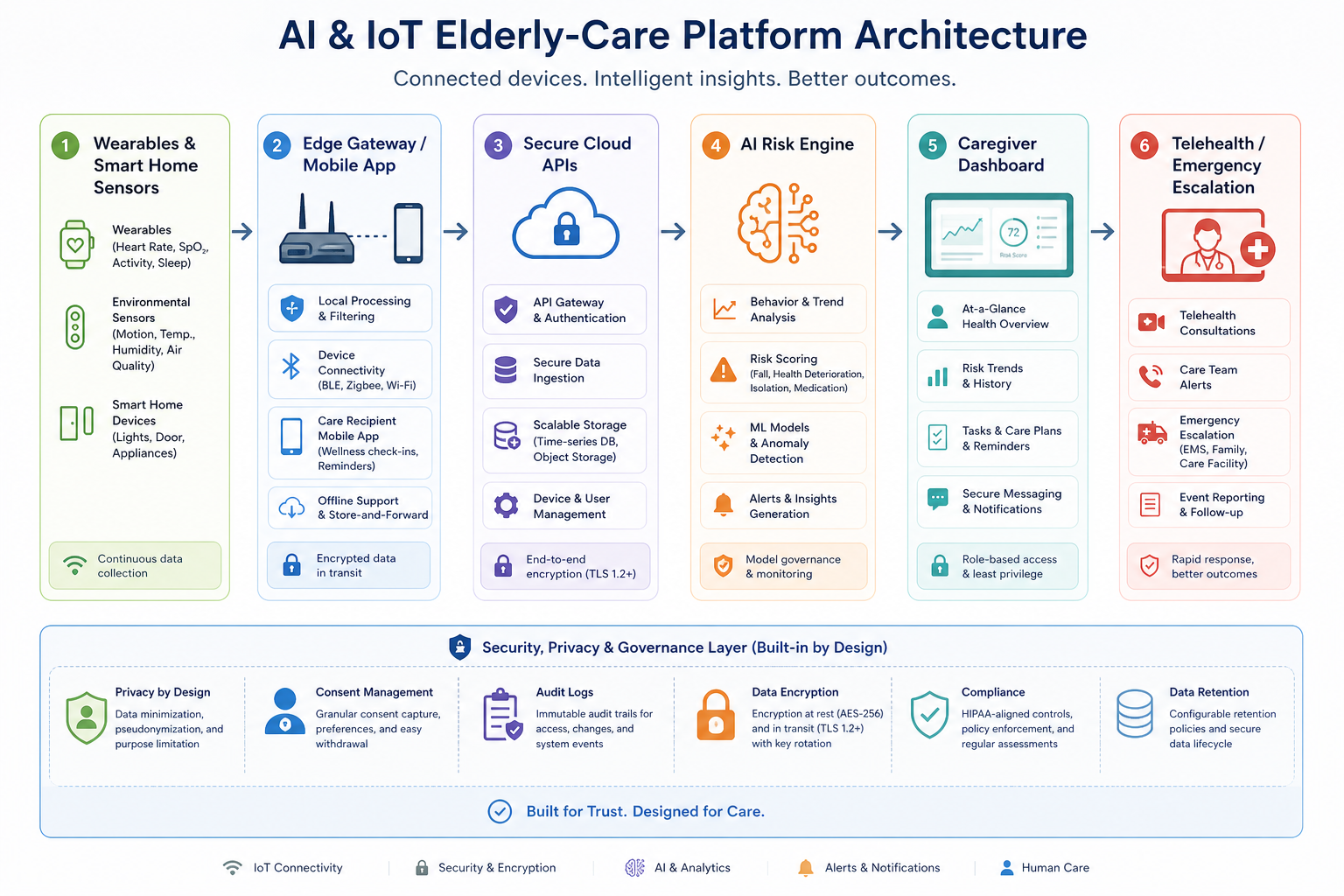
Quick Answer: How Do AI And IoT Improve Elderly Care?
AI and IoT improve elderly care by combining real-time signals with decision support. IoT devices capture events such as movement, sleep, medication use, location, heart rate, door activity, room conditions, and emergency-button presses. AI systems then identify patterns, rank alerts, suggest interventions, and help care teams focus on the highest-risk situations first.
For product teams, this is both a healthcare workflow and a software architecture challenge. A safe connected-care app needs reliable device ingestion, mobile caregiver workflows, secure data handling, analytics, and clear escalation rules. That is why elderly-care products often overlap with healthcare app development cost planning, privacy engineering, and long-term product operations.
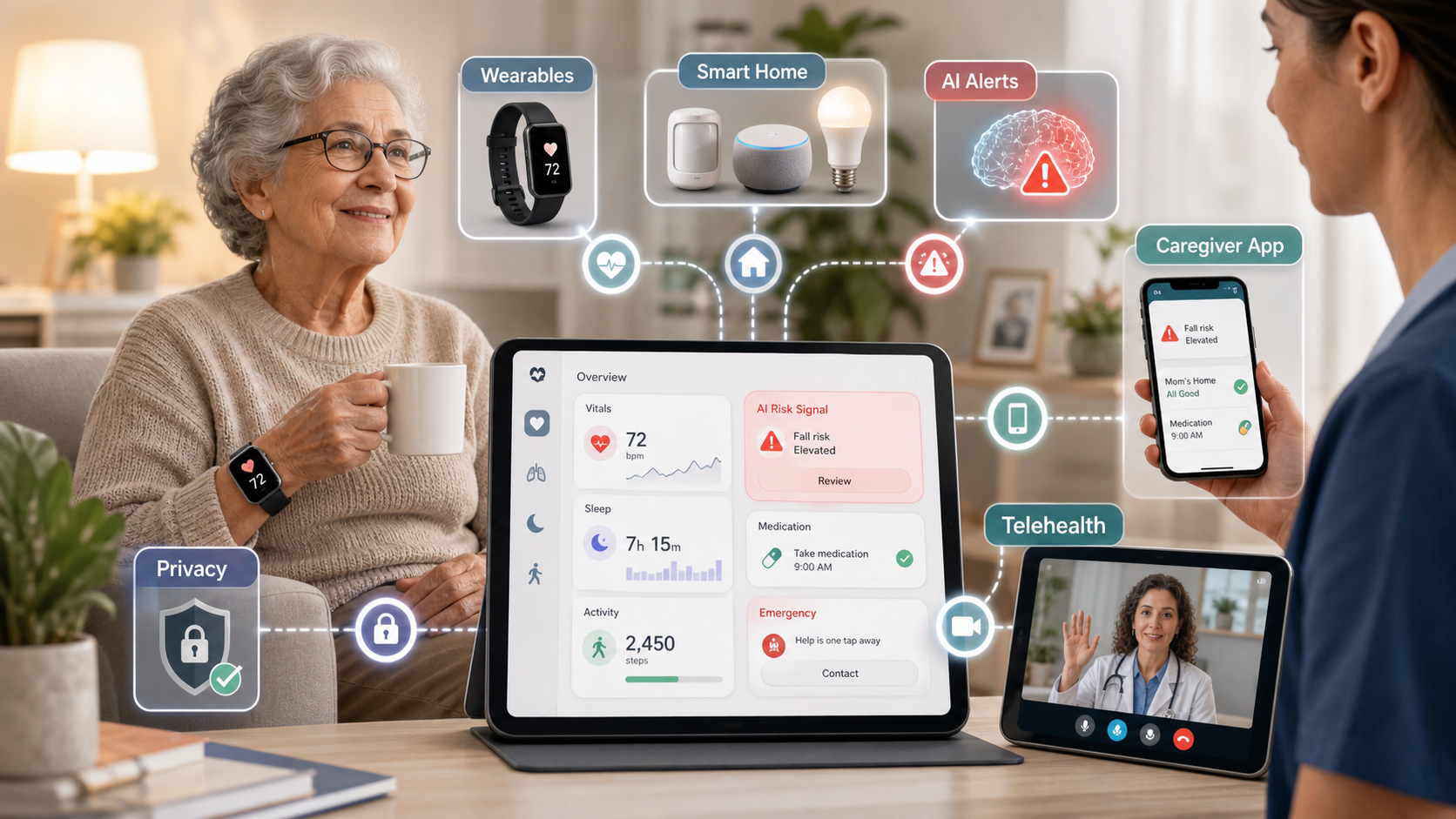
AI And IoT Elderly-Care Feature Priority Matrix
Connected-care roadmaps should start with a narrow safety workflow before adding advanced AI. A good MVP proves that devices, alerts, caregivers, and escalation rules work reliably in real homes or care facilities.
| Stage | Feature focus | Why it matters |
|---|---|---|
| MVP | Wearable or sensor ingestion, caregiver alerts, medication reminders, emergency contact flow, basic profile data, and event history. | The care team can see urgent signals and respond without a complex operating model. |
| Advanced | AI risk scoring, anomaly detection, telehealth escalation, fall-risk patterns, role-based dashboards, family updates, and device health monitoring. | The product starts reducing noise and guiding caregivers toward high-value action. |
| Scale | Multi-site operations, consent management, audit logs, analytics, integration APIs, care-plan automation, and quality reporting. | The platform can support senior-living teams, care agencies, and healthcare partners with governance. |
1. Safety Monitoring Without Turning Care Into Surveillance
The main promise of IoT in elderly care is continuous context. Motion sensors, bed sensors, smart watches, fall detectors, door sensors, and connected emergency buttons can help caregivers notice changes before they become crises.
The product decision is how much monitoring is appropriate. A safety-first system should define which signals are collected, when alerts fire, who receives them, and how false alarms are handled. For many teams, the caregiver-facing experience is a mobile app development problem as much as an IoT problem: alerts need to be readable, prioritized, acknowledged, and routed to the right person.
2. AI Risk Scoring And Alert Prioritization
AI can help elderly-care products move beyond simple threshold alerts. Instead of notifying everyone for every sensor event, the system can look for patterns such as changes in mobility, missed medication routines, unusual nighttime movement, repeated bathroom visits, inactivity, or a combination of environmental and wearable signals.
These models should be designed with guardrails. Start with explainable rules and human review, then add machine-learning signals where data quality supports them. NextPage's AI development services are relevant when teams need evaluation workflows, risk scoring, model monitoring, or AI features that must remain auditable in healthcare-adjacent environments.
3. Medication Reminders And Adherence Support
Medication support is one of the most practical assistive-technology use cases. Apps can remind older adults when medication is due, notify caregivers when doses are missed, connect with smart pill dispensers, and keep a simple adherence history for care reviews.
The workflow should avoid blaming or overwhelming the user. Good reminders are clear, respectful, localized, and easy to confirm. Caregiver escalation should happen only when a pattern matters, not after every minor delay.
4. Caregiver, Family, And Clinician Coordination
Elderly care often involves family members, paid caregivers, nurses, doctors, and facility staff. The product has to define roles clearly: who can view alerts, who can update the care plan, who can change contact rules, who can see health data, and who is responsible when an event is escalated.
Dashboards and activity feeds should make the current state easy to scan. For healthcare-adjacent UX decisions, the trust and clarity patterns in mental wellness app development are useful because both domains require calm interfaces, privacy-aware communication, and sensitive escalation design.
5. Telehealth And Emergency Escalation
Connected-care platforms become more useful when alerts can become action. A fall alert may need a family notification, a caregiver dispatch, a telehealth check-in, or an emergency call. A missed medication pattern may need a nurse review rather than a panic notification.
Define escalation paths before building automation. Each alert type should have severity, response owner, timeout, fallback contact, documentation rule, and post-event review. This prevents the product from becoming a notification stream with no operational accountability.
AI And IoT Elderly-Care Platform Architecture
A production elderly-care product is not just a device app. It is a connected system with device onboarding, secure data ingestion, cloud services, AI processing, caregiver tools, consent controls, and operational reporting.
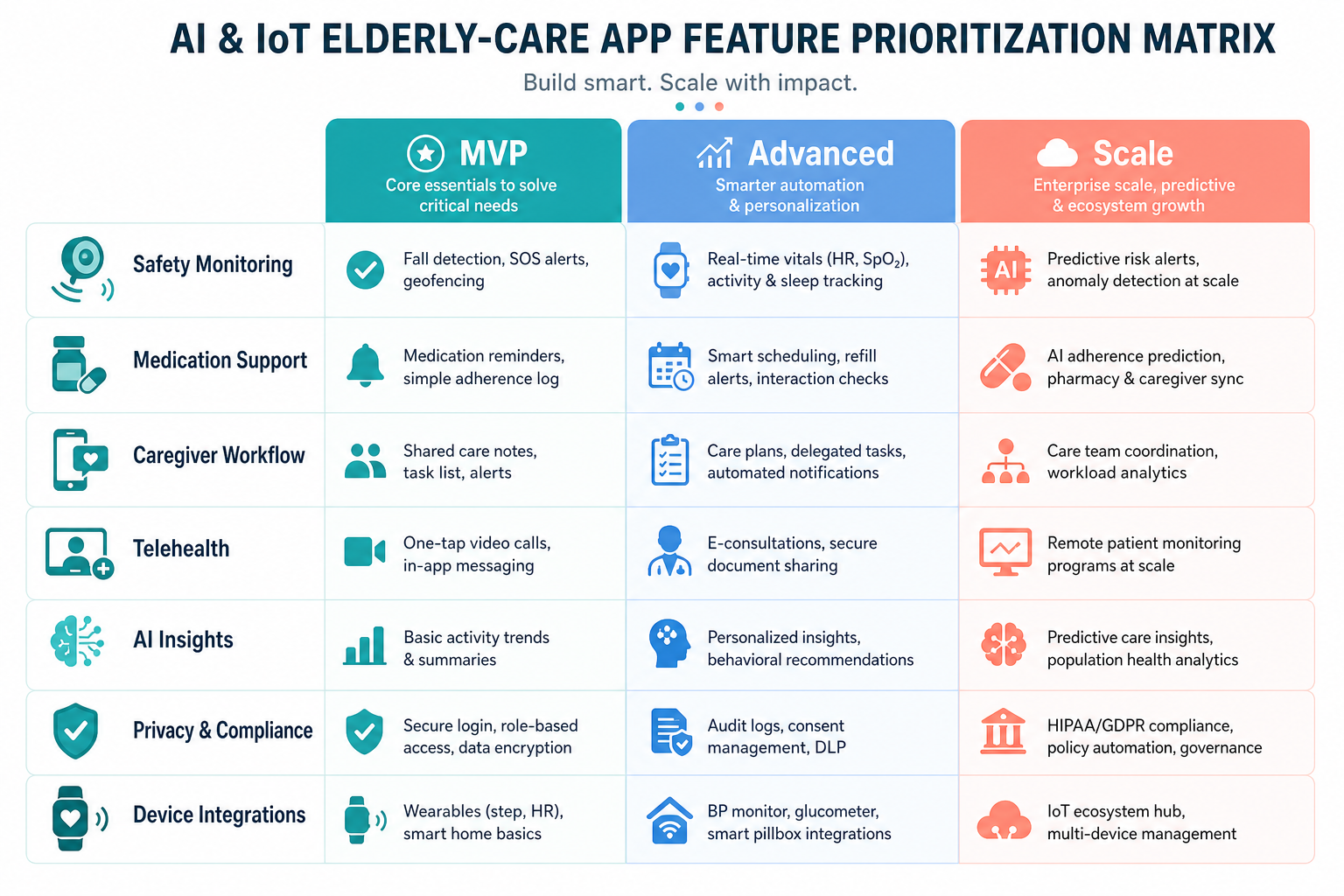
The backend may need device provisioning, real-time event processing, user roles, data retention rules, notification queues, integrations, analytics, and audit logs. If the platform includes custom facility workflows or payer reporting, it may become a broader custom software development project rather than a simple mobile app.
6. Privacy, Consent, And Data Governance
Elderly-care technology can handle sensitive information: location, movement, medication activity, health indicators, voice commands, room patterns, family contacts, and care notes. Teams should define consent, access, retention, encryption, and audit requirements before launch.
Privacy is also a product experience. Older adults and families should understand what is monitored, why it matters, who can see it, and how settings can be changed. For higher-risk deployments, add audit logs, role-based access, data minimization, and human review for AI-driven recommendations.
7. Analytics And Care Outcomes
Assistive technology should be measured by care outcomes, not device count. Useful metrics include resolved alerts, missed-medication trends, response time, fall-risk indicators, device uptime, caregiver workload, family engagement, and avoidable escalation events.
Automation should be justified by operational value. The AI Automation ROI Calculator can help teams estimate whether alert triage, documentation, caregiver assignment, or reporting automation is worth deeper investment.
8. Cost And Scope Planning For Elderly-Care Apps
Cost depends on device integrations, real-time data needs, compliance expectations, AI complexity, mobile apps, admin dashboards, reporting, and QA depth. A prototype with one wearable and basic alerts is very different from a multi-device care platform for senior-living operators.
Before requesting estimates, define target users, devices, event volume, roles, integrations, privacy requirements, and launch market. The Custom Software Cost Estimator can help turn those assumptions into a more useful budget conversation.
Implementation Roadmap For AI And IoT Elderly-Care Products
- Define one safety workflow: choose a measurable problem such as fall detection, missed medication, remote check-ins, or caregiver escalation.
- Validate devices in the real environment: test signal quality, setup friction, battery life, connectivity, and false alarms.
- Build the caregiver workflow: make alerts actionable, acknowledgeable, and role-aware before adding advanced AI.
- Add governance early: consent, access control, audit logs, data retention, and incident review should not wait until launch.
- Introduce AI carefully: start with explainable risk rules, then expand to pattern detection after data quality is proven.
- Measure outcomes: track response time, resolved events, caregiver workload, user confidence, and device reliability.
Common Mistakes To Avoid
- Buying devices before defining workflow: sensors are only useful when alerts lead to clear actions.
- Over-automating sensitive decisions: AI should support caregivers, not silently make high-impact care decisions without review.
- Ignoring false alarms: noisy notifications reduce trust and can cause caregivers to miss real risks.
- Underestimating onboarding: older adults, families, and care staff need setup flows that are calm and resilient.
- Treating privacy as legal copy only: privacy settings, consent, and access visibility must be built into the product.
Final Recommendation
Start with one care outcome and build the smallest connected system that can improve it reliably. For example: reduce missed medication, shorten emergency response time, spot mobility changes earlier, or help families coordinate care without constant calls.
AI and IoT can make elderly care safer and more coordinated, but only when the technology respects independence, keeps caregivers in control, and turns data into responsible action.