
A useful CI/CD testing strategy does not mean running every test before every deployment. It means placing the right checks at the right stage so teams catch release-breaking risk early without turning the pipeline into a waiting room. The fastest checks should block bad changes within minutes. Slower checks should run on a schedule, before release, or in production monitoring where they create more signal than delay.
For most SaaS and internal product teams, the practical answer is this: automate smoke checks, API contracts, critical user flows, targeted regression, performance budgets, security basics, and rollback signals, then connect the work to a real QA automation testing services roadmap instead of a disconnected script backlog. Keep exploratory testing, ambiguous UX review, and brand-new feature judgment in human hands until the workflow stabilizes enough to automate.
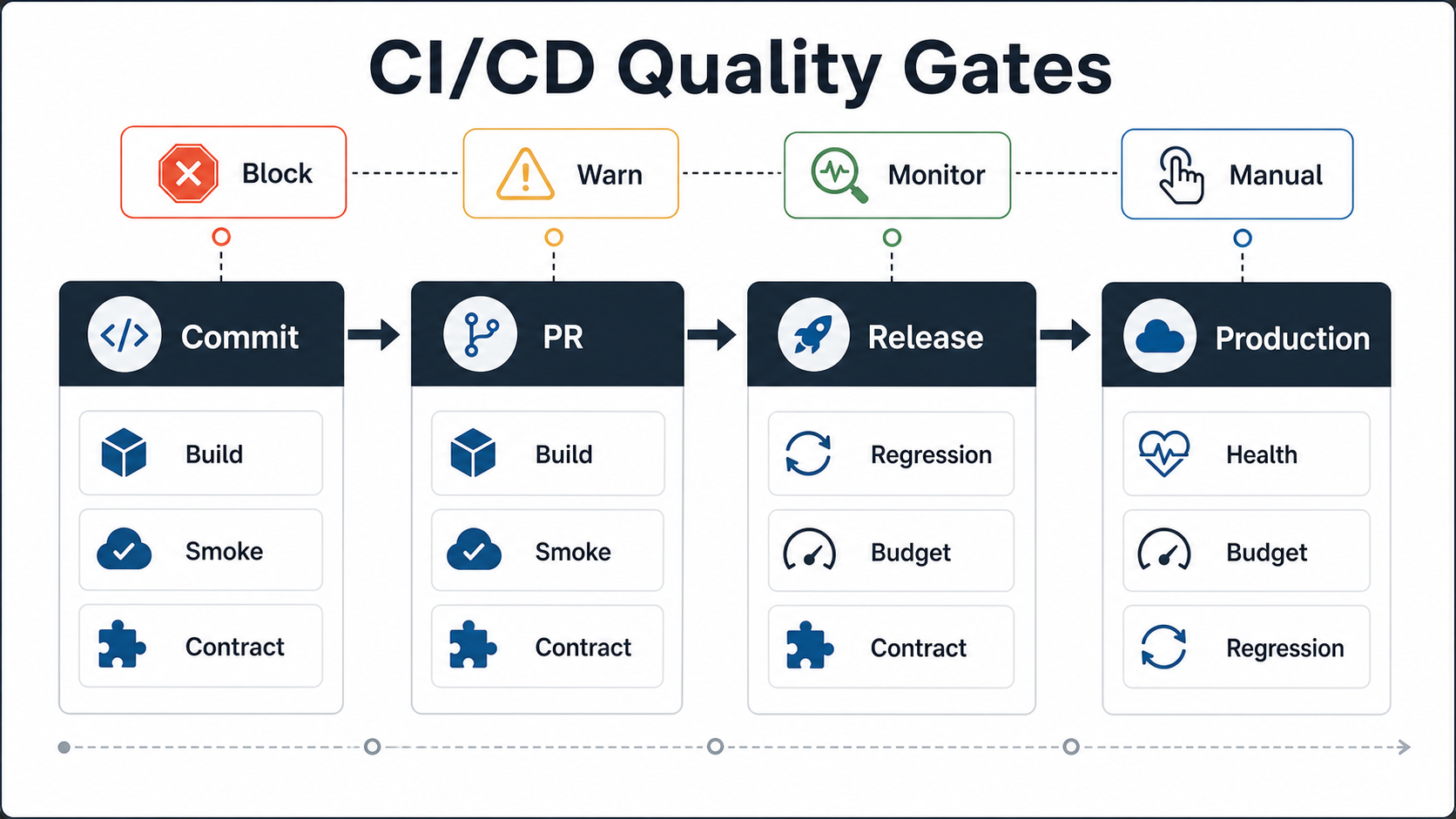
Quick Answer: What Should A CI/CD Testing Strategy Automate?
Automate the checks that answer a release question quickly and repeatably: did the build compile, can users sign in, do critical APIs still honor their contracts, did checkout or the main workflow break, did a high-risk regression return, did performance cross a budget, and can the team detect or roll back a bad release? For teams still shaping the broader test pyramid, NextPage's test automation strategy for web apps gives a useful companion model for coverage, framework choice, and maintenance ownership.
Do not automate a test just because it is possible. A good pipeline separates blocking gates from background evidence. Commit and pull request stages should run fast tests that protect shared branches. Nightly and release stages can run broader regression, device, browser, and data-heavy checks. Production should monitor health, error rates, synthetic flows, and rollback triggers.
This is also why teams should revisit the broader manual vs automation testing decision before wiring everything into CI. Automation protects known repeatable risk. Manual QA still matters when a team is exploring usability, accessibility, edge cases, and product fit.
Place Tests By Pipeline Stage, Not By Tool
The biggest mistake is designing a CI/CD testing strategy around a favorite framework instead of the release decision. Playwright, Cypress, Selenium, Appium, Postman, contract-test libraries, load-test tools, and security scanners are useful only when the stage they run in has a clear owner and action.
Use the pipeline stages as the organizing model. At commit time, run checks that are cheap and deterministic: linting, unit tests, type checks, build verification, and a very small smoke suite. At pull request time, add API contract checks and one or two critical user flows touched by the change. Nightly builds can handle fuller regression, cross-browser/device coverage, and larger data scenarios. Release candidates should run the checks that decide whether the deployment proceeds. Production should confirm that the release remains healthy after it meets real traffic. This is easiest when the product was built with deployment environments, seed data, observability, and rollback paths in the web app development roadmap.
Teams improving delivery reliability should connect this test plan to their deployment architecture. A weak pipeline cannot be fixed by tests alone. The same ownership model that supports DevOps consulting services also supports practical quality gates: smaller changes, reliable environments, traceable deployments, and clear rollback paths.
What To Automate First
Start with the tests that would stop a release if they failed. For a B2B SaaS product, that usually means authentication, billing or subscription state, account access, core dashboard loading, permissions, one critical data-entry workflow, and the API calls that support those paths. For an ecommerce workflow, it may mean search, cart, checkout, payment handoff, order confirmation, and inventory updates. For a mobile product, it may mean install, login, crash-free startup, push notification permissions, offline behavior, and store-release readiness.
The mobile app testing checklist is a useful comparison point because mobile release risk is not only code correctness. Device coverage, OS versions, permissions, analytics, crash reporting, and app store readiness all affect whether a release is safe. Web and SaaS teams have the same pattern, even if the labels differ: browsers, feature flags, integrations, observability, and support handoff shape the release decision.
Once the critical path is covered, add API contract checks. Teams that need independent browser, API, UAT, and regression coverage can pair the pipeline plan with functional testing services so release evidence does not depend only on developer-owned scripts. Then add API contract checks. These catch integration breaks faster than full end-to-end tests and are less fragile than clicking through every workflow. Then add targeted regression for high-risk modules: billing, data import, permissions, reporting, search, notifications, and workflows that frequently break during release. Performance budgets come next, especially for pages or APIs tied to revenue, retention, or support volume. The regression testing checklist for software releases can help teams decide which known-risk workflows deserve repeat coverage before each release candidate.
A Practical Quality-Gate Matrix
The matrix below shows how to keep the pipeline fast while still building confidence. The important distinction is not whether a test is automated; it is whether that automated check should block a developer, block a release, run in the background, or watch production after deployment.
| Check Type | Best Stage | What It Answers | Release Action |
|---|---|---|---|
| Build, lint, type checks | Commit / pull request | Can this change safely enter the shared branch? | Block immediately. |
| Smoke tests | Commit / pull request / release | Are the core pages and services alive? | Block if any critical flow is down. |
| API contract tests | Pull request / release | Did a service change break a consumer expectation? | Block until the contract or consumer is updated. |
| Critical user flows | Pull request / release | Can users complete the workflows that matter most? | Block high-severity failures. |
| Full regression | Nightly / release candidate | Did a broader known-risk area regress? | Triage by severity and change scope. |
| Performance budgets | Nightly / release / production | Did key pages or APIs cross a budget? | Block severe breaches; track trend breaches. |
| Production health checks | After deploy | Is the release healthy under real conditions? | Rollback, pause rollout, or open incident. |
Quality-Gate Policy: Block, Warn, Monitor, Or Keep Manual
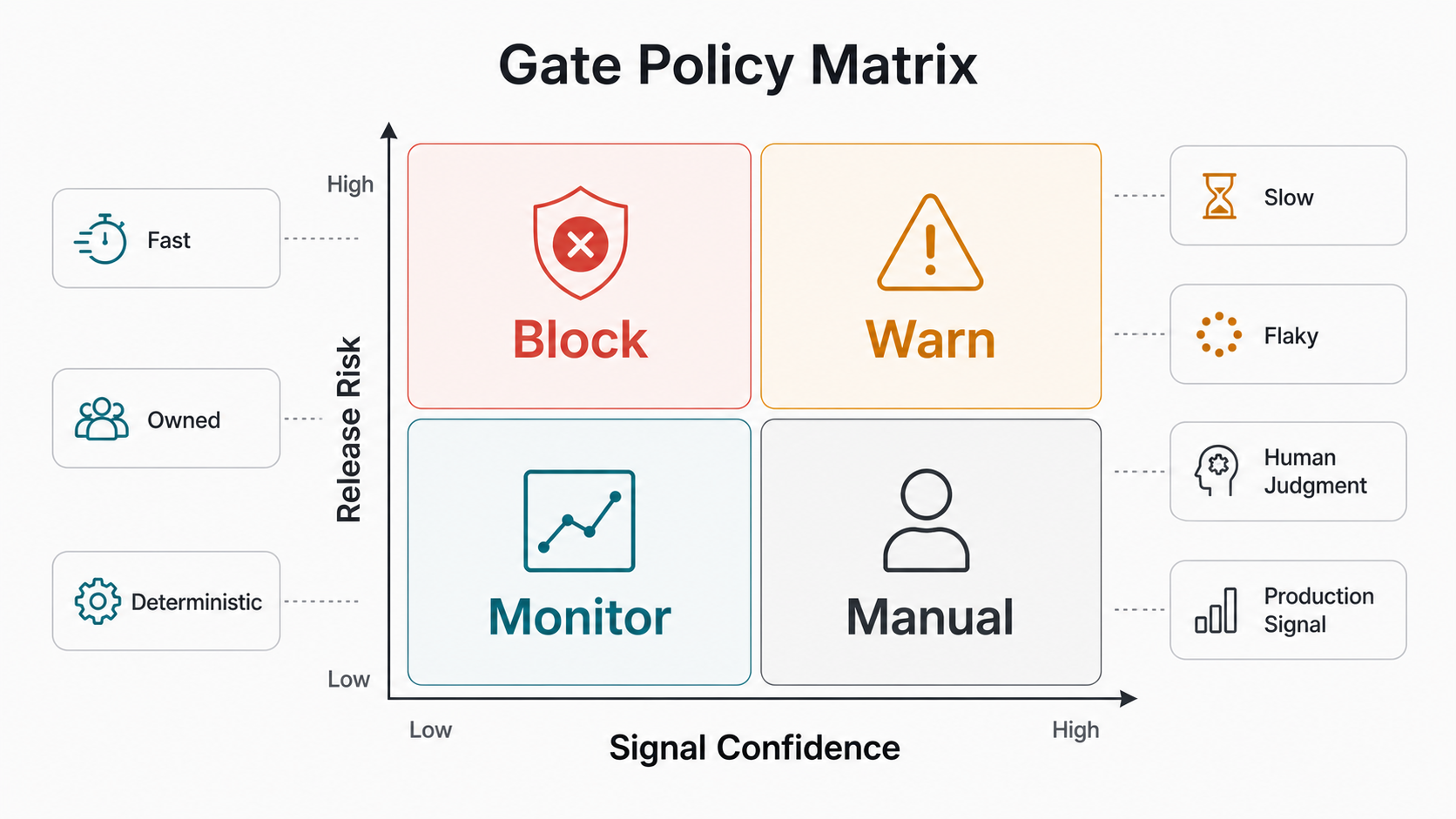
Before adding another CI job, decide what the result should do. A blocking gate should stop the pipeline only when the check is deterministic, fast enough for the stage, owned by a team that can fix it, and tied to material release risk. Build failures, broken smoke tests, violated API contracts, and severe security or performance regressions usually qualify.
Warnings are useful when a signal matters but does not always justify stopping delivery: flaky non-critical flows, moderate performance drift, partial device coverage, or a regression that affects a low-traffic workflow. Monitoring belongs after deployment when production traffic gives a better answer than synthetic staging data. Manual review still belongs where the question is subjective, exploratory, accessibility-sensitive, or tied to brand-new product behavior.
AI-assisted and LLM-backed features need an extra evidence gate. Do not rely only on conventional unit or browser checks when the product includes prompts, retrieval, generated responses, routing logic, or model latency. Add evaluation thresholds for task success, groundedness, unsafe-output checks, latency budgets, and rollback criteria, then keep human review for new use cases until the evaluation set is representative. Teams building those features can connect CI/CD gates to a broader AI development services release plan so model behavior, product QA, and deployment operations are reviewed together.
Avoid Brittle Tests That Slow Delivery
A CI/CD testing strategy fails when every UI test becomes a blocking gate. Browser automation is valuable, but it should be reserved for journeys where the browser itself carries risk: authentication, permissions, payment, file upload, complex forms, dashboards, or workflows with heavy client-side state. If a rule can be tested at the unit, service, or API layer, it usually belongs there.
Keep user-flow tests stable by controlling test data, avoiding dependency on third-party services during PR checks, using resilient selectors, and testing outcomes rather than visual trivia. Keep regression suites useful by pruning tests that no longer protect a release decision. A failing test that nobody trusts is not a quality gate; it is pipeline noise.
For teams scaling capacity, this is often a people-and-process problem as much as a tooling problem. A delivery partner can help map QA, DevOps, frontend, backend, and product responsibilities. NextPage's software outsourcing in India model is relevant when teams need QA and engineering capacity around a product roadmap, not just isolated test scripts.
Release Readiness Signals To Track
Good CI/CD quality gates produce decisions, not dashboards for their own sake. Track the percentage of changes passing on first run, average time to feedback, flaky-test rate, change failure rate, defect escape rate, rollback frequency, and time to restore after a bad deployment. These metrics reveal whether automation is improving release confidence or merely adding ceremony. If stakeholders need the business case behind the investment, connect the plan to a software QA budget and use the test automation ROI model to connect regression time, escaped defects, release delay, and maintenance cost.
Capacity planning also matters. If a team wants smoke checks, API contracts, browser flows, performance budgets, and monitoring but has no one maintaining fixtures, environments, and flaky-test triage, the suite will decay. Use the dedicated India team cost calculator to model what a realistic QA, DevOps, and engineering support mix might look like. Use the custom software cost estimator when the testing strategy is part of a broader rebuild, integration, or platform upgrade.
Legacy And High-Risk Systems Need A Different Rollout
Legacy systems should not jump straight into a heavy CI/CD test suite. Start by mapping the riskiest release surfaces: fragile integrations, undocumented business rules, old dependencies, manual database changes, permissions, reporting jobs, and areas where support tickets spike after deployments. Then create characterization tests around the behavior that must not change.
If the product is already showing modernization pressure, run a risk scan before designing the automation roadmap. The legacy software modernization scorecard can help teams decide whether they need stabilization, refactoring, migration planning, or a more deliberate release-readiness program before adding more deployment frequency.
A 30-60-90 Day CI/CD Testing Roadmap
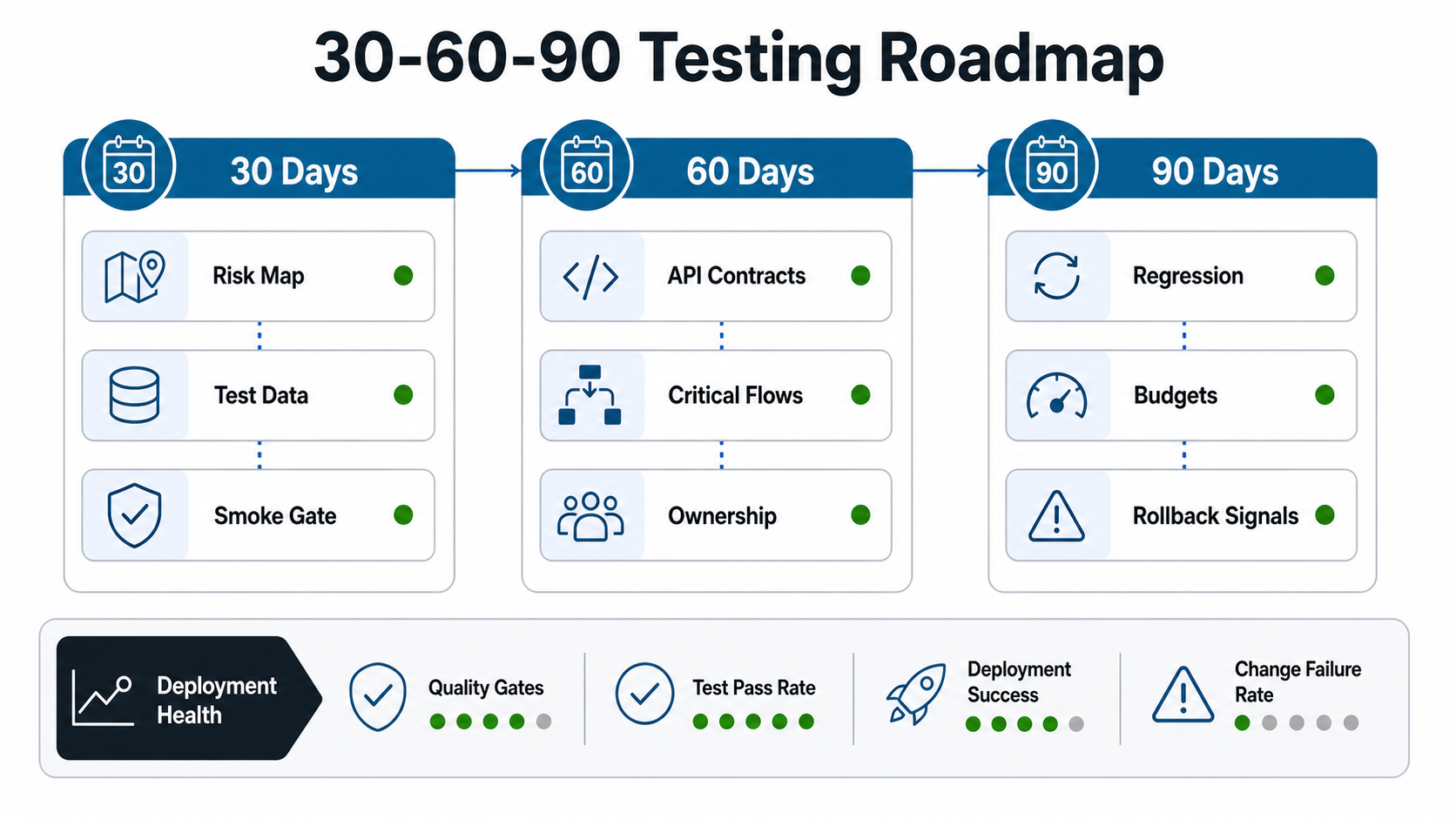
In the first 30 days, choose the release risks that actually matter. Document critical flows, identify the current escaped-defect pattern, stabilize test data, add build and smoke checks, and agree on what blocks a release. Keep this phase small enough that developers trust the results.
In days 31 to 60, add API contract checks, one or two critical browser flows, and the first targeted regression suite for high-risk areas. Wire results into pull requests and release candidates. Define ownership for failures so the team knows whether developers, QA, DevOps, or product triage the result.
In days 61 to 90, expand coverage based on evidence. Add nightly regression for slower flows, performance budgets for key pages and APIs, release dashboards, synthetic production checks, rollback triggers, and post-release health review. Retire tests that do not influence a decision. A mature CI/CD testing strategy stays lean because every test has a job. For hardware, mobile, or field-product releases, the DeviceBridge case study shows why explicit timeout, dropped-session, demo-mode, and recovery states matter before automation can be trusted in real operating conditions.
How NextPage Helps
NextPage helps teams turn release risk into a practical CI/CD quality-gate plan. We map the critical workflows, decide what belongs in smoke, API, browser, regression, performance, and production monitoring layers, then build the automation around your actual release process. The result is not a giant test suite; it is a release decision system your developers can trust.
If your team is shipping frequently but still relying on manual regression, a CI/CD Quality Gate Review is a good starting point, especially when paired with software testing services that cover automation, exploratory testing, release readiness, and post-release evidence. We can assess your pipeline, identify the checks worth automating first, and build a staged roadmap that improves confidence without slowing every release. Teams that need implementation capacity can pair that roadmap with custom software development support so QA automation, DevOps, backend, frontend, and product ownership stay connected.