
Quick Answer: What Should a Regression Testing Checklist Include?
A regression testing checklist should prove that recent changes did not break existing workflows. For most software releases, that means retesting critical user journeys, authentication, permissions, payments or bookings, integrations, data changes, notifications, reports, browser and device coverage, accessibility, analytics, performance-sensitive paths, and the release evidence needed for sign-off.
The checklist should be risk-based, not exhaustive for every release. A small copy change may need smoke testing plus a narrow regression pass. A billing change, mobile OS upgrade, role-permission update, API migration, or database change needs deeper coverage across workflows, failure states, observability, rollback readiness, and stakeholder sign-off. If your team is still deciding how regression fits with functional testing and UAT, start with NextPage's UAT vs functional testing vs regression testing guide, then use this checklist to decide what to run before the next release.
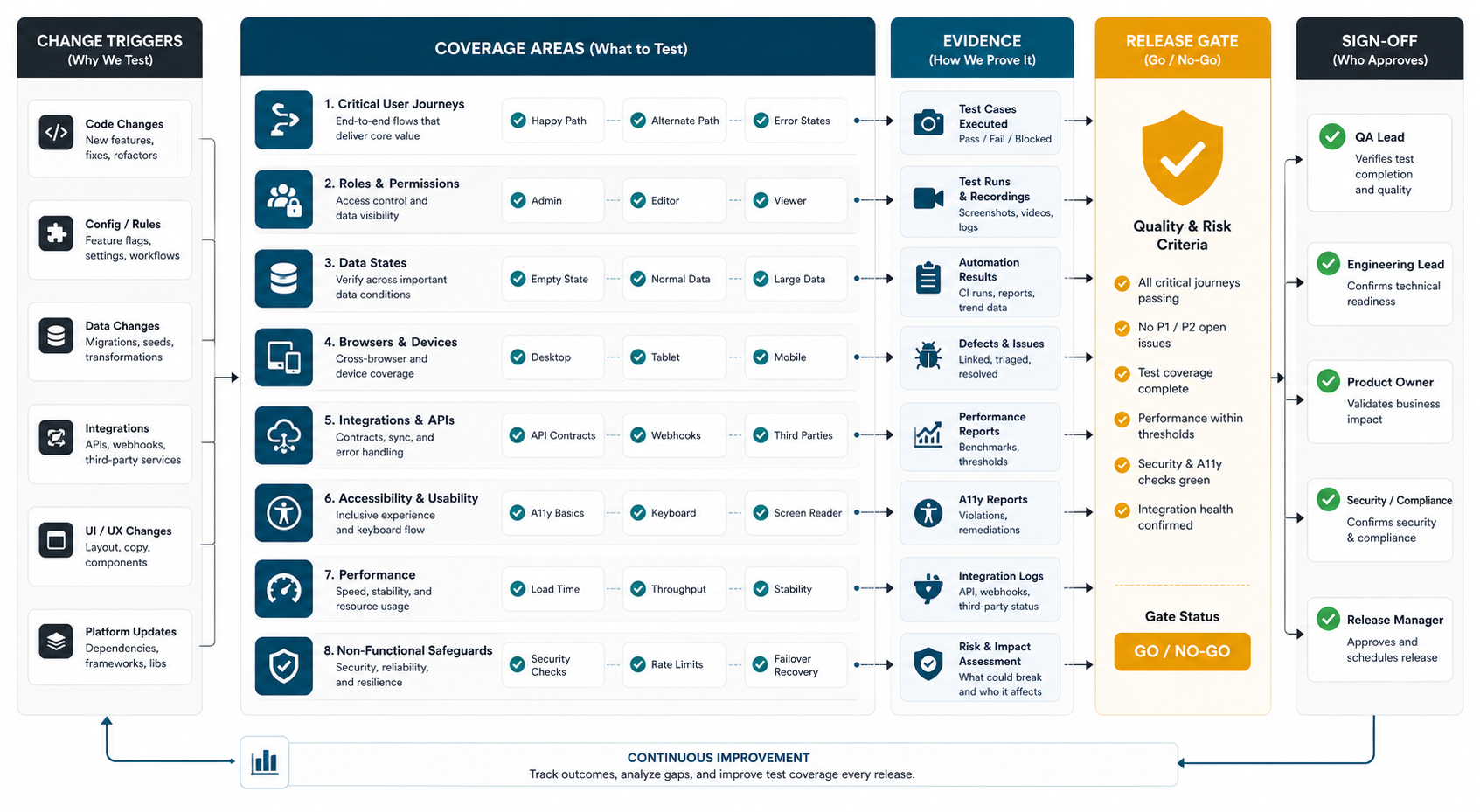
When Should You Run Regression Testing?
Run regression testing whenever a change can affect existing behavior. The trigger may be code, configuration, content, API contracts, infrastructure, dependencies, browser or mobile OS support, feature flags, security patches, data migration, analytics tagging, permissions, or a third-party integration. Current release-checklist guidance also emphasizes backups, rollback plans, environment consistency, documentation, support readiness, post-release monitoring, and cross-device testing as part of release confidence rather than separate afterthoughts.
| Change trigger | Regression focus | Why it matters |
|---|---|---|
| New feature | Shared workflows, roles, navigation, saved data, and existing edge cases | New logic often touches old paths indirectly |
| Bug fix | The fixed path plus neighboring workflows that use the same component or API | A narrow fix can create a broader side effect |
| Payment, booking, subscription, or order update | Happy path, failed payment, retries, refunds, email/SMS, reporting, and reconciliation | Revenue flows need stronger evidence before release |
| Role or permission change | Admin, manager, staff, customer, guest, suspended, and edge-role access | Permission regressions create security and support risk |
| Mobile or browser support change | Target devices, OS versions, browsers, responsive layouts, permissions, and offline behavior | Real users rarely match the developer's test environment |
| Data migration or schema change | Old records, new records, imports, exports, reporting, filters, and rollback path | Data issues can look fine in a clean staging account and fail in production-like states |
For a broader launch gate, pair this regression checklist with NextPage's pre-launch QA checklist for custom software. Regression testing is one part of release readiness; security, accessibility, support handoff, monitoring, and customer communication still need their own checks.
1. Define the Regression Scope From Release Risk
Start with the release notes, merged tickets, dependency updates, feature flags, migration scripts, and production incidents since the last release. Then group changes by business risk. The question is not, "What can QA test?" The better question is, "What existing behavior would create customer, revenue, operational, compliance, or reputation risk if it broke after this release?"
- List the user journeys touched directly by the release.
- List adjacent journeys that share code, data, APIs, components, permissions, or infrastructure.
- Mark revenue, account access, compliance, safety, operational, and executive-reporting paths as high priority.
- Separate must-pass checks from nice-to-have exploratory checks.
- Agree what can be tested manually, automated, sampled, or deferred with owner approval.
If the release includes new features, use a functional coverage pass first. NextPage's functional testing checklist for web and mobile apps explains how to build a role, workflow, device, and data matrix before writing test cases.
2. Retest Critical User Workflows
Every regression checklist should start with the paths users rely on to get value from the product. These vary by product type, but the test design pattern is consistent: choose the workflow, run it with realistic data, test common failure states, and capture evidence.
| Product type | Critical regression paths | Evidence to keep |
|---|---|---|
| SaaS product | Signup, login, subscription, team invite, permissions, dashboard, export, billing, support contact | Role screenshots, API responses, billing event, email, audit log |
| Marketplace or eCommerce | Search, product detail, cart, checkout, payment failure, refund, order status, notifications | Order ID, payment status, inventory state, customer/vendor notifications |
| Mobile app | Install, onboarding, permissions, push notifications, offline behavior, crash recovery, account recovery | Device/OS matrix, screenshots, crash-free run, store-readiness notes |
| Internal operations tool | Role access, data entry, approvals, reports, imports, exports, integrations, audit trail | Test records, report output, import/export files, permission evidence |
| Healthcare or finance workflow | Identity, consent, sensitive data, audit logs, exception handling, integration handoffs | Masked test data, audit evidence, access-control results, error handling notes |
Mobile teams should be especially disciplined about device and OS evidence. NextPage's mobile app testing checklist and mobile app QA launch checklist both show how to keep launch evidence usable for product, engineering, support, and leadership.
3. Check Roles, Permissions, and Data States
Many regression defects hide outside the happy path. A release may work for an admin on a clean staging account and still fail for a restricted user, expired account, migrated customer, partially completed profile, old subscription, or imported record.
- Test admin, manager, staff, customer, guest, suspended, read-only, and edge roles where relevant.
- Check create, read, update, delete, approve, reject, export, refund, cancel, restore, and archive permissions.
- Use realistic records: empty account, new account, long-running account, high-volume account, migrated account, and partially complete account.
- Confirm validation messages, error states, empty states, loading states, and permission-denied screens.
- Verify audit logs and activity history when the workflow affects compliance, billing, or operations.
For web apps with authentication, dashboards, permissions, reports, and integrations, scope is often larger than the visible UI suggests. NextPage's web app development cost guide is useful when regression testing is tied to broader release budget and complexity.
4. Retest Integrations, Notifications, and Reports
Regression testing should cover the systems around the product, not only the screen where the change was made. Many release failures happen in downstream effects: notifications do not send, webhooks retry incorrectly, dashboards show stale numbers, exports break, or a third-party API changes behavior.
| Area | Checklist items | Common miss |
|---|---|---|
| APIs and webhooks | Success, validation error, timeout, retry, duplicate event, version compatibility | Only the happy path is tested |
| Email, SMS, push | Trigger, recipient, template, personalization, unsubscribe or permission state, delivery record | Notifications work in staging but not for real roles or locales |
| Reports and dashboards | Filters, date ranges, permissions, exports, empty states, large datasets, currency or timezone logic | Charts look right with demo data but fail on production-shaped records |
| Payments and subscriptions | Success, failure, retry, upgrade, downgrade, cancellation, refund, invoice, reconciliation | The UI passes while payment events or records drift |
| Search and analytics | Index update, tracking event, funnel step, attribution, privacy rules, no-result states | Release decisions lose measurement after launch |
When a workflow is repeated every sprint, consider whether it belongs in an automated smoke or regression suite. NextPage's test automation ROI guide explains how to weigh regression hours saved against test maintenance and flaky-test cleanup.
5. Cover Devices, Browsers, Accessibility, and Performance-Sensitive Paths
A release can pass core workflow testing and still fail in the real conditions users face. Regression testing should include the environments that represent your customer base and business commitments.
- Browsers: latest Chrome, Safari, Edge, Firefox, and any enterprise-supported versions.
- Mobile: high-traffic iOS and Android versions, common screen sizes, permission states, poor-network behavior, background/foreground transitions, and app upgrades.
- Responsive UI: navigation, modals, forms, tables, sticky bars, pagination, and long text on smaller screens.
- Accessibility: keyboard paths, focus states, labels, contrast, validation messages, screen-reader-critical flows, and reduced-motion behavior where relevant.
- Performance-sensitive paths: login, search, checkout, dashboards, upload, report generation, and high-volume lists.
If your release includes a mobile product or companion app, connect regression scope to the app roadmap. NextPage's mobile app development team plans QA around real device behavior, backend contracts, launch evidence, analytics, and post-release improvement loops.
Build a Regression Evidence Matrix
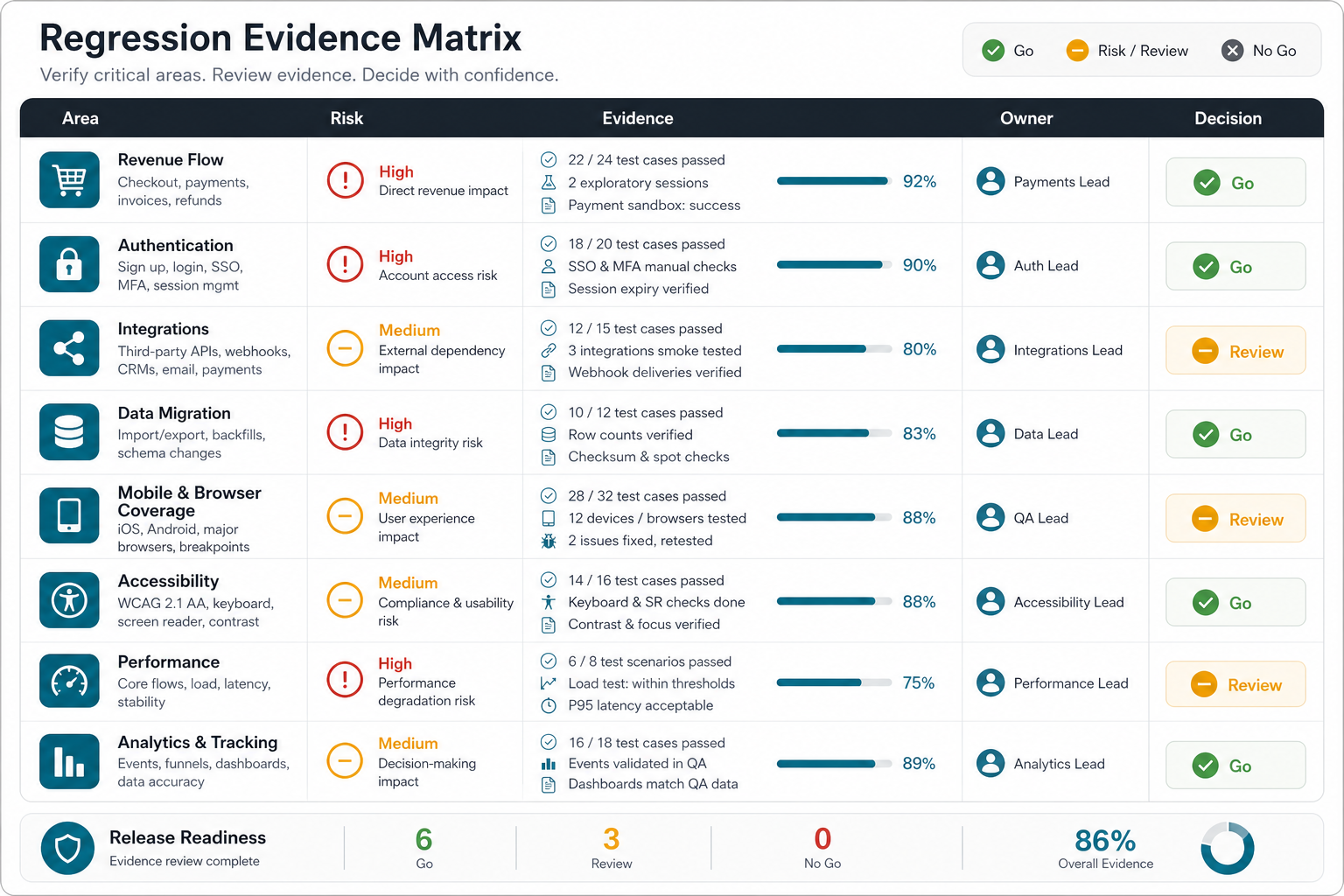
A useful checklist becomes stronger when it produces release evidence. Keep the matrix lightweight enough for every sprint, but explicit enough that product, engineering, QA, support, and leadership can understand the release decision.
| Product area | Risk | Evidence | Owner | Decision |
|---|---|---|---|---|
| Account access | Users cannot log in, recover accounts, or use correct permissions | Role screenshots, password reset result, audit log | QA plus engineering | Must pass |
| Revenue workflow | Orders, bookings, subscriptions, or invoices fail | Transaction ID, event log, customer/vendor notifications | QA plus product | Must pass |
| Integration handoff | Data does not sync or retry correctly | API payload, webhook result, error-path evidence | Engineering | Must pass or approved exception |
| Mobile/browser coverage | Users hit device-specific or viewport-specific breakage | Device matrix and screenshots | QA | Pass for supported matrix |
| Reports and analytics | Teams make decisions from stale or incorrect data | Report export, dashboard screenshot, tracking event | Product plus QA | Pass or known limitation |
The owner column matters. Regression testing slows down when every failure becomes a negotiation. Assign owners before the test pass starts so failures move quickly to fix, retest, accept, or defer.
Add a Release Confidence Scorecard
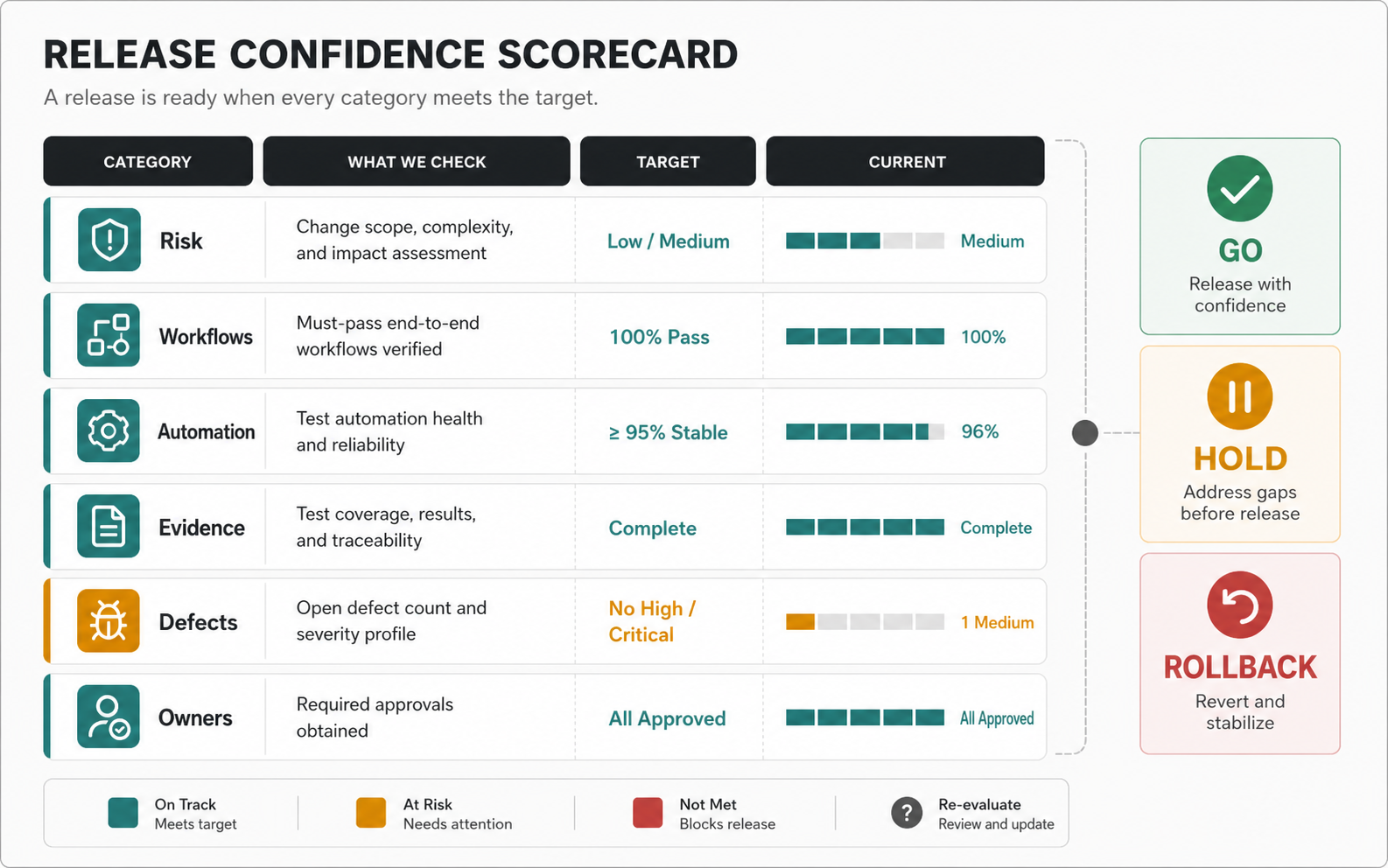
A checklist proves coverage. A scorecard proves whether the release is ready. Use a simple 0-2 scale for each area, then require explicit owner approval when any high-risk area is below target.
| Scorecard area | 0 means | 1 means | 2 means |
|---|---|---|---|
| Change risk | Impact is unclear or undocumented | Known impacted areas are listed | Direct and adjacent risk is mapped to tests |
| Critical workflows | Core paths are untested | Core happy paths pass | Happy, failure, role, and data-state paths pass |
| Automation signal | Automated checks are missing or red | Automated checks pass with known gaps | Stable smoke/regression checks pass in CI or release branch |
| Evidence quality | Evidence is scattered or not reproducible | Evidence exists for main workflows | Evidence ties result, owner, environment, and decision together |
| Defect severity | Blockers or unknown critical defects remain | Known non-blockers have owners | No release blockers and accepted risks are documented |
| Rollback readiness | No rollback path or unclear monitoring | Rollback path exists but is not rehearsed | Rollback, alerts, and post-release validation are ready |
A low-risk release may ship with one or two moderate scores if the owner accepts the risk. A high-risk release involving payments, account access, data migration, regulated workflows, or mobile store submission should require stronger evidence before go-live.
6. Define Go/No-Go Criteria Before Testing Starts
Do not wait until the end of the regression pass to decide what matters. Agree on severity definitions, blocking defects, acceptable known issues, rollback triggers, and sign-off owners before QA starts.
- Release blocker: account access, revenue, critical data, security, compliance, or core workflow failure.
- High severity: important workflow works only with a workaround or fails for a meaningful user segment.
- Medium severity: non-critical issue with limited scope and clear workaround.
- Low severity: cosmetic, copy, alignment, or rare edge behavior that does not affect release confidence.
- Approved exception: known issue accepted by the product owner with customer/support notes and a fix plan.
Connect this step to the maintenance budget. Deferring defects is sometimes reasonable, but unowned regression debt turns into recurring support cost. NextPage's software maintenance cost guide explains how support, improvements, compatibility, security, and cloud operations affect post-launch budgets.
Decide What To Automate, Sample, Explore, Or Defer
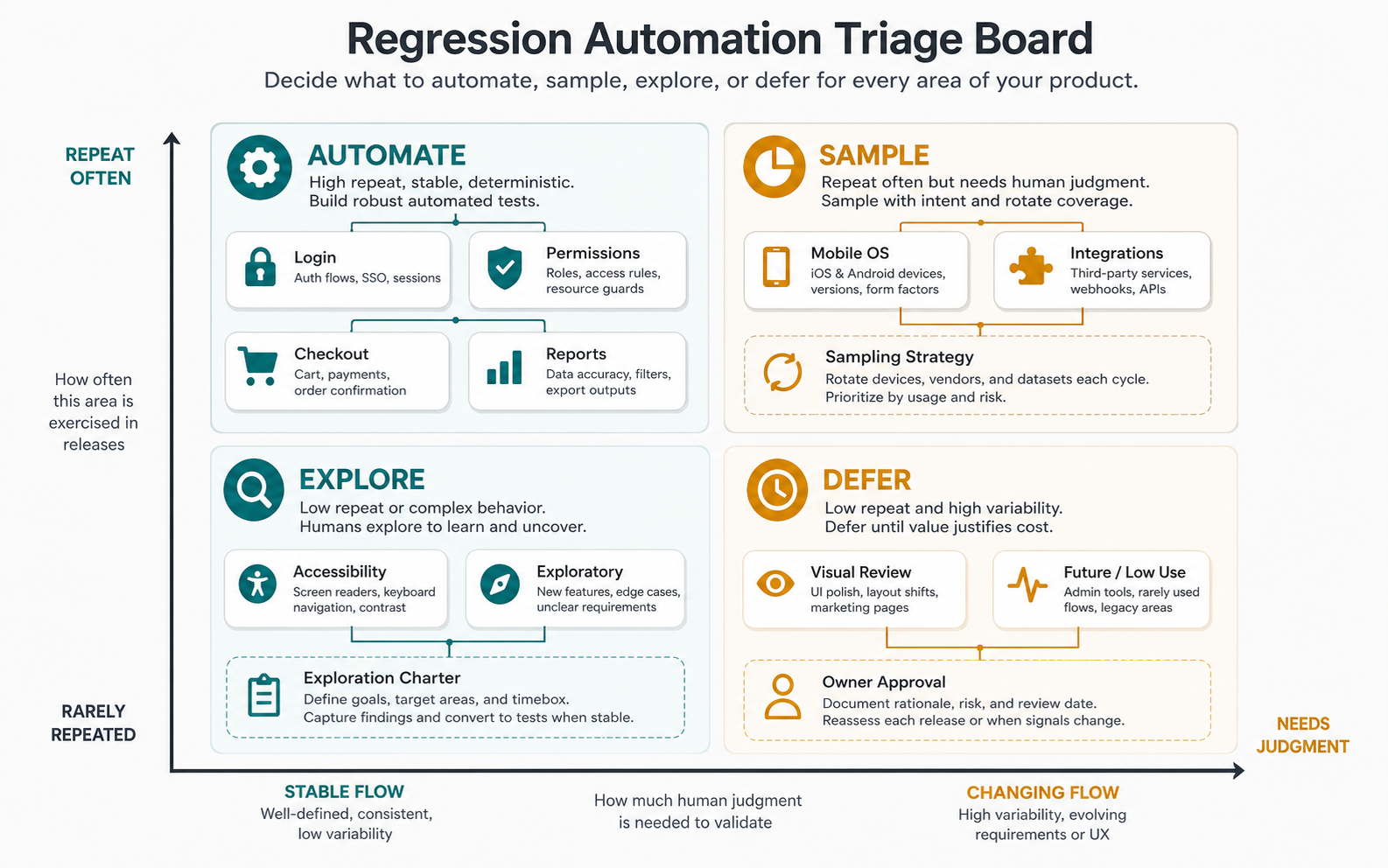
Do not automate every regression case just because it appears in the checklist. Automation is most useful when the workflow is stable, repeated often, expensive to test manually, and important enough to block a release. Manual sampling is better for broad browser/device coverage when the risk is real but the exact combinations change. Exploratory testing is better for new UX, ambiguous edge cases, accessibility judgment, and workflows where the team still expects surprises.
| Test type | Best for | Watch out for |
|---|---|---|
| Automated smoke checks | Login, account access, checkout, API health, core create/update paths | False confidence if assertions only confirm that pages load |
| Automated regression pack | Stable, high-value workflows repeated every release | Flaky selectors, brittle data setup, and slow suites that teams ignore |
| Manual sampled regression | Device/browser combinations, role variants, reports, and integrations | Unclear sampling rules that change from tester to tester |
| Exploratory testing | New or changed behavior, edge cases, usability, accessibility, and visual judgment | No notes, no session charter, or no owner for discovered risks |
| Deferred with approval | Low-risk checks outside the release impact area | Deferrals without expiry dates or owner accountability |
Use NextPage's manual vs automation testing guide when deciding which regression checks deserve automation. If automated tests are flaky, quarantine or fix them before they influence release sign-off; a red suite that nobody trusts is not release evidence.
Add A CI/CD Signal Freshness Gate
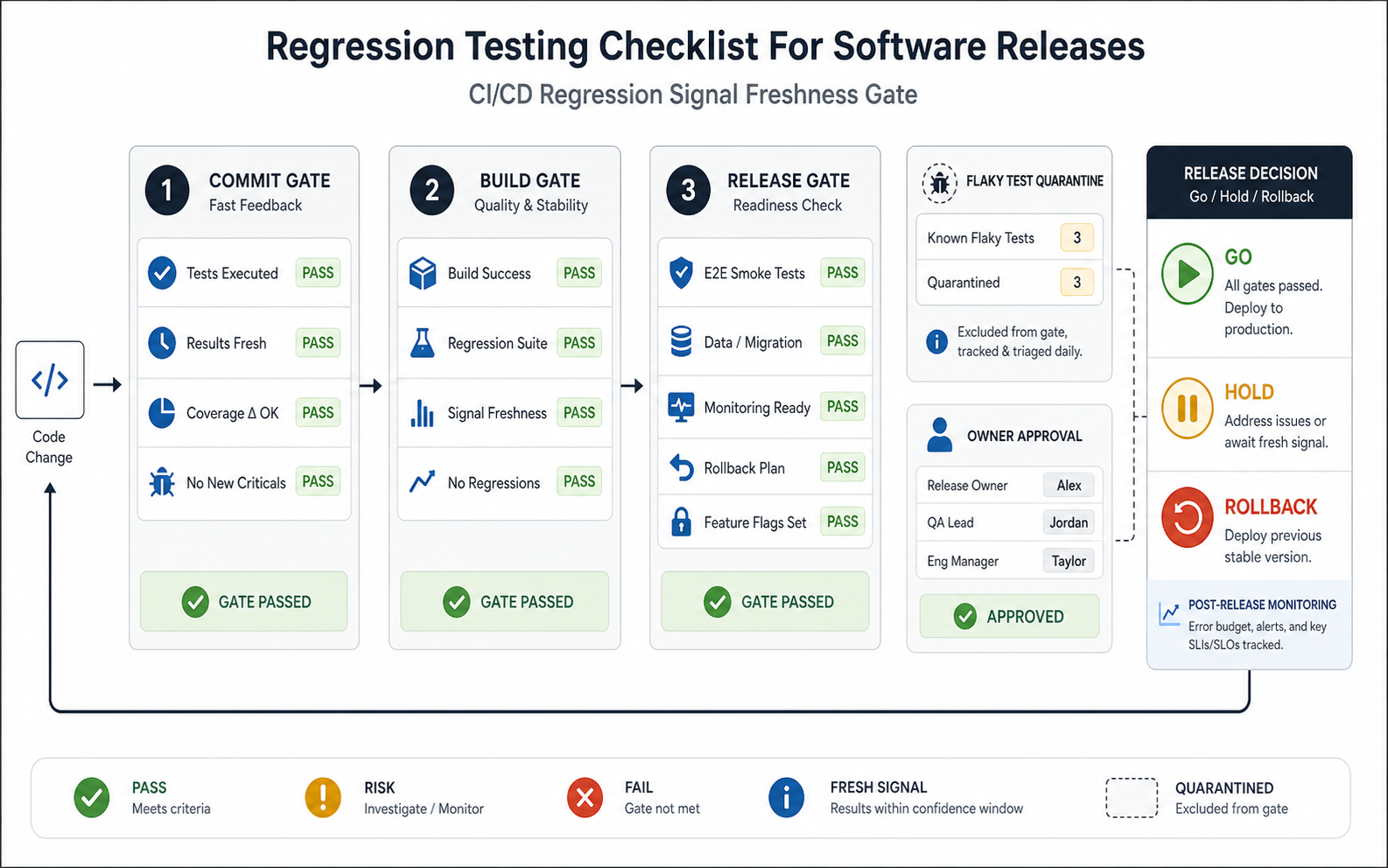
Modern regression testing is not only about whether a suite once passed. The release owner needs to know whether the signal is fresh enough for the current commit, environment, data set, feature flag state, and rollback plan. Treat stale results, flaky tests, skipped device coverage, or unreviewed monitoring as release risks rather than administrative details.
| Gate | Fresh Enough When | Hold The Release When |
|---|---|---|
| Commit gate | Fast smoke, unit, API, and critical-path checks ran against the current candidate | Results belong to an older branch, commit, or feature-flag state |
| Build gate | Regression results match the deployable build, test data, browser/device scope, and environment | Failures are waived without owner notes or the test environment drifted from production |
| Release gate | Rollback, monitoring, alerts, support visibility, and post-release validation are ready | Known flaky tests still influence go/no-go or rollback criteria are unclear |
This is where regression testing connects to a broader QA operating model. For teams that need help designing release gates, NextPage's software testing services and functional testing services pages explain how risk, coverage, automation, and release evidence can be structured around real product workflows.
Regression Testing Checklist Template
Use this checklist as a starting point and trim it for the release risk. A small release should not carry the same burden as a payments migration or mobile app launch.
- Review release notes, merged tickets, feature flags, dependency updates, migrations, and incident history.
- Mark directly changed workflows and adjacent workflows that share components, APIs, data, permissions, or infrastructure.
- Retest login, account recovery, role permissions, onboarding, core user journey, save/update actions, notifications, reporting, and exports.
- Retest revenue, booking, order, subscription, refund, cancellation, and reconciliation paths when applicable.
- Run negative paths: validation errors, empty states, expired sessions, failed payments, integration timeouts, duplicate submissions, and permission-denied states.
- Use realistic data states: new, old, migrated, high-volume, partial, suspended, archived, and edge-case accounts.
- Cover the supported browser, device, OS, viewport, network, and permission matrix.
- Check accessibility basics for keyboard navigation, focus, forms, labels, contrast, and screen-reader-critical flows.
- Check performance-sensitive flows such as login, search, checkout, dashboards, uploads, and large reports.
- Confirm analytics, audit logs, email/SMS/push notifications, webhooks, exports, and support/admin visibility.
- Record evidence, owner, defect severity, retest status, accepted exceptions, and final go/no-go decision.
Post-Release Validation For Regression Risk
Regression work does not end when deployment starts. Keep a short post-release validation pass for the same workflows that carried the highest pre-release risk. Confirm account access, revenue events, notifications, integration handoffs, dashboards, analytics, logs, alerts, and support visibility in production or production-like telemetry.
- Assign a release owner to monitor high-risk workflows for the first hours or business cycle after launch.
- Compare production metrics against expected traffic, conversion, error, latency, and notification patterns.
- Keep rollback criteria visible so the team does not debate thresholds during an incident.
- Feed any missed regression issue back into the next checklist, automation suite, and release scorecard.
How NextPage Helps With Release Regression QA
NextPage helps software teams turn regression testing from a rushed end-of-sprint activity into a practical release-readiness system. We map critical workflows, roles, integrations, data states, device coverage, automation opportunities, evidence requirements, and sign-off rituals so QA effort matches the real risk of the release.
The right engagement may be a sprint QA review, release readiness checklist, regression coverage matrix, mobile launch QA pass, automation roadmap, dedicated QA capacity, or broader custom software improvement plan. If you need QA analysts embedded into an active roadmap, review NextPage's QA testing staff augmentation services. If you are budgeting QA as part of a new build or modernization project, use the Custom Software Cost Estimator to frame scope, then talk to NextPage about a regression testing and release readiness plan.