
Collaborative trip planning apps help groups turn scattered chats, spreadsheets, booking links, and last-minute changes into one shared travel workflow. For founders, travel agencies, tour operators, and community platforms, the opportunity is not just another itinerary screen. The product has to coordinate people, preferences, bookings, payments, alerts, and offline access without making the group feel managed by software.
This guide explains how to plan a group travel app, which features belong in the MVP, where collaboration creates the most value, and how to avoid overbuilding before travelers trust the core trip flow.
Quick Answer: What A Collaborative Trip Planning App Should Do
A collaborative trip planning app should help a group decide where to go, build a shared itinerary, collect preferences, manage bookings, split expenses, send real-time updates, store important documents, and keep essential details available offline. The best products make coordination easier without removing flexibility from the trip.
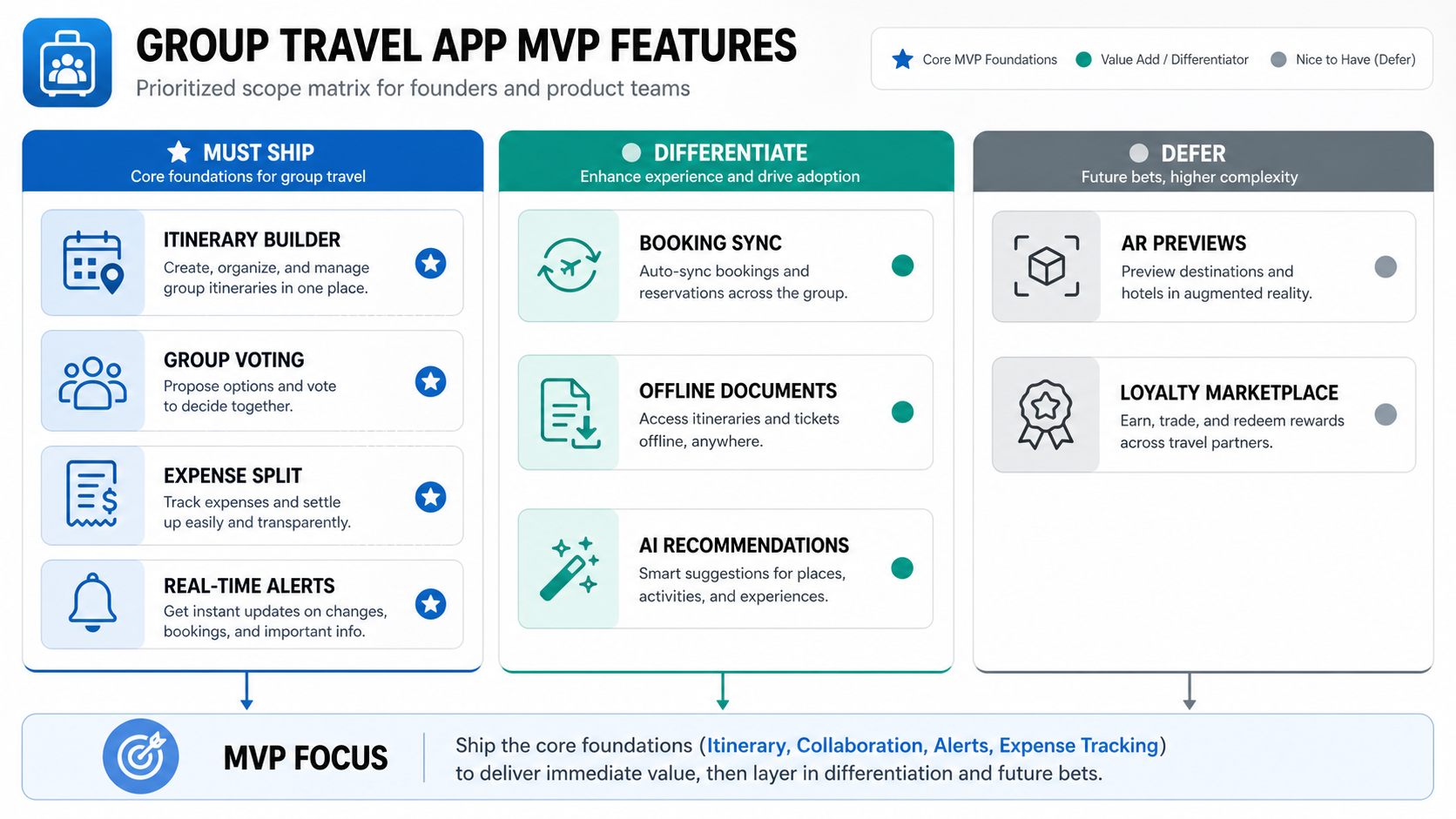
For a product team, the launch scope should be narrower than the final vision. Start with the repeated workflow: invite travelers, propose itinerary items, vote or comment, confirm plans, share booking details, and keep the group updated when something changes. NextPage's guide to travel app development cost is useful when turning that workflow into budget and timeline assumptions.
Why Group Travel Planning Is Hard
Group travel has more coordination risk than solo travel because every decision affects several people. Travelers may have different budgets, arrival times, dietary needs, accessibility requirements, passport constraints, activity preferences, and tolerance for structure. Without a shared system, the plan usually gets fragmented across messaging apps, email confirmations, notes, screenshots, payment apps, and browser tabs.
The app should reduce that fragmentation. It should make the current plan obvious, show what still needs a decision, explain who is responsible for each task, and preserve the context behind a booking or itinerary change. That is why group travel is a strong candidate for thoughtful mobile app development rather than a generic booking wrapper.
Primary Users And Roles
Before designing features, define who the product serves. A friends-and-family trip planner needs lightweight invitations, voting, expense splitting, and casual reminders. A tour operator needs admin controls, supplier data, booking statuses, traveler documents, and customer support workflows. A corporate retreat tool needs approvals, policy controls, reporting, and privacy boundaries.
Most collaborative travel products need at least three roles: organizer, traveler, and operations/admin. The organizer creates the trip and drives decisions. Travelers vote, comment, upload preferences, and receive updates. Operations teams or platform admins manage templates, suppliers, support cases, and analytics. Clear roles prevent the app from exposing too much control to every participant.
Group Travel App MVP Features
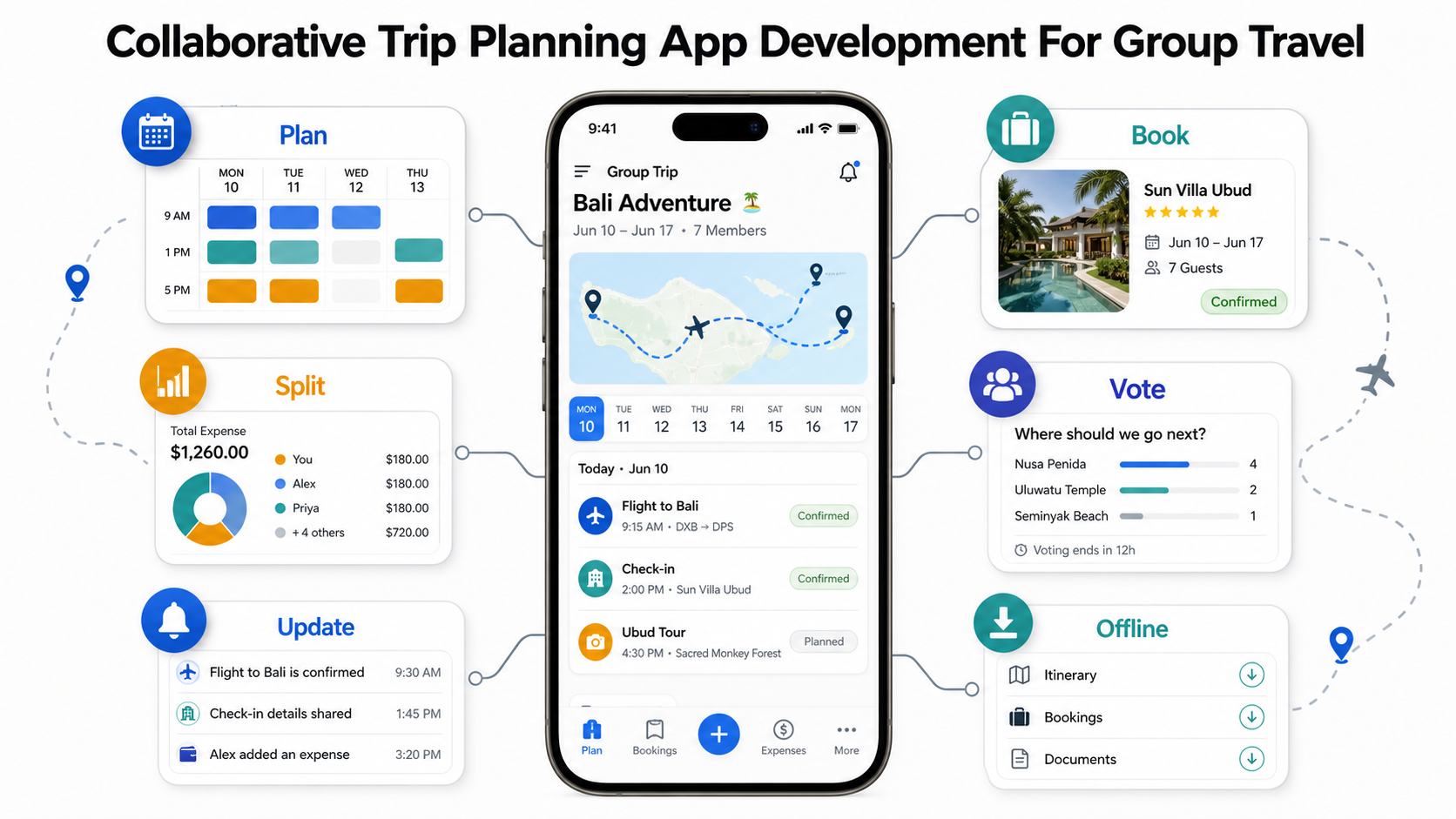
A practical MVP should include trip creation, traveler invitations, shared itinerary items, comments or notes, preference collection, voting, reminders, expense tracking, booking attachment storage, and push or email notifications. These features support the core job: getting a group from idea to confirmed plan with fewer missed details.
Advanced capabilities such as AI recommendations, AR previews, loyalty marketplace features, supplier dashboards, dynamic packaging, and automated rebooking can be valuable later. They should not distract from the first release if the core collaboration loop is still unproven. The MVP development company approach is to ship the smallest reliable workflow, measure adoption, and expand once travelers use it repeatedly.
Itinerary Collaboration Workflow
The itinerary should be the shared source of truth. Each item needs a date, time, location, owner, notes, confirmation status, cost estimate, and optional booking attachment. Travelers should be able to propose changes without silently overwriting the organizer's plan. For example, a traveler can suggest a restaurant, the group can vote, and the organizer can confirm it as part of the official schedule.
Good itinerary design also needs context. A museum visit is not just a title; it may include ticket rules, accessibility notes, transit time, refund policy, and why the group chose it. The app should preserve that context so late joiners can understand decisions without reading a long chat history.
Booking, Expenses, And Payments
Booking is where many group trips become messy. One person may book accommodation, another may reserve activities, and each traveler may handle their own flights. The app should distinguish between planned, reserved, paid, and confirmed items so the group knows what is locked and what still carries risk.
Expense tracking should stay simple at first: who paid, who participated, what currency was used, and whether the balance has been settled. For monetized or marketplace travel products, payments, refunds, fraud checks, and supplier reconciliation become deeper custom software development concerns that need careful architecture.
Real-Time Coordination And Offline Reliability
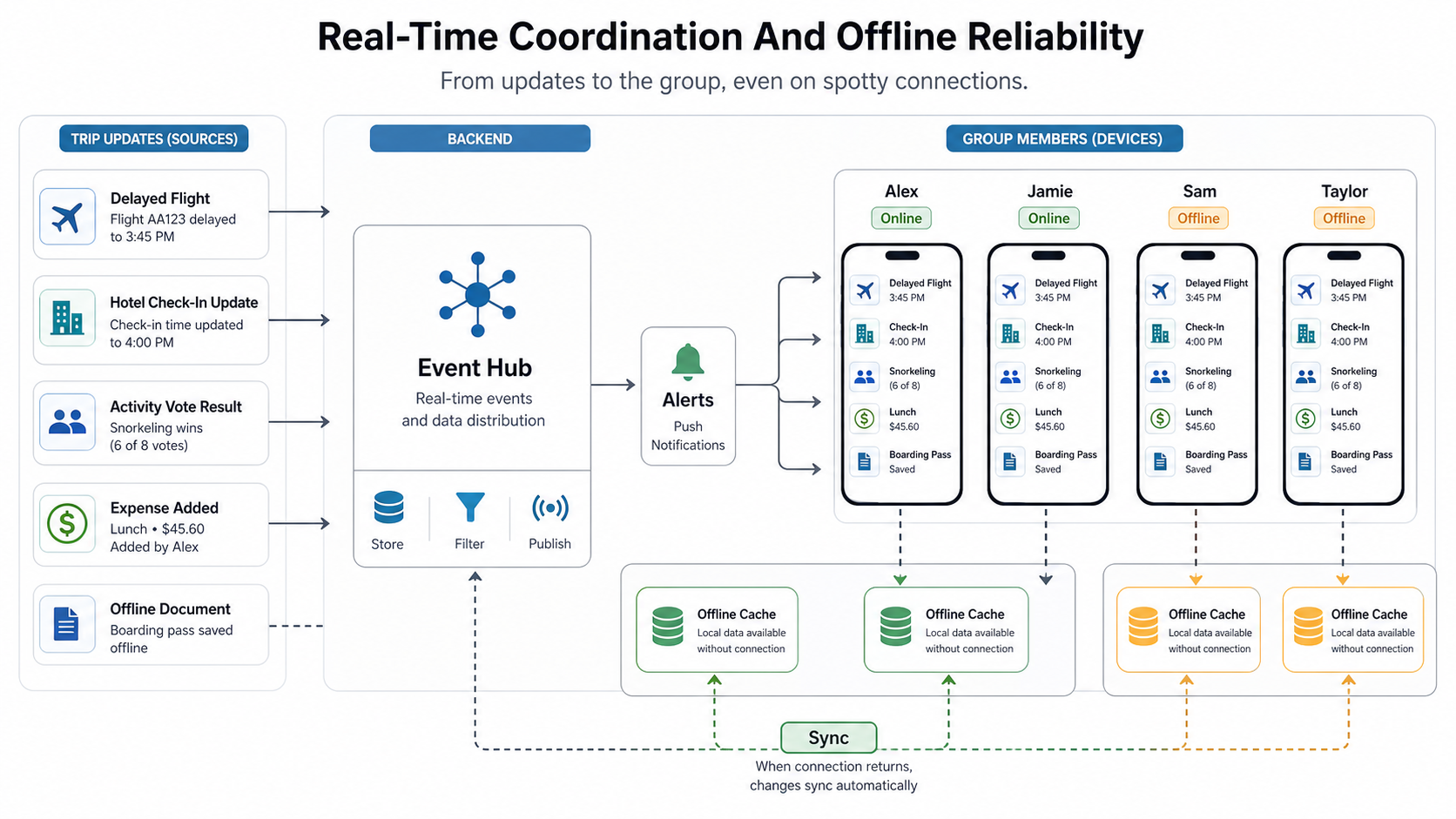
Real-time updates are most valuable when a plan changes under pressure. A delayed flight, hotel check-in update, weather disruption, venue closure, or activity vote result should reach the right travelers quickly. Notifications should be grouped by importance so the product does not become noisy.
Offline reliability matters because travel often happens in airports, trains, rural destinations, and international roaming conditions. At minimum, the app should cache itinerary details, booking references, emergency contacts, maps or addresses, and key documents. NextPage's article on offline functionality for remote destinations explains why offline-first thinking is more useful than treating offline access as a late add-on.
AI, AR, And Personalization
AI can help with destination recommendations, itinerary suggestions, budget-aware alternatives, summary generation, and conflict detection across traveler preferences. It should support decisions rather than hide them. A group still needs transparency about why a recommendation was made and which constraints it considered.
AR previews can be useful for venue orientation, hotel walkthroughs, museum previews, or destination discovery, but they are rarely a first-release requirement. Use AI and AR where they reduce decision fatigue or uncertainty. Avoid adding them as novelty features if the planner, booking, expense, and update workflows are still weak.
Technical Architecture For A Group Travel App
The architecture should support accounts, trips, participants, roles, itinerary items, comments, votes, expenses, notifications, attachments, audit trails, and offline sync. If the product connects to travel suppliers, it also needs integration queues, retry handling, rate-limit protection, supplier error states, and reconciliation dashboards.
For mobile clients, plan for unreliable connectivity and device handoff. The app should handle optimistic updates carefully, show sync state, and prevent duplicate expense or booking records. If the product includes admin operations, a web dashboard may be as important as the mobile app. Reviewing a field workflow such as the FieldIQ portfolio case study can help frame how mobile capture, backend rules, and operations review fit together.
Cost, Roadmap, And Build-Vs-Buy Decision
The cost to build a collaborative trip planning app depends on scope: simple group itinerary planner, booking-enabled travel app, tour operator platform, marketplace, corporate travel tool, or AI-assisted recommendation product. Integrations, payments, offline mode, admin dashboards, supplier systems, and personalization usually move the product into a larger budget band.
Use the Custom Software Cost Estimator to model likely budget and timeline assumptions. If the team is unsure whether a custom platform is justified, the Build vs Buy Decision Tool can compare packaged travel tools, white-label platforms, and a custom product roadmap.
Launch Checklist For Product Teams
- Define the trip type: friends, families, corporate groups, tours, communities, or travel agencies.
- Map the first repeated workflow: invitation, itinerary proposal, voting, confirmation, booking attachment, update, and expense split.
- Set clear roles: organizer, traveler, admin, supplier, or support agent.
- Design for low connectivity: cache critical trip data and show sync state clearly.
- Protect trust: make costs, confirmations, changes, and permissions transparent.
- Measure behavior: track invited travelers, accepted invites, votes, confirmed itinerary items, booking attachments, opened alerts, and settled expenses.
A collaborative trip planning app succeeds when people keep using it after the excitement of planning fades. Focus the first version on clarity, coordination, and confidence. Once the group trusts the plan, advanced booking, marketplace, AI, and loyalty features have a stronger foundation.