
Quick Answer: CRM Migration Checklist
A CRM migration checklist should protect customer records, revenue workflows, reporting, and team adoption before anyone moves production data. The practical sequence is: audit the source CRM, assign data owners, map objects and fields, clean duplicates, preserve consent and activity history, inventory automations, test integrations, rehearse cutover, define rollback criteria, and validate reports after launch.
The risk is rarely just export and import. CRM migration affects sales pipeline, customer success history, marketing handoffs, support context, renewal dates, dashboards, commissions, permissions, and everyday user behavior. A technically successful migration can still fail if reps cannot trust account ownership, lifecycle stages, opportunity history, or the reports leadership uses on Monday morning.
This checklist is CRM-specific. For a broader migration operating model, use NextPage's data migration checklist as the companion framework. If you need delivery help, NextPage's CRM data migration services turn source audit, cleanup, mapping, validation, cutover, and adoption into an executable plan. If the migration exposes deeper workflow limits in the CRM platform itself, the custom CRM development cost guide helps compare configuration, integration, and custom build paths.
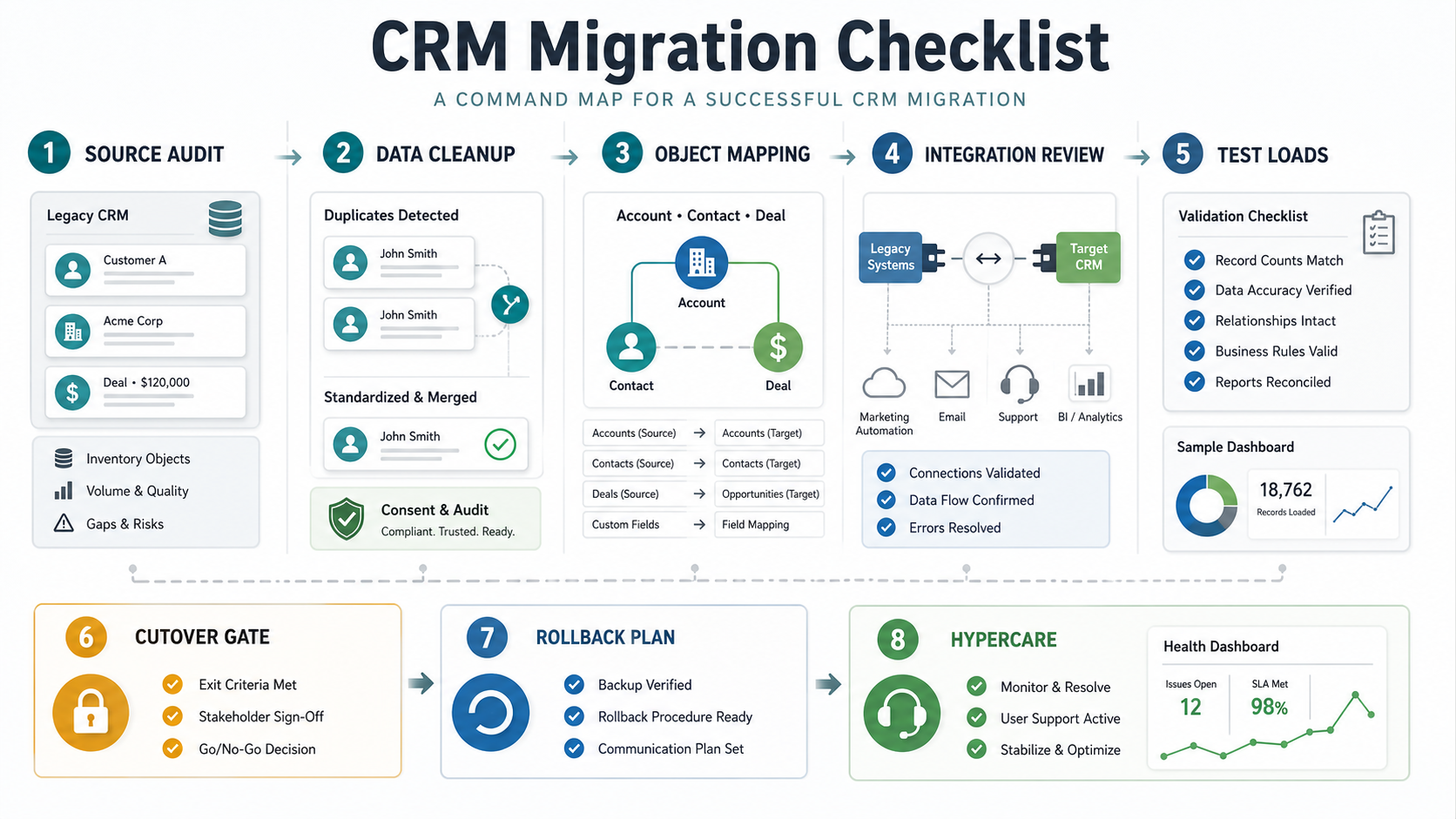
CRM Migration Planning Table
Start with a migration table that connects each workstream to an owner and evidence. This prevents the project from becoming a technical data load with no business acceptance path.
| Workstream | What to decide | Evidence before cutover |
|---|---|---|
| Source CRM audit | Which systems, exports, objects, attachments, and histories are in scope | Inventory signed off by RevOps, sales, support, and IT |
| Object and field mapping | How accounts, contacts, leads, deals, activities, cases, and custom objects move | Mapping workbook with source field, target field, transform rule, owner, and sample record |
| Data cleanup | Duplicate rules, stale contacts, invalid emails, retired fields, and ownership conflicts | Cleanup report with counts before and after rules are applied |
| Consent and compliance | How opt-ins, audit fields, regions, data retention, and deletion requests are preserved | Sample validation of consent fields and audit-sensitive records |
| Automations and integrations | Which workflows, forms, email tools, support desks, billing systems, and warehouses depend on CRM data | Dependency runbook with test status and owner approval |
| UAT and cutover | Who approves sample records, reports, dashboards, permissions, and go-live timing | UAT signoff, cutover checklist, rollback trigger, and communication plan |
1. Audit The Source CRM Before Mapping Fields
A CRM source audit lists every system that currently creates, updates, reads, or reports on customer data. Include the visible CRM, spreadsheet imports, web forms, marketing automation, support desk, quote tools, email sync, calling tools, billing systems, data warehouse jobs, and manual reporting files. If a stakeholder says "we just need contacts and deals," ask where activities, owners, pipeline stages, lifecycle status, consent, and source attribution are used downstream.
The audit should separate records by business value. Active accounts, open opportunities, renewal accounts, recent support cases, and current marketing leads need more validation than stale archives. Historical data still matters, but it may belong in read-only reference storage instead of the primary working CRM if it slows launch or creates noisy records.
For older CRM or custom systems, run a modernization risk review before treating migration as a pure data task. The Legacy Software Modernization Scorecard is useful when the current CRM, plugins, integrations, or reporting layer are brittle enough that the move should include stabilization, refactoring, or replacement decisions.
2. Assign Data Ownership And Acceptance Rules
CRM data quality needs named business owners. IT can move data, but sales operations must decide pipeline stages, customer success must validate account health fields, marketing must approve consent and attribution rules, support must confirm case history, and finance may need billing or renewal fields to remain reconciled. Without ownership, the migration team guesses.
| Data area | Likely owner | Acceptance question |
|---|---|---|
| Accounts and companies | RevOps or sales operations | Can reps find the right account, owner, segment, region, and parent-child structure? |
| Contacts and leads | Marketing operations | Are consent, source, lifecycle, and suppression states accurate? |
| Deals and opportunities | Sales leadership | Do stage, amount, close date, owner, probability, and history match pipeline reality? |
| Activities | Sales managers and CRM admins | Are tasks, calls, meetings, emails, and notes useful enough to migrate? |
| Cases or tickets | Support or customer success | Does the new CRM preserve open issues, SLA context, and customer history? |
| Reports and dashboards | Leadership and operations | Can the same business decisions be made from the new CRM after launch? |
Document signoff criteria before the first test load. Sample record review, dashboard reconciliation, automation tests, and user acceptance should be planned as deliverables, not afterthoughts.
3. Map CRM Objects, Fields, And Relationships
CRM migration mapping should start with object relationships, not individual fields. Decide how leads become contacts, how contacts connect to accounts, how opportunities relate to products or quotes, how activities attach to records, and how custom objects such as subscriptions, properties, locations, assets, policies, or onboarding projects should move. A field map without an object model creates rework.
The mapping workbook should include source object, source field, target object, target field, data type, allowed values, transformation rule, default value, ownership rule, required status, privacy sensitivity, sample source value, sample target value, and acceptance owner. For picklists, map every old value to a new value or a deliberate "retired" state. Never let unknown values silently collapse into "other" if that field drives reports or automations.
Use the target CRM's native model where it fits. If the target system needs a web app, internal workflow layer, or integration service around the CRM, treat that as a custom software development decision rather than hiding it inside migration scope.
4. Clean Duplicates, Retire Fields, And Fix Bad Data
Duplicate cleanup is one of the highest-leverage CRM migration tasks. Define matching rules for company domain, legal name, email, phone, tax ID, account hierarchy, region, and CRM owner. Then decide how winners are chosen: newest activity, open deal ownership, highest revenue, support history, or manual review. Some records can be merged automatically; strategic accounts and open opportunities should usually be reviewed.
Do not move every field because it exists. Retire unused fields, undocumented flags, one-off campaign fields, obsolete lifecycle stages, and values nobody trusts. Mark whether each field is migrate, transform, archive, or drop. Field retirement is where CRM migration becomes an operations improvement instead of a copy of old clutter.
| Cleanup item | Rule to define | Validation evidence |
|---|---|---|
| Duplicate accounts | Domain, normalized name, parent account, owner priority | Duplicate report and manual review list |
| Duplicate contacts | Email exact match, personal email handling, inactive contact policy | Contact merge samples and suppression checks |
| Invalid values | Allowed values for stage, source, region, segment, and lifecycle | Exception list cleared or approved |
| Stale fields | Archive or retire fields with no owner or use case | Field disposition list signed off |
| Missing owners | Fallback owner rules for account, deal, lead, and case records | Unassigned-record count near zero or approved |
5. Preserve Consent, Audit, And Sensitive Fields
CRM migration can create compliance risk when consent, suppression, source, region, deletion request, and audit fields are flattened or lost. Treat consent and privacy fields as first-class migration objects. Preserve opt-in status, opt-in source, timestamp, region, legitimate-interest notes, unsubscribe status, deletion flags, and any data processing constraints that affect outreach.
Sensitive fields need handling rules: who can see them, whether they move, whether they should be masked, and whether they are necessary in the target CRM. If the target CRM changes permission groups, test those groups with real scenarios before launch. A migration that exposes restricted account, health, finance, or contract fields to the wrong roles creates more risk than a delayed launch.
6. Inventory Automations, Reports, And Integrations
CRM migration breaks when teams forget what depends on CRM data. Inventory lead routing, assignment rules, lifecycle automations, email sequences, quote generation, support ticket creation, invoice or billing sync, Slack alerts, webhook jobs, enrichment tools, data warehouse exports, BI dashboards, call tools, form submissions, and marketing attribution. For each dependency, capture trigger, source field, target system, failure behavior, owner, and test evidence.
Integration testing should include happy path and failure path. What happens when a required field is missing, a duplicate arrives, an API rate limit is hit, an owner is inactive, or an external system rejects an update? CRM cutover is not ready until the integration runbook explains retries, monitoring, owner handoff, and recovery.
For migrations that also move databases, files, or application workloads, NextPage's cloud migration services page outlines adjacent planning for application and database migration, validation, cutover, and post-migration optimization.
Platform-Specific CRM Migration Validation
A useful CRM migration checklist should include the target platform's rules, not only generic field mapping. Salesforce, HubSpot, Dynamics 365, Zoho, Pipedrive, and custom CRMs model records differently. The same customer history may become accounts, contacts, companies, deals, opportunities, activities, cases, tickets, custom objects, products, subscriptions, assets, or consent records depending on the destination.
Salesforce import guidance emphasizes duplicate rules, matching rules, external IDs, field-level security, page layouts, and small test imports before full import. HubSpot import guidance adds strict file requirements, association labels, unique identifiers, and column-to-property mapping. Microsoft Dynamics 365 migration guidance often introduces Dataverse, dual-write, environment linking, map activation, and synchronization behavior. Treat these as checklist inputs before the first full test load.
| Target CRM | Validation Focus | Evidence Before Cutover |
|---|---|---|
| Salesforce | External IDs, lookup relationships, duplicate rules, matching rules, field-level security, required fields, and automation side effects. | Small CSV test import, duplicate exception report, owner-approved field map, and sample Account-Contact-Opportunity records. |
| HubSpot | Contacts, companies, deals, tickets, custom objects, association labels, unique value properties, lifecycle values, and list membership. | Import preview, association sample review, dedupe report, failed-row export, and workflow suppression or reactivation plan. |
| Dynamics 365 / Dataverse | Tables, company or business-unit scope, dual-write maps, environment refresh rules, integration state, and ownership/security roles. | Sandbox migration, map activation checklist, sync error report, security-role test, and reporting reconciliation. |
| Custom CRM | Object model, API constraints, permission model, reporting layer, attachments, audit history, and downstream integrations. | API test load, transformation logs, permission smoke test, rollback script, and business-owner signoff on sample records. |
If the migration exposes target-platform gaps that cannot be solved by configuration, separate the data move from the product decision. Some teams need CRM data migration services; others need a custom workflow, reporting layer, or integration service around the CRM. In that case, connect the migration plan to custom software development instead of hiding product scope inside a data-import checklist.
7. Run Test Loads, Reconciliation, And UAT
Use multiple test loads before production. The first load proves extract, transform, and import mechanics. The second load validates cleanup rules, object relationships, permissions, automations, and sample records. The final rehearsal should be close to production timing and should include the actual cutover runbook.
Reconciliation needs record counts and business checks. Compare source and target counts by object, owner, segment, stage, region, open opportunities, active customers, recent activities, open cases, and opt-out lists. Then review sample records that represent normal, complex, and high-risk scenarios.
| UAT area | What users verify | Pass evidence |
|---|---|---|
| Sales workflow | Open opportunities, owners, next steps, activities, stage movement, tasks | Sales manager signoff on representative accounts and deals |
| Marketing workflow | Lead source, campaign attribution, consent, lists, lifecycle transitions | Marketing operations signoff and suppression test |
| Customer success | Renewals, health fields, active accounts, notes, onboarding or support context | CS sample review and dashboard reconciliation |
| Leadership reports | Pipeline, bookings, conversion, activity, churn risk, forecast views | Source vs target report comparison |
| Admin controls | Roles, permissions, audit logs, imports, exports, automation controls | CRM admin checklist complete |
8. Plan Cutover, Rollback, And Go/No-Go Criteria
Cutover should be a timed operating plan with owners, not a vague weekend migration. Define data freeze timing, final export, delta capture, import order, automation pause/resume, integration switch, validation windows, communication plan, training support, rollback trigger, and post-launch monitoring. Decide who can approve go-live and who can stop the cutover.
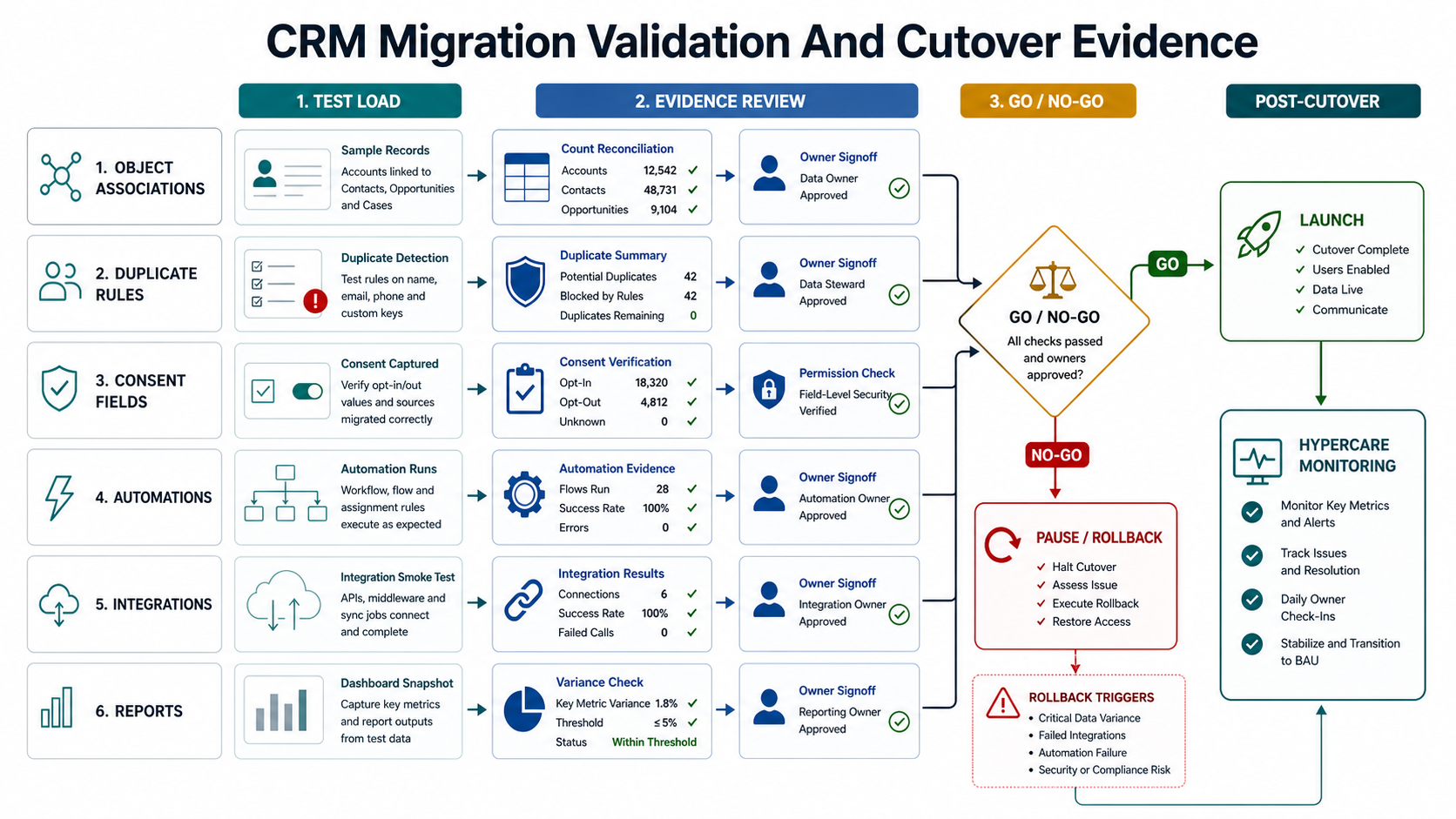
| Cutover checkpoint | Go-live question | Rollback or pause trigger |
|---|---|---|
| Final export | Was the source frozen or delta captured cleanly? | Missing final activity, owner, opportunity, or consent records |
| Import sequence | Did parent records load before dependent records? | Broken account-contact, deal-account, or activity relationships |
| Automations | Were old rules paused and new rules tested before release? | Duplicate notifications, incorrect lead routing, or failed assignment rules |
| Integrations | Did forms, billing, support, marketing, and BI flows pass smoke tests? | Rejected records, sync failures, or bad data written downstream |
| Reports | Do leadership dashboards reconcile with approved tolerances? | Pipeline, revenue, owner, or stage variance beyond threshold |
| User access | Can each role see and edit the right records? | Permission gaps that block daily sales or expose restricted data |
9. Monitor Adoption And Data Quality After Launch
CRM migration is not finished on go-live day. Track login rates, record creation, activity logging, ownership changes, duplicate creation, failed integrations, required-field errors, report variance, support tickets, and user feedback. Schedule post-launch cleanup checkpoints at one week, two weeks, and one month.
Use dashboards that show whether the CRM is being trusted. If reps continue using spreadsheets, if managers rebuild reports outside the CRM, or if operations teams keep correcting records manually, treat those as migration defects. They may indicate missing fields, weak training, confusing workflows, broken integrations, or a target CRM model that does not match the business.
If CRM data is expected to feed AI, forecasting, churn prediction, or sales-assist workflows, data readiness matters even more. NextPage's enterprise AI readiness checklist explains why customer records, permissions, ownership, and workflow context need to be reliable before automation is layered on top. For teams with legacy workflows around the CRM, use the Legacy Software Modernization Scorecard to decide whether migration should include integration cleanup or system replacement.
Common CRM Migration Failure Modes
The most common CRM migration failure mode is treating the project as a one-time import. Other frequent issues include unmapped custom objects, duplicate accounts created by inconsistent domains, lost activity history, consent fields flattened into generic notes, old automations left running, integration credentials overlooked, dashboards rebuilt with different definitions, and insufficient UAT from sales and customer success.
Another failure mode is moving bad process into a cleaner system. If pipeline stages are unclear, lead ownership is political, reports are manually curated, or integrations are already brittle, migration will expose those problems. Fix enough of the operating model to make the new CRM trustworthy, but do not turn migration into an unlimited CRM transformation program. Keep version one focused on reliable customer operations.
How NextPage Helps With CRM Migration Planning
NextPage approaches CRM migration as a delivery and operations project. We map the source systems, review data quality, define object and field mappings, plan cleanup rules, test integrations, support cutover rehearsals, and help teams decide when CRM configuration is enough versus when a custom workflow or integration layer is needed.
The goal is not just to move records. The goal is to help sales, support, marketing, finance, and leadership trust the new CRM after launch. That means clear migration scope, evidence-based validation, business-owner signoff, rollback planning, and a realistic post-launch improvement plan.
If your team is preparing a CRM move, start with the checklist above and a sample data audit. The fastest way to reduce risk is to discover mapping gaps, duplicate rules, integration dependencies, and report mismatches before the production cutover window is already booked. For early scope and budget framing, use the custom software cost estimator, and review the ClearRoute case study for an example of structured field evidence and operational review workflows.