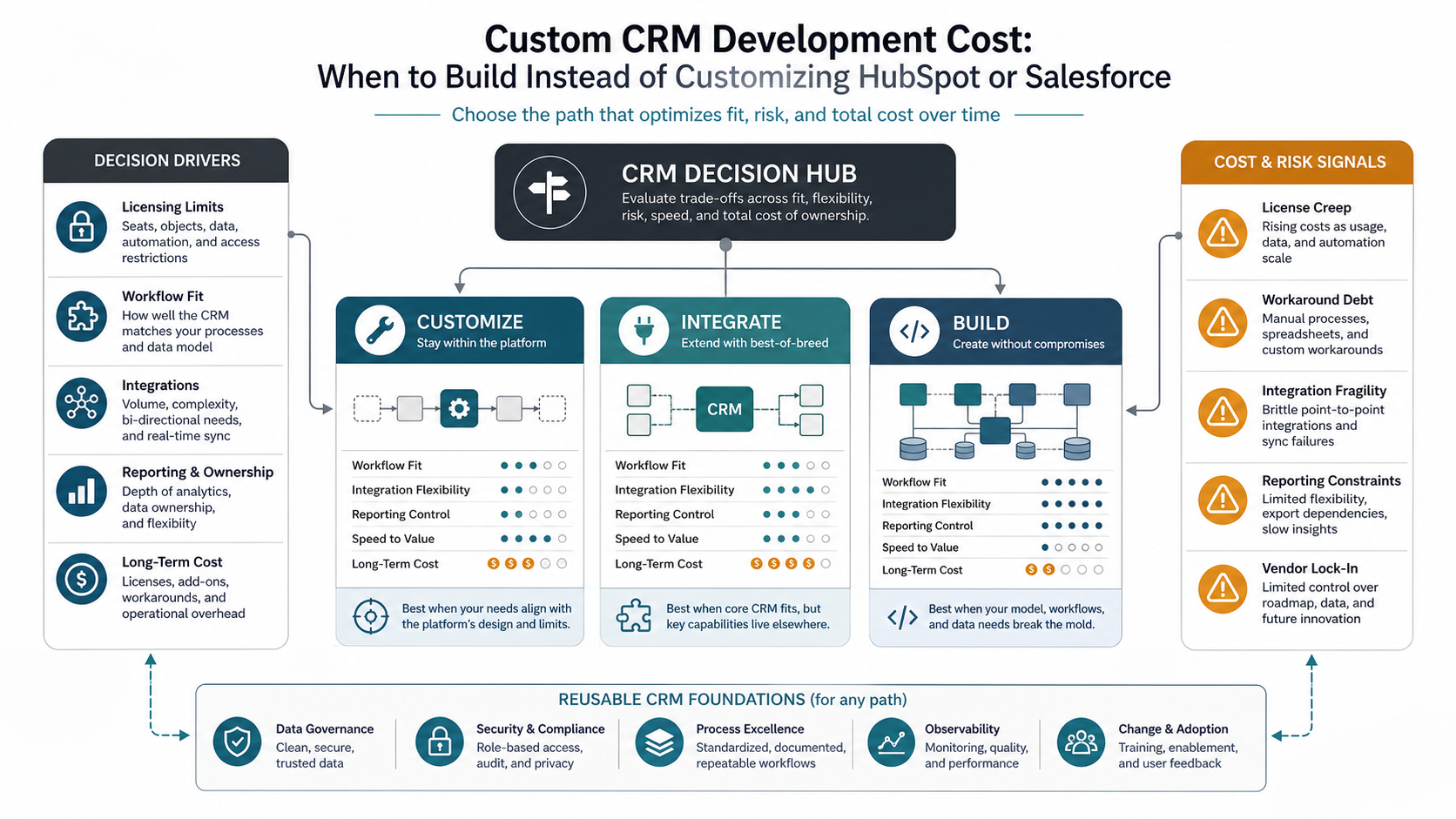

Quick Answer: Custom CRM Development Cost
Custom CRM development cost depends on the gap between your operating model and what an off-the-shelf CRM can support cleanly. If your sales, service, delivery, billing, and reporting workflows already fit HubSpot, Salesforce, Zoho, or another CRM with light configuration, custom development is usually not the first move. If the team is building spreadsheet workarounds, duplicating data across systems, creating fragile point-to-point integrations, or changing the business process to satisfy the tool, a custom CRM or workflow platform can become the more practical investment.
For planning, think in scope tiers instead of one universal price. A focused internal CRM for pipeline, customer records, activity tracking, and simple reports is one tier. A multi-team platform with service workflows, custom objects, role-based permissions, document generation, billing handoffs, and analytics is another. A CRM that becomes the operating system for sales, support, implementation, finance, and leadership reporting is closer to custom business software than a CRM plugin project.
NextPage usually estimates this kind of work as a custom software development project because the budget is shaped by workflows, integrations, data ownership, and long-term change control. If you only need a directional range, the Custom Software Cost Estimator is the right starting point before a detailed discovery session.
When Custom CRM Makes Sense
A custom CRM makes sense when the CRM is no longer just a contact database. It becomes the place where teams enforce process, coordinate work, route exceptions, generate documents, reconcile customer data, or see operational truth. In those cases, the cost of forcing the business into a packaged data model can become higher than the cost of building a focused system around the work.
The strongest signals are not cosmetic. Look for repeated exports, manual re-entry, duplicate customer records, pipeline stages that do not match real work, approval steps that live in chat, service histories split across tools, reporting that requires analyst cleanup, and integrations that break whenever a field changes. Those are signs that customization has turned into workaround debt.
Packaged CRM still has a place. HubSpot and Salesforce both provide mature sales tooling, reporting, automation, AI-assisted workflows, partner ecosystems, and implementation paths. Official HubSpot pages describe Sales Hub tiers, seats, automation, forecasting, custom objects, and Sales Hub's ability to work alongside an existing CRM. Salesforce's pricing FAQ highlights add-ons, outside-system integrations, annual subscription patterns, and usage-based products. The build-versus-customize decision should compare total operating fit, not only subscription sticker price.
Build, Customize, Or Integrate?
Most teams do not have only two choices. The practical options are to stay inside the CRM, customize it, integrate around it, or build a focused custom CRM/workflow layer. Each path has a different cost shape.
| Path | Best fit | Cost usually comes from | Risk to watch |
|---|---|---|---|
| Configure the CRM | Standard sales or service process with known objects and light reporting | Seats, implementation, admin time, templates, simple automation | Outgrowing the data model after adoption |
| Customize the CRM | Process mostly fits, but needs custom objects, approvals, dashboards, and workflows | Higher-tier licenses, implementation partner work, admin ownership, training | Complex configuration that only a few people understand |
| Integrate around the CRM | CRM remains customer source of truth while specialized work happens elsewhere | API work, middleware, sync logic, monitoring, error recovery, data mapping | Fragile integrations and inconsistent records |
| Build a custom CRM | Workflow, data model, permissions, reporting, or user experience breaks the platform mold | Product discovery, design, engineering, migration, security, QA, rollout, maintenance | Underestimating governance, adoption, and ongoing iteration |
A custom build is not automatically better. It is better when it removes durable friction that the packaged CRM cannot remove without adding more cost, fragility, or operational compromise.
CRM Cost Drivers That Change The Estimate
The biggest CRM cost drivers are user complexity, workflow depth, integration requirements, data migration, reporting needs, security, and change management. A useful estimate should show how each driver affects scope instead of hiding everything behind a single number.
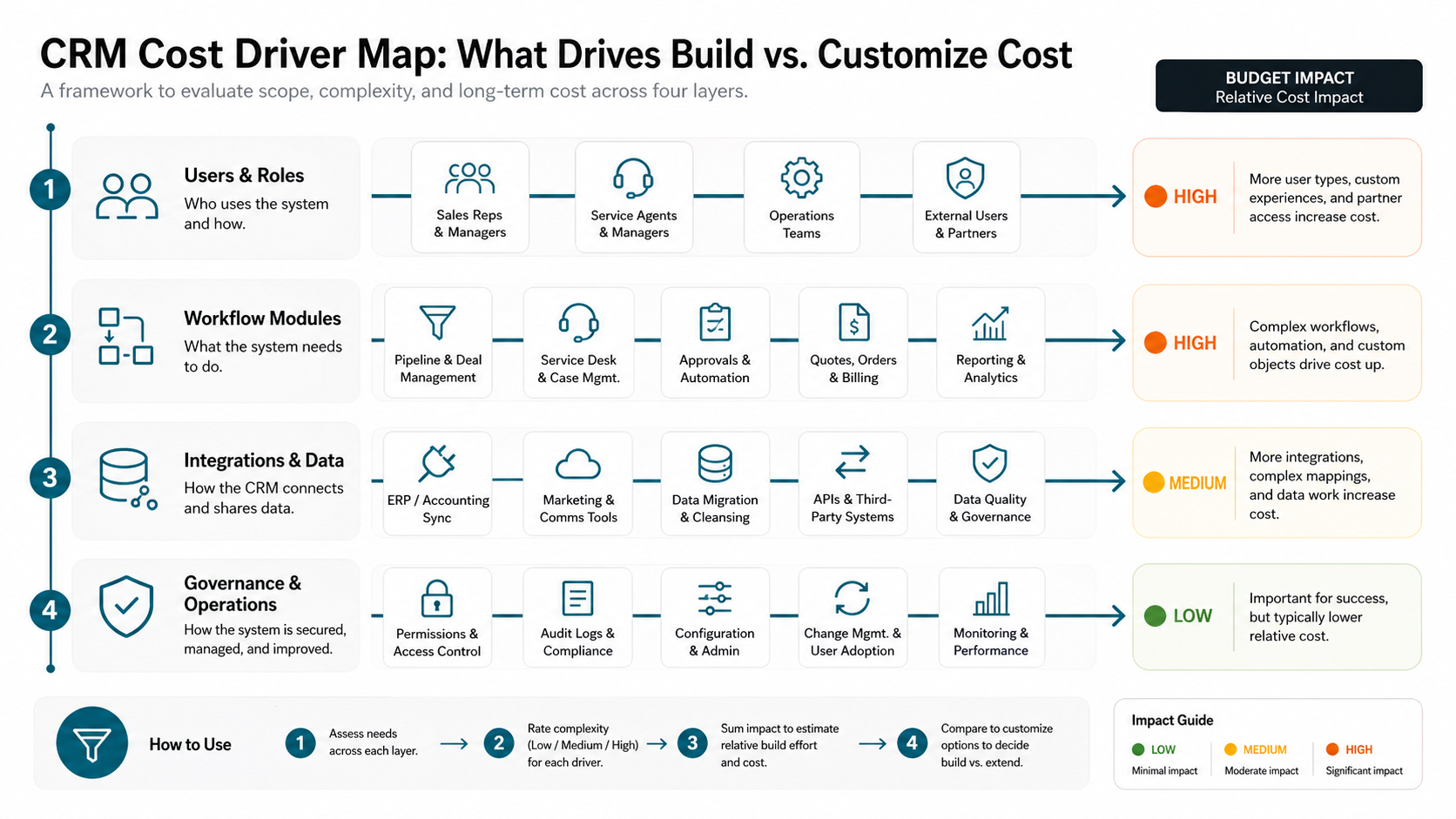
| Driver | Lower scope | Higher scope |
|---|---|---|
| Users and roles | One team, simple manager/admin split | Sales, service, operations, partners, external users, field teams, finance, and executive views |
| Workflow modules | Contacts, accounts, deals, tasks, notes, and basic reminders | Cases, quotes, approvals, renewals, onboarding, billing handoff, fulfillment, and SLA workflows |
| Data migration | Clean CSV import with limited history | Deduplication, historical activities, attachments, field mapping, validation, and rollback planning |
| Integrations | Email, calendar, forms, and one reporting feed | ERP, accounting, telephony, support desk, marketing tools, data warehouse, payment systems, and third-party APIs |
| Reporting | Standard pipeline and activity dashboards | Custom KPIs, cohort reports, attribution, forecasting, service performance, and operational analytics |
| Security | Authenticated internal users with basic permissions | Granular roles, audit logs, tenant separation, approval history, data retention, and sensitive-field controls |
| Adoption | Small trained group and simple rollout | Multiple departments, migration from existing tools, training, admin handoff, documentation, and behavior change |
Typical Scope Tiers
CRM estimates become clearer when they are separated into product tiers. A focused CRM MVP should prove that the new workflow is better than the existing stack. A larger platform should be justified by repeatable operations, high user volume, measurable savings, or revenue visibility that cannot be achieved through configuration.
| Tier | What it includes | Best for |
|---|---|---|
| Focused CRM MVP | Core records, pipeline or case workflow, role basics, import, simple reports, admin controls | Teams replacing spreadsheets, legacy tools, or a narrow broken workflow |
| Operational CRM platform | Multiple workflows, custom objects, integrations, dashboards, notifications, approvals, auditability | Sales and service teams that need one operating layer across departments |
| Customer operations system | CRM plus billing, delivery, support, analytics, external access, advanced permissions, automation, and ongoing roadmap | Companies where CRM data drives delivery, finance, account management, and leadership reporting |
If the CRM is mostly a sales interface, configuration may be enough. If it is becoming a web application for the business, the work may belong closer to web app development with CRM-like data and workflows.
HubSpot And Salesforce Customization Costs To Model
When comparing custom development with HubSpot or Salesforce customization, include more than licenses. Model the paid seats required for each user type, the edition needed for automation or custom objects, onboarding or implementation services, partner configuration, data migration, reporting work, API limits, add-ons, sandbox or environment needs, and ongoing administrator time.
HubSpot's official Sales Hub page lists free, Starter, Professional, and Enterprise tiers and describes features such as deal pipelines, forecasting, custom objects, AI-guided selling, CPQ, and the ability to use Sales Hub alongside another CRM. Salesforce's pricing page notes add-ons, integration options for outside systems, annual contract patterns for most subscriptions, and separate usage tools such as Data 360 and Agentforce calculators. Those details matter because a team may start with a simple CRM license and later need higher-tier seats, integration tooling, partner help, or usage-based products.
The decision is not whether SaaS is expensive or custom software is expensive. The decision is whether the platform's cost structure matches how your business actually works. A packaged CRM can be excellent when your process fits. Custom software becomes relevant when the organization keeps paying to work around the platform instead of getting leverage from it.
Integration And Data Migration
Integration scope can move a CRM estimate more than the visible screens. A custom CRM that only stores customer records and tasks is very different from one that syncs with accounting, billing, marketing automation, helpdesk, logistics, product usage data, and executive dashboards.
Every integration needs authentication, field mapping, retries, error queues, ownership rules, monitoring, and a plan for conflicts. If a contact is updated in two places, which system wins? If a payment fails, does the CRM create a task, update an account status, notify finance, or block a renewal? These decisions turn a CRM from a database into business infrastructure.
Migration also needs budget. Clean imports are rare. Old CRM exports often contain duplicate companies, inconsistent lifecycle stages, missing owners, stale contacts, custom fields nobody trusts, and attachments that need special handling. Migration should include mapping, cleansing, test imports, stakeholder review, and a fallback plan.
CRM Intelligence And Reporting
AI and automation can make a CRM more valuable, but they should not be added before the workflow is clear. Useful CRM automation includes lead routing, follow-up reminders, account health flags, quote or proposal triggers, service escalation, duplicate detection, meeting summaries, and reporting alerts. More advanced work can include lead research, CRM hygiene, sales-assist workflows, and AI-generated next-step drafts with human review.
If your CRM roadmap includes AI, start with repeatable work and measurable outcomes. The AI Automation ROI Calculator can help decide whether repeated CRM tasks are worth automating. For sales-specific ideas, NextPage's guide to AI agents for sales covers lead research, follow-up, CRM hygiene, and deal support patterns that often sit near CRM data.
Reporting is another common reason teams consider custom CRM development. Packaged dashboards may be enough for standard sales metrics. Custom dashboards become useful when leadership needs data from CRM, billing, support, delivery, and product usage in one place. That requires data definitions, ownership, and refresh rules before charts are designed.
How To Estimate Custom CRM Development Cost
A practical estimate starts with a working model, not a feature wishlist. List the people who use the CRM, the decisions they make, the records they need, the workflows they complete, the systems they read or update, and the reports leadership expects. Then separate launch scope from later automation.
- Define the primary workflow. Is the first version for sales pipeline, service cases, onboarding, account management, renewals, partner management, or operations?
- Map user roles. Identify sales reps, managers, service agents, admins, executives, finance users, external partners, and read-only users.
- Choose system boundaries. Decide what stays in HubSpot, Salesforce, accounting, helpdesk, email, data warehouse, and what moves into the custom layer.
- Rank integrations. Mark each integration as read-only, write-back, real-time, scheduled, or manual for version one.
- Plan migration. Identify source systems, data quality issues, history requirements, attachments, duplicates, and acceptance checks.
- Set reporting outcomes. Define the metrics and decision cadence before designing dashboards.
- Budget ownership. Include administrator handoff, documentation, training, monitoring, support, and future changes.
This is also where build-versus-customize becomes clearer. If the estimate is dominated by standard CRM behavior, customize. If the estimate is dominated by unique workflows, data ownership, integrations, and operational reporting, a custom build may be more durable.
Hidden Costs That Surprise Teams
The hidden costs in CRM projects are usually operational, not technical. Teams underestimate migration cleanup, admin ownership, user adoption, edge-case permissions, email/calendar nuance, reporting definitions, and the time required to retire old workflows. They also underestimate how quickly a few custom fields can become a business-critical data model.
Packaged CRM hidden costs often include implementation partner work, higher-tier features, add-ons, integration middleware, sandbox environments, data enrichment, training, and internal admin time. Custom CRM hidden costs often include maintenance, roadmap discipline, security reviews, support, documentation, and the need to say no to low-value customizations.
The best way to control both is to keep version one narrow. Replace the workflow that creates the most friction. Measure adoption and data quality. Then expand into automation, analytics, and adjacent teams once the foundation is trusted.
How NextPage Approaches CRM Builds
NextPage starts CRM work by mapping the operating model before recommending a platform path. We look at user roles, sales and service workflows, current CRM limits, reporting needs, integration boundaries, migration risk, and the cost of keeping existing workarounds. Sometimes the right recommendation is to keep HubSpot or Salesforce and clean up implementation. Sometimes it is to build an adjacent workflow app. Sometimes it is to create a custom CRM because the business process is the product.
The practical outcome is a version-one scope that can launch, be adopted, and be improved. That may include a custom CRM, a customer operations portal, an admin dashboard, a data layer around a packaged CRM, or a workflow automation layer. The goal is not to replace tools for the sake of replacement. The goal is to make customer operations easier to run, easier to measure, and easier to change.
If your team is weighing CRM customization against a custom build, start with the workflow map and a cost model. Then use the estimator or a discovery sprint to turn that model into a realistic roadmap.