
Quick Answer: Customer Portal Development
Customer portal development is the process of building a secure web application where customers can manage accounts, find answers, submit requests, view documents, track work, make payments, and interact with your business without waiting for a support team. A useful portal is not just a login screen. It connects customer-facing tasks to CRM data, billing, files, support queues, notifications, permissions, analytics, and the internal teams that own the follow-up.
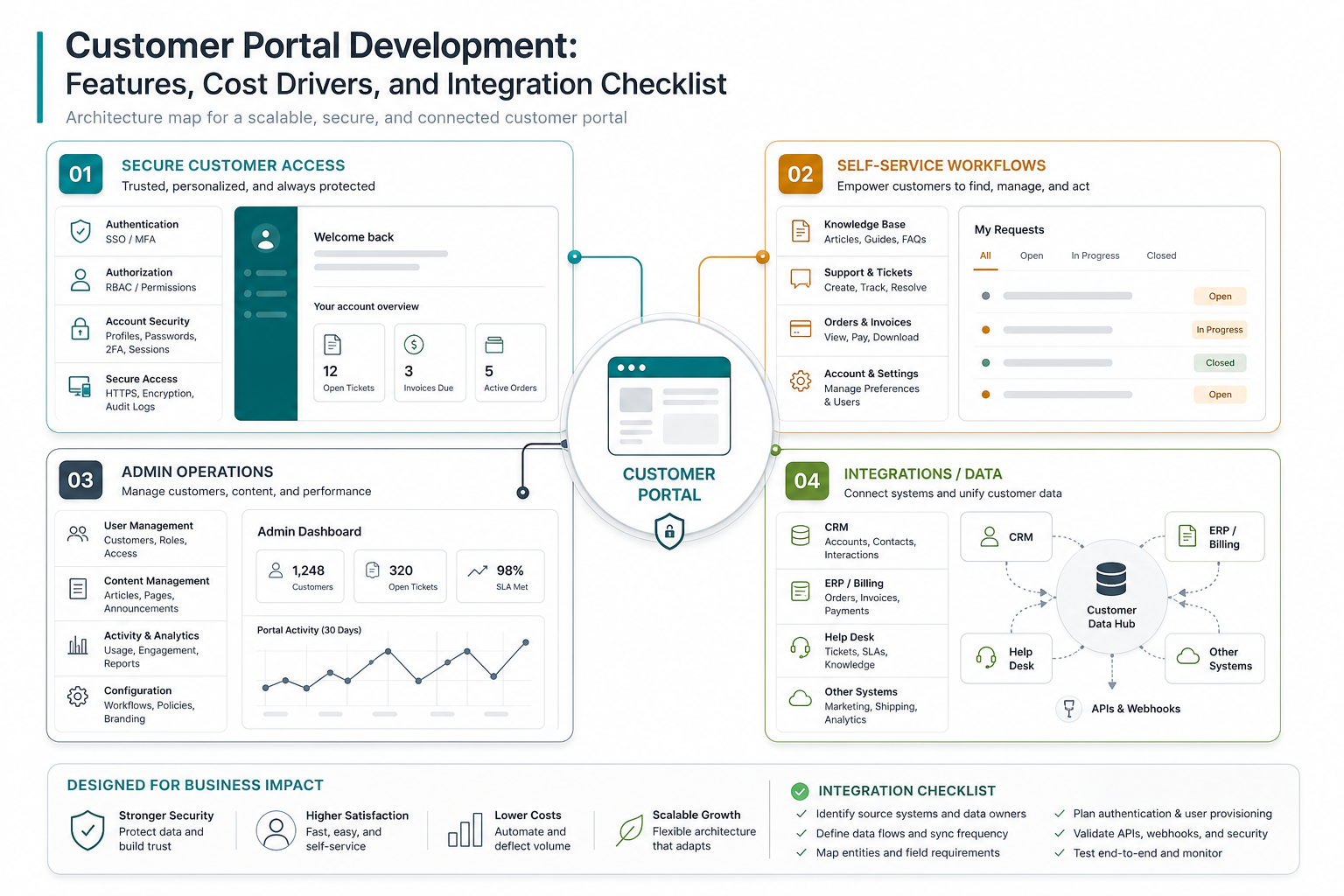
A practical first release usually includes authentication, role-based dashboards, account or profile management, support requests, knowledge base content, document access, notifications, admin controls, analytics, and one or two high-value integrations. More advanced portals add payment flows, approval workflows, AI support, customer-specific pricing, multi-account permissions, API access, and deeper workflow automation.
If you already know the user roles and first workflows, use the custom software cost estimator to turn portal scope into a directional budget before requesting a full proposal. If the team is still deciding whether to configure a platform or build custom software, compare the tradeoffs with the build vs buy decision tool.
What a Customer Portal Should Do
A customer portal should reduce friction for customers and reduce repetitive work for the business. It needs to answer the practical questions customers ask every week: What is my account status? Where is my order, ticket, project, subscription, invoice, file, or service request? What action is needed from me? Who has access? What changed since last time?
For some companies, the portal is a support and knowledge base layer. For others, it is a client operations hub with projects, documents, approvals, billing, onboarding, reporting, and account-level permissions. Ecommerce teams may focus on orders, returns, subscriptions, loyalty, and product support. B2B service companies often need files, tasks, messages, estimates, contracts, invoices, and progress visibility.
This is why the best portal scope starts with jobs-to-be-done, not a generic feature list. A useful portal maps customer tasks to internal ownership: which team receives the request, which system holds the source data, what status should be visible, which actions customers can complete themselves, and which actions require staff review.
Customer Portal Types
| Portal Type | Primary Workflow | Typical Users | Build Notes |
|---|---|---|---|
| Support portal | Tickets, knowledge base, chat, service status, attachments | Customers and support teams | Needs ticket system integration and clear escalation rules |
| Account portal | Profile, subscriptions, billing, invoices, payment methods, usage | Customers, finance, success teams | Needs secure billing and CRM data sync |
| Project or client portal | Milestones, files, approvals, messages, tasks, reports | B2B clients and delivery teams | Needs permissions, document control, and audit history |
| Partner portal | Leads, resources, deal registration, training, shared reporting | Channel partners and account teams | Needs multi-organization permissions and content management |
| Operations portal | Requests, service bookings, field updates, compliance documents | Customers, operations, vendors | Needs workflow automation and mobile-friendly UX |
Many portals combine more than one type. The risk is trying to launch all of them at once. A focused first release should choose the workflow that removes the most support burden or creates the clearest customer value.
Core Features for a Customer Portal
Core features should support the customer journey and the admin workflow behind it. A portal that looks polished but cannot update account data, route tickets, or show trustworthy status will create more support work instead of less.
| Feature Area | What to Build | Why It Matters |
|---|---|---|
| Secure access | Login, MFA when needed, password reset, SSO, session controls, account invitations | Customers need safe access without blocking normal usage |
| Role permissions | Customer users, admins, finance users, partners, internal staff, organization-level roles | B2B portals often have multiple users under one account |
| Dashboard | Status cards, recent activity, open requests, next actions, key documents, alerts | The homepage should answer what needs attention now |
| Self-service workflows | Requests, tickets, orders, bookings, approvals, renewals, forms, account updates | Self-service only works when users can complete real tasks |
| Knowledge base | FAQs, guides, policies, onboarding steps, search, recommended content | Content can deflect repetitive support questions |
| Documents | Secure files, contracts, invoices, reports, version history, download permissions | Document access is often a major portal value driver |
| Notifications | Email, in-app alerts, status changes, reminders, SLA updates, digest options | Customers should not need to keep checking manually |
| Admin tools | User management, content, workflow settings, request queues, reporting, audit logs | The business needs control after launch |
For most teams, these features are a web app development project with customer-facing UX, backend logic, admin surfaces, and integrations. If the portal replaces several manual processes, it also overlaps with custom software development.
Task-First Navigation and First Login Experience
Portal adoption often fails because customers cannot find the action they came for. Treat navigation as a product decision, not only a menu design task. The first screen should prioritize the highest-value tasks: pay an invoice, check order status, submit a support request, upload a document, approve a milestone, view a report, or update account details.
Use customer language instead of internal department names. A user may not know whether an issue belongs to support, operations, finance, or success. They know the outcome they need. Good navigation groups answers and actions around tasks such as Orders, Billing, Documents, Requests, Projects, Products, Subscriptions, and Account Access.
The first-login experience should be short. A guided setup can help customers invite team members, confirm profile details, connect a payment method, or submit their first request, but long tutorials usually delay the job they came to complete. Use targeted cues and empty states that point to the next action.
Integrations That Shape the Build
Integrations are usually where a customer portal becomes valuable and where estimates become uncertain. A portal may need CRM records, help desk tickets, billing data, order history, document storage, e-signature tools, project management updates, ERP data, analytics, email, SMS, chat, identity providers, and payment processors.
The first integration question is not "which tools do we use?" It is "which system owns the truth?" If invoices live in accounting software, the portal should not create a second invoice source. If customer status lives in a CRM, the portal needs rules for what can be displayed, edited, cached, or hidden. If request data starts in the portal but must be handled by support or operations, the handoff must be explicit.
| Integration | Common Use | Planning Risk |
|---|---|---|
| CRM | Account data, contacts, customer health, ownership | Field mapping, duplicate records, permission boundaries |
| Help desk | Tickets, SLA status, attachments, support history | Status sync, private notes, escalation logic |
| Billing or payments | Invoices, subscriptions, payment methods, receipts | Security, PCI boundaries, failed payment handling |
| Document storage | Reports, contracts, files, statements, signed forms | Access control, versioning, retention |
| ERP or operations systems | Orders, shipments, service status, inventory, projects | API quality, data freshness, retries, error handling |
| Chat or AI support | Guided answers, triage, account-aware help | Knowledge freshness, handoff, evaluation, guardrails |
If support deflection is a major goal, an AI chatbot development layer can help answer from approved portal content and route issues. It should be added after source content, permissions, escalation paths, and answer quality evaluation are clear.
Customer Portal Development Cost Drivers
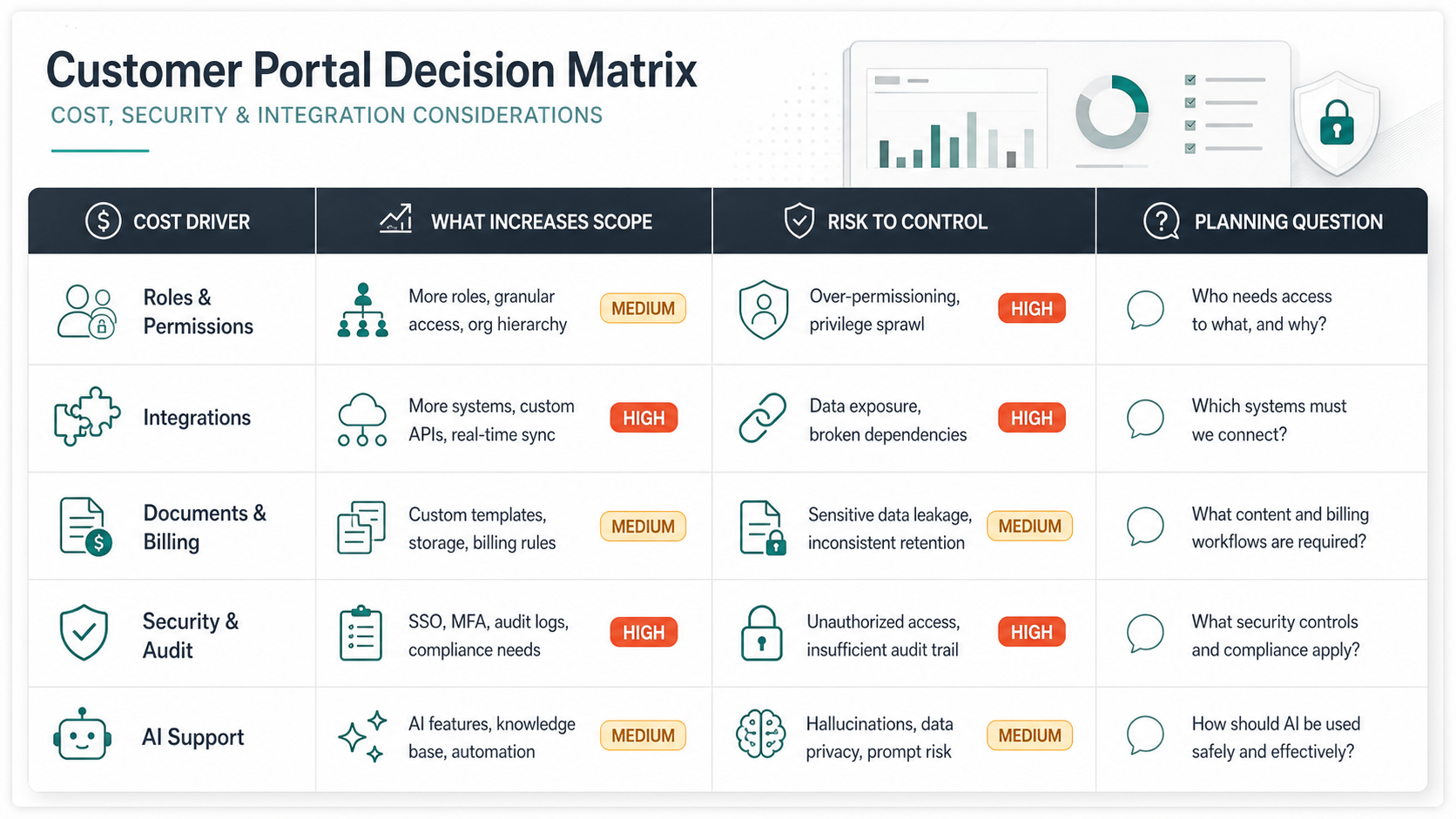
Customer portal development cost depends on workflow depth, not the label "portal." A simple support portal with login, FAQs, tickets, and basic account details is very different from a multi-tenant B2B portal with billing, documents, project workflows, CRM sync, role hierarchy, approvals, analytics, and AI support.
| Scope | Typical Build | Planning Range | Good Fit |
|---|---|---|---|
| Focused MVP | Login, dashboard, knowledge base, support requests, simple admin, analytics | $25,000-$75,000 | Teams validating self-service and support deflection |
| Operational portal | Role permissions, documents, notifications, CRM/help desk sync, reporting, richer admin | $75,000-$180,000 | B2B service companies and SaaS teams improving account operations |
| Enterprise portal | Multi-tenant roles, billing, approvals, ERP integrations, audit logs, AI, advanced analytics | $180,000-$400,000+ | Companies where the portal becomes a core operating platform |
Use these as planning bands, not fixed quotes. Final cost changes with design depth, accessibility needs, number of roles, integration quality, data cleanup, compliance, testing, deployment model, migration needs, and post-launch support. The safest estimate comes after a short discovery phase that validates systems, workflows, and edge cases.
MVP Scope and Rollout Plan
The best portal MVP should prove one measurable loop. For a support portal, that loop may be: customer searches knowledge base, submits a ticket if needed, tracks status, receives updates, and rates resolution. For a client portal, the loop may be: client logs in, reviews project status, downloads files, approves a milestone, and asks a question in context.
| Release | Include | Defer | Success Measure |
|---|---|---|---|
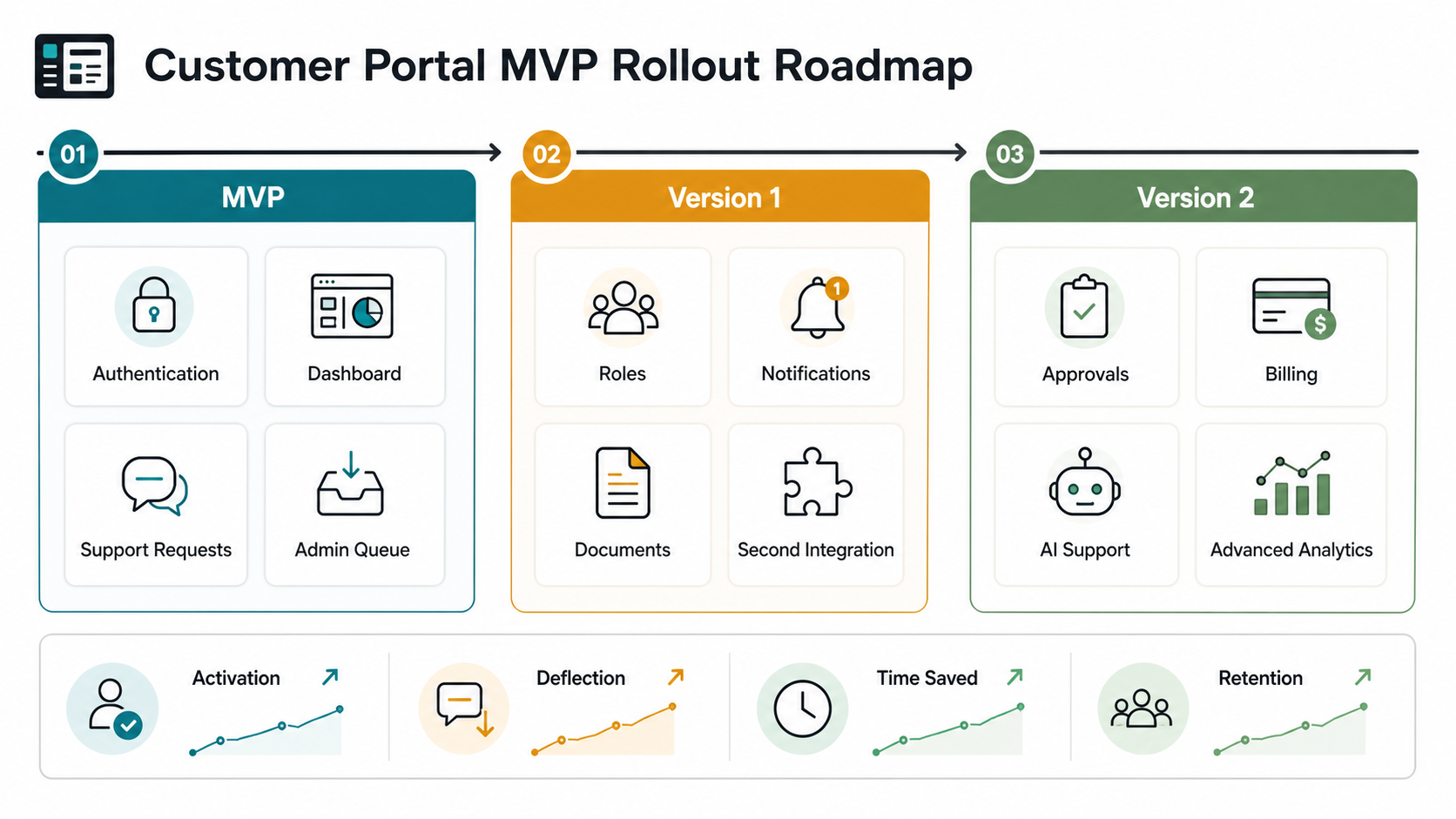
| MVP | Authentication, dashboard, one or two core workflows, admin queue, analytics, priority integration | Complex automation, advanced AI, mobile apps, deep ERP sync | Portal activation, request completion, support deflection |
| Version 1 | More roles, notifications, documents, knowledge base expansion, reporting, second integration | White-labeling, multi-region complexity, heavy customization | Reduced ticket volume, faster response, higher self-service completion |
| Version 2 | Approvals, billing, AI support, workflow automation, advanced analytics, API access | Anything not tied to adoption or operating leverage | Lower cost-to-serve, retention, account expansion, staff time saved |
This sequencing protects the launch from becoming a broad digital transformation strategy project. A portal can grow into a major customer operating system, but the first version should solve a visible customer pain and prove that users will return.
Build vs Buy and No-Code Tradeoffs
No-code portal builders and packaged customer portal platforms can be a good fit when the workflow is standard: secure login, knowledge base content, basic records, forms, status views, and simple integrations. They are especially useful when speed matters more than unique workflow logic.
Custom portal development makes more sense when customer permissions are complex, data must flow across several systems, the portal needs custom admin workflows, the user experience is part of the competitive advantage, or the business needs ownership over integrations and future roadmap decisions. Many teams use a hybrid path: configure the common pieces, then build custom workflows around source systems and customer operations.
If the existing business systems are old, fragmented, or hard to integrate, treat the portal as a modernization initiative rather than a standalone UI. The portal may expose gaps in data quality, API access, identity, reporting, and operational ownership. In those cases, review the legacy application modernization roadmap before promising customers a new self-service experience.
Security, Permissions, and Compliance
Security is not a late-stage checklist for customer portals. The portal may expose account data, invoices, contracts, tickets, private documents, usage history, payment records, or regulated information. That requires clear decisions about authentication, role-based access, data retention, audit logging, encryption, backup, and incident response.
B2B portals need special attention to organization-level permissions. One customer account may have owners, finance users, approvers, viewers, external consultants, and former employees. The product needs invitation flows, account removal, audit history, and easy admin controls so access does not become a support ticket every time a team changes.
Compliance needs depend on the industry and data type. Healthcare, finance, education, government, and enterprise procurement workflows may require stricter retention, logging, identity, and data-handling controls. If the portal exposes sensitive or regulated data, include security testing services and release evidence in the plan before launch.
How to Measure Portal Success
A customer portal should be measured by adoption and operating impact, not only launch completion. Useful metrics include activation rate, monthly active customer accounts, self-service completion rate, ticket deflection, average response time, time-to-resolution, document downloads, invoice payment speed, failed login rate, search success, task completion, and customer satisfaction.
Internal metrics matter too. Track admin time saved, duplicate data entry reduced, integration errors, stale records, request routing accuracy, content gaps, and workflow exceptions. A portal that moves work out of email but creates manual cleanup elsewhere has not really reduced cost.
Review analytics and support conversations after launch. The best backlog often comes from failed searches, abandoned forms, repeated tickets, and customer actions that still require a phone call. Those signals show where the next portal release should invest.
How NextPage Plans Customer Portals
NextPage plans customer portals by mapping the workflow behind each screen: who logs in, what they can see, which action they can take, which internal system owns the data, and what happens when the happy path breaks. That makes the estimate more realistic than pricing a generic list of portal features.
For teams replacing email-heavy operations, the first step is usually a scoped product plan: customer roles, top self-service workflows, source systems, integration constraints, admin ownership, security needs, launch metrics, and release boundaries. Once those decisions are visible, the build can move faster without turning into a vague portal rebuild.
NextPage can support the broader web portal development services path as well as the custom software, web app, security, integration, and AI support pieces around the portal. Start with the customer tasks that create the most support load or revenue friction. A focused portal that removes those blockers will usually outperform a large portal that tries to expose every internal process at launch.