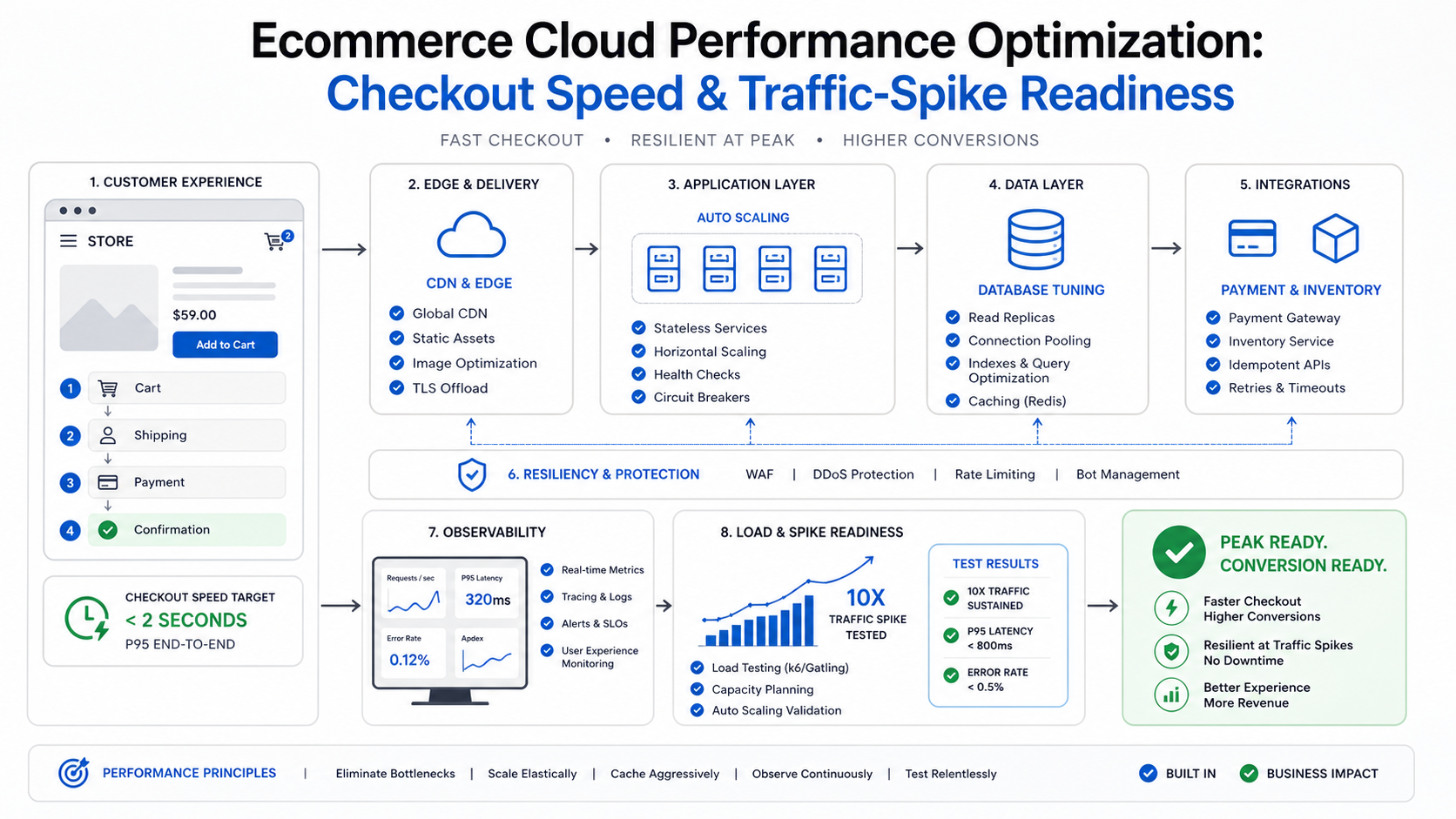

Ecommerce cloud performance optimization is the work of keeping the revenue path fast and reliable when traffic changes suddenly. It is not only a bigger server, a CDN toggle, or a one-time PageSpeed score. It connects storefront speed, product search, cart state, checkout APIs, payment callbacks, inventory sync, database behavior, autoscaling, observability, and launch operations into one readiness plan.
The highest-risk moment is rarely an average shopping day. It is the email campaign, influencer post, festive sale, marketplace push, paid ad burst, or limited product drop that sends more buyers than usual into the same few flows. If product pages load slowly, cart state breaks, tax or shipping calls time out, or checkout confirmation lags, cloud spend can rise while revenue leaks.
Quick Answer: What Should Ecommerce Cloud Performance Optimization Include?
Ecommerce cloud performance optimization should include storefront Core Web Vitals, product listing and search latency, cart and checkout p95 response time, payment and inventory integration resilience, CDN and cache rules, database query tuning, autoscaling warmup, queue capacity, observability, realistic load testing, rollback planning, and launch-day dashboards. The goal is a measurable readiness plan for the flows that directly affect conversion and order completion.
Use field data and production-like tests together. Google’s current Core Web Vitals framework centers on Largest Contentful Paint, Interaction to Next Paint, and Cumulative Layout Shift, with good field-data thresholds of LCP within 2.5 seconds, INP under 200 milliseconds, and CLS below 0.1 at the 75th percentile of real visits. Shopify’s 2026 speed analysis reinforces that load time and interactivity should be treated as conversion signals, not vanity scores. Ecommerce teams should pair those user-experience signals with backend metrics such as checkout latency, add-to-cart success, payment success, dependency timeouts, and queue age. If the goal is revenue lift rather than infrastructure tuning alone, connect this work to ecommerce conversion optimization services so storefront speed, checkout UX, analytics, and experimentation move together.
If your current hosting model or workload placement cannot support the campaign plan, connect the work to a broader cloud migration assessment instead of applying isolated fixes to an architecture that is already at its limit.
Why Ecommerce Performance Is Different From Generic Cloud Tuning
Ecommerce performance has a direct conversion surface. A slow internal report is painful, but a slow product page or broken payment callback can turn into abandoned carts within minutes. The system also has more external dependencies than many web apps: payment gateways, tax engines, shipping rules, inventory systems, ERPs, product feeds, search services, recommendation engines, analytics scripts, fraud checks, and marketing tags.
That means the first question is not whether CPU is high. The first question is which buyer journey is at risk. Separate flows that create revenue from flows that support operations. Product discovery, product detail pages, cart, checkout, payment authorization, order confirmation, account login, promotion code validation, inventory reservation, and post-purchase emails need their own measurements, owners, and failure thresholds.
| Commerce Flow | Performance Risk | Evidence To Collect |
|---|---|---|
| Product listing and search | Slow filtering, heavy images, cache misses, search dependency latency | LCP, INP, TTFB, cache hit rate, search response time, image weight |
| Cart and session | Session store pressure, stale prices, inventory race conditions | Cart API p95, session errors, inventory mismatch rate |
| Checkout | Payment, tax, shipping, fraud, or address APIs block completion | Checkout p95, third-party latency, failed payment callbacks |
| Order confirmation | Queue backlog delays confirmation or fulfillment handoff | Queue age, job duration, retry count, ERP sync status |
Revenue Risk And Error Budgets For Peak Commerce Events
A stronger ecommerce performance plan gives every buyer-facing flow a business owner and an error budget before infrastructure work starts. That budget should define the maximum acceptable checkout error rate, payment callback delay, product-search latency, queue age, and inventory conflict rate during the event window. Without those thresholds, teams often keep tuning CPU or cache rules while the real revenue leak sits in a payment retry loop, a slow tax API, or a product-feed lock.
Use field data for the storefront experience and production-like load tests for the revenue path. Field data shows whether real shoppers pass Core Web Vitals on their devices and networks. Load tests show whether checkout, queues, inventory, and third-party integrations still behave when campaign traffic arrives in bursts. The useful operating question is not whether the site can survive a synthetic request count; it is whether buyers can find products, add to cart, pay, receive confirmation, and trigger fulfillment without exceeding the agreed error budget.
| Budget Area | Peak-Event Signal | Owner Decision |
|---|---|---|
| Storefront experience | LCP, INP, CLS, TTFB, image weight, third-party script cost | Which templates must pass before the campaign goes live? |
| Checkout reliability | Checkout p95, payment authorization rate, timeout count, callback lag | Which dependencies need timeout, fallback, or escalation rules? |
| Operational recovery | Queue age, retry count, dead-letter volume, rollback marker, support tickets | When does the team pause traffic, roll back, or switch to degraded mode? |
1. Baseline The Revenue Path Before Tuning Infrastructure
Start with a baseline for the flows that make money. Measure page experience, API latency, error rates, conversion drop-off, cloud utilization, database wait time, cache behavior, and third-party dependency latency during the same time window. Avoid comparing a mobile traffic spike with a desktop baseline or a campaign hour with an ordinary weekday without marking the difference.
For 2026 planning, treat Core Web Vitals as a conversion diagnostic rather than a cosmetic SEO task. Current ecommerce performance research and checkout guides keep pointing to the same pattern: speed, responsiveness, form friction, trust, and payment reliability compound at checkout. A good readiness review therefore asks whether the buyer can find a product, interact with filters, add to cart, complete payment, and receive confirmation while the system is under realistic load.
The supporting cloud performance audit checklist is a good companion when the problem is still vague. Use it to move from symptoms such as slow pages or failed spikes to a bottleneck map with owners and retest criteria.
2. Tune CDN, Cache, And Media For Product Discovery
Product discovery is usually the first traffic multiplier. A campaign may send thousands of users to a landing page, category page, collection, or product detail page before anyone reaches checkout. The CDN and cache strategy should protect those pages without serving stale prices, incorrect inventory, or personalized data to the wrong shopper.
Review cache headers, edge rules, image formats, responsive image sizes, product media weight, third-party scripts, redirects, geolocation rules, search indexing behavior, and cache purge routines. Static assets and product media should be aggressively optimized. Dynamic pricing, cart state, account data, and inventory-sensitive responses need more careful rules. For stores where slow product discovery, high cloud cost, and reliability issues overlap, a focused cloud performance optimization services sprint should tie CDN changes to origin metrics, cache hit rate, database waits, and buyer-facing conversion signals.
- Cache static assets: JavaScript, CSS, fonts, product images, icons, and campaign media should not hit origin on every request.
- Separate public and private data: Do not mix cacheable product content with account, cart, or personalized pricing responses.
- Control invalidation: Plan how catalog, price, promotion, and inventory changes purge safely before a campaign starts.
- Watch scripts: Marketing tags, chat widgets, analytics, and recommendation scripts can hurt storefront speed if nobody owns their budget.
3. Remove Checkout And Integration Bottlenecks
Checkout is where cloud performance becomes business performance. The most common mistake is tuning the app server while checkout still waits on slow payment, shipping, tax, fraud, address, inventory, or ERP calls. Trace the full checkout path and mark every synchronous dependency that can block order completion. If payment routing or settlement is part of the bottleneck, compare gateway architecture, callback behavior, and retry requirements against the payment gateway integration architecture guide before the campaign window.
Some dependencies must stay synchronous because the order cannot continue without them. Others can move to queues, cached lookup tables, fallback rules, or post-confirmation jobs. The goal is not to hide failures. It is to keep the buyer-facing path short, observable, and recoverable. If you are changing platforms, gateways, catalog structure, or checkout rules, borrow the validation mindset from the WooCommerce migration checklist: payments, shipping, tax, redirects, catalog data, checkout rules, and launch QA all need explicit test cases before traffic is sent to the new path.
| Dependency | Risk During Spike | Optimization Move |
|---|---|---|
| Payment gateway | Authorization latency or callback retries delay completion | Timeout controls, idempotency, webhook monitoring, retry queue |
| Inventory service | Race conditions oversell limited stock | Reservation logic, stock cache, conflict handling, alerting |
| Shipping and tax | External API latency blocks checkout | Precomputed rules, timeout fallback, dependency dashboard |
| ERP or fulfillment | Backlog slows order handoff after purchase | Async queue, dead-letter review, replay tooling |
Checkout Dependency Resilience Scorecard
Checkout performance work should classify every dependency by what must happen before the buyer sees confirmation and what can safely move behind the order. This is where many traffic-spike plans fail: the storefront is cached and autoscaled, but tax, shipping, payment, inventory, fraud, or ERP calls still sit on the critical path without timeout budgets or recovery rules.
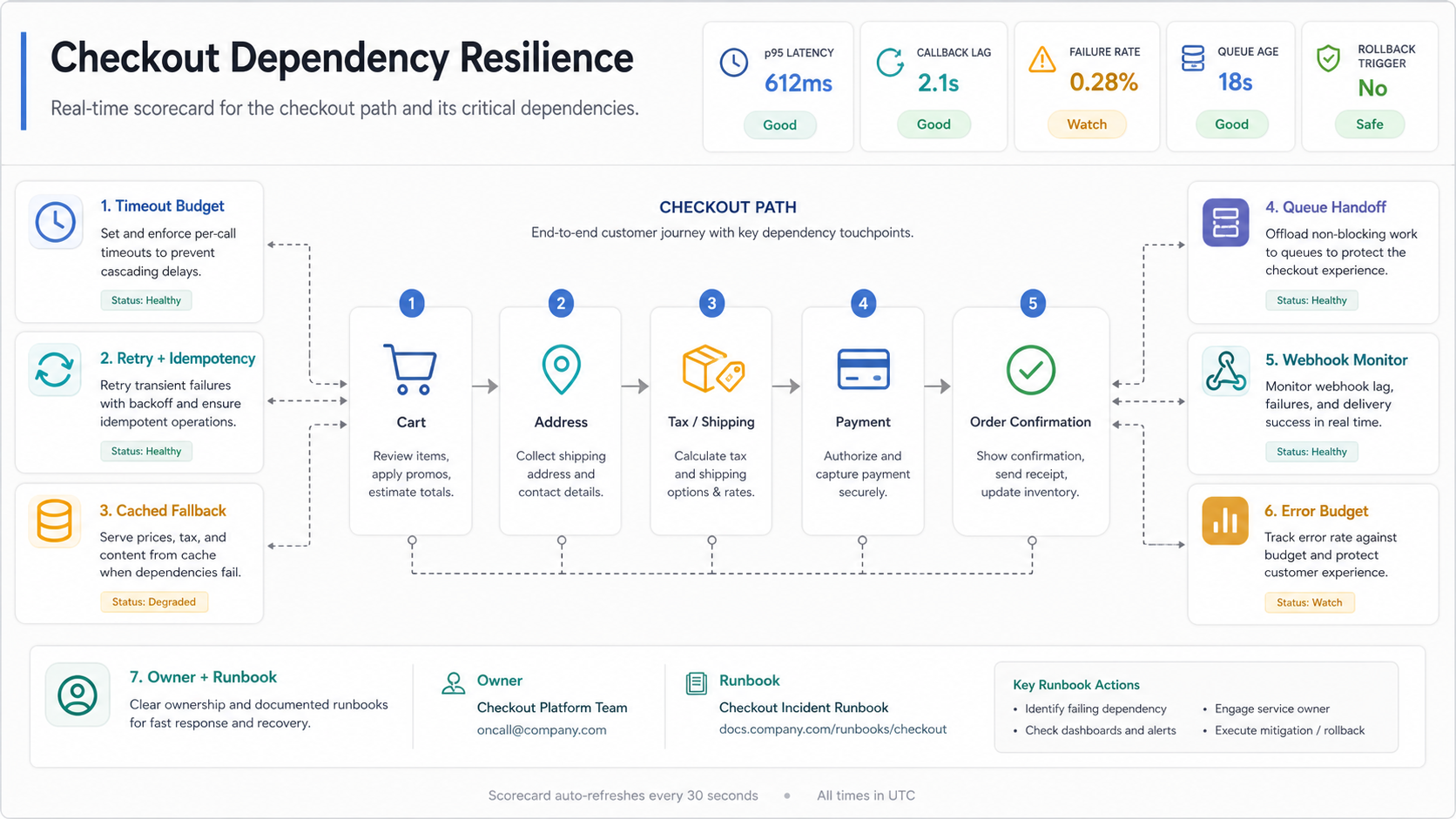
| Dependency Decision | Use This Rule | Evidence Before Launch |
|---|---|---|
| Keep synchronous | The buyer cannot complete checkout safely without the answer. | p95 and p99 latency, timeout budget, error rate, and vendor escalation owner. |
| Cache or precompute | The value changes slowly or can tolerate a short freshness window. | Cache age, invalidation rule, stale-data warning, and price or tax exception test. |
| Queue after confirmation | The work is required for fulfillment but does not need to block the buyer. | Queue age, retry count, dead-letter review, replay tooling, and support visibility. |
| Fallback temporarily | A third party may fail but the business has an approved degraded mode. | Fallback copy, risk owner, rollback trigger, and post-event reconciliation plan. |
This scorecard also helps decide whether a platform change is needed. If the checkout path depends on unusual business rules, deep integrations, or proprietary fulfillment logic, compare the roadmap with the Build vs Buy Decision Tool before assuming a plugin, hosted platform, or quick infrastructure upgrade will remove the risk.
4. Make Autoscaling Predictable Before The Campaign
Autoscaling is not readiness by itself. It has thresholds, warm-up time, cooldown windows, maximum capacity, database limits, queue worker constraints, deployment interactions, and cloud quotas. If scaling begins only after customers already see checkout errors, the policy is too late for the event.
For planned campaigns, pre-warm predictable layers where appropriate, raise minimum capacity during the launch window, confirm cloud quotas, and test whether new instances become healthy fast enough. Also check the shared constraints autoscaling cannot fix: database locks, a single payment gateway bottleneck, a synchronized inventory write path, or a search dependency with its own rate limit.
When performance work exposes deeper application or platform scope, the ecommerce build may need architecture changes. The eCommerce app development cost guide can help frame whether the next move is a focused performance sprint, a checkout refactor, or a larger commerce platform roadmap.
Campaign Readiness Matrix For Ecommerce Performance
A practical readiness plan has four lanes: measure, tune, validate, and operate. Measure the buyer journey first, tune the highest-risk layers, validate with realistic traffic and data, then operate the launch with a live dashboard and rollback criteria.
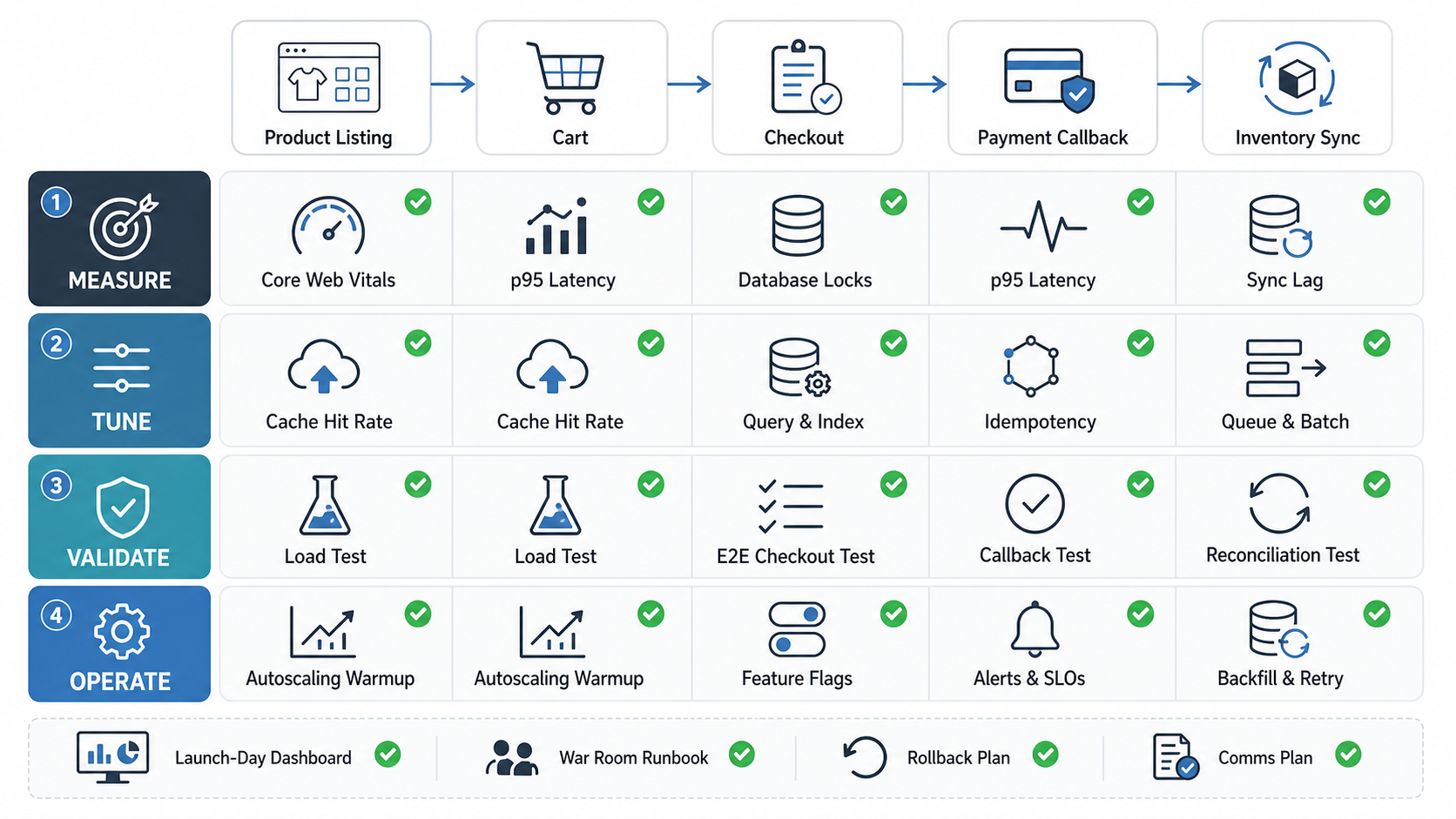
| Lane | What To Check | Exit Criteria |
|---|---|---|
| Measure | Core Web Vitals, checkout p95, errors, dependency latency, queue age, conversion funnel | Dashboard shows buyer journey health by step |
| Tune | CDN, image delivery, cache rules, database indexes, slow APIs, worker capacity | Known bottlenecks have owners and retest results |
| Validate | Load tests, checkout tests, payment callbacks, inventory conflicts, rollback drills | Spike test passes at target traffic with acceptable error budget |
| Operate | Launch runbook, alerts, escalation, freeze window, rollback trigger, post-event review | Team knows what to watch and when to intervene |
5. Load Test With Realistic Commerce Data
Load tests should look like your campaign, not like a generic homepage benchmark. Include traffic mix, device split, cache state, product listing paths, product detail pages, cart changes, promotion codes, checkout attempts, payment callback simulation, inventory writes, search queries, and background jobs. If 80 percent of spike traffic lands on three products, the test should reflect that pattern.
Use realistic test data but protect live customers and payment systems. Coordinate sandbox gateways, test product SKUs, controlled inventory, synthetic users, and clear cleanup steps. Track the same metrics during the test that you will use during the real event: p95 latency, error rate, queue age, cache hit rate, database locks, dependency latency, autoscaling events, and conversion drop-off. For catalog-heavy retailers, pair this with the demand forecasting software roadmap so promotion demand, stock signals, and fulfillment capacity are tested together.
Load testing should connect to release evidence, not sit in a separate spreadsheet. The regression testing checklist is useful when the campaign also includes feature changes, checkout changes, theme updates, new integrations, or promotion rules that can break under real buyer behavior.
6. Build A Launch-Day Dashboard And Runbook
Performance optimization is incomplete if the team cannot operate the event. Create a launch-day dashboard that follows the buyer journey: landing page health, product page speed, add-to-cart success, checkout p95, payment success, order confirmation, inventory sync, queue age, error classes, and cloud capacity. Add release markers, campaign start times, cache purges, and deployment freezes so the team can correlate changes with symptoms.
The runbook should name owners, escalation channels, rollback triggers, fallback content, queue replay steps, gateway contacts, support messaging, cache-purge owners, and post-event review timing. A clear rollback condition is better than a long debate during a revenue event. For example: roll back if checkout error rate stays above the agreed threshold for five minutes, if payment callbacks fall behind beyond the recovery window, if inventory reservations conflict above a defined tolerance, or if the campaign dashboard shows conversion falling while infrastructure metrics still look healthy.
Platform Notes For Shopify, Magento, WooCommerce, And Custom Commerce
Platform choice changes where the work happens. Shopify teams usually focus on theme speed, app bloat, media, scripts, checkout extensions, API usage, and campaign operations. Adobe Commerce, Magento, and WooCommerce teams often need deeper database, plugin, hosting, cache, search, and queue review, especially when autoscaling is constrained by platform architecture or shared dependencies. Custom commerce teams must own the full application, infrastructure, data model, and integration behavior.
For custom storefronts, portals, and commerce workflows, the performance plan may overlap with web app development because frontend architecture, backend APIs, admin workflows, and integration design all affect the buyer experience. If the scope turns into a broader store modernization phase, review retail ecommerce modernization services before committing to platform, checkout, data, and cloud work as disconnected projects.
How NextPage Helps With Ecommerce Cloud Performance
NextPage helps ecommerce teams map the buyer journey, identify cloud and application bottlenecks, tune CDN and cache behavior, review checkout dependencies, test campaign readiness, and create launch dashboards that engineering and operations teams can act on. The work starts with evidence, not assumptions, so fixes are prioritized by conversion risk and implementation effort.
If your store slows down during campaigns, checkout becomes unreliable under spikes, or cloud spend keeps rising without better conversion, a peak-traffic readiness assessment can separate quick wins from architecture changes that need a proper sprint. When the remediation list becomes a broader product roadmap, use the MVP Scope Builder and Custom Software Cost Estimator to separate launch-critical work from later modernization.