
ERP integration cost usually starts around $25,000 to $75,000 for one clean, well-documented system connection and can move beyond $250,000 when the work includes legacy data cleanup, multiple APIs, reporting reconciliation, security controls, QA, cutover, and post-go-live support. The real budget driver is not the ERP brand. It is how many systems must agree on customers, products, vendors, inventory, invoices, approvals, and reports without breaking daily operations.
For operations and finance leaders, the useful question is not "How much does ERP cost?" It is "What does this ERP need to integrate with, which system owns each record, how clean is the source data, how will reporting be reconciled, and who supports failures after launch?" A narrow accounting or inventory connector can be planned quickly. A multi-system ERP integration program needs discovery, migration evidence, error handling, user acceptance testing, and hypercare built into the estimate.
If you need a first planning band, start with the Custom Software Cost Estimator. If your current ERP work involves brittle exports, manual reporting, old databases, finance handoffs, warehouse systems, ecommerce, CRM, or BI, pair the estimate with an ERP integration and modernization review before asking for a fixed quote.
Quick Answer: What Does ERP Integration Cost?
| Integration Scope | Typical Planning Range | Timeline | Best Fit |
|---|---|---|---|
| Discovery and integration audit | $7,500-$25,000 | 2-4 weeks | Mapping systems, owners, data objects, APIs, reporting gaps, and cutover risk before build. |
| Single clean API integration | $25,000-$75,000 | 4-10 weeks | ERP to CRM, ecommerce, accounting, warehouse, payroll, or reporting with documented APIs. |
| Legacy connector or batch sync | $50,000-$150,000 | 8-16 weeks | CSV, SFTP, database views, stored procedures, old ERP adapters, or limited vendor API support. |
| Multi-system integration layer | $120,000-$350,000 | 3-8 months | ERP, CRM, ecommerce, warehouse, finance, BI, approvals, queues, retries, and reconciliation. |
| ERP migration plus integration program | $250,000-$750,000+ | 6-15 months | Data cleanup, historical retention, multiple modules, phased cutover, reporting redesign, and hypercare. |
These are planning ranges, not quote promises. Current ERP pricing references commonly show implementation services, integration development, data migration, training, and support becoming a larger budget factor than the license itself. The expensive part is rarely a single API call. It is making the connected process reliable when data is incomplete, rules differ between systems, reporting must reconcile, and the business cannot pause during cutover.
The ERP Integration Cost Model
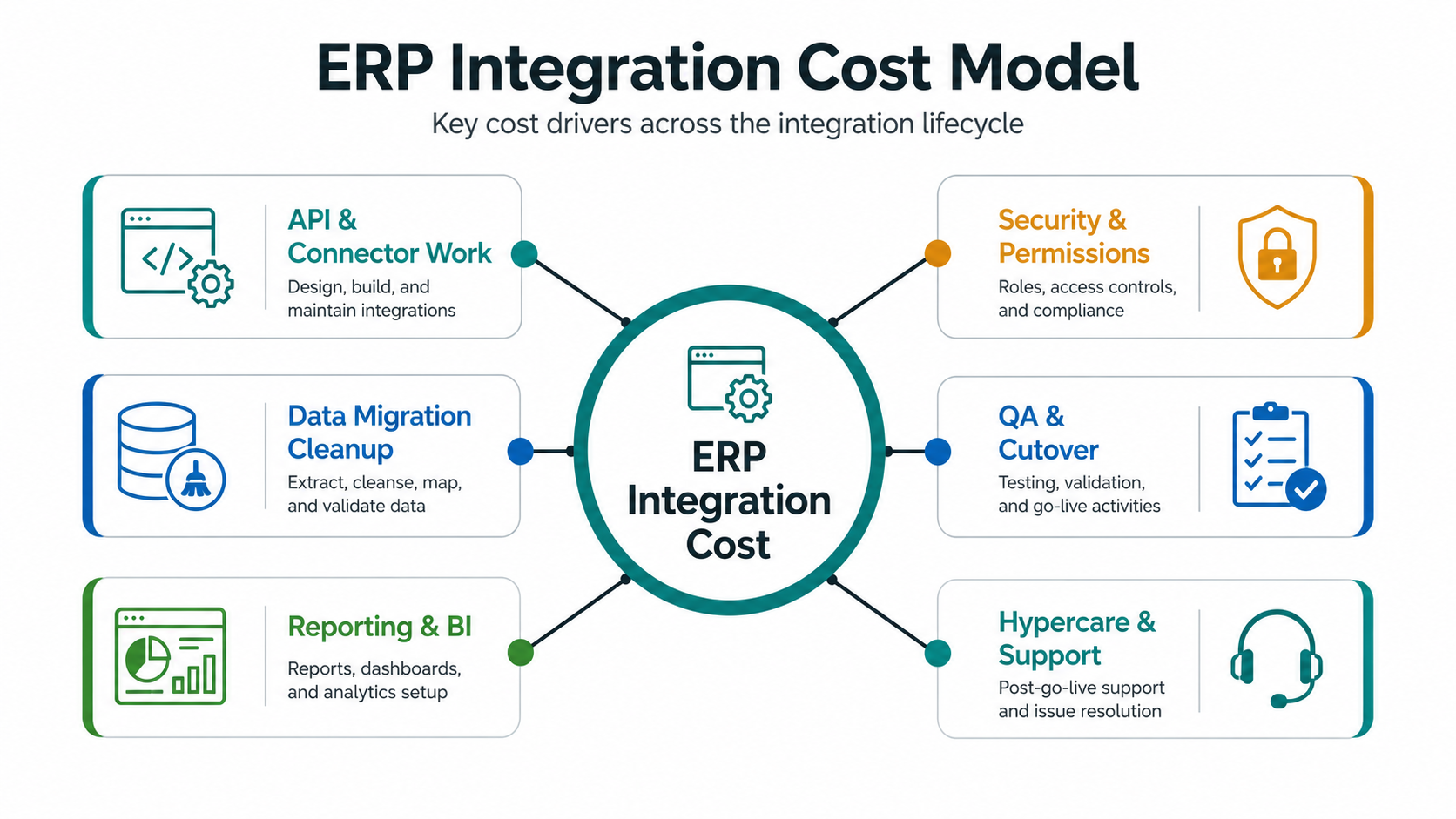
An ERP integration is a business-control project disguised as a technical connection. The software has to move data, preserve meaning, protect permissions, keep reports trustworthy, and give teams a way to recover when something fails. That is why an estimate should be broken into cost drivers instead of summarized as "ERP integration."
- API and connector work: authentication, endpoints, pagination, rate limits, transformations, queues, retries, and monitoring.
- Data migration cleanup: duplicates, missing fields, old codes, units of measure, vendor records, inventory balances, and historical retention.
- Reporting and BI: reconciled totals, executive dashboards, operational exports, data warehouse feeds, and report ownership.
- Security and permissions: role-based access, audit logs, sensitive fields, finance controls, and approval boundaries.
- QA and cutover: integration tests, UAT, parallel runs, rollback planning, user training, and launch support.
- Hypercare and support: monitoring, error queues, support runbooks, bug fixes, report changes, and enhancement planning.
Start By Listing Systems, Owners, And Records
Integration cost drops when the team knows which systems exist, what each system owns, and which records must move between them. It rises when discovery finds spreadsheet-only fields, duplicated customer records, unowned product catalogs, informal approval rules, and reports that no longer match finance totals.
| Business Record | Common Source Of Truth | Common Subscribers | Cost Risk |
|---|---|---|---|
| Customers and accounts | CRM or ERP | ERP, billing, support, ecommerce, BI | Duplicate companies, mismatched tax IDs, subsidiaries, stale owners. |
| Products and inventory | ERP or warehouse system | ecommerce, POS, planning, BI, supplier portals | Units of measure, variants, serial/batch logic, stock adjustments. |
| Invoices and payments | Accounting or ERP | CRM, customer portal, reporting, collections | Partial payments, credits, tax logic, cancelled orders, reconciliation. |
| Purchase orders and vendors | ERP or procurement tool | Finance, warehouse, approvals, reporting | Approval rules, vendor duplicates, goods receipt, invoice matching. |
| Reports and KPIs | ERP, data warehouse, or BI layer | Leadership, finance, operations, sales | Different totals across systems and no accepted reconciliation method. |
This is the first place to use NextPage's ERP Integration And Modernization Services as a planning reference. The service focuses on API and webhook integrations, batch sync, ETL jobs, reporting pipelines, recovery paths, and legacy ERP modernization, which are exactly the assumptions that shape cost.
API And Connector Cost Depends On The Integration Pattern
A vendor's "API available" checkbox is not enough for estimation. Cost depends on whether the API supports the records, filters, webhooks, bulk exports, sandbox data, permissions, and error responses the workflow needs. A modern REST API with good docs is very different from a legacy database view or nightly CSV export.
| Pattern | When It Fits | Budget Notes |
|---|---|---|
| Direct API integration | Well-documented ERP or SaaS endpoint with stable auth and object model. | Lower cost when scope is narrow and API limits are clear. |
| Webhook or event flow | Near-real-time updates for orders, inventory, invoices, or approvals. | Needs verification, dedupe, idempotency, retry, replay, and monitoring. |
| Batch or ETL sync | Large imports, reporting feeds, nightly updates, or legacy handoffs. | Cheaper for non-real-time work but needs reconciliation and error handling. |
| Legacy adapter | Old ERP with limited API, database access, flat files, or vendor constraints. | Higher discovery, testing, support, and failure-recovery cost. |
| Integration layer or iPaaS | Many systems, repeatable mappings, business-managed workflows, or staged modernization. | Can reduce point-to-point work but still needs governance and ownership. |
If the integration touches user-facing workflows or customer promises, budget for product-quality engineering. If it only moves data for internal reporting, batch sync may be enough. The mistake is paying for real-time complexity where a daily reconciled feed is safer, or underbuilding real-time controls where operations depend on immediate state.
Data Migration Cleanup Is Often The Hidden Multiplier
ERP data migration cost is rarely about export/import alone. It is about deciding what data should survive, how it maps to the new operating model, how teams validate it, and what happens to historical records. Product codes, customer names, vendor records, tax categories, account mappings, warehouse locations, and units of measure can all break integration logic if they are not cleaned first.
Use the ERP Data Migration Checklist to pressure-test the plan before build. For larger moves, ERP Data Migration Services covers source-system inventory, master-data cleanup, field mapping, ETL workflows, validation evidence, reconciliation, cutover planning, and rollback support.
A practical estimate should separate migration work from connector work. Otherwise the API team gets blamed for data quality problems that existed before the integration started.
Reporting And BI Validation Need Their Own Budget
ERP integrations are judged by whether teams trust the numbers after launch. If the ERP says inventory is one number, ecommerce shows another, and the dashboard shows a third, the integration has failed even if the API calls technically succeeded.
Budget for reconciliation reports before launch: inventory totals, open orders, invoices, payments, purchase orders, vendor balances, customer counts, and exception queues. Decide which reports must match exactly, which reports are directional, and which historical reports should stay in a legacy read-only archive rather than be forced into the new ERP.
Reporting validation also affects support cost. A clean dashboard with mismatch queues and drilldowns helps operations fix issues. A hidden worker script with no reconciliation evidence creates expensive manual investigation after go-live.
QA And Cutover Are Not Optional Polish
Integration QA should cover more than happy paths. Test duplicate events, partial failures, cancelled orders, edited invoices, missing fields, timezone differences, permissions, rollback, and retry behavior. For ERP work, user acceptance testing should include finance, operations, warehouse, procurement, and reporting users because each team sees a different failure mode.
NextPage's QA Automation Testing Services are relevant when the integration requires API contract tests, payload checks, auth validation, third-party handoffs, backend workflow tests, and smoke tests after deployment. Automated checks do not replace UAT, but they keep recurring integration failures from reaching users.
A Phased ERP Integration Roadmap Controls Cost
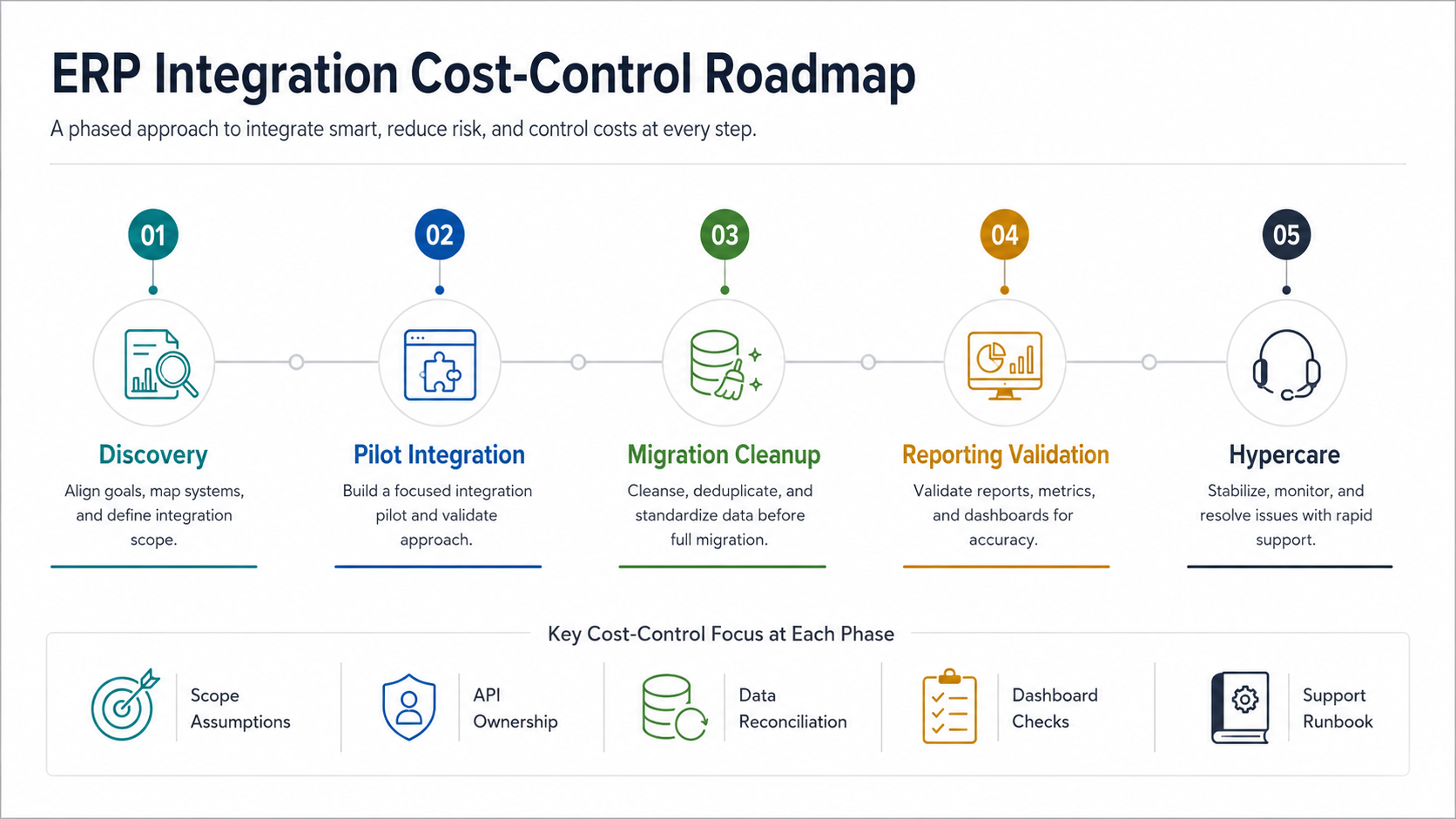
- Discovery: map systems, owners, data objects, APIs, reports, constraints, and launch risks.
- Pilot integration: connect one high-value workflow with monitoring and clear success criteria.
- Migration cleanup: clean master data, map fields, test imports, reconcile totals, and plan rollback.
- Reporting validation: prove the numbers that finance and operations will use after go-live.
- Hypercare: monitor sync failures, support users, tune reports, and stabilize before adding more systems.
This approach is especially useful when the ERP program overlaps with custom modules. The existing Custom ERP Development Cost guide covers broader module, platform, and support planning; this article narrows the cost lens to connected systems and operational data flow.
Plan Hypercare And Support Before The Launch Date
Most ERP integration surprises happen after the first production users arrive: missing records, approval edge cases, failed syncs, slow reports, tax or unit mismatches, and unclear ownership. Budget for hypercare during the first 30 to 90 days. The support model should define who watches queues, who owns vendor API issues, who fixes mapping bugs, who communicates with users, and when an incident becomes a product change.
For mission-critical workflows, support should include monitoring, alerting, replay tools, reconciliation reports, runbooks, dependency updates, security patching, and a roadmap for the next integration phase. A cheap launch without support usually becomes expensive manual recovery.
How To Reduce ERP Integration Cost Without Creating Rework
- Start with one business-critical workflow. Do not connect every system before proving the first operating path.
- Document source-of-truth rules. Cost rises when multiple systems can overwrite the same record without ownership.
- Clean master data before connector development. Bad data turns technical integration into operational cleanup.
- Use batch sync where real-time is not required. Real-time flows need more failure handling and support.
- Limit release-one reports to decisions people actually make. Nice-to-have dashboards can wait until core totals reconcile.
- Test exception paths early. Refunds, stock corrections, cancellations, partial payments, and failed syncs reveal hidden cost.
- Budget support explicitly. Hypercare is cheaper than emergency debugging with no logs or runbook.
What A Useful ERP Integration Estimate Should Include
A serious estimate should show the assumptions behind the price. Ask vendors to document connected systems, API method, data objects, ownership rules, migration volume, reporting needs, QA scope, cutover plan, support model, and exclusions. If those assumptions are missing, two quotes are not comparable.
- Systems included in release one and systems explicitly deferred.
- Record ownership for customers, products, inventory, invoices, vendors, and reports.
- API, webhook, batch, ETL, iPaaS, or legacy adapter approach for each connection.
- Data cleanup, mapping, validation, reconciliation, and rollback assumptions.
- Security, permissions, audit logs, and sensitive data boundaries.
- QA plan, UAT responsibilities, cutover support, and training needs.
- Monitoring, alerts, replay tools, runbooks, and post-launch support.
If your integration is part of a larger custom platform, review Custom ERP Development Services for module, workflow, reporting, integration, and AI-ready data planning.
How NextPage Helps Estimate And Build ERP Integrations
NextPage estimates ERP integration from the operating model first. We map the systems, data ownership, integration paths, migration risk, role permissions, reporting checks, QA scenarios, cutover plan, and support responsibilities before treating the work as a build quote. That helps separate a focused connector from a full integration and migration program.
If you are early in planning, use the Custom Software Cost Estimator. If brittle workflows, legacy exports, accounting sync, warehouse data, ecommerce, CRM, or reporting are already part of the problem, the next step is an ERP integration modernization discovery call.