
An ERP data migration checklist should prove that business-critical records are ready before the new ERP system becomes the source of truth. The checklist has to cover more than extract, transform, and load. It should connect ERP object ownership, master data quality, transaction history, configuration mapping, integration readiness, validation evidence, cutover controls, rollback criteria, and hypercare support.
ERP migrations are especially risky because one incorrect customer, vendor, item, bill of materials, tax code, inventory balance, or open order can create downstream finance, procurement, fulfillment, manufacturing, and reporting problems. The safest teams treat migration as a controlled business workstream, not only a technical data move.
Use this checklist for ERP upgrades, ERP replacements, multi-entity consolidations, legacy ERP modernization, cloud ERP moves, or staged module migrations across finance, procurement, inventory, sales, manufacturing, HR, and service operations.
Quick Answer: ERP Data Migration Checklist
An ERP data migration checklist should confirm seven things before production cutover: the ERP scope is owned, source data is inventoried, ERP object mapping is approved, master data is cleaned, transaction and balance validation has evidence, integrations and reports are tested, and rollback criteria are clear. If any of those areas lacks an owner or proof, the ERP migration is not ready for go-live.
| Checklist Area | ERP-Specific Question | Evidence To Capture |
|---|---|---|
| Scope | Which modules, legal entities, plants, warehouses, ledgers, customers, vendors, SKUs, and history are in scope? | ERP scope matrix, owner map, data-retention decisions. |
| Mapping | How do source objects map to target ERP objects, fields, reference data, and workflows? | Object mapping workbook, transform rules, open question log. |
| Cleansing | Which duplicate, inactive, incomplete, or invalid records must be corrected before trial load? | Master data quality report, cleansing rules, steward signoff. |
| Validation | Do counts, balances, open documents, inventory quantities, and critical reports reconcile within approved tolerances? | Reconciliation reports, UAT scripts, approval evidence. |
| Cutover | When do source changes freeze, final deltas load, smoke tests run, and users switch? | Cutover runbook, go/no-go checklist, integration smoke tests. |
| Rollback | What failures trigger rollback, and how will source systems, backups, and communications recover? | Rollback runbook, backup proof, recovery validation. |
For a broader migration model, use NextPage's data migration checklist. This ERP version narrows the same discipline to ERP entities, operational cutover, and business-owner evidence.

1. Define ERP Scope, Source Systems, And Ownership
Start by listing every ERP module, entity, and source system that will feed the target. ERP programs often fail because teams document the obvious transactional database but miss satellite systems, spreadsheets, local warehouse tools, reporting marts, EDI feeds, legacy configuration exports, or manual finance reconciliations.
The inventory should include production ERP tables and objects, legacy databases, file shares, integration middleware, reporting systems, tax engines, shop-floor systems, CRM and ecommerce feeds, procurement portals, payroll or HR systems, and archived data required for audit. Use a risk lens similar to a legacy software modernization scorecard when older ERP screens, unsupported databases, custom reports, or fragile integrations are still business-critical.
| ERP Scope Item | What To Document | Primary Owner |
|---|---|---|
| Legal entities and ledgers | Companies, charts of accounts, fiscal calendars, currencies, tax rules, open balances, and retained history. | Finance controller and ERP finance lead |
| Customers and vendors | Account hierarchy, payment terms, tax IDs, addresses, credit limits, contact data, and duplicate rules. | AR/AP owners and master data steward |
| Products and inventory | Items, SKUs, units of measure, lots, serials, warehouses, bins, cost data, safety stock, and inactive records. | Supply chain and inventory owner |
| Manufacturing data | BOMs, routings, work centers, recipes, production versions, quality rules, and MRP parameters. | Operations and manufacturing engineering |
| Open transactions | Open orders, purchase orders, invoices, returns, shipments, receipts, projects, cases, and work orders. | Process owner for each module |
| Integrations and reports | APIs, EDI, batch jobs, BI dashboards, tax interfaces, ecommerce feeds, and operational reports. | Integration owner and analytics owner |
If the ERP program also includes infrastructure or hosting changes, connect this inventory to a cloud migration assessment so workload dependencies, data flows, security controls, and cutover windows are mapped before architecture decisions are fixed. When legacy screens, batch jobs, or custom integrations are moving with the data, pair the inventory with application migration services planning so code, database, and workflow dependencies are not separated too late.
2. Map ERP Objects, Rules, And Dependencies
ERP mapping is not just field-to-field conversion. It translates the way the business works from one operating model to another. A source customer type may become a target account group. A legacy item category may drive tax behavior, MRP planning, pricing, reporting, or approval routing. A small mapping decision can change finance close, procurement, fulfillment, or production planning.
Create an object-level mapping first, then drill into field-level rules. For each ERP object, define source system, target object, required fields, transformation logic, default values, reference data, validation rule, dependent processes, owner, and unresolved questions. Include retired fields and excluded records so there is an intentional decision trail.
| Mapping Risk | Why It Matters In ERP | Checklist Action |
|---|---|---|
| Reference data mismatch | Payment terms, tax codes, units of measure, locations, item groups, and cost centers drive downstream workflows. | Normalize reference dictionaries and approve mappings with process owners. |
| Custom fields | Legacy ERP customizations may hold business logic that is not obvious from the field label. | Trace custom fields to reports, integrations, approvals, and operating procedures. |
| Open transaction state | Partially received POs, backorders, pending invoices, returns, and work orders can migrate into invalid states. | Define state mapping, cutover freeze rules, and exception handling. |
| Historical reporting | Old structures may not match the target ERP chart, item hierarchy, or org model. | Decide what to migrate, archive, summarize, or expose through reporting only. |
| Cross-module dependency | Finance, inventory, sales, procurement, and manufacturing objects often validate each other. | Sequence loads around dependencies and test related workflows together. |
Teams that have already run a CRM migration will recognize the same discipline around object mapping and cutover. The difference is that ERP data often touches accounting, inventory, fulfillment, and compliance at the same time. NextPage's CRM migration checklist is a useful comparison for customer data, but ERP needs a wider operational validation model.
3. Clean Master Data Before Trial Loads
Do not wait for the migration tool to expose master data problems. Profile and clean the most important ERP objects before repeated trial loads begin. Focus on records that affect orders, invoices, inventory, production, procurement, payroll, financial close, regulatory reporting, and customer service.
Common ERP cleansing work includes merging duplicate vendors, standardizing addresses, closing inactive customers, correcting item units of measure, retiring obsolete SKUs, fixing tax classification gaps, validating bank details, normalizing chart-of-account mappings, and removing stale or unauthorized users. Keep unresolved records in an exception queue with a named steward and business impact.
| Data Quality Check | ERP Examples | Decision Needed |
|---|---|---|
| Duplicates | Duplicate customer, vendor, employee, item, asset, or location records. | Merge, retain, archive, or escalate for manual review. |
| Completeness | Missing tax IDs, payment terms, GL mappings, units, addresses, lot controls, or cost fields. | Fill from trusted source, default with approval, or block migration. |
| Validity | Invalid codes, inactive references, old departments, obsolete warehouses, or unsupported currencies. | Map to active target values or retire with evidence. |
| Consistency | Different names, formats, categories, and rules across plants, regions, or acquired entities. | Standardize globally or preserve local differences intentionally. |
| Retention | Historical transactions and attachments that may be too old, too large, or legally required. | Migrate, archive, summarize, or expose through read-only reporting. |
Trial loads should not only prove that data can be imported. They should show whether cleansing rules are reducing defects, whether exceptions are shrinking, and whether business owners can approve the remaining risk.
ERP Platform Validation By Target System
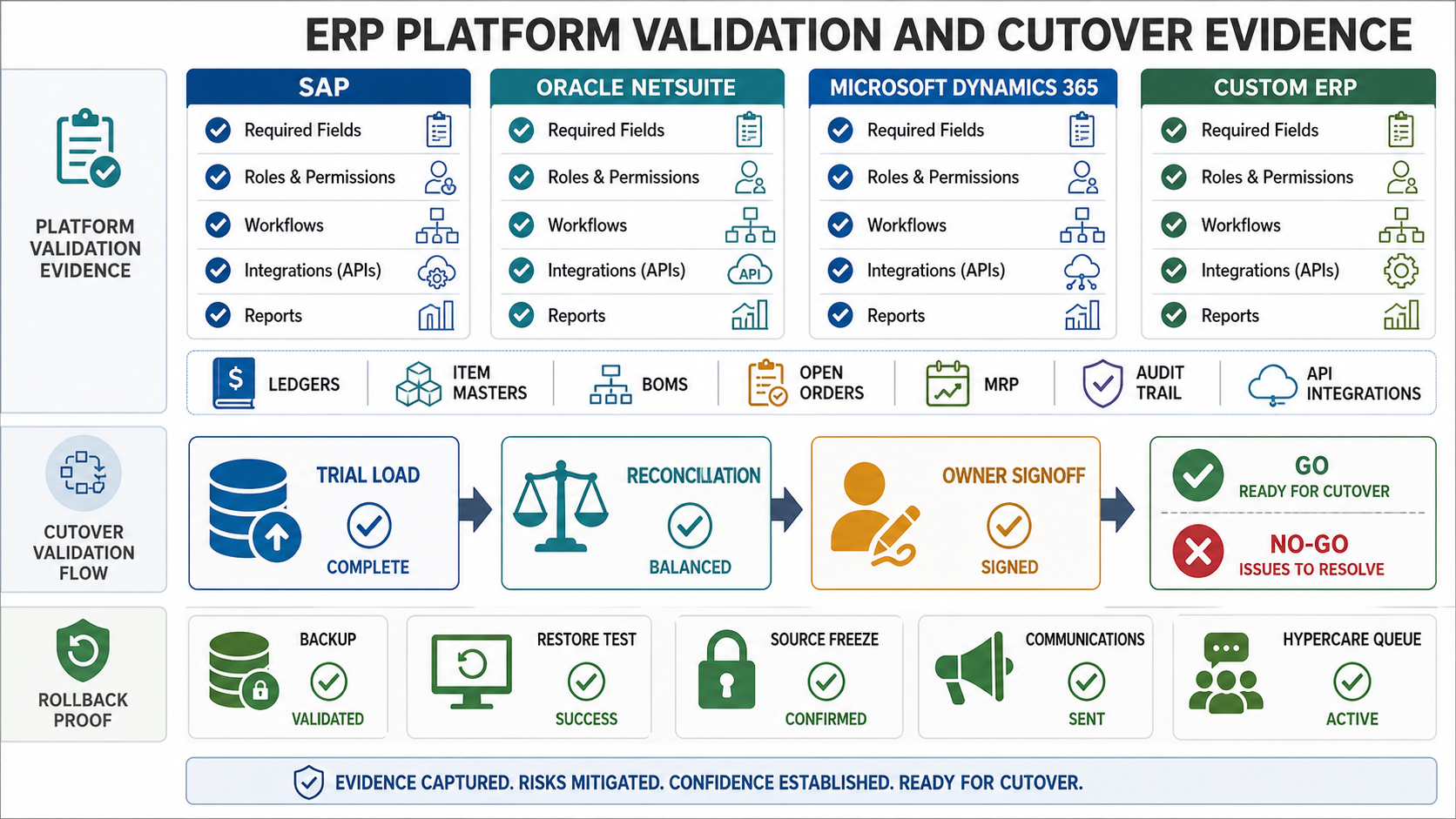
A useful ERP migration checklist should include the target platform's import rules, not only generic source-to-target mapping. SAP, Oracle NetSuite, Microsoft Dynamics 365, and custom ERP systems each have different rules for required fields, master data objects, integration ownership, security roles, reporting, and cutover evidence. Treat the platform rules as checklist inputs before the first full trial load.
Current vendor guidance reinforces that point. NetSuite's data migration setup guidance calls for cleaning data before import and matching CSV files to NetSuite file conventions and record types. Microsoft Dynamics 365 migration guidance emphasizes supported versions, environment readiness, Lifecycle Services tooling, permissions, and unsupported customizations or SQL-level changes that can block migration. SAP ERP migration guidance commonly treats the legacy ERP as the system of record until cutover, which makes source freeze, delta handling, and validation evidence part of the same plan.
| Target ERP | Validation Focus | Evidence Before Cutover |
|---|---|---|
| SAP / S/4HANA | Business partners, material masters, BOMs, routings, open items, custom fields, authorizations, and source-system freeze timing. | Migration cockpit or load logs, reconciliation reports, failed-object queue, owner signoff, backup proof, and delta-load checklist. |
| Oracle NetSuite | CSV file conventions, record type compatibility, subsidiaries, currencies, item records, customers, vendors, contacts, and integration limits. | Cleaned import files, sample import results, failed-row export, saved search validation, role test, and post-import report comparison. |
| Microsoft Dynamics 365 | Lifecycle Services readiness, Dataverse or Finance and Operations entities, security roles, customizations, SQL compatibility, integrations, and reporting. | Environment assessment, migration tool output, sync or data-management job logs, security-role test, and business process smoke tests. |
| Custom ERP | Entity model, API contracts, stored procedures, permissions, custom reports, batch jobs, audit trail, and rollback scripts. | API/load test results, transformation logs, permission smoke test, report baseline, rollback rehearsal, and support handoff queue. |
If the target platform exposes gaps that cannot be solved by import rules alone, separate the migration plan from the product decision. Some teams need ERP data migration services; others need application migration services or modernization work around the ERP. The point is to make the operating risk explicit before go-live pressure turns it into a production incident.
4. Build ERP Validation Evidence
ERP validation should be defined before the first serious trial load. Counts matter, but they are not enough. The team must prove that business objects reconcile, transactions behave correctly, and reports still support decisions.
Validation evidence should combine technical checks and business process tests. Finance may need trial balance and open AR/AP reconciliation. Inventory may need quantity, valuation, lot, serial, and warehouse checks. Manufacturing may need BOM explosion, routing, MRP, and work-order tests. Procurement and sales may need open order, pricing, tax, shipment, and invoice workflow proof.
| ERP Validation Layer | What To Test | Evidence |
|---|---|---|
| Completeness | Objects, records, attachments, active/inactive status, historical ranges, and skipped records. | Source-to-target count report and exception list. |
| Financial accuracy | GL balances, open AR/AP, tax values, asset balances, inventory valuation, and currency conversion. | Reconciliation report with tolerance and finance signoff. |
| Operational accuracy | Open orders, MRP results, inventory availability, receiving, shipping, billing, returns, and service cases. | Business workflow tests and sample record review. |
| Integrity | Customer-to-order, vendor-to-PO, item-to-BOM, invoice-to-payment, and location-to-inventory relationships. | Referential integrity tests and failed relationship report. |
| Reporting | Close reports, sales dashboards, purchasing reports, inventory reports, production reports, and audit extracts. | Report comparison pack and stakeholder approval. |
When the ERP move includes database or cloud components, validation and rollback planning should align with the infrastructure runbook. The AWS database migration checklist shows how database-level checks, cutover controls, and recovery evidence can support the ERP validation plan.
5. Plan ERP Cutover, Rollback, And Hypercare Together
ERP cutover is a business event. Source changes freeze, final deltas load, integrations switch, users stop using old processes, reports move, support teams monitor exceptions, and leaders decide whether to continue or roll back. The cutover plan should be rehearsed with real owners and realistic data volumes.
| Cutover Gate | ERP Checklist Question | Required Proof |
|---|---|---|
| Source freeze | When do order entry, receiving, shipping, invoicing, production posting, and master data changes pause? | Freeze notice, exception policy, owner confirmation. |
| Final delta load | How are final master data changes, open transactions, balances, and attachments captured? | Export/import logs and delta reconciliation. |
| Smoke tests | Can users create, approve, receive, ship, invoice, post, plan, and report in the new ERP? | Smoke test results by module and owner. |
| Integration switch | Are EDI, ecommerce, CRM, warehouse, banking, tax, payroll, and BI interfaces pointing to the target? | Integration logs and monitoring dashboard. |
| Rollback trigger | Which failures require rollback instead of hotfix or manual workaround? | Trigger list, decision owner, backup proof. |
| Hypercare | Who owns defects, data exceptions, reporting issues, and user support after go-live? | Hypercare rota, escalation path, issue queue, daily review. |
Set rollback criteria before go-live pressure starts. Examples include unreconciled material finance balances, failed critical integrations, corrupted open orders, unacceptable inventory variance, missing audit trails, or target ERP instability that blocks core operations.
6. Protect Sensitive ERP Data And Audit Trails
ERP data includes financial records, employee data, vendor banking details, customer information, tax data, commercial terms, product costs, and operational history. Migration work creates temporary copies and elevated access that may not exist during normal operations.
Control the migration environment as carefully as the target ERP. Encrypt extracts and backups, restrict staging access, mask sensitive fields in non-production trial loads, review service accounts, log transformations, and define how long temporary files remain. Confirm that audit evidence is preserved for approvals, transformations, loads, reconciliation, and deletion of temporary stores.
| Control | ERP Migration Action | Evidence |
|---|---|---|
| Access control | Limit migration tools, extracts, staging data, and target load permissions to named users and service accounts. | Access list, approval record, revocation proof. |
| Encryption | Encrypt files, databases, backups, transfer paths, and temporary stores. | Storage settings, transfer logs, key ownership. |
| Masking | Mask payroll, customer, vendor bank, tax, and sensitive commercial fields in non-production environments. | Masking rules and sample validation. |
| Audit trail | Log extraction, transformation, load, validation, exceptions, approvals, and rollback decisions. | Execution logs and evidence archive. |
| Retention | Define retention and deletion for extracts, staging data, rejected rows, screenshots, and backups. | Retention policy and deletion confirmation. |
Security review should include tooling behavior. Migration scripts and error logs often reveal sensitive values if teams do not intentionally redact them.
How NextPage Helps With ERP Data Migration
NextPage helps teams turn ERP data migration from a high-pressure data move into a controlled delivery program. The work starts with source discovery, ERP object inventory, ownership mapping, data quality triage, dependency analysis, validation design, rehearsal planning, cutover controls, rollback criteria, and post-go-live support.
A practical first engagement can produce an ERP migration readiness score, a source-system inventory, a master data cleanup backlog, an object mapping plan, a validation evidence model, and a cutover runbook. For early budget framing, use the custom software cost estimator, then review the QualityHub case study for an example of operational evidence, approvals, and exception tracking around supplier quality workflows. That gives stakeholders a concrete path before they commit to production dates or vendor implementation milestones.
If your team is preparing an ERP upgrade, ERP replacement, consolidation, or cloud ERP migration, start by proving readiness. The MVP Scope Builder can also help separate launch-critical migration controls from later reporting, automation, and analytics improvements. NextPage can help convert ERP scope, mapping, validation, cutover, rollback, and hypercare into an executable migration plan.