
Quick Answer: What Should A GCP Migration Checklist Include?
A GCP migration checklist should prove workload readiness, landing-zone design, identity and network controls, runtime choice, data migration safety, security evidence, cost governance, cutover ownership, rollback triggers, and post-cutover optimization. The goal is not simply to move applications to Google Cloud. The goal is to show which workloads are ready, which ones need modernization, which data paths are safe, and what evidence lets the business approve production cutover.
Use this checklist before selecting a migration tool, signing a vendor proposal, or scheduling the first cutover window. Google Cloud migration planning should move through assessment, foundation, migration, validation, and optimization. NextPage turns that into an evidence-backed planning sequence for engineering leaders, cloud architects, SaaS operators, and IT managers.
If you need execution support, start with Google Cloud migration services for GCP-specific readiness, architecture, migration waves, data movement, and post-cutover stabilization. If your estate spans multiple platforms, pair this with broader cloud migration services planning so the GCP move fits the full operating model.
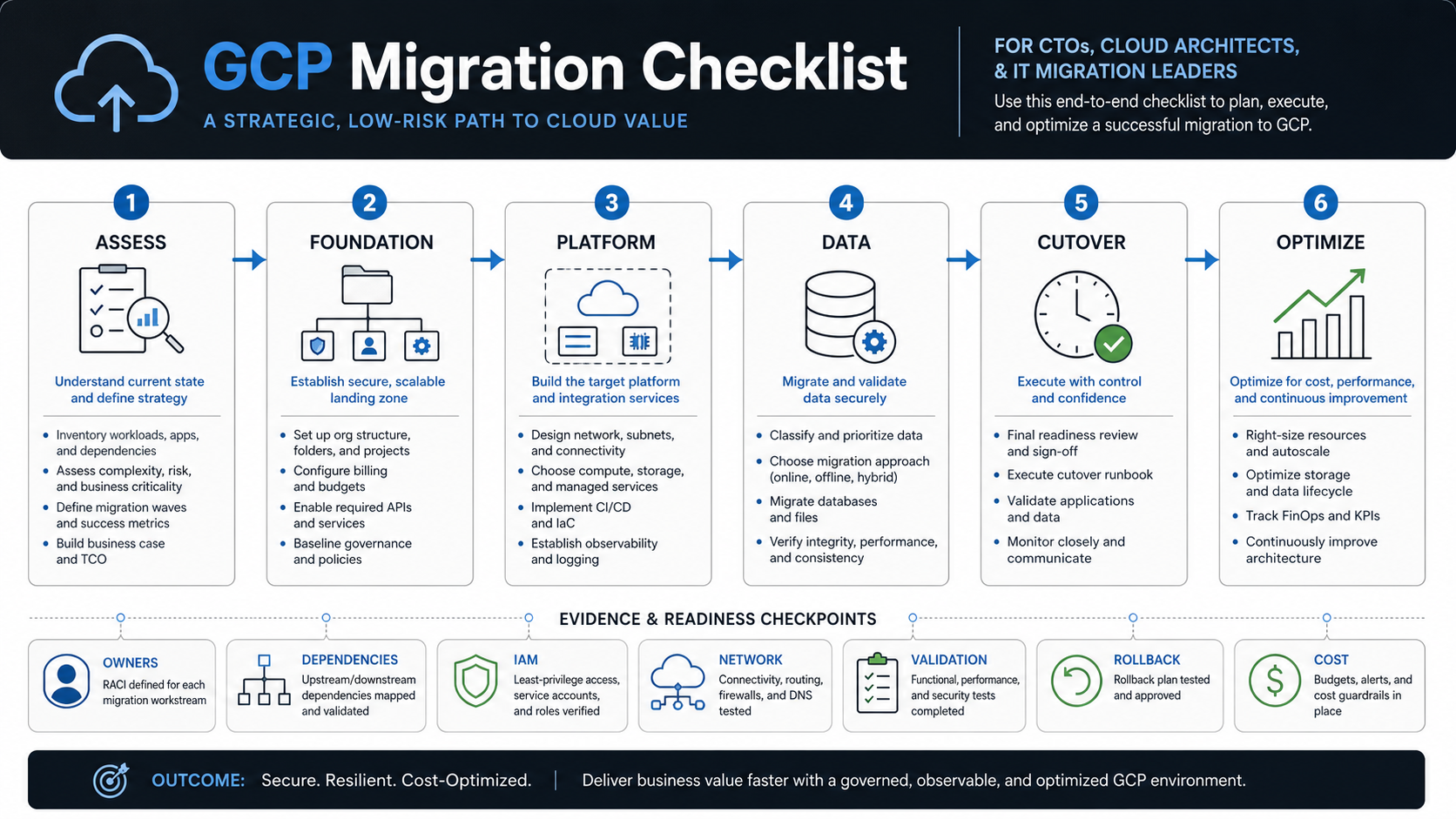
Where GCP Migration Plans Fail
Most failed migrations do not fail because Google Cloud lacks the right service. They fail because the current estate is poorly understood, dependency maps are incomplete, data validation is rushed, identity boundaries are vague, test environments do not mirror production, and rollback criteria are negotiated too late. A checklist should force these decisions before the migration wave starts.
The common service-page promise is broad: public cloud migration, hybrid migration, database migration, SAP migration, security, disaster recovery, and managed services. That breadth is useful, but a buyer still needs a sharper operating question: what must be true before each workload moves?
NextPage's point of view is simple: migration planning should be evidence-driven. Every wave should have a workload owner, dependency inventory, target platform decision, data plan, security controls, cost model, test proof, cutover checklist, rollback trigger, monitoring setup, and hypercare owner. Without that evidence, the migration is still a hope, not a plan.
1. Build A GCP Migration Readiness Scorecard
Start by scoring each workload before architecture decisions. A stable stateless API, fragile monolith, batch data pipeline, customer portal, ERP extension, and regulated database are different migration problems. A readiness scorecard prevents teams from forcing every workload into the same migration wave.
| Readiness Area | Checklist Questions | Evidence To Collect |
|---|---|---|
| Business criticality | Who owns the workload, and what downtime is acceptable? | Owner, SLA or SLO, revenue/user impact, support contacts. |
| Architecture | Is the workload stateless, stateful, monolithic, containerized, or already cloud-native? | Architecture diagram, runtime inventory, ports, jobs, storage, queues. |
| Dependencies | Which APIs, databases, file shares, identity systems, and third parties does it use? | Dependency map, data-flow diagram, firewall rules, integration contracts. |
| Data risk | What data moves, how large is it, and how will it be validated? | Data classification, volume, migration window, reconciliation checks. |
| Operations | How is the workload deployed, monitored, backed up, and recovered today? | Runbooks, CI/CD flow, dashboards, backup restore proof, incident history. |
| Security | What identities, secrets, network exposure, compliance controls, and audit evidence apply? | IAM map, secret inventory, compliance checklist, vulnerability findings. |
Score workloads as rehost, replatform, refactor, replace, retire, or retain. If the application itself needs dependency cleanup, use application migration services planning before trying to solve everything inside the cloud landing zone. The Legacy Software Modernization Scorecard is useful when leaders need a fast way to separate lift-and-shift candidates from refactor or retirement candidates.
2. Design The Landing Zone Before Workloads Move
A GCP landing zone is the operating foundation for projects, folders, IAM, networking, billing, logging, monitoring, security policies, and deployment controls. Teams that skip this step often recreate on-premises sprawl in a new cloud account structure.
Plan the foundation around resource hierarchy, identity, networking, security controls, operations, and billing. The point is not to document every possible Google Cloud setting. The point is to make the safe path obvious for migration teams and prevent each wave from inventing its own project structure, firewall pattern, logging setup, budget label, or service-account policy.
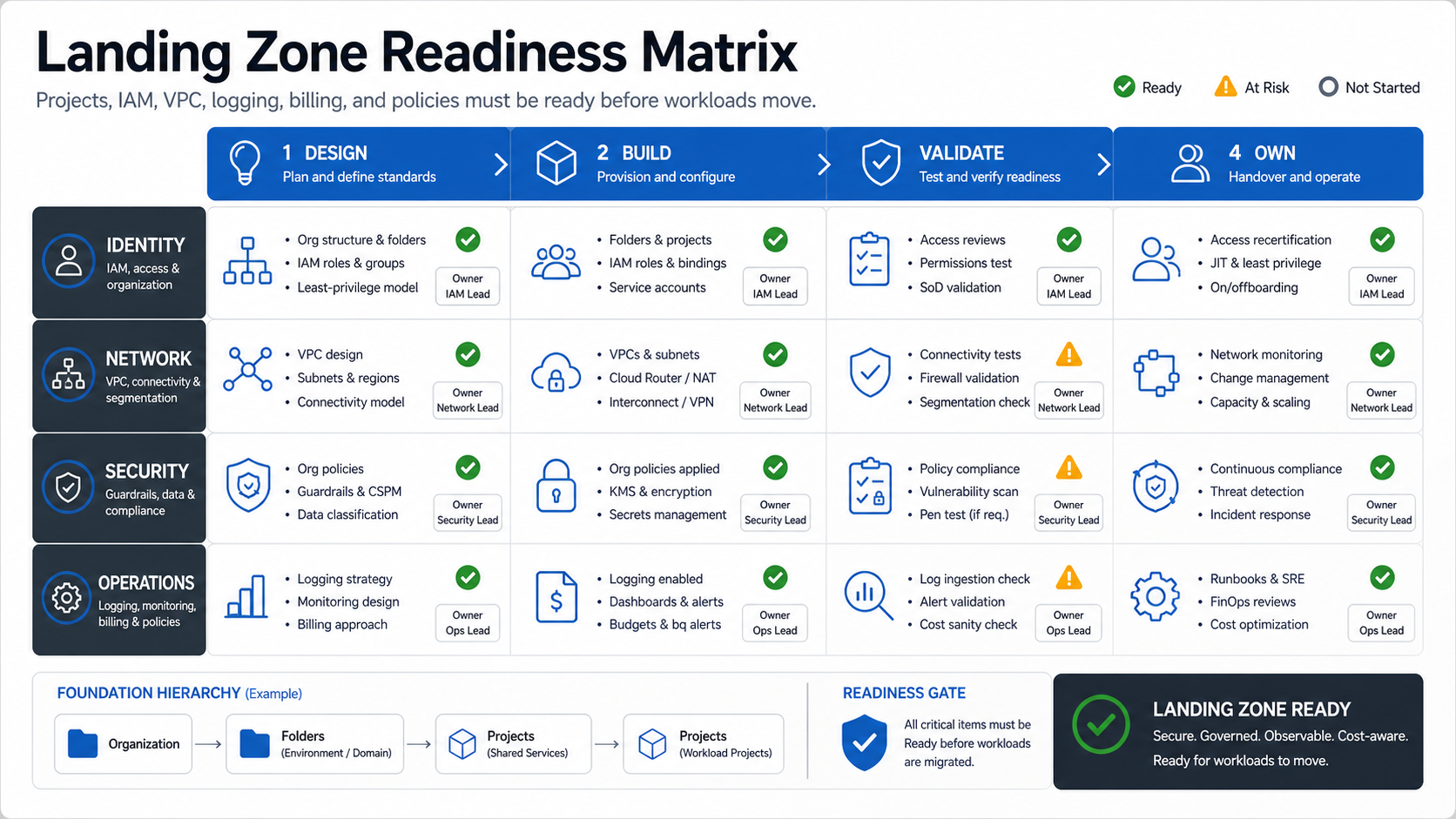
Landing Zone Readiness Matrix
Use a matrix for the foundation because landing-zone readiness is not a single approval. Identity, network, security, and operations each need design, build, validation, and ownership evidence.
| Lane | Design Evidence | Validation Evidence | Owner |
|---|---|---|---|
| Identity | Folder/project structure, groups, roles, service-account model, break-glass access. | Access review, least-privilege test, privileged workflow rehearsal. | IAM or platform lead. |
| Network | VPCs, subnets, DNS, ingress, egress, hybrid connectivity, private service access. | Connectivity tests, firewall validation, segmentation review, routing proof. | Network lead. |
| Security | Organization policies, key management, secrets, vulnerability scanning, audit logs. | Policy compliance, scan results, encryption proof, incident route test. | Security lead. |
| Operations | Logging, monitoring, alerting, backup, runbooks, billing labels, budget alerts. | Dashboard proof, alert tests, backup restore proof, budget anomaly workflow. | Ops or SRE lead. |
This matrix should be reviewed before the first production workload moves. If the foundation is not ready, early migration waves will spend time compensating for missing controls instead of validating the actual application move.
3. Choose Cloud Run, GKE, Compute Engine, Or Managed Services Deliberately
GCP migration is not one runtime decision. Cloud Run, GKE, Compute Engine, App Engine, Cloud Functions, Cloud SQL, AlloyDB, Spanner, BigQuery, Memorystore, Pub/Sub, and Cloud Storage can all be right depending on workload behavior. The checklist should force teams to explain why.
| Target Option | Best Fit | Risk To Check |
|---|---|---|
| Cloud Run | Containerized APIs, workers, internal tools, event-driven services, and apps that benefit from managed serverless operations. | Cold start tolerance, request limits, background jobs, VPC access, secret handling. |
| GKE | Kubernetes estates, service mesh needs, platform engineering standards, complex container orchestration, or multi-service workloads. | Cluster operations, node cost, policy, upgrade cadence, observability, team skill. |
| Compute Engine | Lift-and-shift VMs, packaged apps, legacy workloads, custom OS dependencies, or transitional migration waves. | Patch ownership, backup, images, autoscaling, availability, right-sizing. |
| Cloud SQL or AlloyDB | Managed relational databases where PostgreSQL, MySQL, or SQL Server fit the workload. | Extensions, replication, downtime, performance, failover, storage growth. |
| Spanner or BigQuery | Globally distributed transactional needs or analytical workloads that outgrow traditional database patterns. | Schema redesign, query patterns, cost model, team learning curve. |
Use rehosting when speed and risk reduction matter. Use replatforming when a managed service removes real operational load. Use refactoring when the current architecture blocks reliability, cost, scale, or product change. The wrong move is pretending every workload deserves the most modern target in the first wave. If legacy constraints are driving the decision, review the legacy application modernization roadmap before locking target architecture.
4. Separate Data Migration From Application Hosting
Data migration is usually the highest-risk part of a cloud move. Application hosting can be rolled back more easily than missing orders, corrupted customer records, inconsistent financial data, or broken reporting. Treat data as its own workstream with owners and evidence.
For each database, object store, file share, queue, and analytical pipeline, document source of truth, migration method, downtime window, sync strategy, validation checks, retention policy, encryption requirement, and rollback criteria. If the data plan is weak, the workload is not ready even if the compute target is clear.
Use a companion data migration checklist for field mapping, deduplication, transformation rules, sample checks, control totals, reconciliation, failed-record handling, and sign-off evidence. For regulated or customer-facing systems, rehearse the data move before production cutover and keep the validation evidence available for audit and stakeholder review. If ERP or operations data is involved, ERP integration and modernization services can help keep source-of-truth and reconciliation decisions from becoming afterthoughts.
5. Prove Security And Compliance Before Cutover
Google Cloud's architecture guidance is organized around operational excellence, security, privacy and compliance, reliability, cost optimization, performance optimization, and sustainability. A GCP migration checklist should map each production workload to those operating concerns before launch.
Security evidence should include IAM roles, service accounts, privileged access, network exposure, firewall rules, private connectivity, secret storage, key ownership, vulnerability scans, logging, alerting, incident response, data residency, backup policy, and audit-review ownership.
Security is not a final approval checkbox. It should shape the landing zone, runtime platform, data movement, deployment process, and support model from the beginning. When cloud-facing risks need independent review, security testing services can validate access, configuration, storage, deployment paths, observability, and operational controls before the cutover window.
6. Model Cost Before And After Migration
Cloud cost surprises usually come from incomplete assumptions: overprovisioned compute, chatty networking, high log volume, expensive storage classes, forgotten environments, data egress, inefficient database sizing, and unmanaged autoscaling. Build the cost model before the migration wave, then compare it with real post-cutover usage.
Checklist items include labels, budgets, alerts, committed-use decisions, right-sizing assumptions, storage lifecycle rules, log retention, test environment schedules, and ownership for monthly cost reviews. If a workload is migrated without tags and budgets, nobody owns its cost behavior.
After launch, connect cost to performance evidence. A cloud performance audit checklist can help identify whether slow queries, over-scaled containers, inefficient caching, or noisy observability are driving both latency and spend. For ongoing tuning, cloud performance optimization services can turn utilization, cost, reliability, and user-experience data into a practical improvement backlog.
7. Plan Cutover, Rollback, And Hypercare As One Workflow
Cutover planning should start before migration execution. Define freeze windows, stakeholder approvals, DNS changes, database locks, final sync timing, smoke tests, monitoring checks, rollback trigger, communication plan, and the first 72-hour support model.
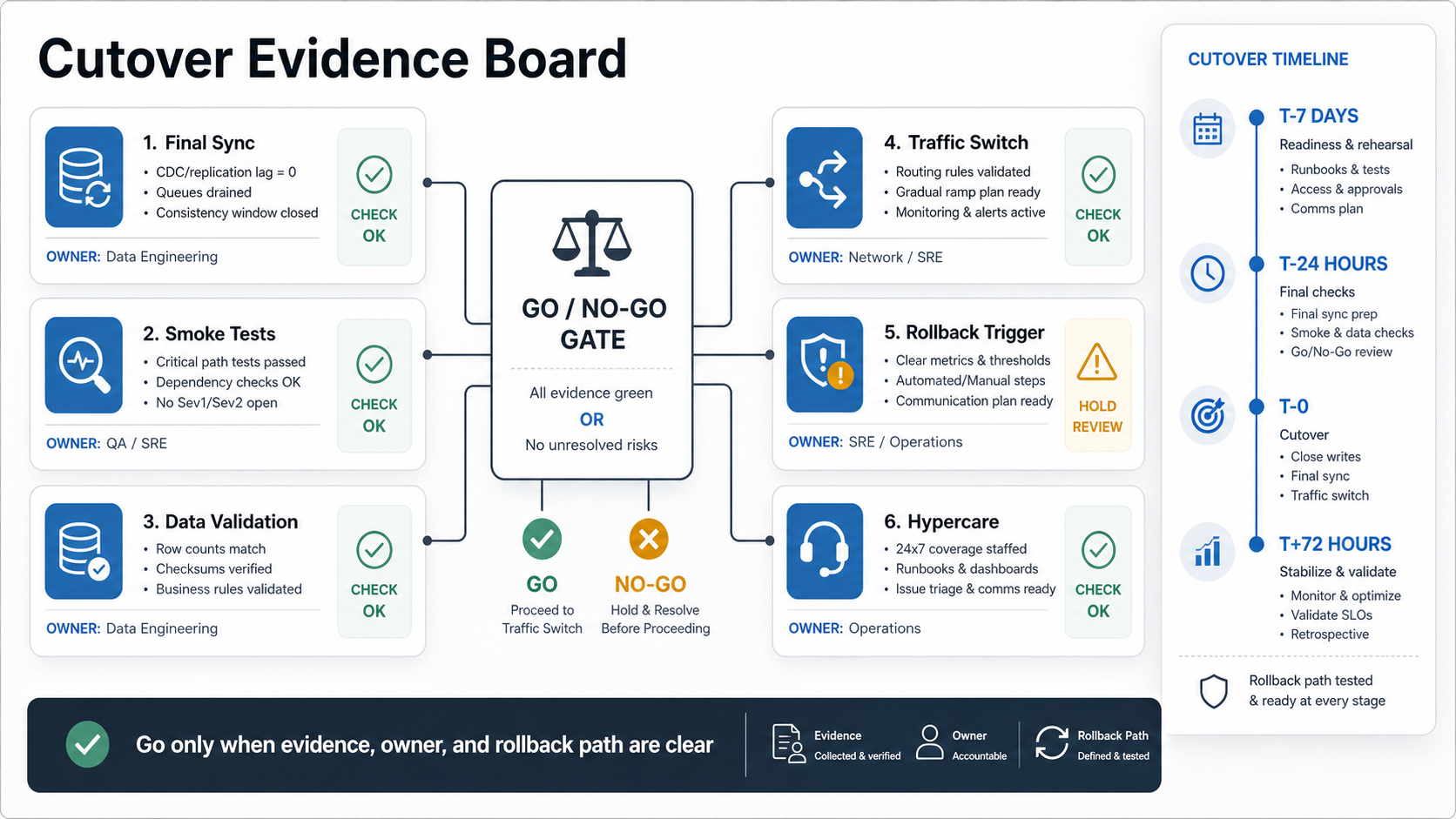
Cutover Evidence Board
A migration plan without rollback is just a deployment wish. A rollback plan without a decision deadline is also weak, because some data changes become harder to reverse after users start working in the new system.
| Cutover Step | Owner | Pass/Fail Evidence |
|---|---|---|
| Final dependency check | Application owner | All upstream/downstream services reachable in the target environment. |
| Data sync and validation | Data owner | Control totals, sample records, reconciliation, and error queue reviewed. |
| Traffic switch | Platform owner | DNS, load balancer, routing, certificates, and health checks pass. |
| Smoke tests | QA or product owner | Critical user journeys, API checks, jobs, and reports succeed. |
| Rollback decision | Migration lead | Rollback criteria and deadline are explicit before the point of no return. |
| Hypercare | Support owner | Dashboard, alert routing, support queue, and incident bridge are active. |
The cutover board should be visible to application owners, platform teams, data owners, security reviewers, support leads, and business sponsors. If any owner cannot show evidence, the release should pause rather than hope the issue is minor.
8. Optimize After The First Stable Wave
The first successful cutover is not the end of a GCP migration. It is the point where real operating data starts to matter. Review performance, cost, reliability, security alerts, failed jobs, support tickets, database behavior, autoscaling, backup success, and team runbooks after the workload has handled normal traffic.
Post-cutover work may include right-sizing, moving VMs to managed runtimes, improving CI/CD, adding infrastructure as code, tightening IAM, changing storage classes, improving dashboards, tuning database indexes, and decomposing fragile workloads. The managed cloud services checklist is useful here because migration teams should hand over evidence that operations can actually use.
If executives need proof that complex platform and workflow changes can be delivered with business context, review the NextPage portfolio before shaping the migration roadmap. Portfolio evidence helps sponsors see how operating workflows, dashboards, integrations, and modernization decisions translate into shipped systems.
NextPage's GCP Migration Checklist
Use this condensed checklist in planning meetings:
- Inventory applications, databases, integrations, data stores, jobs, owners, and business criticality.
- Classify each workload as rehost, replatform, refactor, replace, retire, or retain.
- Design the GCP landing zone before moving production workloads.
- Choose Cloud Run, GKE, Compute Engine, Cloud SQL, Spanner, BigQuery, or other targets by workload behavior.
- Separate application hosting from data migration, validation, and reconciliation.
- Prove IAM, network, secrets, encryption, vulnerability, logging, and incident controls.
- Model cost with labels, budgets, alerts, right-sizing, and post-cutover review.
- Run test migrations and document evidence before production cutover.
- Define cutover, rollback, communications, and hypercare ownership.
- Optimize after launch using real performance, cost, reliability, and support data.
How NextPage Can Help With GCP Migration
NextPage helps teams turn this checklist into a migration roadmap, architecture plan, migration wave backlog, validation evidence, and production support model. Start with Google Cloud migration services when GCP is the target, or use cloud migration services when the roadmap spans multiple platforms.