
Quick Answer: .NET Vs .NET Core In 2026
.NET Core is no longer the current product name for new Microsoft application development. It evolved into the unified .NET platform starting with .NET 5, and the current long-term direction is modern .NET releases such as .NET 10 LTS. For most new web, API, cloud, and cross-platform products, choose modern .NET rather than starting a new project on .NET Framework or old .NET Core versions.
.NET Framework still matters when an existing Windows application depends on Web Forms, WCF server features, Windows-only libraries, mature enterprise integrations, or third-party packages that are not available on modern .NET. In that case, the practical question is not only ".NET vs .NET Core"; it is whether the application should be maintained, refactored, or migrated in phases.
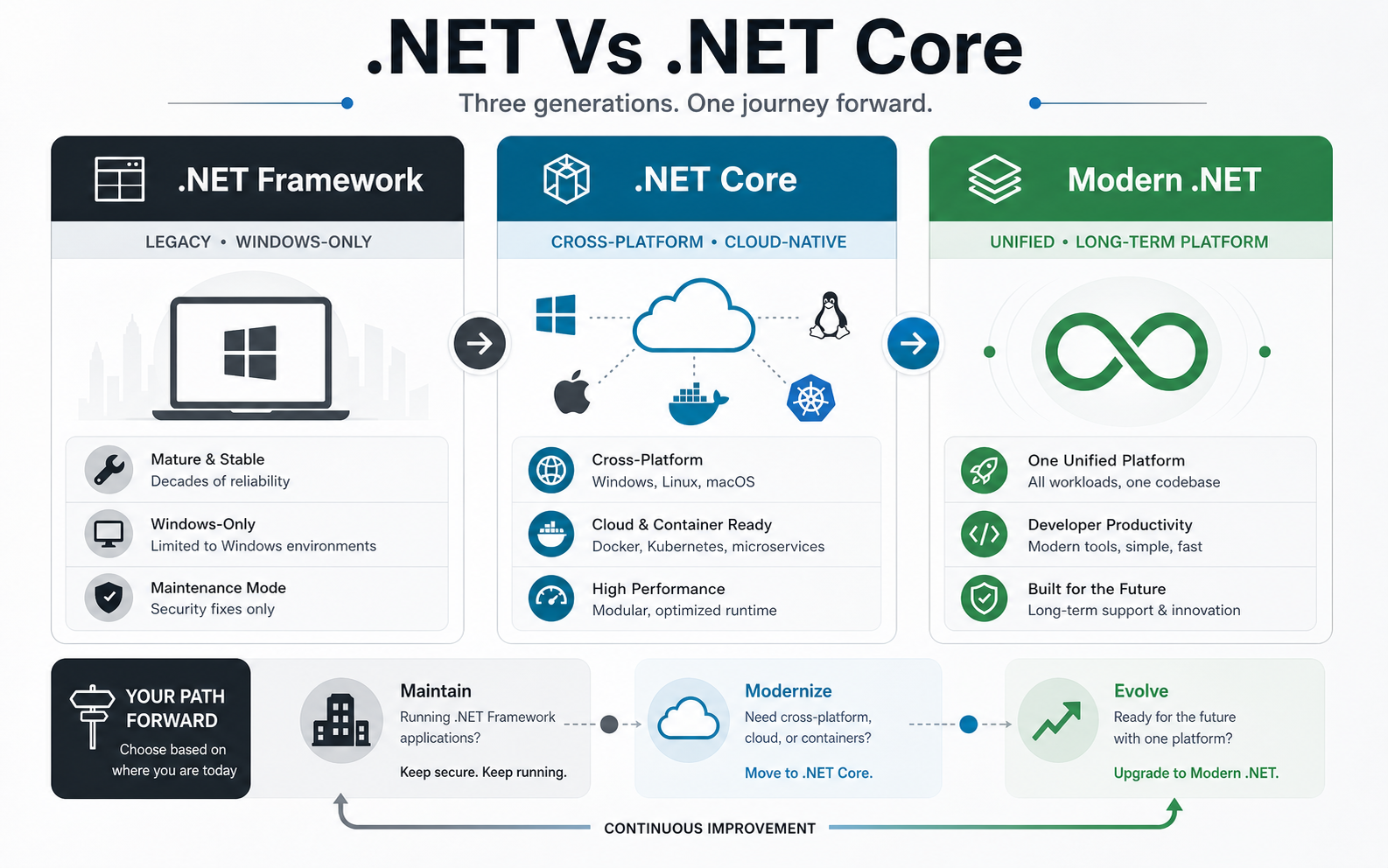
What Is .NET Framework?
.NET Framework is Microsoft's original Windows-focused development platform for building desktop applications, ASP.NET web applications, services, and enterprise systems. It includes the Common Language Runtime, a large class library, ASP.NET, Windows Forms, WPF, ADO.NET, and other long-running technologies that many organizations still operate today.
The strongest reason to keep .NET Framework is compatibility. If an application is stable, Windows-only, and deeply tied to older APIs or vendor packages, maintaining it on a supported Windows environment can be more responsible than forcing a risky rewrite. Microsoft's .NET Framework support policy keeps .NET Framework 4.8.1 tied to supported Windows lifecycle coverage, but it is not the innovation path for new cloud-native systems.
What Was .NET Core?
.NET Core was Microsoft's cross-platform, open-source reboot of the .NET stack. It introduced a modular runtime, modern command-line tooling, NuGet-first dependencies, strong performance, side-by-side versioning, and first-class support for Linux, macOS, containers, and cloud deployment.
The important update is that ".NET Core" as a separate brand has effectively become modern .NET. .NET Core 3.1 and earlier are out of support. For current projects, teams should evaluate supported .NET versions, release cadence, and long-term support needs instead of treating .NET Core as a separate future-facing choice.
.NET Framework Vs .NET Core Vs Modern .NET
| Platform | Best Fit | Primary Constraint | Decision Guidance |
|---|---|---|---|
| .NET Framework | Existing Windows desktop, ASP.NET Web Forms, WCF server, and legacy enterprise apps. | Windows-first architecture and limited modern cloud-native evolution. | Maintain when dependencies require it; modernize gradually when business risk or operating cost grows. |
| .NET Core | Older cross-platform apps built before the unified .NET era. | Old .NET Core versions are no longer the preferred target for new work. | Upgrade supported apps to a current .NET LTS or STS version. |
| Modern .NET | New APIs, SaaS products, cloud apps, microservices, containers, background jobs, and cross-platform systems. | Requires dependency validation when migrating legacy apps. | Use as the default for new server-side and cloud-native development. |
If your team is choosing a stack for a new product, NextPage's custom software development process can shape the technology decision around product roadmap, performance needs, integrations, and maintainability instead of treating the framework choice as an isolated engineering preference.
Decision Matrix: Which .NET Path Should You Choose?
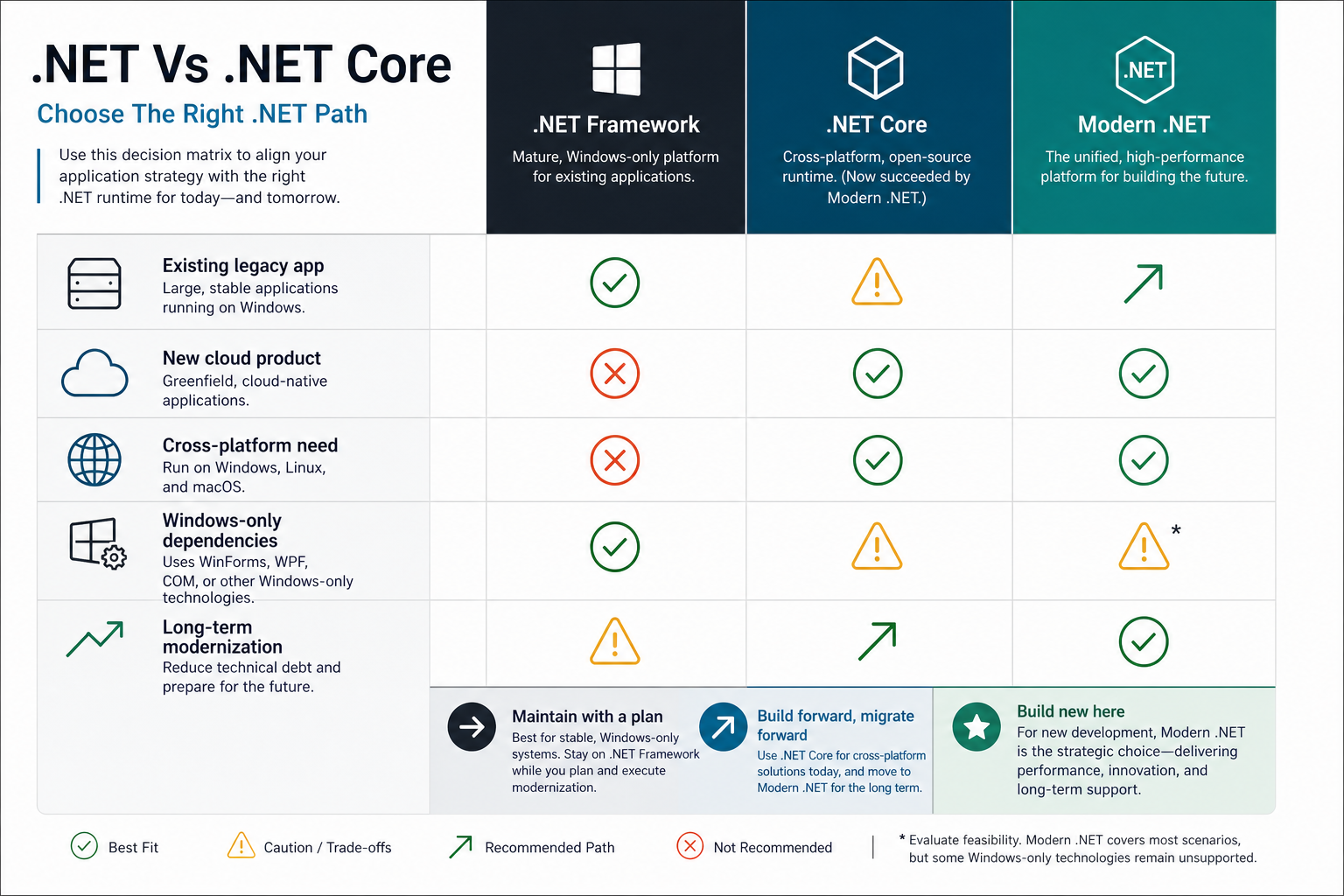
Choose modern .NET for new web APIs, SaaS platforms, microservices, containerized workloads, high-performance backend systems, and products that need Linux or cloud flexibility. It is also the best default when your roadmap includes CI/CD, observability, horizontal scaling, and long-term platform upgrades.
Stay on .NET Framework when the application is already working, Windows-only, and tied to mature dependencies that would be expensive to replace immediately. This is common in internal line-of-business systems, older intranet portals, WPF applications, Windows services, and highly customized enterprise integrations.
Upgrade from old .NET Core versions when the application is still valuable but running on unsupported or near-end-of-support versions. The upgrade can often be smaller than a full migration from .NET Framework because the app already follows newer project structure, package, and deployment patterns.
Support Lifecycle Matters More Than The Name
Microsoft's current .NET support policy lists .NET 10 as an LTS release supported until November 2028, with .NET 9 and .NET 8 supported until November 2026. That means a platform decision should include security patch cadence, upgrade windows, dependency support, hosting compatibility, and the team's ability to keep applications current.
A supported version is not a one-time checkbox. Production systems need a recurring upgrade plan, test automation, dependency scans, observability, and rollback discipline. For aging applications, the Legacy Software Modernization Scorecard can help estimate whether the current system is a maintenance candidate, refactoring candidate, or migration candidate.
Migration And Modernization Roadmap
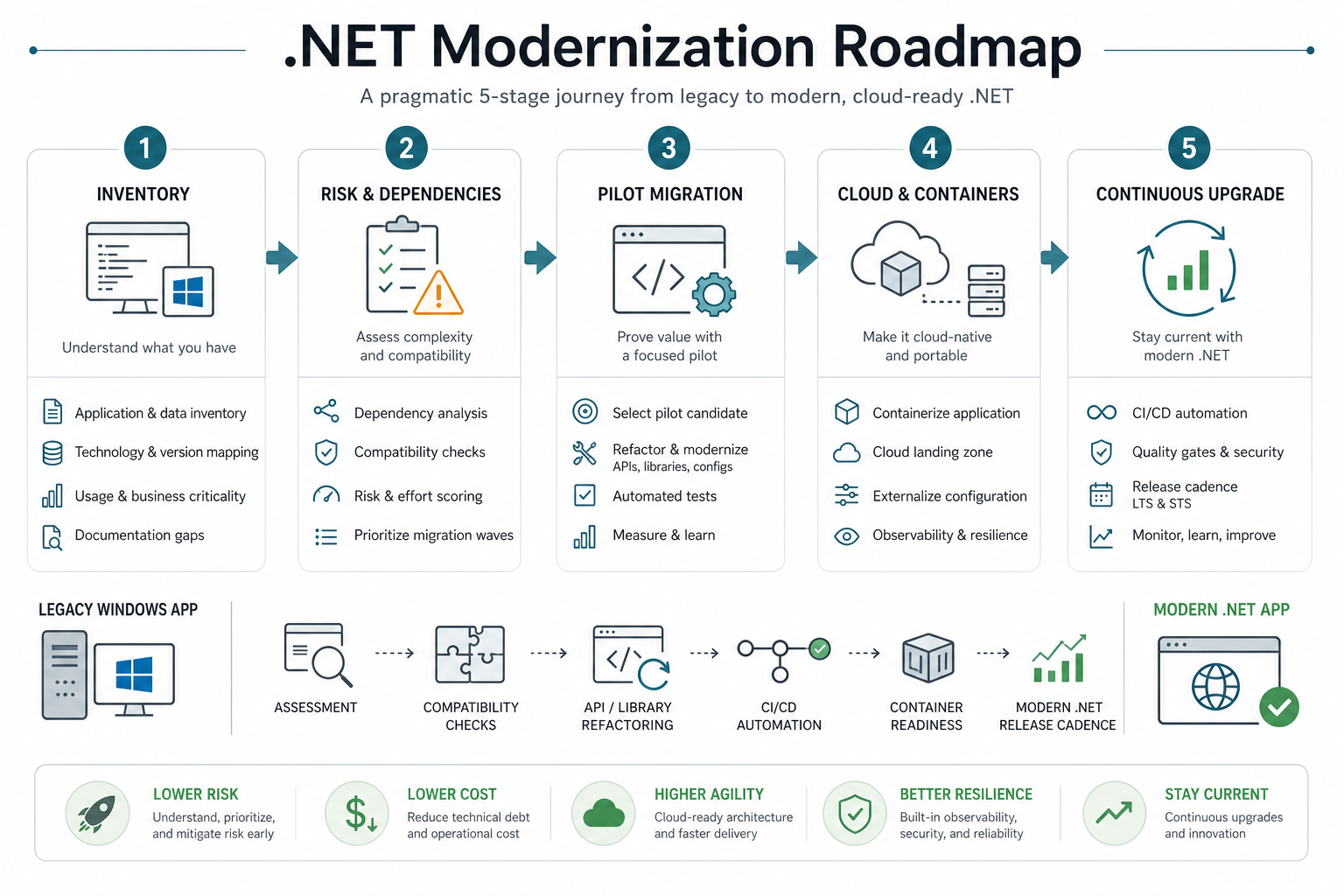
- Inventory the application: map projects, runtime versions, NuGet packages, third-party components, database dependencies, hosting model, user flows, background jobs, and integration points.
- Separate compatibility risks: identify Web Forms, WCF server dependencies, Windows-only APIs, old authentication flows, reporting libraries, COM dependencies, and unsupported packages.
- Choose a migration pattern: upgrade in place, carve out APIs, replace modules gradually, rebuild the UI, or keep the legacy system stable while new capabilities move to modern .NET.
- Pilot a narrow workflow: migrate a low-risk service, API, or background process first so the team can validate deployment, logging, testing, performance, and rollback behavior.
- Institutionalize upgrades: treat .NET version upgrades, package patching, test coverage, and hosting updates as part of the product operating model.
For a broader migration plan, the Legacy Application Modernization Roadmap explains how to phase cost, risk, and technical debt decisions without disrupting business workflows.
Performance, Cloud, And Deployment Tradeoffs
Modern .NET is usually stronger for performance-sensitive APIs, containerized services, Linux hosting, cloud-native deployment, and small service footprints. The runtime, ASP.NET Core pipeline, dependency injection model, configuration system, and hosting model are designed for current deployment practices.
.NET Framework can still run important workloads well, but it is less flexible for container portability, cross-platform infrastructure, and frequent platform upgrades. If the business goal is a modern web product, API platform, or SaaS system, the decision often belongs in a wider website development process or product modernization plan, not a narrow runtime comparison.
When Should You Use .NET Framework?
- The application already runs reliably on .NET Framework and has no urgent business reason to change.
- The system depends on ASP.NET Web Forms, WCF server features, WPF, Windows Forms, COM, or Windows-only libraries.
- Third-party dependencies do not yet support modern .NET, or replacement would create excessive short-term risk.
- The app is internal, stable, low-change, and hosted on a supported Windows environment.
- The modernization budget is better spent first on tests, security, documentation, monitoring, or integration cleanup.
When Should You Use Modern .NET?
- You are building a new web application, API, SaaS product, microservice, or background processing system.
- You need Linux hosting, containers, Kubernetes, serverless deployment, or cloud portability.
- You care about performance, startup time, side-by-side deployments, and modern dependency management.
- Your team wants a long-term upgrade path with current C#, ASP.NET Core, Entity Framework Core, and cloud tooling.
- You are modernizing a legacy system in phases and want new modules to avoid inherited platform constraints.
Final Recommendation
For new development in 2026, choose modern .NET unless a specific dependency forces another path. For existing .NET Framework systems, avoid a rushed rewrite. Audit the application, protect the stable parts, identify business-critical modernization triggers, and migrate incrementally where modern .NET will reduce risk, cost, or delivery friction.
The strongest choice is the one that fits the application's lifecycle. .NET Framework is a compatibility platform for many existing Windows systems. .NET Core was the transition path. Modern .NET is the strategic platform for new Microsoft-stack development.