
Quick Answer: What Is The Website Development Process?
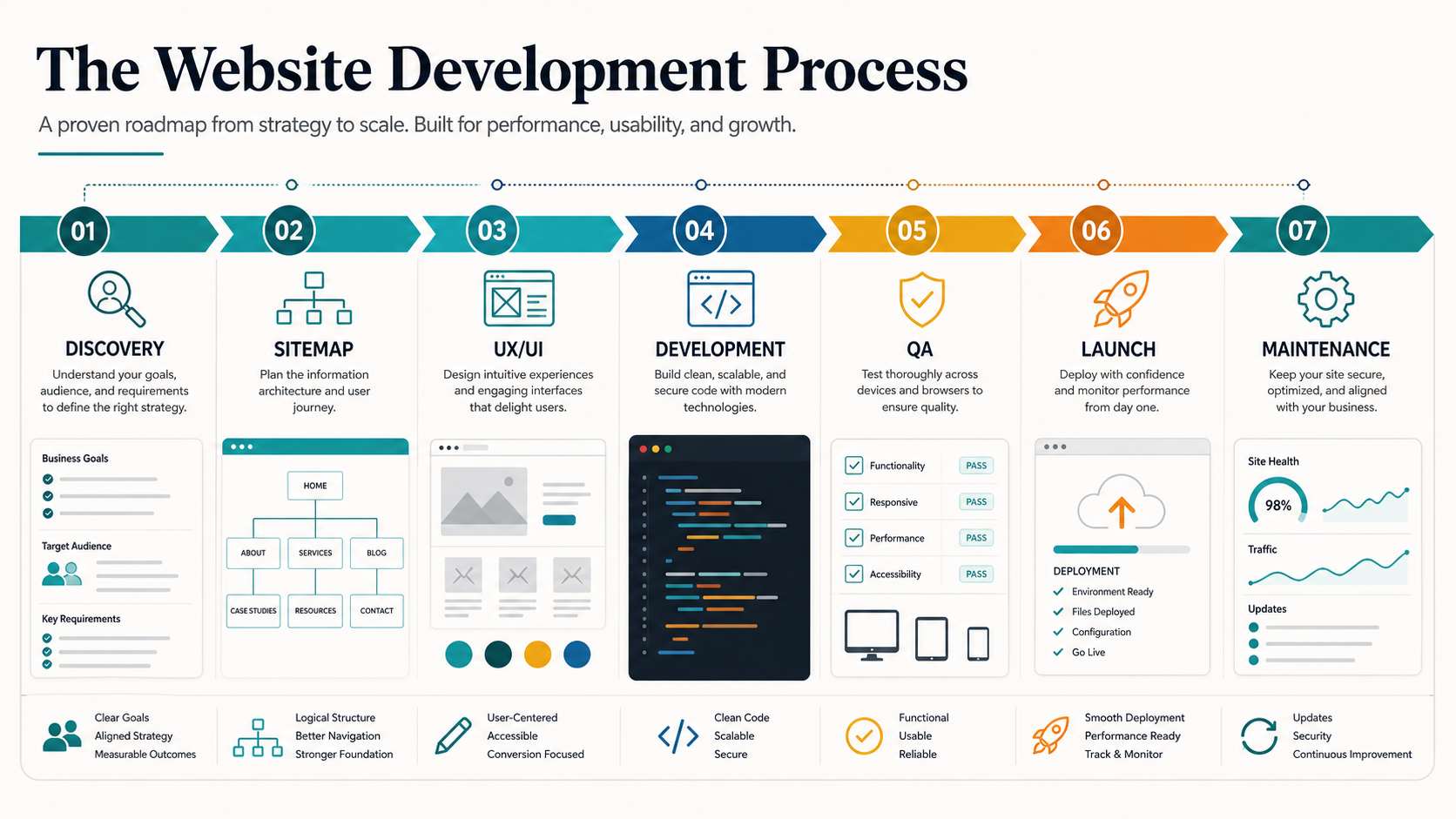
The website development process is the structured path from business goals to a launched, maintained website. A practical process includes discovery, scope definition, sitemap and content planning, UX/UI design, frontend and backend development, CMS or admin setup, integrations, QA, launch, analytics, and ongoing maintenance.
For business websites, the biggest risk is not choosing the wrong color or framework. The bigger risk is starting development before the offer, audience, content ownership, conversion path, technical scope, and post-launch responsibilities are clear. A strong process turns those decisions into visible checkpoints before budget is spent on the wrong build.
Start With Business Goals Before Design
Before choosing WordPress, Next.js, Shopify, Webflow, or a custom stack, define what the website must do for the business. A brochure site, lead-generation site, customer portal, marketplace, SaaS dashboard, and e-commerce storefront have different content models, integrations, admin workflows, security needs, and maintenance costs.
Start with a short discovery document that answers: who the website is for, what action visitors should take, which services or products need priority, what content already exists, which systems must connect, who will update the website, and how success will be measured after launch. If the project is closer to a product than a marketing site, involve a web app development team early so architecture decisions are made before design files harden.
Choose The Right Website Scope
Many website projects fail because the team treats every request as the same type of build. A static website is not the same as a CMS website, and a CMS website is not the same as a custom web app. The right scope depends on how often content changes, how many user roles exist, whether users log in, and which business systems need to connect.
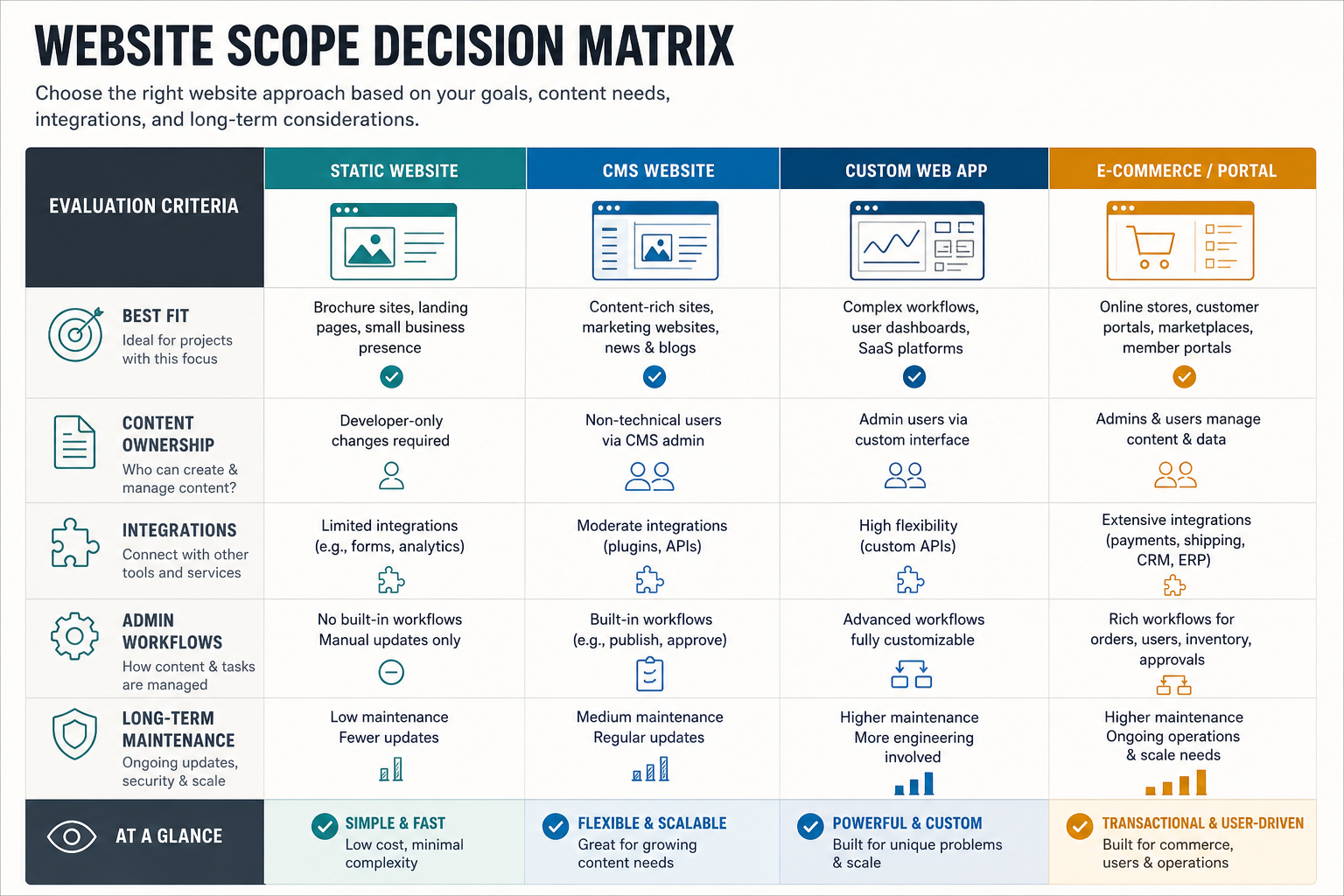
| Website Type | Best Fit | Key Planning Question |
|---|---|---|
| Static website | Small brand or campaign pages with rare updates | Can content be updated by developers only? |
| CMS website | Marketing sites, blogs, service pages, and editorial teams | Who owns content updates after launch? |
| Custom web app | Portals, dashboards, workflows, SaaS products, and role-based systems | Which workflows, permissions, and data rules must be modeled? |
| E-commerce or marketplace | Catalog, cart, checkout, vendor, booking, or transaction-heavy products | Which payments, inventory, fulfillment, and support flows are required? |
If the website includes workflows beyond pages and forms, compare the site scope against custom software development requirements. If the first release still feels too broad, the MVP Scope Builder can help separate launch-critical features from later-phase work.
Website Development Phases
Phase 1: Discovery And Requirements
Discovery turns vague expectations into a buildable brief. The team reviews business goals, target audiences, current website analytics, competitor pages, brand constraints, content inventory, technical dependencies, and conversion goals. The output should include a prioritized page list, must-have features, integration notes, content ownership, launch risks, and decision owners.
This phase should also define what will not be built in the first release. Scope control is easier when stakeholders can see the tradeoff between timeline, cost, quality, and feature depth. For cost-sensitive teams, pair discovery with the Custom Software Cost Estimator to create an initial planning range before requesting a formal quote.
Phase 2: Sitemap, Content, And SEO Planning
The sitemap defines the website's structure: home page, service pages, product pages, blog, case studies, pricing, contact paths, legal pages, and any gated or logged-in areas. Strong sitemap planning prevents duplicate pages, buried conversion paths, and navigation that reflects internal departments instead of user intent.
Content planning should happen before high-fidelity design. Each important page needs a search intent, primary message, supporting proof, CTA, metadata direction, internal-link plan, and owner. If the website is being rebuilt, map old URLs to new URLs before launch so search equity and campaign links are preserved.
Phase 3: UX And UI Design
UX design defines page flow, information hierarchy, navigation, forms, and component behavior. UI design gives those decisions a visual system through typography, spacing, color, imagery, states, and responsive layouts. The design phase should include desktop and mobile views for high-traffic templates, not only a polished home page.
Design review should focus on whether the page helps visitors decide, compare, trust, and act. A beautiful layout still fails if the CTA is vague, proof is missing, forms are too long, or key content is hidden on mobile.
Phase 4: Frontend, Backend, And CMS Development
Frontend development turns approved designs into responsive, accessible pages. Backend development handles data, APIs, authentication, workflows, and integrations. CMS setup gives non-technical teams a safe way to publish content without breaking layouts.
Technology choices should follow the website model. WordPress can work well for editorial marketing sites. Next.js and React are strong for fast, SEO-ready interfaces and product-like experiences. Node.js, Python, PHP, Java, or .NET can all be appropriate on the backend depending on existing systems, team capability, integrations, and maintainability. For a deeper budget and timeline view, use NextPage's web app development cost guide.
Phase 5: Integrations And Data Flows
Most business websites connect to more than a form inbox. Common integrations include CRM, email marketing, analytics, payment providers, booking tools, search, chat, helpdesk, product databases, warehouse systems, or internal APIs. Document every data flow: what is captured, where it goes, who receives alerts, what failure looks like, and how consent is handled.
Case-study-heavy projects also need a practical proof system. For example, the LessonBridge tutoring platform case study shows how discovery, booking, availability, payments, and admin operations can connect into one education workflow rather than a set of isolated pages.
Phase 6: QA, Launch, And Monitoring
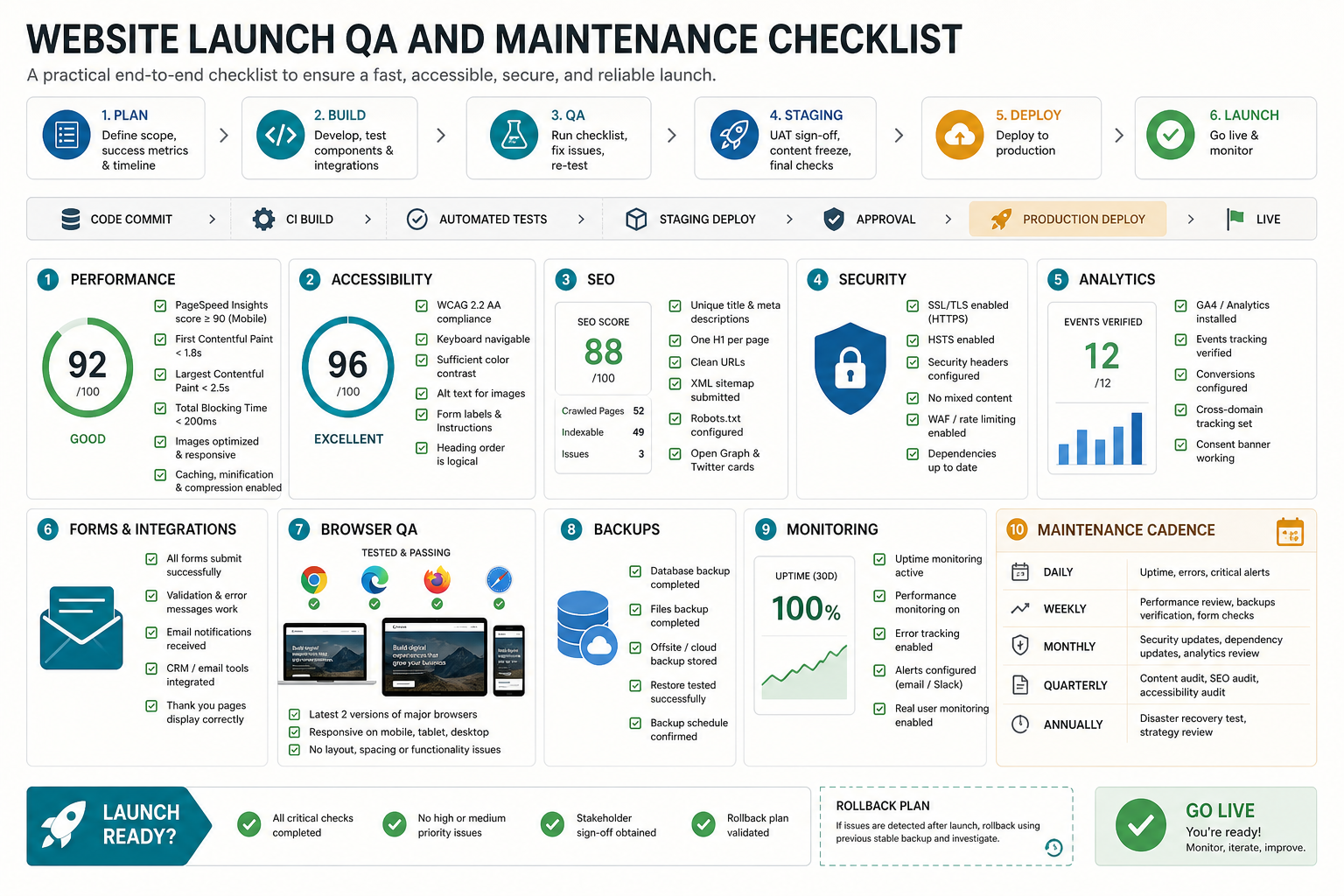
QA should cover more than whether the page opens. Test responsive layouts, forms, emails, redirects, analytics events, browser compatibility, Core Web Vitals, accessibility, metadata, schema, sitemap, security headers, broken links, backups, and CMS editing paths. Launch planning should include a rollback path, DNS window, cache purge plan, analytics validation, and post-launch monitoring.
What You Need Before Building A Website
The basic setup still matters: domain name, hosting, CMS or application platform, brand assets, content, analytics access, and a clear maintenance owner. But these decisions should be made in the right order. Buying hosting before deciding whether the site is static, CMS-driven, or application-like can create migration work later.
- Domain and DNS: choose a domain that fits the brand and plan DNS ownership before launch.
- Hosting or cloud platform: select infrastructure around traffic, security, CMS needs, integrations, and deployment workflow.
- Content system: decide whether editors need WordPress, a headless CMS, structured admin tools, or developer-managed content.
- Brand and page content: prepare messaging, imagery, page copy, legal content, proof points, and case studies before final QA.
- Analytics and conversion tracking: define events, goals, dashboards, and attribution before launch.
- Maintenance plan: assign ownership for updates, backups, monitoring, security patches, content changes, and performance reviews.
Website Development Budget And Timeline
Website development cost depends on scope, design depth, page count, CMS complexity, custom workflows, integrations, content production, SEO migration, QA expectations, and maintenance needs. A simple marketing website can move quickly when content is ready. A custom portal or transactional platform needs more planning, backend work, testing, and stakeholder review.
Budget should include discovery, UX/UI design, frontend development, backend or CMS development, content migration, copywriting, image production, integrations, QA, launch support, analytics, and maintenance. Teams often underbudget the content and QA work, even though those two areas decide whether the website is useful after it is technically live.
If the website is part of a larger software product, compare the scope with NextPage's guide to custom software development cost and the article on prototype versus MVP planning.
Common Website Development Mistakes To Avoid
- Starting with design before scope: visual polish cannot fix unclear page goals, content gaps, or undefined integrations.
- Choosing technology by trend: the best stack is the one the team can build, secure, maintain, and extend for the business model.
- Ignoring mobile content: many pages look fine on desktop but hide proof, CTAs, or key comparison content on smaller screens.
- Treating SEO as a post-launch task: metadata, redirects, internal links, schema, and page intent should be planned before launch.
- Skipping editor workflows: a CMS is only useful if real editors can update the right fields safely.
- Underplanning maintenance: websites need security updates, backups, monitoring, content refreshes, and performance checks after launch.
Final Recommendation
A good website development process is a decision system, not just a sequence of tasks. Start with business goals, choose the right website model, plan content and SEO early, design around user decisions, build with maintainable technology, test the full launch path, and assign ownership for post-launch improvements.
When the website includes custom workflows, dashboards, portals, or product logic, treat it as a software project from day one. That is where a structured MVP development process and examples like the FieldIQ platform case study become useful references for planning roles, interfaces, backend systems, and long-term operations.