
Supply chain visibility software should turn supplier, inventory, shipment, risk, and operations signals into owned decisions before a delay becomes a customer problem. The useful version is not another dashboard. It is an operating loop: collect trustworthy events, score business impact, assign the right owner, trigger the next action, and feed the resolution back into ERP, WMS, TMS, supplier, and planning systems.
This roadmap is for supply-chain directors, logistics operators, procurement teams, manufacturing IT leaders, and operations executives who need visibility across suppliers, warehouses, transportation, and risk events. If AI is part of the roadmap, scope it around decisions it can improve: ETA risk, inventory anomalies, supplier performance, freight audit, exception summaries, and planning recommendations. NextPage's AI in supply chain management guide covers those use cases in more depth.
Quick Answer: What Should Supply Chain Visibility Software Do?
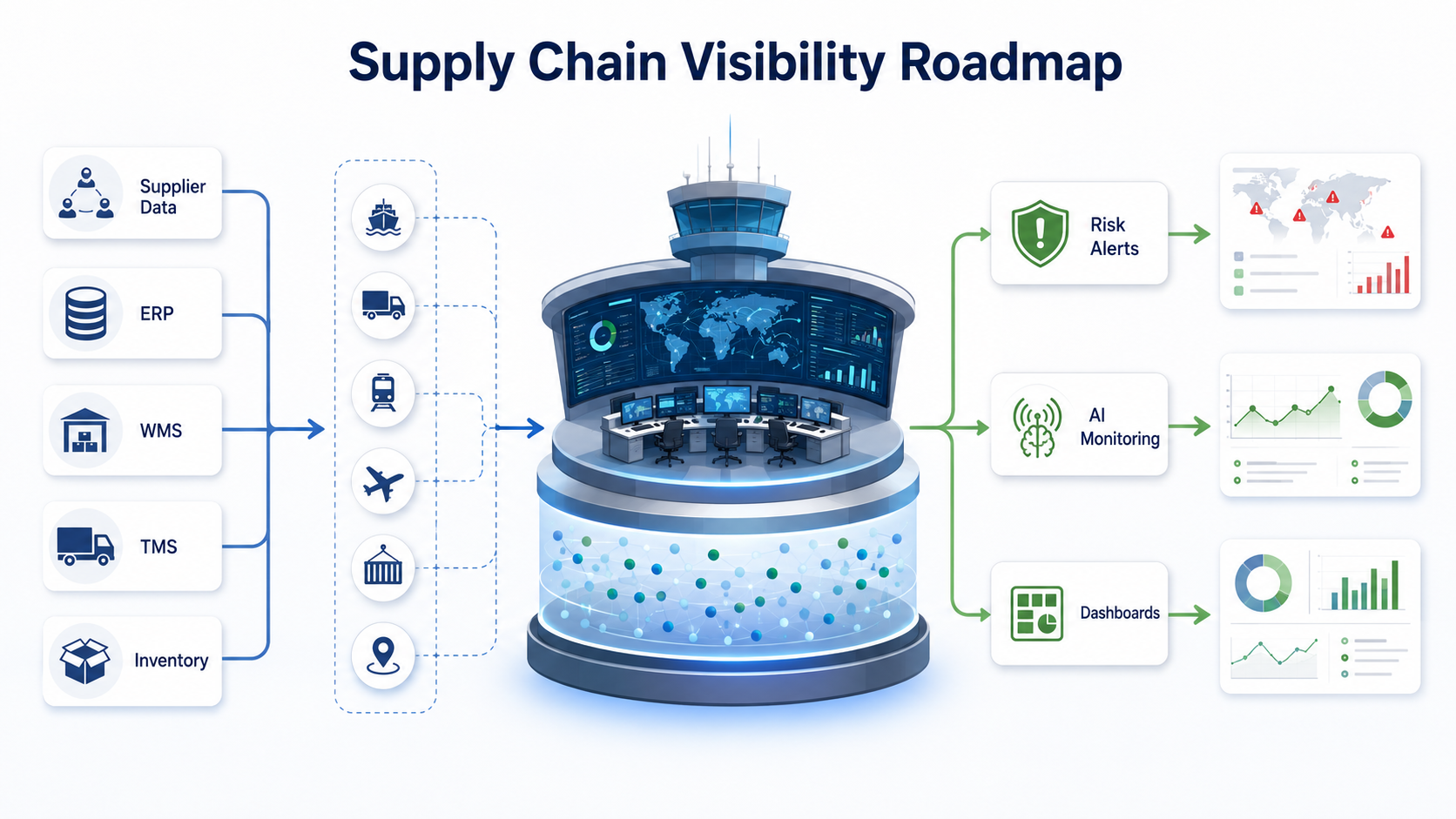
Supply chain visibility software should collect data from suppliers, ERP, WMS, TMS, inventory systems, carrier feeds, risk sources, and operations teams; normalize those inputs into a shared event model; detect exceptions; route alerts to accountable owners; and show KPI dashboards that match real operating decisions.
The first release usually does not need every supplier, carrier, lane, warehouse, SKU, and risk feed. It needs one valuable visibility question answered reliably. Good MVP questions include: which inbound shipments will miss production windows, which suppliers have missing readiness data, which inventory positions are below tolerance, which orders need expedited action, and which disruptions require customer communication.
For logistics-heavy scopes, compare the roadmap with NextPage's AI solutions for logistics and supply chain operations. The same production constraints show up repeatedly: route planning, warehouse workflows, inventory forecasting, freight audit, shipment visibility, exception handling, and ERP/TMS/WMS integrations all depend on clean event data and reviewable workflows.
Visibility Is Not Just A Dashboard
Many visibility projects fail because they start with screens instead of decisions. A dashboard that shows yesterday's data from disconnected systems may look useful in a demo and still fail in daily operations. The better starting point is an exception workflow: what changed, who owns it, what action is expected, which system must be updated, and how leadership knows whether the issue was resolved.
Separate three layers. The data layer collects supplier, shipment, inventory, production, purchase order, and risk signals. The decision layer calculates status, priority, SLA, confidence, and recommended action. The workflow layer assigns owners, sends alerts, creates tasks, tracks resolution, and writes updates back to source systems. A real control tower needs all three.
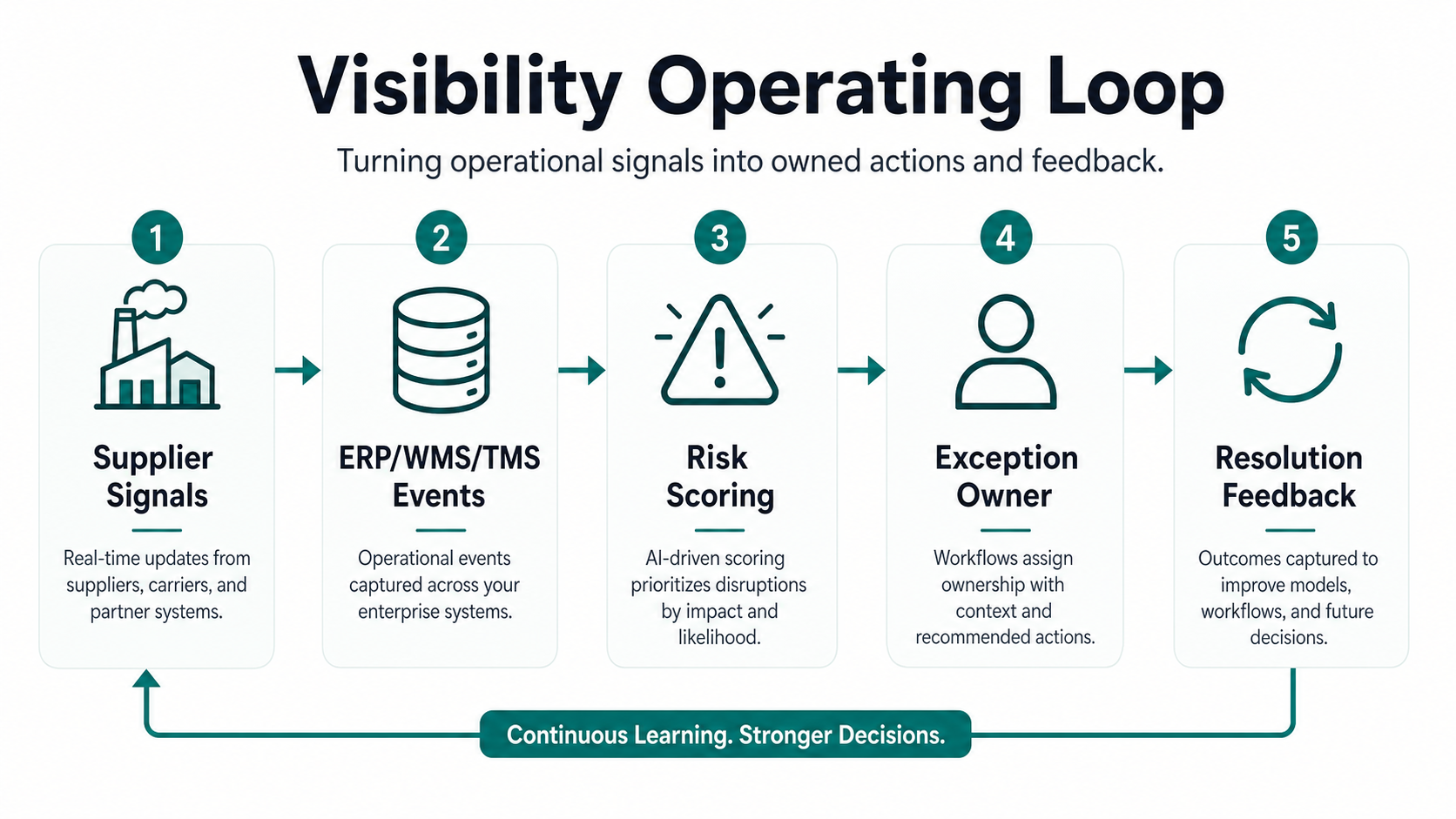
If the goal is a logistics control tower, keep the operating loop explicit. NextPage's AI agents for logistics control towers article explains why exception classification, approval boundaries, and system updates matter more than a generic chatbot or alert feed.
Build The Data Foundation First
The data foundation decides how much visibility the software can actually provide. Start with the entities that matter: supplier, purchase order, SKU, shipment, container, carrier, lane, warehouse, inventory location, production order, customer order, risk event, and exception. Then define source ownership and update frequency for each entity.
| Data Source | Visibility Signal | Common Problem | Design Decision |
|---|---|---|---|
| Supplier portal or EDI | Readiness, ASN, production status, and document completeness. | Late, incomplete, or inconsistent supplier updates. | Define required fields, reminder rules, exception thresholds, and fallback upload paths. |
| ERP | Purchase orders, demand, inventory value, customer commitments, and finance context. | Custom fields, stale exports, weak API access, or unclear system ownership. | Keep ERP as system of record, then build integration recovery and reconciliation reports. |
| WMS | Warehouse receipt, putaway, pick/pack/ship, inventory movement, and cycle counts. | Different warehouse status codes and timing gaps. | Normalize event names and preserve the original warehouse event for audit. |
| TMS and carrier feeds | Shipment milestones, ETA, exceptions, proof of delivery, and route changes. | Tracking gaps and inconsistent carrier event formats. | Use event confidence, last-seen timestamps, and owner escalation when feeds go silent. |
| Risk feeds | Weather, port congestion, geopolitical, supplier, cybersecurity, or compliance risk. | Too many alerts without business impact scoring. | Map risk to order, lane, inventory, supplier, customer, and revenue exposure. |
| Manual operations input | Exception notes, corrective actions, owner decisions, and supplier commitments. | Important context trapped in email and spreadsheets. | Capture decision notes, approvals, and closeout reasons in the workflow record. |
Do not postpone governance. Decide canonical IDs, event timestamps, confidence rules, duplicate handling, ownership, retention, and reconciliation before adding predictive models. For ERP-heavy environments, visibility software often starts as ERP integration and modernization: preserving the system of record while removing manual handoffs, delayed reporting, and workflow gaps around it.
Integration Checklist For ERP, WMS, TMS, And Supplier Systems
Integration design should be practical, not ideological. APIs are ideal when systems expose stable endpoints and operations need near-real-time updates. Event streams help with status changes and exception workflows. EDI remains common for supplier and logistics communication. Batch can still support noncritical historical analysis, but it should not be the only source for urgent operational alerts.
| Integration Area | Questions To Answer | Failure Mode To Plan |
|---|---|---|
| ERP | Which purchase orders, inventory positions, suppliers, SKUs, and customer commitments must be visible? Can updates be written back? | ERP rejects write-back, custom fields drift, or nightly exports overwrite corrected status. |
| WMS | Which warehouse milestones matter for operations, and how quickly do they need to appear? | Warehouse events arrive late, duplicate, or use local status codes that planners misread. |
| TMS and carriers | Which shipment events, ETA changes, delays, and proof-of-delivery signals are required? | Carrier feeds go silent, ETAs conflict, or milestone quality differs by lane. |
| Supplier systems | Will suppliers use a portal, API, EDI, spreadsheet upload, or managed onboarding flow? | Supplier participation is low because the workflow is too hard or the value is unclear. |
| Data warehouse | Which visibility events become reporting facts, and how will historical trends be preserved? | Operational events and analytics facts diverge, creating two versions of truth. |
| Notifications | Which alerts go to email, Slack, Teams, SMS, portal notifications, or task queues? | Alerts create noise because severity, ownership, and runbooks are not defined. |
When the roadmap includes several enterprise systems, use a dedicated integration inventory. If the scope includes custom APIs, adapters, retries, monitoring, and reconciliation, treat it as custom software development, not simple dashboard work.
Risk Alerts And Exception Workflows
Risk alerts should be designed around business impact, not noise. A delayed shipment is not always urgent. A delayed shipment attached to a production-critical component, high-value customer order, or single-source supplier can be critical. The alerting model needs context from inventory, demand, supplier, lane, and customer priority.
Group alerts into categories: supplier readiness gaps, missing documents, late ASN, carrier delay, customs or port risk, inventory shortage, quality hold, demand spike, cybersecurity or compliance risk, and manual escalation. Each alert should have severity, owner, due time, recommended action, source evidence, and resolution status.
The workflow matters as much as detection. Who acknowledges the alert? Who contacts the supplier? Who updates the ETA? Who informs sales or customer support? Who approves expediting cost? Without ownership and closure, visibility becomes another stream of unhandled notifications.
Choose The First Visibility MVP
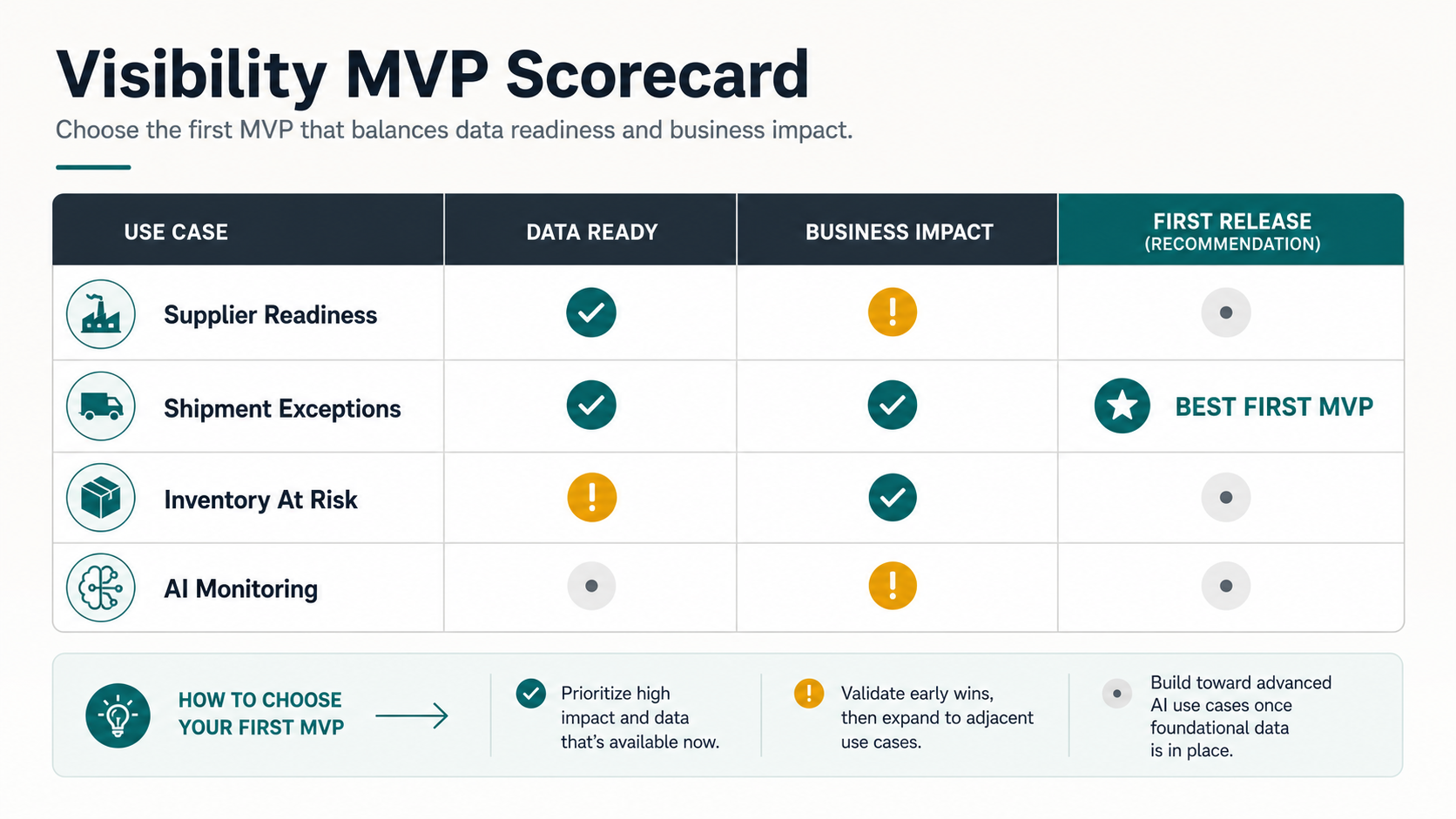
Pick the first release by scoring business impact against data readiness. A use case with perfect strategic value but unreliable inputs will stall. A use case with clean data but no operational consequence will not earn adoption. The first MVP should be narrow enough to ship and important enough to change a daily decision.
| MVP Candidate | Strong First Release When | Delay When | Useful KPI |
|---|---|---|---|
| Supplier readiness | Supplier data is already collected but updates are late, incomplete, or hard to trust. | Supplier onboarding is not owned and suppliers have no clear incentive to participate. | On-time supplier updates, missing document rate, readiness exceptions closed. |
| Shipment exceptions | TMS or carrier events exist, but teams manually identify which delays matter. | Carrier feeds are too sparse to support operational decisions. | Time to detect, time to acknowledge, late shipment impact avoided. |
| Inventory at risk | ERP/WMS inventory is reliable enough to connect stock, demand, and customer commitments. | Inventory accuracy is poor and cycle-count discipline needs repair first. | Stockout risk, inventory-at-risk value, expedite cost, service-level protection. |
| AI monitoring | Exception history exists and teams can review model recommendations safely. | There is no closed-loop process to confirm whether recommendations helped. | Recommendation acceptance, false-positive rate, missed-event rate, resolution time. |
For ROI framing, use the AI Automation ROI Calculator when the use case reduces manual review or exception handling. Use the Custom Software Cost Estimator when integration count, user roles, dashboards, permissions, and data complexity drive the budget.
Where AI Monitoring Fits
AI monitoring can help when there is enough event data and a clear operating decision. Useful applications include ETA risk scoring, anomaly detection, supplier performance patterns, demand-supply mismatch detection, document classification, freight audit review, and natural-language summaries of exception clusters.
Keep AI bounded. A model can rank risk, summarize context, or recommend an action, but the workflow should preserve source evidence and human accountability. Show the signal, confidence, reason, and historical basis when possible. Track false positives and missed events as part of release quality. If teams cannot explain or act on an AI alert, it will not improve visibility.
Before AI affects customer commitments, inventory movement, expediting spend, or supplier scorecards, run the AI Agent Readiness Assessment. It helps test workflow clarity, data readiness, integration access, human-review controls, and monitoring before an AI workflow touches live operations.
Implementation Roadmap And KPIs
Phase 1: visibility discovery. Choose one use case, such as inbound supplier readiness, port-delay impact, warehouse receipt visibility, or shipment exception management. Inventory systems, data fields, owners, alert rules, and KPI baselines.
Phase 2: data model and integrations. Build canonical IDs, event model, source connectors, error handling, reconciliation, and permission model. Avoid designing dashboards until the event model is stable.
Phase 3: alerts and workflows. Add exception rules, owners, notifications, task queues, status changes, comments, and resolution tracking. Test with real operating scenarios.
Phase 4: dashboards and AI monitoring. Add KPI views, trend analysis, anomaly detection, risk scoring, and executive reporting. Good KPIs include on-time supplier updates, inventory-at-risk, late shipment impact, alert acknowledgement time, resolution time, expedite cost, forecast variance, and customer-order risk.
Manufacturers should align this roadmap with ERP and shop-floor realities. NextPage's manufacturing ERP implementation guide is useful when production planning, warehouse movement, procurement, quality, finance, and reporting all need to agree before visibility can be trusted.
Cost Drivers And Build-Vs-Buy Decisions
Buy when a commercial platform already covers your carriers, suppliers, shipment modes, and standard workflows. Build or customize when the visibility gap is tied to proprietary operations, legacy ERP constraints, supplier onboarding requirements, unique alert logic, or dashboards that commercial tools cannot model cleanly.
The biggest cost drivers are number of systems, data quality, supplier onboarding effort, event volume, alert complexity, permissions, dashboard depth, AI/analytics scope, and write-back requirements. A narrow MVP with two systems and one exception workflow can move quickly. A global control tower with many regions, suppliers, carriers, and custom workflows is a transformation program.
Use portfolio proof when aligning stakeholders. The FreightLens logistics visibility case study shows how operational visibility becomes more valuable when data capture, exception handling, dashboards, and workflow ownership are designed together.
How NextPage Can Help
NextPage helps operations teams design and build supply-chain visibility software around real decisions: supplier readiness, inventory risk, shipment exceptions, ERP/WMS/TMS integration, dashboards, AI monitoring, and rollout planning. A practical engagement starts with an integration inventory, data model, risk-alert design, and MVP roadmap.
The right first release should make one operational decision faster and more reliable. Once the data and workflow loop works, dashboards and AI become useful instead of cosmetic.