
Quick Answer: Manufacturing ERP Implementation Guide
A manufacturing ERP implementation should start with the operating model, not the software menu. The system has to coordinate production planning, inventory, warehouse movement, procurement, quality, sales orders, finance, compliance, shop-floor data, and management reporting. If those workflows are not mapped before vendor selection, teams often buy a broad ERP package and then discover that the hard work sits in integrations, data cleanup, role design, exception handling, and adoption on the plant floor.
The right plan separates three decisions: which standard ERP modules can run the business, which workflows need configuration, and where custom software development or integrations are required because the manufacturer has unique production, inventory, costing, customer, or compliance logic. Use this guide to shape the scope before you ask for vendor quotes or sign a long implementation contract.
If you already have a rough module list, run the Custom Software Cost Estimator to pressure-test integration complexity, then use the MVP Scope Builder to split the first rollout from later phases.
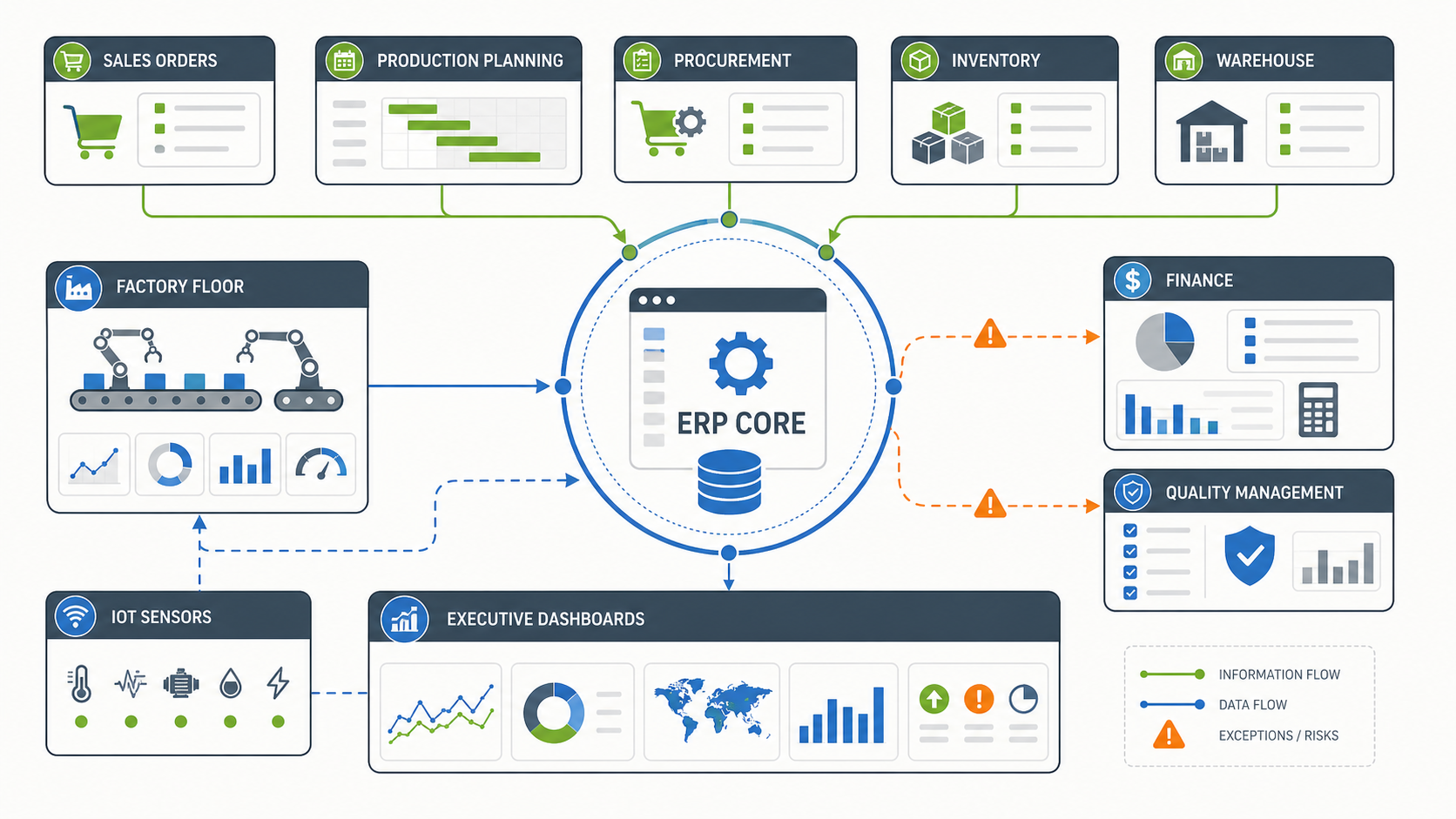
Manufacturing ERP Module Map
The Intileo reference page highlights warehouse management, product lifecycle management, supply chain, inventory and order management, sales enablement, automation, and integrated ERP. Those are common manufacturing priorities, but they should be converted into workflow questions before they become a module list. For proof of how these operating records can become usable software, compare the supplier-quality workflows in the QualityHub portfolio case study.
| Module area | Planning questions | Implementation notes |
|---|---|---|
| Production planning | How are work orders, bills of materials, routings, capacity, and scheduling managed today? | Validate whether the ERP can model real constraints or needs custom planning rules. |
| Inventory and warehouse | Where do stock counts, bin locations, lot/serial rules, transfers, and cycle counts break down? | Barcode, mobile scanning, and warehouse task logic often drive integration scope. |
| Procurement and supply chain | Which suppliers, lead times, approvals, substitutions, and replenishment rules matter? | Supplier portals and purchase approval flows may sit outside the ERP core. |
| Quality and compliance | What inspections, nonconformance records, certificates, recalls, and audit trails are required? | Quality workflows need clear data ownership and traceability before migration. |
| Sales orders and finance | How do quotes, orders, pricing, credit limits, invoices, costing, and margin reporting connect? | Finance should be involved early so operational shortcuts do not corrupt cost reporting. |
| Analytics and automation | Which machine, labor, production, and exception signals should managers see daily? | IoT, AI, and predictive analytics add value only when the base data model is reliable. |
Do not implement every module at once just because the ERP license includes it. A better first release covers the workflow that creates the most operational drag and the smallest number of integrations needed to make that workflow real. The broader custom software development company checklist is useful when comparing implementation partners because ERP projects need discovery, integration, security, support, and delivery discipline.
Integration Architecture for Manufacturing ERP
ERP success depends on how well the system exchanges data with the surrounding business. A manufacturer may need connections to ecommerce, CRM, EDI, shipping carriers, accounting, HR/payroll, CAD or PLM tools, shop-floor machines, MES systems, spreadsheets, data warehouses, and customer portals. Each connection creates decisions about master data, timing, ownership, retries, and exception handling. The inventory capture pattern in the ScanPilot portfolio case study is a practical example of field data feeding back-office operations.
Start by defining the system of record for each major entity: item, customer, supplier, order, work order, batch, lot, employee, cost center, shipment, invoice, and asset. Then define whether each integration is real time, scheduled, manually approved, or exception-only. This is the difference between a clean ERP architecture and a fragile set of point-to-point syncs.
- Master data: decide where products, BOMs, routings, customer records, suppliers, and price rules are created and changed.
- Operational events: define how production completions, material issues, receiving, shipping, scrap, and quality holds move through the system.
- Financial events: protect costing, inventory valuation, revenue recognition, tax, and reconciliation flows from unreviewed operational edits.
- Human workflow: keep approvals, escalations, substitutions, overrides, and exception queues visible instead of hiding them in email.
- Analytics: feed dashboards from governed ERP data, not from disconnected spreadsheets that disagree with finance. If production signals are part of the roadmap, use the AI in manufacturing use cases guide to separate practical automation from speculative features.
When the ERP cannot comfortably support a workflow, a focused internal app can be cleaner than forcing the process into a bad module fit. NextPage's guide to internal tool development explains when custom operational tools beat spreadsheets and no-code workarounds.
Manufacturing ERP Cost Drivers
ERP budgets move because of business complexity, not just user count. Two manufacturers with the same number of employees can have very different costs if one has simple assembly and the other has multi-site production, serialized inventory, contract manufacturing, complex costing, regulated quality records, and customer-specific packaging or pricing.
| Cost driver | What increases scope | How to control it |
|---|---|---|
| Data migration | Dirty item masters, duplicate suppliers, missing units of measure, open work orders, and unclear ownership | Run a data audit before implementation and migrate only what the new process needs. |
| Integrations | Multiple ERPs, accounting tools, CRM, ecommerce, EDI, scanners, MES, IoT devices, and analytics systems | Rank integrations by launch value and define fallback processes for phase one. |
| Customization | Unique costing, planning, quality, approvals, customer rules, or shop-floor workflows | Separate competitive workflows from habits that can change with process redesign. |
| Reporting | Real-time dashboards, margin analysis, production KPIs, audit reports, and executive scorecards | Define the decisions each report supports before building dashboard inventory. |
| Change management | Multi-shift adoption, field teams, warehouse teams, supervisors, finance, and leadership all changing behavior | Train by role, pilot with real orders, and document exception paths before go-live. |
For broader budget planning, compare your ERP workstreams with the custom software development cost guide. The same cost logic applies: integrations, data quality, user roles, workflow complexity, risk, and long-term support usually matter more than screen count.
A Practical ERP Rollout Plan
A safer manufacturing ERP rollout proves the core process before expanding into every department. The first release should be narrow enough to control, but real enough to expose operational friction. A fake pilot with sample data does not reveal whether receiving, production, quality, shipping, finance, and managers can operate from the same records.
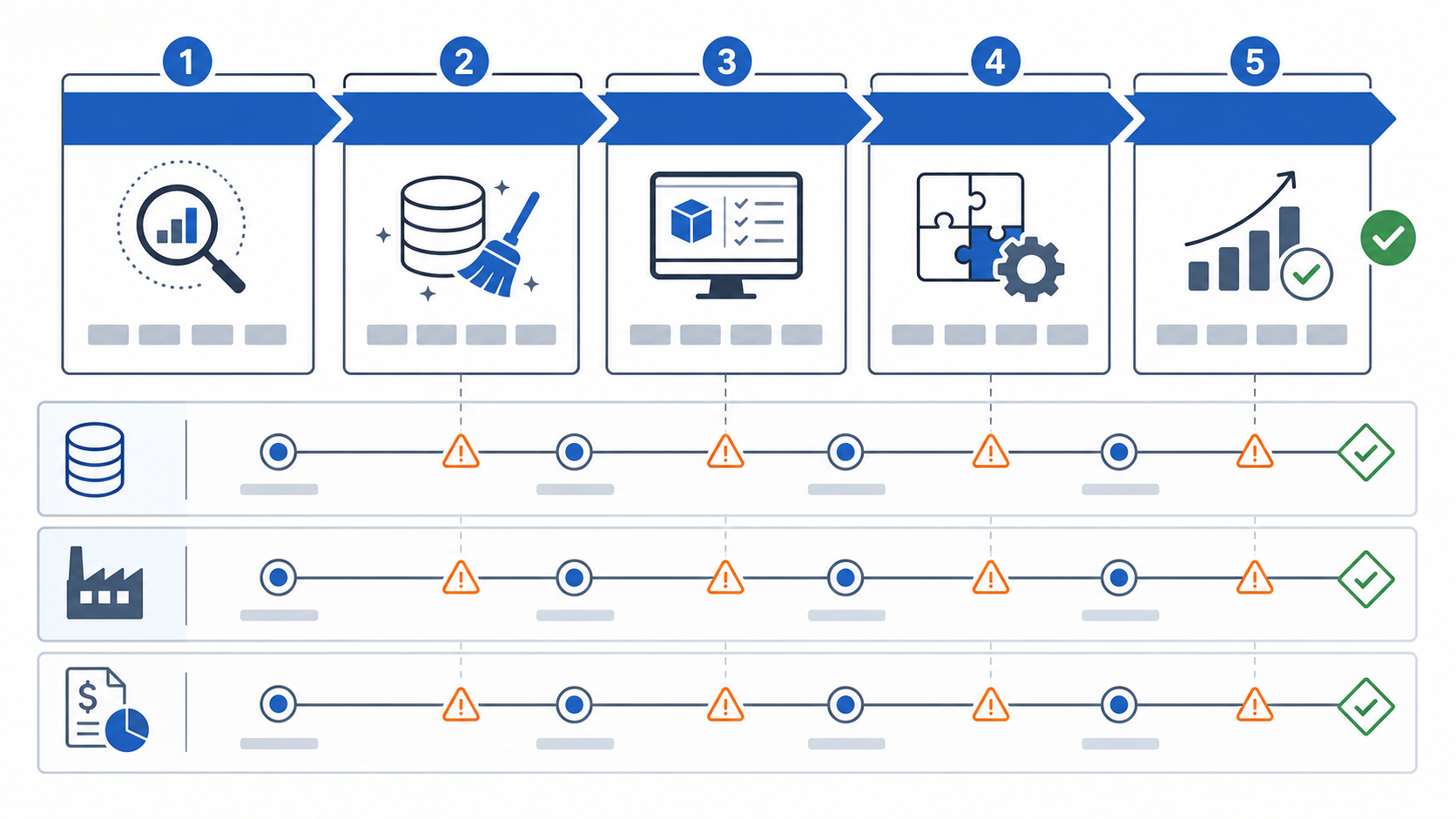
| Phase | Goal | Evidence to collect |
|---|---|---|
| 1. Discovery | Map current workflows, pain points, systems, reports, owners, and business outcomes. | Process map, module priority, data inventory, integration list, risk register. |
| 2. Data cleanup | Fix the records that will break launch: items, BOMs, suppliers, customers, inventory, units, and open orders. | Migration sample, validation rules, ownership model, cutover checklist. |
| 3. Pilot module | Launch one high-value workflow such as inventory visibility, warehouse movement, or production work orders. | User feedback, exception log, transaction accuracy, cycle-time improvement. |
| 4. Integration hardening | Connect the ERP to finance, CRM, ecommerce, MES, EDI, scanners, or dashboards where needed. | Retry rules, reconciliation reports, monitoring, support playbook. |
| 5. Expansion | Add modules, sites, roles, reports, automation, and optimization after the core model is stable. | Adoption metrics, KPI movement, backlog, training plan, governance cadence. |
Manufacturing leaders often want a big-bang rollout because the current tools are painful. That instinct is understandable, but it increases the chance that every team hits unresolved data and workflow problems on the same week. A phased roadmap lets you prove the new operating model while keeping production running.
When Custom ERP Extensions Make Sense
Customization is not automatically bad. Bad customization happens when teams rebuild avoidable legacy habits. Good customization protects workflows that create operational advantage, satisfy compliance, improve speed, or connect systems the ERP cannot handle cleanly.
Consider a custom ERP extension when:
- The ERP has a module, but the workflow needs too many manual workarounds to match production reality.
- Warehouse, shop-floor, or field users need a simpler interface than the full ERP screen set.
- Customer-specific quoting, scheduling, packaging, quality, or fulfillment rules are central to revenue.
- Integration with machines, scanners, IoT sensors, or external systems requires custom event handling.
- Managers need operational dashboards that combine ERP records with live production or customer data.
Use custom work selectively. A simple approval portal, production dashboard, mobile warehouse flow, or data validation service can be more durable than twisting ERP configuration past its natural limits. If automation is part of the business case, estimate the payback with the AI Automation ROI Calculator and rank candidate workflows with the Workflow Automation Opportunity Finder before funding advanced predictive or AI-assisted workflows.
ERP Implementation Risk Checklist
Most ERP failures are visible early if the team looks for them. Use this checklist before contract signature, before pilot launch, and before go-live.
- Scope: the first release has a named workflow, business owner, success metric, and deferred backlog.
- Data: item masters, BOMs, routings, inventory, suppliers, customers, and open transactions have owners and validation rules.
- Integrations: every integration has a system of record, sync timing, failure handling, and reconciliation process.
- Security: role access, approvals, audit logs, and sensitive financial or customer data rules are defined.
- Reporting: critical reports are tied to operating decisions, not rebuilt because every old spreadsheet existed.
- Training: each role practices real transactions, exceptions, and reversals before go-live.
- Support: launch support, issue triage, SLA expectations, and enhancement intake are agreed before production use.
- Governance: operations, finance, IT, and leadership meet regularly to resolve tradeoffs instead of treating ERP as only an IT project.
ERP implementation is a software and operations change at the same time. The vendor may configure the tool, but the business still has to own decisions about process, data, adoption, and tradeoffs.
How NextPage Helps Scope Manufacturing ERP
NextPage helps manufacturing teams turn ERP ideas into a buildable roadmap. We map the current workflow, identify the systems and spreadsheets that must change, separate standard ERP modules from custom extensions, define integration boundaries, and estimate the first release based on risk and business value. When the roadmap includes predictive planning, document processing, or operator copilots, our AI development services team can scope the data, evaluation, and human-review layers alongside the ERP integration work.
For a useful scoping conversation, bring the current system list, sample reports, module wish list, top operational problems, integration needs, data cleanup concerns, and target launch window. We will help define the smallest practical release, the integrations that must be reliable from day one, and the custom software pieces that are worth building because they make the operating model work.