
Quick Answer: Custom Software Development Cost
Custom software development cost depends on the business workflow the software must run, not just the number of screens or the technology stack. The biggest budget drivers are user roles, feature depth, data complexity, integrations, security requirements, QA coverage, cloud operations, and how much uncertainty the team must resolve before launch.
A practical estimate should separate four parts: core product scope, technical foundation, launch quality, and risk reserve. That keeps the conversation grounded in decisions you can control instead of a vague fixed price. For a first-pass range, start with NextPage's Custom Software Cost Estimator, then refine the number around the exact workflows, integrations, and team model.
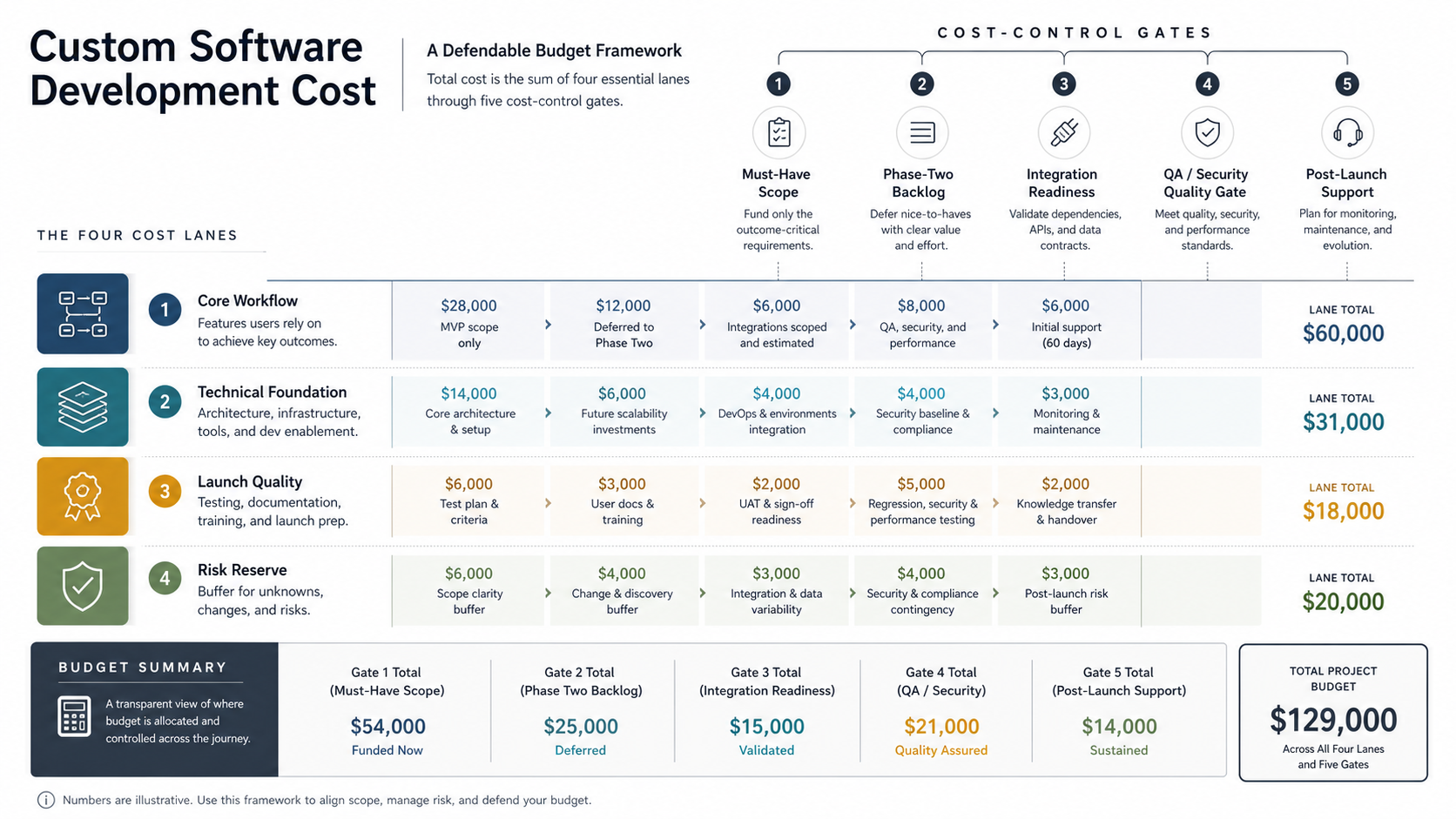
Why Custom Software Cost Varies So Much
Two projects can both be called "custom software" and still require completely different budgets. One may be a focused internal tool that replaces a spreadsheet. Another may be a multi-tenant SaaS platform with billing, audit logs, integrations, admin controls, analytics, and support workflows.
The difference is not cosmetic. A custom system has to encode business rules, protect data, handle edge cases, support real users, and keep working after launch. Estimating only by page count hides the expensive parts: permissions, data flows, error handling, reporting, migration, security, monitoring, and operational support.
That is why a good custom software development estimate starts with the operating model. Who uses the system? What work does it replace? Which decisions does it automate? What data does it trust? What happens when something fails?
Common Custom Software Budget Scenarios
Use these scenarios as planning bands, not promises. Real budgets depend on scope clarity, geography, seniority, delivery model, security exposure, integrations, and launch expectations. Public pricing data also varies widely, which is why the estimate should be validated against requirements instead of copied from a market average.
| Project type | Typical scope | Budget signal | Risk to review early |
|---|---|---|---|
| Internal workflow tool | Forms, roles, approvals, dashboards, exports, simple integrations | Lower to mid when workflows are stable | Hidden spreadsheet rules and reporting expectations |
| Customer or partner portal | Accounts, documents, requests, payments, notifications, admin controls | Mid because UX, security, and support tooling matter | Permissions, file handling, and support escalation |
| Operational platform | Multiple roles, workflow routing, integrations, analytics, audit trail | Mid to high because edge cases compound | Data quality, exception handling, and integration reliability |
| SaaS product | Tenant model, onboarding, subscriptions, billing, analytics, support tools | Higher when the platform foundation is real | Multi-tenant security, account lifecycle, and scaling |
| AI-enabled workflow | Core app plus AI, RAG, agents, evaluations, human review, monitoring | Higher when AI affects production decisions | Data readiness, evaluation quality, and guardrails |
| Legacy rebuild | New system replacing aging software, data migration, parallel run, training | Higher when old rules are undocumented | Migration, business continuity, and change management |
If your project is browser-based and product-led, compare the estimate with NextPage's web app development cost guide. If it is a subscription product, review SaaS application development cost because tenant isolation, billing, onboarding, and support tooling add real scope.
The Cost Drivers That Matter Most
The most important cost drivers are the ones that increase decision paths. A simple field, button, or dashboard can become expensive when it needs permission logic, historical records, integrations, notifications, review workflows, audit logs, or exception handling.
| Cost driver | Lower-complexity version | Higher-complexity version |
|---|---|---|
| User roles | Admin and standard user | Teams, tenants, approval roles, delegated access, audit controls |
| Business workflow | Linear status flow | Conditional routing, escalations, SLA rules, retries, exceptions |
| Data model | Clean records in one system | Legacy data, duplicates, custom IDs, historical states, migrations |
| Integrations | One stable API | CRM, ERP, payment, logistics, analytics, and retry/reconciliation logic |
| Security | Basic login and HTTPS | SSO, MFA, audit logs, retention, encryption, compliance controls |
| Reporting | Simple table and export | Permission-aware dashboards, filters, scheduled reports, snapshots |
| AI features | Drafting or classification assist | RAG, agents, tool use, evaluations, human approval, monitoring |
For CRM-heavy workflows, use the custom CRM development cost guide as a comparison point. CRM projects often look simple until sales, service, billing, reporting, and handoff rules need to match the real operating model.
How Team Model Changes the Budget
Custom software cost is partly the cost of the team needed to make good decisions. A smaller team can work for a narrow MVP, but the responsibilities do not disappear. If product thinking, UX, architecture, QA, DevOps, or support planning are skipped, the cost often returns later as rework.
| Role | What the role protects | When it becomes important |
|---|---|---|
| Product lead | Scope, priorities, acceptance criteria, stakeholder tradeoffs | Any project with multiple decision makers or unclear workflows |
| UX/UI designer | Flow clarity, dashboard usability, forms, information architecture | Customer portals, admin tools, and high-frequency internal systems |
| Frontend engineer | Responsive UI, browser behavior, accessibility, state management | Interactive apps, dashboards, portals, and SaaS products |
| Backend engineer | Data model, APIs, business rules, permissions, integrations | Nearly every serious custom software build |
| QA engineer | Regression coverage, edge cases, release confidence | Payments, approvals, integrations, sensitive data, or many user roles |
| Cloud/DevOps engineer | Environments, deployment, monitoring, backups, reliability | Production systems with uptime, security, or scaling expectations |
If the project is still early, use NextPage's MVP Scope Builder to separate the first release from later-phase ideas. Scope discipline is usually the fastest way to reduce cost without weakening the product.
Build a Defendable Software Budget
A defendable budget explains what must ship, what can wait, and what uncertainty might cost. This matters when the estimate has to survive finance review, founder discussion, procurement, or board approval.
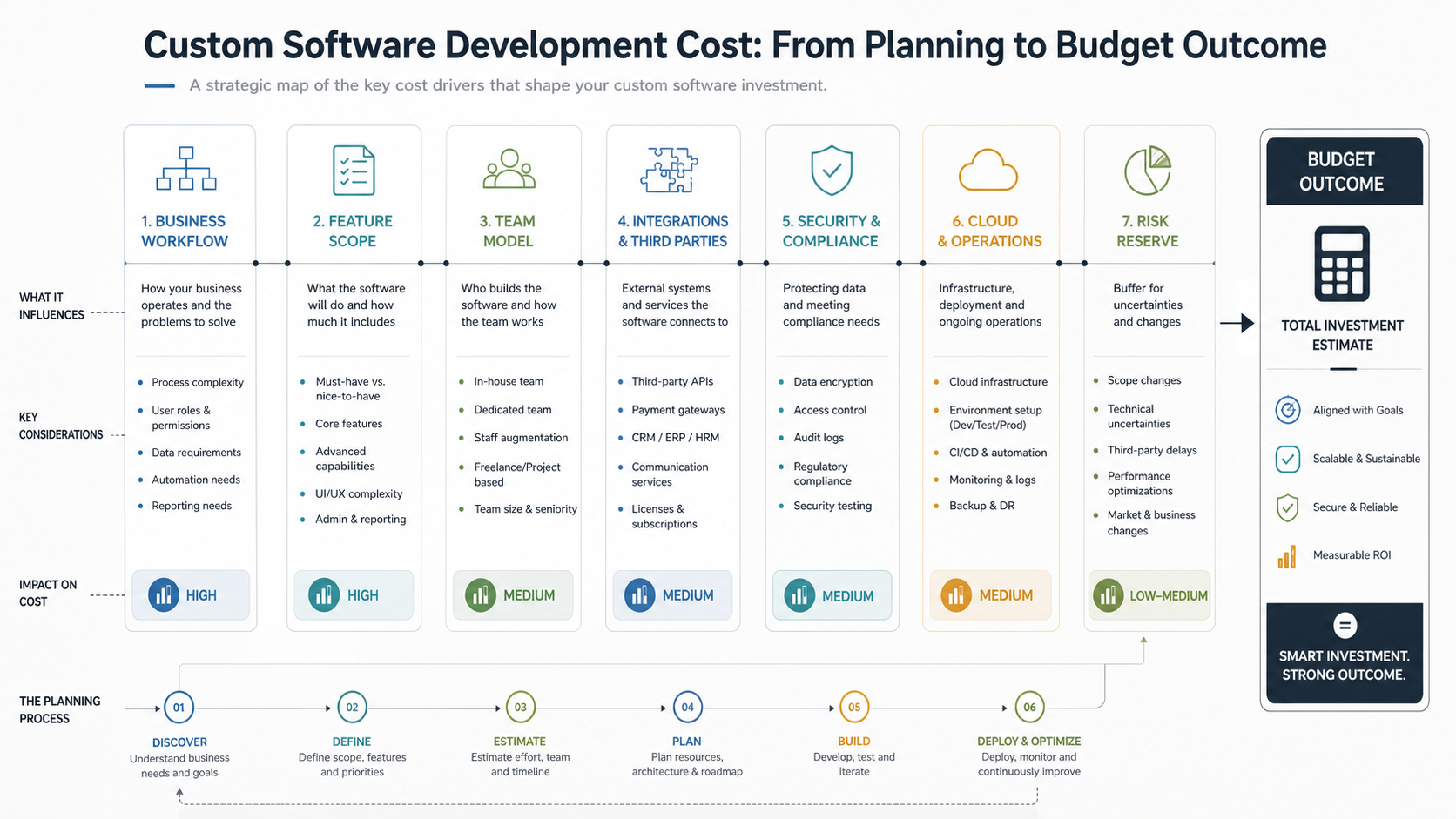
- Define the core workflow. Name the user, trigger, input, decision, output, and business result.
- Map roles and permissions. Role complexity affects UX, backend rules, QA cases, and admin tooling.
- Inventory integrations and data sources. API and data uncertainty are common budget risks.
- Separate must-have from phase two. Keep version one focused on the workflow that proves value.
- Decide launch quality. Uptime, security, performance, accessibility, monitoring, and support targets change effort.
- Hold reserve for unknowns. Keep capacity for data cleanup, integration changes, user feedback, and post-launch fixes.
For legacy systems, budget control starts with deciding whether to stabilize, refactor, rebuild, or replace. The Legacy Software Modernization Scorecard helps teams compare those paths before committing to a full rebuild.
Fixed Price vs. Retained Team vs. Dedicated Team
A fixed-price project can work when scope is narrow, acceptance criteria are stable, integrations are known, and change is unlikely. It becomes risky when discovery is still active because every new learning turns into a negotiation.
A retained team works better when the product needs discovery, build, QA, launch support, and iteration. You still need budget discipline, but you can make tradeoffs continuously: ship the core workflow, defer low-value features, and adjust based on evidence.
A dedicated team model makes sense when software is a long-term operating capability, not a one-time project. It can support continuous improvements, integrations, support, analytics, and modernization work after the first release. The right model depends on how much product ownership you want inside the business and how much delivery capacity you need over time.
Hidden Costs That Surprise Teams
Many estimates miss the work that sits around visible features. These hidden costs do not always appear in an early feature list, but they affect real production readiness.
- Discovery and process mapping: unclear workflows require interviews, decision mapping, and acceptance criteria before development.
- Data cleanup and migration: old spreadsheets and legacy databases often contain duplicates, missing fields, and undocumented rules.
- Integration reliability: production APIs need retries, logs, failure handling, and support diagnostics.
- Admin tooling: internal teams need safe ways to manage users, records, failed jobs, and support cases.
- Security and compliance: access controls, audit logs, retention, backups, and incident handling should not be afterthoughts.
- Training and rollout: users need migration support, onboarding, documentation, and feedback loops.
- Maintenance: software needs updates, monitoring, cloud cost management, dependency upgrades, and incremental improvements after launch.
Post-launch ownership deserves a line item from day one. NextPage's software maintenance cost guide explains how to budget support, security, cloud, and improvements after the initial release.
Where AI Changes Custom Software Cost
AI can make custom software more valuable, but it does not automatically make it cheaper. A simple AI assist feature may be modest in scope. A production AI workflow can add data preparation, retrieval, evaluation, guardrails, permissions, human approval, monitoring, and model operations.
The cost question is not "Can we add AI?" The better question is which decision or workflow AI should improve and how the system will know when the answer is good enough. If AI touches customer data, business-critical decisions, regulated content, or autonomous tool use, budget for evaluation and oversight.
For AI-heavy builds, connect the estimate to an implementation plan through AI development services. The architecture, data readiness, and review model can change both the timeline and the level of risk reserve required.
How NextPage Estimates Custom Software
NextPage estimates custom software by starting with the operating workflow, then translating it into product scope, UX, architecture, team capacity, integrations, QA, cloud operations, and support requirements. The goal is not to force a generic price band onto a unique business process. The goal is to expose the decisions that actually move budget.
For a focused first release, that may mean a lean MVP with one core workflow and a few integrations. For a business-critical system, it may mean discovery, architecture, security, QA, migration, monitoring, and retained support. For AI-enabled software, it may mean a staged build that proves data quality and evaluation before broader automation.
Use the Custom Software Cost Estimator to get a directional range, then review the assumptions with a team that can challenge scope, identify hidden risks, and turn the estimate into a practical build plan.