
Quick Answer: What Should An AI Customer Service Agent Integrate With?
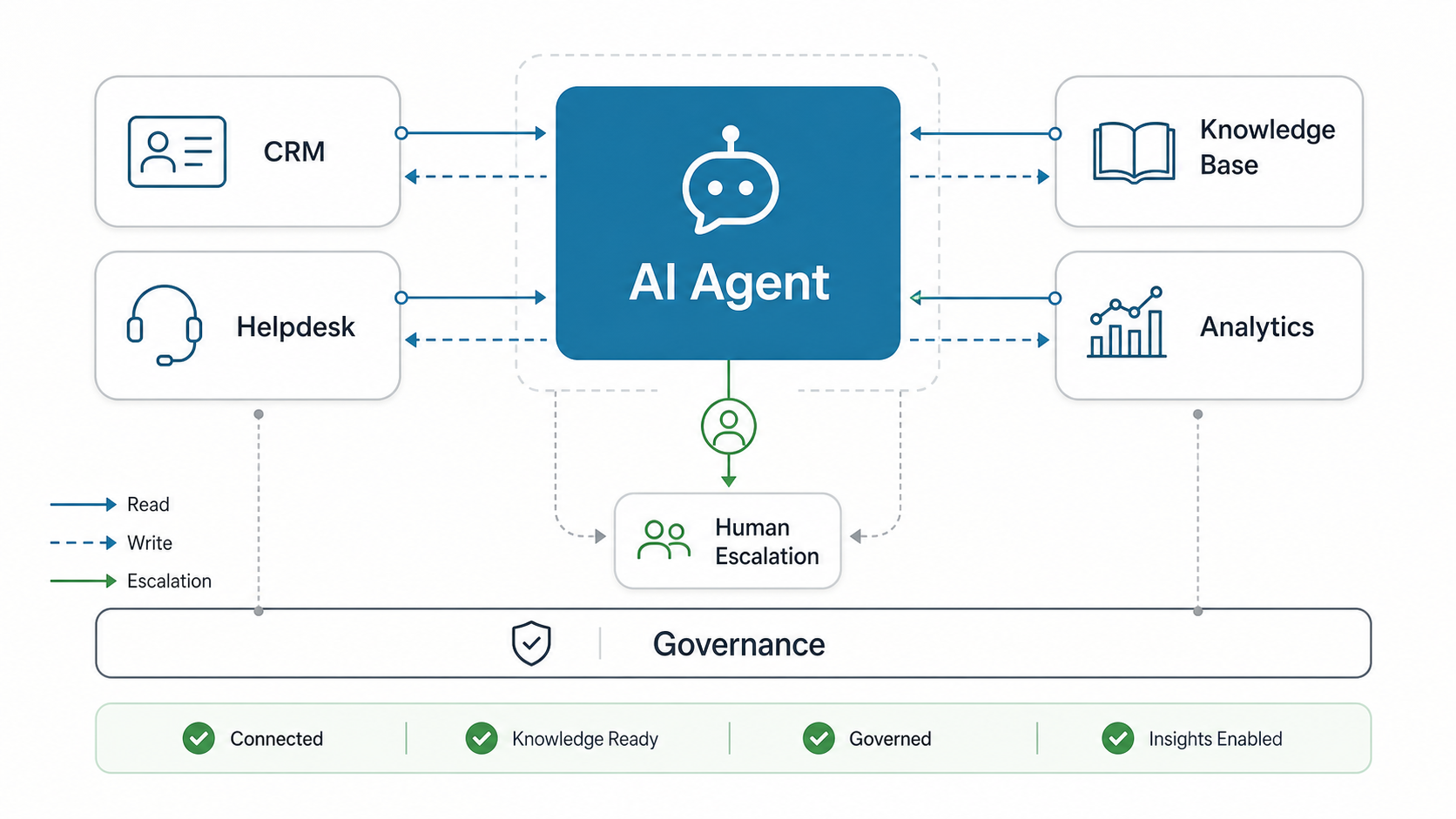
An AI customer service agent should integrate with five systems before it is trusted in production: the CRM for customer identity and account context, the helpdesk for ticket creation and escalation, the knowledge base for approved answers, business systems for order or subscription lookups, and analytics for quality, containment, and handoff measurement. The agent also needs permissions, audit trails, human fallback rules, and a testing process so it can act safely instead of only chatting.
The practical question is not whether the agent can answer a support question. It is whether the agent can retrieve the right context, know which actions it is allowed to take, create a clean record of what happened, and hand off to a person when confidence, policy, or customer risk requires it. Before funding a full build, use an AI Agent Readiness Assessment to check whether the workflow, data, integrations, and governance model are ready for an agent.
Start With The Integration Architecture
A production support agent needs an architecture that separates conversation, knowledge retrieval, tool actions, workflow policy, and monitoring. That separation keeps the implementation controllable: the model can draft and reason, but approved connectors decide what data it may read, what systems it may update, and when it must stop.
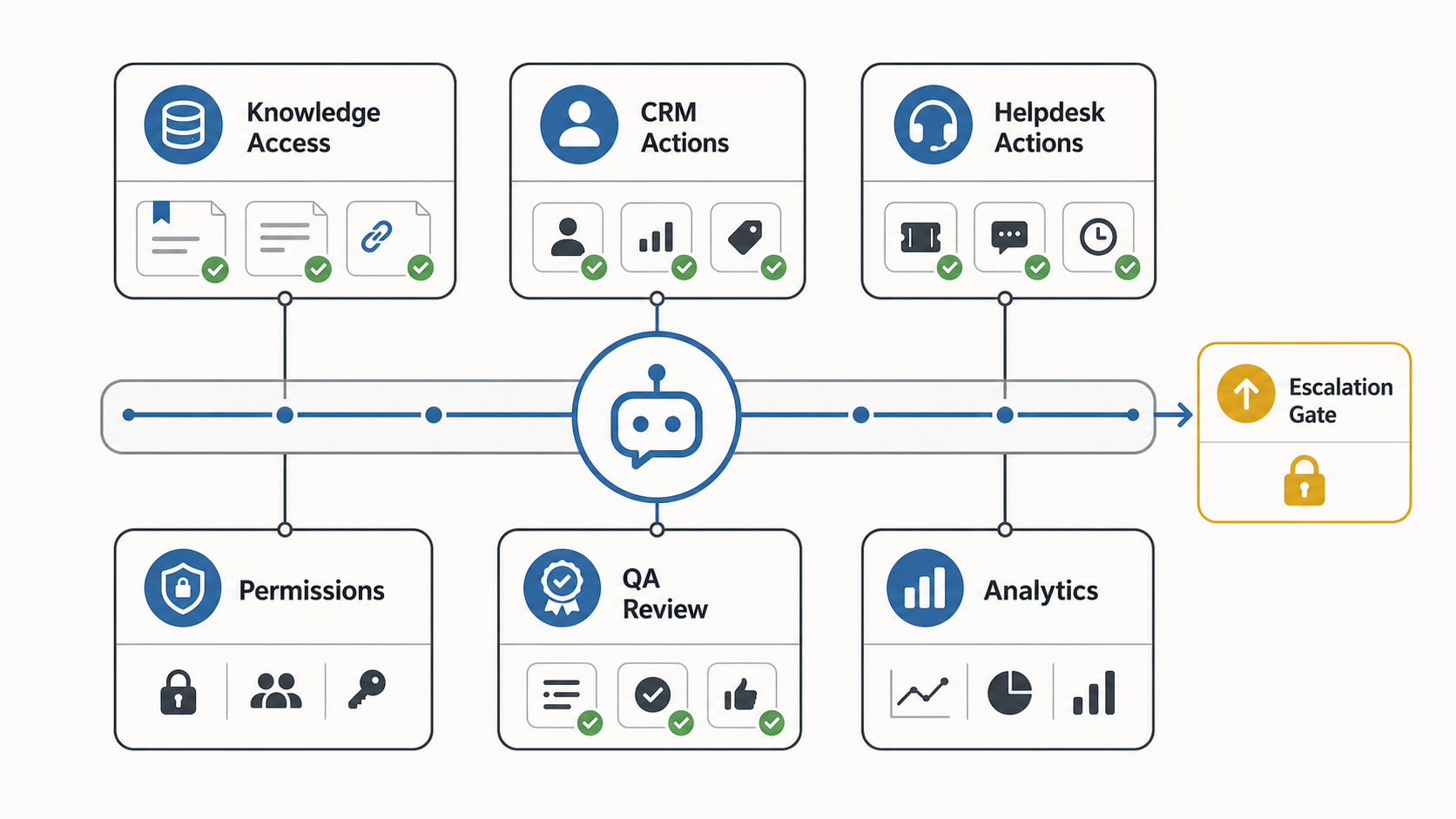
A useful first design has six layers: customer channels, identity resolution, knowledge retrieval, helpdesk or CRM actions, human escalation, and analytics. This is where many teams move from a demo to a real AI chatbot development or AI customer service agent development effort, because support outcomes depend on integrations as much as conversation quality.
| Layer | Integration Work | Decision To Make |
|---|---|---|
| Channels | Website chat, app chat, email, WhatsApp, portal, or internal support tools | Which channels need the same agent behavior on day one? |
| Identity | Login state, email match, customer ID, account role, plan, region | What can the agent see before verification? |
| Knowledge | Help center, policy docs, product manuals, support macros, internal SOPs | Which sources are approved for customer-facing answers? |
| Actions | Create tickets, update fields, trigger workflows, check order or billing status | Which actions are read-only, approval-based, or fully automated? |
| Escalation | Queue routing, priority, transcript, customer sentiment, next-best action | When does the agent hand over? |
| Analytics | Containment, resolution quality, deflection, CSAT, reopen rate, QA review | How will quality be measured beyond volume? |
Current customer-service AI platforms are converging around the same production pattern: agents need approved knowledge sources, explicit actions, audience or channel controls, conversation history, and handoff evidence. Salesforce frames service agents around knowledge, actions, and instructions; Zendesk and Intercom emphasize managed knowledge sources; and ServiceNow positions CSM agents around case context, resolution notes, and agentic workflows. That makes the integration plan more important than the model prompt.
| 2026 Integration Pattern | What To Verify Before Launch | Why It Protects Support Quality |
|---|---|---|
| Managed knowledge sources | Owners, freshness dates, public/private access, and retired articles | Prevents the agent from mixing approved policy with stale or internal-only guidance |
| Authorized actions | Read-only, draft, approval-required, and automated action tiers | Keeps the agent useful without granting broad CRM or helpdesk permissions too early |
| Human handoff rules | Confidence thresholds, VIP routing, sentiment triggers, and compliance topics | Stops unresolved or sensitive cases from staying trapped in automation |
| Conversation evidence | Transcript, retrieved sources, tool calls, fields changed, and handoff reason | Lets support leaders audit the answer and improve the workflow after launch |
CRM Integration: Customer Context, Segments, And Write-Back Rules
The CRM gives the agent context that a public FAQ cannot provide: who the customer is, what plan they are on, their lifecycle stage, recent activity, contract details, account owner, open opportunities, and support history. Without that context, the agent can give a correct generic answer and still create a poor customer experience.
CRM integration should start with read access before write access. Let the agent retrieve account fields, segment, product entitlement, renewal status, and previous issues. Then decide which updates are safe: adding a note, tagging a case, changing a contact preference, or creating a follow-up task. Higher-risk actions, such as changing billing data or account ownership, should require human approval.
Assign an owner to every CRM field the agent can read or update. The launch checklist should document the source system, allowed values, customer-verification requirement, retention rule, fallback owner, and audit evidence for each field. That prevents the agent from turning a support shortcut into a messy data-quality problem. If the CRM itself is still being redesigned, use the CRM implementation roadmap to stabilize objects, integrations, dashboards, and rollout ownership before adding an AI agent on top.
Teams building around sales and support workflows should treat CRM automation as part of the operating model, not a bolt-on feature. The AI workflow automation guide is a useful companion when you need to decide which tasks move from intake to decision, action, review, and monitoring.
Helpdesk Integration: Tickets, Routing, SLAs, And Audit Trails
Helpdesk integration turns an answer engine into a support workflow participant. The agent should be able to search existing tickets, create a new ticket, attach a transcript, classify issue type, set priority, route to the right queue, recommend a macro, and record what the customer already tried. That handoff prevents customers from repeating themselves after escalation.
Define a strict ticket schema before launch. Required fields often include customer ID, issue category, product area, channel, severity, sentiment, attempted resolution, confidence score, escalation reason, and related knowledge source. If the agent cannot fill a required field confidently, it should ask one clarifying question or escalate with a clear gap.
For regulated, enterprise, or high-value accounts, treat ticket creation as an evidence workflow. Store the transcript, source citations, tool calls, handoff reason, and any fields the agent changed. That evidence helps support leads audit quality, coach agents, and rollback risky automation before it affects more customers.
| Helpdesk Requirement | Why It Matters | Launch Rule |
|---|---|---|
| Ticket creation | Keeps unresolved issues trackable | Require category, transcript, customer identity, and attempted resolution |
| Routing | Sends issues to the right team faster | Route by product, severity, account tier, and topic confidence |
| SLA handling | Protects premium and urgent cases | Escalate when policy, plan, or sentiment crosses a threshold |
| Audit trail | Supports QA, compliance, and coaching | Store sources used, actions taken, and handoff reason |
Knowledge Base And RAG: Approved Answers, Freshness, And Citations
Customer service agents should answer from approved knowledge, not from generic model memory. A retrieval-augmented generation layer can connect the agent to help articles, product documentation, policy pages, release notes, troubleshooting flows, and internal SOPs. The real work is preparing the content so retrieval is accurate and maintainable.
Start by assigning ownership to every knowledge source. Each document should have a source owner, last-reviewed date, audience, product/version scope, confidence level, and retirement rule. The agent should cite or internally log the retrieved source so QA reviewers can trace why an answer was given.
For 2026 support-agent builds, treat freshness as an integration requirement rather than an editorial afterthought. Native knowledge updates, external URL sync intervals, source visibility, and citation settings all affect whether a customer sees an approved answer or a stale policy. Add tests for recently changed pricing, plan limits, outage procedures, and regional policy differences before each wider rollout.
For deeper architecture choices, compare this plan with generative AI development patterns for production workflows and agents. If the implementation needs private knowledge retrieval, evaluation sets, latency planning, and observability, NextPage’s LLM development service page is a useful companion. If the scope includes support, sales, and internal workflows, the AI chatbot development cost guide also explains why RAG, integrations, and actions drive cost more than the chat UI itself.
Analytics: Containment, Quality, Escalation, And ROI Signals
Support-agent analytics should measure quality, not only deflection. Track containment rate, first-contact resolution, escalation accuracy, average handle time after handoff, customer satisfaction, reopen rate, policy breach rate, failed retrievals, and the percentage of conversations reviewed by QA. A high containment rate with poor reopen performance is a warning sign, not a win.
Analytics also needs operational instrumentation: which intent was detected, which source was retrieved, which tool was called, what action was taken, whether the customer accepted the answer, and why the agent escalated. These signals help teams decide whether to improve knowledge content, adjust prompts, fix API mappings, or tighten permissions. Add an evaluation queue for sampled conversations, high-risk intents, low-confidence answers, reopened tickets, and handoffs where the human agent had to repeat discovery. The goal is not just automation volume; it is a feedback loop that improves knowledge, routing, prompts, and permission rules every week.
Also separate channel metrics from workflow metrics. A support agent may answer across chat, email, voice, messaging apps, and external AI surfaces, but leadership still needs one view of whether context was preserved, the right account was matched, the right ticket fields were written, and the same escalation reason followed the customer across channels.
Before expanding automation, use the AI Automation ROI Calculator to test whether the repetitive support workload is large enough to justify integration effort and ongoing QA. For support-specific measurement, the AI customer support automation ROI guide explains how to balance deflection, CSAT, cost, and human escalation metrics.
Rollout Gates: When To Move From Assistant To Automation
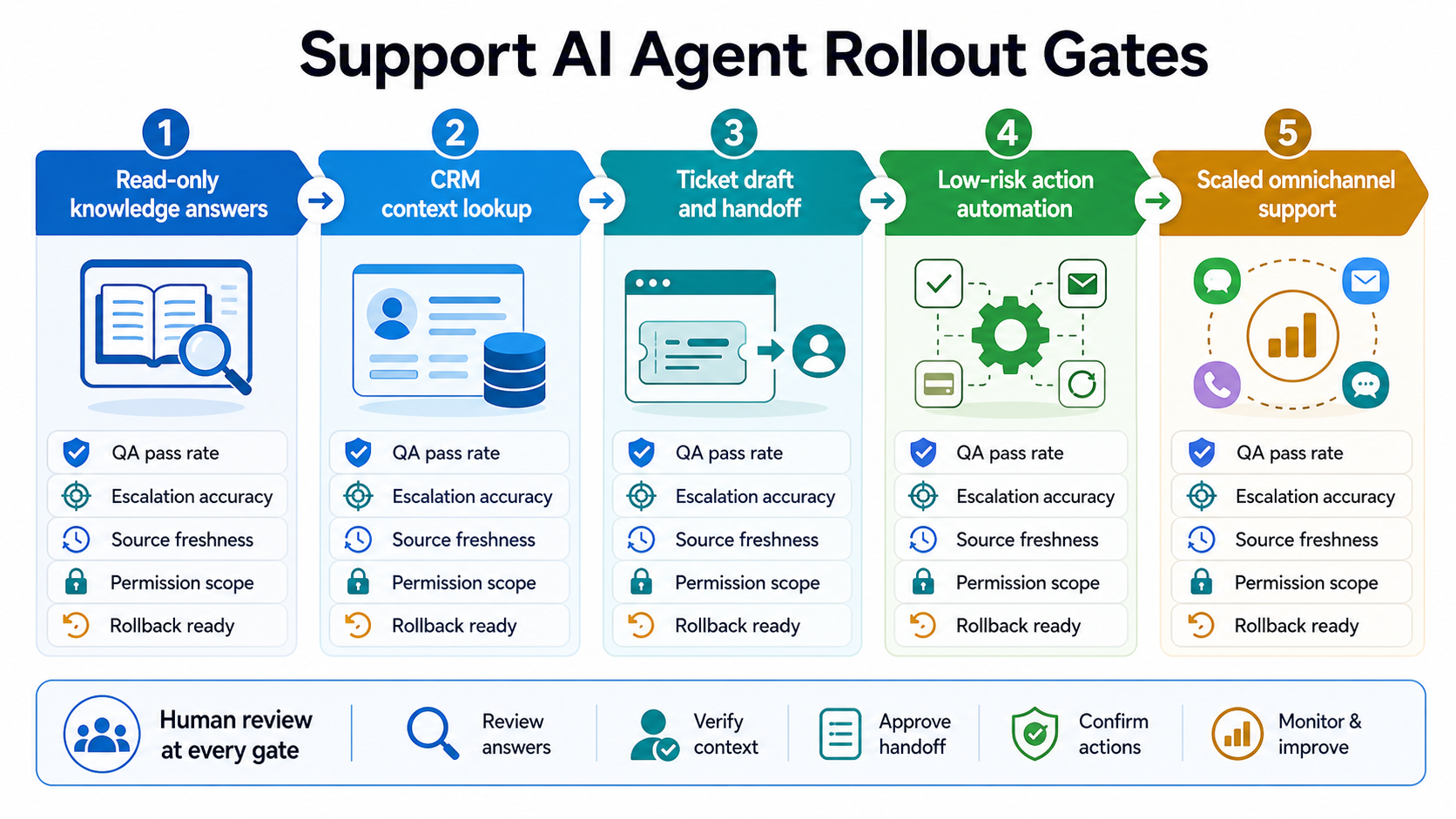
Do not give the agent more autonomy just because a demo works. Move through gates that prove quality, scope, and recoverability. A useful sequence is read-only knowledge answers, CRM context lookup, ticket draft and handoff, low-risk action automation, and finally scaled omnichannel support.
Each gate should have entry criteria and rollback criteria. Examples include source freshness above an agreed threshold, QA pass rate by intent, escalation accuracy, permission scope review, failed retrieval analysis, and a support-owner signoff. If a gate fails, keep the agent in the previous mode instead of widening automation.
Permissions, Privacy, And Governance Controls
A customer service AI agent should not inherit broad system permissions. Design separate scopes for anonymous visitors, verified customers, support agents, managers, and administrators. The agent should only access the data needed for the current task and should avoid exposing private CRM or helpdesk information in the customer-facing response.
Governance controls include role-based access, secrets management, PII masking, data retention rules, allowlisted actions, human approval for sensitive workflows, source logging, prompt/version tracking, abuse monitoring, and rollback procedures. These controls are especially important when the agent can create tickets, update CRM fields, trigger refunds, change subscriptions, or summarize customer history.
Make the agent instructions testable. Policy checks such as account-change eligibility, refund limits, identity verification, and no-answer conditions should be written as explicit rules with pass/fail examples. That makes evaluation less subjective and helps support leads prove that the agent refused unsupported requests instead of improvising.
For broader implementation support across model selection, integrations, workflow orchestration, and monitoring, connect this plan to AI development services rather than treating the agent as a standalone chat widget.
Implementation Roadmap For A Production Support Agent
Use a phased rollout so integration risk is visible early. A sensible first phase is read-only retrieval from approved knowledge and CRM context for one or two support intents. The second phase can create tickets and draft notes. The third phase can automate low-risk actions, such as status lookup or account instructions. Higher-risk actions should remain approval-based until QA evidence proves the workflow is reliable. For budget planning, compare each phase with the AI agent development cost drivers: integration depth, autonomy, evaluation, security, monitoring, and change management.
- Define the support scope. Pick narrow intents with measurable volume, clear answer sources, and low policy risk.
- Map systems and fields. Document CRM objects, helpdesk fields, knowledge sources, analytics events, and API owners.
- Design permission tiers. Separate read-only, draft, approval-required, and automated actions.
- Build the knowledge pipeline. Ingest approved sources, tag ownership, test retrieval, and define freshness checks.
- Connect the helpdesk. Create ticket schemas, escalation rules, transcript handling, and routing logic.
- Instrument quality. Track containment, escalation, reopen rate, source quality, and QA review results.
- Launch behind guardrails. Start with limited traffic, review conversations daily, then widen the scope based on evidence.
- Plan the next integration surface. Decide whether new AI channels, MCP-style connectors, or additional backend tools should reuse the same permission, logging, and handoff model.
AI Customer Service Agent Integration Readiness Checklist
- Top support intents are ranked by volume, complexity, policy risk, and business value.
- CRM fields are mapped with clear read/write permissions and customer verification rules.
- Helpdesk ticket fields, routing rules, priority logic, and transcript storage are defined.
- Knowledge sources have owners, freshness dates, audience rules, and retirement processes.
- Business-system actions are separated into read-only, draft, approval-required, and automated tiers.
- Escalation rules cover low confidence, customer frustration, VIP accounts, compliance risk, refunds, and unresolved loops.
- Analytics events capture intent, source, tool call, action, handoff reason, CSAT, reopen rate, and QA outcome.
- Security controls cover PII handling, access scopes, secrets, audit logs, retention, and rollback.
- QA reviewers have a launch checklist, test conversations, regression prompts, and acceptance thresholds.
- The first release is narrow enough to monitor and improve before adding more channels or actions.
How NextPage Can Help
NextPage can help teams design and build customer service AI agents that connect to real support operations: CRM context, helpdesk workflows, knowledge retrieval, analytics, escalation rules, and governance controls. The goal is not a chatbot demo; it is a support system that reduces repetitive work while protecting customer experience.
If you are planning a support AI agent, start with an integration readiness review. NextPage can map your current CRM, helpdesk, knowledge base, and reporting setup, then turn the safest first use cases into a phased implementation roadmap for customer service AI agent development.