
Quick Answer: How To Implement AI In ERP
AI in ERP implementation works when it starts with one governed workflow, trusted ERP data, and a measurable operating outcome. The practical sequence is: choose a repeatable decision, clean the data behind that decision, stabilize the integrations, add AI where prediction or summarization improves judgment, keep human approval on risky actions, and scale only after the pilot proves quality, adoption, and control.
For most companies, the strongest first ERP AI use cases are demand forecasting, inventory recommendations, invoice and purchase-order extraction, exception triage, anomaly detection, reporting copilots, and workflow automation around approvals. These use cases create value because they sit close to daily operations. They also fail quickly when master data is inconsistent, integrations are brittle, permissions are unclear, or nobody owns output quality after launch.
Do not treat AI in ERP as a feature toggle. Treat it as an operating layer around the ERP system of record: data readiness, integration contracts, permission boundaries, review queues, audit logs, evaluation metrics, rollback steps, and a rollout plan that business users can trust. If the ERP data, reports, and handoffs are already dependable, AI can accelerate decisions. If they are not, AI usually amplifies the same confusion faster.
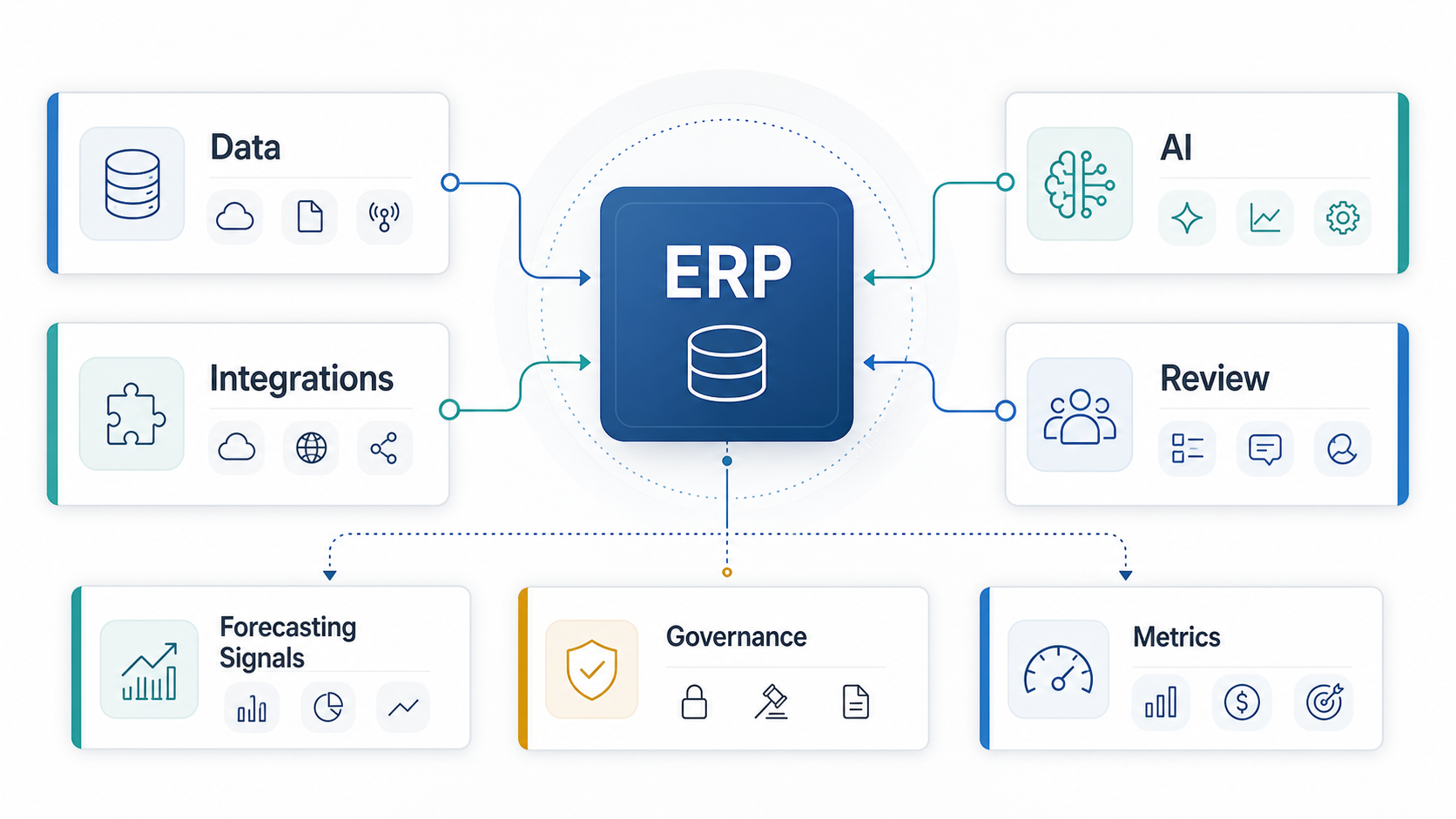
What AI Actually Changes Inside ERP
Traditional ERP centralizes transactions. AI adds prediction, classification, extraction, summarization, recommendation, and assisted action around those transactions. That difference matters. A purchase order, stock transfer, invoice, production order, or supplier record is still the system of record. AI should help a user decide what to review, what is unusual, what could happen next, or what action to prepare.
That makes ERP AI most useful in high-volume workflows with recurring decisions and enough historical data to evaluate quality. Finance teams can match invoices to purchase orders faster. Planners can review demand swings earlier. Procurement teams can monitor supplier risk. Warehouse teams can prioritize exceptions. Managers can ask grounded questions over approved ERP reports. The common pattern is not full autonomy; it is better triage, clearer recommendations, and faster review.
AI should not silently rewrite business rules, approve risky payments, change supplier terms, update master data, or override planning constraints without accountability. The safest pattern is assisted decision-making first, supervised automation second, and autonomous execution only after the workflow has clear thresholds, audit trails, rollback paths, and business-owner signoff.
The AI-Ready ERP Operating Model
Use a five-layer model before selecting tools or vendors:
- Data foundation: Define owners, quality rules, naming conventions, retention rules, and golden sources for customers, suppliers, SKUs, inventory, finance, employees, and transactions.
- Integration layer: Stabilize APIs, events, queues, controlled exports, webhooks, and middleware between ERP, CRM, WMS, TMS, eCommerce, HRMS, finance, BI, and custom workflow systems.
- AI automation layer: Add extraction, classification, recommendations, forecasting, anomaly detection, summarization, or natural-language query only where the workflow has measurable value.
- Workflow layer: Put AI output into role-based queues, approval screens, exception dashboards, and notifications so people can act without leaving the operational context.
- Governance layer: Track model input, output, user action, confidence, override reason, access level, audit logs, and KPI impact.
This is where custom ERP development services and ERP integration and modernization services become more valuable than another disconnected AI experiment. Many companies do not need a new ERP. They need a cleaner operating layer around the ERP they already depend on.
AI In ERP Use-Case Matrix
| Use Case | Good First Scope | Required Data | Review Model | Success Metric |
|---|---|---|---|---|
| Invoice and PO automation | Extract fields, match documents, flag mismatches | POs, invoices, vendor master, tax rules, approvals | Human review for exceptions and first releases | Lower manual matching time and fewer payment errors |
| Demand forecasting | Forecast demand by SKU, region, channel, or season | Sales history, stockouts, promotions, lead times, returns | Planner approves forecast changes | Forecast accuracy, stockout reduction, inventory turns |
| Anomaly detection | Flag unusual transactions, costs, claims, or stock moves | Transaction history, thresholds, user roles, audit events | Reviewer triages before enforcement | False-positive rate and avoided leakage |
| Inventory recommendations | Suggest reorder levels, transfers, or safety stock | Demand, lead time, supplier reliability, warehouse stock | Buyer or planner approves before action | Reduced overstocks, shortages, and emergency purchases |
| ERP copilot or report assistant | Answer role-specific questions using approved ERP data | Semantic data model, permissions, report definitions | User validates answer before business action | Faster reporting and fewer ad hoc analyst requests |
A useful prioritization rule is simple: start where the decision repeats often, the cost of delay is visible, and the output can be reviewed quickly. Avoid starting with high-risk autonomous decisions that require perfect data, complex approvals, and enterprise-wide policy alignment on day one.
ERP AI Readiness Checklist
Before funding an AI ERP implementation, run a readiness check against one workflow. The AI Agent Readiness Assessment is a practical starting point, and the same readiness logic applies to ERP copilots, predictive workflows, document automation, and supervised agents.
- Workflow clarity: Can the team describe the current process, exceptions, approvals, handoffs, and owner for each decision?
- Data trust: Are required fields complete, current, deduplicated, permissioned, and traceable to a source system?
- Integration control: Can the ERP safely exchange data with surrounding systems through APIs, events, queues, or controlled exports?
- Decision boundaries: Which actions can AI suggest, which can it draft, and which must remain human-approved?
- Evaluation set: Does the team have historical examples to test accuracy, false positives, business impact, and edge cases?
- Auditability: Can the system record input, output, reviewer, override reason, and final action?
- Change ownership: Is a business owner accountable for tuning rules, training users, and accepting operational risk?
If several answers are weak, the first project should be data cleanup, workflow redesign, or integration modernization. The Enterprise AI Readiness Checklist covers the broader data, workflow, security, and governance questions that determine whether an ERP AI pilot can move beyond a demo.
ERP AI Governance Gate
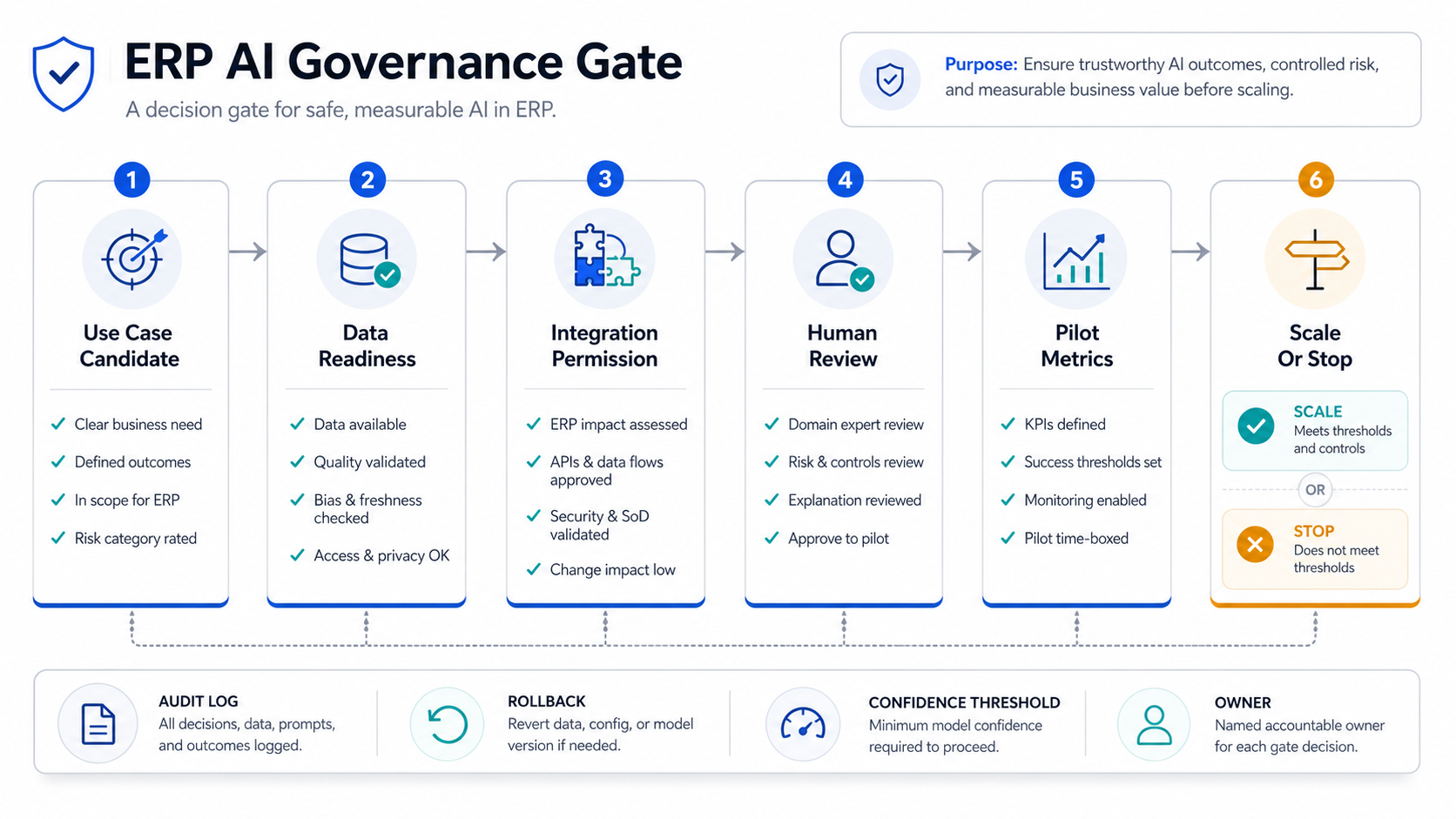
Governance is not a final compliance layer. It is part of the architecture. Every ERP AI workflow should name its business owner, risk category, permission envelope, review policy, evaluation plan, audit evidence, and rollback process. The higher the financial, customer, supplier, compliance, or production impact, the more explicit the control model needs to be.
Use a scale-or-stop gate after the pilot. Scale only when the workflow meets its quality threshold, users trust the output, exceptions are understood, and audit evidence is complete. Stop or narrow the workflow when false positives are too high, data freshness is weak, reviewers keep overriding recommendations, or the system cannot explain enough evidence for the decision. NextPage's guide to enterprise AI agent governance is useful when the ERP workflow may call tools, update records, or coordinate several systems.
Data Governance Comes Before Model Selection
ERP AI depends on the meaning of enterprise data. A model cannot reliably forecast demand if stockouts are not captured, promotions are missing, discontinued SKUs remain active, or product hierarchies keep changing. A copilot cannot answer finance questions safely if permissions, report definitions, and chart-of-account mappings are inconsistent.
Strong data governance for ERP AI should cover master data, transaction data, access control, business definitions, data lineage, retention, and exception ownership. For generative AI or RAG-style ERP assistants, add approved knowledge sources, retrieval boundaries, prompt logging, answer evaluation, citation requirements, and red-team examples.
In regulated or operationally sensitive environments, design logs before launch. Teams should be able to reconstruct which source record, model output, human reviewer, override reason, and final ERP action led to a decision. If the workflow cannot be audited, it should not be allowed to make material changes.
Reference Architecture For AI-Enabled ERP
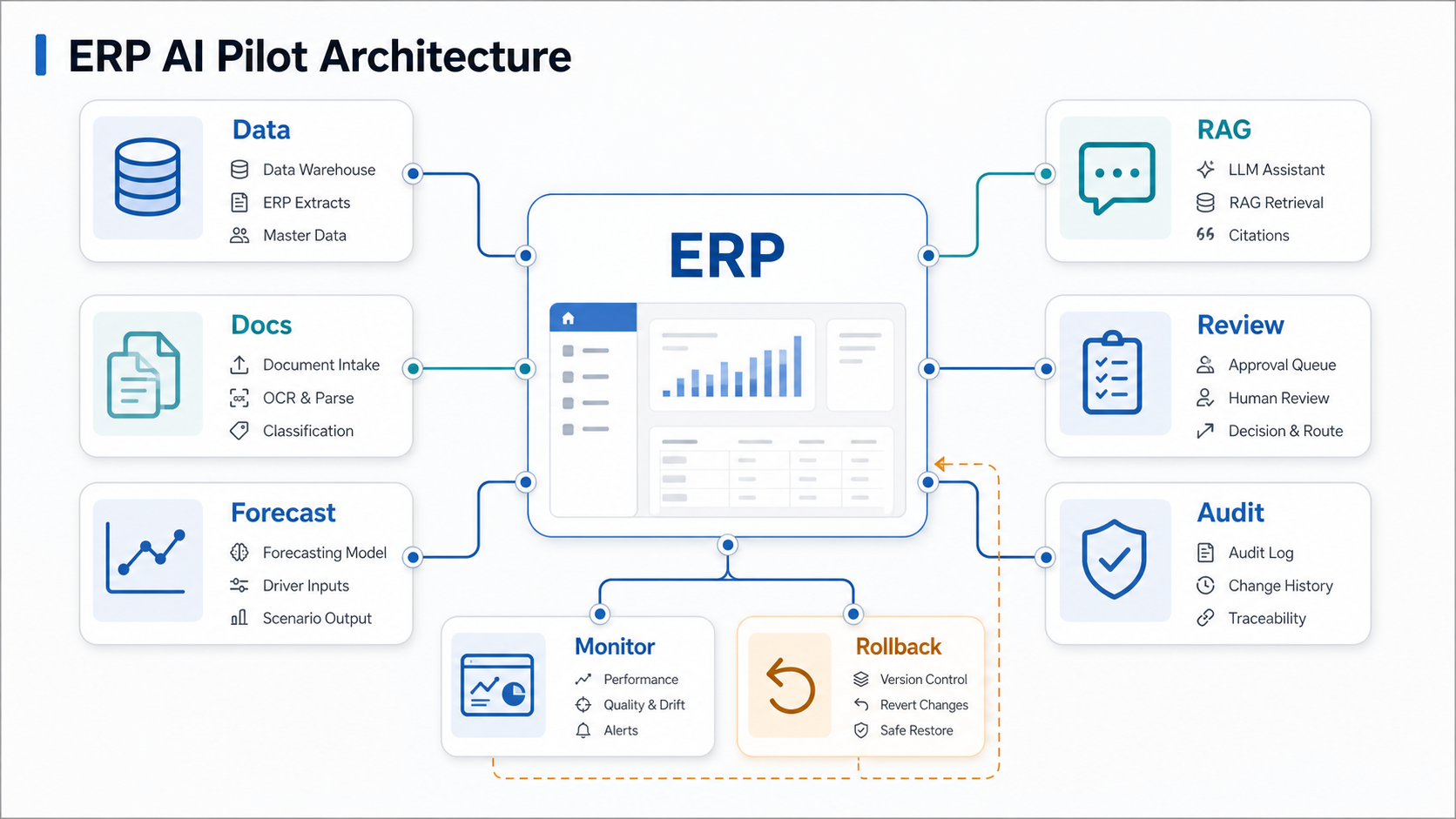
A pragmatic ERP AI architecture includes the ERP system of record, a secure integration layer, a workflow application or portal, a governed analytics layer, and one or more AI services. The ERP should remain authoritative for transactions. AI services should receive only the data they need, return structured outputs where possible, and write actions through controlled application logic rather than direct database access.
For predictive use cases, historical ERP data may flow into a feature store, warehouse, or analytics model that produces forecasts and scores. For document and language use cases, the system may use OCR, extraction models, embeddings, retrieval, and LLMs. For workflow automation, rules engines and queues are often as important as the model because they determine what happens when confidence is low or an exception is detected.
When a legacy ERP cannot expose clean APIs, modernization may start with adapters, read replicas, scheduled exports, or a custom workflow layer. The goal is not to bypass the ERP. The goal is to protect it while making daily work faster. NextPage often approaches this through business process automation services and robotic process automation services around ERP, CRM, finance, HR, logistics, and legacy systems.
Demand Forecasting And Inventory Optimization
Forecasting is one of the most attractive ERP AI use cases because the business value is easy to understand: fewer stockouts, fewer overstocks, better purchasing, and less reactive planning. It is also one of the easiest use cases to underestimate.
Good forecasting needs more than sales history. It may need lost sales, stockout periods, promotions, seasonality, lead times, supplier reliability, channel changes, returns, regional differences, and manual planner overrides. Without that context, the model can learn misleading patterns and still look mathematically clean.
Start with a narrow planning unit: one product family, warehouse group, region, or channel. Compare model forecasts against the current planning baseline. Let planners approve changes before the ERP creates purchase orders or production recommendations. If supply chain is central to the business, review NextPage's guide to AI in supply chain management and then decide whether forecasting, inventory recommendations, procurement risk, or warehouse exceptions should be the first pilot.
Copilots, Agents, RPA, Or Rules?
AI in ERP does not always require an agent. Use rules when the decision tree is stable. Use RPA when the main problem is repetitive screen or document work. Use integrations when the issue is moving data safely between systems. Use RAG or an ERP copilot when the workflow needs grounded answers from reports, policies, contracts, or knowledge bases. Use an agent only when the system must plan steps, call approved tools, and react to changing context.
| Approach | Best Fit | Risk To Manage |
|---|---|---|
| Rules | Stable approvals, alerts, routing, and threshold checks | Rule sprawl and brittle exceptions |
| RPA | Repeatable document or system tasks with limited judgment | Fragile UI automation and credential control |
| Integrations | Moving ERP data across CRM, WMS, finance, HR, or support tools | API limits, retries, permissions, and audit logs |
| RAG or copilot | Grounded retrieval, summarization, and report explanation | Stale sources, hallucination, and permission leakage |
| Supervised agent | Multi-step work with approved tool use and exception handling | Tool permissions, human approval, monitoring, and rollback |
The AI workflow automation guide is a useful companion when the team is deciding the right level of autonomy for a finance, procurement, warehouse, or operations workflow.
Phased Rollout Roadmap
- Discovery: Select one workflow, define the business outcome, map current data and decisions, and estimate value with the AI Automation ROI Calculator.
- Readiness sprint: Fix data fields, permissions, integration gaps, report definitions, and exception categories required for the first use case.
- Prototype: Build a narrow model, copilot, extractor, or recommender using historical examples and human review.
- Pilot: Run the AI output beside the current process, measure accuracy and time saved, and collect override reasons.
- Controlled launch: Put the workflow into production with role-based access, monitoring, audit logs, and rollback steps.
- Scale: Expand to adjacent modules only after the first workflow has stable adoption, measurable ROI, and clear ownership.
This phased approach also aligns with broader ERP implementation discipline. The Manufacturing ERP Implementation Guide makes the same point for module rollout: do not implement everything at once just because the platform can support it.
Metrics That Prove ERP AI Is Working
Use operational metrics, not novelty metrics. Track time saved per transaction, exception backlog, cycle time, forecast accuracy, stockout rate, overstock value, invoice match rate, false-positive rate, approval turnaround, report request volume, user adoption, override rate, and avoided manual effort. For financial use cases, track leakage, early-payment capture, reconciliation time, or working-capital impact.
Also track risk metrics: unsupported answers, access-policy violations, hallucinated report explanations, model drift, stale data, unreviewed high-risk recommendations, and rollback events. AI in ERP should improve control as well as speed. If a workflow becomes faster but less auditable, it is not ready for scale.
Common Failure Modes
- Starting with a platform demo instead of a workflow: The team buys an AI feature without knowing which decision will improve.
- Ignoring master-data quality: AI output looks polished but inherits duplicate suppliers, inconsistent SKUs, stale prices, or missing lead times.
- Skipping integration design: The model works in a notebook but cannot safely read or write through ERP-approved pathways.
- Automating approvals too early: The system moves from recommendation to action before thresholds and audit trails are mature.
- Measuring only accuracy: A model can be accurate and still fail if users do not trust it or if the workflow does not change.
- Forgetting ownership: Nobody is accountable for exceptions, drift, prompt changes, data freshness, retraining, or user adoption after the pilot.
How NextPage Helps
NextPage helps teams turn ERP AI ideas into controlled, production-ready workflows. We assess workflow value, data readiness, integration depth, risk level, and governance before recommending a build. Then we design the custom workflow layer, AI service, integration path, dashboards, review queues, and rollout plan needed to make the use case operational.
If you are evaluating AI in ERP implementation, start with a readiness review. Use the AI Agent Readiness Assessment, review the strongest workflow candidate, and then decide whether you need AI development services, ERP modernization, or a smaller automation sprint first.