
Quick Answer: AI Should Prioritize Vulnerability Work, Not Own It Alone
AI-powered vulnerability management works best when it turns noisy findings into a ranked, explainable, human-reviewed remediation queue. It should combine exploit likelihood, asset exposure, business impact, compensating controls, ownership, and release risk. It should not silently patch production systems, suppress findings without evidence, or let a model invent security context that your scanners, CMDB, cloud inventory, SBOM, tickets, and engineers cannot verify.
The practical goal is not full autonomy. The goal is faster decision quality: which vulnerabilities need emergency action, which can wait for a normal release train, which need mitigation instead of a patch, and which are false positives or duplicate findings. For most SaaS and product teams, that means starting with a supervised workflow that creates better tickets, clearer SLAs, safer patch recommendations, and an audit trail security and engineering can both trust.
If your team is evaluating this kind of workflow, start with a scoped assessment of data quality, integrations, approval boundaries, and remediation capacity. NextPage builds practical AI development services for workflows where automation must be governed, observable, and tied to real business systems.
Why Vulnerability Backlogs Become Workflow Problems
Most vulnerability backlogs are not caused by a lack of scanners. They grow because every scanner, package tool, cloud posture product, container registry, SAST result, DAST result, penetration test, SBOM, and vendor advisory emits findings in a different shape. Security teams then have to deduplicate, map findings to assets, identify owners, validate exploitability, understand business context, and negotiate release windows with engineering.
AI can help because much of that work is pattern matching across fragmented context. It can cluster duplicates, summarize affected assets, enrich CVEs with known exploitation signals, compare findings against ownership data, suggest remediation paths, and draft tickets. But the workflow only improves if the system has accurate inputs and clear escalation rules. A model wrapped around messy asset inventory simply produces confident confusion faster.
| Backlog Failure | Why It Happens | AI Workflow Response |
|---|---|---|
| Everything is critical | Teams rely on severity alone | Add exploit likelihood, exposure, asset criticality, and business impact |
| Duplicate tickets | Tools report the same root issue differently | Cluster by CVE, package, asset, image, service, and owner |
| No owner | Asset inventory is disconnected from engineering teams | Map services to repos, teams, on-call groups, and product areas |
| Patches stall | Release risk is unclear | Attach test scope, rollback plan, dependency impact, and approval needs |
| False positives consume time | Findings are not validated against runtime context | Require evidence, scanner confidence, reachable path, and compensating controls |
This is why the first AI use case should usually be triage and workflow quality, not automatic remediation. Once the queue is clean, targeted automation becomes much safer.
The Signals An AI Vulnerability Workflow Should Rank
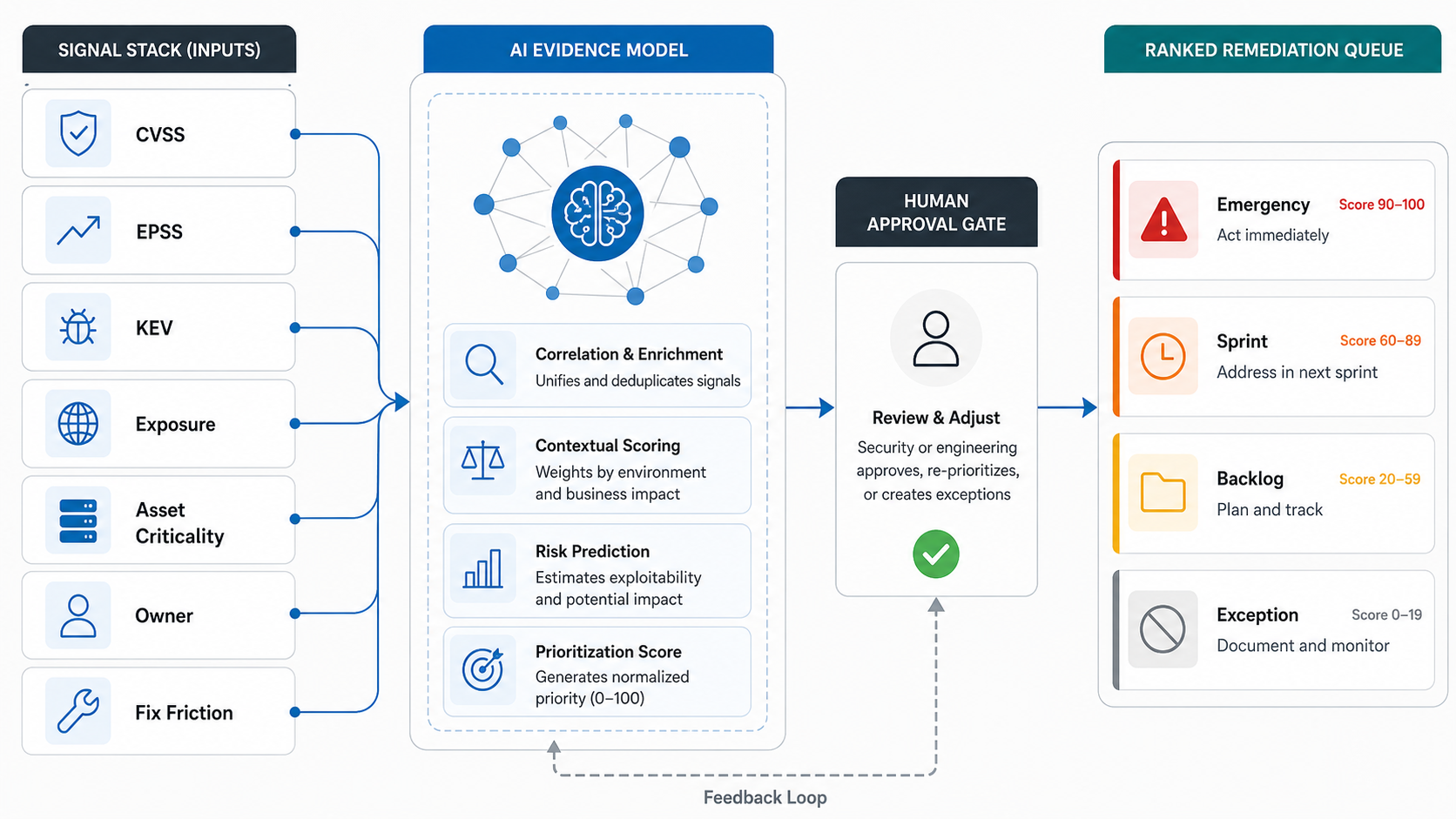
A useful prioritization model combines several evidence layers. CVSS helps describe vulnerability severity, and CVSS v4.0 makes it clearer that teams should consider base, threat, environmental, and supplemental context instead of treating the base score as the whole decision. FIRST describes EPSS as a data-driven machine-learning model that estimates the probability a published CVE will be exploited in the wild in the next 30 days. CISA Known Exploited Vulnerabilities signals known exploitation, while SSVC-style decision logic helps translate signals into response actions. Your own environment adds the missing context: exposure, asset value, reachability, compensating controls, owner capacity, release risk, and remediation cost.
The mistake is treating any single score as the queue. A critical CVSS issue buried in an internal lab system may not beat a medium-severity vulnerability on a public authentication service with active exploitation and weak monitoring. Conversely, an exploit-likely issue on a system behind strong segmentation may still be urgent if it protects regulated data or shared identity infrastructure.
| Signal | Question It Answers | How AI Can Help |
|---|---|---|
| CVSS or vendor severity | How severe is the vulnerability in general? | Normalize severity language and flag missing context |
| EPSS | How likely is exploitation soon? | Rank high-probability CVEs and explain percentile movement |
| CISA KEV or threat intel | Is this exploited in the wild? | Escalate to emergency workflow and require incident review |
| Exposure | Can attackers reach the asset? | Connect cloud, network, endpoint, and app inventory |
| Business criticality | What breaks if this asset is compromised? | Use service catalog, data classification, revenue, and customer impact |
| Remediation friction | How hard is the fix? | Suggest owner, patch path, tests, rollback, and release window |
Teams modernizing older systems should add maintenance risk to the model. If a service is fragile, unsupported, or blocked by legacy dependencies, the Legacy Software Modernization Scorecard can help decide whether repeated patch work is masking a modernization problem.
What AI Should And Should Not Decide
AI can recommend priority. It should not become the final risk owner. The workflow needs explicit boundaries for what the model can read, what it can write, which actions need approval, and which actions are prohibited. These boundaries should be visible in the product, not hidden in a prompt file.
Good first decisions for AI include grouping findings, summarizing evidence, drafting remediation tickets, suggesting owners, identifying duplicate packages, comparing patch guidance, proposing test scope, and explaining why a finding moved up or down. Higher-risk decisions need human approval: suppressing findings, changing SLAs, modifying production configuration, opening firewall rules, merging patches, disabling controls, or closing exceptions.
This is the same operating principle used in secure AI agent development: tool permissions, approval gates, audit logs, and rollback paths should be designed before an agent can affect live systems.
2026 Reality Check: Keep Agentic Security Workflows Human-Reviewed
Recent agentic vulnerability-handling research is promising, but it also reinforces why production security workflows need bounded roles and review gates. A 2026 role-based agentic workflow study split work across planner, analyzer, fixer, and verifier roles, yet reported limited autonomous fix accuracy on real-world vulnerabilities. That is useful signal for buyers: AI can compress investigation, explanation, routing, and evidence collection, but remediation authority should still sit behind policy, tests, protected branches, and named human approval.
Use agentic patterns where they are strongest: triage planning, vulnerability clustering, impact summaries, owner suggestions, fix-option drafts, verification checklists, and evidence packets. As of August 10, 2026, the official prioritization references still point in the same direction: EPSS estimates near-term exploitation probability, CVSS v4.0 captures severity and vulnerability characteristics, CISA KEV confirms known exploitation, and SSVC-style decision trees help translate those signals into response actions. Be more conservative with actions that can change production systems, suppress findings, alter firewall or identity policy, merge code, or close exceptions. The workflow should prove every recommendation with retrieved context, scanner evidence, reachable-path analysis, test results, and an audit trail before any automated action expands.
A Practical Triage And Remediation Workflow
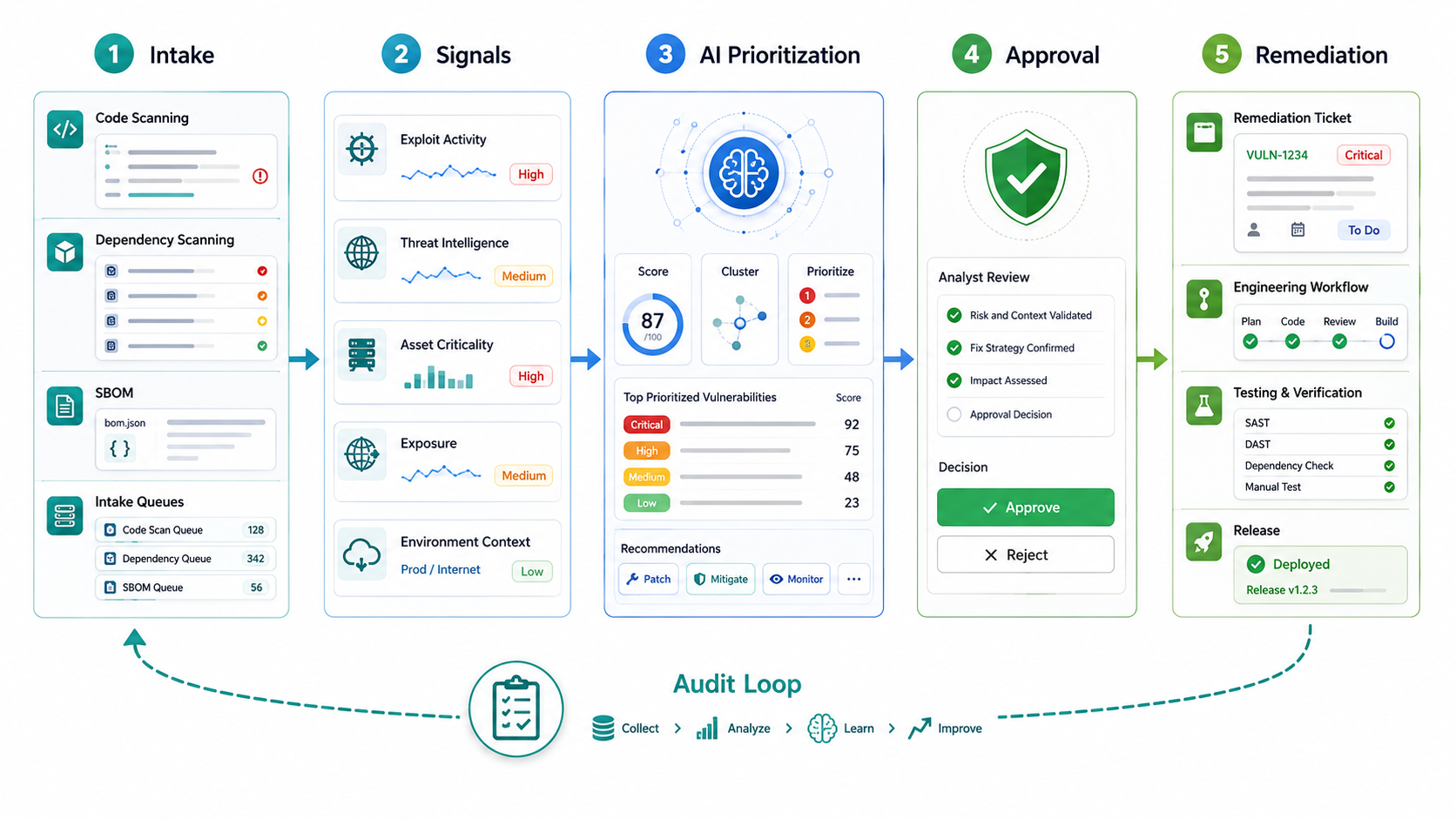
A production-ready workflow should make each step explicit. The system should preserve raw findings, enriched context, model reasoning, human decisions, ticket changes, test evidence, and final closure. That audit trail matters when a vulnerability is later exploited, when an exception expires, or when leadership asks why one issue was patched before another.
- Ingest findings. Pull scanner, SBOM, cloud, container, endpoint, SAST, DAST, penetration-test, and advisory data into a normalized queue.
- Deduplicate and cluster. Group by CVE, CWE, package, container image, repo, asset, service, environment, and owner.
- Enrich with threat and asset context. Add CVSS, EPSS, KEV, exposure, data sensitivity, service criticality, internet reachability, and control coverage.
- Rank into action tiers. Separate emergency, sprint, backlog, exception, and investigate queues.
- Draft remediation tickets. Include owner, evidence, affected assets, patch options, test scope, dependency impact, rollback plan, and due date.
- Route for human review. Require security approval for emergency actions and engineering approval for risky patches.
- Track remediation. Connect status to Jira, GitHub, CI/CD, change management, release notes, and scanner rescan evidence.
- Close with evidence. Require fixed version, passing tests, rescan status, exception note, or mitigation proof.
For many organizations this is a better first automation target than auto-patching. It improves every future patch decision while keeping production change control intact. If the workflow will trigger CI/CD gates, security scans, secrets checks, or release approvals, connect it to a documented DevSecOps pipeline checklist so vulnerability remediation is governed by the same controls that protect normal product releases.
Reference Architecture For AI-Assisted Vulnerability Management
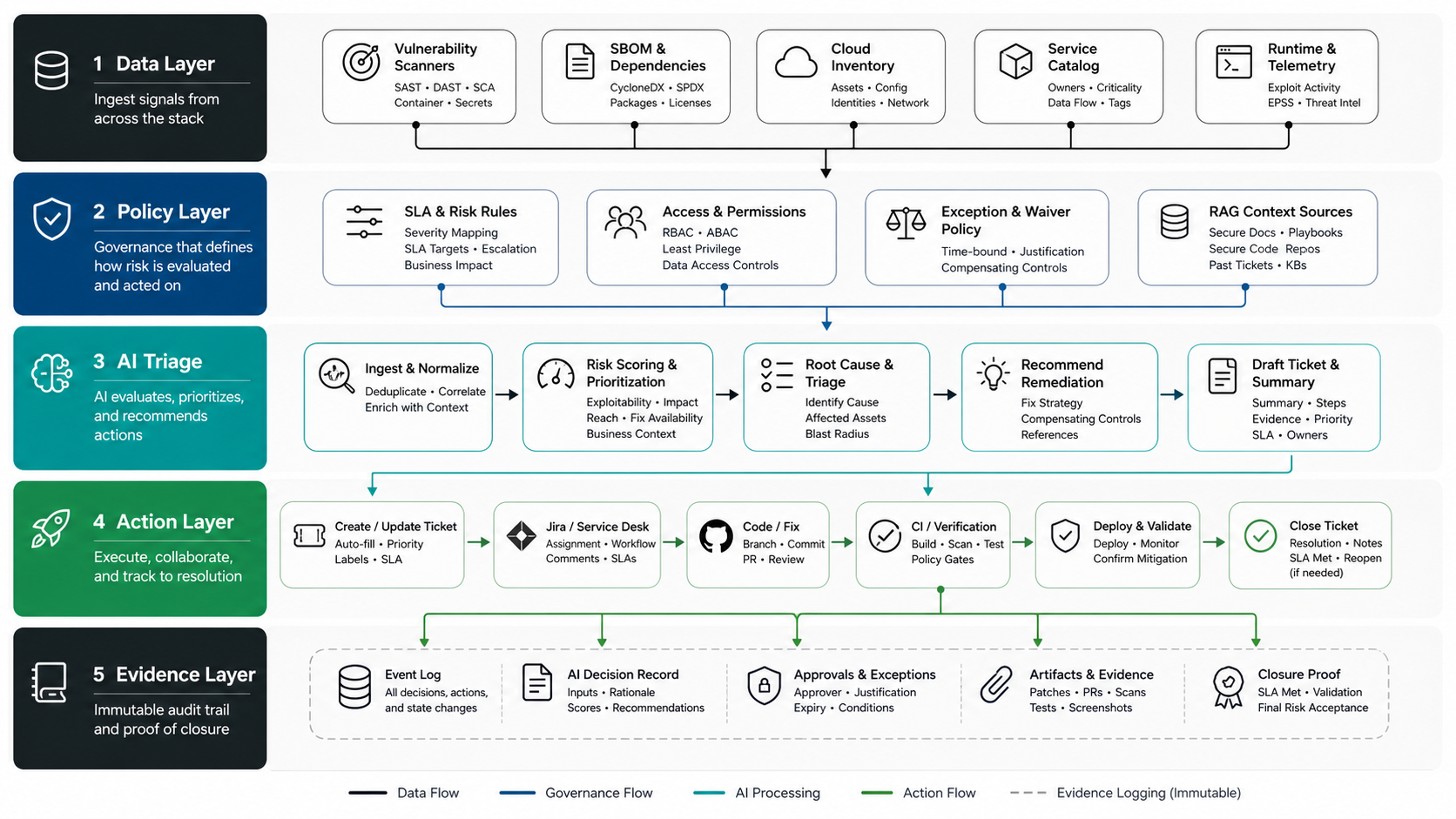
The architecture should be boring and controllable. Use connectors for scanners and asset systems, a normalized vulnerability store, a policy layer for priority and permissions, retrieval over approved context, an AI assistant for triage and ticket drafting, and integrations into engineering systems. Avoid a model that directly queries everything and writes everywhere.
For teams already building internal automation, the pattern looks similar to AI workflow automation: intake, enrichment, decision support, human review, action, monitoring, and feedback. Regulated teams can also use the same control logic described in NextPage's AI governance checklist for critical infrastructure software when the workflow affects high-impact systems. Security workflows simply require tighter permissions and stronger evidence requirements.
- Data layer: scanner results, SBOMs, package inventories, asset inventory, service catalog, repo ownership, runtime exposure, and ticket history.
- Policy layer: priority rules, SLA matrix, approval rules, exception policy, tool permissions, and prohibited actions.
- AI layer: summarization, clustering, owner suggestions, remediation notes, natural-language query, and ticket drafting.
- Action layer: Jira, GitHub, GitLab, CI/CD, Slack, email, change management, and scanner rescan workflows.
- Evidence layer: logs, prompts, retrieved context, model output, human decisions, ticket updates, test results, and closure proof.
Before building, use the AI Agent Readiness Assessment to test whether the workflow has clear goals, reliable data, integration access, and human-review controls.
Human Review, Permissions, And Audit Logs
Security automation fails when convenience outruns accountability. The AI system should show why it ranked a finding, what evidence it used, what it did not know, and who approved the next action. Every exception should have an owner, expiration date, compensating control, and review cadence.
Permissions should be narrow by default. The assistant may read scanner results and create tickets. It may not close high-risk vulnerabilities, suppress KEV findings, change firewall policy, or merge code without explicit approval. If the workflow later adds patch suggestions or pull requests, use repository-specific permissions and protected-branch checks.
The AI agent observability checklist is relevant here: traces, eval gates, guardrail events, rollback paths, and human-review logs are not optional once AI participates in security operations.
Rollout Plan And Success Metrics
Roll out in phases so the security team can measure whether the workflow improves real outcomes. Start read-only, then generate draft recommendations, then create tickets with approval, then automate low-risk handoffs. Keep auto-remediation for a later phase after the model, policies, and integrations have earned trust.
| Phase | Scope | Success Metric |
|---|---|---|
| Phase 1: visibility | Normalize and enrich findings | Duplicate rate, owner coverage, missing asset context |
| Phase 2: assisted triage | Rank queues and draft tickets | Time-to-triage, analyst edits, priority agreement rate |
| Phase 3: workflow routing | Create approved remediation tickets | SLA adherence, ticket completeness, reopen rate |
| Phase 4: guarded actions | Suggest patches or low-risk changes | Test pass rate, rollback rate, human approval rate |
| Phase 5: optimization | Use feedback to refine rules | Reduced critical backlog and fewer stale exceptions |
Track outcomes security and engineering both care about: mean time to triage, mean time to remediate, number of stale critical findings, percentage of internet-exposed high-risk assets fixed within SLA, exception age, false-positive rate, duplicate ticket rate, emergency change failure rate, and analyst hours saved. A narrow pilot should prove both risk reduction and operating leverage before the team expands AI permissions.
Turn Prioritization Into SLA And Evidence Rules
The next maturity step is converting vulnerability priority into rules that engineering can execute. Use CVSS v4.0 as a severity and context baseline, EPSS for near-term exploitation probability, CISA KEV for known exploitation, and SSVC-style decision logic for response actions. Then add local context: internet exposure, asset owner, data class, compensating controls, release window, test coverage, rollback path, and exception owner.
A governed workflow should produce a queue action, not just a score. For example, a KEV-listed vulnerability on an internet-facing identity service may require emergency change control, incident-review evidence, and same-day executive visibility. A high-CVSS finding on an isolated non-production asset may route to a sprint ticket with proof of segmentation and a time-bound exception. The important part is that the AI recommendation shows the evidence used, the confidence level, the responsible owner, and the approval gate before any ticket, suppression, or remediation action moves forward.
| Queue Action | Evidence Required | Approval Gate |
|---|---|---|
| Emergency fix | Known exploitation, reachable asset, critical business service, rollback note | Security lead plus service owner |
| Sprint remediation | High severity or exploit probability, clear owner, test scope, release window | Engineering owner |
| Mitigation first | Patch risk is high, compensating control is available, exposure can be reduced | Security and platform owner |
| Exception | Business justification, expiry date, monitoring evidence, residual-risk owner | Security risk owner |
This is also where ROI measurement belongs. If the workflow is meant to save analyst and engineering time, estimate those savings with the AI Automation ROI Calculator, then compare the projected savings with risk outcomes such as critical backlog age, SLA adherence, reopen rate, and emergency change failure rate.
AI Vulnerability Management Readiness Checklist
- Do we have a reliable asset inventory mapped to business services and engineering owners?
- Can we distinguish development, staging, production, internet-facing, and internal-only assets?
- Are scanner findings normalized by CVE, package, image, host, repo, service, and owner?
- Do we use exploit likelihood, known exploitation, exposure, and asset criticality, not just severity?
- Do we know which actions require security, engineering, product, or compliance approval?
- Can the workflow create tickets with evidence, tests, rollback notes, and due dates?
- Can every AI recommendation show source context and uncertainty?
- Are exceptions owned, time-bound, and reviewed?
- Do we have logs for prompts, retrieved context, outputs, approvals, and downstream actions?
- Do we measure whether AI reduces backlog risk rather than only ticket count?
- Do SLA decisions include CVSS, EPSS, KEV, SSVC-style response logic, asset exposure, rollback evidence, and a named approval owner?
How NextPage Helps Build Governed AI Security Workflows
NextPage helps teams design and build AI-assisted security workflows that connect real systems: scanners, SBOMs, cloud inventory, service catalogs, ticketing, code repositories, CI/CD, and reporting. We start with workflow discovery, data readiness, integration access, risk boundaries, and human approval requirements before deciding where AI belongs.
The result can be a triage assistant, remediation-ticket generator, owner-mapping workflow, exception review queue, internal dashboard, or controlled AI agent that helps security and engineering teams move faster without losing accountability. For broader intake, routing, approval, and reporting automation around the security workflow, connect the implementation plan to NextPage's AI automation services capability instead of treating vulnerability triage as an isolated model experiment.