
Fleet management software helps businesses see where vehicles are, how drivers are performing, when maintenance is due, and which operating decisions are increasing cost or risk. A useful fleet app is not just a GPS screen. It is a connected operating system for vehicles, drivers, dispatch, maintenance, compliance, fuel, reporting, and customer-facing visibility.
If you are planning a new fleet product, start by separating must-have launch features from advanced optimization. The first release should make daily operations more visible and easier to control. Later releases can add deeper analytics, predictive maintenance, telematics integrations, and AI-assisted route or utilization decisions.
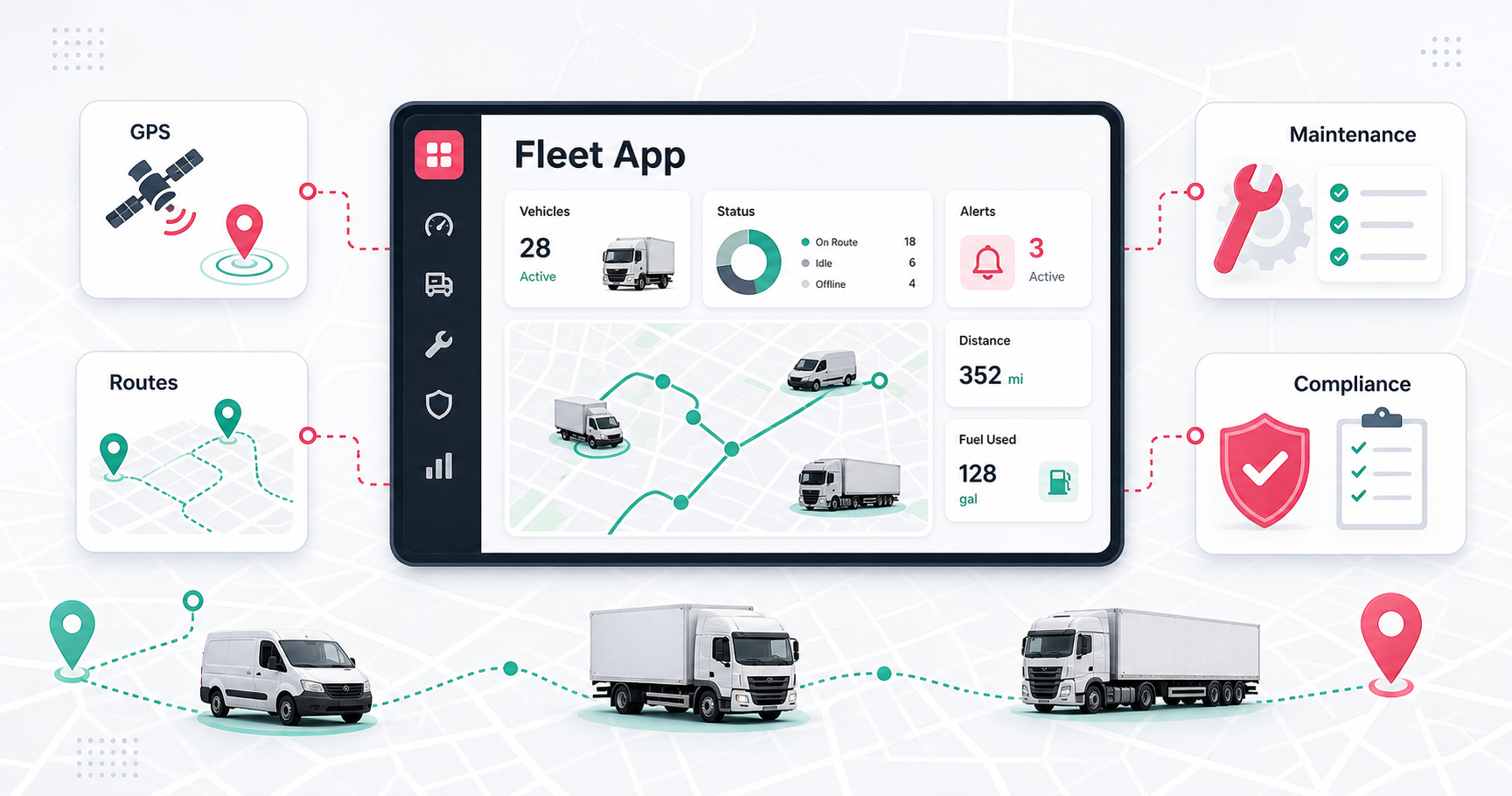
Quick Answer: Essential Fleet Management App Features
The essential features for a fleet management app are real-time GPS tracking, driver mobile workflows, route planning, dispatch visibility, maintenance scheduling, fuel tracking, vehicle and asset records, driver behavior monitoring, alerts, compliance reporting, analytics dashboards, role-based admin controls, and integrations with maps, telematics, ERP, TMS, WMS, fuel cards, and notification systems.
For an MVP, prioritize live vehicle visibility, driver tasks, trip status, maintenance reminders, basic reporting, and admin controls. For a larger operations platform, add geofencing, inspections, fuel analysis, compliance documents, workflow automation, offline driver support, and integrations. For enterprise fleets, add predictive maintenance, advanced route optimization, audit trails, multi-branch permissions, telematics data pipelines, and executive analytics.
Why Fleet Management Software Matters
Fleet operations are expensive because small inefficiencies repeat every day across vehicles, routes, drivers, fuel, service schedules, and customer commitments. Without a central system, teams rely on calls, spreadsheets, manual inspections, and delayed reports. That makes it harder to see idle vehicles, missed maintenance, unsafe driving, route waste, and compliance gaps before they become costly.
A good fleet app gives managers a live operating view. Drivers know what to do next. Maintenance teams see what needs attention. Dispatchers can react to delays. Leaders can compare utilization, fuel use, downtime, route performance, and service quality. This is where fleet software overlaps with custom software development: the value comes from matching the software to the actual operating model.
Fleet Feature Priority Matrix
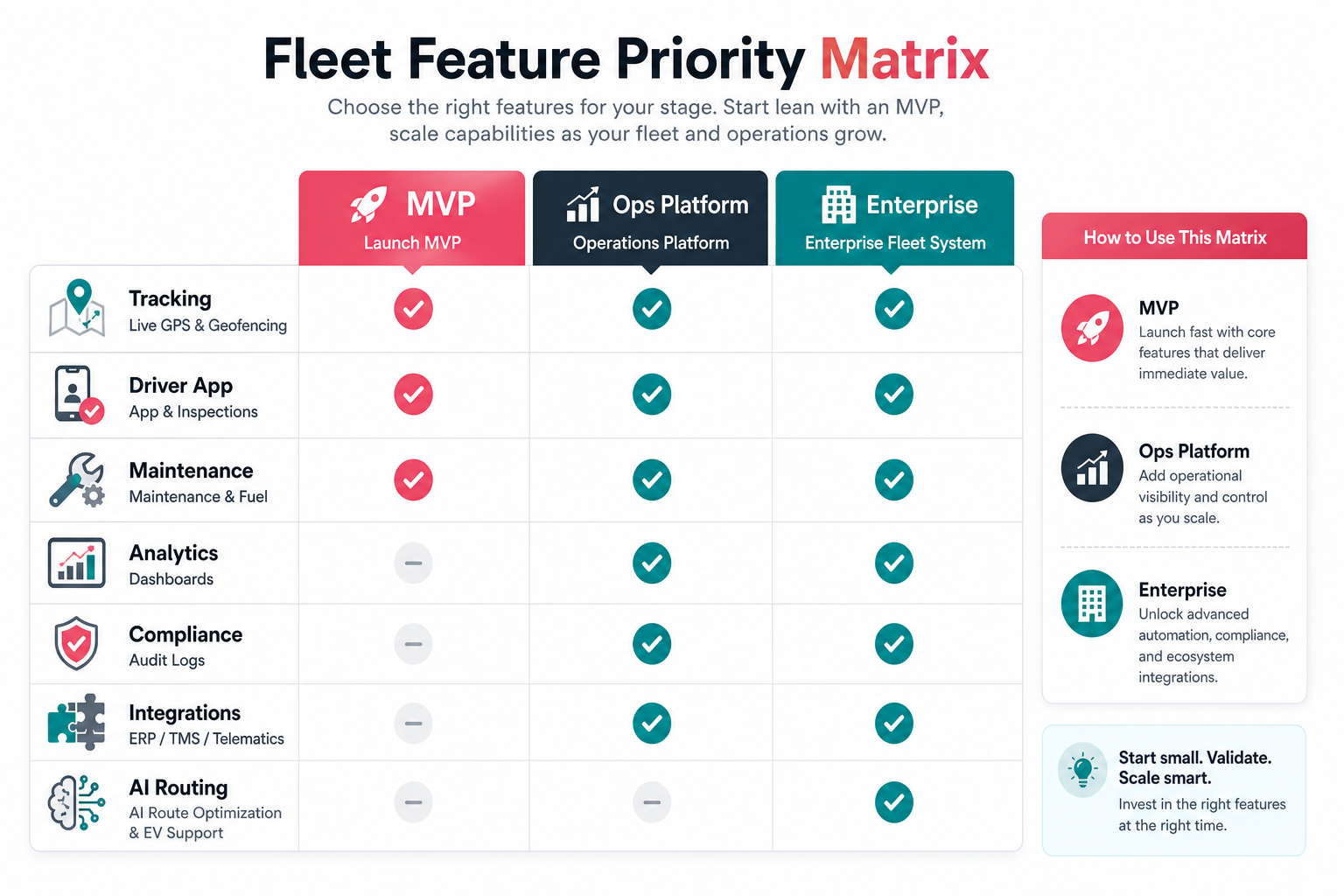
| Feature Area | What It Should Do | Best Stage |
|---|---|---|
| Real-time GPS tracking | Show live location, trip progress, ETA, idle time, route adherence, and geofence events. | MVP |
| Driver mobile app | Give drivers assignments, route details, inspections, proof capture, status updates, and messaging. | MVP |
| Maintenance scheduling | Track service history, mileage or hour-based reminders, repair tickets, parts, and downtime. | MVP to operations platform |
| Fuel management | Track fuel usage, card transactions, abnormal consumption, route impact, and cost per vehicle. | Operations platform |
| Compliance reporting | Manage inspection records, driver documents, audit logs, safety incidents, and regulated workflows. | Operations platform |
| Telematics integrations | Ingest GPS devices, OBD-II adapters, sensors, cameras, and third-party fleet data. | Operations to enterprise |
| AI route optimization | Recommend routes, detect inefficiencies, balance constraints, and improve planning from operating data. | Enterprise |
Real-Time GPS Tracking And Geofencing
Real-time GPS tracking is usually the foundation of a fleet management app. It should show current vehicle location, movement status, trip history, stop duration, ETA, route deviation, and exception events. Managers need this data to answer practical questions: which vehicle is closest, which route is delayed, which driver is idle, and which job is at risk.
Geofencing adds operational context. The app can trigger alerts when a vehicle enters a warehouse, leaves a service area, reaches a customer site, or spends too long at a location. For related location-heavy product planning, NextPage's logistics app development cost guide explains how maps, routing, driver workflows, and integrations affect scope.
Driver Mobile App And Inspection Workflows
The driver app should reduce calls and manual paperwork. Useful features include assigned jobs, navigation handoff, route notes, pre-trip and post-trip inspection forms, damage photos, proof of delivery, digital signatures, incident reporting, fuel receipts, maintenance requests, and status updates. Offline support may be necessary when drivers work in weak connectivity areas.
Driver experience is a product design problem, not only a form list. Screens should be fast, readable, and hard to misuse while someone is on the move. This is why fleet products benefit from strong mobile app development practices around workflow design, device testing, notifications, permissions, and field usability.
Maintenance, Fuel, And Asset Management
Maintenance features help teams prevent breakdowns instead of reacting after a vehicle is already unavailable. The app should track service schedules, mileage, engine hours, repair history, open issues, parts, vendors, inspection failures, warranty details, and downtime. Alerts should be based on actual operating signals whenever possible, not only calendar reminders.
Fuel management should connect cost to behavior. Track fuel card usage, fuel volume, vehicle efficiency, idle time, route impact, unusual purchases, and trends by driver or vehicle. When fuel, maintenance, and asset data sit next to trip history, managers can make better decisions about replacement, utilization, and operating cost.
Fleet Data Architecture
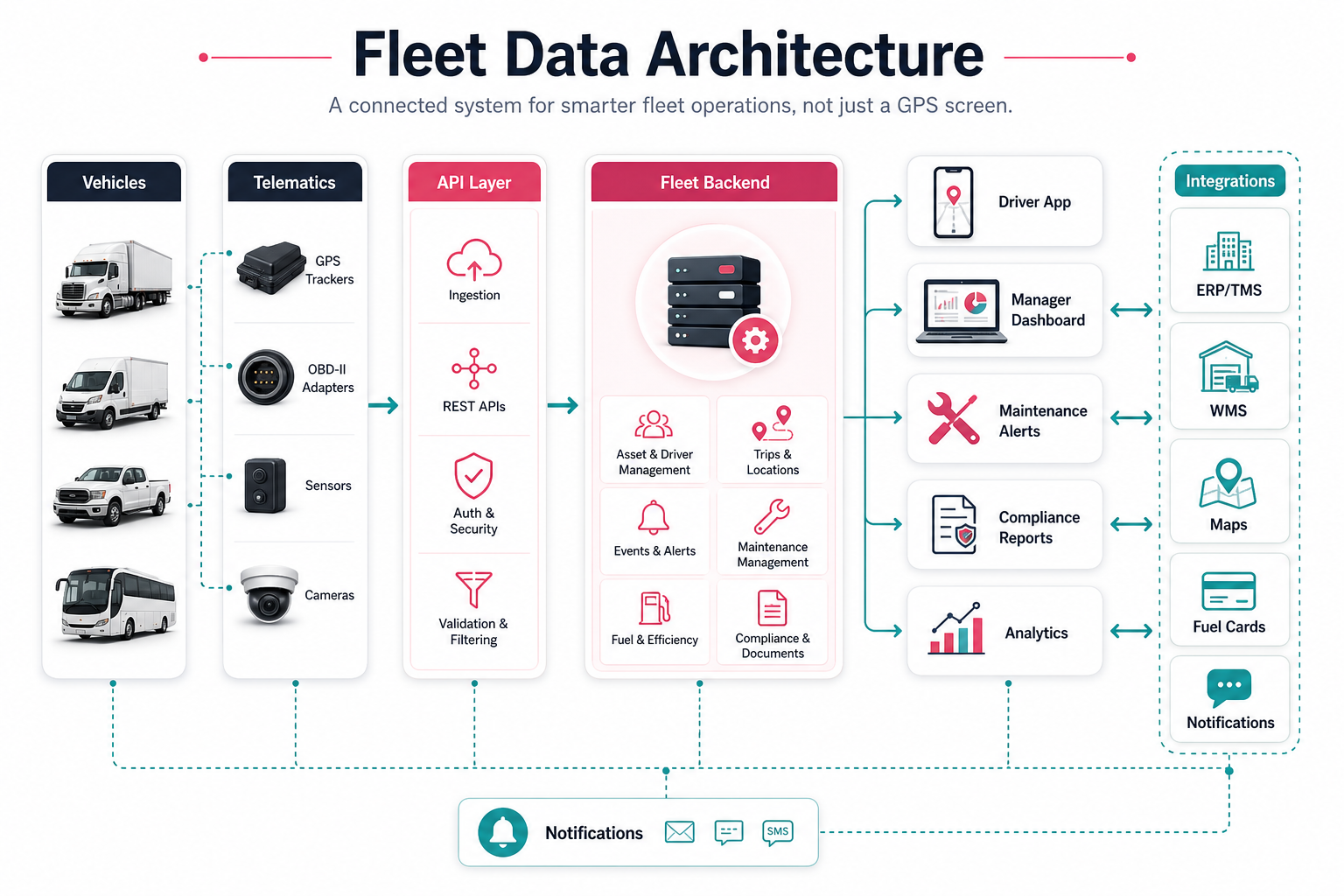
A fleet management app becomes valuable when data flows reliably from vehicles into workflows. Common inputs include GPS devices, OBD-II adapters, telematics providers, driver mobile events, inspection forms, fuel cards, service records, maps, ERP, TMS, WMS, and notification systems. The backend must normalize this data, secure it by role, and expose it through dashboards, alerts, reports, and APIs.
For complex fleets, architecture decisions matter as much as feature lists. You may need event ingestion, queue processing, audit logs, device identity, retry handling, location data retention rules, and monitoring. NextPage's RouteLedger fleet backend case study shows how fleet operations can be organized into focused APIs and background services.
Route Optimization, Dispatch, And Alerts
Route optimization should match the maturity of the fleet. In an MVP, route support may mean driver navigation handoff and dispatcher visibility. In a more advanced product, it may include multi-stop planning, delivery windows, vehicle capacity, driver shifts, traffic, priority jobs, geofences, and live rerouting.
Alerts should be actionable. Good alerts identify late arrivals, route deviations, long idle time, missed inspections, unsafe driving events, maintenance thresholds, compliance expiry, fuel anomalies, and high-risk vehicle conditions. Avoid alert noise by giving each alert an owner, severity, and next action.
Reporting, Analytics, And AI Readiness
Fleet analytics should help managers improve decisions, not only export charts. Track utilization, cost per mile, fuel consumption, idle time, route variance, driver safety, maintenance cost, downtime, asset availability, delivery performance, and exception trends. Dashboards should separate daily operational decisions from executive reporting.
Once the data foundation is stable, AI can help with anomaly detection, maintenance risk scoring, demand forecasting, route recommendations, and exception triage. Before investing in automation, use the AI Automation ROI Calculator to estimate whether the workflow has enough volume and value.
Compliance, Security, And Role-Based Controls
Fleet systems often hold location history, driver records, customer addresses, maintenance documents, incident reports, and operational data. Security and compliance features should include role-based access, audit logs, document expiry alerts, approval workflows, secure file storage, data retention controls, and clear permission boundaries between dispatchers, drivers, managers, vendors, and administrators.
For regulated or multi-branch operations, reporting should be designed around evidence. The app should make it easy to find who changed a record, when a vehicle was inspected, which issue was resolved, and what happened when an exception occurred.
Implementation Roadmap For A Fleet App
- Map the operating model: document vehicle types, roles, routes, maintenance workflows, compliance needs, integrations, and reporting expectations.
- Define MVP workflows: choose the first measurable loop such as vehicle visibility, driver tasks, dispatch control, maintenance reminders, or compliance tracking.
- Design the data model: define vehicles, drivers, trips, locations, alerts, inspections, work orders, fuel records, assets, documents, users, roles, and audit logs.
- Build and integrate: connect maps, notifications, telematics, file storage, admin screens, dashboards, and driver workflows.
- Harden operations: add monitoring, retries, offline handling, QA across devices, support tooling, and data quality checks.
- Scale intelligence: add predictive maintenance, route optimization, analytics, and automation after real fleet data confirms the priority.
If you need an early estimate, start with the Custom Software Cost Estimator. If the build-vs-buy decision is still open, the Build vs Buy Decision Tool can help compare packaged fleet tools against a custom platform.
Final Recommendation
The best fleet management app starts with operational visibility and grows into control, automation, and intelligence. Prioritize GPS tracking, driver workflows, maintenance, fuel, compliance, alerts, reporting, and integrations around the actual decisions your team makes every day. Then add advanced optimization only when the data foundation and workflow ownership are ready.