
Quick Answer: How Do You Recover A Failed Software Project?
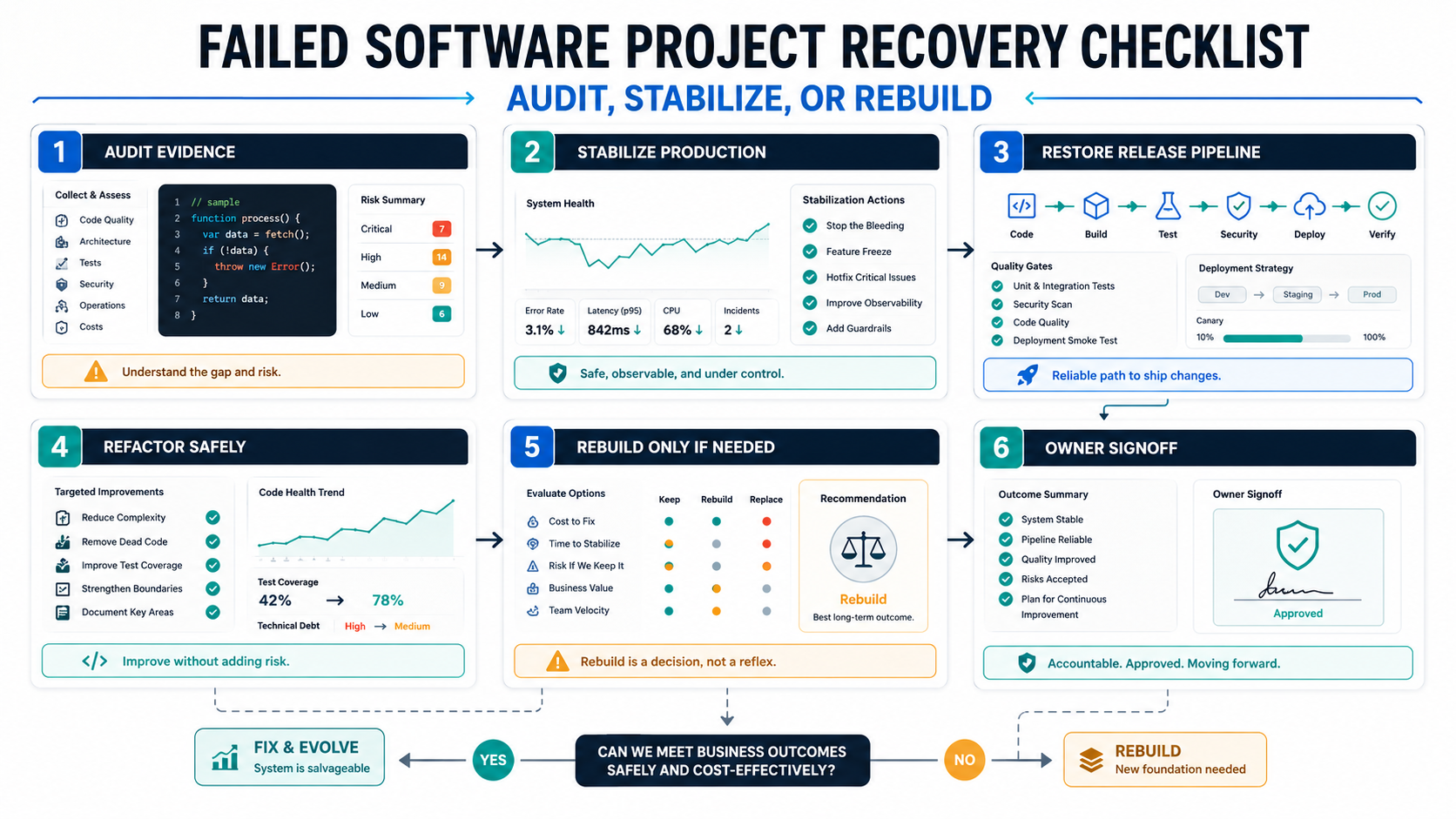
A failed software project should be recovered in this order: secure access, audit what exists, stabilize production and releases, protect business-critical workflows, then decide whether to maintain, refactor, migrate, or rebuild. Starting with a full rebuild before the audit is usually the riskiest move because the current system may contain hidden business rules, edge cases, data assumptions, integrations, and operational knowledge that no one has documented.
The first goal is not to make the code beautiful. The first goal is to make the project knowable and controllable again. That means getting source code, environments, credentials, database backups, deployment history, issue lists, analytics, logs, and stakeholder priorities into one recovery view. If the system is old or business-critical, score the risk with the Legacy Software Modernization Scorecard before committing budget to a rescue plan.
For founders, CTOs, product owners, and operations leaders, the safest recovery path is evidence first, action second. Use the checklist below to decide what can be stabilized quickly, what needs refactoring, what should move to a new platform, and what is broken enough to justify rebuilding. If the team needs an outside recovery view, start with software project rescue services that produce a risk map, stabilization backlog, and rebuild-vs-refactor recommendation instead of a rebuild-first pitch.
Warning Signs That A Software Project Needs Rescue
A project is not failed only because deadlines slipped. It needs recovery when the team can no longer explain what is true, what is safe to change, and what must happen before the next release. The warning signs usually show up in delivery, operations, code ownership, and stakeholder trust at the same time.
- Small changes take too long: simple fixes require days of investigation because code paths, environments, and dependencies are unclear.
- Releases are unreliable: deployments fail, production bugs repeat, rollbacks are manual, and QA cannot predict what will break.
- The previous vendor or developer disappeared: source code, credentials, documentation, or deployment access is incomplete.
- Business users have lost confidence: teams create spreadsheet workarounds, avoid new features, or stop reporting defects because nothing changes.
- Infrastructure is fragile: servers, cron jobs, queues, certificates, storage, or third-party integrations fail without clear ownership.
- Security and data risk are unknown: no one can confirm permissions, backups, vulnerabilities, audit logs, or data retention rules.
When these symptoms appear together, treat the project like an operational incident, not a normal feature backlog. Stabilization work should be protected from new feature pressure until the project is safe to ship again. If the failure is part of a larger modernization problem, connect the rescue scope to legacy software modernization so the team can separate emergency repairs from planned platform change.
The First 72 Hours: Secure Access And Stop The Bleeding
The first 72 hours of a rescue should create control. Do not start rewriting code yet. Get access, verify backups, freeze risky deployments, identify production defects, and document who can approve changes. If the project is live, this phase is about reducing immediate business risk while preserving evidence.
| Area | What To Collect | Why It Matters |
|---|---|---|
| Source code | Repositories, branches, commit history, dependency files, build notes | Confirms what code exists and whether ownership is recoverable |
| Production access | Hosting, DNS, domains, SSL, databases, queues, storage, logs | Prevents outages from becoming impossible to diagnose |
| Data safety | Backups, restore tests, schemas, migration scripts, retention rules | Protects the business before larger changes begin |
| Release process | CI/CD, manual deployment steps, rollback notes, environment differences | Shows whether the team can safely ship fixes |
| Stakeholder truth | Critical workflows, top defects, missed commitments, support tickets | Focuses recovery on business impact, not only code complaints |
If production data or deployment ownership is unclear, pause feature work. A team that cannot restore from backup or roll back a bad release should not be adding scope.
Software Project Recovery Audit Checklist
The audit should separate symptoms from causes. A slow product may have database problems, poor infrastructure, accidental complexity, missing indexes, heavy frontend assets, weak APIs, or all of them. A buggy product may be suffering from unclear requirements, no automated tests, unstable dependencies, poor state management, or rushed releases. The audit should make those causes visible.
Use this checklist as a starting point:
- Product scope: current users, must-keep workflows, abandoned features, promised features, and unclear requirements.
- Architecture: frontend, backend, database, third-party services, background jobs, file storage, auth, and integration boundaries.
- Code health: dependency age, framework support, duplication, testability, module boundaries, security issues, and build reliability.
- Data and integrations: ownership, schema quality, migration history, sync failures, external API limits, and reconciliation gaps.
- Release readiness: CI/CD, review process, environment parity, regression coverage, rollback, monitoring, and incident response.
- Team handoff: documentation, credentials, decision history, product backlog, support history, and business owner availability.
The audit deliverable should not be a vague code review. It should produce a risk map, prioritized stabilization backlog, recovery options, rough budget bands, and a decision on whether to stabilize, refactor, migrate, or rebuild.
First 30 Days: Stabilize Before Adding Features
The first month should restore confidence in the system. Feature delivery can resume only when the project has a reliable way to test, deploy, observe, and roll back changes. This is where many rescue efforts fail: the new team tries to prove momentum by shipping visible features while the foundation is still unsafe.
- Week 1: create a recovery baseline. Confirm access, backups, environments, top defects, active users, release history, and critical workflows.
- Week 2: repair the release path. Restore build scripts, CI/CD, environment variables, dependency installation, basic smoke tests, and rollback notes.
- Week 3: fix high-impact defects. Prioritize bugs that block revenue, operations, security, data accuracy, or user trust.
- Week 4: restore delivery rhythm. Run a small release, measure regression issues, document the process, and turn the audit into a realistic roadmap.
For release recovery, use a regression testing checklist before every meaningful change. If the product is close to relaunch, a pre-launch QA checklist helps verify roles, devices, integrations, data states, notifications, and failure paths before users are exposed again.
Recovery KPIs That Prove The Rescue Is Working
A recovery plan should show measurable control returning to the product. Without metrics, the team can confuse activity with progress and keep funding work that does not reduce risk. Track a small KPI set weekly until the project is stable enough for normal roadmap planning.
| KPI | What It Proves | Healthy Signal |
|---|---|---|
| Access completeness | The company can control source, hosting, data, domains, and releases | No critical production asset depends on a vendor or personal account |
| Restore confidence | Backups and rollback paths are real, not assumed | A restore or rollback has been tested before risky changes resume |
| Release reliability | The team can ship fixes without creating broad regressions | Smoke, regression, and deployment checks run for every rescue release |
| Defect burn-down | Critical business workflows are becoming safer | High-severity defects trend down and repeat incidents are explained |
| Decision clarity | Stakeholders know what will be stabilized, refactored, migrated, or rebuilt | Every major workstream has an owner, acceptance rule, and budget range |
These KPIs also protect the rescue budget. If release reliability and defect burn-down are not improving, adding features will usually hide the problem. Use a regression testing checklist as the release gate and keep a visible owner for every exception.
Stabilize, Refactor, Migrate, Or Rebuild?
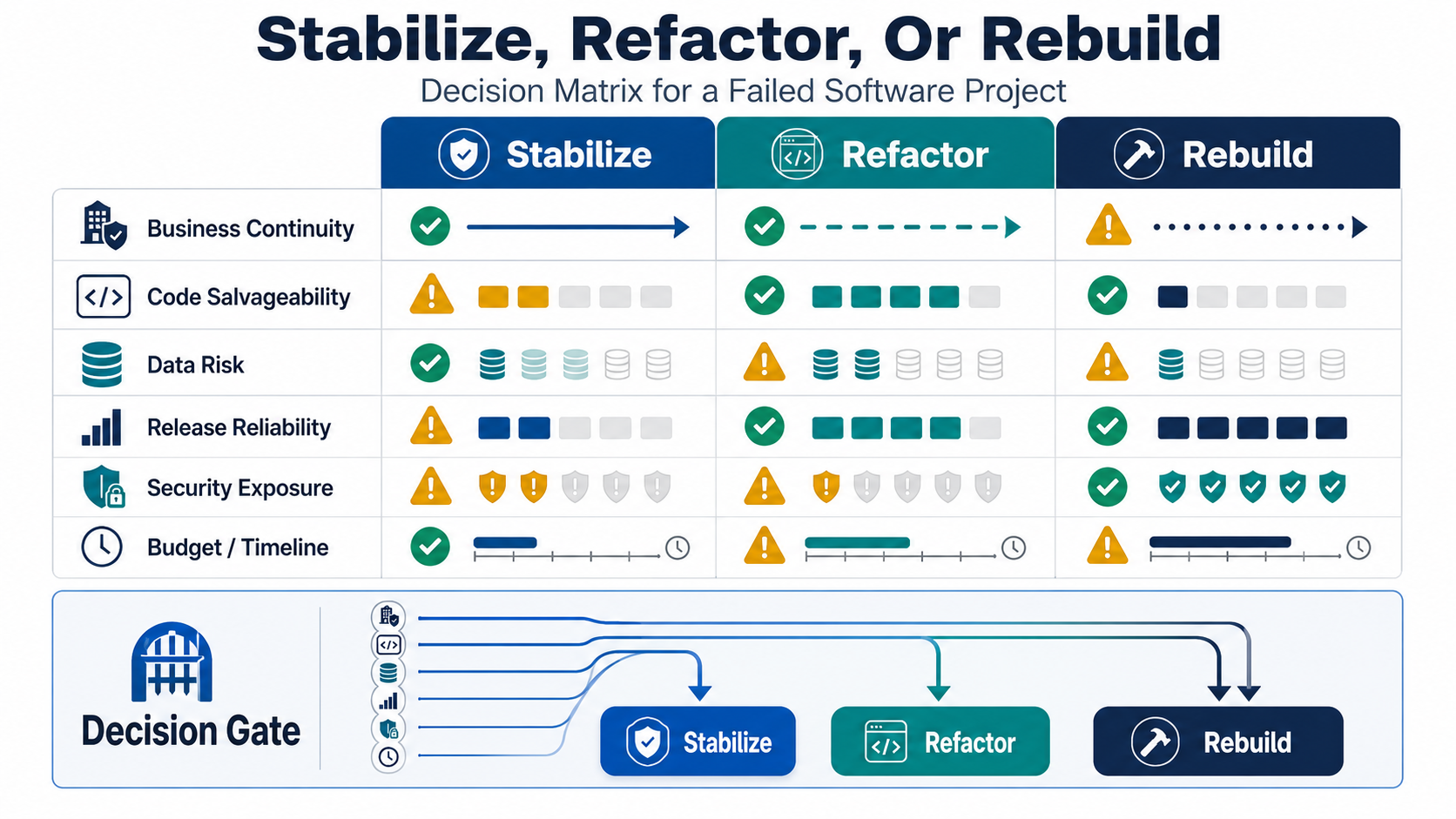
The rebuild decision should be earned. Rebuilding can be right when the current system has unsalvageable architecture, unsupported technology, missing source code, severe security risk, broken data assumptions, or a product direction that no longer matches the business. But rebuilding is expensive because the team must preserve business rules, migrate data, recreate integrations, retrain users, and keep the current system alive during the transition.
| Path | Use It When | Avoid It When |
|---|---|---|
| Stabilize | The system works but releases, defects, access, or operations are unstable | The architecture cannot support required workflows even after fixes |
| Refactor | Core business logic is valuable and code can be improved safely in increments | There are no tests, no boundaries, and every change causes unknown production risk |
| Migrate or replatform | Infrastructure, hosting, database, or platform limitations are the main blocker | Data ownership and rollback rules are not understood |
| Rebuild | The current system is structurally unsafe, unsupported, or misaligned with the business | The team cannot define scope, parity requirements, data migration, and acceptance tests |
If the decision involves cloud infrastructure, start with a cloud migration assessment. If the project involves moving production data, use a data migration checklist with inventory, mapping, validation, cutover, and rollback planning before the rebuild plan is approved.
Vendor Handoff Risks To Resolve Early
Failed projects often carry handoff gaps. A previous vendor may have owned deployment access, undocumented scripts, personal cloud accounts, third-party credentials, or private package registries. A rescue team should make these dependencies explicit before quoting a confident timeline.
- Code ownership: confirm repository access, license rights, third-party code, and whether generated or purchased components can be reused.
- Credential ownership: move production access to company-owned accounts with role-based access and emergency recovery.
- Environment parity: compare local, staging, and production behavior so fixes do not work only on one machine.
- Documentation debt: document deployment, recovery, integrations, data flows, and operational ownership as work proceeds.
- Commercial expectations: separate rescue scope from new product scope so stakeholders understand what the first phase will and will not solve.
The most useful rescue partner is not the one that promises everything can be fixed quickly. It is the one that shows what is known, what is unknown, what must be stabilized first, and which decisions need business owner approval.
Who Owns Each Recovery Decision?
Software rescues fail when every decision is treated as a technical detail. A rescue needs explicit owners because code, data, budget, customer promises, security, and operations often point in different directions. Before approving the roadmap, assign decision rights for the work that can change business risk.
- Business owner: defines the workflows that must keep running, approves scope tradeoffs, and decides which promises can move.
- Technical owner: owns architecture, dependency, security, and data-risk recommendations.
- Release owner: decides whether a fix can ship based on QA evidence, rollback readiness, monitoring, and support coverage.
- Data owner: approves migration mapping, retention, access controls, validation samples, and cutover timing.
- Finance owner: compares stabilize, refactor, migrate, and rebuild options against budget confidence and opportunity cost.
This owner model keeps the rescue from becoming an endless technical cleanup. It also gives the team a clear way to pause when a migration, infrastructure move, or rebuild decision needs business approval instead of engineering optimism.
Turn The Audit Into A Recovery Roadmap
After the audit, group work into four tracks: immediate stabilization, release process, modernization, and product roadmap. This prevents technical debt from swallowing the whole budget while also preventing new features from ignoring operational risk.
A practical roadmap might include production backups, CI/CD repair, defect triage, monitoring, dependency updates, test coverage, database cleanup, performance fixes, security remediation, documentation, and then selected product improvements. For larger systems, the legacy application modernization roadmap can help structure waves around audit, stabilization, migration, modernization, and post-launch optimization.
Once the rescue scope is clearer, use the custom software cost estimator to frame budget, timeline, team shape, integration complexity, and rebuild/refactor assumptions. Estimation before audit is mostly guesswork; estimation after audit becomes a decision tool.
How NextPage Helps With Software Project Recovery
NextPage helps teams recover stuck, inherited, unstable, or high-risk software projects by starting with evidence. A Software Rescue Audit can include codebase review, architecture risk mapping, release pipeline review, database and integration checks, QA readiness, infrastructure assessment, and a prioritized stabilization backlog.
The outcome is a practical recommendation: stabilize and continue, refactor in phases, migrate infrastructure or data, rebuild selected modules, or plan a full replacement. For most projects, the best answer is a controlled sequence rather than a dramatic reset. The goal is to restore business confidence while reducing technical risk sprint by sprint.
If your project is stuck, abandoned, or too risky to release, start by identifying what must keep working this month. NextPage can help audit the current state, stabilize the release path, and turn the rescue into a realistic modernization plan through a focused Software Rescue Audit.