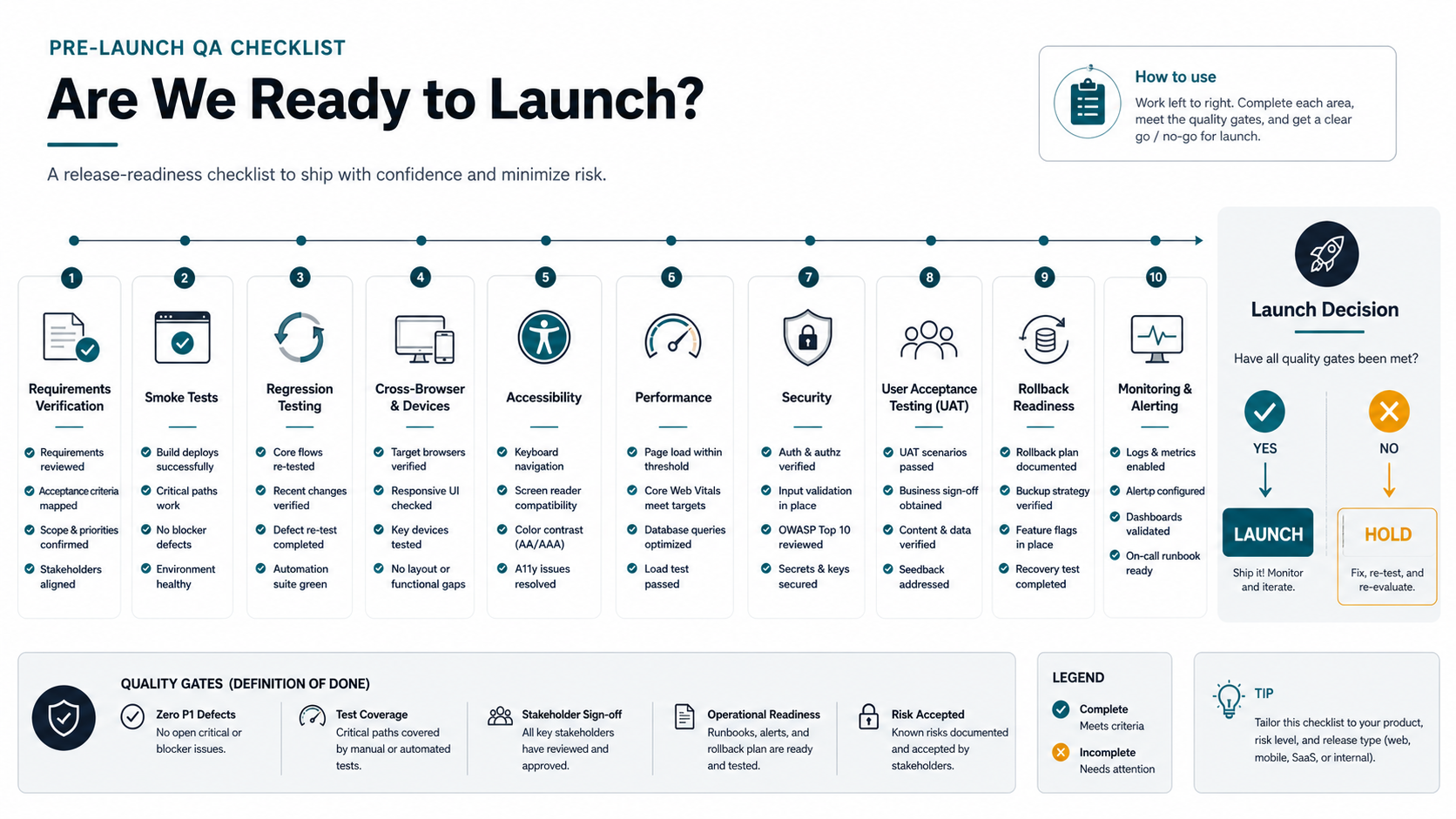

Quick Answer: What Should a Pre-Launch QA Checklist Include?
A pre-launch QA checklist should prove that the software can handle the workflows, roles, integrations, devices, data states, and failure paths users will hit after launch. The release gate should include requirements traceability, smoke testing, regression coverage, cross-browser and device checks, accessibility basics, performance checks, security review, user acceptance testing, rollback planning, and post-launch monitoring.
For custom software, the goal is not to test every possible click. The goal is to identify the release risks that would break revenue, operations, customer trust, compliance, or support capacity. If the team cannot show what was tested, who approved it, what failed, what was fixed, and what remains risky, the launch is not ready. Teams that need launch support beyond checklist review can connect this QA gate to a broader custom software development plan and, when release risk is high, a dedicated software QA testing services sprint so scope, engineering, QA, and post-launch support stay tied together.
1. Define the Release Scope Before Testing Starts
QA becomes noisy when the release scope is vague. Before the final test cycle, confirm the exact version being tested, the environments in scope, the user roles, the integrations, the data migrations, and the workflows that must be ready on day one. This is especially important when a first release has been trimmed from a larger roadmap. If the team is still debating what belongs in version one, use the MVP Scope Builder to separate launch-critical items from later-phase enhancements.
A useful release scope document should name the business outcome, the non-negotiable workflows, the accepted exclusions, the owner for every integration, and the cutoff date for new changes. Any feature added after that date should trigger a new risk review, because late scope changes often invalidate previous regression results.
Also define the test environment contract before evidence is trusted: build number, feature flags, seed data, third-party sandbox credentials, analytics events, background jobs, and integration endpoints. A checklist is weaker when QA signs off in an environment that does not match the launch path.
2. Trace Requirements to Test Evidence
Every critical requirement should map to at least one test case, one expected result, and one evidence artifact. For a SaaS portal, that may mean user signup, billing, role permissions, notification delivery, reporting, and account cancellation. For an internal operations tool, it may mean order creation, approval routing, inventory updates, export files, and audit logs.
The simplest traceability table has four columns: requirement, test scenario, latest result, and evidence link. Evidence can be a test run, screenshot, log, issue ticket, UAT sign-off, or monitoring dashboard. The table helps executives understand launch readiness without reading the entire QA backlog. If the team needs a deeper test-case baseline, pair this section with the functional testing checklist for web and mobile apps and the UAT vs functional testing vs regression testing guide so requirement coverage, QA ownership, and business sign-off are not confused with casual exploratory testing.
3. Smoke Test the Critical Paths First
A smoke test confirms that the build is stable enough for deeper QA. Run it after deployment to staging, after major bug fixes, before UAT, and immediately before production release. Keep it short enough that it can be repeated without resistance.
For most custom software launches, the smoke suite should cover login, password reset, primary navigation, the main create/update workflow, payment or submission flows if relevant, email or notification delivery, dashboard loading, permission boundaries, and key API integrations. If the smoke test fails, pause broader testing until the build is stable.
4. Run Regression Where Changes Can Break Existing Value
Regression testing should focus on the parts of the product that were already working and must not break during the launch push. This includes shared components, authentication, forms, data models, third-party integrations, permissions, and reporting logic. Teams often underestimate regression risk when a small UI change touches a shared validation rule or API response.
If budget or time is tight, prioritize regression by business impact. Protect revenue flows, customer-facing workflows, admin controls, sensitive data, and integration handoffs before lower-risk cosmetic checks. Use a focused regression testing checklist when the release contains shared components, reused APIs, role permissions, or reporting changes that could quietly break existing value. The custom software development cost guide is useful when release teams need to understand how complexity, integrations, and rework affect the budget behind QA decisions.
5. Check Browsers, Devices, Network States, and Viewports
Custom software often looks ready on the developer's machine before it has been tested in real user conditions. For web apps, test the supported desktop and mobile browsers, responsive breakpoints, common screen sizes, input methods, and file upload/download flows. For mobile apps, include OS versions, device sizes, permissions, app resume states, push notifications, deep links, and offline or poor-network behavior. Mobile-heavy launches should also use the mobile app testing checklist to confirm device coverage, crash monitoring, app store readiness, and release evidence.
If the product includes a mobile experience, align QA with the kind of launch support described on NextPage's mobile app development service page: device/API testing, beta readiness, crash monitoring, analytics, and iteration after release. For web-heavy products, connect the same evidence discipline to web app development release gates so browser coverage, API behavior, and workflow QA are planned before launch week. The final checklist should state which devices and browsers were tested and which are unsupported.
6. Validate Accessibility and Usability Basics
Pre-launch QA should include keyboard navigation, focus states, color contrast, readable form errors, label associations, touch target sizing, and meaningful alt text for important images. Accessibility checks are not only a compliance concern. They also expose hidden usability problems that affect all users, especially in dense dashboards and operational tools.
Usability QA should confirm that success states, empty states, validation messages, and error recovery paths are understandable. A workflow that technically works but leaves users uncertain will create support load immediately after launch. For products with public users, regulated workflows, or dense operational screens, add an explicit accessibility remediation owner instead of leaving WCAG and usability defects as unnamed polish work.
7. Review Performance, Security Basics, and Data Integrity
Performance checks should answer practical launch questions: do core pages load acceptably under expected traffic, do reports or dashboards time out, do background jobs block the user experience, and does the system degrade gracefully during third-party API delays? Teams with unclear release-risk budget should compare manual QA, automation, performance, and security effort against the software QA budget guide before cutting these checks from the launch plan. Capture baseline metrics before launch so the team can detect post-launch regressions.
Security review should cover authentication, authorization, password reset, session handling, role permissions, input validation, file handling, secrets exposure, audit logging, and sensitive data access. Data integrity checks should validate migration counts, duplicate handling, required fields, time zones, currency values, and integrations that create or update records across systems. When the release has meaningful security exposure, tie the checklist to a focused web application penetration testing checklist before treating the product as launch-ready.
8. Build a Release-Readiness Evidence Matrix
The final QA report should be readable by both technical and non-technical stakeholders. Organize evidence into four lanes: critical workflows, quality gates, risk controls, and launch operations. Each lane should show pass/fail status, open issues, owner, severity, decision required, and evidence link.
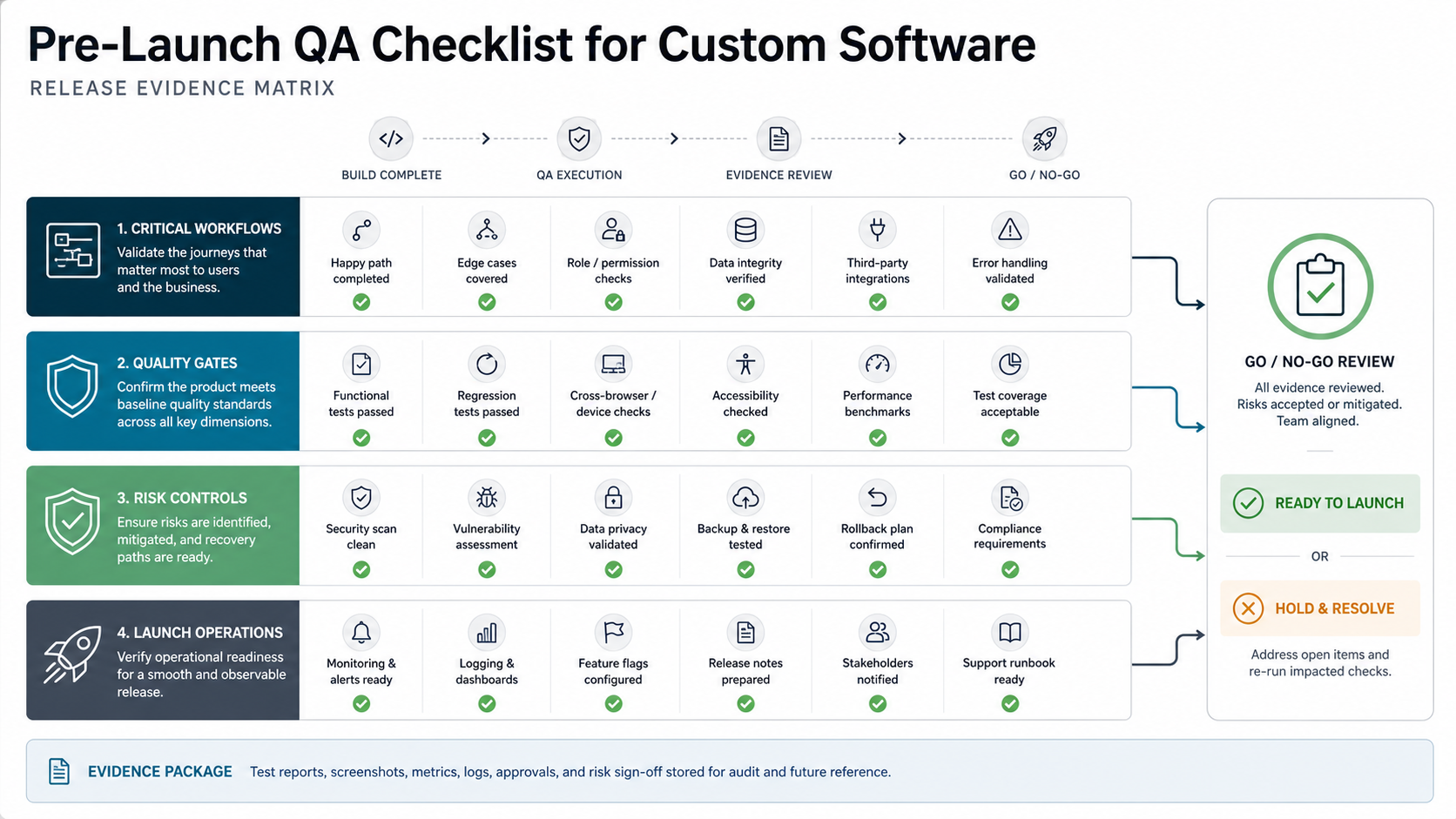
This is where teams should be honest about accepted risk. A low-severity typo does not block launch. A broken payment callback, incorrect role permission, failed data migration, or missing rollback plan might. If vendor selection is still active, compare each partner's QA discipline against the questions in the custom software development company checklist.
9. Run UAT With Real Roles and Realistic Data
User acceptance testing should not be a casual demo. Give business users role-specific scripts, realistic data, pass/fail criteria, and a way to flag severity. UAT should verify that the software supports real operating procedures, not just technical requirements.
Ask each UAT participant to sign off on the workflows they own. If they approve with caveats, record the caveats and decide whether they are launch blockers, post-launch backlog items, or training needs. UAT evidence is often the clearest signal that the product is operationally ready.
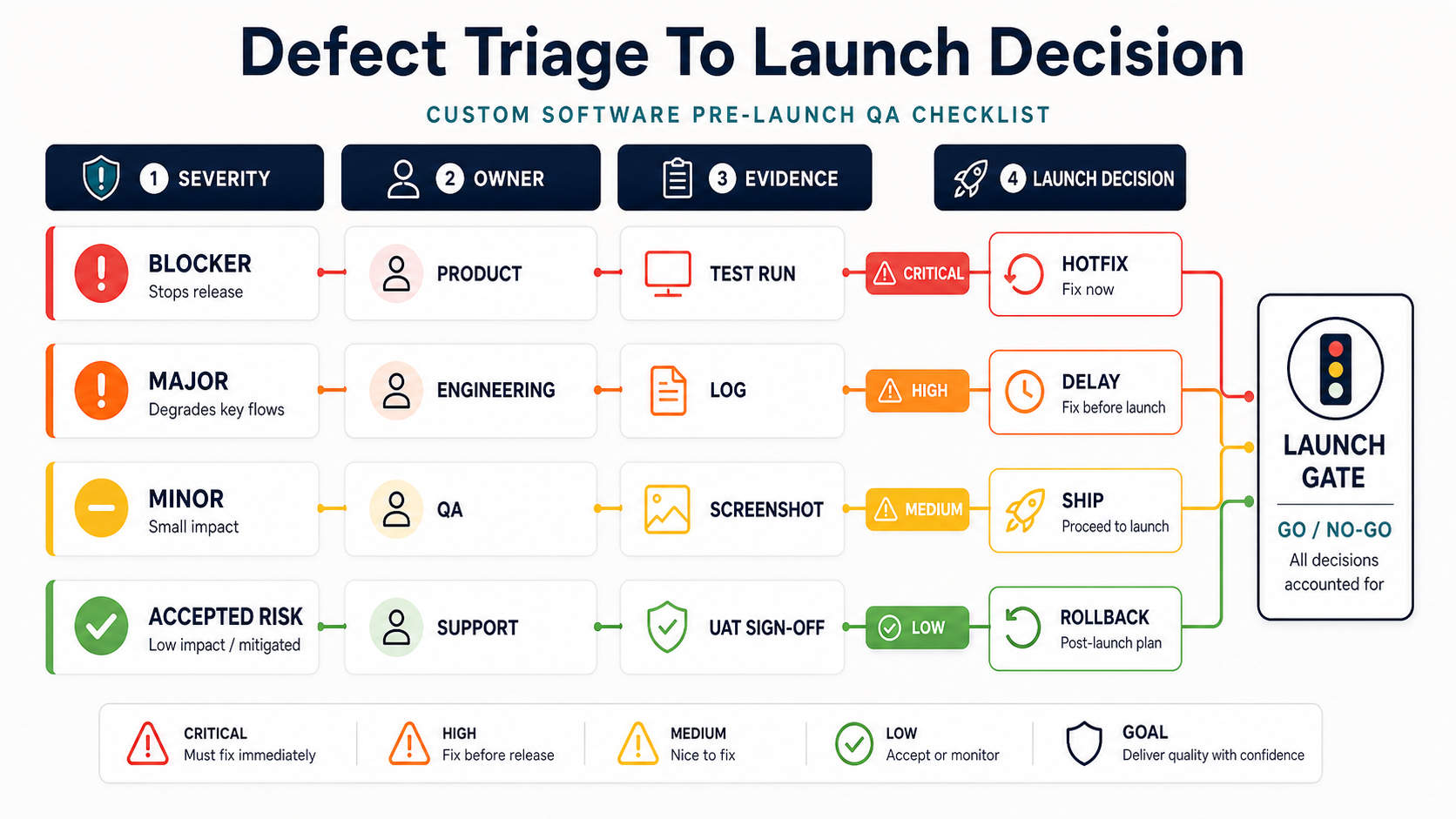
Use a simple triage rule before the final meeting: blocker defects stop the release, major defects need a named fix owner and launch decision, minor defects can move only when stakeholders accept the impact, and accepted risks need monitoring or rollback evidence. This keeps QA from becoming a long issue list with no decision path.
10. Confirm Rollback, Monitoring, and Support Before Launch
A launch plan is incomplete without rollback criteria. Define who can stop the release, how rollback happens, which data changes are reversible, which integrations need coordination, and how customers or internal users will be notified. For modernization work, use the Legacy Software Modernization Scorecard to identify risks that may require extra fallback planning.
Post-launch monitoring should include application errors, uptime, performance, failed jobs, payment or workflow drop-off, support tickets, analytics events, and user feedback. Assign owners before launch. The first 24 to 72 hours should have a named response team, not a vague promise to watch dashboards. If the release depends on complex handoffs after launch, use the build vs buy software ownership checklist to make admins, integrations, access reviews, and support responsibilities explicit.
Go/No-Go Meeting Checklist
| Area | Question to Answer | Evidence |
|---|---|---|
| Scope | Is everyone aligned on what is launching and what is excluded? | Release scope and accepted exclusions |
| Critical workflows | Do the workflows that protect revenue, operations, and trust pass? | Smoke, regression, UAT results, and blocker/major defect disposition |
| Integrations | Have API, email, payment, CRM, analytics, and data handoffs been tested? | Integration test logs and sample records |
| Risk | Are open defects understood and explicitly accepted? | Severity list and owner decisions |
| Rollback | Can the team pause, rollback, or hotfix without improvising? | Rollback runbook and owner list |
| Monitoring | Will the team see failures quickly after launch? | Dashboards, alerts, support rota, and first-72-hour owner list |
When to Get Help With Pre-Launch QA
Bring in QA support when the product has complex integrations, regulated data, payment or billing flows, multiple user roles, mobile device coverage, high-traffic expectations, or a launch deadline that leaves no room for repeated rework. Independent QA is also useful when the development team is too close to the product to spot workflow gaps.
NextPage can help teams turn the checklist into a release-readiness review, focused QA sprint, or custom software launch plan. If the open question is budget, start with the Custom Software Cost Estimator to understand how scope, integrations, and quality expectations shape the launch investment.