
A realistic mobile app development timeline is usually 10-16 weeks for a focused MVP, 4-7 months for a production app with backend, payments, integrations, and admin workflows, and 8-12+ months for complex marketplace, fintech, healthcare, IoT, or enterprise apps. The fastest teams do not skip discovery, UX, API planning, QA, or app-store readiness. They compress the calendar by deciding release-one scope early, running backend and mobile work in parallel, testing continuously, and removing approval blockers before the final sprint.
If your launch pressure is real, the question is not "How do we code faster?" It is "Which decisions create rework if they arrive late?" Payment rules, user roles, offline behavior, admin operations, privacy answers, device support, analytics events, and store-review notes can all delay a mobile release even when the screens look finished.
Use NextPage's MVP Scope Builder before locking the roadmap. It helps separate the first release from later-phase ideas so the team can estimate a timeline that survives design, development, QA, and launch.
Quick Answer: Mobile App Development Timeline By Scope
| Scope | Typical Timeline | What It Usually Includes | Main Schedule Risk |
|---|---|---|---|
| Prototype or clickable demo | 2-5 weeks | Discovery, key user flows, clickable Figma prototype, light technical notes | Stakeholders mistake a prototype for production readiness. |
| Focused MVP | 10-16 weeks | Core user role, login, main workflow, basic backend, admin essentials, QA, app-store prep | Release-one scope keeps expanding after design starts. |
| Standard production app | 4-7 months | iOS and Android, backend APIs, payments or notifications, admin console, analytics, QA, launch | Backend, integrations, and QA evidence are planned too late. |
| Complex product platform | 8-12+ months | Multiple roles, marketplace logic, offline sync, regulated workflows, AI, IoT, ERP/CRM, reporting | Operational rules are still being discovered during development. |
These bands are planning ranges, not promises. For a buyer-facing companion page, NextPage also keeps a dedicated mobile app cost and timeline overview that connects scope, systems, and release risk. A four-screen app with difficult compliance, payments, or hardware behavior can take longer than a larger-looking content app. NextPage's mobile app development planning starts with workflow risk, backend dependency, QA coverage, and release readiness rather than screen count alone.
The Mobile App Timeline Is A System, Not A Straight Line
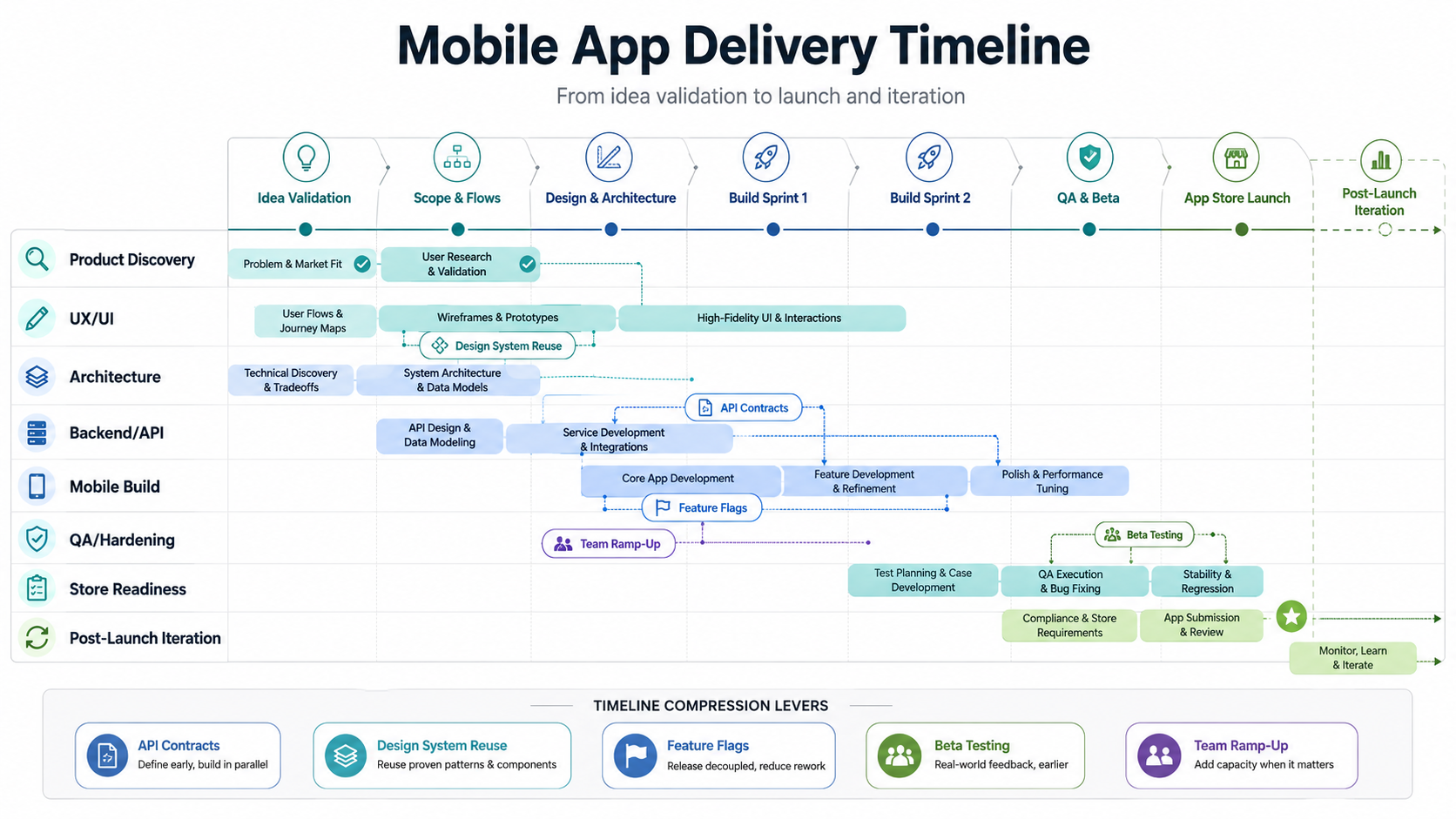
Most delay happens when teams treat mobile app development as one long coding phase. A launch-ready app is a product system: customer flows, admin workflows, backend APIs, data rules, integrations, privacy disclosures, device behavior, analytics, release operations, and support handoffs. Several of these can move in parallel, but only after the product rules are explicit enough for each workstream to make decisions.
A useful timeline has gates. Discovery should produce a release-one scope, user roles, success metrics, high-risk assumptions, and a technical risk list. Design should produce validated flows and states, not only attractive screens. Architecture should define API contracts, auth, data model, environments, and integration ownership. QA should start with acceptance criteria and device coverage before the last sprint. Launch should include app-store metadata, privacy policy, demo credentials, review notes, rollback plan, and support scripts.
For a deeper phase-by-phase companion, see NextPage's mobile app development process guide and the mobile app case studies page for NDA-safe examples of backend-connected mobile delivery. This post focuses on timeline ranges and acceleration choices.
Phase 1: Discovery And Release-One Scope (1-3 Weeks)
Discovery is where the timeline is won or lost. A strong discovery sprint defines the problem, primary users, core workflow, business rules, non-negotiable integrations, data sensitivity, launch geography, and the first version that can prove value. The output should be a prioritized backlog, user-flow map, technical risk register, release-one acceptance criteria, and decision log.
Do not let discovery become endless strategy. The goal is enough clarity to protect the build from rework. For a founder, that may mean deciding whether the first version needs subscriptions, social login, referrals, chat, or admin reporting. For an enterprise team, it may mean deciding which legacy system is the source of truth, which user roles can approve changes, and which audit logs are mandatory.
A focused MVP can keep discovery close to one week if a product owner is available and decisions are fast. A regulated, multi-role, or integration-heavy app usually needs two to three weeks because the team must validate operating rules before design and architecture can move safely. NextPage's Mobile App MVP Roadmap is useful when the first release is still too broad.
Phase 2: UX, UI, And Product States (2-5 Weeks)
Design speed depends less on the number of screens and more on the number of states. A login screen is simple until the product needs invite flows, blocked accounts, profile verification, consent, fallback support, role switching, or region-specific terms. A checkout screen is simple until discounts, failed payments, refunds, partial fulfillment, wallet balances, taxes, and receipts appear.
For a lean MVP, two to three weeks can be enough for user flows, wireframes, visual design, clickable prototype, and a design system starter. For a standard production app, plan three to five weeks because the team needs empty states, loading states, error states, permission prompts, notification states, admin actions, accessibility checks, and responsive behavior across device sizes.
The best acceleration move is to design the risky flows first. If payments, location, onboarding, offline sync, or matching logic will drive the business, design those before polishing the profile page. This gives engineering and QA earlier signals about API needs, analytics events, and edge cases.
Phase 3: Architecture, API Contracts, And Environment Setup (1-3 Weeks)
Architecture can overlap with design, but it cannot be skipped. The team should define the mobile stack, backend stack, database shape, auth model, API contracts, file handling, admin console scope, third-party services, environments, CI/CD, logging, crash reporting, and release ownership.
For many business apps, backend and admin work decide the real timeline. A mobile app may look small while the backend must handle roles, permissions, payments, content moderation, inventory, bookings, dispatch, CRM sync, reporting, refunds, or audit logs. If API contracts arrive late, mobile developers either wait or build against guesses that need rework later.
Use this phase to decide whether native, React Native, Flutter, or web-first delivery is appropriate. If stack choice is still open, the Mobile App Technology Stack Guide explains how product risk, device APIs, team skills, AI, QA, and release operations should drive the decision.
Phase 4: Mobile And Backend Build (6-16+ Weeks)
The build phase is where calendar estimates vary most. A focused MVP may need six to ten weeks of implementation after discovery and design. A standard production app can need ten to sixteen weeks. A complex multi-role platform can need several build waves across six months or more.
Healthy teams break the build into vertical slices: onboarding, core workflow, notifications, payments, admin action, reporting, and launch flow. Each slice should include mobile UI, backend API, database behavior, analytics event, permissions, QA acceptance criteria, and error handling. This prevents the common failure where the mobile app is "done" but the admin, API, or support workflow is not.
Cross-platform development can reduce duplicated frontend effort, but it does not remove product ownership, backend work, integration testing, QA, analytics, release operations, or store readiness. Native development can be faster for device-heavy products because the team is not fighting framework boundaries. The right speed decision is the one that reduces rework over the full release, not just the first sprint.
The Critical Path Risks That Delay Mobile Apps
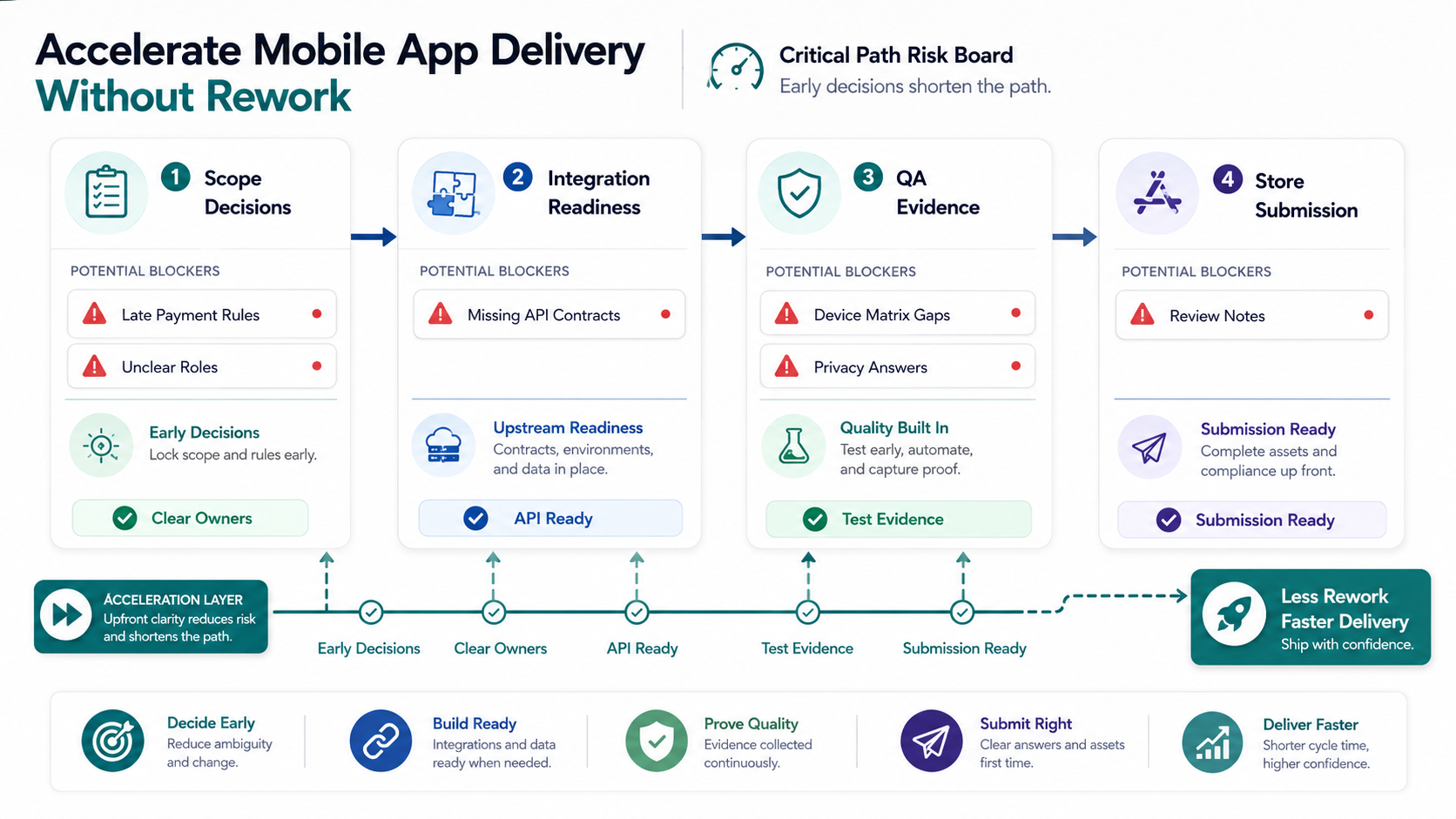
When a timeline slips, the visible reason is often "development took longer." The root cause is usually a late decision or hidden dependency. These are the risks to surface early:
- Scope ambiguity: stakeholders keep adding release-one features because later phases are not explicitly parked.
- Unclear roles: customer, admin, operator, vendor, support, and finance permissions are still changing.
- Backend dependency: APIs, admin tools, or data migration are not ready when mobile screens need them.
- Third-party integration delays: payment, maps, SMS, CRM, ERP, analytics, identity, or review accounts are not configured.
- QA compression: device testing, poor-network behavior, permission flows, crash checks, and regression coverage are squeezed into the final week.
- Store readiness gaps: privacy policy, screenshots, app metadata, demo credentials, in-app purchase setup, and data safety answers are prepared after the build.
- Launch ownership gaps: no one owns release notes, support scripts, monitoring, rollback, or post-launch triage.
Apple's App Store Review Guidelines were updated on February 6, 2026, and still emphasize complete, tested submissions with working URLs, demo access when login is required, and complete in-app purchase configuration. Google Play also lets teams control when reviewed changes are published through managed publishing. Treat these as planning inputs, not paperwork at the end.
Phase 5: QA, Beta, And Release Hardening (2-5 Weeks)
QA should start during the build, but the release-hardening window still needs dedicated time. A small MVP may need two weeks for functional testing, device coverage, analytics checks, regression fixes, beta feedback, and store submission preparation. A complex app may need four to five weeks or more, especially if there are payments, offline workflows, regulated data, or multiple roles.
Mobile QA should cover devices, OS versions, screen sizes, app permissions, interrupted sessions, poor network, push notifications, deep links, app upgrades, empty states, error handling, crash reporting, analytics events, API failures, and security-sensitive flows. The Mobile App QA And Launch Checklist is the right companion when a team needs release evidence instead of a last-minute bug bash.
If QA capacity is the bottleneck, consider external support before the final sprint. For teams that need embedded release coverage, QA testing staff augmentation services can add device, workflow, regression, and app-store evidence without turning QA into a last-week scramble. NextPage's mobile app testing services can cover device matrices, workflow testing, release readiness, regression cycles, and post-launch monitoring for iOS, Android, Flutter, and React Native releases.
Phase 6: App Store, Play Store, And Launch Operations (1-3 Weeks)
Store submission is not just uploading a build. Plan app name, description, keywords, screenshots, preview media, category, privacy policy, data safety disclosures, age rating, support URL, marketing URL, demo credentials, review notes, in-app purchase products, subscription metadata, and regional availability.
For a clean first launch, budget one to three weeks for submission assets, final review cycles, policy fixes, approval timing, staged rollout, and support readiness. The time can be shorter for simple apps from mature developer accounts and longer for new accounts, regulated categories, payments, user-generated content, or apps that require detailed review notes.
Do not schedule marketing launch for the same hour as first submission. Plan a release buffer and define what happens if Apple or Google asks for more information. A professional launch plan includes monitoring, crash alerts, support routing, analytics dashboards, rollback decisions, and a post-launch bug triage window.
How To Accelerate Delivery Without Creating Rework
Acceleration works when it removes waiting time, not when it hides risk. These moves can shorten a mobile app timeline without damaging quality:
- Freeze release-one scope early: keep a visible later-phase list so stakeholders know ideas are captured, not ignored.
- Prototype risky flows first: payments, onboarding, location, offline sync, matching, or AI output should not wait for final polish.
- Run backend and mobile in parallel: use API contracts, mocks, and fixture data so mobile can move before every endpoint is complete.
- Use a design system starter: reusable components speed production screens and reduce QA inconsistencies.
- Keep QA inside every sprint: test vertical slices as they land instead of saving the whole app for final hardening.
- Prepare store assets early: privacy answers, demo accounts, screenshots, and review notes should not be final-week tasks.
- Staff around bottlenecks: add QA, backend, mobile, or product capacity where the critical path actually needs help.
Adding more developers does not automatically speed up a late project. It can slow the team if product rules, API contracts, codebase ownership, and QA gates are unclear. The best time to ramp is before the critical path is blocked. If team capacity is the constraint, the Dedicated India Team Cost Calculator can help model roles, monthly budget, and ramp-up shape.
Team Shape: Who You Need At Each Stage
A lean MVP team usually needs product ownership, UX/UI, one or two mobile developers, backend/API ownership, QA coverage, and release management. Some people can wear multiple hats, but the responsibilities still exist. Skipping product ownership creates scope churn. Skipping backend architecture creates integration delays. Skipping QA creates launch risk.
A standard production app often needs a product manager or product owner, designer, mobile developers, backend developer, QA engineer, DevOps/release support, and part-time technical lead. A complex app may need dedicated roles for security, data migration, integrations, automation testing, analytics, and support operations.
If speed matters, staff for parallel workstreams: one team member should not be the only person owning design review, API decisions, QA fixes, store assets, and stakeholder approvals. NextPage's hire dedicated developers in India model is useful when the core team has product direction but needs mobile, backend, QA, or sprint capacity with delivery governance. For mobile-specific proof, the FieldIQ portfolio case study shows how role-aware mobile workflows, backend systems, media handling, and AI support can sit in one product delivery plan.
A Practical Timeline Template For A Focused MVP
| Weeks | Workstream | Key Outputs |
|---|---|---|
| 1-2 | Discovery and scope | Release-one backlog, user roles, workflow map, risk register, acceptance criteria |
| 2-4 | UX/UI and architecture | Clickable prototype, design system starter, API contracts, environment plan, analytics plan |
| 4-10 | Build vertical slices | Onboarding, core workflow, admin basics, backend APIs, notifications, reporting essentials |
| 8-12 | QA and beta | Device matrix, regression runs, crash fixes, beta feedback, security/privacy checks |
| 11-14 | Store readiness and launch | Final builds, metadata, screenshots, review notes, demo account, staged rollout, monitoring |
| 14-16 | Post-launch stabilization | Bug triage, analytics review, support updates, roadmap adjustment |
The overlap is intentional. Design and architecture can overlap after the core workflow is known. Backend and mobile can overlap after contracts exist. QA can overlap with build after acceptance criteria are clear. Store preparation can start before the final binary is ready. What should not overlap is unresolved product strategy with production coding on the same uncertain feature.
How Timeline Connects To Budget
Timeline and cost move together because mobile app development is a team-capacity problem. A shorter calendar usually requires clearer scope, faster decisions, stronger product ownership, more parallel roles, and enough QA coverage to avoid a post-launch fire drill. A longer calendar is not always bad; it can be the responsible choice when the app has compliance, integrations, marketplace operations, or offline risk.
For budget planning, use the Mobile App Development Cost in 2026 guide. It explains how features, team shape, platform choice, backend complexity, and QA depth affect cost. If your roadmap includes taxi, grocery, social commerce, fintech, healthcare, IoT, marketplace behavior, or an offline-first release, also compare PWA development cost vs native app tradeoffs before assuming every first release needs the same platform path.
How NextPage Helps Plan And Accelerate Mobile App Delivery
NextPage helps founders and product teams turn launch pressure into a practical delivery plan. We define release-one scope, choose the right mobile stack, design the core workflows, build backend and mobile workstreams in parallel, set QA gates early, prepare app-store submission, and support post-launch iteration.
If you need a realistic timeline before committing budget, start with the MVP Scope Builder. If you already know the product needs iOS, Android, backend, QA, and launch support, review our mobile app development service and the mobile app development process landing page. If the bottleneck is capacity, estimate a focused delivery pod with the Dedicated India Team Cost Calculator.