
Quick Answer: Narrow AI for Business Software
Narrow AI for business software is an AI system designed to improve one specific workflow: classify support tickets, detect invoice anomalies, forecast demand, extract fields from documents, rank leads, recommend next actions, or summarize approved knowledge for a defined user group. It is not general intelligence. It is scoped software with a model inside it.
That scope is the advantage. A narrow AI system can be tested against real examples, connected to existing tools, monitored for quality, and handed back to a human when confidence is low. McKinsey's 2025 Global Survey reported that 88% of organizations regularly use AI in at least one business function, but the business value still depends on turning AI from a pilot into an operating workflow.
For teams evaluating a first project, the right question is not "should we use AI?" It is: which repeated decision, prediction, classification, extraction, or assistance workflow has enough volume, data, integration access, and business value to justify implementation? NextPage's AI Agent Readiness Assessment is a useful first screen because it scores workflow clarity, data readiness, integrations, governance, and human review controls before build work starts.
Why Narrow AI Is the Practical Starting Point
Broad AI transformation programs often fail because they start with a model category instead of a workflow. Narrow AI starts with the work itself. A finance team wants fewer invoice exceptions missed. A support team wants faster triage without unsafe auto-responses. A sales team wants better lead routing. An operations team wants earlier demand or capacity signals. These are bounded problems with known users, known systems, and measurable outcomes.
The source article explains narrow AI as artificial intelligence trained for a specific task or closely related set of tasks, with examples such as fraud detection, speech recognition, recommendation systems, and image analysis. This NextPage version translates that idea into software implementation: what to build, what data is needed, where the AI fits in the product, and when buying a tool is enough.
Narrow AI also keeps risk visible. If a system is built to classify inbound support requests, everyone can define the labels, review the training examples, measure routing quality, and design an escalation path. If the mandate is "make operations intelligent," nobody knows what quality means.
Narrow AI Use Cases by Business Workflow
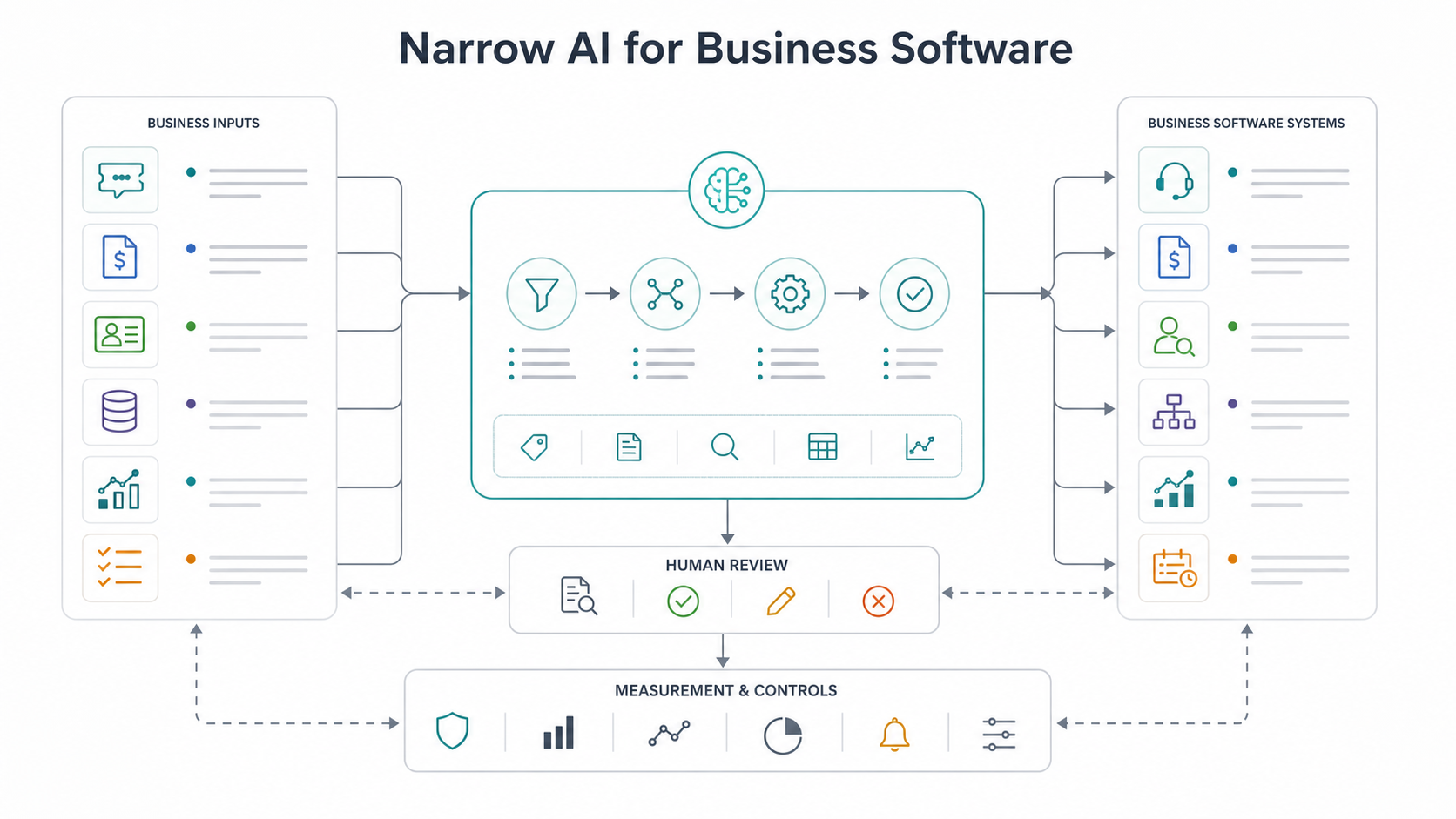
Start by mapping the use case to a business workflow, not to a buzzword. Each candidate should have a clear input, AI task, output, user, decision owner, and metric.
| Workflow | Narrow AI task | Business output | What to measure |
|---|---|---|---|
| Customer support | Classify, route, and draft responses | Priority, topic, suggested reply, escalation path | First response time, resolution time, deflection quality, escalation accuracy |
| Finance operations | Detect anomalies and extract fields | Invoice risk score, missing data, exception queue | Review hours saved, false positives, missed exceptions, cycle time |
| Sales operations | Score and enrich leads | Fit score, segment, next action, CRM update | Qualified pipeline, handoff speed, conversion lift, stale-data reduction |
| Product and analytics | Cluster behavior and predict churn | User segment, churn risk, adoption signal | Retention lift, activation rate, support load, prediction accuracy |
| Operations and supply chain | Forecast demand or capacity | Demand forecast, staffing signal, reorder trigger | Forecast error, stockouts, overstock, service-level performance |
| Document-heavy teams | Extract, classify, summarize, and validate | Structured records, summary, missing-field flags | Processing time, extraction accuracy, exception rate, rework avoided |
These use cases may involve machine learning, rules, retrieval, LLMs, or a mix. Prediction and scoring workflows often belong in machine learning development. Retrieval, summarization, and guided drafting may fit broader AI development services when the system needs secure data access, evaluation, and workflow integration.
Data Needs by AI Task Type
Different narrow AI tasks need different data. A classification model needs examples of past inputs and the correct label. A forecasting model needs historical time-series data and context variables. A document extraction workflow needs representative documents, ground-truth fields, and exception examples. A recommendation system needs user, item, event, and outcome data. A generative support assistant needs approved source material, permission rules, and evaluation questions.
The fastest way to avoid a failed pilot is to inspect the data before choosing the model. Ask whether the data is accessible, current, representative, permissioned, labeled, and connected to the outcome you care about. If a human reviewer cannot explain the right answer for a sample, the AI system probably cannot be evaluated cleanly either.
A practical data-readiness review should cover source systems, owners, update frequency, missing fields, duplicates, sensitive data, access rules, edge cases, and how rejected or corrected AI outputs will feed improvement. The enterprise AI readiness checklist covers these broader workflow, security, and governance questions for teams moving beyond isolated demos.
Build-vs-Buy Checklist for Narrow AI
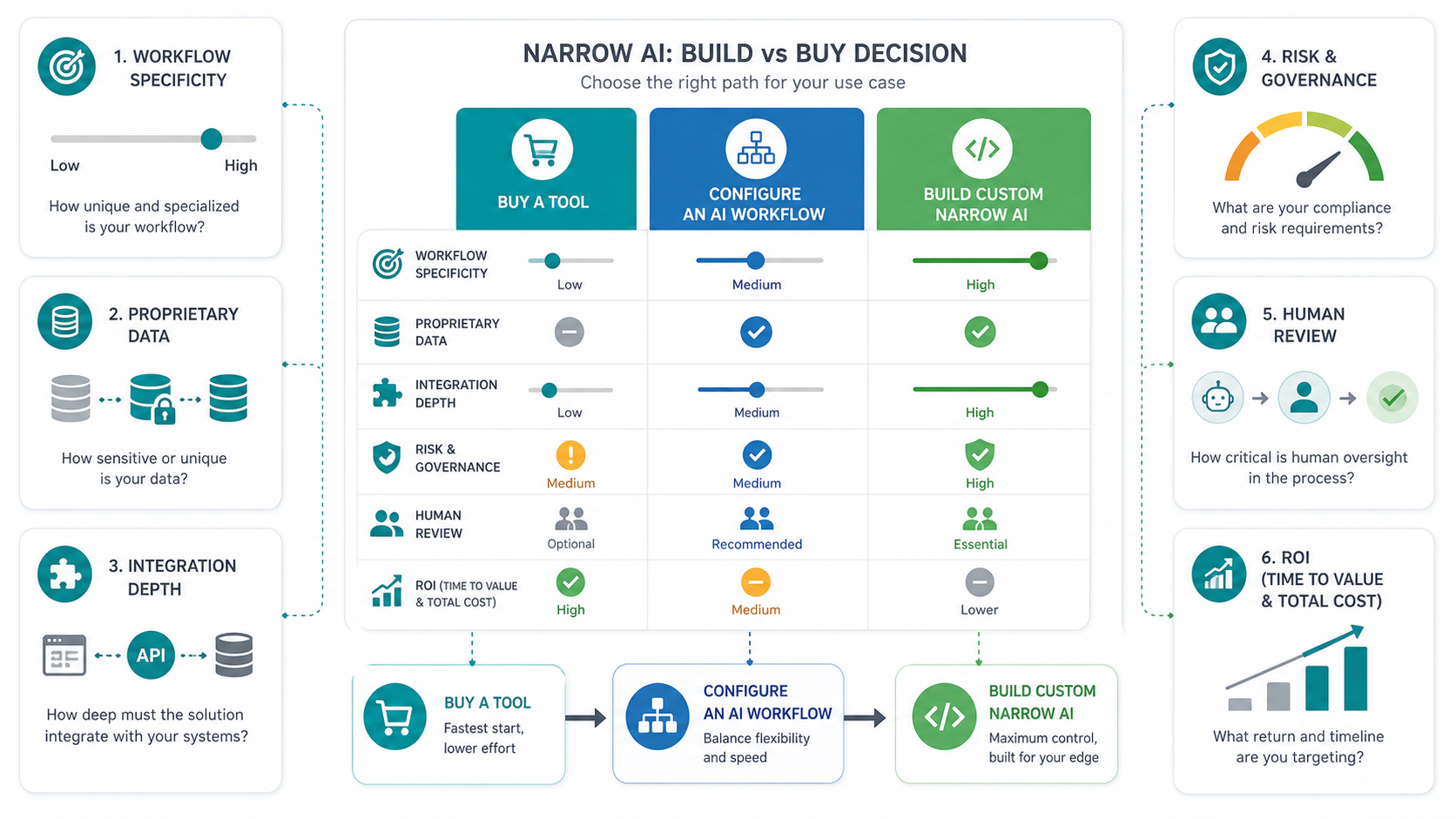
Buying is often right when the task is common, the workflow can adapt to the tool, the risk is low, and data integration is shallow. Examples include transcription, generic meeting summaries, basic content drafts, simple image tagging, or standard help-desk AI features.
Configuring an AI workflow is the middle path. The team may use existing models and platforms, but the value comes from prompt design, retrieval setup, rules, permissions, review queues, and integration into CRM, ERP, help desk, document management, or analytics tools.
Custom narrow AI is worth considering when the workflow depends on proprietary data, domain-specific rules, high accuracy targets, audit requirements, custom UX, deep integrations, or a feedback loop that generic software cannot support. Before committing budget, use the AI Automation ROI Calculator to estimate the volume, hours saved, and payback range.
| Decision factor | Buy a tool | Configure a workflow | Build custom narrow AI |
|---|---|---|---|
| Workflow specificity | Standard task | Known task with team-specific rules | Distinct workflow or competitive process |
| Data | Generic or low-risk data | Internal data with clear access rules | Proprietary, sensitive, fragmented, or high-value data |
| Integration depth | Minimal | Moderate API or platform integration | Deep CRM, ERP, product, data warehouse, or operational integration |
| Governance | Low risk | Review and logging required | Audit, permissions, explainability, or compliance expectations |
| ROI | Productivity gain | Process improvement | Material cost, revenue, risk, or capacity impact |
Software Architecture and Integration Requirements
A narrow AI feature is still software. It needs authentication, input validation, system access, data pipelines, quality checks, observability, fallback behavior, and a user experience that makes the AI output useful. Many pilots work in a notebook and fail in production because nobody designed the surrounding system.
For a support classifier, the architecture may connect the help desk, customer records, knowledge base, routing rules, model endpoint, review queue, and analytics dashboard. For invoice anomaly detection, it may connect OCR, ERP records, vendor master data, historical payment patterns, approval thresholds, and an exception workflow. For a sales lead score, it may connect website events, CRM records, enrichment data, territory rules, and rep notifications.
The implementation detail depends on the task, but the pattern is consistent: inputs, model, context, business rules, human review, system action, logging, monitoring, and feedback. NextPage's AI workflow automation guide is a useful companion when the narrow AI use case needs to move work across several tools instead of only producing an answer.
Governance, Human Review, and Risk Controls
Narrow scope does not remove governance. It makes governance easier to design. A focused system can define which users may access which data, when a human must review the output, what gets logged, what confidence threshold triggers escalation, and how the team will detect drift over time.
Plan controls around the risk of the workflow. A low-risk productivity assistant can tolerate occasional review. A customer-facing support assistant needs citations, refusal behavior, tone controls, and escalation. A finance or healthcare workflow needs audit logs, permissions, traceability, and clear ownership for exceptions. If the project could evolve into tool-using agents, compare the design with the distinctions in Generative AI vs AI Agents vs Agentic AI.
Good governance also includes measurement. Track input volume, acceptance rate, correction rate, false positives, false negatives, reviewer time, latency, cost, model errors, and business outcome movement. Without measurement, the system becomes a demo that nobody can defend.
Score the First Workflow Before You Build
Use a simple scorecard before selecting the first narrow AI project. A good first workflow scores high on specificity, data readiness, integration access, review ownership, measurable value, and acceptable risk.
| Question | Strong answer | Weak answer |
|---|---|---|
| Is the workflow specific? | Input, output, user, owner, and metric are named | The goal is broad or aspirational |
| Is data available? | Representative examples and source access exist | Data is scattered, unlabeled, or inaccessible |
| Can quality be evaluated? | Acceptance criteria and test examples are defined | No one agrees what a good output means |
| Can a human review exceptions? | Escalation and correction workflow is clear | Low-confidence cases have no owner |
| Does it integrate with work tools? | Target systems and API limits are known | The output lives outside the real workflow |
| Is the value measurable? | Hours, speed, risk, revenue, or quality target is explicit | Success is described only as innovation |
If several workflows compete, start with the one that can be evaluated fastest and has a visible business owner. The first project should build organizational confidence, not test every possible AI capability at once. If vendor selection is part of the decision, use the checklist in How to Choose an AI Development Company to compare workflow depth, security, evaluation, and delivery discipline.
Implementation Roadmap
Begin with discovery. Define the workflow, users, systems, data sources, success metrics, review owners, and unacceptable failure modes. Then pull a sample data set and test whether the task is measurable. This stage often reveals that the first use case should be narrower than the original idea.
Next, prototype the AI task in isolation. Compare model approaches, prompts, retrieval, features, labels, or rules against real examples. Measure quality before integrating too deeply. If the prototype cannot beat a baseline or support a human reviewer, do not force it into production.
After the task works, design the software wrapper: authentication, permissions, APIs, workflow UI, review queue, logging, monitoring, feedback capture, and admin controls. Launch with a limited user group, compare output quality against human review, and improve the system with corrected examples.
Finally, scale only after the operating model is stable. Add more workflows, more users, deeper automation, or agentic capabilities when the narrow workflow already shows measurable value and governance maturity.
How NextPage Helps
NextPage helps teams turn narrow AI ideas into production business software. The work usually starts with workflow selection, data-readiness review, integration mapping, model or platform choice, evaluation design, and a practical build-vs-buy recommendation.
For some teams, the right answer is a configured AI workflow using existing tools. For others, it is a custom classifier, scoring model, document-processing workflow, RAG assistant, or supervised automation pipeline connected to internal systems. The architecture should follow the workflow, data sensitivity, quality target, and business value.
If your team is evaluating task-specific AI, NextPage can help choose the first workflow, test whether the data is ready, estimate ROI, and build a controlled system that improves real work instead of adding another disconnected AI pilot.