
Secure payment options in event management apps are no longer just a checkout feature. They decide whether attendees trust the registration flow, whether organizers can reconcile revenue cleanly, and whether the event team can support refunds, group bookings, tax rules, and hybrid access without manual work.
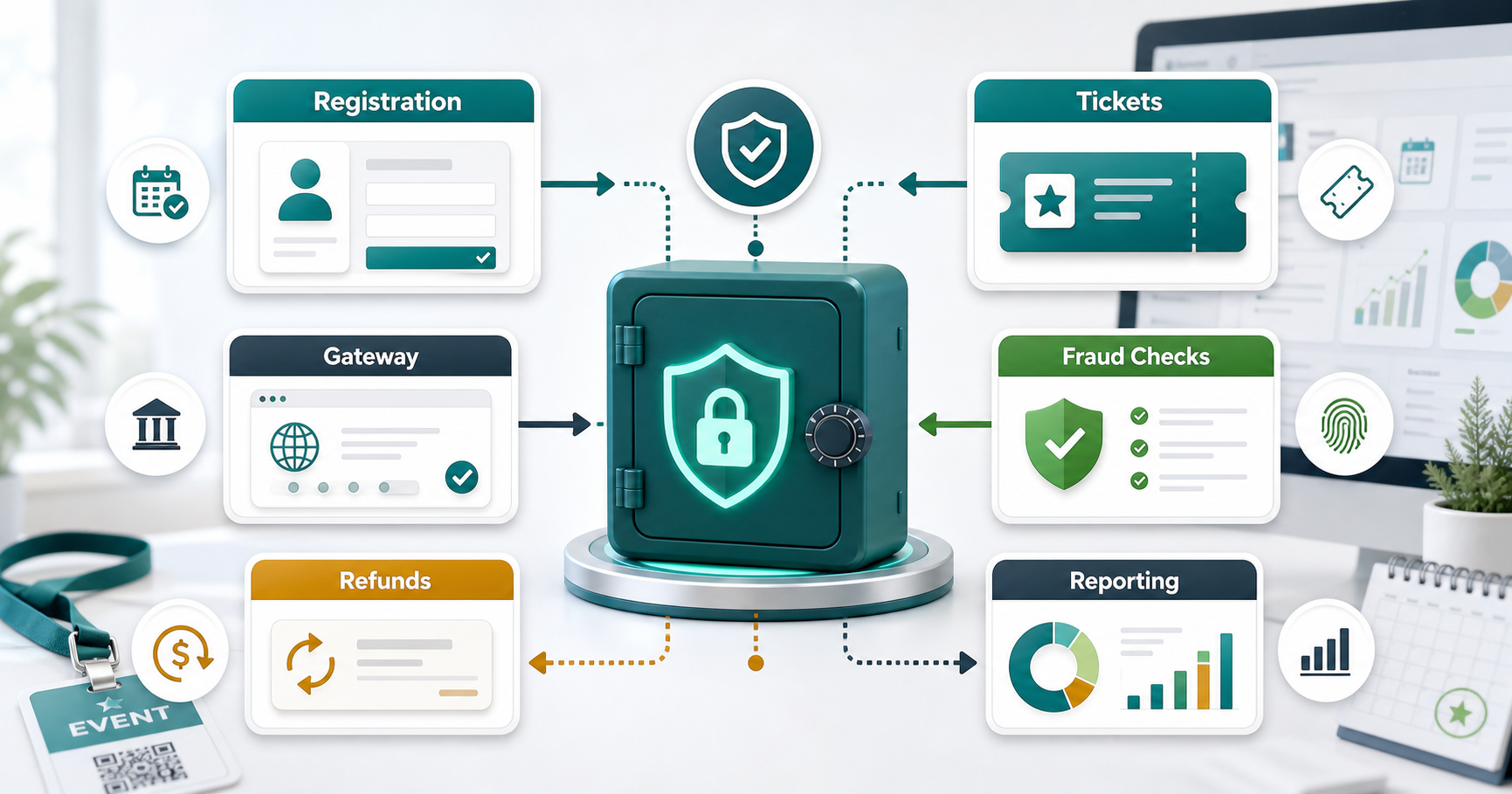
For most event products, the safest payment strategy is to combine familiar payment methods, a PCI-compliant payment gateway, tokenized card handling, fraud controls, automated receipts, refund workflows, and real-time reporting inside the registration experience. The goal is not to store payment data inside the event app. The goal is to design a reliable payment layer that connects ticketing, attendee records, access control, finance, and support.
Quick Answer: Which Secure Payment Options Should Event Apps Support?
An event management app should usually support credit and debit cards, digital wallets, net banking or bank transfer where the audience expects it, invoice-based payment for corporate bookings, promo codes, refunds, and on-site QR or card payment for walk-in registrations. The exact mix depends on event format, ticket price, geography, attendee type, and risk level.
The payment layer should also support the non-visible controls that make these methods safe: payment gateway tokenization, PCI DSS scope reduction, webhook verification, role-based admin access, refund permissions, audit logs, fraud screening, failed-payment recovery, and clean reconciliation exports. If the app also handles agenda access, paid sessions, subscriptions, sponsor upgrades, or virtual-event passes, payments must be tied to entitlement rules as well.
What Makes Event Payment Processing Different?
Event payments are more complex than a basic ecommerce checkout because the payment creates an operational commitment. Once an attendee pays, the app may need to issue a ticket, reserve a seat, unlock a virtual room, trigger a badge, update capacity, send tax documentation, notify a CRM, and expose revenue data to the organizer.
That is why payment processing should be planned alongside the broader event product. A strong event app connects registration, attendee management, check-in, notifications, and organizer reporting. If you are still shaping the product scope, the NextPage guide to event management app features is a useful companion because it explains the feature stack around ticketing, agenda, attendee profiles, sponsor visibility, and on-site workflows.
The payment model should answer five questions before development starts: who pays, what they are buying, which payment methods they expect, when refunds are allowed, and how the organizer will reconcile money after the event.
Core Payment Methods For Event Management Apps
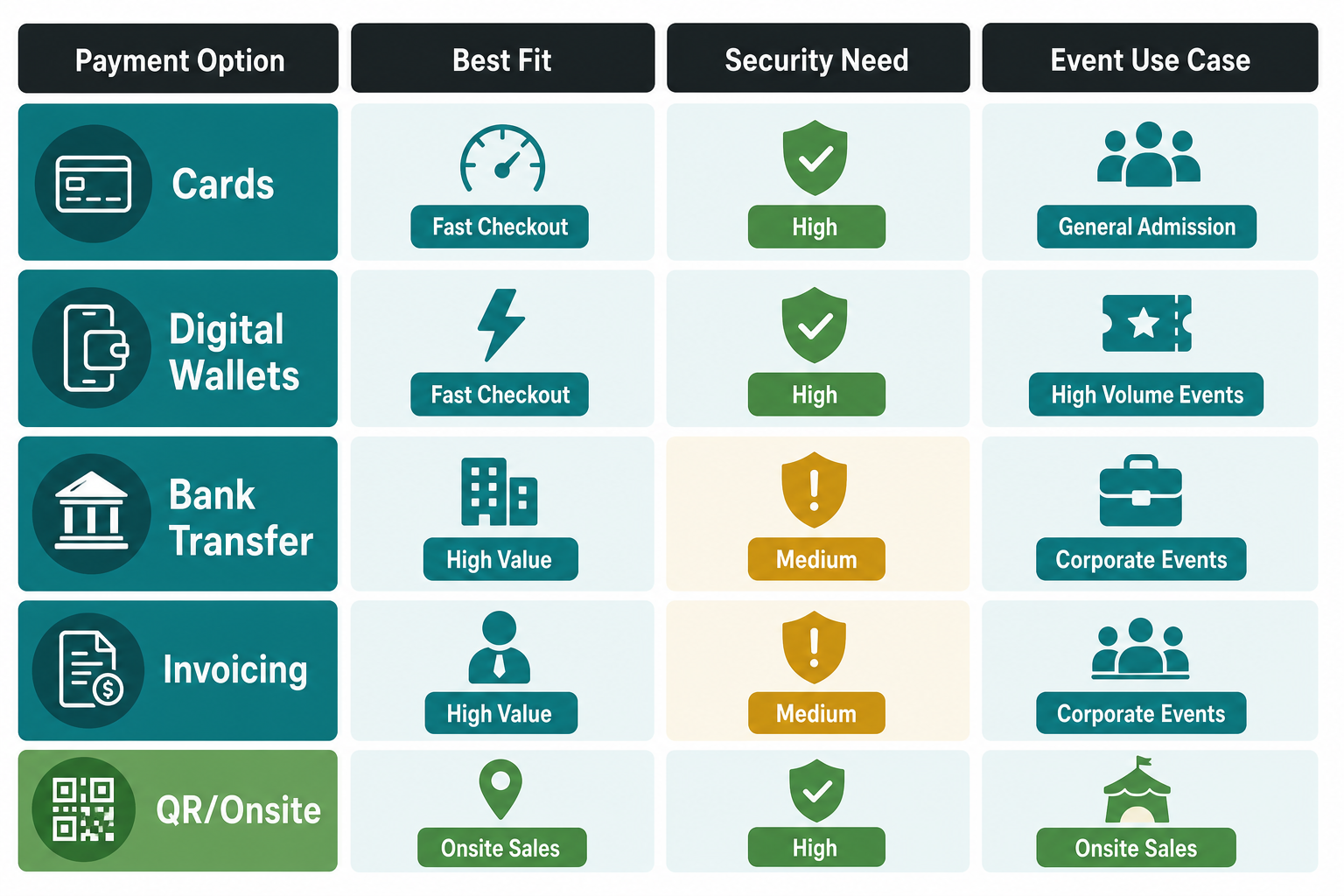
Most event apps do not need every payment method on day one. They need the right methods for the attendee segment and event format.
Cards And Digital Wallets
Cards and wallets are the default choice for public conferences, workshops, webinars, expos, community events, and paid virtual sessions. They reduce friction because attendees can complete checkout quickly, receive immediate confirmation, and store proof of purchase in email or the app.
The app should support failed-payment recovery, duplicate-payment checks, partial refunds when allowed, and clear transaction status labels. A reliable card flow also needs a secure gateway, tokenized card storage handled by the gateway, and webhook handling for delayed or disputed events.
Bank Transfers And Net Banking
Bank transfer and net banking options can matter for regional audiences, high-value registrations, or events where attendees prefer direct bank rails. The tradeoff is operational complexity. The app may need pending-payment states, manual or automated settlement confirmation, invoice matching, and clear deadlines for seat reservation.
Invoice-Based Corporate Payments
Corporate events, training programs, and trade shows often need invoice support because one buyer may purchase seats for a team. This changes the workflow. The product may need organization accounts, billing contacts, purchase order fields, tax IDs, approval states, downloadable invoices, and seat allocation after payment approval.
On-Site QR And Walk-In Payments
In-person events benefit from QR-based payment links or card terminals for walk-in registrations, upgrades, merchandise, and last-minute add-ons. These payments should still sync with the same attendee record and reporting dashboard. Otherwise the finance team ends up reconciling separate payment sources after the event.
Secure Checkout UX For Attendees
Payment security is partly technical and partly experiential. Attendees should understand what they are buying, what the final amount includes, which payment options are available, whether the transaction is secure, and when they will receive confirmation.
A good checkout flow keeps the number of steps low, shows the ticket summary before payment, validates coupon codes before authorization, supports mobile-first forms, and avoids redirect confusion. The registration experience should also handle accessibility, error recovery, and trust signals. The NextPage article on event app user-friendly interfaces is relevant here because payment completion depends heavily on clear navigation, readable forms, and a low-friction attendee journey.
For hybrid events, the checkout UX should also make access rules obvious. Attendees need to know whether they are buying an in-person seat, virtual access, workshop access, VIP entry, a group pass, or a replay package.
Payment Security Controls To Build Around
The safest event apps keep sensitive card data out of the application database. A PCI-compliant payment provider should handle card capture, tokenization, and vaulting. The event app should store only the identifiers it needs: payment intent ID, transaction status, ticket ID, attendee ID, refund status, and reconciliation metadata.
PCI Scope Reduction
Use hosted fields, hosted checkout, or provider-controlled payment elements so raw card data does not touch the event app server. This reduces compliance burden and lowers the risk of accidental exposure.
Tokenization And Encryption
Tokenization lets the app reference a payment method without storing the card number. Encryption should protect data in transit and sensitive operational data at rest. The app should also separate payment permissions from general event-admin permissions.
Webhook Verification
Payment gateways communicate status changes through webhooks. The app should verify webhook signatures, handle retries idempotently, and avoid issuing tickets until payment status is trusted. This is especially important for delayed methods, chargebacks, refunds, and failed payments.
Fraud And Abuse Controls
Fraud controls can include velocity checks, suspicious coupon use detection, location signals, AVS or 3DS support where relevant, refund abuse alerts, and admin review queues for high-risk orders. Similar secure-payment principles appear in other app categories too, including healthcare booking products that require secure payment integration for sensitive transactions.
Registration-To-Reconciliation Workflow
The payment workflow should be designed as an end-to-end lifecycle, not a single gateway call. This is where many event apps become fragile: payment succeeds, but ticket issuance fails; refund happens, but access remains active; or check-in data does not match revenue reports.
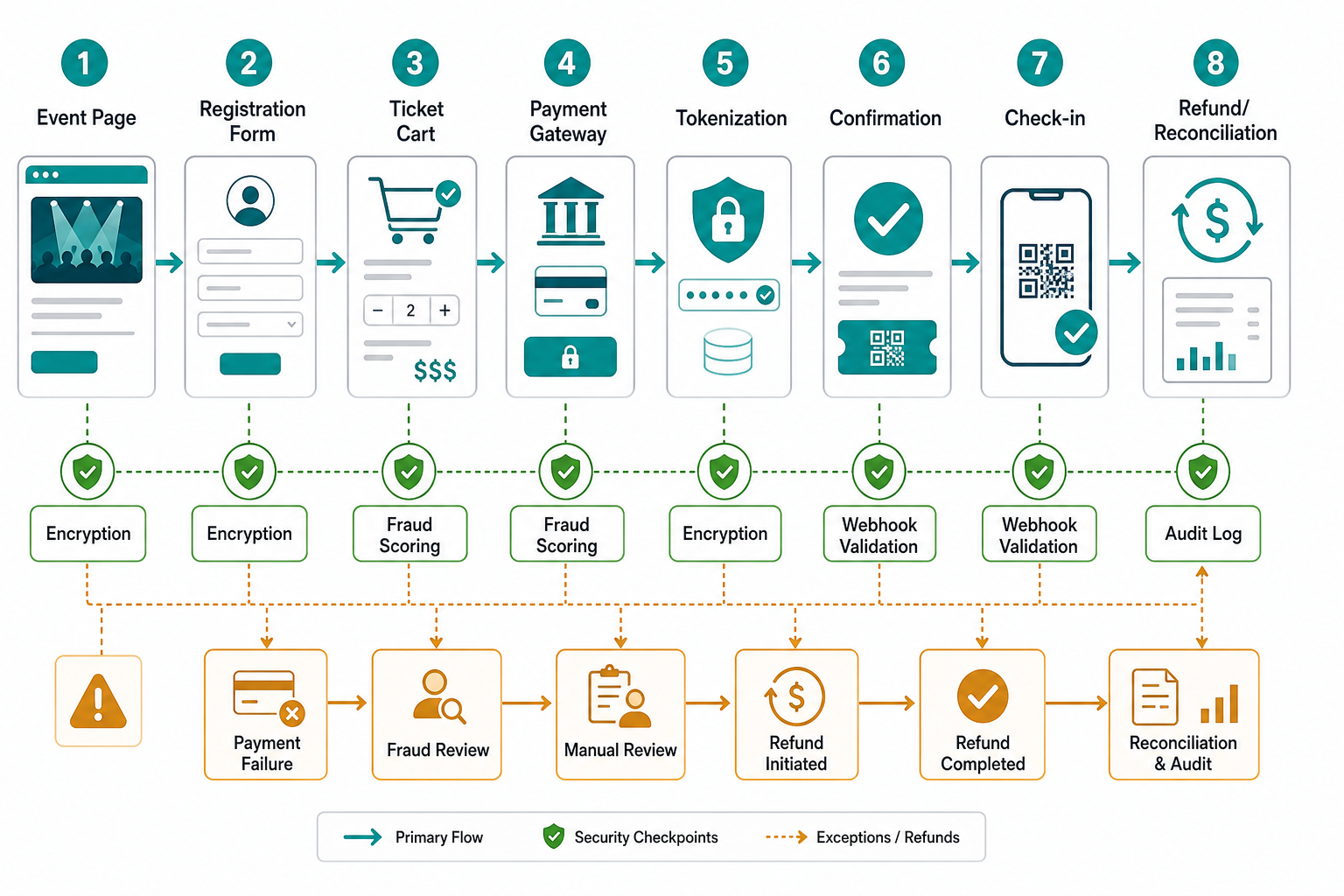
A practical event-payment workflow usually looks like this:
- The attendee selects ticket type, add-ons, sessions, or virtual access.
- The app validates capacity, pricing, taxes, coupon rules, and attendee fields.
- The payment gateway authorizes or captures the transaction.
- The app verifies the gateway event and creates the ticket or entitlement.
- The attendee receives confirmation, invoice or receipt, calendar details, and access instructions.
- The organizer dashboard updates registrations, revenue, capacity, and exceptions.
- Refunds, chargebacks, cancellations, and transfers update both payment and access records.
When this workflow is planned early, the app is easier to support during peak registration periods and event-day check-in.
How Payments Connect To Event Marketing And Communication
Payment data should improve communication without exposing sensitive financial details. The app can trigger confirmation emails, payment reminders, abandoned-registration nudges, invoice follow-ups, refund notifications, and post-event receipts.
Segmentation also becomes more useful. Organizers can send different messages to paid attendees, pending invoice buyers, group-booking administrators, VIP pass holders, virtual attendees, and people who abandoned checkout. The important rule is to keep marketing automation connected to payment status, not raw payment data.
Reporting, Analytics, And Finance Operations
Event organizers need more than a payment success count. They need revenue by ticket tier, coupon performance, tax totals, payment method mix, refund volume, settlement status, chargeback exposure, and revenue by channel.
For larger events, the app may need exports for accounting tools, CRM synchronization, sponsor reporting, and team-level role permissions. If payment integration is part of a broader custom platform, estimate the budget around workflows and integrations rather than screens. The Custom Software Cost Estimator can help frame the scope, while NextPage's custom software development cost guide explains why integrations, roles, data models, and compliance requirements drive effort.
Payment Features For Virtual And Hybrid Events
Virtual and hybrid events add entitlement complexity. Payment may unlock a live stream, workshop room, replay library, networking area, or downloadable material. The app must connect payment status to access control so unpaid, refunded, or transferred tickets do not keep premium access.
Hybrid products also need ticket-type clarity. An attendee might switch from in-person to virtual, buy an add-on workshop, or request a refund for one portion of a bundle. The payment system should support these edge cases without forcing support teams to manually adjust records in multiple places.
Common Mistakes To Avoid
The most common mistake is treating the payment gateway as the whole payment system. A gateway is only one piece. The product also needs pricing rules, data modeling, admin workflows, refunds, access control, reporting, and support visibility.
Other mistakes include storing sensitive payment details unnecessarily, ignoring failed-payment states, skipping webhook verification, delaying refund rules until launch, offering too many payment methods without operational support, and building checkout without mobile usability testing. For web-based event portals, the same budget and complexity logic described in the web app development cost guide applies because integrations, permissions, reporting, and reliability expectations shape the actual build.
How NextPage Scopes Secure Payment Features
NextPage scopes secure payment features by starting with the event business model. A small workshop registration flow may only need cards, wallet support, basic refunds, and receipt emails. A large hybrid conference platform may need group billing, tax rules, promo campaigns, check-in synchronization, sponsor upgrades, virtual entitlements, analytics, and accounting exports.
The right implementation plan should define payment methods, gateway choice, PCI scope, user roles, admin permissions, refund rules, reporting needs, and integration points before development starts. That planning keeps the app safer and reduces the chance of expensive event-day operational failures.