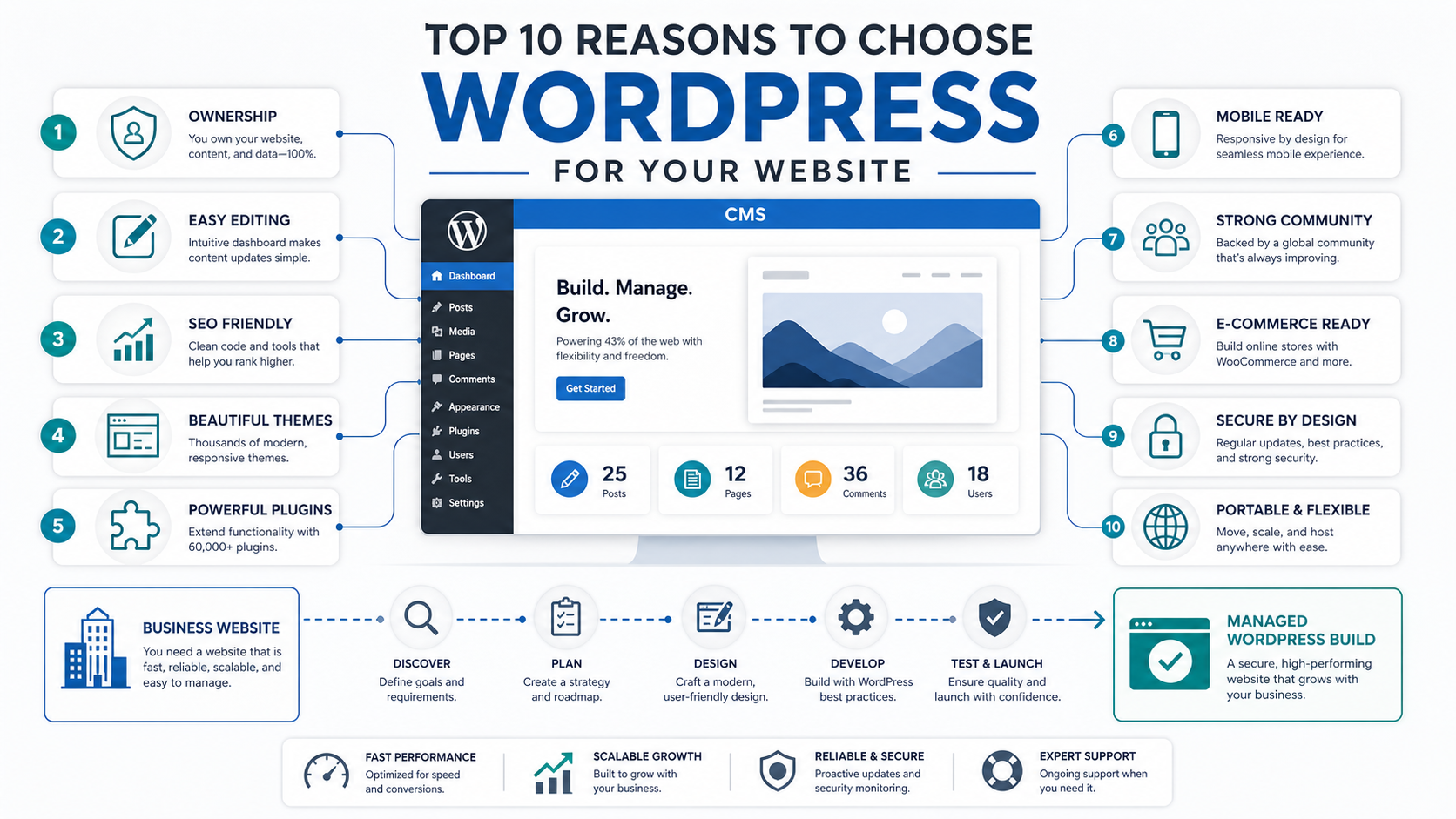

WordPress is still a strong choice for many business websites, but the reason is not simply that it is popular or free. The real advantage is that WordPress gives teams a familiar content system, a large plugin ecosystem, flexible design options, and a practical path from a simple marketing site to richer commerce or publishing workflows.
As of May 2026, W3Techs reports that WordPress powers about 41.9% of all websites and 59.5% of websites with a known CMS. That scale matters because it creates a deep hiring market, mature hosting options, and a wide support ecosystem. It also means businesses need clear governance around updates, plugins, performance, and security instead of treating WordPress as a set-and-forget website.
This guide explains the ten strongest reasons to choose WordPress, where it fits best, and when a custom software development or web app development approach may be a better long-term decision.
Quick Answer: Why Choose WordPress For A Business Website?
Choose WordPress when your website needs editable pages, SEO-friendly publishing, flexible design, lead generation, integrations, ecommerce extensions, and a platform that non-technical teams can manage after launch. It is especially useful for marketing websites, service-company sites, content hubs, local business sites, ecommerce catalogs, membership content, and landing pages that need frequent updates.
Do not choose WordPress just because it is common. Choose it when the website is mostly content-led and the operating team is ready to maintain themes, plugins, backups, analytics, forms, and security updates.
When WordPress Is The Right Fit
WordPress works best when the main job of the site is to publish, explain, rank, convert, and support sales conversations. A business can launch a polished website quickly, then keep improving content without waiting for a developer for every copy or page update.
- Marketing websites: service pages, landing pages, case studies, blogs, and conversion forms.
- Publishing-heavy sites: articles, guides, resources, news, and category archives.
- Commerce and subscription sites: product catalogs, paid content, memberships, and booking flows when the plugin stack is well governed.
- Local and multi-location businesses: repeatable page templates, location pages, schema, and easy content ownership.
- Founder-led companies: quick iteration without building a custom CMS from scratch.
If your project is closer to a SaaS platform, marketplace, realtime dashboard, or complex internal workflow, use the custom software cost estimator to compare the likely build range before forcing the product into a CMS.
10 Reasons To Choose WordPress For Your Website
1. Open-Source Ownership Reduces Platform Lock-In
WordPress is open source, which means the core software can be used, extended, and hosted in many ways. You are not locked into a single website builder's hosting, editor, template marketplace, or pricing model. That matters when the site becomes a business asset rather than a temporary brochure.
Open source does not mean a professional website is free. Strategy, design, implementation, hosting, performance tuning, security, and ongoing support still have costs. The value is that your business can own the implementation path and change partners without rebuilding from zero.
2. Content Teams Can Update Pages Without Engineering Help
A good WordPress build gives marketing, sales, and operations teams direct control over pages, posts, media, menus, forms, and landing-page copy. That shortens the feedback loop between campaign ideas and published content.
The best implementations use reusable blocks and page templates so editors can move quickly without breaking brand consistency. If the site needs a more structured first release, define must-have pages with the MVP Scope Builder before design starts.
3. WordPress Gives You A Practical SEO Foundation
WordPress can support clean URLs, editable titles and meta descriptions, schema plugins, image alt text, category structures, internal links, XML sitemaps, and fast content publishing. Those basics make it a practical foundation for SEO when the site is planned properly.
The CMS alone will not rank the site. You still need useful service pages, strong information architecture, technically sound templates, Core Web Vitals attention, and content that answers buyer questions. For teams trying to appear in AI-generated answers as well as search results, pair the CMS plan with AI search optimization work so content is structured for retrieval, summaries, and entity clarity.
4. Themes And Custom Blocks Speed Up Design
WordPress themes and block patterns can accelerate launch when they are treated as a starting system, not a pile of disconnected templates. A custom theme or carefully customized block library can keep the site visually consistent while still letting editors create new pages.
For serious businesses, avoid overloading the site with a page builder, theme pack, and plugin stack that fight each other. The goal is an editable website that remains fast, maintainable, and clear for users.
5. Plugins Extend The Website Without Rebuilding Everything
The plugin ecosystem is one of WordPress's biggest advantages. Forms, SEO, caching, analytics, ecommerce, memberships, subscriptions, translation, backups, redirects, and security workflows can often be added faster than building each capability from scratch.
That flexibility needs discipline. Every plugin becomes part of the site's risk profile. Choose established plugins, document why each one exists, remove unused plugins, and test updates before applying them to important websites. If recurring revenue is part of the plan, review WordPress subscription plugins before committing to a membership or paid-content architecture.
6. Responsive Themes Help You Start Mobile-Friendly
Most modern WordPress themes are responsive by default, which helps businesses avoid a separate mobile website. That said, mobile-friendly is not the same as mobile-optimized. Forms, navigation, image weight, sticky elements, and checkout steps still need real device testing.
If mobile behavior is central to the business model rather than just part of the website experience, compare the CMS route with mobile app development so the team does not mistake a responsive website for a product-grade mobile workflow.
7. The Community Makes Support Easier To Find
Because WordPress is widely used, it is easier to find developers, designers, SEO specialists, hosting providers, maintainers, and documentation than with many niche CMS platforms. That makes the site easier to support after the original launch team moves on.
This is one reason businesses often hire a specialist instead of building alone. A professional partner can decide which parts should be plugin-based, which parts need custom code, and which parts should be kept deliberately simple. The related guide on why to hire a WordPress development company goes deeper into that decision.
8. Ecommerce, Membership, And Booking Workflows Are Possible
WordPress can support ecommerce catalogs, subscriptions, appointment booking, digital downloads, paid content, and lead-generation workflows. For many service businesses and small commerce teams, that is enough to validate demand without building a custom platform first.
The limit appears when workflows become highly specific: vendor dashboards, realtime inventory, complex approvals, dynamic pricing, logistics, or custom roles. At that point, a portfolio example such as Rosecart is a useful reminder that commerce platforms often need product architecture beyond a basic CMS plugin stack.
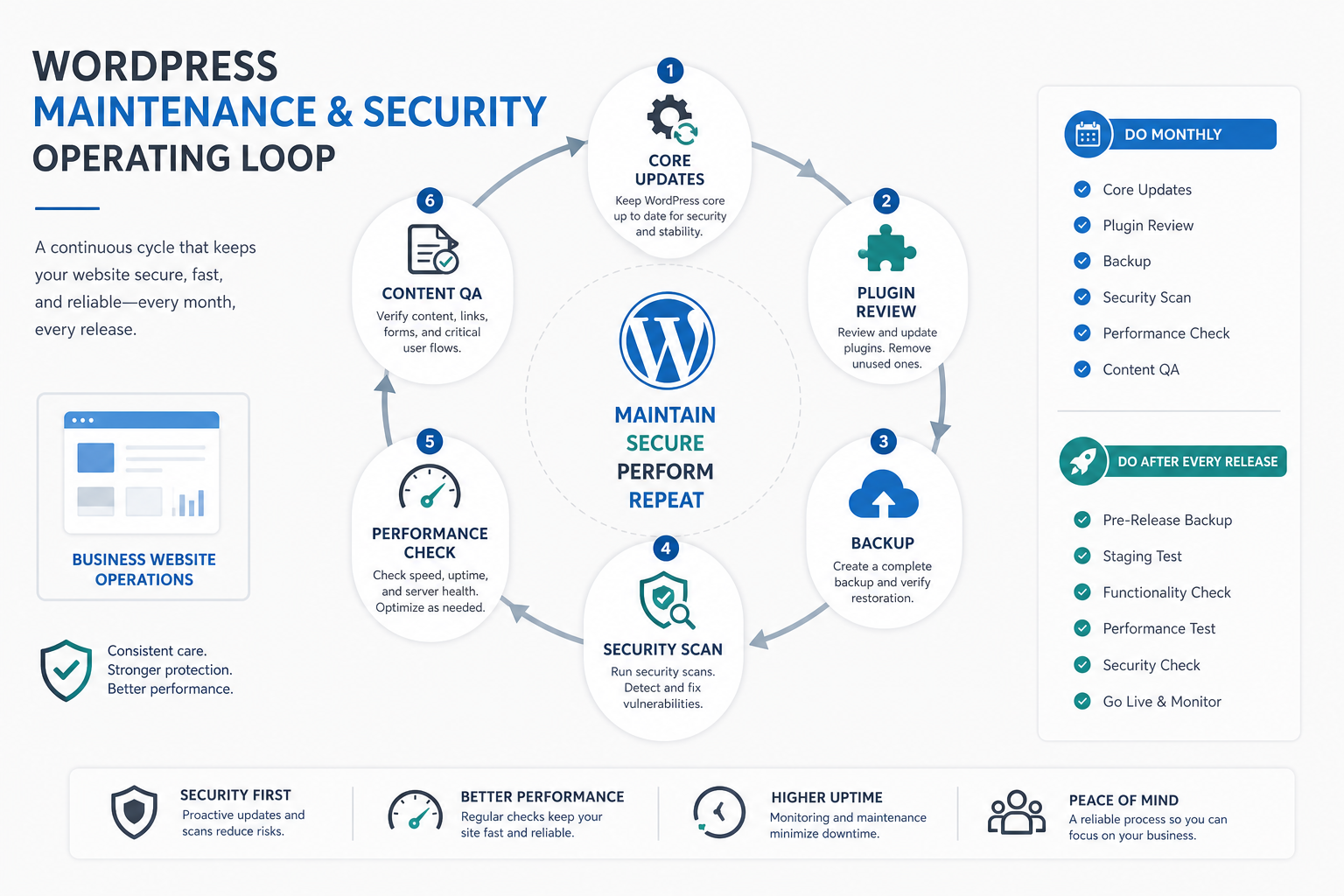
9. Security Is Manageable When Maintenance Is Treated As An Operating Process
WordPress can be secure, but security depends on maintenance. The official WordPress documentation recommends keeping plugins and themes updated, and WordPress.org notes that the security team supports vulnerability handling across core, plugins, and themes. For business sites, this should translate into backups, least-privilege accounts, update testing, monitoring, and a recovery plan.
The practical rule is simple: fewer high-quality plugins, tested updates, strong hosting, backups, and clear ownership beat a large unmanaged plugin stack.
10. WordPress Is Portable Enough For Long-Term Business Use
A well-built WordPress site can be moved between hosts, handed to another qualified team, connected to analytics and CRM systems, redesigned around new templates, or used as a content layer while other systems evolve around it. That portability is useful for companies that expect their website to change over time.
Portability depends on implementation quality. Custom code should be documented, plugins should have a clear purpose, media should be organized, and credentials should not live in random dashboards or personal accounts.
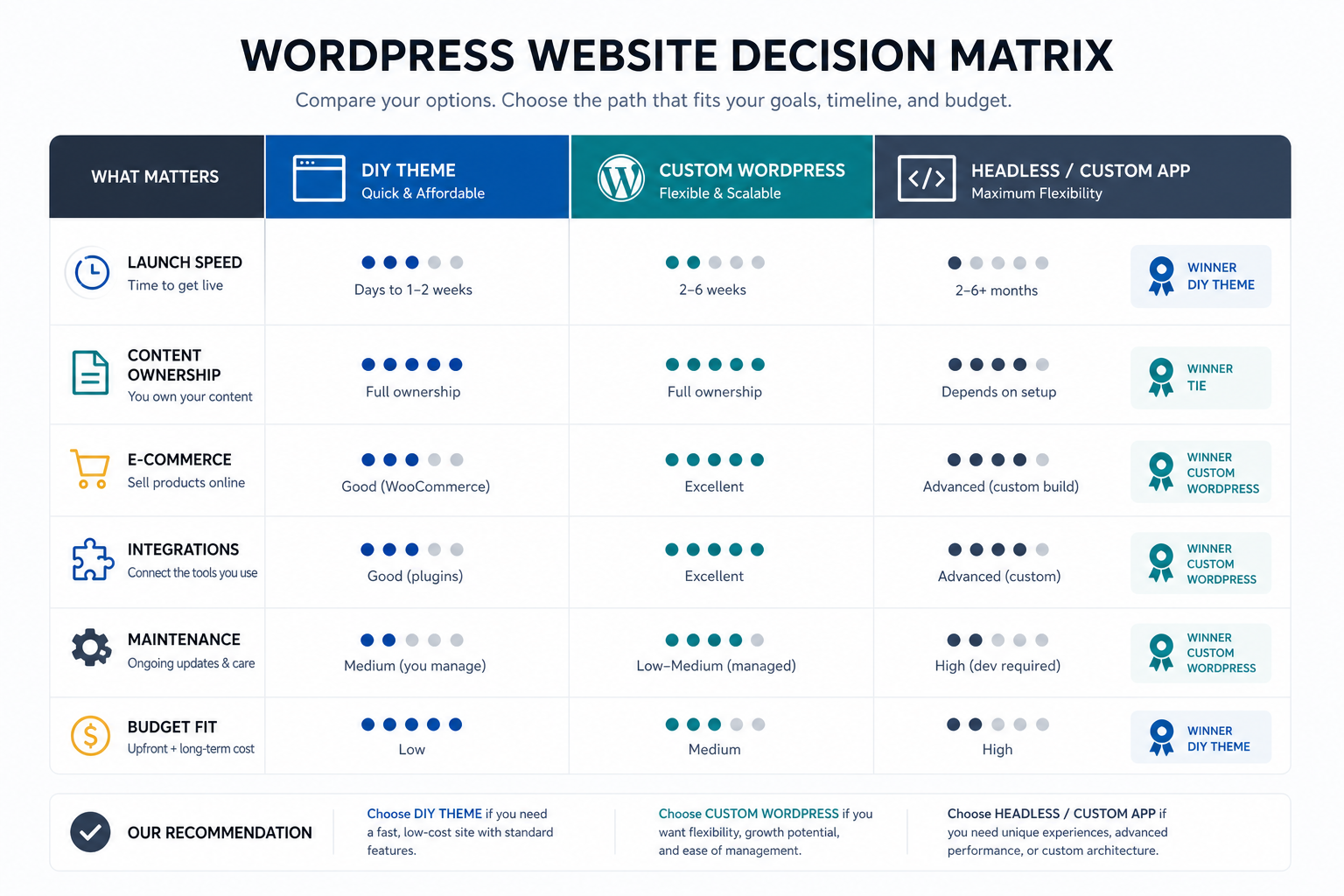
When Not To Choose WordPress
WordPress is not the right answer for every digital product. If the main value is custom workflows, realtime collaboration, complex permissions, large-scale data processing, AI automation, multi-sided marketplace behavior, or mobile-first product use, the team should compare WordPress with custom application architecture early.
| Need | WordPress Fit | Better Direction |
|---|---|---|
| Marketing website with blog and lead forms | Strong fit | WordPress with custom templates |
| Content hub with SEO publishing | Strong fit | WordPress with editorial governance |
| Simple ecommerce or subscriptions | Possible fit | WordPress with careful plugin selection |
| SaaS dashboard or workflow product | Weak fit | Custom web application |
| Realtime mobile product | Weak fit | Mobile app and API backend |
WordPress Website Launch Checklist
Before launching a WordPress website, confirm that the platform choice is supported by an operating plan:
- Content model: page templates, blog categories, landing pages, and reusable blocks are defined.
- SEO basics: titles, descriptions, schema, redirects, sitemap, image alt text, and internal links are reviewed.
- Performance: image sizes, caching, scripts, fonts, hosting, and mobile page speed are tested.
- Security: backups, updates, admin roles, plugin list, and recovery ownership are documented.
- Analytics: forms, conversions, events, search console, and reporting dashboards are connected.
- Editorial workflow: who can publish, approve, update, and remove content is clear.
Final Recommendation
Choose WordPress when your business needs a flexible, editable, SEO-friendly website with a mature support ecosystem. It remains a practical choice for service businesses, content-led brands, ecommerce experiments, and teams that need marketing control after launch.
Choose something else when the website is really a software product. If users need custom workflows, complex roles, realtime interactions, AI-heavy features, or deep operational logic, start with product architecture and then decide whether WordPress should play any role in the content layer.