
User personas help app teams make product decisions around real user needs instead of internal guesses. A strong persona turns research into a practical decision tool: who the app is for, what job they need done, what blocks them, how they behave today, and which product choices will create measurable value.
For founders, product managers, designers, and engineering teams, personas are useful only when they shape the app roadmap. They should influence feature priority, onboarding, UX copy, analytics events, usability testing, launch messaging, and future iteration. If a persona is just a slide in a strategy deck, it will not improve the product.
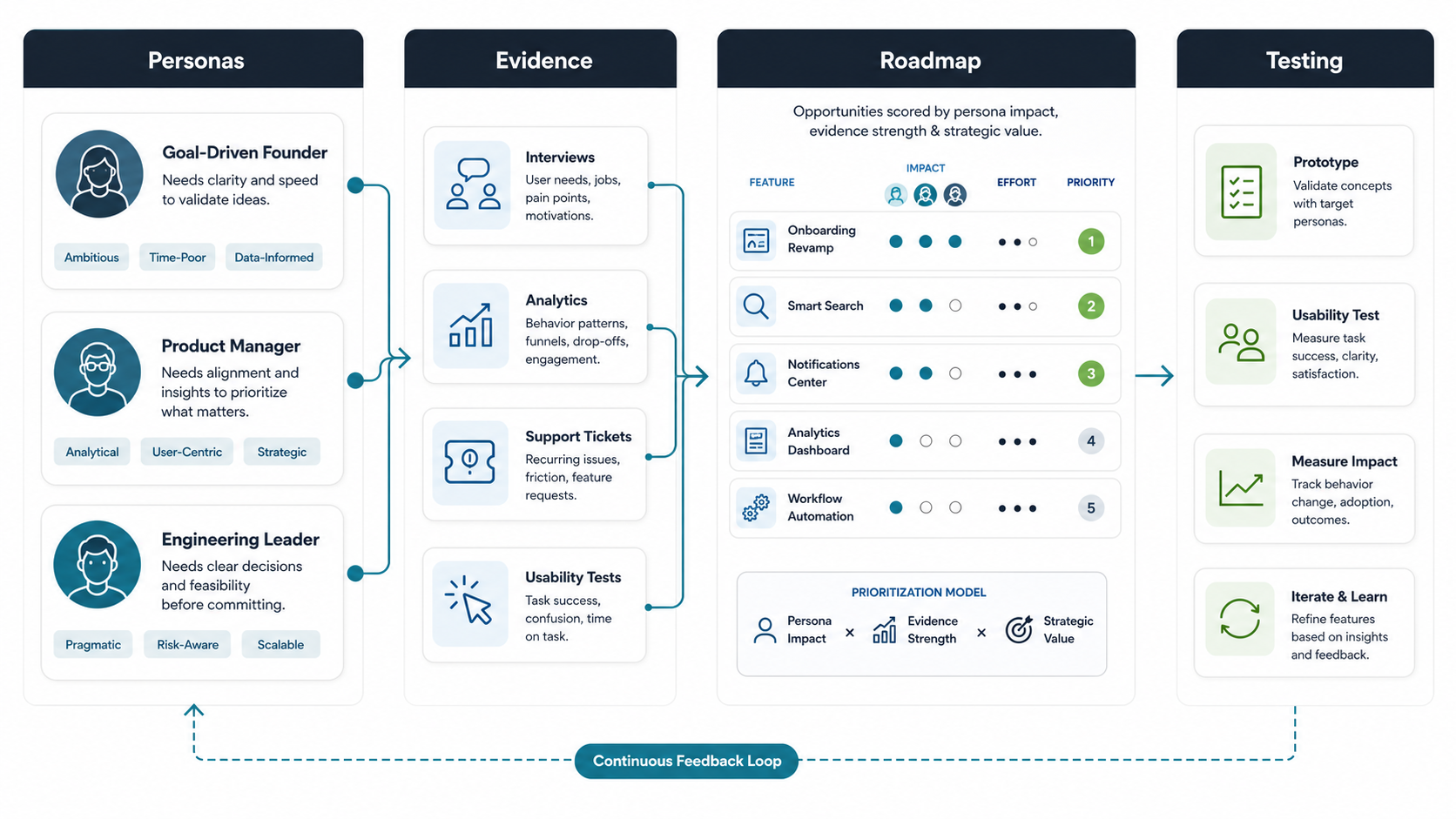
Quick Answer: Why User Personas Matter In App Development
User personas matter in app development because they give teams a shared, evidence-based view of the people they are building for. They help teams choose the right features, design clearer user journeys, reduce onboarding friction, write more relevant product copy, plan better usability tests, and measure whether the app is solving the right problems.
A useful persona is not a fictional biography built from assumptions. It is a compact research artifact built from interviews, analytics, support conversations, market signals, sales feedback, usability testing, and product data. The best personas describe user goals, jobs-to-be-done, pain points, behaviors, constraints, decision triggers, and success signals.
What Is A User Persona In App Development?
A user persona is a representative profile of a target user segment. In app development, it helps the team understand the user group well enough to make product choices. A persona should explain what the user is trying to achieve, why the current process is difficult, what they expect from a digital product, and what would make them keep using the app.
Personas are especially useful during early product planning. Before a team invests in design and engineering, personas clarify who the first version should serve. That keeps scope grounded in the user segments most likely to adopt, pay, refer, or use the app repeatedly. For a broader build plan, NextPage's mobile app development service explains how product stage, devices, performance, and maintenance shape the app stack.
What Should A Strong App User Persona Include?
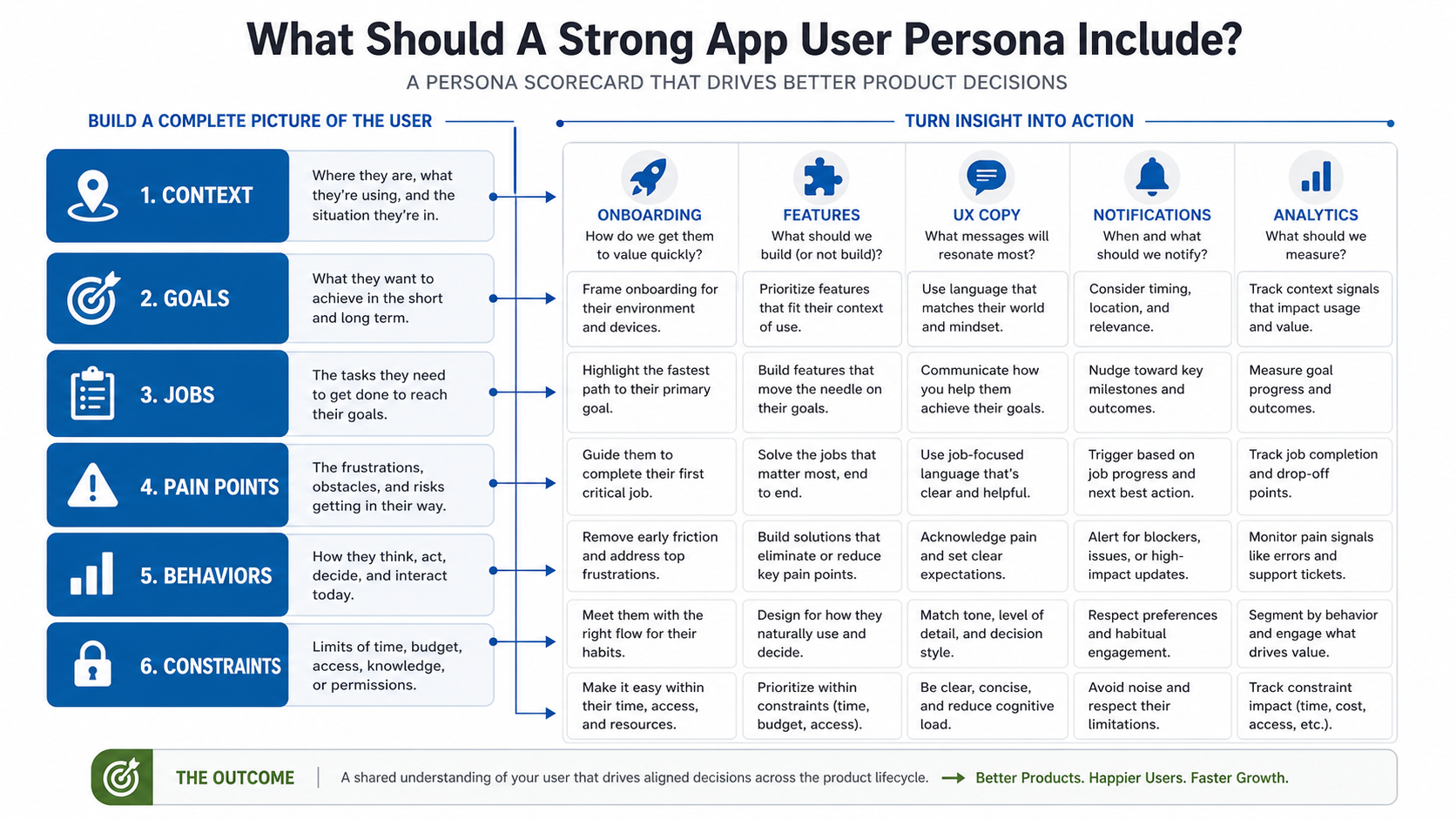
A strong app user persona should include the details that change product decisions. Demographics can help, but they are rarely enough. The most useful fields are context, goals, jobs-to-be-done, pain points, behavioral patterns, constraints, buying or adoption triggers, preferred devices, accessibility needs, and success metrics.
| Persona Element | What To Capture | Product Decision It Influences |
|---|---|---|
| Context | Where, when, and why the user needs the app. | Onboarding, permissions, offline support, device strategy. |
| Goals | The outcome the user wants in the short and long term. | Feature priority, success metrics, conversion paths. |
| Jobs-to-be-done | The practical task the user is trying to complete. | Core workflow, navigation, information architecture. |
| Pain points | Frustrations, risks, delays, and unmet needs. | MVP scope, UX fixes, support reduction opportunities. |
| Behaviors | Current habits, tools, workarounds, and decision patterns. | Product flows, notifications, retention loops. |
| Constraints | Budget, time, access, knowledge, trust, device, or compliance limits. | Pricing, permissions, content depth, security, launch plan. |
For planning estimates, connect each persona field to real scope. Personas that reveal complex permissions, integrations, native device needs, offline use, or compliance expectations can change cost and timeline. The Custom Software Cost Estimator is useful when persona findings start turning into delivery assumptions.
How To Collect Data For User Personas
Reliable personas need both qualitative and quantitative evidence. Interviews show motivation and language. Surveys show patterns across a larger sample. Analytics show behavior. Support tickets reveal friction. Sales calls expose objections. Competitor reviews show unmet expectations. Usability testing shows where the product experience breaks.
Start with the smallest useful research plan. Interview target users, review current analytics if a product exists, study support or sales notes, and map repeated problems. Then group users by meaningful differences: goals, frequency, workflow complexity, decision authority, budget, risk sensitivity, or usage environment. Avoid building personas only from age, gender, job title, or assumptions from the internal team.
How Many User Personas Should An App Have?
Most apps need three to five primary personas. Fewer than three can hide important differences between user groups. More than five often makes prioritization harder. The goal is not to represent every possible user. The goal is to represent the user segments that should guide the roadmap.
For an MVP, choose the one or two personas that create the clearest initial value. Secondary personas can influence later releases, onboarding variants, or advanced workflows. If two personas have nearly identical goals, constraints, and behavior, merge them. If one persona needs a different product, pricing model, compliance path, or app surface, keep it separate.
How To Use Personas Throughout The App Development Process
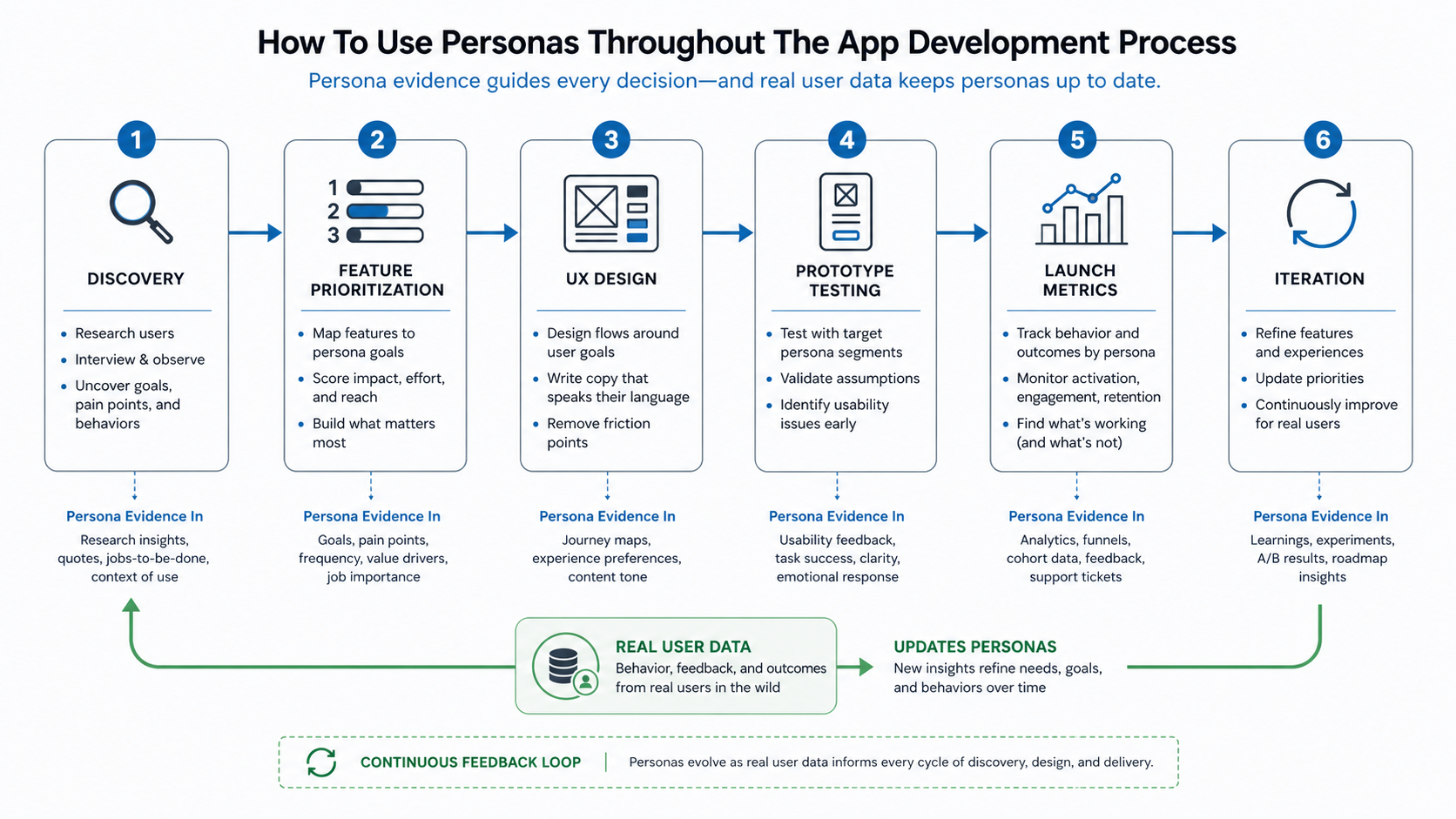
Personas should shape the full app lifecycle. During discovery, they define the problem and target user. During planning, they help rank features by impact. During UX design, they guide flows, copy, empty states, accessibility needs, and decision points. During testing, they help recruit participants and design realistic tasks. After launch, they help teams compare adoption, engagement, and retention across user segments.
- Discovery: validate the user problem, user context, and current alternatives.
- Feature prioritization: score features by persona impact, evidence strength, effort, and business value.
- UX design: build user journeys around goals, constraints, and moments of friction.
- Prototype testing: test assumptions with users who match priority personas.
- Launch metrics: track activation, conversion, retention, support issues, and task completion by segment.
- Iteration: update personas as real product data changes the team's understanding.
This is similar to how strong app verticals are planned. NextPage's guide on creating an engaging user experience in music app development shows how user motivation, discovery, playback, accessibility, and retention shape UX decisions in one product category. The SoundCrate music app case study also shows how native product surfaces can be organized around discovery and personal library workflows.
How Personas Improve Feature Prioritization
Personas improve feature prioritization by making the team ask who benefits, how often, and why it matters. A feature that helps the highest-value persona complete a critical task should usually outrank a feature that feels interesting but has weak user evidence. Personas also make tradeoffs clearer when engineering capacity is limited.
Use a simple scoring model: persona impact, evidence strength, effort, strategic value, and risk reduction. If a feature scores high for a low-priority persona, delay it. If a feature solves a repeated pain point for the primary persona and improves activation or retention, move it forward. If the team is deciding whether to buy, configure, or build custom workflows, the Build vs Buy Decision Tool can help frame the tradeoff.
Common User Persona Mistakes
The most common mistake is treating personas as fictional characters instead of research-backed decision tools. Teams also make personas too broad, too demographic, too static, or too disconnected from product metrics. A persona named "busy professional" is not useful unless it explains what that user needs to do, what blocks them, and which app decisions follow from those facts.
- Using stereotypes: assumptions replace evidence and lead to weak product choices.
- Creating too many personas: roadmap focus gets diluted.
- Ignoring behavior: demographics are captured, but real tasks and constraints are missing.
- Not updating personas: launch data changes the truth, but the persona stays frozen.
- Keeping personas inside design: engineering, marketing, support, and leadership never use them.
- Failing to connect personas to metrics: the team cannot tell whether the persona improved product outcomes.
How To Measure Whether Personas Are Working
Personas are working when they improve decisions and outcomes. Track whether feature discussions become clearer, whether usability tests uncover fewer basic mismatches, whether onboarding completion improves, whether support questions decline, and whether activation or retention improves for the user segments the personas represent.
Good metrics include activation rate, task completion rate, conversion rate, retention, session depth, feature adoption, support tickets, NPS or satisfaction, usability test success, and qualitative feedback from sales or customer success. If a persona does not help the team predict or explain these outcomes, refine it with better evidence.
What To Do After Creating User Personas
After creating user personas, turn them into product operating tools. Add them to roadmap planning, user stories, design reviews, QA scenarios, analytics plans, onboarding decisions, and launch messaging. Every major product decision should be able to answer which persona it serves and which evidence supports it.
If the app is still early, use personas to define MVP scope and avoid building for too many audiences at once. If the product is already live, compare personas against real usage data and adjust. For industry-specific planning, the food ordering app best practices guide is a useful example of starting with target audience needs before feature decisions. The transportation app development guide shows the same principle in a more operations-heavy app category.
Final Recommendation
User personas matter because app development is a sequence of product decisions. The team has to decide who to serve first, what to build, what to remove, how to design the workflow, what to test, and what to measure after launch. Personas make those choices easier when they are based on evidence and used throughout delivery.
Keep personas practical. Build them from real data, connect them to features and metrics, update them after launch, and make them visible to everyone responsible for the app. That turns personas from a planning artifact into a product advantage.