
Quick Answer: Edge AI vs Cloud Computer Vision
Edge AI runs computer vision inference close to the camera, sensor, kiosk, vehicle, production line, or local gateway. Cloud computer vision sends images, frames, or video clips to cloud infrastructure for inference, storage, retraining, analytics, and centralized operations. A hybrid model keeps latency-sensitive decisions near the source while using the cloud for orchestration, monitoring, historical analysis, and model improvement.
The right deployment model depends less on a preferred vendor and more on operating constraints. Choose edge-first when milliseconds matter, connectivity is unreliable, sensitive video should not leave the site, or local autonomy is required. Choose cloud-first when workloads are batch-oriented, data needs central review, hardware operations must stay light, or model updates and analytics matter more than immediate response. Choose hybrid when real-time action and central learning both matter.
If the project is still in budget or roadmap planning, pair this guide with the computer vision development cost breakdown. Deployment location affects hardware, bandwidth, annotation, integration, MLOps, and support effort, so it should be decided before the proof of concept becomes production architecture.
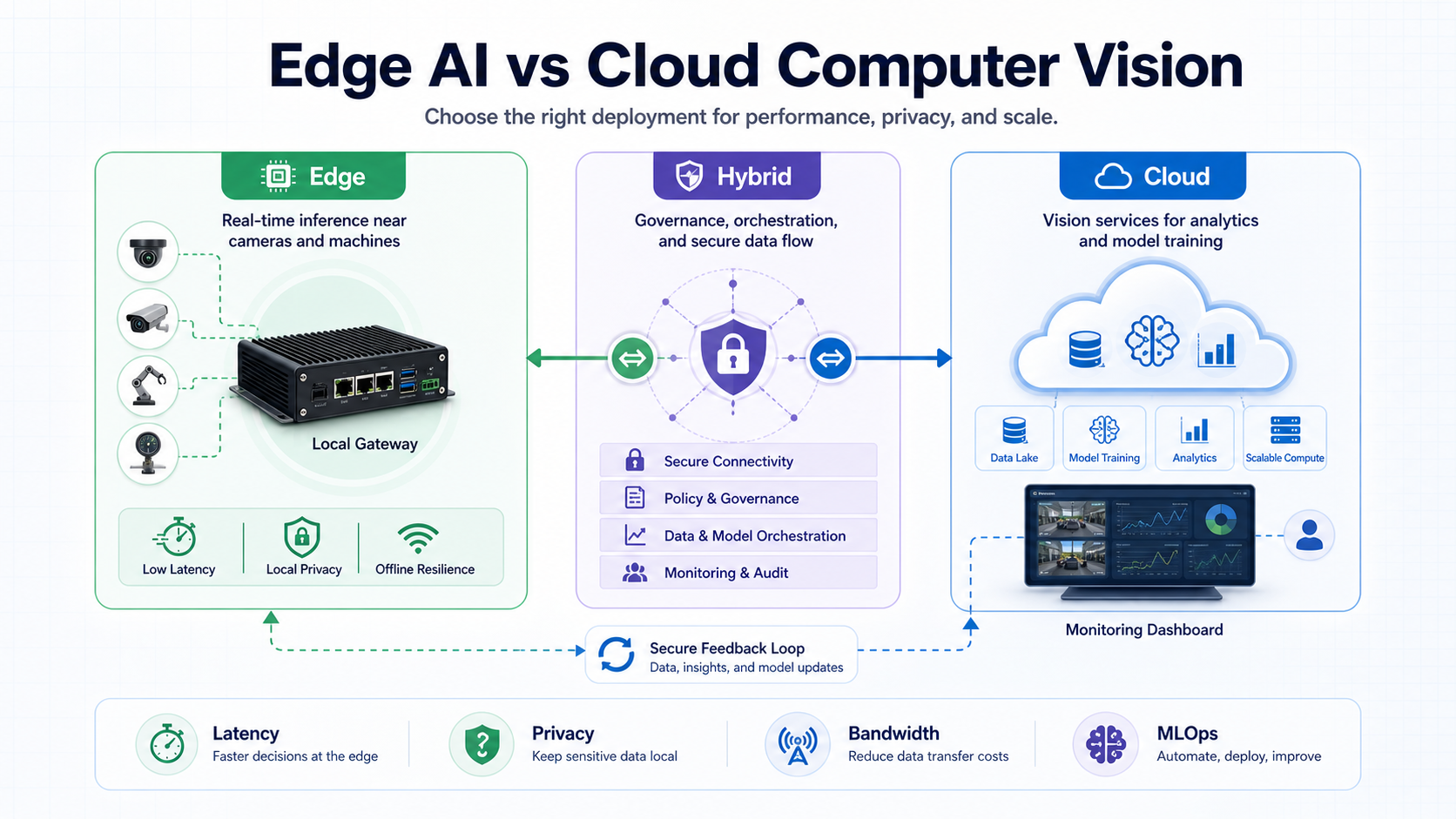
What Changes By Deployment Model?
A computer vision system has more moving parts than the model. Cameras need placement and calibration. Frames need sampling rules. Models need runtime hardware. Predictions need business logic. Operators need alerts, dashboards, exception handling, and retraining feedback. The deployment model decides where those responsibilities live. If the team needs implementation support beyond architecture choice, start with computer vision development services that plan data capture, model quality, deployment, and workflow integration together.
| Decision Area | Edge AI | Cloud Vision | Hybrid Vision |
|---|---|---|---|
| Inference location | Camera, device, gateway, local server | Cloud GPU/CPU service or managed API | Critical inference local, enrichment and learning centralized |
| Typical strength | Low latency, local privacy, offline continuity | Central scale, easier updates, shared analytics | Balanced autonomy and centralized governance |
| Main operational burden | Device lifecycle, heat, power, runtime updates | Network, upload cost, data residency, cloud dependency | Clear split of ownership, sync, fallback, and monitoring |
| Best-fit examples | Line-stop inspection, safety alerts, access control, autonomous equipment | Batch quality review, document/image classification, central video analytics | Retail loss prevention, smart facilities, fleet or factory analytics |
The mistake is treating edge and cloud as a permanent ideology. In production, most serious systems use some blend: local detection for immediate action, cloud storage for evidence, central dashboards for operations, and a repeatable update path for model improvement.
Latency And Real-Time Actions
Latency is the clearest reason to use edge AI. If the system must reject a defective item on a fast production line, stop a machine, open a gate, alert a driver, or trigger a safety workflow, sending every frame to the cloud can be too slow or too fragile. Even when average latency looks acceptable, tail latency during congestion can break the workflow. For detection-heavy workflows, object detection development services should test camera placement, inference speed, false-positive handling, and downstream action logic before production rollout.
Cloud computer vision still works well for use cases where seconds or minutes are acceptable. Examples include reviewing uploaded inspection photos, classifying product images, summarizing camera events, processing shelf images after capture, or generating analytics from historical footage. Retail teams can use the same cloud-friendly pattern for retail shelf monitoring computer vision when store images are captured first and reviewed through merchandising workflows. If the vision workload is part of a broader infrastructure move, a cloud migration assessment should map video traffic, storage, data residency, access controls, and operating cost before production design is locked.
Define the response-time budget before selecting architecture. A useful budget includes camera capture time, preprocessing, inference, business-rule evaluation, alert delivery, operator acknowledgement, and any mechanical action. If the real budget is under a few hundred milliseconds or must work during network disruption, edge or hybrid should be the default candidate.
Privacy, Data Residency, And Video Risk
Raw visual data is often more sensitive than teams expect. It can reveal faces, license plates, screens, documents, factory layouts, patient contexts, safety incidents, customer behavior, or employee activity. Moving that data to the cloud can be acceptable, but only after retention, access, encryption, consent, residency, and audit requirements are explicit.
Edge deployment can reduce risk by processing frames locally and sending only events, counts, embeddings, cropped evidence, or anonymized metadata upstream. That does not remove governance work, but it can reduce the amount of sensitive data that leaves the site.
For bounded AI workflows, the governance pattern matters as much as the model. The narrow AI business use cases guide is a useful companion when deciding where human review, role-based access, audit trails, and risk controls should sit in a production workflow.
Bandwidth, Storage, And Total Cost
Video is expensive to move and store. A cloud-first design may look simpler during a demo because it avoids device management, but production bandwidth and retention can become a recurring cost center. Continuous video streams, high-resolution frames, multi-site camera networks, and long evidence retention windows change the economics quickly.
Edge AI can lower bandwidth by filtering what gets uploaded. Instead of sending all footage, the system can send events, thumbnails, selected clips, counts, or low-frequency snapshots. The tradeoff is that the hardware must be powerful enough, maintainable enough, and observable enough to keep inference reliable at every site.
Use cost modeling that includes hardware, installation, replacement cycles, connectivity, storage, cloud inference, monitoring, data labeling, model updates, integrations, and support. For early planning, the Custom Software Cost Estimator can help frame how AI features, integration count, user roles, and operational complexity affect delivery effort.
Model Updates, Monitoring, And MLOps
Cloud deployment usually makes model updates easier because inference runs in a central environment. Teams can roll out a new model behind a controlled endpoint, compare versions, capture failed cases, and roll back without touching devices. That simplicity is valuable when the model changes often or the deployment spans many sites.
Edge deployment needs a more deliberate update path. Devices need version control, compatibility checks, staged rollouts, rollback behavior, health reporting, and a way to capture examples that should improve the model. A model that performs well in the lab can drift when lighting, camera angle, product packaging, seasonality, dust, or operator behavior changes. This is where production machine learning development services matter: the model lifecycle, evaluation data, deployment controls, and monitoring plan need ownership after launch.
Before production, define who owns inference health, drift signals, false-positive review, false-negative review, retraining data, and rollback. The MLOps implementation checklist gives a practical way to structure deployment ownership, monitoring, governance, and improvement loops. The companion machine learning integration roadmap is also useful when the model has to connect with existing apps, APIs, review queues, and reporting workflows.
Deployment Decision Matrix
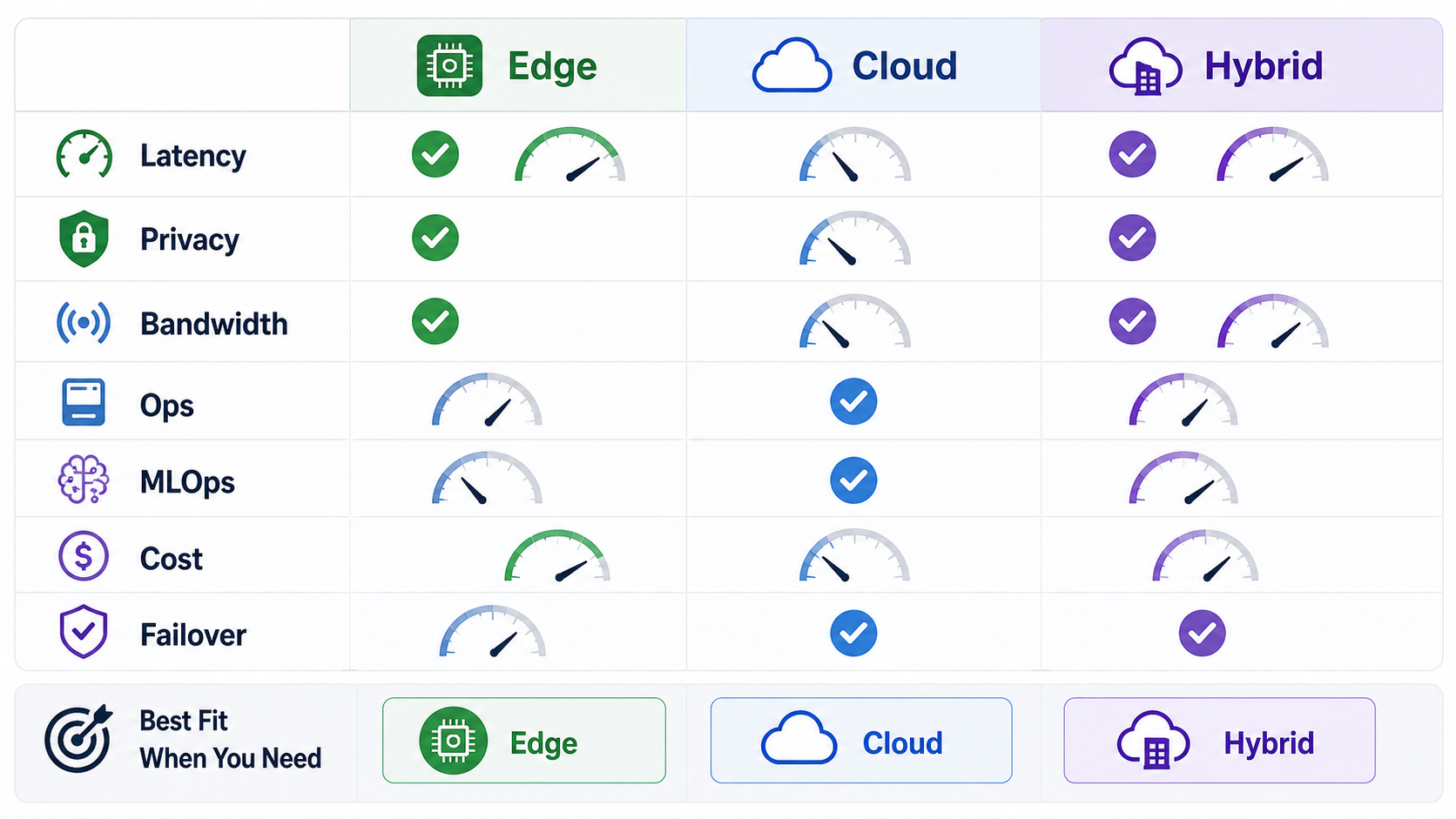
The safest decision is rarely based on one factor. Score each deployment model against the constraints that would actually break the business workflow: real-time action, sensitive data, connectivity, operating environment, hardware support, model update frequency, analytics requirements, and failure tolerance.
| If This Is Critical | Lean Toward | Reason |
|---|---|---|
| Sub-second local action | Edge or hybrid | The decision should happen near the camera or equipment. |
| Central analytics across many sites | Cloud or hybrid | The cloud simplifies aggregation, dashboards, and historical analysis. |
| Strict data minimization | Edge or hybrid | Local processing can reduce raw video movement. |
| Frequent model iteration | Cloud or hybrid | Central deployment usually reduces update friction. |
| Weak or costly connectivity | Edge | The system cannot depend on constant upload capacity. |
| Many distributed devices | Hybrid | Local autonomy needs central fleet visibility and update control. |
Architecture Patterns That Work
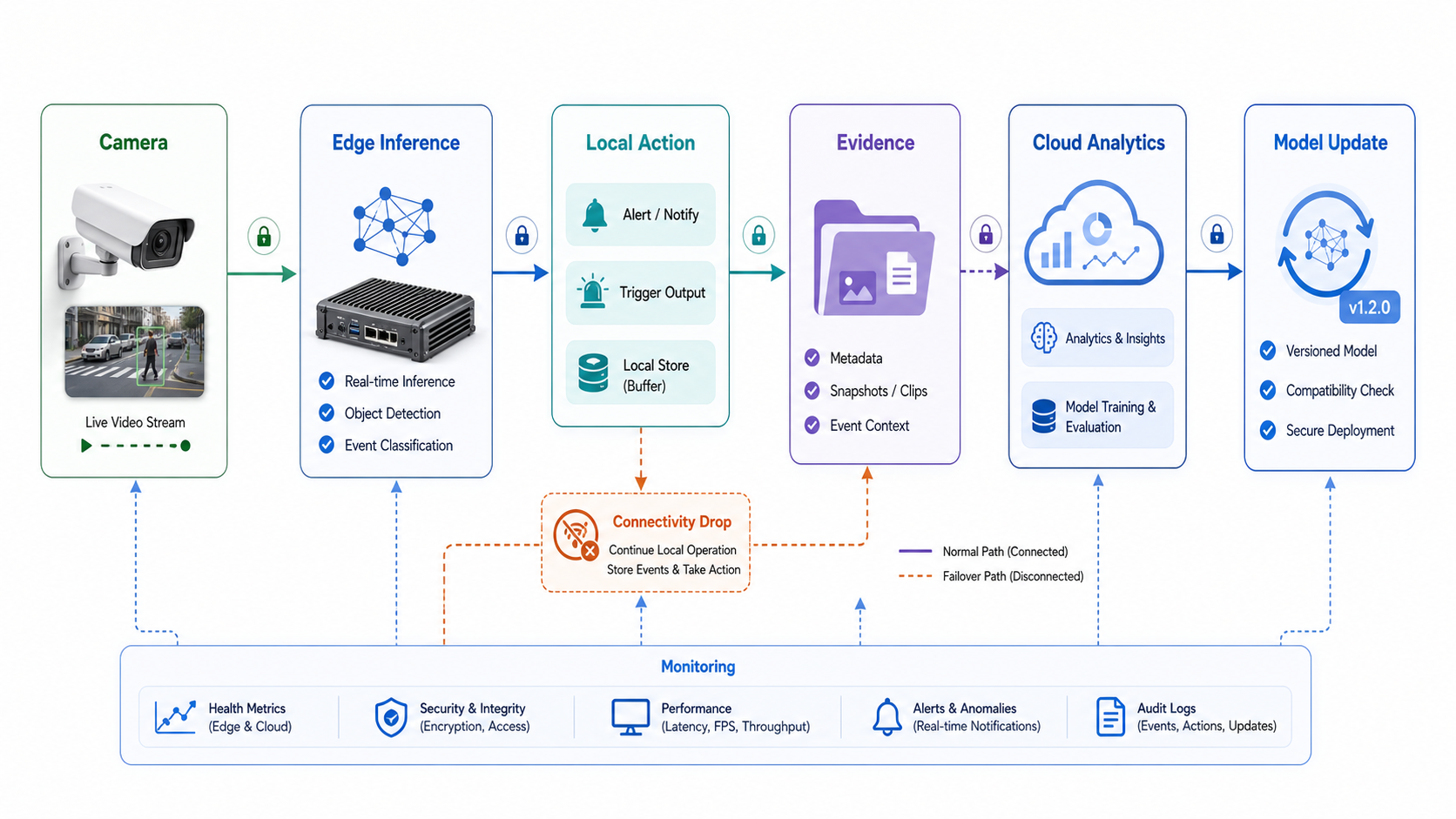
A pure edge pattern usually places preprocessing, inference, thresholding, and immediate action on a camera, embedded device, gateway, or local server. It sends only selected metadata, events, health signals, and evidence clips upstream. This pattern suits computer vision quality inspection for manufacturing, access control, safety alerts, and remote operations where connectivity cannot be trusted. Manufacturing teams can also compare the architecture against a broader physical AI software roadmap when sensors, simulations, robotics, or shop-floor integrations are part of the same program.
A pure cloud pattern captures images or clips and sends them to a cloud service for inference and downstream processing. It suits centralized review, asynchronous classification, batch quality checks, image search, and analytics workloads where latency is less important than consistency and scale. For teams building this as part of a larger operating system, NextPage's computer vision development services and AI development services can cover model integration, evaluations, workflow automation, monitoring, and human-in-the-loop controls.
A hybrid pattern keeps local decisions at the edge while the cloud handles fleet management, dashboards, model registry, retraining feedback, and cross-site reporting. When the core model is detection-heavy, object detection development services should define how boxes, classes, confidence thresholds, exceptions, and review queues move between edge devices and cloud systems. This is often the production answer for teams that need both fast action and centralized learning. It also aligns with the broader reality that computer vision is usually part of a business system, not a standalone model. NextPage's custom software development work often sits around this layer: dashboards, workflows, integrations, approvals, and operator-facing tools.
From Proof Of Concept To Production
Do not let the proof of concept hide production constraints. A prototype can run on sample video, a cloud notebook, or a powerful development machine. Production has camera placement issues, unreliable lighting, network limits, permission boundaries, false positives, device replacement, model drift, support tickets, and integration dependencies.
A practical rollout starts with one high-value workflow, a small camera/site sample, clear success metrics, and a deployment hypothesis. Test edge and cloud assumptions early: run latency measurements, bandwidth estimates, privacy review, hardware thermal checks, failure-mode tests, and manual review loops. Then decide whether the production system should be edge-first, cloud-first, or hybrid. If the use case involves factory or field inspection, the AI visual inspection data labeling guide helps define label quality, edge cases, review loops, and production monitoring inputs.
If the team needs external help, evaluate consultants on production readiness rather than model demos. The machine learning consulting company checklist explains why baseline models, data readiness, monitoring, integration ownership, and ROI questions should be part of vendor selection. For a public example of a field capture, processing, review, and computer vision evidence loop, review the ClearRoute portfolio case study.
Common Deployment Mistakes
- Choosing edge only because it sounds advanced. Edge adds device operations, update management, and local observability. Use it when the constraints justify that burden.
- Choosing cloud only because it is easier to prototype. Upload cost, latency, data residency, and network reliability can make a cloud-first prototype hard to operate.
- Ignoring fallback behavior. Decide what happens when the device overheats, the network drops, the model confidence is low, or the cloud endpoint is unavailable.
- Skipping human review design. Operators need queues, thresholds, examples, audit trails, and a way to correct the model when the prediction is wrong.
- Forgetting integration work. Predictions must connect to machines, warehouse systems, security workflows, maintenance tickets, dashboards, CRM, ERP, or incident tools to create business value.
How NextPage Helps With Computer Vision Architecture
NextPage helps teams turn computer vision ideas into deployable business systems. We can review the target workflow, data sensitivity, camera environment, latency needs, connectivity assumptions, integration scope, model update path, and support model before recommending edge, cloud, or hybrid architecture. Use the AI Automation ROI Calculator when the first use case involves repeated visual review, inspection, triage, or exception handling and the team needs a payback range before funding the build.
A useful architecture review should produce more than a model choice. It should define where inference runs, what data is stored, how alerts flow, which users review exceptions, how retraining examples are captured, what monitoring proves the system is healthy, and which integrations are required for rollout. As an IT company in Mohali building software, AI, and digital products, NextPage can connect the AI architecture decision with the dashboards, APIs, mobile surfaces, and support workflows needed around the model.
Book an edge vs cloud computer vision architecture consultation with NextPage.