
Quick Answer: Generative AI Development Cost in 2026
Generative AI development cost in 2026 usually depends on the workflow you want to improve, the architecture needed to support it, the quality and sensitivity of your data, the number of integrations, and the amount of evaluation and human review required before launch. A narrow GenAI assistant may be scoped as a pilot. A production RAG system, internal copilot, domain workflow, or AI agent connected to business tools needs a larger budget because the team must design retrieval, permissions, observability, testing, and support.
As a planning band, many teams should expect a focused GenAI proof of concept to start in the low five figures, a production business workflow to move into the mid five to low six figures, and a complex enterprise rollout with multiple systems, compliance requirements, and agentic automation to require a larger phased program. The exact number should come from scope, not a generic per-feature price list.
If you are budgeting a first GenAI build, start with NextPage's generative AI development service page, estimate the business case carefully, and use this guide to pressure-test the architecture before asking for a quote.
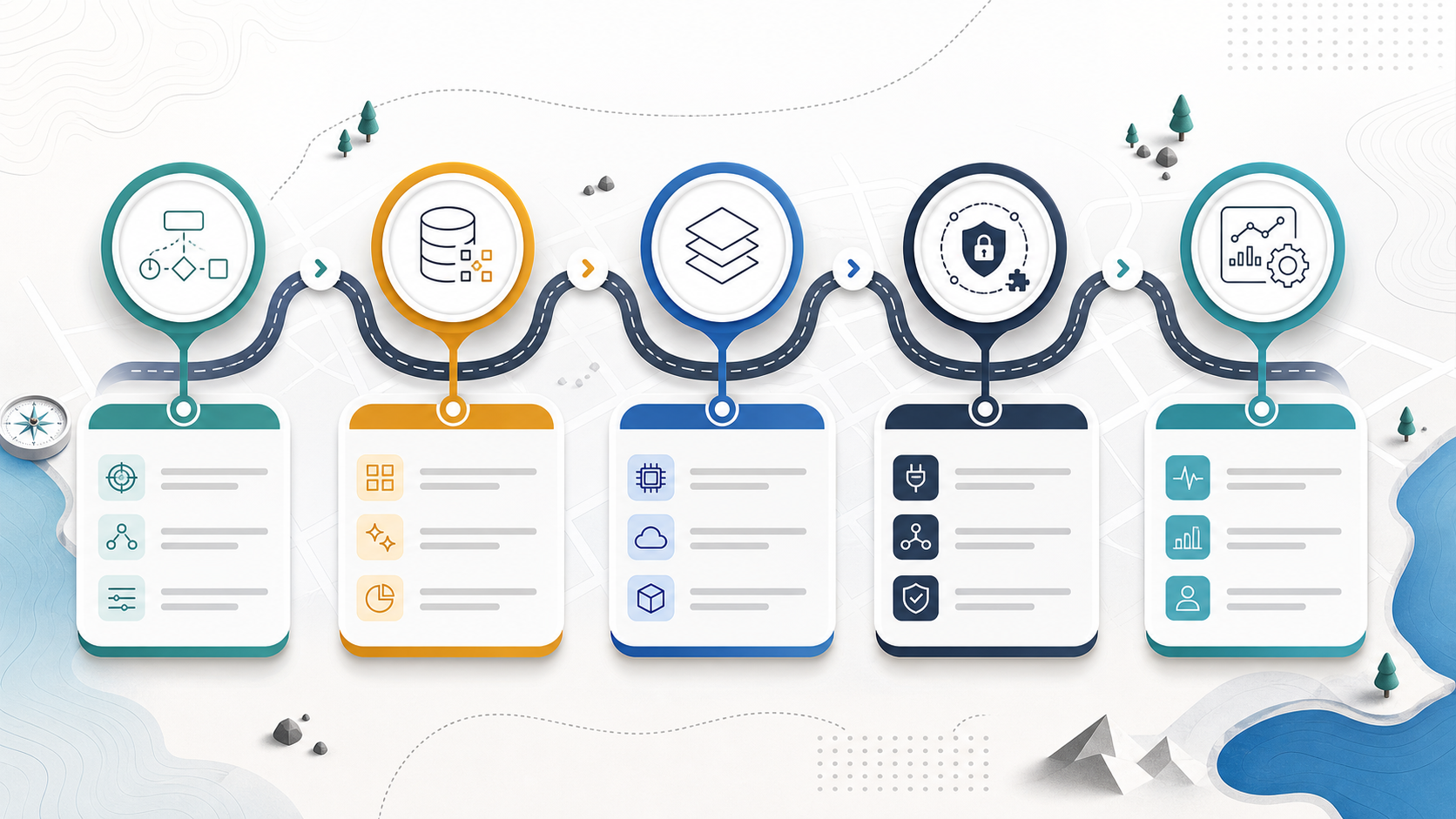
What Actually Drives GenAI Development Cost?
The expensive part of generative AI is rarely the chat interface. The real cost sits in the surrounding system: preparing trusted context, connecting private data, deciding what the AI can and cannot do, testing output quality, protecting sensitive information, and monitoring the workflow after launch.
The OrangeMantra reference page positions generative AI development across LLM APIs, RAG, fine-tuned domain models, AI agents, enterprise platforms, and compliance-aware use cases. That is a useful service map. For budgeting, each option changes the workstream behind the scenes.
| Cost driver | What changes the budget | Why it matters |
|---|---|---|
| Workflow scope | One assistant, one department workflow, or multiple operational processes | More decisions, exceptions, approvals, and user roles increase discovery and testing |
| Data readiness | Clean docs and structured records versus scattered files, stale content, and missing ownership | RAG quality depends on source quality, chunking, metadata, access rules, and update cadence |
| Architecture | Hosted model API, RAG, fine-tuning, domain model, agent, or hybrid system | Each architecture adds different engineering, evaluation, and operating-cost requirements |
| Integrations | CRM, ERP, ticketing, EHR, documents, internal databases, payments, or admin tools | Production value usually comes from connecting AI to real systems, not isolated prompts |
| Security and compliance | PII, PHI, financial data, audit logs, retention, approvals, and access control | Governance cannot be added only at the end when AI touches sensitive workflows |
| Evaluation and operations | Test sets, prompt/version tracking, human review, monitoring, fallback paths, and support | Reliable GenAI needs quality gates after launch because model behavior and data can change |
This is why a GenAI estimate should look closer to a software product roadmap than a prompt-writing quote. The cost question is not "How much is an AI chatbot?" It is "Which business workflow needs AI, what data will it use, what decisions can it influence, and how will we know it is safe enough to operate?" If the work is closer to operational automation than content generation, compare the scope with NextPage's AI workflow automation guide before estimating.
Practical Budget Ranges by Scope
Use these ranges as planning bands, not fixed vendor pricing. Geography, seniority, compliance, speed, data cleanup, and product expectations can move the number significantly.
| Scope band | Typical build | Planning budget band | Good fit |
|---|---|---|---|
| Discovery and prototype | Use-case workshop, data audit, prompt experiments, clickable flow, small API proof | $8k-$25k | Proving whether GenAI belongs in the workflow before funding production |
| Focused MVP | One assistant or workflow with approved data sources, authentication, admin controls, and basic evaluation | $25k-$75k | Internal knowledge assistant, sales enablement copilot, document drafting, support triage |
| Production RAG or copilot | Retrieval pipeline, permissions, analytics, versioned prompts, feedback loop, monitoring, and integrations | $75k-$180k | Knowledge-heavy workflows where answer quality, source traceability, and access control matter |
| Agentic workflow | Tool use, task orchestration, approvals, error handling, audit trail, queueing, and fallback paths | $120k-$300k+ | Workflows where AI drafts, checks, routes, updates records, or triggers actions with supervision |
| Enterprise platform | Multiple teams, governance, reusable AI components, compliance review, data connectors, dashboards, and support model | $250k+ phased program | Organizations standardizing GenAI across several products or departments |
These bands should be tied to outcomes. A $30k prototype can be a good investment if it stops a weak idea early. A $180k production system can be attractive if it removes thousands of hours of manual review or improves revenue-critical response time. A cheap build is expensive when it cannot be trusted in the workflow.
For a broader software budgeting baseline, compare the AI-specific drivers here with NextPage's custom software development cost guide and the custom software cost estimator.
Architecture Choices: API, RAG, Fine-Tuning, or Agents
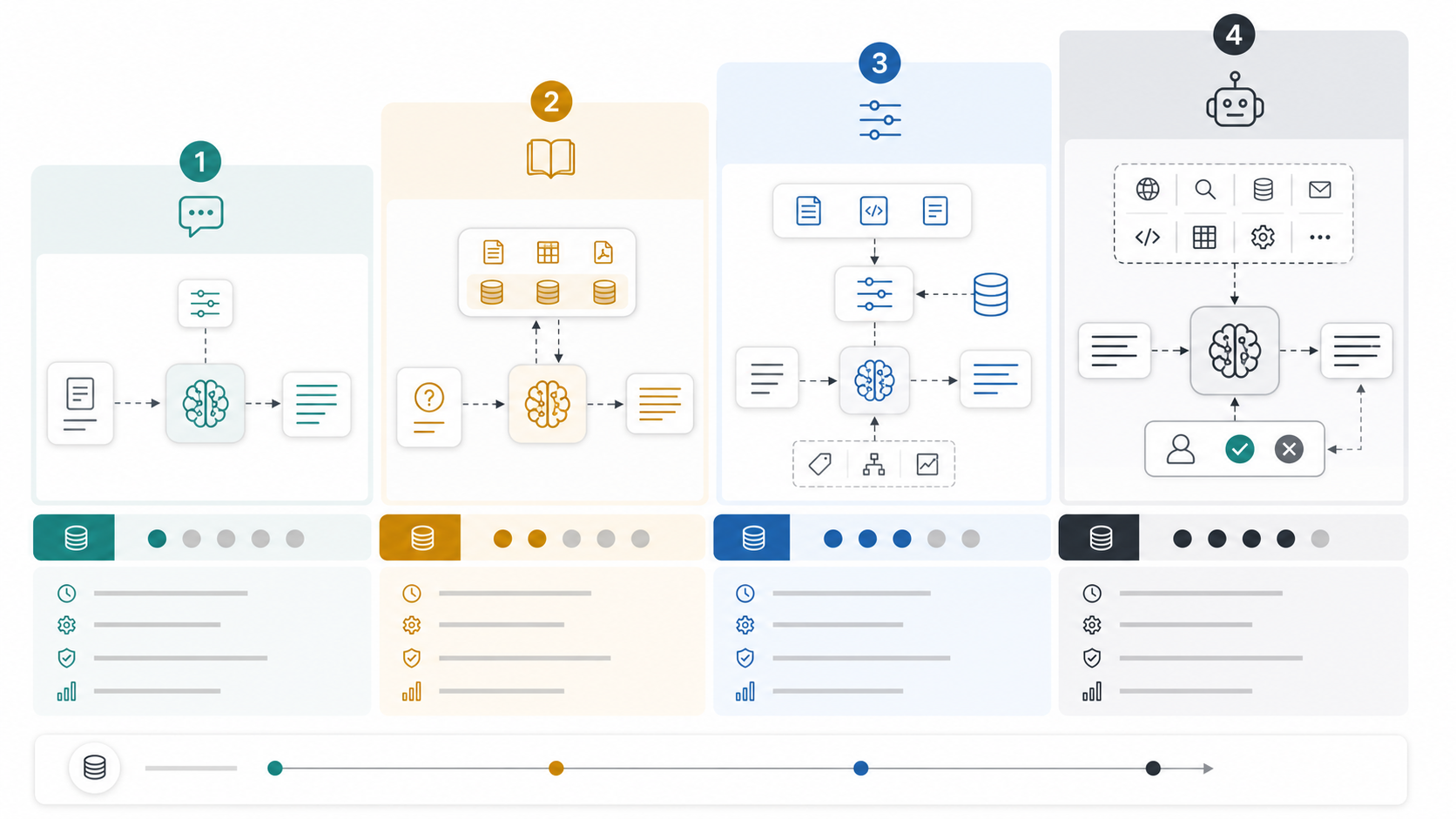
Architecture is one of the fastest ways a GenAI budget changes. A hosted model API can be enough for summarization, drafting, classification, or extraction when the workflow does not require deep private knowledge. A RAG system is better when answers must be grounded in your documents, policies, product data, tickets, or knowledge base. Fine-tuning is useful only when behavior, style, domain format, or classification quality needs examples beyond prompting and retrieval. Agents become relevant when the system needs to use tools and move work forward, not just answer questions.
| Architecture | Cost profile | Budget risk | Use when |
|---|---|---|---|
| Model API feature | Lower build complexity, usage-based operating cost | Quality depends on prompts, model choice, latency, and token volume | You need summarization, drafting, extraction, or classification around limited context |
| RAG system | Medium build complexity, ongoing indexing and evaluation | Bad retrieval creates confident wrong answers | Your answers must cite or use private, changing business knowledge |
| Fine-tuned workflow | Higher setup and evaluation cost | Training data quality and regression testing matter | You need repeatable domain behavior or output format that prompts cannot reliably produce |
| AI agent | Higher engineering and governance cost | Tool access, permissions, failure paths, and human approval gates must be designed | The AI must check systems, draft actions, update records, or coordinate multi-step work |
For teams choosing between these patterns, NextPage's LLM development service explains production AI products, RAG, and workflow automation. The Generative AI Architecture Decision Guide and the guide to domain-specific LLM development are useful when you are deciding whether retrieval, fine-tuning, or an AI agent is the right fit.
Hidden Costs That Surprise Teams
Model API pricing matters, but it is only one operating-cost line. Current public pricing from providers such as OpenAI and AWS Bedrock changes by model, input tokens, output tokens, caching, batch usage, region, and feature type. A cost plan should therefore estimate expected monthly usage, context size, output length, number of users, peak demand, and whether cheaper models can handle lower-risk tasks.
The bigger hidden costs are often outside the model invoice:
- Data cleanup: duplicate documents, stale policies, missing owners, bad metadata, and inconsistent formats reduce answer quality.
- Access control: enterprise assistants need document-level or record-level permissions, not one shared knowledge bucket.
- Evaluation: teams need test questions, expected answers, failure categories, regression checks, and review workflows.
- Human review: high-impact workflows need approval queues, confidence thresholds, escalation paths, and audit trails.
- Integration reliability: CRM, ERP, ticketing, search, storage, and internal APIs need retries, logs, and support diagnostics.
- Security review: sensitive workflows need data retention decisions, secrets management, redaction, vendor review, and incident plans.
- Maintenance: prompts, retrieval logic, model choices, data pipelines, and evaluation sets need periodic updates.
If the planned system uses tools or acts across operational systems, run the AI Agent Readiness Assessment before estimating. It helps identify whether the workflow, data, integrations, and governance controls are ready for agentic automation.
How to Plan ROI Before Funding the Build
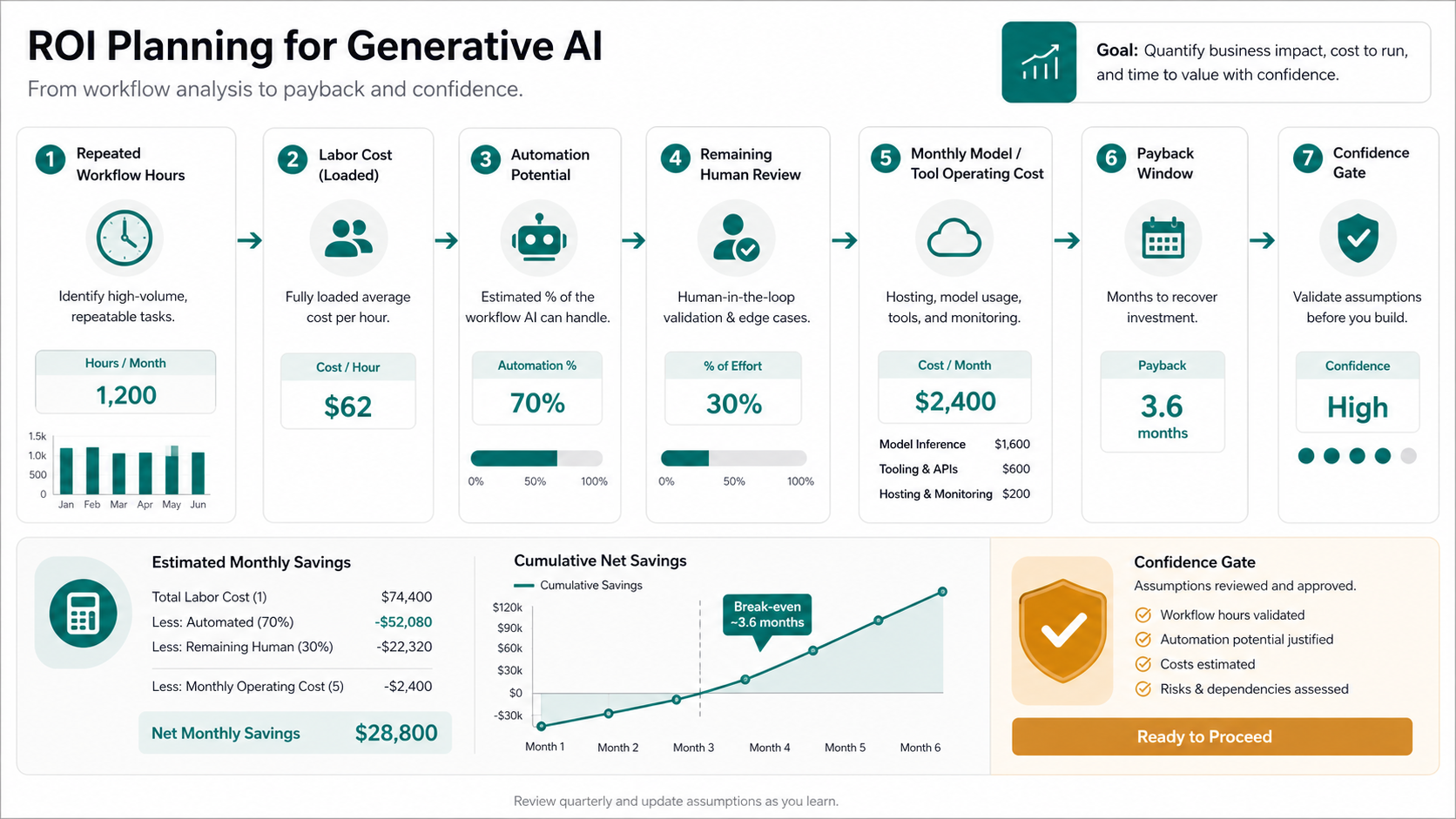
A GenAI project should have a measurable reason to exist. The cleanest ROI cases usually start with repeated work: intake review, document summarization, support triage, sales research, proposal drafting, compliance checks, knowledge retrieval, report generation, or operations handoff. The value comes from time saved, faster cycle time, fewer errors, better conversion, or improved service quality.
Before building, estimate:
- How many people touch the workflow each week.
- How many hours the repeated work consumes.
- What percentage of work can be assisted or automated without increasing risk.
- What quality level is required before humans can trust the output.
- How much review time remains after AI assistance.
- What operating cost is acceptable relative to the savings.
Then compare the implementation band against the annual value. A $60k GenAI assistant may be compelling if it saves 500 hours per month across a team. The same assistant is hard to justify if it saves only a few hours and introduces review overhead. The AI Automation ROI Calculator is a practical starting point for this payback conversation, and the Workflow Automation Opportunity Finder can help identify which repeated process should be scoped first.
A Safer GenAI Development Roadmap
The safest GenAI projects move through phases. Skipping straight to a broad enterprise rollout usually hides the riskiest assumptions until too late.
| Phase | What to prove | Typical output |
|---|---|---|
| 1. Discovery | Workflow value, risk, data sources, users, approvals, and measurable outcome | Scope brief, ROI hypothesis, architecture recommendation, build/no-build decision |
| 2. Prototype | Whether prompts, retrieval, or model choices can produce useful output on real examples | Demo flow, sample outputs, issue log, cost estimate, evaluation plan |
| 3. MVP | Whether a small user group can use the system inside a controlled process | Authenticated app, curated data, feedback loop, admin visibility, initial monitoring |
| 4. Production hardening | Whether the system can handle permissions, quality drift, failures, audits, and support | Security controls, regression tests, usage analytics, incident plan, release runbook |
| 5. Expansion | Whether the same platform can support additional teams or workflows | Reusable connectors, governance model, backlog, cost controls, roadmap |
For agentic workflows, also read NextPage's AI agent development cost guide. Agents can create strong ROI, but they need more guardrails because they interact with tools, records, approvals, and exception paths.
GenAI Cost Planning Checklist
- Define the exact workflow and the user role that will benefit first.
- Separate content generation, knowledge retrieval, decision support, and workflow automation use cases.
- Inventory data sources, owners, freshness, access rules, and cleanup gaps.
- Choose the simplest architecture that can meet quality and governance requirements.
- Estimate monthly token volume, user count, peak usage, and expected output length.
- Decide which outputs need citations, confidence scores, or human approval.
- Plan evaluation before launch, including test cases and failure categories.
- Budget for monitoring, prompt/version updates, data refreshes, support, and security review.
- Connect the estimate to a measurable ROI case before funding a large rollout.
How NextPage Helps Scope GenAI Work
NextPage helps teams turn GenAI ideas into buildable software plans. If you are still comparing vendors, use the AI development company evaluation checklist to pressure-test cost, architecture, and delivery claims. We map the workflow, data sources, architecture, integrations, security needs, evaluation approach, and ROI case before recommending a prototype, MVP, RAG system, fine-tuned workflow, or AI agent.
If you are comparing GenAI vendors or trying to estimate budget, bring the workflow, sample data, current tools, user roles, and target outcome to a scoping call. We will help identify the riskiest assumptions, choose the architecture that fits the business case, and define the first release that can prove value without overbuilding.
Plan a generative AI build with NextPage.