
Quick Answer: What Should an IoT Mobile App Development Roadmap Include?
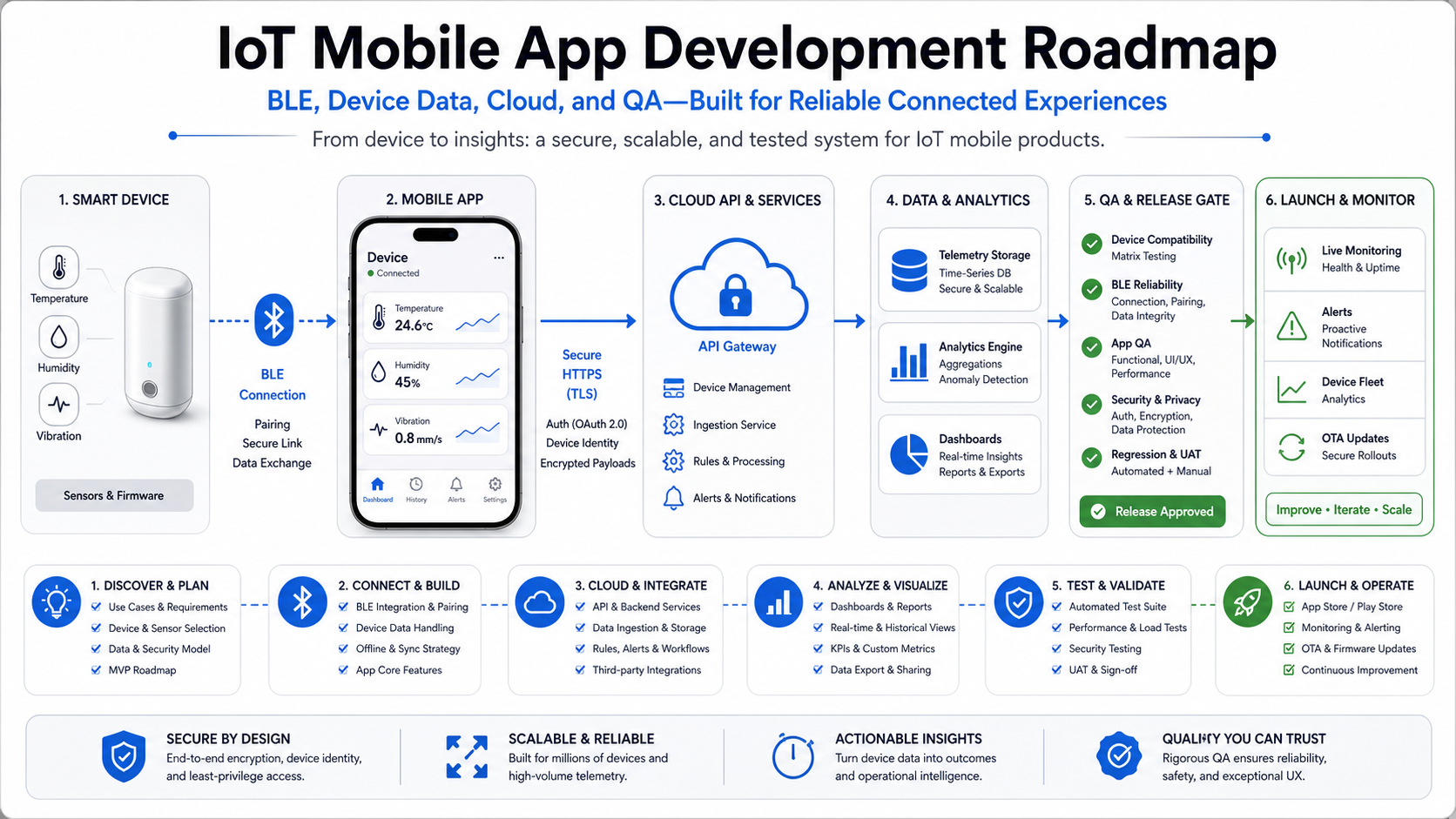
An IoT mobile app development roadmap should define the device protocol, pairing model, mobile app state, offline behavior, cloud ingestion layer, data storage, admin tools, security controls, QA plan, and post-launch monitoring before the first production sprint starts. The hard part is rarely one mobile screen. The hard part is making firmware, Bluetooth or network connectivity, mobile permissions, cloud APIs, operations workflows, and support diagnostics behave like one dependable product.
For most connected-device products, the safest first release is a narrow, testable system: one device family, one or two critical data flows, a clear pairing journey, stable telemetry rules, and enough admin visibility to debug field issues. Teams can use a focused MVP scope builder to separate the build-now release from later dashboards, automation, and multi-device expansion.
This guide is for founders, product managers, and operations leaders planning Bluetooth, sensor, hardware-connected, or device-data mobile products. It focuses on practical scope decisions rather than generic app features.
Start With Device Reality Before App Screens
Connected-device projects go sideways when the team designs a polished app flow before confirming what the device can actually do. A BLE sensor, industrial gateway, smart appliance, wearable, and vehicle tracker all impose different constraints on battery life, range, pairing, firmware updates, payload size, clock accuracy, local storage, and failure recovery.
Before wireframes, document the device contract. That contract should answer which data points the device exposes, how often they change, whether writes are allowed, how firmware versions are identified, what happens when a command fails, and which states must be visible to the user. For BLE products, the contract usually includes services, characteristics, permissions, notification behavior, reconnect rules, and how the app handles devices that advertise but cannot complete pairing.
If the device is already built, run a short discovery sprint around real hardware. If the hardware is still evolving, define a simulator or test fixture early. Mobile developers need predictable payloads, error codes, and device states long before final firmware is ready.
Choose the Connectivity Model That Matches the Product
IoT mobile apps usually sit in one of four connectivity patterns. BLE-first products connect the phone directly to nearby hardware for setup, data sync, commands, or control. Wi-Fi or cellular devices often use the mobile app for onboarding while the device sends data directly to the cloud. Gateway products route device data through a hub, vehicle unit, or edge computer. Hybrid products combine local control with cloud status, so the app must know which source of truth is current.
The right model changes the backlog. A BLE-first app needs strong reconnect behavior, local diagnostics, permission education, and careful background-mode expectations. A cloud-first device needs onboarding reliability, account-device ownership, API authorization, and remote status clarity. A gateway model needs device inventory, role permissions, location or site hierarchy, and operational support screens.
This is why an IoT app belongs closer to custom software development than to a simple mobile UI project. The app is one part of a system that includes device identity, cloud services, support tooling, and release operations.
Plan the Device-to-Cloud Architecture Before Screens
A clean architecture separates four responsibilities: device communication, mobile experience, cloud ingestion, and operations visibility. Device communication handles pairing, payloads, commands, firmware versioning, and low-level errors. The mobile experience turns those states into understandable actions. Cloud ingestion validates, stores, and routes data. Operations visibility helps support, QA, and product teams see what is happening after launch.
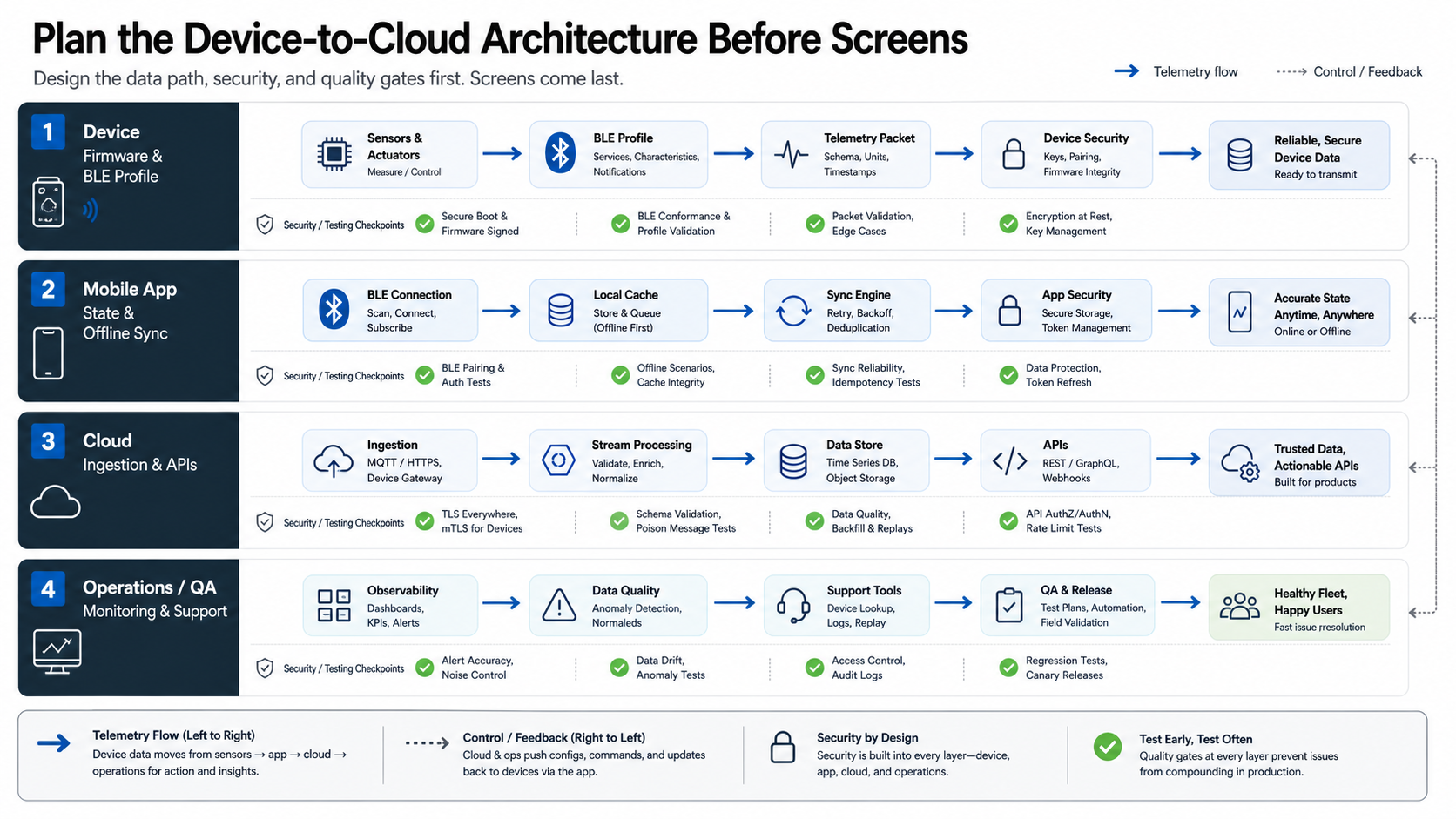
The mobile app should not become the hidden backend. If analytics, alerts, warranty workflows, subscription rules, or admin changes matter to the business, move those rules into cloud services where they can be tested, versioned, and observed. NextPage's mobile app development work typically treats data sync, cloud choices, analytics, and admin workflows as part of product delivery rather than afterthoughts.
For planning, map every critical data flow as a sequence: device emits or receives data, mobile app validates or queues it, API accepts or rejects it, backend stores it, user or operator sees it, and monitoring records whether the flow worked. This makes hidden risk visible.
Design Pairing, Permissions, and Recovery as Core Product Features
Pairing is not a setup chore. It is often the first moment a buyer decides whether the product feels reliable. A strong pairing journey explains why Bluetooth, location, local network, notifications, camera, or account permissions are needed before the system asks for them. It also handles partial success: device found but not owned, owned but offline, paired to another account, firmware too old, battery too low, or cloud registration delayed.
Plan for recovery screens, not just success screens. Users need to know whether to move closer, power-cycle the device, wait for a firmware update, retry cloud registration, or contact support with a diagnostic code. Support teams need enough metadata to avoid guessing: app version, OS version, device model, firmware version, last sync time, permission state, and error reason.
Do not bury every problem behind a generic "try again" message. In field products, vague errors become support cost.
Treat Offline Sync and State as Product Requirements
Connected-device apps often operate in warehouses, vehicles, clinics, homes, events, or outdoor environments where connectivity is inconsistent. The product must define what works offline, what can be queued, what must fail fast, and what should wait for confirmation from the device or cloud.
At minimum, classify each action into one of four buckets: read-only local state, queued write, cloud-confirmed action, or device-confirmed action. This prevents the app from telling users that something happened when it only created a local request. It also shapes the data model: queued commands need IDs, timestamps, retry rules, cancellation behavior, and conflict handling.
For location-heavy or sensor-heavy operations, fleet products are a useful comparison point. The same mobile integration questions that appear in a fleet management app also appear in many IoT builds: field capture, mobile status, telemetry, alerts, and operational follow-up.
Build the Cloud API Around Device Ownership and Telemetry
A connected-device cloud is more than a database table for sensor readings. It normally needs account-device ownership, device provisioning, role-based access, telemetry ingestion, event history, command records, firmware metadata, alert thresholds, audit logs, and admin search. If the product serves businesses, add organization hierarchy, sites, teams, billing state, and support impersonation rules.
Telemetry design deserves early attention. Decide which readings are raw, which are normalized, which trigger events, which feed dashboards, and which must be retained for compliance or support. Do not store every packet forever by default. Choose retention, aggregation, and export rules around the product's actual operating model.
Cost planning should include backend and operations work, not just mobile development. The custom software development cost drivers that matter here are integration complexity, data volume, reliability targets, role complexity, support tooling, and the level of QA needed across device states.
Put Security, Privacy, and Device Abuse Cases Into Scope
IoT products expose unusual risk because physical devices, mobile accounts, and cloud APIs all meet in the same user journey. The roadmap should cover device ownership transfer, lost phones, shared devices, revoked users, retired hardware, spoofed device IDs, replayed commands, insecure local storage, and API abuse.
Useful controls include short-lived API tokens, server-side authorization on every device action, signed firmware metadata where relevant, encrypted storage for sensitive mobile data, rate limits, audit logs, and clear support workflows for device reassignment. For consumer products, privacy copy and data deletion paths matter. For business products, admin visibility and export policies matter.
Security is also a vendor-evaluation topic. If an outside team is building the system, use a software development company checklist to ask about threat modeling, credential handling, release ownership, monitoring, maintenance, and incident response before the contract is signed.
Create a QA Matrix for Hardware, App, Cloud, and Field Conditions
IoT QA needs a matrix, not a single happy-path test plan. Test across device firmware versions, mobile OS versions, permissions, app upgrade paths, pairing states, network quality, device range, battery state, account roles, and cloud error modes. Add regression tests for payload parsing, command retries, sync conflicts, and firmware compatibility.
Use real devices whenever possible, but do not depend only on manual testing. A practical setup combines device simulators, recorded payload fixtures, API tests, mobile smoke tests, and a small field-test checklist. The goal is to catch system failures before they turn into support tickets that require hardware, app, and backend teams to debug together under pressure.
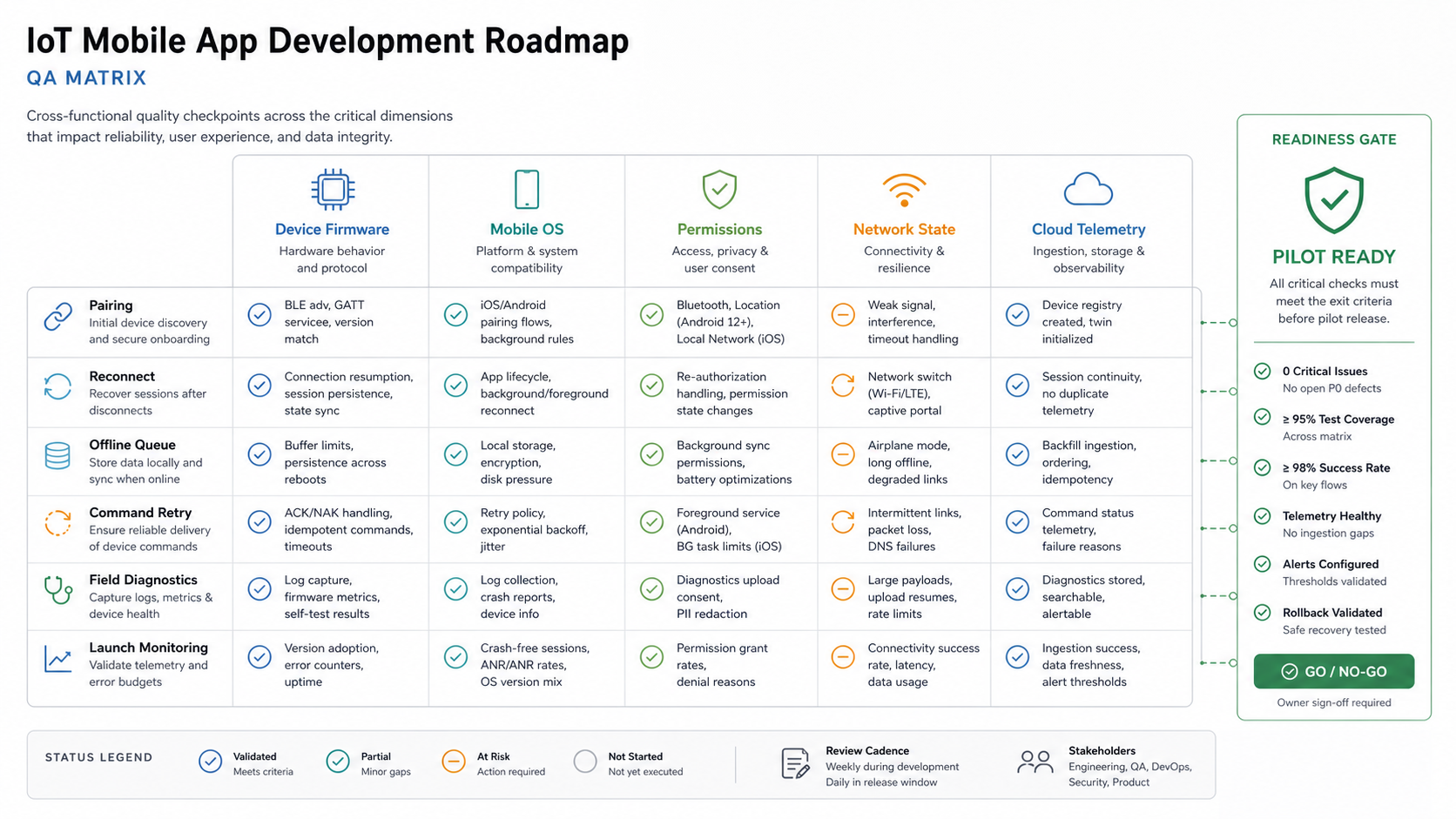
For launch readiness, define acceptance criteria in business language: user can pair first device in under a target time, failed pairing gives a specific next action, telemetry appears in admin within an expected window, queued actions recover after network loss, and support can diagnose top failure reasons from logs. After launch, extend those checks into a mobile app maintenance checklist that covers crash monitoring, OS compatibility, telemetry delays, device failure patterns, and support-response loops.
Estimate Budget by System Complexity, Not Screen Count
Budget depends on the device contract, integration depth, reliability target, and number of operating states. A simple companion app for one BLE device may be a focused MVP. A multi-device operations platform with dashboards, alerts, admin roles, firmware workflows, and analytics is a broader custom software system.
A realistic estimate should include discovery, architecture, UX, mobile development, backend APIs, cloud storage, admin tools, QA automation, real-device testing, deployment, monitoring, and maintenance. The Custom Software Cost Estimator is the right next step when you need a range that reflects complexity rather than a generic app price.
Team shape usually includes a product lead, mobile engineer, backend engineer, QA engineer, UX designer, and someone who can coordinate firmware or hardware constraints. For regulated, industrial, healthcare, logistics, or field-service products, add security and operations review early.
A Practical IoT Mobile App Roadmap
Use this order to reduce risk:
- Discovery: confirm users, device states, business workflow, support needs, and data requirements.
- Device contract: document connectivity model, payloads, command rules, firmware assumptions, and failure codes.
- Architecture: define mobile state, cloud APIs, storage, admin tools, telemetry, and monitoring.
- Prototype: prove pairing, core data sync, and one high-value user flow with real or simulated hardware.
- MVP build: ship account flows, device ownership, setup, dashboard, alerts or actions, support diagnostics, and admin basics.
- QA and field pilot: test device variants, OS versions, permissions, network loss, and support workflows.
- Launch operations: monitor errors, telemetry delays, device failures, app crashes, and user support reasons.
- Scale phase: add multi-device support, automation, analytics, integrations, firmware workflows, and role-based admin controls.
The best roadmap is specific enough for engineering but clear enough for business tradeoffs. It should show what must be true before launch, what can wait, and which risks need proof before the budget expands.
How NextPage Helps Scope Connected-Device Mobile Products
NextPage can help turn an IoT app idea into a practical build plan across mobile UX, backend APIs, cloud data, admin workflows, QA, and rollout. The useful starting point is not a long feature wishlist. It is a scoped device-to-cloud map that shows what the app must control, what the cloud must own, what support must see, and what users need during setup and failure recovery.
If you are still shaping the first release, start with the MVP Scope Builder. If you already know the device model and core workflows, estimate the likely build range with the Custom Software Cost Estimator, then use that output to plan a focused discovery call.