
Real-time GPS tracking is the feature that makes a taxi booking app feel dependable. Riders want to see where the driver is, drivers need clear pickup and route context, and operators need enough live visibility to handle delays, cancellations, support calls, and peak-hour dispatch.
A strong tracking system is not only a map pin. It combines mobile location capture, permissions, map matching, ETA calculation, trip status, safety alerts, dispatch rules, backend events, and operations dashboards. If any part is weak, users see frozen cars, wrong ETAs, duplicate support tickets, and lost trust.

Quick Answer: GPS Tracking For Taxi Apps
A taxi booking app needs real-time driver location, rider pickup location, trip route tracking, ETA updates, geofencing, driver arrival detection, route deviation alerts, location sharing, trip history, and an operator dashboard. The backend should process location events securely, smooth noisy GPS signals, update trip state, and keep the rider experience accurate without draining the driver's battery.
For an MVP, prioritize live driver tracking, pickup and drop-off location accuracy, ETA updates, basic route display, and trip status notifications. For a more mature ride-hailing platform, add geofencing, batch dispatch, driver heat maps, safety monitoring, route deviation detection, offline recovery, analytics, and integrations with maps, payments, support, and fleet operations.
Why Real-Time Tracking Decides User Trust
Taxi booking apps succeed when users feel in control of uncertainty. A rider who can see the driver moving toward the pickup point is less likely to cancel or call support. A driver who gets precise pickup context wastes less time circling. An operator who sees live trips can intervene before a delay becomes a complaint.
The opposite is also true. If the map jumps, ETAs drift, or the driver arrival state is wrong, users assume the whole app is unreliable. Tracking quality affects conversion, repeat usage, support volume, driver productivity, and brand trust.
Core Tracking Features For A Taxi Booking App
| Feature | What It Should Do | Why It Matters |
|---|---|---|
| Live driver location | Show the driver's current position with sensible refresh timing and smoothing. | Riders can trust that a booking is active and progressing. |
| Pickup accuracy | Let riders adjust pickup points and help drivers navigate to the right entrance. | Bad pickup context creates cancellations and support calls. |
| ETA calculation | Estimate arrival and trip duration using distance, road network, traffic, and driver movement. | ETAs set user expectations before and during the ride. |
| Geofencing | Detect arrival, airport zones, service areas, restricted zones, and route milestones. | Trip status can update automatically with less manual input. |
| Route deviation alerts | Flag unusual route changes, long stops, or unexpected trip patterns. | Safety and support teams can respond faster. |
| Operations dashboard | Give dispatch and support teams live visibility into trips, drivers, delays, and exceptions. | The business can manage service quality instead of reacting blindly. |
These tracking features should sit beside the broader taxi booking app features that users expect, including fare estimates, payments, ride history, ratings, support, notifications, and driver profiles.
GPS Reliability Checklist
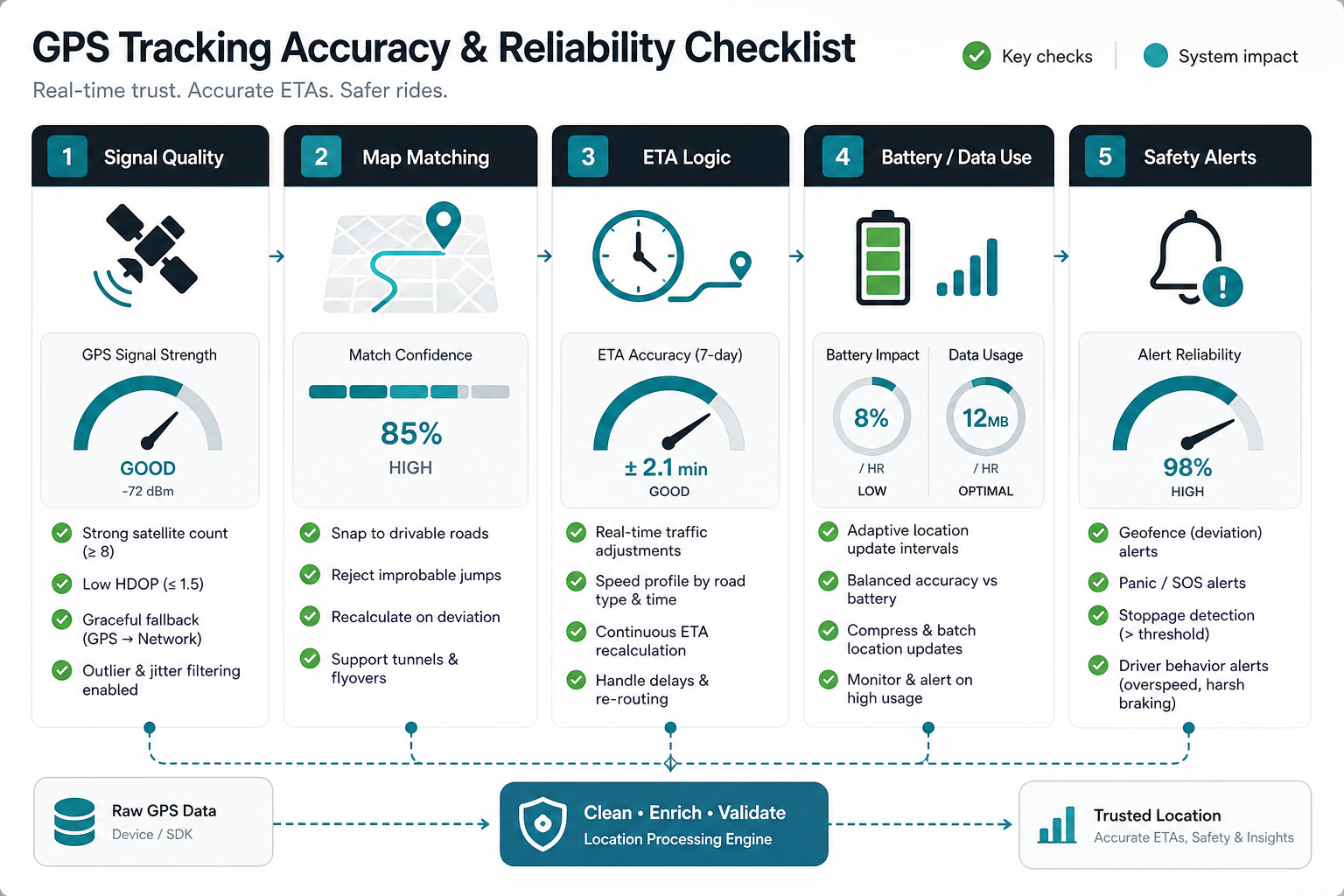
Location data is naturally messy. Tall buildings, tunnels, weak devices, battery-saving modes, permission changes, and network gaps can all affect accuracy. A production app should smooth location points, ignore impossible jumps, recover after connectivity drops, and show honest states when tracking is temporarily unavailable.
Battery and data use need careful tuning. Sending location updates every second may look attractive during testing, but it can drain drivers' phones and increase backend load. Most taxi apps need adaptive update frequency: faster during active pickup and trip movement, slower during idle states, and resilient when the app moves between foreground and background.
Tracking Architecture For Taxi Apps
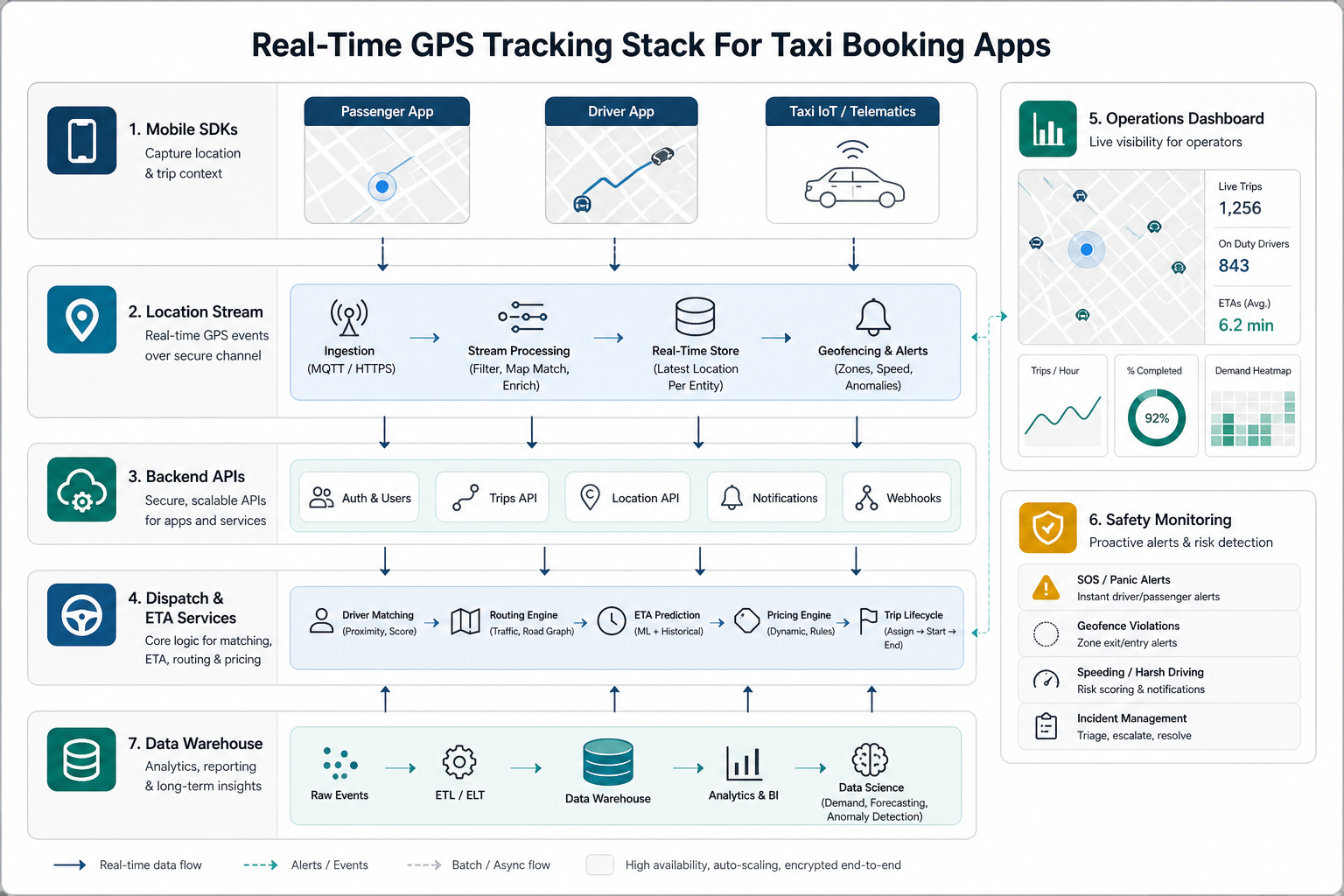
A reliable architecture starts in the rider and driver mobile apps. The driver app captures location events with permission-aware background behavior. The rider app receives filtered trip updates that are useful for the current state, not every raw GPS point. The backend validates and stores events, updates trip status, calculates ETAs, and publishes changes to the right users.
For high-volume taxi or fleet products, tracking should be event-driven. Location events can flow through queues or streaming infrastructure, while trip state, dispatch, alerts, analytics, and support dashboards consume the parts they need. This is where taxi tracking overlaps with custom software development: the system has to match the operator's dispatch model, service areas, roles, and escalation rules.
For a logistics-style backend example, the RouteLedger fleet backend case study shows how vehicle operations can be organized around focused APIs, background services, and operational visibility.
Maps, ETA, And Route Optimization
GPS tells the app where a driver is; maps and routing logic explain what that location means. A taxi app should account for road network distance, traffic, pickup side of the street, service zones, airport rules, toll roads, driver direction, and local traffic patterns. Simple straight-line distance is rarely enough for real dispatch quality.
ETA should also change with trip state. Before pickup, the app estimates driver arrival. During the ride, it estimates drop-off. During peak hours, it may need to account for driver availability, traffic, and supply-demand imbalance. For adjacent operations planning, NextPage's guide to fleet management app features covers route optimization, driver workflows, maintenance, and analytics from a broader fleet perspective.
Safety, Privacy, And Compliance
Real-time tracking handles sensitive data. Riders and drivers should understand when location is collected, why it is needed, who can see it, and how long it is retained. The app should avoid exposing unnecessary full location history to support users, drivers, or admins who do not need it.
Safety features can include trip sharing, emergency contact workflows, route deviation alerts, unusual stop detection, driver identity verification, audit logs, and support escalation. These controls need clear product rules. Too few alerts create risk; too many alerts create noise that operators ignore.
Development Cost And Scope Drivers
The cost of GPS tracking in a taxi booking app depends on more than adding a map SDK. Scope increases with background location behavior, real-time sockets, ETA calculation, geofencing, dispatch algorithms, driver heat maps, analytics, admin dashboards, safety monitoring, QA across devices, and integrations with payments or CRM systems.
A basic tracking MVP can be built with standard map APIs, mobile location services, backend trip state, and notification flows. A mature platform requires stronger infrastructure, monitoring, data retention policies, operational dashboards, and device testing. Use the Custom Software Cost Estimator to frame budget and timeline before committing to a full build.
Implementation Roadmap
- Define trip states: document request, accepted, driver en route, arrived, started, paused, completed, cancelled, and support escalation states.
- Design location rules: decide update frequency, accuracy thresholds, background behavior, retry logic, and data retention rules.
- Build the tracking MVP: connect rider and driver apps to map display, route preview, ETA updates, and trip status notifications.
- Add operations visibility: give dispatch and support teams a dashboard for active trips, exceptions, driver availability, and delayed pickups.
- Harden reliability: test weak networks, app backgrounding, GPS drift, tunnels, low battery, denied permissions, duplicate events, and delayed webhooks.
- Scale intelligence: add geofencing, route deviation detection, heat maps, driver performance analytics, and smarter dispatch after real operating data is available.
Because this touches mobile permissions, map UX, notifications, and device-specific behavior, the tracking layer should be planned as part of the full mobile app development workflow rather than bolted on after the booking flow is done.
Common GPS Tracking Mistakes
The most common mistake is showing raw GPS points directly to users. Raw location often jumps, lags, or disappears, so the app needs smoothing and honest fallback states. Another mistake is treating ETA as a static number instead of a changing prediction based on driver movement, road network, and trip state.
Teams also underestimate QA. Tracking must be tested on real devices, in moving vehicles, across background states, with low battery modes, and under weak network conditions. Simulator-only testing misses many of the failures users notice immediately.
Choosing A Development Partner
A taxi app development partner should be comfortable with mobile apps, backend APIs, maps, real-time updates, payments, admin dashboards, QA, and post-launch monitoring. Ask how they handle location accuracy, driver battery usage, ETA updates, exception states, safety alerts, and production observability.
If you are deciding between a packaged dispatch product and a custom build, the Build vs Buy Decision Tool can help compare cost, control, differentiation, and timeline. Custom tracking makes the most sense when the taxi business has specific dispatch rules, service areas, pricing logic, fleet workflows, or customer experience requirements that generic software cannot cover well.
Final Recommendation
Build real-time GPS tracking as a complete product system, not as a map widget. The rider experience, driver app, backend location stream, ETA engine, dispatch dashboard, safety controls, privacy rules, and analytics all need to work together.
For a taxi booking app MVP, focus on accurate live driver tracking, pickup precision, ETA updates, trip status, and reliable notifications. Then expand into geofencing, route deviation alerts, heat maps, advanced dispatch, and analytics once real operating data shows where the business needs more control.